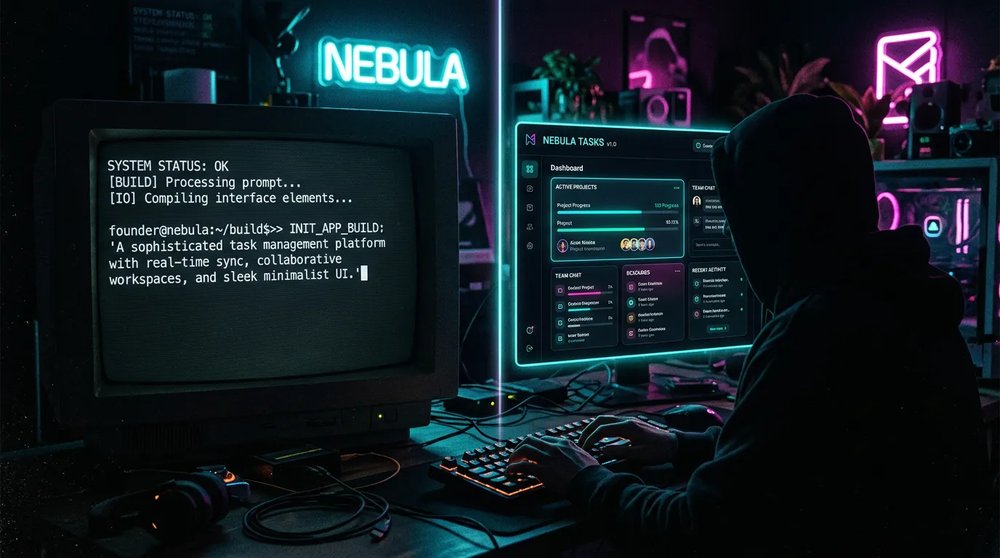
Vibe coding means programming by describing what you want to an artificial intelligence, which writes the code for you. You type "create a sign-up page with email validation" in plain English, the tool generates the files, you test the result in your browser and you fix things with a new message. Andrej Karpathy, OpenAI cofounder and former director of AI at Tesla, coined the term in a post on February 2, 2025. In 2026, the practice relies on three families of tools: in-browser app generators (Lovable, Bolt.new), AI code editors (Cursor) and terminal agents (Claude Code, Codex). Vibe coding is enough for a prototype, a website or an internal tool. Once a product takes payments or stores personal data, someone who can read code needs to review it before it goes live.
What is vibe coding?
A short definition of vibe coding
Vibe coding is a software development method in which a person describes what they need in natural language and an AI generates the matching code. The person judges the result by how it behaves, without reading every line, and fixes the application through conversation.
A traditional developer writes their instructions, understands them and debugs them by hand. A vibe coder describes an outcome, tests what the AI produces and rephrases the request until the behavior is right.
The origin: Andrej Karpathy's post of February 2, 2025
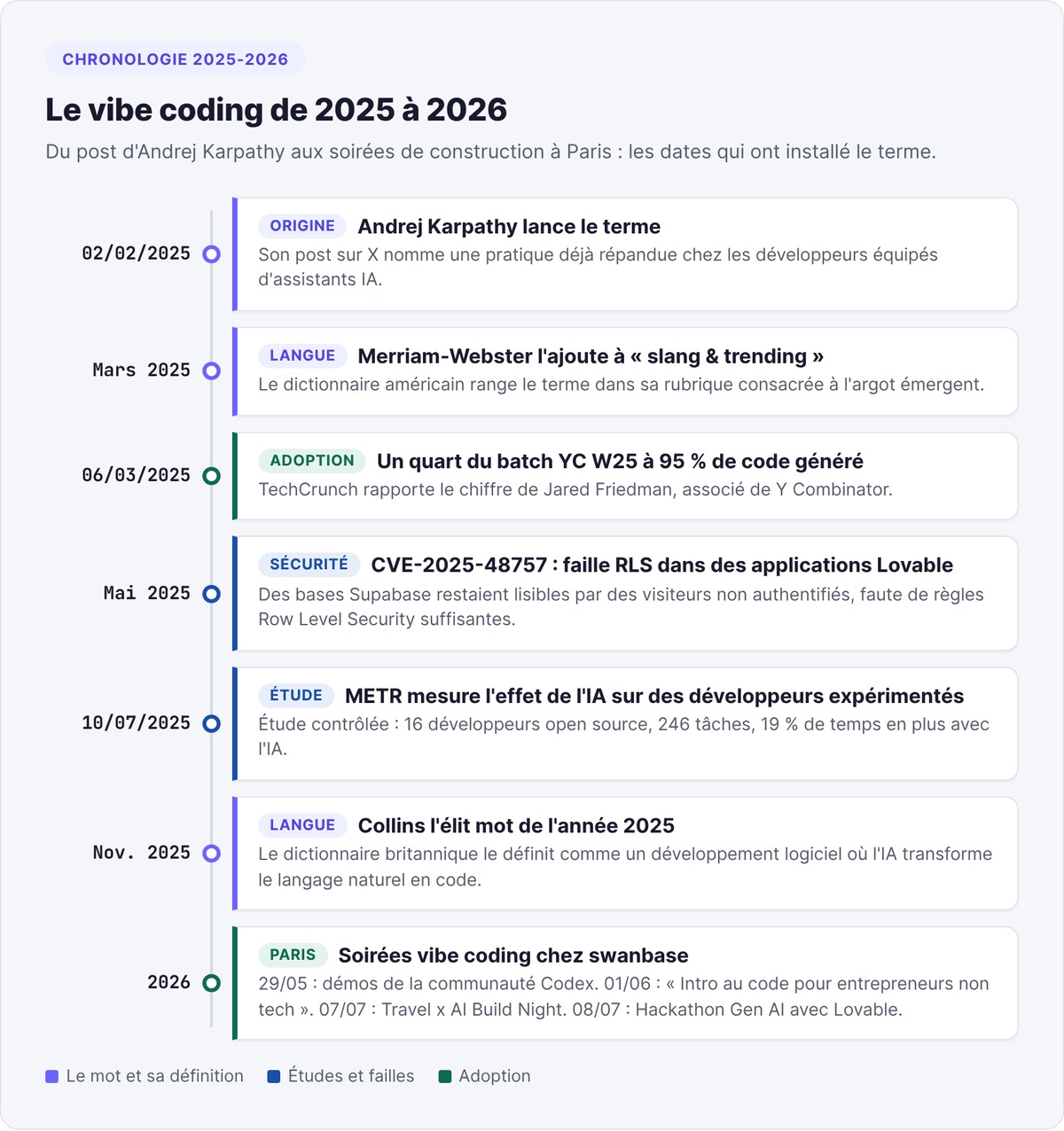
On February 2, 2025, Andrej Karpathy published a post on X that named a practice already common among developers using AI assistants:
"There's a new kind of coding I call 'vibe coding', where you fully give in to the vibes, embrace exponentials, and forget that the code even exists."
In the same post, he describes his method. Karpathy uses Cursor Composer with the Sonnet model, talks to it out loud through SuperWhisper and makes simple requests, like halving the padding on the sidebar. He accepts every change without reading the diffs, and when an error shows up, he pastes the message into the chat with no comment.
Vibe coder: the verb and the profile
As a verb, "to vibe code an app" means building it through successive prompts, without writing the code yourself. As a noun, a vibe coder is the person who works this way, whether or not they know how to program. Two profiles dominate: the non-technical founder building a prototype to test an idea, and the developer who hands the repetitive parts of a project to AI.
From slang to the dictionary
The American dictionary Merriam-Webster added the term to its "slang & trending" section, dedicated to emerging slang. In November 2025, the British dictionary Collins named it word of the year 2025 and defined it as software development in which AI turns natural language into code.
How vibe coding works in practice
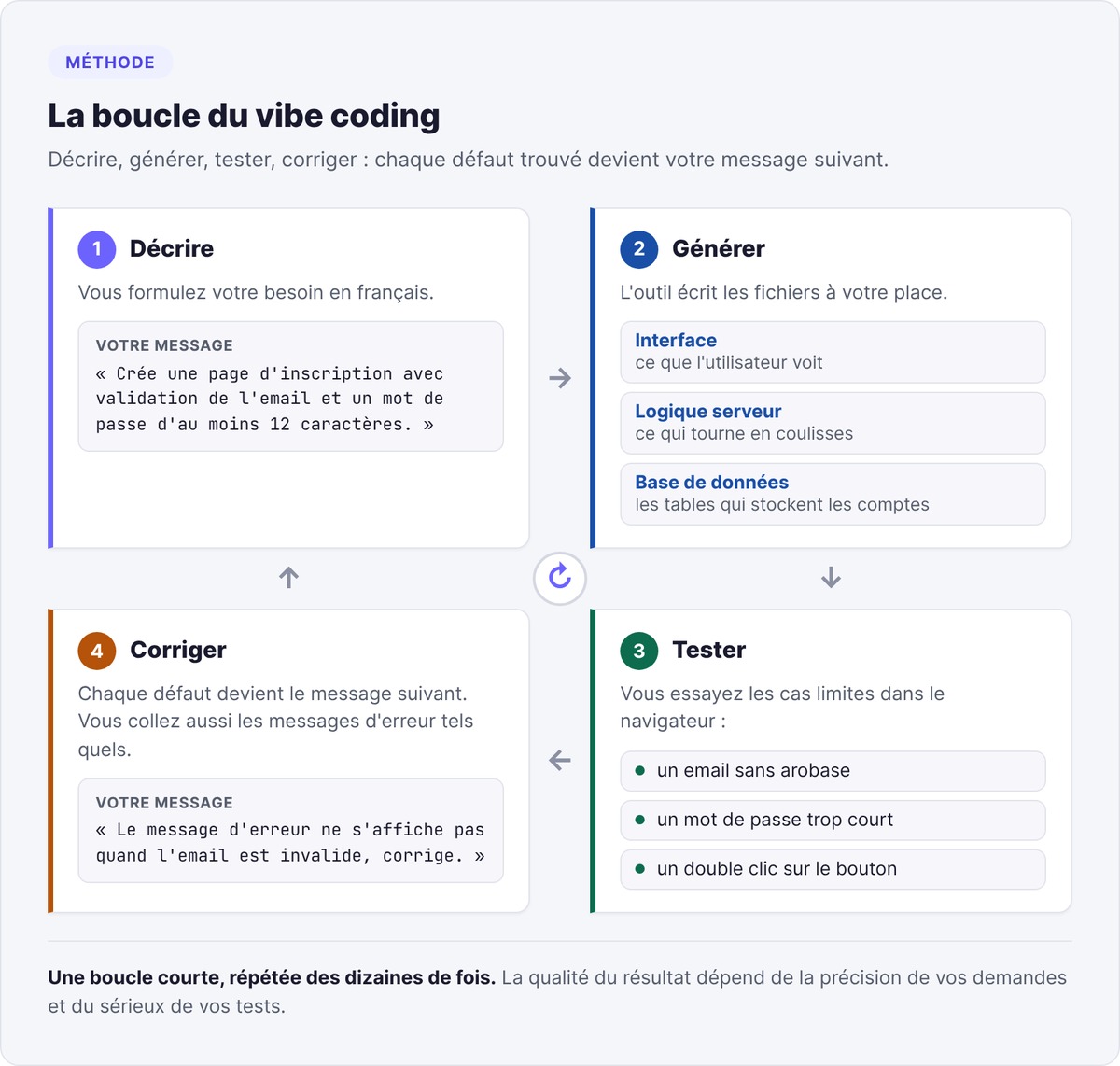
You follow a short loop, repeated dozens of times, and the quality of the result depends on how precise your requests are and how seriously you test.
The describe, generate, test, fix loop
- Describe. You state what you need: "Create a sign-up page with email validation and a password of at least 12 characters."
- Generate. The tool writes the files: interface, server logic, database tables.
- Test. You try the edge cases in the browser: an email with no @ sign, a password that's too short, a double click on the button.
- Fix. Each defect becomes the next message: "The error message doesn't show when the email is invalid, fix it." You also paste error messages exactly as they appear.
Vincent Maurin, co-director of swanbase, demonstrated this loop live during his talk "Intro to code for non-technical entrepreneurs" on June 1, 2026 in Paris. He asked Claude to produce HTML, CSS and JavaScript from an image, then to explain that code and modify it.
A complete example: a feedback collection app
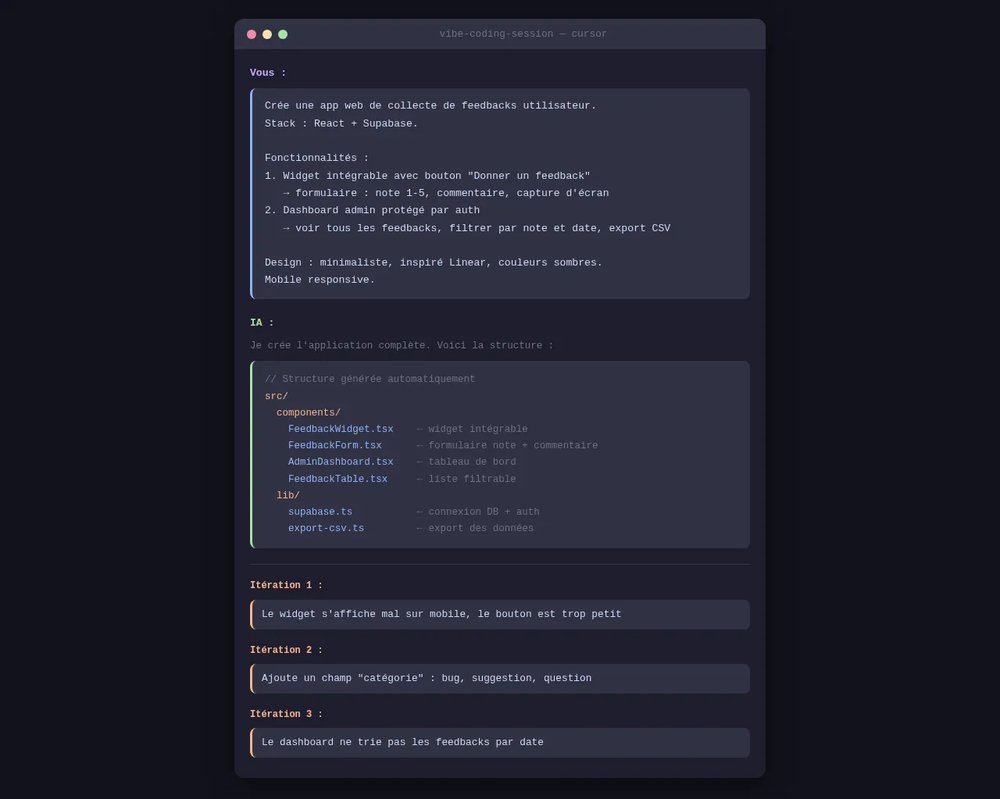
First message for an app that collects feedback from users of a SaaS product:
"Create a web app for collecting user feedback. Stack: React + Supabase. Features: (1) an embeddable widget that end users see on the product, with a "Give feedback" button that opens a form (rating from 1 to 5, free-text comment, optional screenshot), (2) an admin dashboard protected by authentication where the founder sees all feedback, can filter by rating and date, and export to CSV. Design: minimalist, inspired by Linear, dark colors. Mobile responsive."
The first version works and is still imperfect. Three iterations come up almost every time:
- "The widget displays badly on mobile, the button is too small."
- "Add a category field to the form with the options bug, suggestion, question."
- "The dashboard doesn't show feedback in chronological order, sort from newest to oldest."
To follow the step-by-step tutorial with the prompt template, read our guide to learning vibe coding.
Accepting code without reading it all: Karpathy's rule and its limits
Accepting every change without reading it is what defines vibe coding in the strict sense. The rule holds as long as the stakes stay low: a prototype, a weekend project, a throwaway page.
The phrase "trust but verify" sums up sensible use: you let the AI do the writing and you always check the result. If you don't read the code, your yardstick is how the application behaves, and for a prototype that yardstick is enough. As soon as the application touches authentication, payments or personal data, someone has to review those parts line by line.
Two ways to vibe code: generate an app or drive an agent in your codebase
The first mode starts from a blank page. You describe the application in the browser, and a generator like Lovable or Bolt.new creates the project, shows it in a preview and deploys it. You only see the code if you ask for it.
The second mode starts from an existing project. You launch an agent like Claude Code or Codex in your code folder and give it tasks: add a page, fix a bug, write tests. The agent reads your files, edits them and runs commands. This mode requires you to be able to read a project, and it leaves you in control of every file.
Vibe coding, no-code and traditional development: the differences
Vibe coding vs. traditional development
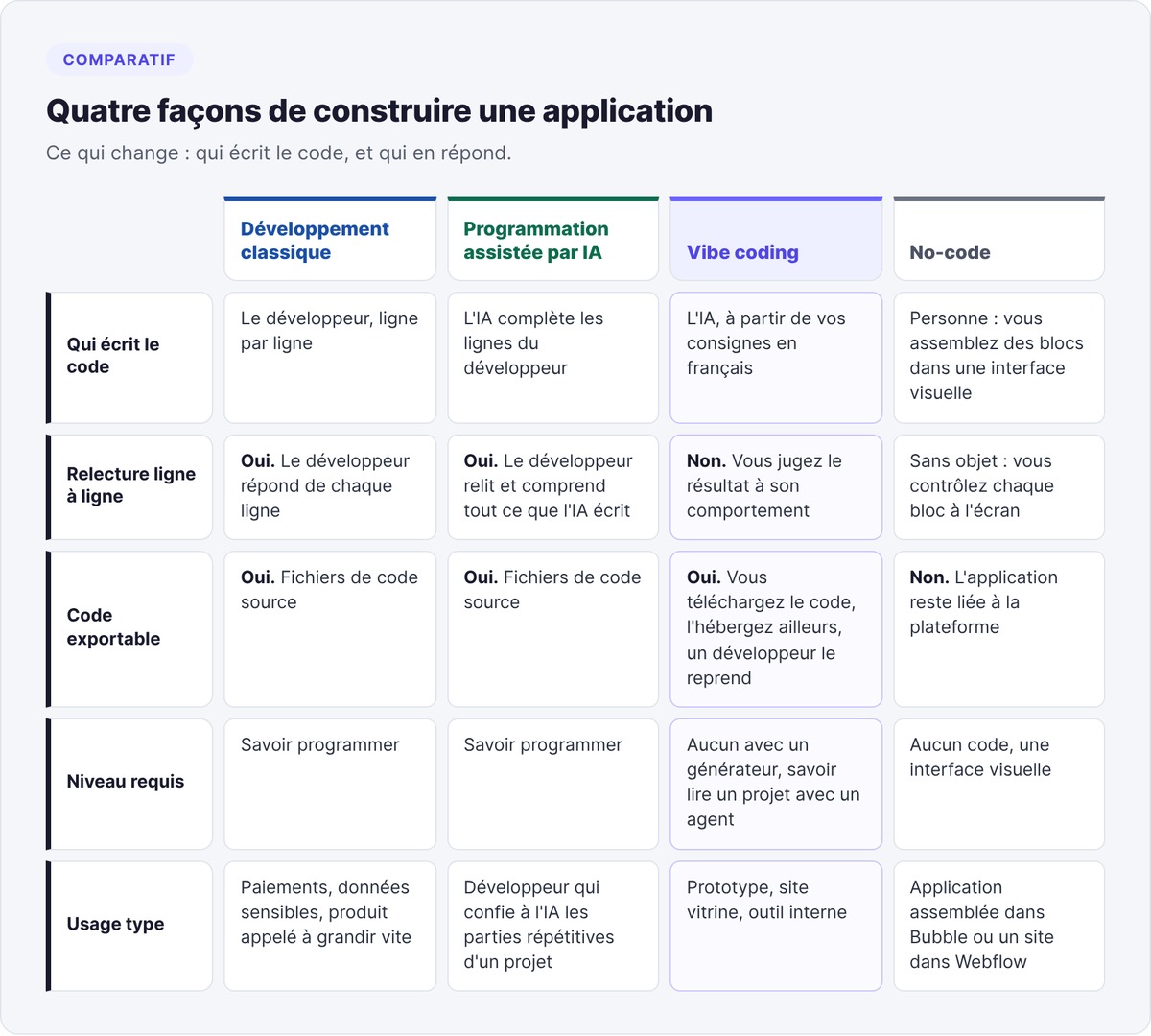
In traditional development, a developer writes every line and is accountable for it. In vibe coding, the AI writes and you judge the result through use.
Vincent Maurin explains these layers to non-technical founders with a restaurant analogy. The frontend is the dining room, which the customer sees, and the backend is the kitchen. The API plays the waiter carrying orders from the dining room to the kitchen, and the database is the pantry. Knowing these four roles helps you tell the AI precisely what's wrong.
Vibe coding vs. no-code
No-code tools like Bubble or Webflow have you assemble blocks in a visual interface, and your application stays on their platform. Vibe coding produces code files you can download, host elsewhere and hand to a developer the day the project grows. In exchange, no-code lets you control every block on screen.
Vibe coding vs. AI-assisted programming
A developer who uses AI to complete their lines, then reviews and understands everything it writes, is doing AI-assisted programming. Simon Willison, developer and creator of Datasette, champions this distinction: vibe coding starts the moment you accept code without understanding it. In the first case, a human is accountable for every line.
Vibe coding tools in 2026
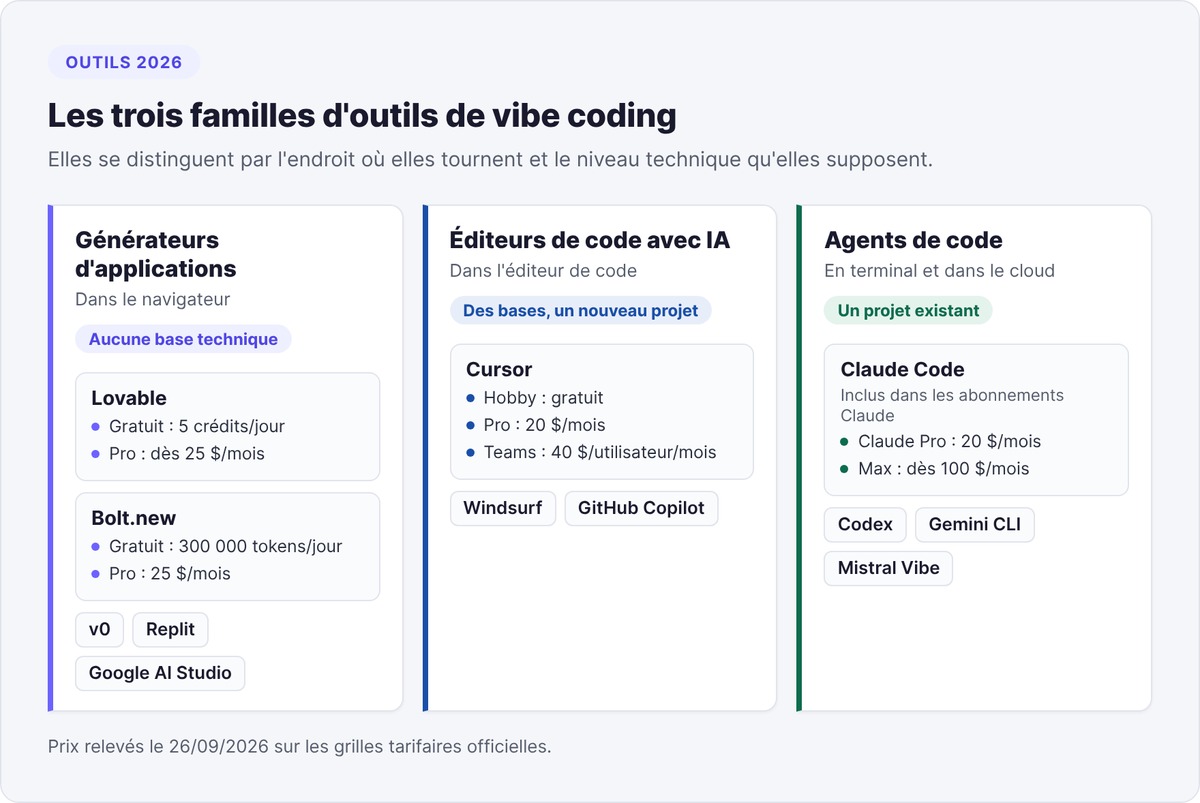
The tools fall into three families, depending on where they run and the technical level they assume. We checked the prices listed on the official pricing pages on September 26, 2026.
In-browser app generators
- Lovable generates polished-looking applications, with Supabase for the database. Free plan: 5 credits per day, up to 30 per month. Pro plan from $25 per month (Lovable pricing).
- Bolt.new, from StackBlitz, generates the app and hosts it without leaving the tab. Free plan: 300,000 tokens per day and 1 million per month. Pro plan at $25 per month (Bolt pricing).
- v0, from Vercel, produces web interfaces from a description or a mockup.
- Replit combines an online development environment with an agent that builds the app.
- Google AI Studio generates apps from a prompt, using Gemini models.
AI code editors
- Cursor takes the VS Code interface and adds a chat and agents that edit several files at once. Free Hobby plan with limited agent requests, individual plan at $20 per month, Teams at $40 per user per month (Cursor pricing).
- Windsurf follows the same editor-with-built-in-agent approach.
- GitHub Copilot installs in VS Code and suits teams already on GitHub.
Terminal and cloud coding agents
- Claude Code, from Anthropic, works in your terminal: it reads the project, edits files, runs tests. Anthropic includes it in Claude Pro at $20 per month ($17 billed annually) and in Max from $100 per month, and leaves it out of the free plan (Claude pricing).
- Codex, OpenAI's coding agent, works on the same principle. The Paris Codex community held its first demo night at swanbase on May 29, 2026.
- Gemini CLI brings Google's models to the terminal.
- Mistral Vibe offers a European alternative, with Mistral AI's models.
Zo Computer adds a persistent cloud server around these agents.
The AI models behind these tools
Each tool runs on one or more large language models: Claude from Anthropic, GPT from OpenAI, Gemini from Google, Devstral from Mistral for code. Cursor and several generators let you pick the model. Claude Code, Codex and Gemini CLI use their own vendor's models. Versions change several times a year, so check which one your tool offers on the day you start.
Choosing a tool for your profile
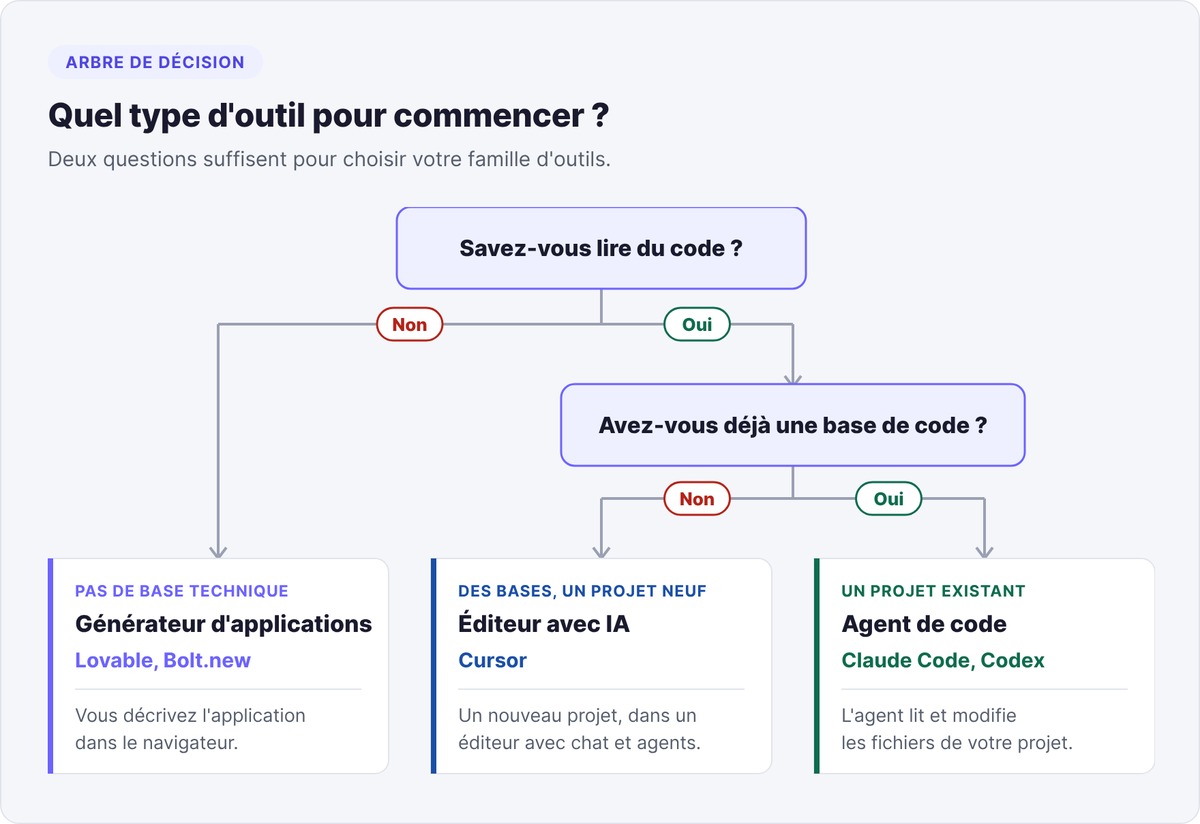
- No technical background: an app generator, Lovable or Bolt.new.
- Some technical background and a new project: an AI editor like Cursor.
- An existing project to evolve: a coding agent like Claude Code or Codex.
To decide between Lovable, Bolt and Cursor based on your stage, see our comparison of vibe coding tools. For the agent vs. editor matchup, read Claude Code or Cursor, and for a wider view, our selection of AI tools to launch your startup.
Websites, apps, internal tools: projects suited to vibe coding
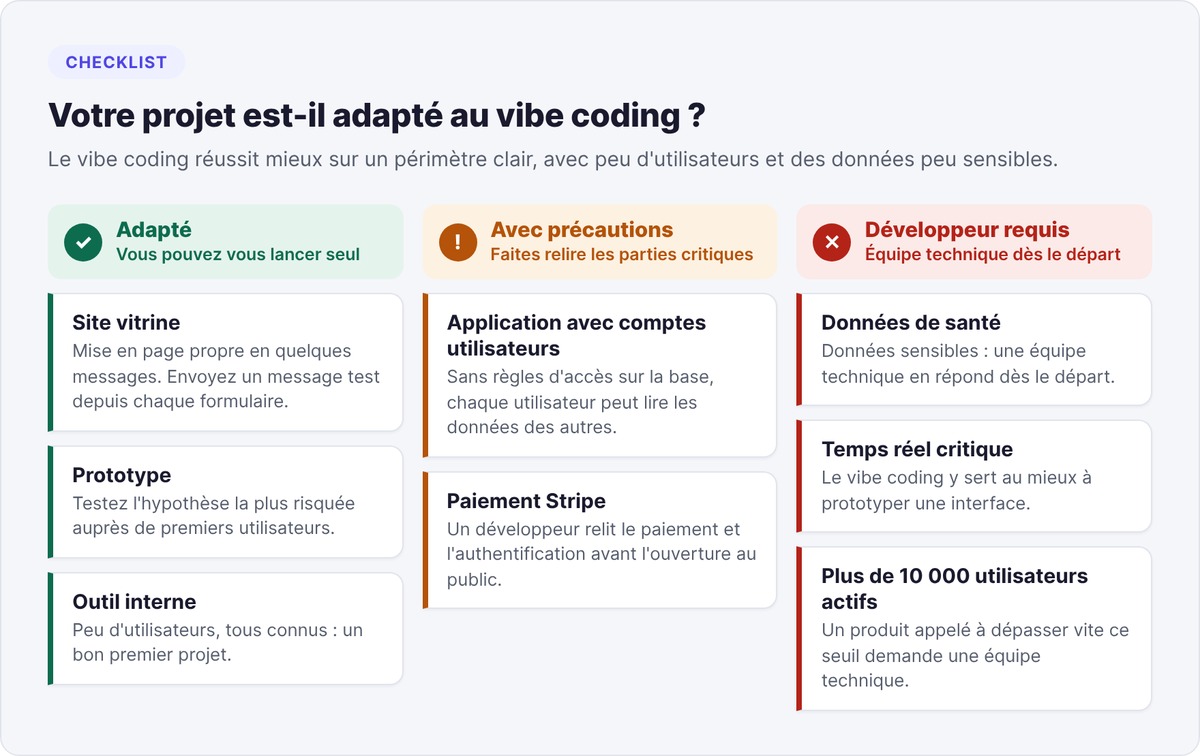
Vibe coding works best on a clear scope, with few users and data that isn't very sensitive.
Building a website with vibe coding
A showcase site, a sales page or an event site are a good fit: generators produce a clean, mobile-friendly layout in a few messages. The classic trap is forms, which the tool displays without connecting them to an email service or a database. Start with Lovable or Bolt.new, and send a test message from every form before going live.
Building a web or mobile app
An app with user accounts, a dashboard and a database is still within reach if you test every user flow. The classic trap: the app works for you and lets every user read everyone else's data, because the database has no access rules. On mobile, publishing to the app stores takes extra work.
Two evenings in Paris in summer 2026 show this format in action. On July 7, the Travel x AI Build Night, co-organized by Just Build It! and hosted at swanbase, gave participants 1 hour 30 minutes to build a product with Lovable and Jinko, followed by a 2-minute demo per project. On July 8, Mines Paris Alumni ran a Gen AI Hackathon with Lovable, with swanbase as a partner: with no technical prerequisites, each participant built, tested and deployed their project over the evening.
Internal tools and automations
A sales tracking dashboard or a script connecting two pieces of software serves a small group of known users, which limits the risk. That makes an internal tool a good first project. The classic trap comes from the access keys for connected software, which the AI sometimes writes directly into the code. An agent like Claude Code or Codex is a good fit, because these tools often sit alongside existing scripts.
Projects to hand to a developer
Critical real-time systems, healthcare, finance, sensitive data and products expected to pass 10,000 active users quickly need a technical team from day one. At best, vibe coding helps prototype an interface there. Our guide to vibe coding mistakes covers these cases in its section "When vibe coding isn't the right answer".
Vibe coding best practices
Five habits prevent most unpleasant surprises. Vincent Maurin presented three of them in his June 1, 2026 talk.
Write a brief before the first prompt
Before opening the tool, write one page on what the application should do, for whom and with what data. List the screens, the possible actions on each screen and the foreseeable error cases. This brief becomes your first prompt, then your checklist during testing. Our guide to learning vibe coding includes a five-part brief template.
Use Git from day one
Git saves every version of your code and lets you roll back when a change breaks the app. Vincent Maurin points out the difference: Git is the version control software running on your machine, GitHub is the online host that stores those versions. Ask the AI to save a version after every step that works.
Keep API keys out of the code
API keys give access to your paid services and your data. Vincent Maurin recommends storing them in environment variables, never in code files, and excluding the file that holds them from your GitHub repository. If you use Supabase, enable Row Level Security on every table: these rules define which user can read which row. An exposed key with no access rules opens up the whole database.
Spot fake data before deploying
Lovable, Bolt and similar tools often create hardcoded fake data instead of connecting the project's database. The app looks complete during your tests, then shows up empty once it's live. Before deploying, create a test account, add an item, reload the page and check that it's still there.
Get the critical parts reviewed
Have a developer review anything involving authentication, payments and personal data before opening the app to the public. Failing that, ask the AI to audit its own code against OWASP recommendations, the reference for web vulnerabilities, then fix what it flags. Our guide to vibe coding mistakes includes a security checklist to run before going to production.

Is vibe coding risky? Limits and criticism
Security: common flaws in generated code
In May 2025, researcher Matt Palmer published CVE-2025-48757: apps generated with Lovable left their Supabase database accessible to unauthenticated visitors, due to insufficient Row Level Security rules, and exposed personal data.
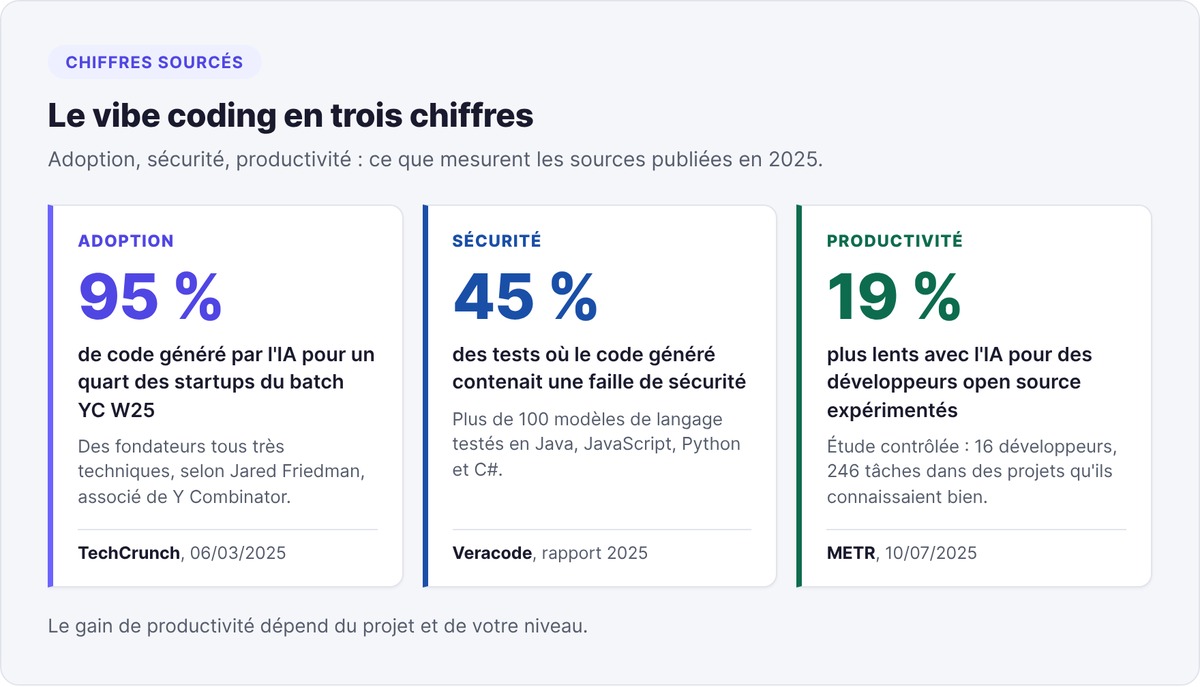
In its 2025 report on the security of AI-generated code, Veracode tested more than 100 language models in Java, JavaScript, Python and C#: in 45% of tests, the generated code contained a security flaw, often from the OWASP Top 10. So name the risk in your prompts, for example "secure the authentication following OWASP recommendations", then have the sensitive areas reviewed.
Maintainability and technical debt
Simon Willison told Ars Technica in March 2025: "Vibe coding your way to a production codebase is clearly risky. Most of the work we do as software engineers involves evolving existing systems, where the quality and understandability of the underlying code is crucial."
Code produced through successive iterations builds up invisible debt: duplicated functions, unnecessary dependencies, conflicting configurations. Treat vibe-coded code as a prototype: if it validates your hypothesis, a developer restructures or rewrites it.
Productivity: gains vary by profile
In March 2025, Y Combinator partner Jared Friedman said that a quarter of the startups in the Winter 2025 batch had codebases that were 95% AI-generated, noting that these founders were all highly technical.
In July 2025, the research organization METR published a controlled study of 16 experienced open source developers, who worked through 246 tasks on projects they knew well. With AI tools, mainly Cursor Pro and Claude 3.5 and 3.7 Sonnet, they took 19% longer, even though they expected a 24% speedup. The gain depends on the project and on your level.
When to hand over to a developer
Paying users, sensitive data or bugs that come back after every fix are signs it's time to bring in a developer. We cover these signals in the section "When to switch to traditional development" of our guide vibe coding an MVP as a non-technical founder.
Vibe coding for startup founders: prototype, MVP or product
Validating an idea without a technical team
For a founder, vibe coding is first a way to test the riskiest hypothesis in the project, usually "customers have this problem and would pay for this solution". A prototype built in a few days is enough to put the idea in the hands of early users. Write down your hypotheses in a lean canvas, then build only what tests the first one.
swanbase's position on code
swanbase took a stance in the FAQ for The Nest, its seven-day hackathon in Paris: "Our tools (Claude, Cursor, Zo Computer, our AI agents) speed up someone who already knows how to build." The same answer notes that a non-software product doesn't require coding skills, while an application benefits from being built by someone very comfortable with code. So a non-technical founder vibe codes to prototype and validate, and a founder who knows how to build vibe codes to move faster on the product.
Building your MVP: solo, with a freelancer or with a CTO
Our guide vibe coding an MVP as a non-technical founder lays out a four-week path and the budget to plan for. To choose between doing it all yourself and delegating, read vibe coding: agency or solo?. If you need a lasting technical team, our guide to finding a CTO for your startup walks through the process.
The future of vibe coding: autonomous agents and developer jobs
Coding agents running in the background
With Claude Code, Codex in the cloud or Google Antigravity, you hand a long task to an agent, such as migrating a database or writing a suite of tests, and do something else while it works. You then review its proposed changes. Open source projects like OpenClaw push this approach toward agents that run continuously.
The impact on developer jobs
A startup can now build its first product with fewer people, and a company can maintain an application with a smaller team. Developers stay in charge of what AI handles poorly on its own: architecture, security, performance and supervising agents. Théo Sitjar, co-founder of swanbase, devoted his July 8, 2026 talk at the Gen AI Hackathon with Lovable to the effects of AI on software and on the job market.
Vibe coding FAQ
Is vibe coding free?
You can start vibe coding for free, with limits you'll hit quickly. As of September 26, 2026, Lovable offers 5 credits per day, Bolt.new 300,000 tokens per day and Cursor a free Hobby plan. Real costs start with your first subscription: $25 per month for Lovable Pro or Bolt Pro, $20 for Cursor or for Claude Pro, which includes Claude Code.
Do you need to know how to code to vibe code?
You can vibe code without knowing how to code, using generators like Lovable or Bolt.new, which are designed for beginners. Still, some understanding of APIs and databases makes your requests more precise. For a software product meant to last, being able to read code becomes a decisive advantage.
Can vibe coding replace a developer?
Vibe coding replaces a developer for a prototype, a simple website or an internal tool. For a product in production, with payments, personal data or many users, you'll need a developer to review and secure the code. Vibe coding then serves to validate the idea before investing in a technical team.
Which AI should you choose for vibe coding?
The right AI depends more on your profile than on the model. With no technical background, pick a generator like Lovable or Bolt.new. With some background and a new project, pick an editor like Cursor. On an existing project, drive an agent like Claude Code or Codex. The section on vibe coding tools in 2026 covers each family and its pricing.
What's the difference between vibe coding and no-code?
Vibe coding produces source code, while no-code has you assemble blocks on a platform. With vibe coding, you can download the code, host it elsewhere and hand it to a developer. With Bubble or Webflow, your application stays tied to the platform, and you control every block on screen.
Can you launch a startup with vibe coding?
You can run a startup's validation phase with vibe coding. You build a prototype, put it in users' hands and confirm or reject your hypothesis. Growing the company then takes paying customers, a viable business model and, eventually, a technical team to evolve the product.
swanbase supports early-stage founders over the long term, in Paris and remotely, for €0, by application, in exchange for equity. The Nest opens batch F26 from November 18 to 25, 2026, with applications open until November 15: apply here.