A founder looking for their first hundred users shouldn't have to hire. They should be able to launch five marketing agents from their terminal, read the results ten minutes later, and move on to the next decision. That conviction is what gave us fog.
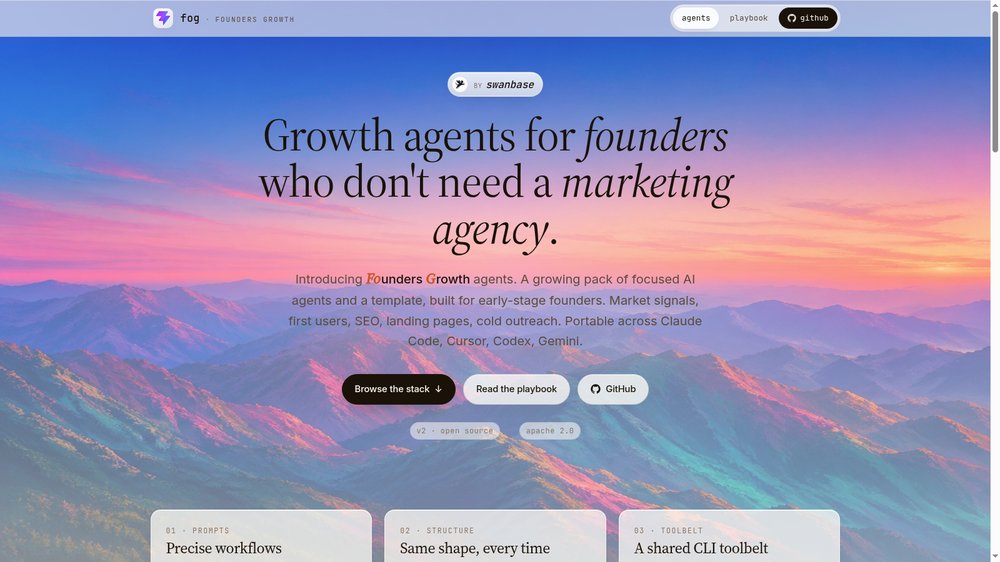
fog (Founders Growth agents) is the open source AI marketing agent stack that swanbase released in 2026 under the Apache 2.0 license. It has five agents, a shared spec format (AGENT.md), a common CLI toolbox, and one philosophy throughout: an agent does one thing, in one chat, and you can read it in two minutes. The pack is portable across Claude Code, Cursor, Codex CLI and Gemini CLI. Official site: fog-agents.com. Full technical playbook: marketing-agents-playbook.
You'll see what an AI marketing agent has become in 2026 (a folder of markdown files, with no robot involved), why the vertical format beats the mega-agent, and how fog structures each of the five agents we're opening up to the founder community today.
Why we built fog for founders
The AI marketing agent market in 2026 looks like this: closed SaaS products selling you "ready-made agents" on subscription, agencies billing a full engagement to wire three prompts into a Notion page, and a handful of open source frameworks designed for AI engineers rather than founders who need to move fast.
None of these tools start from what an early-stage founder actually needs, which sounds like this: "I need to understand what users are saying about my segment right now, I want to launch that analysis in two minutes and read the results before my next meeting." Setting up a Zapier workflow to publish three posts a week solves a different problem.
We wrote fog because we wanted a stack at swanbase that fits exactly that pattern: five agents covering the blockers founders hit on the way from 0 to 1,000 users. We made it open source so other founders can fork the agents, and so the AGENT.md spec can become a standard nobody owns.
What an AI marketing agent is in 2026 (a working definition)
Forget the science fiction
In 2026, an AI marketing agent is a folder of markdown files. There's no robot, no proprietary cloud service, and no ChatGPT in disguise.
A markdown folder read by your harness
In practice, when you install a fog agent on your machine, you end up with a structure like this:
agents/
└── market-signal/
    ├── AGENT.md              ← spec readable by humans + machines
    ├── README.md             ← prerequisites, install
    ├── config.example.json   ← config template
    └── assets/
        └── output-template.md ← deliverable skeleton
You point your AI harness (Claude Code, Cursor, Codex CLI or Gemini CLI) at the folder and write in plain language:
"Run the market-signal agent at agents/market-signal/.
Market: freelance invoicing tools for designers."
The harness reads the AGENT.md, asks you for any missing inputs in chat, runs the workflow step by step (shell commands, CLI calls, LLM reasoning), and writes the deliverable to your project folder. There's no daemon, no SDK, and no runtime to babysit.
The agent is portable because it's plain text with no dependency on any editor. You run the same AGENT.md on Claude Code today and on Cursor tomorrow without touching a line.
Agent, chatbot, prompt, skill: four different jobs
These four concepts often get mixed up, but each does a different job:
| Concept | Form | Output | When to use it |
|---|---|---|---|
| Prompt | A single sentence | Variable | One-shot question, instant answer |
| Chatbot | Open-ended conversation | Variable | Brainstorming, exploration |
| Agent | Structured workflow (AGENT.md) | Predictable format, every time | Repeated task with a formatted deliverable |
| Skill | Reusable subtask (SKILL.md) | Block shared across agents | When 3 agents share the same piece of code |
With a marketing agent, you ask for "this deliverable, in this shape, every time" and you get it, whoever runs the command and whatever the harness.
Anatomy of an AGENT.md (the 6 parts)
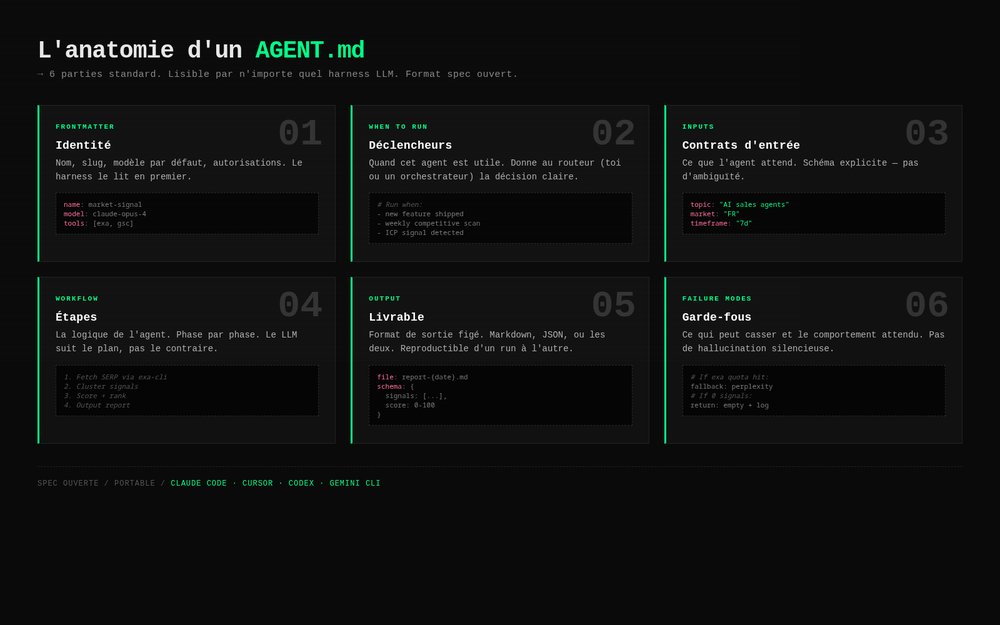
Every well-built AGENT.md has six parts. The format settled over time as we built internal agents at swanbase before opening up the code.
1. Frontmatter
---
name: market-signal
description: Reads what real users say about a market before you write copy
compatibility: claude-code, cursor, codex, gemini
---
A machine-readable header that lets a harness preload the agent without reading the whole file. Three fields are enough.
2. When to run
One to three sentences a founder can read in five seconds. Before validation. When traffic drops. Before spending on paid. Each line is a concrete trigger.
3. Inputs needed
A table of required and optional inputs with default values. The agent must refuse to start if a required input is missing. Most of the failures we saw in production came from skipped inputs.
| Input | Required | Default | Example |
|---|---|---|---|
| market | yes | - | "freelance invoicing tools for designers" |
| language | no | en | fr |
| depth | no | standard | quick / standard / deep |
4. Workflow
Numbered steps, each one ≤ 6 lines. Every step uses shell, a CLI from the toolbox, or LLM reasoning. There are no opaque functions.
5. Output
A markdown skeleton, or a link to a template in assets/. The agent must produce this exact shape on every run. You get a reliable deliverable because its shape stays fixed.
6. Failure modes
What to do when a CLI is missing, when an API returns nothing, when a step times out. The fallback is explicit. An agent that degrades silently loses your trust in a single run.
Six parts, because a founder who has never seen the stack should be able to scan any AGENT.md in thirty seconds and know what it does, what it needs, and what comes out. If you can't, the agent isn't finished.
Vertical agents vs. the mega-agent
The dominant pattern is a mega-AGENT.md with fifty skills bolted on, every helper, every persona, and every CLI wrapper crammed into the same context. We think that's a mistake.
We argue for the opposite. Each fog agent is a small, vertical folder that does one thing, opened in its own chat, with only the context that job needs. The agent is small enough to read in one session, focused enough that the model doesn't drift, and self-contained enough that you can switch harnesses without rewiring anything.
The rule: if two agents share work, that's a candidate for a skill. If an agent grows past a few hundred lines of AGENT.md, it's really two agents. Resist the natural pull toward the mega-agent. Vertical agents stay sharp, while bloated ones get lost in their own context.
See the Claude Code vs. Cursor comparison to understand why the harness affects how much context you can manage.
The 5 agents in the fog stack
Here are the five agents that make up fog today. Each one solves a concrete founder blocker. You run them on demand, the moment the blocker shows up.
market-signal
When to run it. Before you write a single line of copy or code. It reads what users are saying on Reddit, X, niche forums and Hacker News about your target market.
Inputs. market (required: "freelance invoicing tools for designers"), language (default en), geography (default global), depth (quick · standard · deep).
Output. A markdown report with a sentiment breakdown, top issues ranked by mention count, a psychographic profile, 15 to 20 sourced verbatim quotes, and three actionable recommendations.
Underlying conviction. Don't guess what users feel. Read what they wrote.
first-users
When to run it. When you're looking for your first 10 to 50 users and don't know where they hang out.
Inputs. product (required), target_user (required), geography (optional).
Output. A map of relevant channels (subreddits, Slack/Discord communities, X threads, specialist forums, events) with first-message templates tailored to each channel. CLIs used: exa-cli, firecrawl-cli.
seo-audit
When to run it. When traffic drops. A one-shot SEO snapshot that combines Google Search Console data, a live SERP crawl and a prioritized list of fixes.
Inputs. domain (required), gsc_property (required), language (default en), time_range (default 90d).
Output. The pages losing traffic, the keywords involved, the current SERP state, and a list of fixes prioritized by impact × effort. CLIs used: gsc, firecrawl-cli.
landing-page-analyzer
When to run it. Before spending on paid, or after launch when conversion stalls. A heuristic CRO audit against the LEVER framework (Legibility · Enticement · Value clarity · Evidence · Resistance).
Inputs. url (required), goal (required: "book a demo"), target_user (required: "B2B sales ops leads"), context (optional), language (default en).
Output. A LEVER scorecard, the result of the 10-second test, 30+ heuristic findings tagged pass/issue/critical, the top 5 ship-this-week fixes ranked by impact × ease, three rewritten headlines, and 3 to 5 A/B test hypotheses.
Underlying conviction. Don't pay for traffic into a leaky bucket.
cold-outreach-builder
When to run it. When you're ready for targeted outbound. It builds a 4 to 6 message sequence with per-prospect personalization, grounded in Cialdini's principles of persuasion.
Inputs. target_audience (required), value_prop (required), prospect_list (CSV), tone.
Output. A complete email sequence ready to load into Instantly, with personalized hooks for each prospect, the psychological rationale behind each persuasion lever used, and a follow-up plan. CLIs used: exa-cli, firecrawl-cli, instantly-cli.
There's also the _template-agent template, which you can fork to build your own.
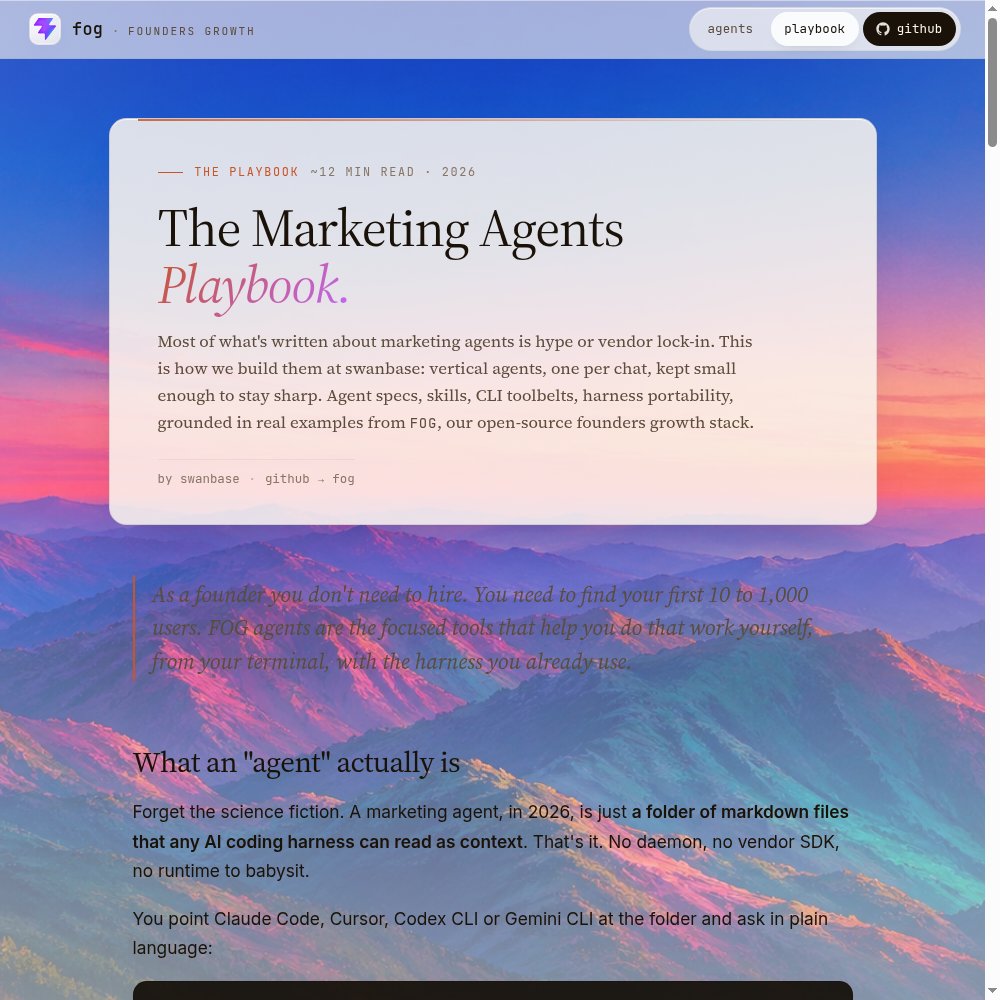
→ Read The Marketing Agents Playbook at fog-agents.com/marketing-agents-playbook (the long version, with line-by-line examples).
cli-skills, the shared toolbox
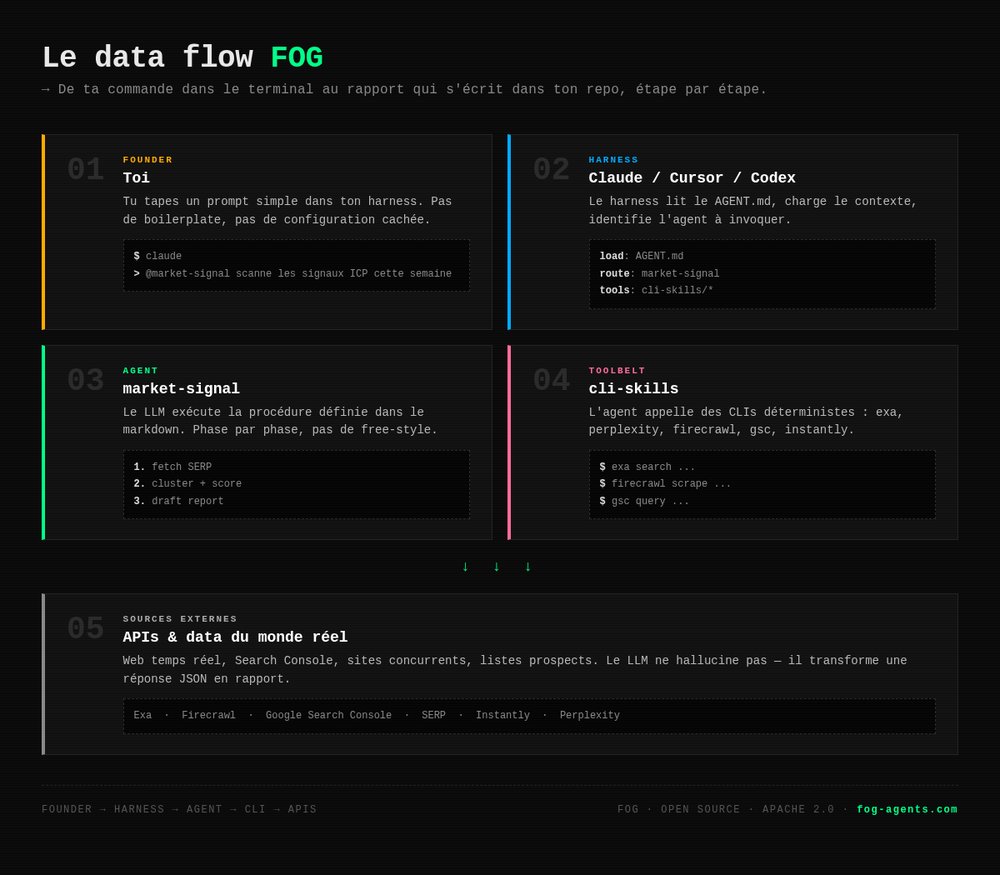
Marketing agents need to do things: search the web, scrape pages, query Google Search Console, push outreach campaigns. Hardcoding those calls into every agent is the naive approach, and the wrong one.
Instead, fog installs a shared CLI toolbox and each agent calls it from the shell. The public toolbox is cli-skills:
# One-shot install, reusable by every fog agent
git clone https://github.com/the20100/cli-skills.git ~/cli-skills

# Add to PATH
export PATH="$HOME/cli-skills/exa-cli/bin:$PATH"
export PATH="$HOME/cli-skills/firecrawl-cli/bin:$PATH"

# API keys required by each CLI
export EXA_API_KEY="..."
export FIRECRAWL_API_KEY="..."
market-signal can now shell out to exa-cli search … without bundling the SDK. seo-audit can call gsc query …. cold-outreach-builder can send to instantly-cli push …. That's three agents sharing one toolbox, with zero duplicated code.
It's the same pattern as /usr/local/bin on Unix: you install once and the whole system uses it. There's no proprietary SDK inside each agent, no duplication, and no version drift between agents.
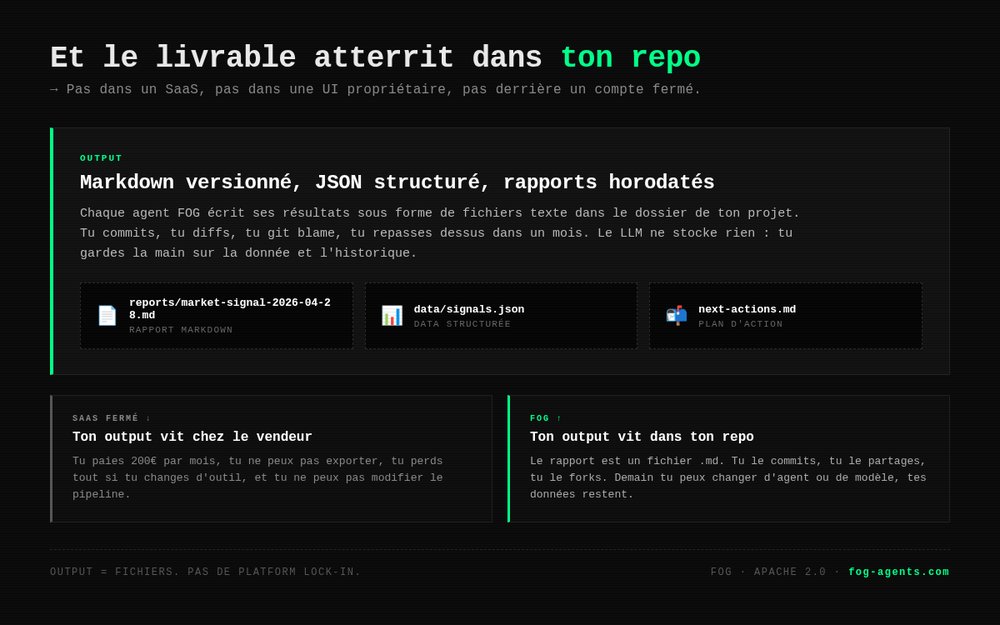
On the way out of the toolbox, fog agents write their results as text files in your project folder. You commit them, diff them, and come back to them a month later. There's no proprietary interface and no platform holding your data hostage, which is what sets fog apart from typical AI marketing agent SaaS products.
How to build your first AI marketing agent (a 4-step method)
If you want to build your own agent (beyond fog's five), here's the method we follow at swanbase.
Step 1: fork _template-agent
The template ships with the fog repo. It defines the contract every agent must meet: an AGENT.md skeleton, a README with prerequisites, config.example.json, assets/output-template.md, and references/ for API docs. It doesn't run on its own; it's a skeleton to copy.
cp -r agents/_template-agent agents/my-new-agent
cd agents/my-new-agent
By the time you build your fourth marketing agent, you'll appreciate that the first three look alike.
Step 2: fill in the six parts of AGENT.md
Frontmatter, when-to-run, inputs, workflow, output, failure modes. If you get stuck on any of the six, read the marketing agents playbook, which walks through each part with examples.
Step 3: test on all four harnesses
Run the same AGENT.md on Claude Code, Cursor, Codex CLI and Gemini CLI. If one harness fails, a portability rule is broken (see the next section). Fix it and run it again.
Step 4: iterate on the output
You judge an agent's reliability by its output. Run the agent ten times on varied cases and compare the outputs. If the shape drifts, your output template is too loose and the spec needs tightening. If the shape holds but the content is weak, your workflow is underspecified.
The cycle: one writing pass, one test pass on five cases, one patch pass, then repeat. Compare that with the weeks it took to get an AI agent into production a year ago, as covered in Claude Managed Agents: the complete guide.
The 3 portability rules (claude code marketing agents)
A marketing agent is portable when it works identically on Claude Code, Cursor, Codex CLI and Gemini CLI. That portability is fragile, and three rules keep it intact.
Rule 1: no calls to harness-specific functions
No mcp__*, no claude-*, no function that only exists in one harness. Anything you can't express in bash + cli-skills doesn't belong in the agent.
That's why proprietary Claude Code marketing agents (ones that depend on an Anthropic MCP server, for example) only work on Claude Code. A portable AI marketing agent is written to the lowest common denominator: shell + CLI.
Rule 2: no hardcoded absolute paths
The agent always works from the user's project root, which it receives as an input. It doesn't know where it lives on disk. Avoid both /Users/<you>/Documents/... and /home/founder/agents/.... Always use paths relative to the project root.
Rule 3: output goes outside the agent's folder
Deliverables are written to <project>/<agent-name>/<label>-<YYYYMMDD>.md. The agent's folder stays clean and updates with a git pull. You can update the agent without risking your deliverables getting overwritten.
Follow these three rules and your agent runs the same on every harness. Break them and you lock yourself into one harness, which breaks fog's core promise.
The 2 non-negotiables we stand by
Under every agent in the stack sit two convictions that are easier to write down than to live by.
"Don't guess what users feel. Read what they wrote."
This kills the urge to invent user pain from a whiteboard. The market-signal agent applies the principle by systematically reading Reddit, X, forums and HN before a single line of copy gets written.
"Don't pay for traffic into a leaky bucket."
This kills the urge to launch paid campaigns before the page deserves them. The landing-page-analyzer agent applies the principle with a systematic LEVER audit before every ad spend.
Build agents that enforce these two disciplines, and your stack handles most of a junior marketer's job, on demand, for the cost of an API call. For the broader picture on startup growth marketing, see growth marketing for startups.
fog vs. the alternatives (agency, SaaS, DIY)
A quick comparison of the four approaches available to a founder who wants to clear their marketing blockers.
| Criterion | Freelance agency | Marketing agent SaaS | DIY (from scratch) | fog |
|---|---|---|---|---|
| Monthly cost | Agency fees | Subscription | Founder time | Cost of API calls |
| Time to first deliverable | 2-4 weeks | 1 day | 2-3 weeks | 30 minutes |
| Auditable | No | No (black box) | Yes | Yes (readable markdown) |
| Modifiable | No | Limited | Yes | Yes (direct fork) |
| Portable across harnesses | N/A | No | Depends on implementation | Yes (by design) |
| License | Contract | Subscription | You own it | Apache 2.0 |
| Fit for a founder at 0-1,000 users | Overkill | Too generic | Too time-consuming | Built for it |
For other tools, see free tools for founders and Claude Code vs. Cursor.
How to get started now
fog lives at fog-agents.com. It's Apache 2.0, free, and modifiable. You can:
- Read the marketing agents playbook: the long version of this article, with concrete examples on the anatomy of an AGENT.md, the toolbox pattern, and three agents broken down line by line.
- Install the cli-skills toolbox: the infrastructure layer shared by every agent. Setup takes fifteen minutes.
- Run your first agent:
market-signalis the simplest. Pick a market you know, run it on Claude Code, and read the report. It takes thirty minutes from clone to first decision.
If you build a marketing agent that could join the public stack, get in touch. fog grows as new founder blockers show up.
FAQ
What exactly is an AI marketing agent? In 2026, an AI marketing agent is a folder of markdown files (AGENT.md, README, config) that an AI harness like Claude Code, Cursor, Codex CLI or Gemini CLI can read and execute. The folder describes in plain language the required inputs, the step-by-step workflow, the expected output format, and the failure modes. The harness reads the AGENT.md, runs the shell commands or CLI calls listed in the workflow, and writes the deliverable to the founder's project folder. There's no daemon to run, no proprietary SDK, and no runtime to maintain.
What's the difference between an agent, a chatbot and a prompt? A prompt is a one-shot instruction sent to the model. A chatbot is an open-ended conversation where the model replies to messages without a predefined plan. An agent follows a structured workflow, described in an AGENT.md, with typed inputs, ordered steps, and a deliverable in a predictable format. The key difference: the agent produces the same output shape on every run, no matter who launches it. The chatbot improvises, and a prompt is too short to do this.
Do I need to know how to code to use fog? No. fog is designed to be used in natural language through an AI harness. You open Claude Code, Cursor, Codex CLI or Gemini CLI, point it at the agent (for example: "Run agents/market-signal/ for the freelance invoicing tools market"), and the harness reads the AGENT.md, asks you for any missing inputs in chat, runs the commands, and writes the deliverable. Being able to read markdown and install a CLI is enough. If you want to modify an agent or build one, reading a bit of Bash helps.
What does it cost per month to run fog? fog's code is free (Apache 2.0). Costs come from the AI harness and the third-party CLIs used by the cli-skills toolbox. Budget for a Claude Pro subscription or Anthropic API access for Claude Code (20 dollars a month on Pro, or pay-as-you-go), plus optional CLIs depending on the agents you run: Exa (semantic web search), Firecrawl (scraping), Perplexity (Q&A search), Instantly (cold email). A founder who runs market-signal and landing-page-analyzer once a week gets by on less than 100 dollars a month, infrastructure included.
Which AI harnesses does fog support? fog is portable by design. The agents run on Claude Code (Anthropic), Cursor, Codex CLI (OpenAI) and Gemini CLI (Google). Three strict rules guarantee portability: no calls to harness-specific functions, no hardcoded absolute paths, and every output is written outside the agent's folder. You can run the same AGENT.md on Claude Code today and on Cursor tomorrow without changing a line.
How long does it take to fit fog into your workflow? Thirty minutes for the first setup: clone the cli-skills repo, export three API keys (Exa, Firecrawl, Serper), point the harness at the agent's folder and run a first command. From there, each additional agent takes ten seconds (point and run). The typical adoption curve: one agent a day during the first week, then built into your decision rhythm (before validation, before paid traffic, after launch, and so on).
Why is fog licensed under Apache 2.0? Three reasons. First, an agent that shapes a founder's marketing decisions must be readable, auditable and modifiable. A closed license blocks that transparency. Second, the AGENT.md format only becomes a standard if everyone can use it, extend it and fork it without asking permission. Apache 2.0 allows commercial use, forking and derivative works, as long as attribution is kept. Finally, we build fog for our own use at swanbase first. Open source is a welcome side effect.
Does fog replace a marketing agency? For a founder going from 0 to 1,000 users, yes. The five agents cover the recurring blockers of that phase. Beyond that stage, when you need to manage a content team, run six-figure paid campaigns or orchestrate a yearly editorial calendar, an agency is still relevant. A senior CMO remains out of fog's reach. What it does replace is the freelance agency you were going to pay every month to do what you can launch yourself in fifteen minutes.
fog is built and maintained by swanbase, which supports early-stage founders in Paris and remotely, by application. Our take on AI agents comes from our own internal stack and from the startups we work with. To dig into related concepts, see also open source alternatives for AI agents and what is Claude Code.