The 10 vibe coding mistakes that cost the most in 2026 are decision mistakes more than technical ones. Write a bad prompt and the AI eventually fixes it. Pile up hallucinations and your editor eventually flags them. But a plaintext API key pushed to GitHub, a 12,000-line project nobody has ever reviewed, or total dependence on Lovable the day Lovable changes its pricing: none of those can be undone with a prompt. Below, we rank the 10 traps by severity × probability, lay out the 4 security essentials before production, and give you a recovery checklist if your project has already drifted. Vibe coding works for people who accept that writing the prompt is only a small part of the job. The rest is reading, validating, refactoring, and securing. If you're coming in cold, start with the canonical definition of vibe coding.
The "severity × probability" matrix of vibe coding mistakes
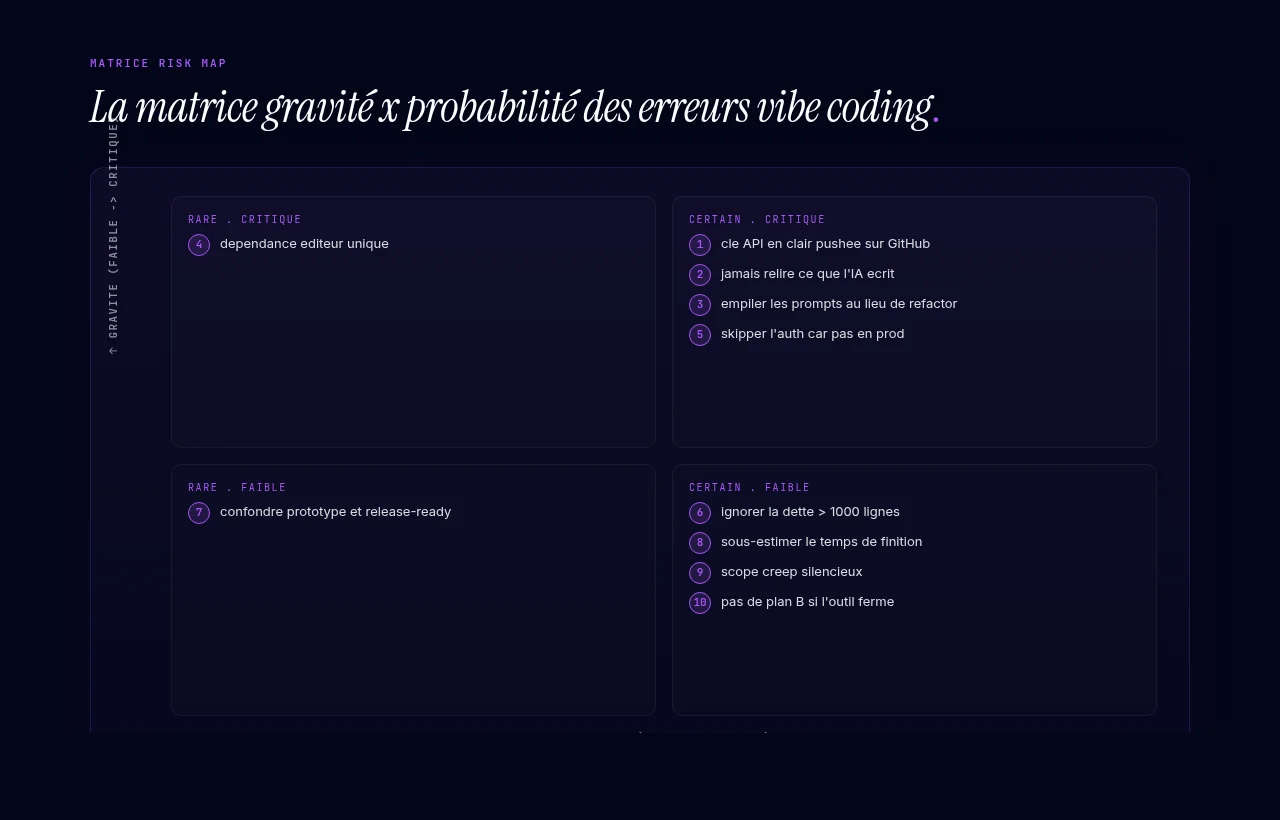
The most visible mistake isn't the most frequent, and the most frequent isn't the most severe. What sinks you is the combination of both. We sorted the list below by severity × probability.
The 10 mistakes, ranked from most to least severe
1. Leaving an API key in plaintext in generated code
You'll tell yourself "that won't happen to me." It will. When you ask the AI to integrate OpenAI, Stripe, or Resend, it pastes the key straight into the file instead of a .env. Then your commit pushes everything to GitHub.
GitHub scans repos, and so do bots. An OpenAI key exposed in a public repo stops being yours the moment a bot reads it. The reflex: a git-ignored .env.local and gitleaks as a pre-commit hook.
2. Never reviewing the generated code
You write a prompt, it works, you move on to the next feature. Three weeks later you have 8,000 lines nobody has read. When a feature breaks, you have no idea why. Neither does the AI, which lost the context between sessions.
Audit rule: if your project has passed 1,000 generated lines without review, doing nothing is no longer an option. Block out 2 hours, review section by section, delete what you don't understand, and ask the AI to explain what's left.
3. Stacking prompts instead of refactoring
A feature doesn't work. You ask for a fix. The fix breaks something else. Thirty prompts later, your code is a layer cake where each layer cancels out the one below. The AI has no memory of what you've stacked.
Refactoring is part of the job. Every 10 features, ask the AI to rewrite the section from scratch, based only on the expected behavior. You'll throw away a big chunk of generated code, and that's exactly the goal.
4. Depending on a single editor (Lovable-only or Bolt-only)
You vibe coded everything on Lovable. Tomorrow, Lovable triples its prices or shuts down. You don't have the code or the hosting, just an account. You're left with nothing.
Lovable and Bolt both offer export. Export by week 2, push to your own GitHub, and add Vercel or Netlify as a fallback deploy target. A portable stack is your line of defense.
5. Skipping auth and basic security because "it's not in production"
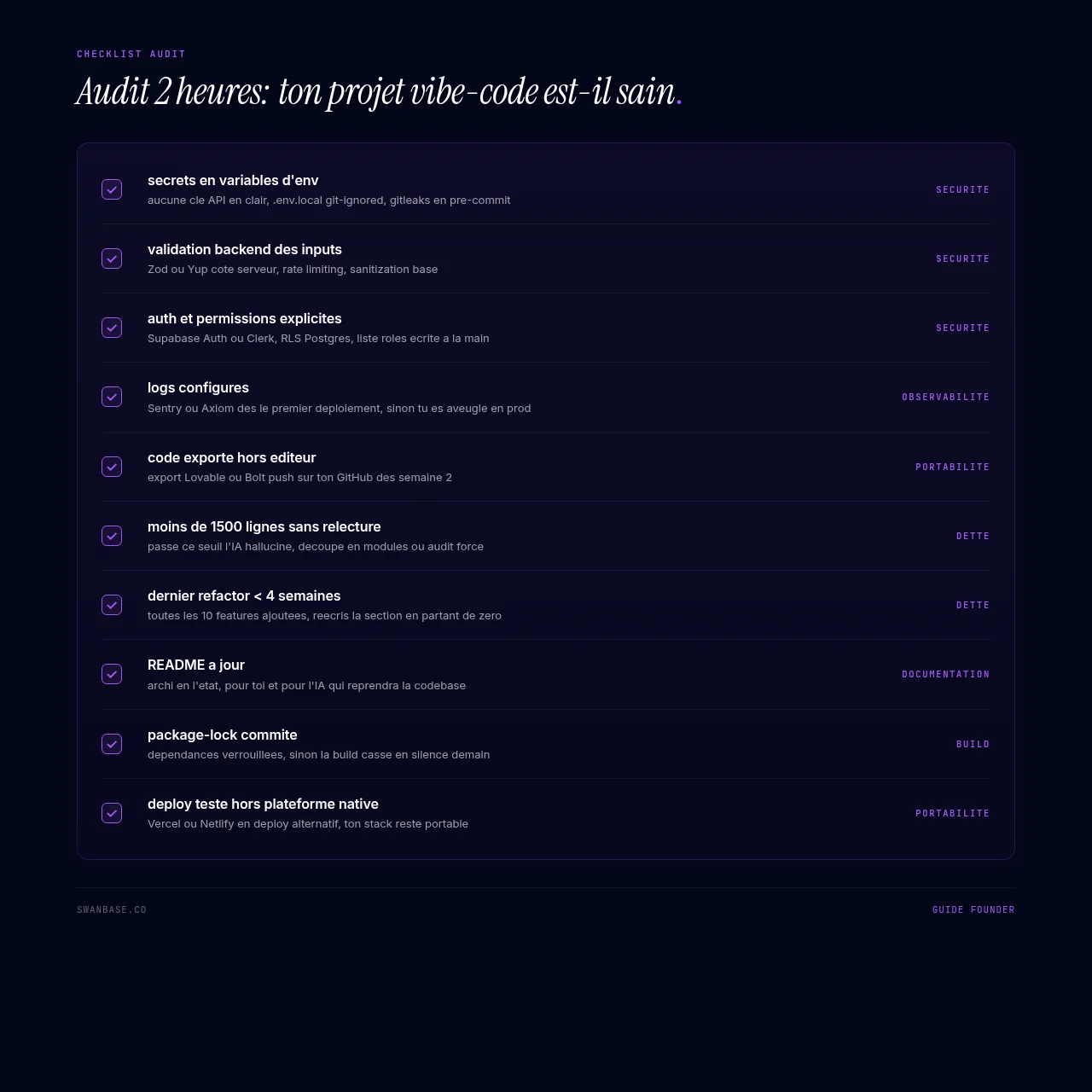
"I'll deal with it later." Nobody deals with it later. The day you send the link to 5 testers, your MVP is in production. Without Supabase Auth or Clerk from week 1, you'll end up with 3 users holding "default" admin permissions you won't know how to revoke. The four essentials (detailed below): secrets in environment variables, input validation, auth and permissions, basic logging.
6. Ignoring debt once the project passes 1,000 lines
At 300 lines, the AI keeps the context. At 1,500 lines, it hallucinates on file 4. At 5,000, it's a lottery. Past a certain threshold, every feature costs more than the last.
Once the project passes a thousand lines, split it into modules, write a context README for the AI, and switch to Cursor or Claude Code (which see the entire codebase) instead of a cloud editor limited to one file at a time.
7. Confusing a prototype with "release-ready"
Your MVP works on your Mac. You demo it to a VC. It crashes, because you forgot the edge cases: empty form, network timeout, refresh mid-flow, declined payment, double-click on submit.
A prototype works on the happy path. Release-ready means it holds up on the less glamorous paths too. That gap takes up a large share of total development time.
8. Underestimating finishing time (the last phase is the longest)
You shipped v1 in 5 days. You think "2 more days and it'll be clean." Three weeks later, you're still at it. Finishing work (UI polish, edge cases, mobile responsiveness, small bugs, copy, performance) consistently takes longer than the happy path.
Tom Cargill's 90-90 rule (Bell Labs), quoted by Jon Bentley in his Programming Pearls column in 1985: the first 90% of the code takes 90% of the scheduled time, and the remaining 10% takes the other 90%. Budget accordingly.
9. Silent scope creep (the AI agrees to everything)
The AI never says "bad idea." Ask it for an analytics dashboard in the middle of onboarding and it adds one; ask for dark mode the night before launch and it builds it. Three days later you have a Frankenstein with 4 features started and none finished.
The discipline: log every feature you add to the scope, work on one at a time, and finish it before starting the next. The AI says yes to everything with no visible cost; the real cost is a project that never ships.
10. Having no plan B if the tool changes its pricing or shuts down
Editors will change their pricing, and some will shut down. Set up your plan B in week 1: exported code, separate hosting, and payments and auth handled by third-party services (Stripe, Supabase, Clerk) that don't depend on the editor. If you've tied everything to Lovable or Bolt, your product belongs to the editor.
Security: the 4 essentials before production
The web is full of articles about vibe coding security holes. The summary fits in four points.
Secrets and API keys
Never put a key in plaintext in your code: use .env.local, .gitignore, and your host's secrets manager (Vercel, Railway, and Render expose this in 2 clicks). Run gitleaks pre-commit and turn on GitHub secret scanning.
Input validation
Treat every user input as hostile by default. The AI often validates only on the frontend. Add backend validation (Zod, Yup), rate limiting (Upstash, Vercel WAF), and sanitization for any input that touches the database.
Auth and permissions
User data requires Row Level Security (Supabase, native Postgres) or mandatory auth middleware. The AI won't write it by default. Write the list of permissions per role by hand.
Basic logging and monitoring
Set up Sentry or Axiom from your first deploy. A vibe-coded project without logs is flying blind: when a feature breaks in production, your only alert is an angry email from a user.
Hallucinations: how to spot and fix them
Telltale hallucination patterns
Four signals tell you the AI is making things up. One: an import for a package that doesn't exist (check npm or PyPI). Two: a method called on an object that doesn't expose it (like .toDateString() on a string). Three: API parameters that aren't in the official docs (the AI regularly invents Stripe fields). Four: code that "works" but does none of what you asked: the function exists, but nothing calls it.
3 reflexes to build
When something breaks, don't re-prompt right away. Read the error, then look up the function or package in the official docs. If you're short on time, ask explicitly: "check that this code only uses functions that actually exist in the [X] docs, and cite the source." The AI often admits its hallucination when you ask.
Already hit the wall? The recovery checklist
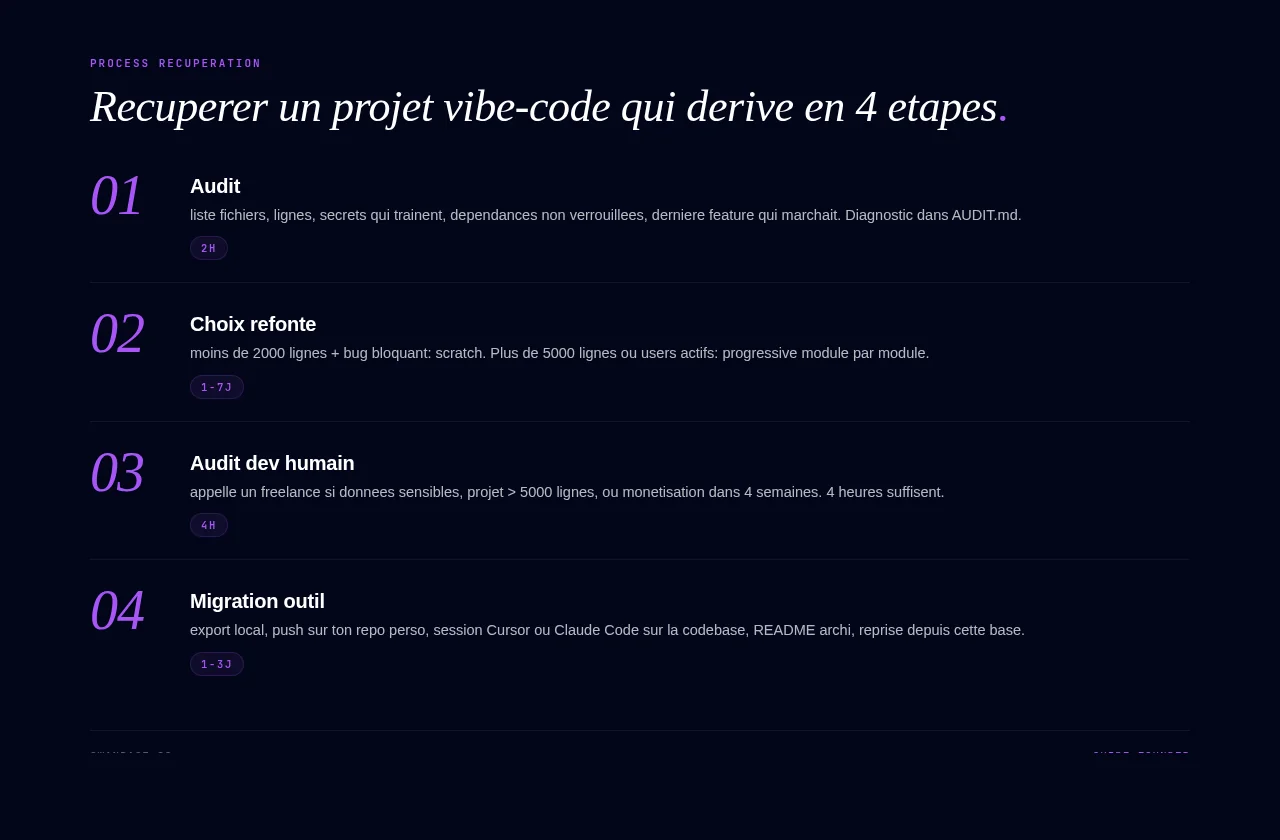
Avoiding mistakes is one thing. Here are four steps to rescue a project that has already drifted.
Quick audit (2 hours)
Set aside a 2-hour session. List the number of files, the number of lines, any secrets lying around, unpinned dependencies, and the last feature that worked. Write this diagnosis in AUDIT.md. It's your baseline snapshot before you intervene.
Incremental refactor or rebuild from scratch
Under 2,000 lines with a blocking bug: rebuilding from scratch is faster. Go back to the original brief, generate a clean v2, and migrate the data. That's a few days instead of weeks of patching.
Over 5,000 lines or with active users: refactor incrementally. Identify the worst module (often auth or checkout), rewrite it in isolation, and switch over once it's tested, rather than replacing the whole project in one go.
When to bring in a "human" developer for an audit
Three signals. One: you handle sensitive data (payments, health, professional) and can't explain what your code does with it. Two: your project has passed 5,000 lines and your prompt spend exceeds a freelancer's hourly rate. Three: you'll start charging for the product within 4 weeks. The freelancer doesn't need to redo your code; a few hours is enough for them to tell you what's broken.
Switching tools without breaking everything
Plan B, activated: export the code locally, push it to your own repo, open a Cursor or Claude Code session on the local codebase, ask the AI for a README describing the current architecture, and continue from there. Expect a few days depending on size.
When vibe coding is the wrong tool
Critical real-time products
Algorithmic trading, video telemedicine, synchronous multiplayer games, industrial control. A 200 ms latency is unacceptable. AI-generated code, even excellent code, often hides inefficiencies: redundant loops, N+1 queries, sequential calls where concurrency was needed. You need a developer who profiles and optimizes.
Strict regulatory compliance (GDPR, finance, health)
PCI-DSS (payments), HDS (health data hosting), sensitive GDPR data, AMF (finance): you have to produce audits, traceable logs, and a documented chain of responsibility. Vibe coding doesn't generate these artifacts by default. A developer produces them as a matter of course.
Scaling past 10,000 active users
No vibe coding editor optimizes for performance at scale. Your first few thousand users will be fine if the architecture is clean; beyond that, you'll need a serious refactor with a developer. That's the deal with these tools: they optimize for speed to market, and the cost of running at scale comes later.
Outside these three cases, vibe coding remains the fastest way to validate your idea. Revisit the full definition of vibe coding to see where it fits.
FAQ
How long before a vibe-coded project becomes unmanageable?
Once generated code passes a thousand lines without review, every feature costs more than the last. A good habit: audit every four weeks, with a partial refactor at each audit.
Do I have to get my code audited by a human developer?
Not always. It's necessary if you handle sensitive data, are aiming for more than 5,000 paying users, or if your product sits in a legal chain of responsibility. For an MVP testing an idea with a handful of users, a serious review by you is enough, backed by a review from the AI itself.
Is vibe coding risky for an MVP I'm showing to a VC?
No, as long as the MVP gets through the demo without crashing. A pre-seed VC looks at traction and the team before code quality. The trap is claiming it's production code when it isn't. Be upfront about it; the VC isn't judging how clean your code is.
My project is crashing after 2 months. Do I have to start over?
Very rarely. A project usually crashes because of one or two modules: auth, state management, or the payment integration. Do a 2-hour audit, rewrite that one module from the original brief, and keep the rest.