ChatGPT Work is ChatGPT's agent mode. You describe an outcome, and ChatGPT carries the task through to a deliverable you can review, such as a deck or a spreadsheet. Along the way, it breaks the work into steps, draws on your files and connected tools, and checks in with you before important actions. OpenAI launched it the week of July 6, 2026. Work shares its credits and usage limits with Codex, OpenAI's coding agent.
Our quick take: Work on the web requires a paid plan, starting with Plus at $20 per month. The desktop app opens it up to Free and Go plans with a single model, GPT-6 Luna, as the rollout progresses. For a startup, the choice often comes down to ChatGPT Work or Claude Cowork, its Anthropic counterpart. You'll find the line-by-line comparison further down.
The prices (in US dollars) and limits below come from the official ChatGPT Work documentation and OpenAI's pricing page, both checked on October 26, 2026.
What is ChatGPT Work?
OpenAI defines it this way: "ChatGPT Work is a way to delegate real work to ChatGPT". You switch from Chat to Work in the selector and set a goal. While ChatGPT works through the steps, you follow its progress, answer its questions or approve important actions.
A ChatGPT mode launched in July 2026
OpenAI's release notes date the launch to the week of July 6 to 10, 2026. At launch, Work ran on GPT-5.6 and could keep going "for hours" on a single goal. On July 9, the Codex app merged into the ChatGPT desktop app for macOS and Windows. That app brings together Chat, Work and Codex, and OpenAI says it's available on every plan, Free included.
On October 12, 2026, Le Blog du Modérateur summarized a16z's twice-yearly ranking. According to YipitData's US panels, ChatGPT picked up speed again after new models and the arrival of ChatGPT Work. The same data shows that only 8% of US ChatGPT subscribers also pay for Claude.
Models available in Work as of October 2026
The documentation recommends three model families depending on the task:
- GPT-6 Astra for demanding work: deep reasoning, visual judgment, a polished final file. It arrived in Work the week of August 31, 2026.
- GPT-6.1 Sol for complex work at a lower cost than Astra. It's reserved for Work and Codex, so Chat mode can't use it.
- GPT-6 Luna for simple, repetitive tasks, with the highest message volume.
GPT-5.5 was retired from ChatGPT, Work and Codex on October 14, 2026, across all plans.
What Work can do
The "Use ChatGPT" page of the documentation lists Work's capabilities:
- use your files, projects, memories, the Library and installed plugins;
- generate images, interactive visualizations and websites published with Sites;
- browse the web and, in the desktop app, drive the browser or the computer with Computer Use;
- run code and shell commands, analyze data, review code;
- split work across several sub-agents;
- schedule tasks that run once, at a set time, on a trigger event or while watching for a change.
Plugins connect Work to Slack, Google Drive, SharePoint, email, calendars, CRMs and project management tools.
What's the difference between ChatGPT Chat and Work?
Switch to Work when you expect a file
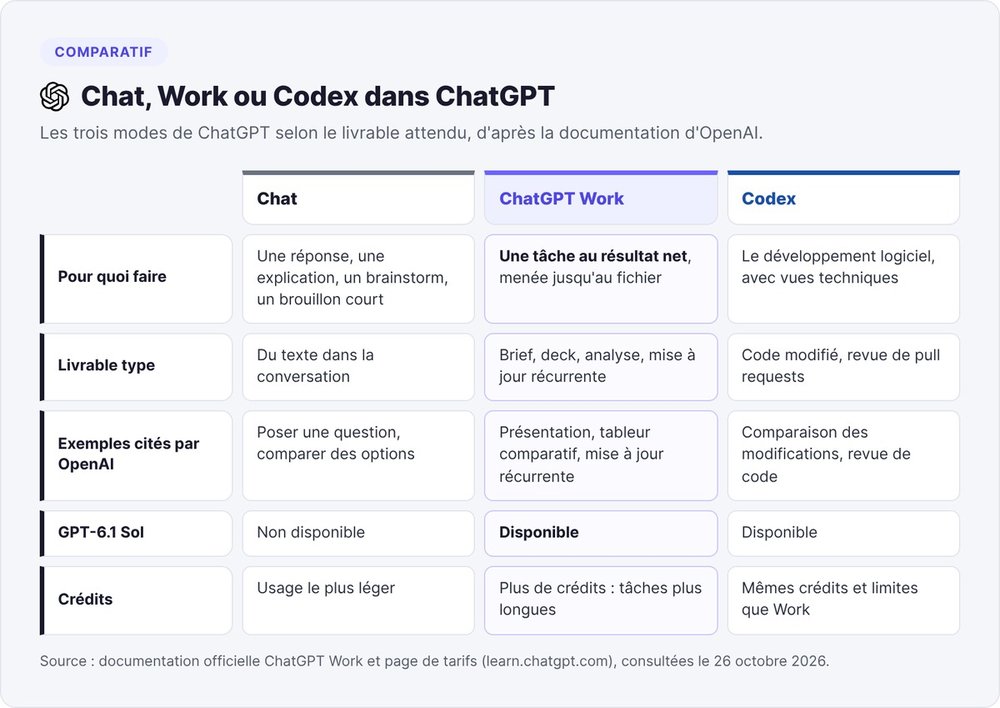
OpenAI puts answers, explanations, brainstorming and short drafts in Chat. Work takes on a task with a clear outcome: a brief, a deck, an analysis or a recurring update. According to the admin FAQ, Work uses more credits than a Chat conversation because its tasks run longer.
In practice, ask your questions in Chat and switch to Work as soon as you expect a file or an action in a tool.
Work and Codex share the same engine
According to OpenAI's admin FAQ, Work "brings the technology behind Codex into ChatGPT", with the same core capabilities. Work presents the job in a desktop-style interface, while Codex keeps its developer views, with diff comparison and pull request review. If you were already using Codex to write documents, OpenAI says you can stay there.
Is ChatGPT Work free? Pricing by plan
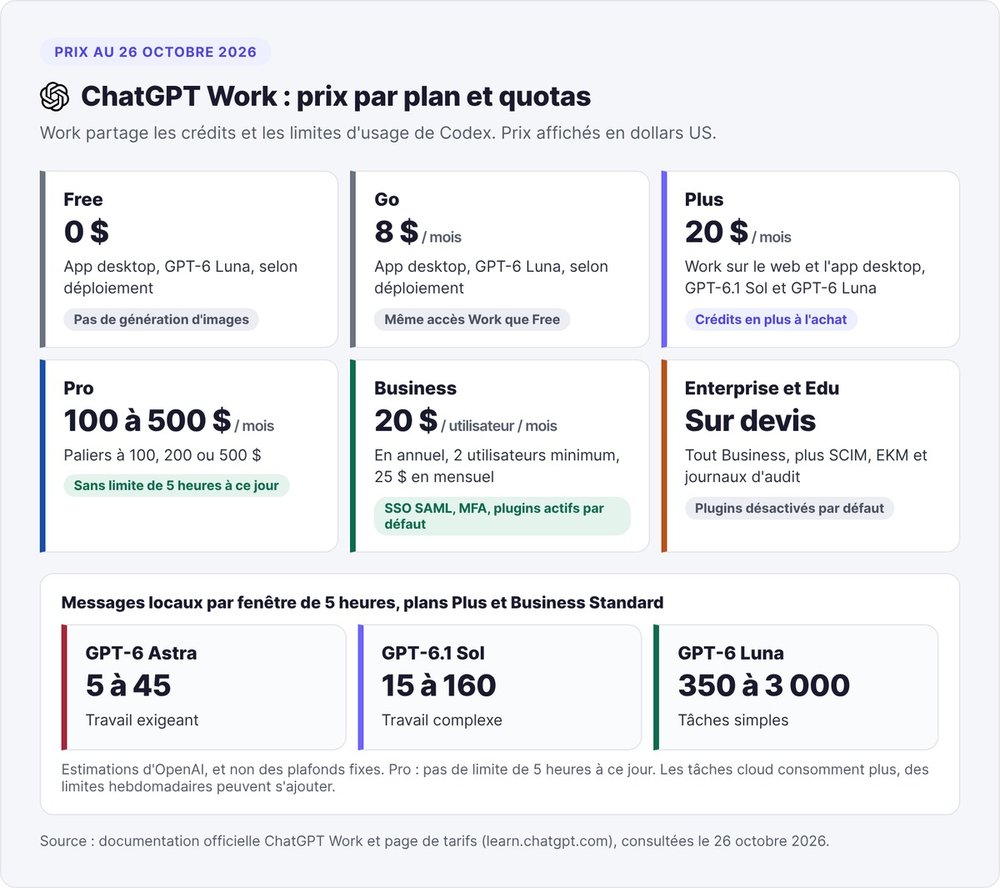
Partly. Work has no separate subscription and draws on the same credits and usage limits as Codex, according to the pricing page.
Free and Go: the desktop app with GPT-6 Luna
The Free ($0) and Go ($8 per month) plans include "GPT-6 Luna at Standard speed in the desktop app, subject to rollout". So ChatGPT's free agent mode goes through the desktop app, which combines Chat, Work and Codex. It runs on the lightest model, once the rollout reaches your account. The Free plan excludes image generation.
Work on the web from the Plus plan up
| Plan | Listed price | Work access |
|---|---|---|
| Free | $0 | Desktop app, GPT-6 Luna, subject to rollout |
| Go | $8 / month | Desktop app, GPT-6 Luna, subject to rollout |
| Plus | $20 / month | Web and desktop app, GPT-6.1 Sol and GPT-6 Luna |
| Pro | $100, $200 or $500 / month | Everything in Plus, no 5-hour limit for now |
| Business | $20 / user / month billed annually, $25 monthly, 2 users minimum | Web, desktop and mobile apps, team workspace |
| Enterprise and Edu | Custom quote | Everything in Business, plus SCIM, EKM and audit logs |
The availability table on the pricing page checks "ChatGPT Work on the web" for Plus, Pro, Business, Enterprise and Edu. For teams, Business adds SAML SSO and MFA, and OpenAI doesn't train its models on your business data by default. Business turns plugins and apps on by default, while Enterprise and Edu keep them off until an admin decides otherwise.
Usage limits and credits
OpenAI publishes ranges of local messages per five-hour window for Plus and Business Standard. Expect 5 to 45 messages with GPT-6 Astra, 15 to 160 with GPT-6.1 Sol and 350 to 3,000 with GPT-6 Luna. Weekly limits may also apply, and a cloud task uses more than a local message.
Two rules help you avoid surprises:
- if you hit the limit mid-task, the agent finishes the current turn, within reasonable use;
- on Plus and Pro, you can buy extra credits without changing plans.
OpenAI recommends checking the usage dashboard every one to two weeks. On personal and Business plans, the web sidebar also shows how much Work usage you have left.
Choosing between the cloud and your computer
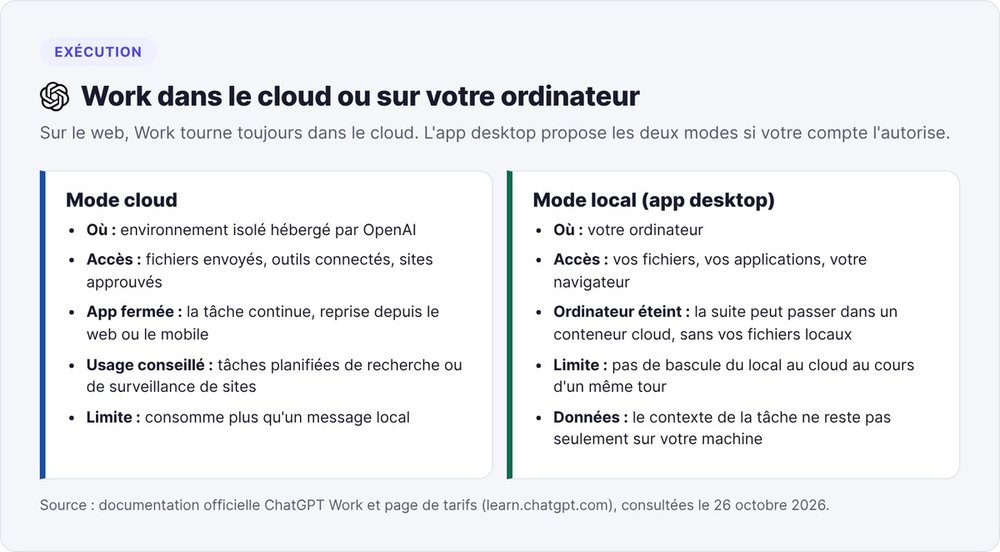
On the web, Work runs in a cloud environment managed by OpenAI. In the desktop app, you can choose where the task runs, if your account or workspace allows it.
A cloud task keeps running after you close the app
In cloud mode, the task runs in an isolated hosted environment, and you can pick it back up from the web or mobile. There, Work uses your uploaded files, connected tools and approved sites. OpenAI recommends the cloud for scheduled research or website monitoring tasks, since you can shut down your computer in the meantime.
Local mode for your files and browser
In local mode, Work uses the files, applications and browser on your computer. OpenAI lists three limits in its documentation:
- a task can't switch from local to cloud within the same turn;
- if your computer is off, the rest of the task may run in a cloud container that no longer has access to your local files;
- local execution doesn't keep the conversation on your machine: "Local execution does not mean that the conversation or task context stays only on the device".
Features limited in Europe
The pricing page marks Computer Use, Chrome control, Record & Replay and memories as "Limited", meaning they're only available in certain regions. According to OpenAI's release notes, Computer Use, the Chrome extension and memories started rolling out in June 2026 in the European Economic Area, the UK and Switzerland. Memories stay off by default there. Record & Replay excluded these regions at launch. If you're in France, check which features your account shows in the app before building a process around them.
Staying in control of sensitive actions
Inside your tools, an agent can send a message or edit a customer record. OpenAI documents its safeguards, and their gaps too.
Pauses and approvals built in by OpenAI
ChatGPT shows its progress and pauses when it's missing information or an approval. The documentation gives specific examples:
- the Apple Messages plugin only sends a message after you approve the text and the recipients;
- the browser asks before visiting a new site, with three possible settings (Always ask, Auto approve, Always allow);
- allowing a site doesn't count as approval for every action: ChatGPT may ask for a separate confirmation before a financial, legal or account commitment;
- with GPT-6 Astra, safety monitoring can pause a task if it detects risky behavior.
Actions with no guaranteed confirmation
OpenAI states plainly that "not every action requires an individual human confirmation". The admin FAQ ranks actions by risk level: reading, drafting, writing to a tool, sharing, scheduling, running code. Reading and drafting carry the least risk.
For your first few weeks, keep Work to reading and drafting, and write the stop instruction into the brief. OpenAI itself suggests the phrase "stop before sending anything".
How to use ChatGPT Work: get started in five steps
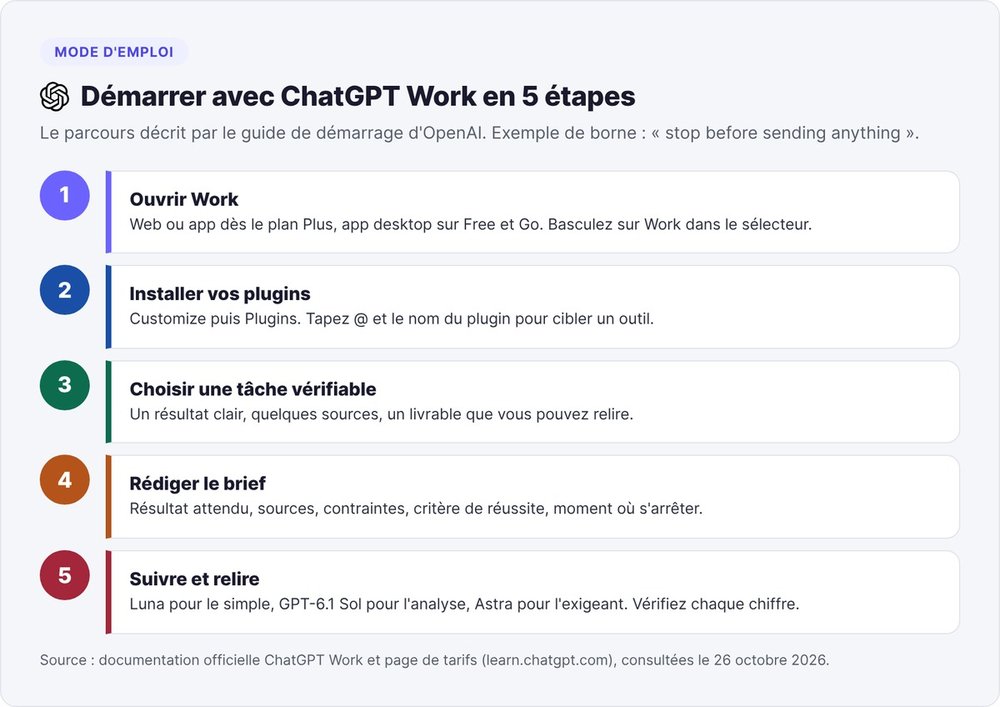
According to OpenAI's getting started guide, a good first task has a clear outcome, a few sources and a deliverable you can review.
Step 1: open Work
On Plus or higher, open ChatGPT on the web or in the app, then switch to Work in the selector. On Free or Go, use the desktop app.
Step 2: install your plugins
In the left navigation, open Customize, then Plugins, and install the tools the task needs. In the prompt, type @ followed by the plugin name to target a specific tool.
Step 3: pick a short, checkable task
Start with a deliverable you can judge in ten minutes: a comparison table, a five-slide deck, a summary of documents.
Step 4: write a complete brief
OpenAI lists five elements: the expected outcome, the sources or plugins to use, the constraints, what a good result looks like, and when to stop for approval. Example: "Compare the five invoicing tools listed in this document. Use only these sources. Deliver a spreadsheet with the monthly price, integrations, usage limits and the date the pricing page was checked. Stop before sending anything."
Step 5: choose the model, follow along, review
Pick Luna for a simple task, GPT-6.1 Sol for an analysis, Astra for a demanding final file. Follow the progress, answer questions, then check every important number before sharing the file.
Five ChatGPT Work tasks for a startup
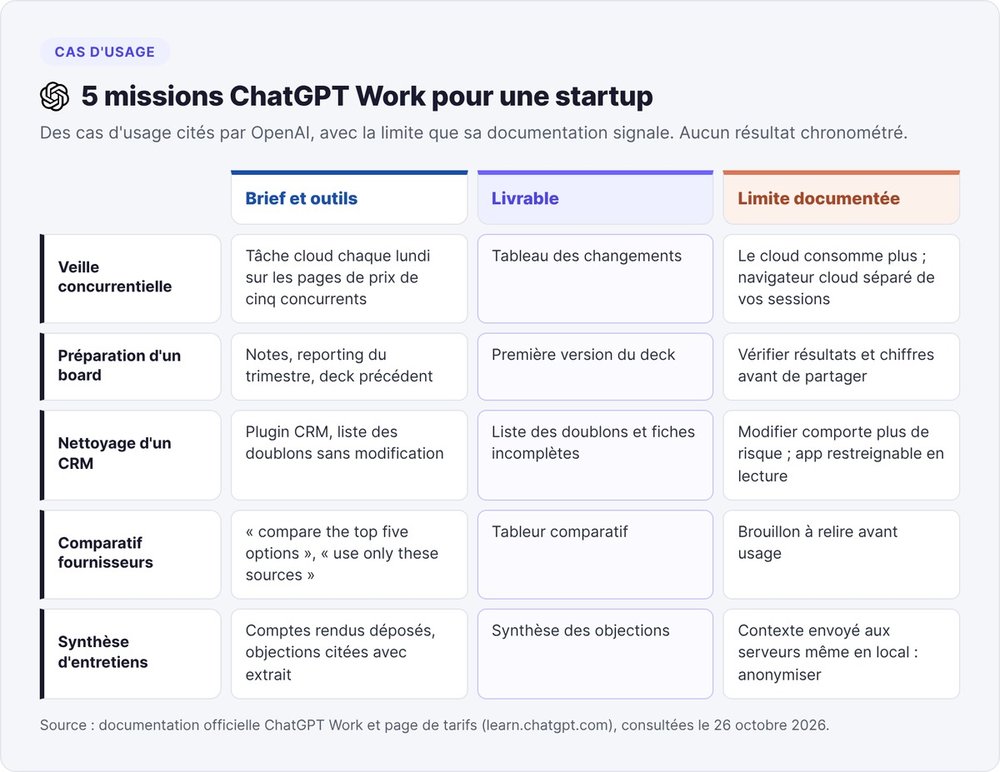
The five tasks below are based on use cases OpenAI mentions, each paired with the limit the documentation flags. We haven't timed any of them, so judge them on your own first try.
Weekly competitive monitoring
Schedule a cloud task every Monday: pull the pricing pages and announcements of five competitors, then deliver a table of changes. Limit: a cloud task uses more than a local message, and the cloud browser doesn't share your own browser's sessions.
Board meeting prep
Give Work your notes, the quarter's reporting and the previous deck, and ask for a first draft of the deck. OpenAI lists creating presentations among its three starter use cases. Limit: the documentation asks you to check results and important numbers before using or sharing them.
CRM cleanup
With your CRM's plugin, ask for a list of duplicates and incomplete records, without making any changes. Limit: editing records carries more risk than reading them, according to the admin FAQ, and an admin can restrict an app to read-only actions.
Vendor comparison spreadsheet
The comparison spreadsheet is OpenAI's second starter use case. Scope the task with "compare the top five options" and "use only these sources". Limit: the admin FAQ classes this kind of deliverable as a draft that someone reviews before use.
Customer interview synthesis
Upload your interview notes and ask for the recurring objections, each with its supporting excerpt. Limit: in local mode, the task context doesn't stay only on your machine, so anonymize customer names before uploading.
ChatGPT Work vs Claude Cowork: the line-by-line comparison
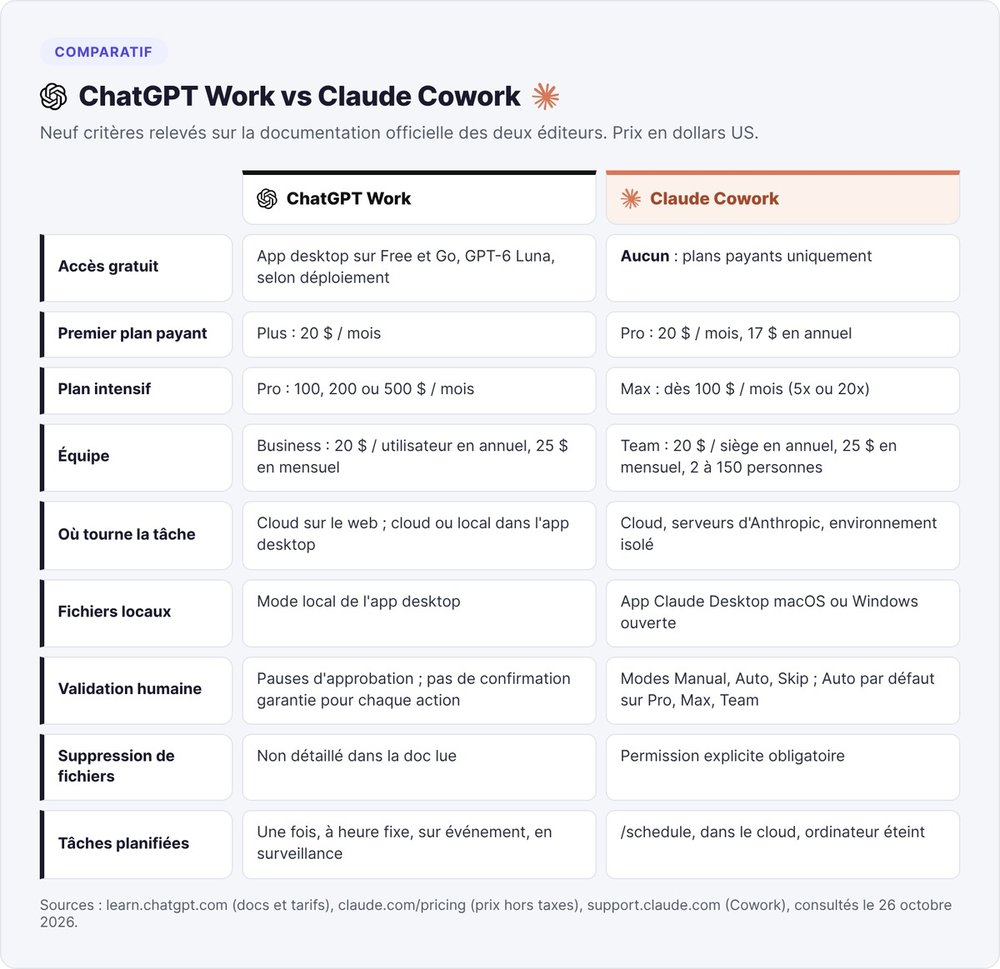
The main alternative to ChatGPT Work is Claude Cowork, Anthropic's agent mode for Claude. Both companies describe the same move: hand off a task and get a finished file back. Anthropic presents Cowork as "the same agentic architecture that powers Claude Code, with no terminal required". Our complete guide to Claude Cowork explains how it works.
The cells below come from both companies' pricing pages and help centers, checked on October 26, 2026. On the Anthropic side, the Claude pricing page lists prices excluding tax, and the Cowork getting started guide describes the plans and approval modes.
Plan pricing
| Criteria | ChatGPT Work | Claude Cowork |
|---|---|---|
| Free access | Desktop app on Free and Go, GPT-6 Luna, subject to rollout | None: paid plans only |
| First paid plan | Plus, $20 / month | Pro, $20 / month or $17 / month billed annually ($200 upfront) |
| Heavy-use plan | Pro, $100, $200 or $500 / month | Max, from $100 / month (5x or 20x Pro usage) |
| Team | Business, $20 / user / month billed annually, $25 monthly, from 2 users | Team, $20 / seat / month billed annually, $25 monthly, 2 to 150 people |
| Large company | Enterprise and Edu, custom quote | Enterprise, $20 / seat / month billed annually, 20 seats minimum, usage billed at API rates |
Execution and approvals
| Criteria | ChatGPT Work | Claude Cowork |
|---|---|---|
| Where the task runs | Cloud on the web; cloud or local of your choice in the desktop app | Cloud, on Anthropic's servers, in an isolated environment |
| Local files | Local mode in the desktop app | Claude Desktop app for macOS or Windows open and connected |
| Human approval | Pauses for approval, per-site setting in the browser, no guaranteed confirmation for every action | Three modes: Manual, Auto (default on Pro, Max, Team), Skip; Manual by default on Enterprise |
| File deletion | Not detailed in the docs we read | Explicit permission required before any deletion |
| Scheduled tasks | Once, at a set time, on an event or while monitoring | /schedule command, runs in the cloud with your computer off |
| Migration | The desktop app imports your settings and projects from Claude Cowork, plugins included | Not applicable |
Which one to choose for your startup
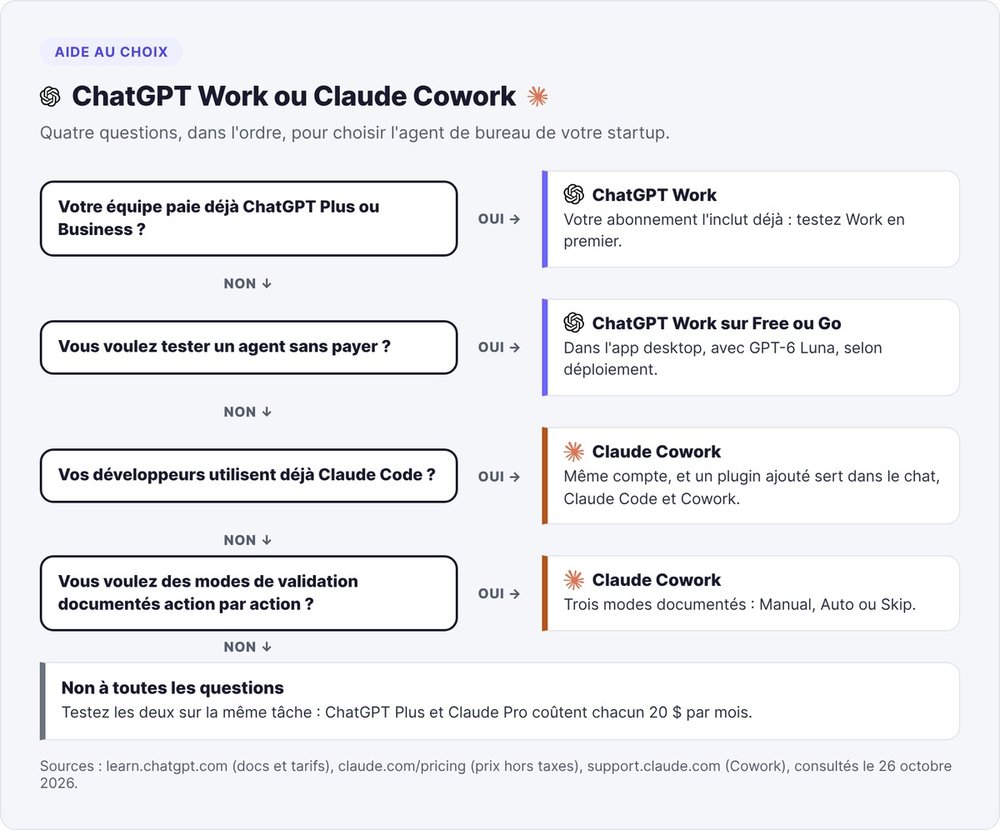
If your team already pays for ChatGPT Plus or Business, try Work first, since your subscription already includes it.
If you want to try an agent without paying, only Work lets you, in the desktop app with Luna. If your developers already use Claude Code, Cowork shares the same account, and a plugin you add works in chat, in Claude Code and in Cowork. If you want fine-grained control over approvals from day one, Anthropic documents Cowork's three modes action by action. At OpenAI, safeguards vary by plugin and by the site being visited.
In the US, only 8% of ChatGPT subscribers also pay for Claude, according to YipitData. OpenAI makes it easier to move from Cowork to Work with the settings import it launched in August 2026.
If none of these cases fits you, test both on the same task: ChatGPT Plus and Claude Pro each cost $20 per month.
Our take on ChatGPT Work
ChatGPT Work is worth a look for weekly tasks with a clear deliverable, like monitoring or reporting. For a founder already on Plus, trying it only costs review time. The weak spots are right there in OpenAI's documentation: quotas given in wide ranges, and approvals that don't cover every action.
Our advice: take a Plus plan, run two read-only tasks for two weeks, then check the usage dashboard before allowing Work to write in your tools. To see where Work fits among other agents, read our roundup of AI tools for startups, the OpenClaw vs ChatGPT comparison, our guide to Manus AI and our guide to Hermes Agent. If you want to build your own agents, our guide to Claude Managed Agents and our Agentik review cover both routes.
ChatGPT Work FAQ
What is ChatGPT Work?
ChatGPT Work is ChatGPT's agent mode, launched by OpenAI the week of July 6, 2026. You describe an outcome, and ChatGPT plans the steps, uses your files and plugins, asks for your approval before important actions and delivers a file for you to review.
What's the difference between ChatGPT Chat and Work?
Chat is for quick answers and short drafts. Work takes a task with a defined outcome, such as a deck, a spreadsheet or a recurring update, and carries it through to the finished file. Work uses more credits because its tasks run longer.
Is ChatGPT Work free?
Partly. Free and Go plans get Work in the desktop app with GPT-6 Luna, subject to rollout. Work on the web requires Plus ($20 per month), Pro, Business, Enterprise or Edu. Work shares Codex's credits and usage limits.
How do you use ChatGPT Work?
Switch to Work in ChatGPT's selector and install your plugins via Customize, then Plugins. Then describe the task with the expected outcome, the sources, the constraints, the success criteria and when to stop. Follow the progress, approve important actions and review the file.
How do you use ChatGPT at work?
Keep Chat for quick questions and hand Work the multi-step tasks that end in a file, like a presentation or a recurring report. Start with reading and drafting, and check the numbers before sharing a deliverable.
Does ChatGPT Work work in France?
OpenAI's documentation doesn't list France as excluded from Work, whose availability depends on plan and region. Some features remain limited: Computer Use, the Chrome extension and memories started rolling out in the European Economic Area in June 2026, with memories off by default.
Can you switch from Claude Cowork to ChatGPT Work?
Yes. Since August 2026, the ChatGPT desktop app can import your instructions and plugins, along with your projects and recent work, from Claude Code, Claude Cowork or Cursor. An option in Settings > Import keeps them in sync.