Zo Computer combines a personal Linux server in the cloud with an AI agent that can act on your files, your tools and your services. We've used it to run part of swanbase, and our verdict is simple: try it if you want to hand AI persistent tasks, automations or websites. A chatbot is enough if you mainly want to write, summarize or chat. The first paid plan costs $18 per month according to the official pricing we checked on September 20, 2026.
ℹ️ Welcome to our hands-on review. Article updated September 20, 2026 at 8 p.m., from Paris. We use an affiliate Zo link: swanbase may earn a commission if you sign up, at no extra cost to you. This commercial relationship doesn't change the prices quoted or the limits we report.
Our test covers everyday work, with Git repositories, a Discord bot, automations and several services. That setup goes well beyond the usual demo where you ask an AI to build a page and then close the tab. Zo earns its place when the work needs to keep going.
Zo Computer turns chat into a cloud computer
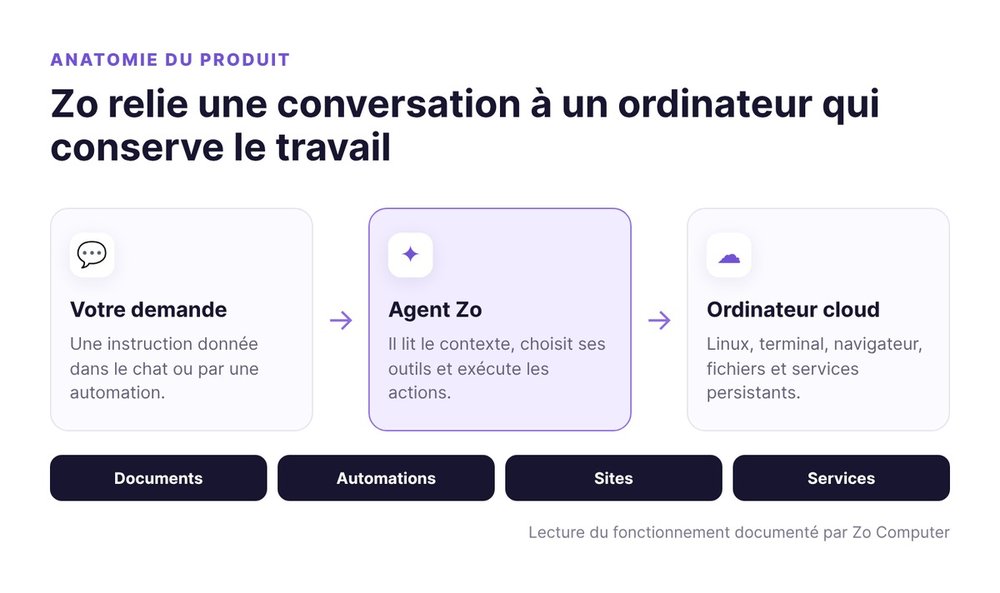
Zo Computer is a personal computer hosted in the cloud. You get a file system, a Linux terminal, a browser and AI tools. The agent talks with you through a chat interface, but its workspace is the computer itself.
That distinction changes the outcome. A chatbot hands you an answer. Zo can write a document, run a script, deploy the service and then pick up the same folder in a later session.
A personal Linux server in the cloud
The server provides continuity. Your folders outlive the conversation. You can install a program, clone a repository or run a web server. Linux users keep full access to the terminal. Everyone else can let the agent prepare the commands and explain what it's doing. Your files stay exportable, but the compute remains hosted by Zo.
An AI agent with access to tools
The agent reads and edits files, browses the web, calls tools and runs commands. It also works with your connected services. That reach explains its main risk: a bad instruction can change a real system.
Zo also supports skills, meaning folders of reusable instructions and scripts. An editorial procedure can become a written operating playbook, tracked in Git, reviewed, and triggered whenever a request matches it.
How it differs from a chatbot
ChatGPT, Claude and other assistants excel at conversation and one-off output. Zo adds a place where the work lives. The difference is like asking for a recipe versus having the kitchen to cook it, then cook it again tomorrow.
This persistence saves you from pasting the context back in every session. Memory is still imperfect. At swanbase, important decisions live in Git and in files the agent rereads before acting.
Our take on Zo Computer after daily use
Zo Computer delivers when the work produces files, changes a repository, calls several tools or needs to resume later. On those tasks, the computer matters more than the model you pick. An excellent model in a chat window is limited by what it can touch. A decent model connected to the right environment can finish the job.
The main strength: a persistent workspace
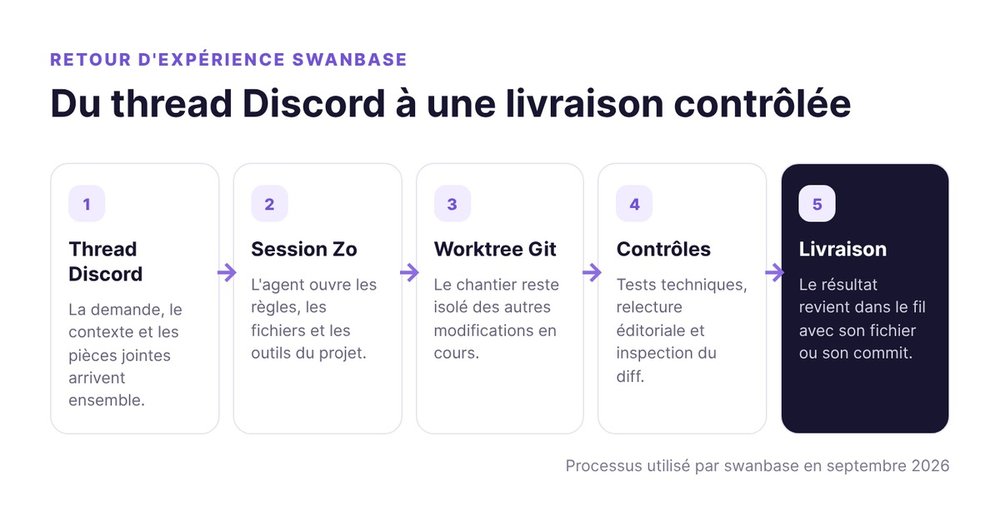
We keep rules, logs, code and documents in the workspace. A session reads the project files, the Git state and the available tests. An isolated worktree avoids overwriting another piece of work in progress. Zo keeps the environment and conventions within reach. Quality depends on how precise those conventions are.
The second win: scheduled work
A Zo automation runs a prompt on a schedule, with the same workspace and the same integrations as the chat. The Zo automations documentation explains that every run stays viewable in the history and that results can be delivered by email, SMS, Telegram, Discord or Slack.
At swanbase, this mechanism runs monitoring, prepares reports and checks certain systems. A good automation reads a fresh source, applies a stable procedure and contacts you only when the result calls for action.
The core limit: Zo needs a control system
Reach replaces friction. A chatbot that gets it wrong usually gives you a bad paragraph. An agent plugged into a server can change a file, push a branch or call an external service. So write the rules before you increase its autonomy.
We separate reading, local changes and external actions. A search or a test can run right away. An email, a publication or a deletion requires approval. Every destructive operation has an explicit target and a recovery path.
How we use Zo Computer at swanbase
Our usage goes well beyond a prompt library. Zo runs part of the work system that turns a request into a tested file, published content or a documented decision.
The Discord bot and work sessions
The message this article responds to came from a Discord thread. The bot ties that thread to a session, passes along attachments and posts the result back in the same thread. Behind that interface, the agent opens the repositories, reads the rules and runs the commands it needs.
Discord provides the collaboration surface. Zo provides the server and the background process. We can start on a phone, let a task run, then find the result in the thread.
Editorial and operational automations
We schedule work that has a clear cadence: monitoring, summaries, checks or reports. Each task has a protocol and an expected artifact. An automation can finish without delivering the right file. So we check the business outcome, beyond the mere absence of technical errors.
Sites and services
We also host prototypes, dashboards, internal APIs and background processes. A registered service restarts with the environment. A process launched by hand disappears on restart.
Git remains the memory of changes. Zo can modify a project and run its checks. The repository then lets you review the diff or roll back.
Human judgment calls
We keep product trade-offs, external authorizations and sign-off on any public promise. The agent can flag an inconsistency, propose a structure and execute a plan. A business decision that was never written down is out of its reach.
More autonomy won't fix a fuzzy goal. Speed of execution doesn't guarantee correctness. Zo accelerates in both directions.
Zo Computer pricing in 2026
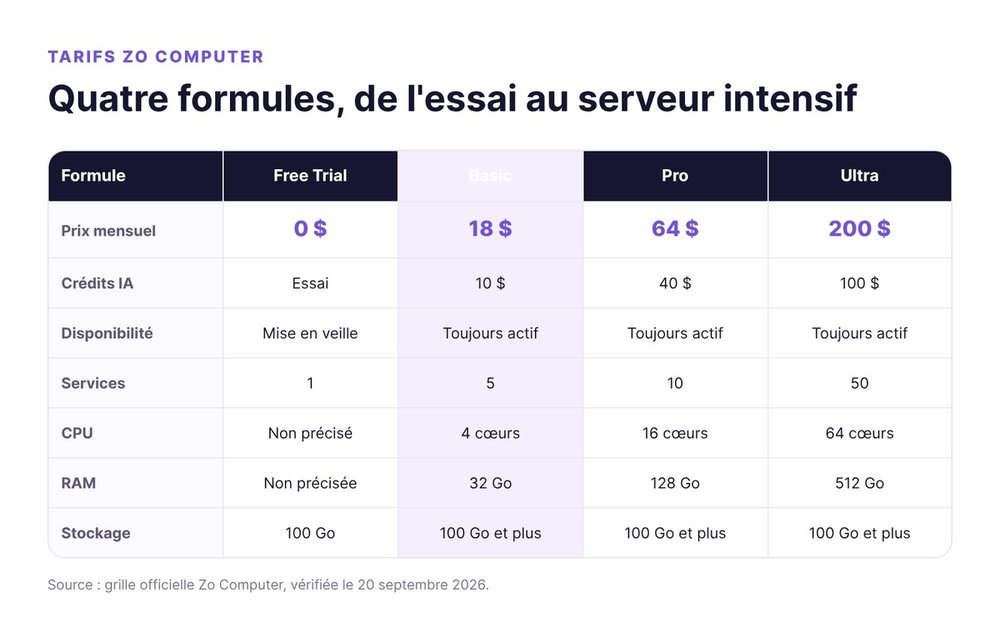
The official Zo Computer pricing page separates the price of the computer, the included AI credits and the available resources. We recorded the figures below on September 20, 2026. Model usage beyond the credits is billed separately.
Free Trial
The Free Trial costs $0. It gives you 14 days of AI and computer access, with 100 GB of storage and one service during the trial. The computer goes to sleep when you're away. Once the trial ends, regular access to the computer stops, but your files remain recoverable.
This plan is enough to learn the interface and test an automation. It can't prove out a need for continuous availability, since the server sleeps.
Basic
Basic costs $18 per month. It includes $10 in monthly AI credits, an always-on computer, 5 services, 3 custom domains, 4 cores, 32 GB of RAM and at least 100 GB of storage. It's the first plan that makes sense for a bot, an API or an automation that must stay reachable.
Pro
Pro costs $64 per month. It includes $40 in AI credits, 10 services, 5 custom domains, 16 cores, 128 GB of RAM and priority support. Pro targets projects that run several services in parallel.
Ultra
Ultra costs $200 per month. The plan lists $100 in AI credits, 50 services, 10 custom domains, 64 cores and 512 GB of RAM. That capacity serves an entire business or compute workloads that would saturate the lower tiers.
Which plan should you choose?
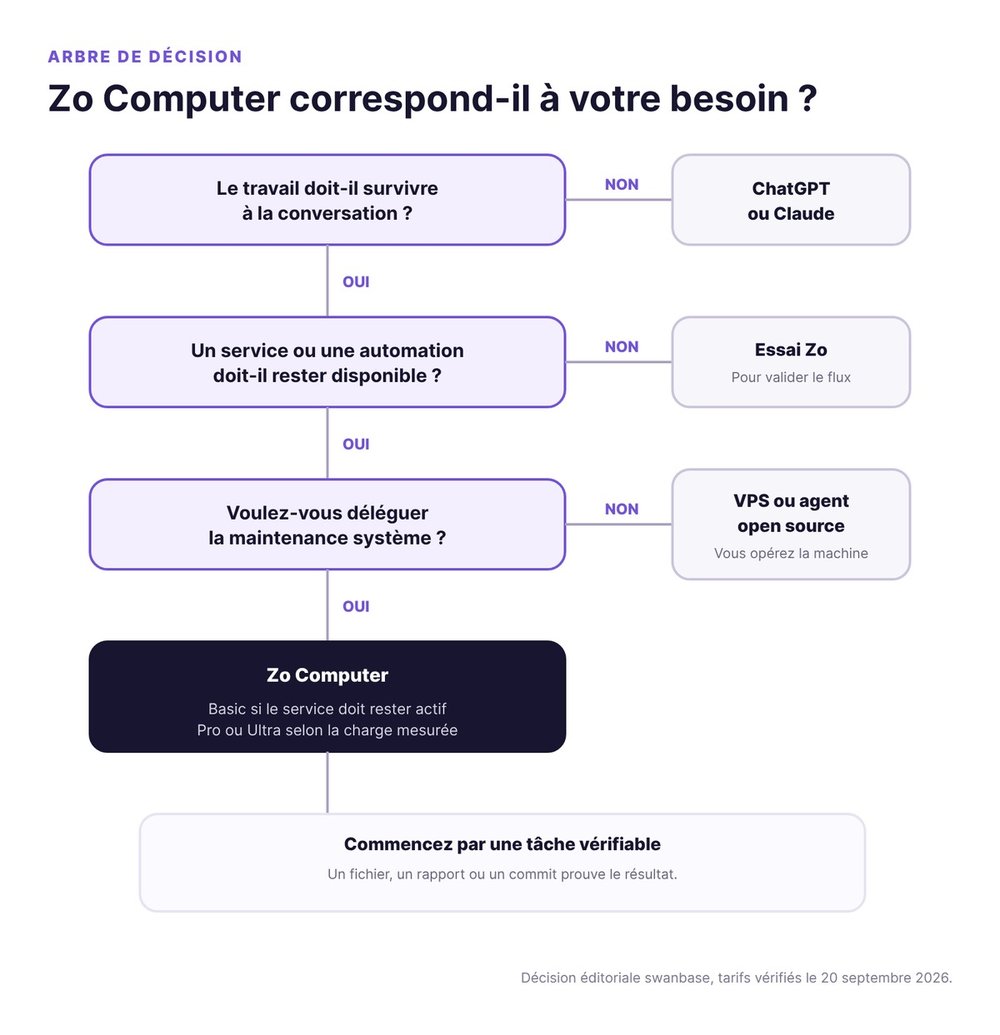
Start with the trial to validate your first workflow. Move to Basic when a service or automation needs to respond around the clock. Pro and Ultra are justified by a measurement: memory used, compute, number of services or AI credits. Wait until you have a stable task before buying that capacity.
Zo Computer vs the alternatives
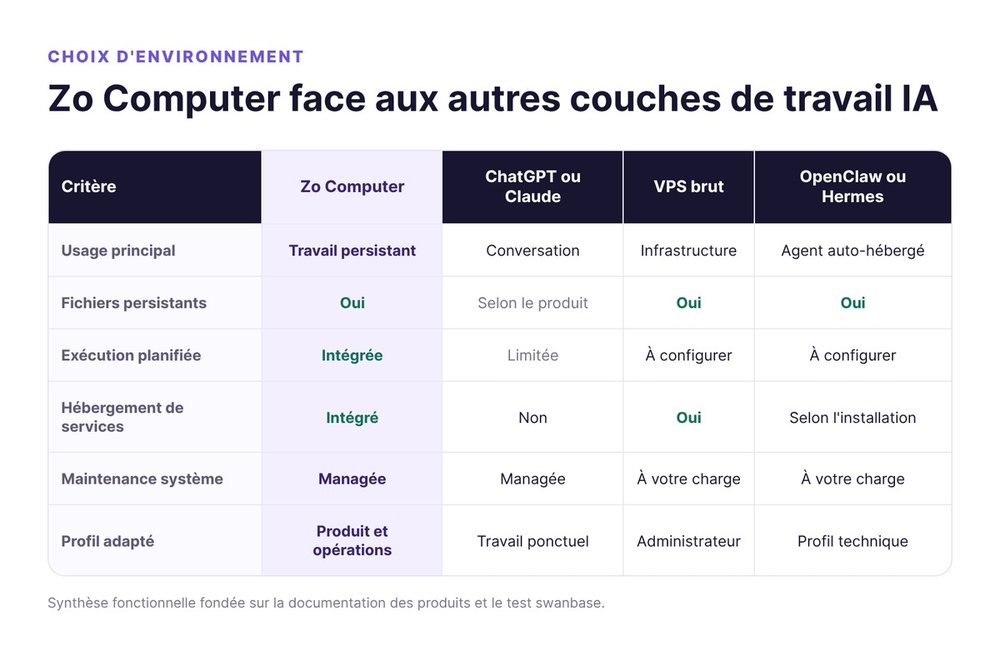
Zo Computer spans several categories. It touches AI chat, cloud servers, automation and hosting. So the comparison starts from your main need. Alternatives to Zo Computer mostly shift the maintenance burden between you and the provider.
Zo Computer or ChatGPT
Choose ChatGPT or Claude for thinking through a problem, analyzing a document and producing a one-off result. Choose Zo when the output needs to land in a file system, trigger a chain of actions or stay available after the conversation.
Zo Computer can feel more complex at first. You're organizing a computer and an agent's permissions, which is a bigger job than setting up an assistant.
Zo Computer or a VPS
A VPS gives you direct control of the system. You then handle accounts, updates, networking, backups and services. Zo already bundles that operations layer with its agent.
A VPS suits the developer who wants to pick every component. Zo suits the person who accepts a managed environment in exchange for moving faster from idea to running service.
Zo Computer vs OpenClaw and Hermes
The Zo Computer vs OpenClaw comparison pits a managed product against a self-hostable architecture. OpenClaw et les autres agents IA open source give you access to the code (see our définition d'OpenClaw). You have to supply the machine, the installation, the channels, the storage and the maintenance.
Zo bundles all of that into a hosted product. You can also install an open source agent on Zo. The choice comes down to which layer you want to run yourself.
Zo Computer with Claude Code or Codex
Claude Code and Codex work inside a repository. Zo gives them a persistent computer, shared files, integrations and services. These layers complement each other: the coding agent works on the project, and Zo carries the environment around it.
Claude Code's MCP also lets you connect an external client to tools and data. Here again, Zo is the place where things run, more than the model writing the code.
Security also depends on your rules
The Zo Computer security documentation states clearly that the agent can access the internet, download programs, write code, run software and control connected devices. That power calls for a risk assessment, especially if you connect email, a calendar or customer data.
The agent works on a dedicated computer
The cloud computer isolates your personal machine. That isolation doesn't automatically protect remote files. A key pasted into a document the agent can read becomes accessible to any tool it calls.
We store secrets in environment variables or in the mechanisms each service provides. Public repositories contain none. For a sensitive task, a persona with few tools limits the fallout of an ambiguous instruction.
Model providers receive the inputs you send
Zo documents the providers that run inference and certain tools. The model you choose receives the prompt and the data it needs to answer. Match what you send to the sensitivity of the material.
Keeping your files on Zo doesn't make every AI call a local computation. Read the provider list before loading a contract, a customer database or health information.
Public services need their own security
A public URL exposes your application to the network. It needs authentication, input validation, logs and appropriate limits. The service behind a public TCP port has to protect itself.
Before a risky change, create a backup or a commit. Before an external action, check the target and the content. This hygiene feels slow until the day it keeps you from publishing private data.
The platform keeps evolving
Prices, models and limits change. Rely on the official documentation for account details, then on your own tests for how reliably the work gets done.
Zo Computer adds a vendor dependency. Your files stay portable, but the managed agent and the services depend on Zo. A remote Git repository reduces that risk.
Who Zo Computer is a good fit for
Zo Computer suits people who have repeatable work to hand to an agent and are willing to write down the rules for that work. Technical skill helps, but the need for persistence matters more.
Good fit
A founder can monitor a source or host an internal tool. A freelancer can bring together notes, automations, scripts and services. A developer gets a persistent server for Claude Code or Codex.
In these cases, Zo removes the infrastructure setup. What's left is describing the workflow, the permissions and the expected result.
Weaker fit
If you only want AI conversation or a few pieces of writing a month, a standard chatbot covers that with less setup. If your company requires certified hosting or network controls that haven't been validated with Zo, start with a security review.
Zo is also a poor match for a critical project with no one operating it. The agent can diagnose a service, but someone needs to recognize a wrong diagnosis, restore a version and decide when to shut the system down.
Getting started with Zo Computer
The best first project fits in one sentence and produces a visible result. Ask Zo to read a file, fill in a report, then alert you if a value crosses a threshold.
Pick a single workflow
Choose a task you already repeat. Define its source, its output and when it should contact you. Run it in conversation first. You'll spot missing permissions and ambiguities before you schedule it.
Write the rules before automating
Name the folders it can access, the forbidden actions and the human approvals. Add an example of a correct result. If the task can send a message, change a database or publish a page, separate the preparation from the final action.
This discipline looks like well-run vibe coding: you can describe the result in plain language, but you keep the tests, Git and change review.
Keep a usable trail
Ask for a file, a report or a commit, then check that artifact. For an automation, also keep the date of the last run and the last valid output.
Upgrade when availability becomes a requirement
Move to Basic when the server's sleep mode breaks your use case. A public site, a bot or continuous monitoring needs an available machine. An occasional task can stay on the trial during the discovery phase.
FAQ
Does Zo Computer work in French?
Yes. The site, the pricing page and conversations all support French. Some of the documentation and community remains in English, which may require translation for the newest features.
Do you need to know how to code to use Zo Computer?
No, for creating files, running a simple automation or publishing a small site. Knowing how to read a log, understand permissions and review a change becomes useful as soon as you host a service or connect important data.
Can Zo Computer replace ChatGPT?
Zo can handle AI conversation and adds a persistent computer. ChatGPT stays simpler for chat-centered use. Zo becomes relevant when your requests need to modify files, run tools or continue on a schedule.
Can you install OpenClaw or Hermes on Zo?
Yes, Zo provides a Linux environment that can host other compatible software. The installation does add a second layer to maintain, though: the agent you chose and its Zo environment.
Is Zo Computer secure?
Zo isolates your work on a dedicated cloud computer and documents its providers. Ultimate security also depends on your permissions, your secrets, the services you expose and the data you send to models. An agent with broad access needs rules and backups.
How much does Zo Computer cost?
The trial costs $0 for 14 days. Paid plans listed on September 20, 2026 start at $18 per month for Basic, then $64 for Pro and $200 for Ultra. AI credits and resources increase with each plan.
You now have the deciding criterion: choose Zo for persistence, execution and hosting. If that need matches your work, try Zo Computer with the swanbase link and start with a single task whose result you can check tomorrow.