Grok Build is the coding agent from SpaceXSI, the AI arm SpaceX formed after it acquired xAI in February 2026. It runs in your terminal, where it reads your repo, proposes a plan, edits files, runs commands and splits large tasks across several subagents. It opened in beta on May 25, 2026, has run on Grok 4.7 since September, and its source code is public under the Apache 2.0 license. Since August 19, the same name also refers to the grok.com mode that builds a website or small app from a description.
Since October 12, Grok Build has been part of the X Subscription. The free tier gets limited access, and the Plus plan at $8 a month excl. tax includes regular usage. This article covers setup, what it really costs, the usage limits, how safe your code is, and how to choose between Grok Build, Claude Code and Cursor.
In short, as of November 3, 2026:
- Publisher: SpaceXSI (SpaceX Super Intelligence, formerly xAI)
- Release: beta on May 25, 2026, version 1.0 in August, v1.0.70 on October 23
- Model: Grok 4.7, or any compatible model declared in your configuration
- Entry price: free with limited access, then $8 a month excl. tax on the Plus plan
- License: Apache 2.0 for the harness, on GitHub
What is Grok Build?
Grok Build is a coding agent: you describe a task in natural language and it works directly on your project's files. The official Grok Build documentation calls it "a powerful and extensible coding agent". You can use it full-screen in the terminal, headless in a script, or inside another application through the ACP protocol.
A coding agent in your terminal
Type grok in your project folder and the agent starts. It reads the directory tree, opens the relevant files, proposes changes as diffs, runs your tests, looks up documentation on the web and tracks long-running tasks in the background. It belongs to the same family as Anthropic's Claude Code and OpenAI's Codex: an agent that acts on your machine, with your permissions.
From xAI to SpaceXSI: who publishes Grok Build
Elon Musk founded xAI in 2023, and SpaceX acquired it on February 2, 2026 in an all-stock deal. The AI arm was renamed SpaceXAI, then SpaceX Super Intelligence (SpaceXSI), the name the x.ai site uses in November 2026, although the GitHub repo still says SpaceXAI. SpaceX has also owned Cursor since August 14, 2026, which is why both tools come in the same subscription.
Key dates, from the May beta to version 1.0
- May 14, 2026: beta limited to SuperGrok Heavy subscribers, the $300-a-month plan, according to ITdaily.
- May 25, 2026: official announcement and rollout to SuperGrok and X Premium+ subscribers.
- May 29, 2026: the
grok-build-0.1model arrives on the API. - July 12 and 13, 2026: a researcher shows the tool was uploading entire repos to the publisher's cloud, and the publisher shuts off the upload the next day.
- July 15, 2026: SpaceXSI publishes the source code under the Apache 2.0 license.
- August 7, 2026: version 1.0, according to trade press (Lindy, Codersera).
- August 19, 2026: Grok Build arrives on grok.com and in the mobile apps, on every plan.
- September 20, 2026: Grok 4.7 comes to Grok Build.
- October 12, 2026: the X Subscription replaces the old pricing.
- October 23, 2026: version 1.0.70, the latest at the time of writing.
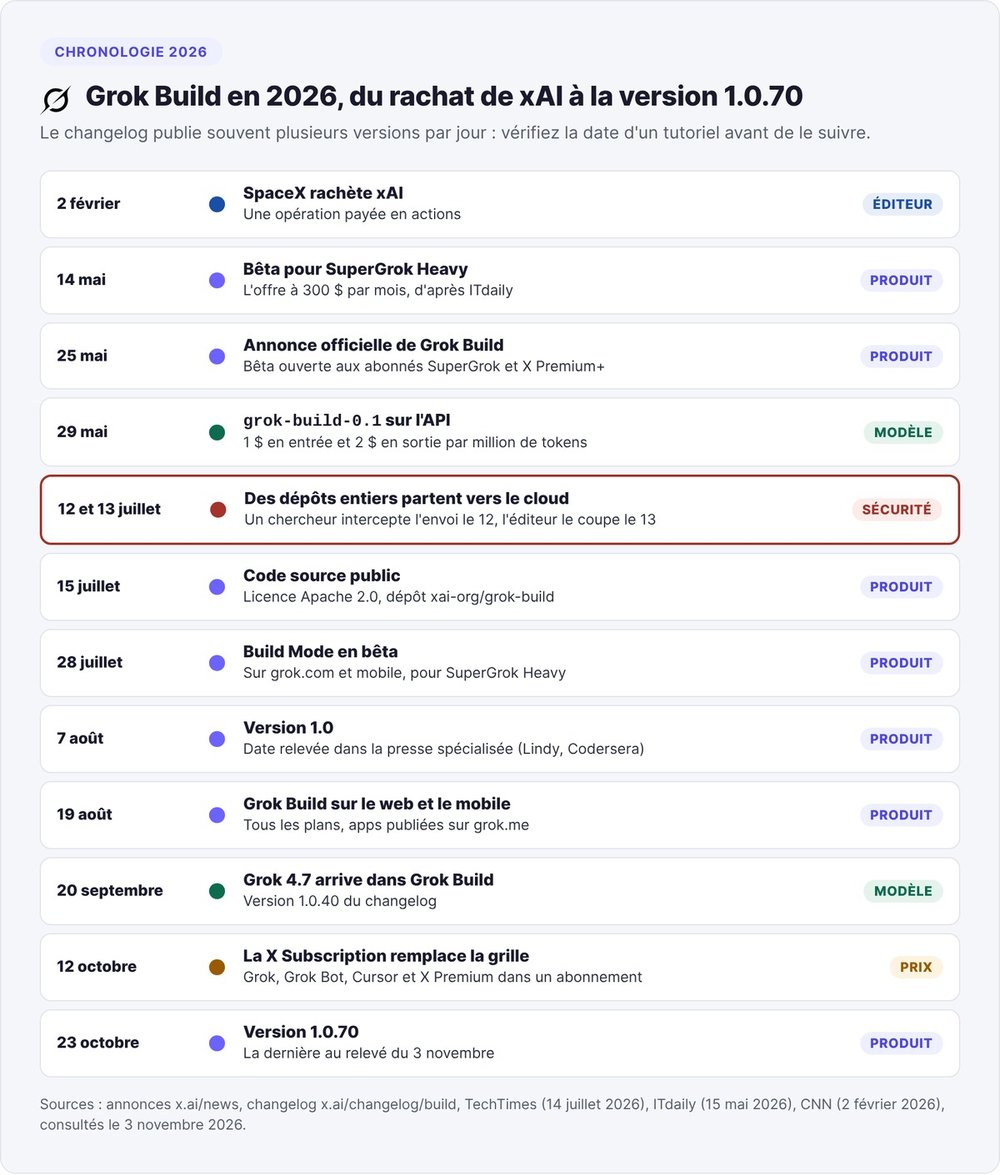
The official changelog often ships several versions a day, so a tutorial from June describes a product that has since changed a lot.
An open-source harness, a closed model
The code lives in the xai-org/grok-build GitHub repo: 27,669 stars and 5,228 forks on November 3, 2026, written in Rust and licensed under Apache 2.0. It covers the agent loop, the editing tools, the terminal interface and the extension system. SpaceXSI syncs it from its internal monorepo and doesn't accept outside contributions. The third-party notices credit tools ported from OpenAI's Codex and from OpenCode.
The model stays with SpaceXSI. Grok 4.7 runs on its servers and you reach it through your subscription or the API. The publisher does say you can build the tool yourself and point it at local inference.
Grok Build in the terminal or on grok.com: two products, one name
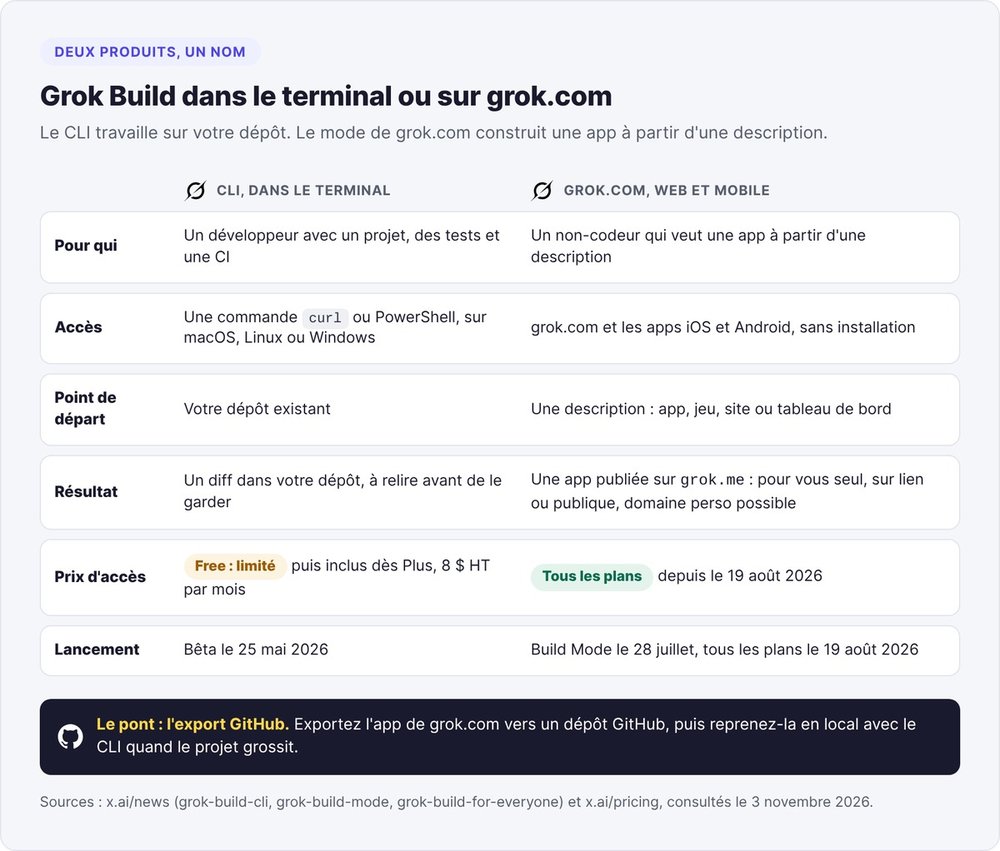
The name covers two products: the command-line agent for developers, and a grok.com mode for building an app without writing code.
The CLI for coding on your repo
The CLI installs on macOS, Linux or Windows and works on an existing repo, and you review every change before keeping it. It's built for developers who already have a project, tests and CI, and most of this article focuses on it.
Grok Build on web and mobile: an app from a description
SpaceXSI launched "Build Mode" on July 28, 2026 for SuperGrok Heavy subscribers, then opened it to every plan on August 19 under the name "Grok Build on web and mobile". You describe an app, a game, a website or a dashboard, and Grok builds a version that runs in the chat, on the web, on iOS or on Android.
Every published app gets an address on grok.me, which you can make visible to you alone, to anyone with the link, or to everyone. You can connect your own domain and let the app call Grok without creating a key. For a non-technical founder, it competes directly with Lovable and Bolt.new.
Moving from grok.com to the terminal with GitHub export
You can export an app started on grok.com to a GitHub repo and then pick it up locally with the CLI. SpaceXSI added this export after the beta, along with remixing of published apps and secrets stored outside the code. It's the usual path for a vibe-coded prototype: you start from a description on the web and take over the code as the project grows, as our vibe coding definition explains.
Grok Build, Grok Bot and the grok-build-0.1 API: telling them apart
- Grok Build: the coding agent, in the terminal or on grok.com.
- Grok Bot: agents that work on an always-on cloud computer, from the Premium plan up. Our Grok Bot article covers it in detail.
grok-build-0.1: a coding model on the API, launched on May 29, 2026 at $1 per million input tokens and $2 per million output tokens. SpaceXSI presented it at the time as Grok Build's model. It also runs in Cursor, Hermes Agent and OpenClaw.
Grok Build's features day to day
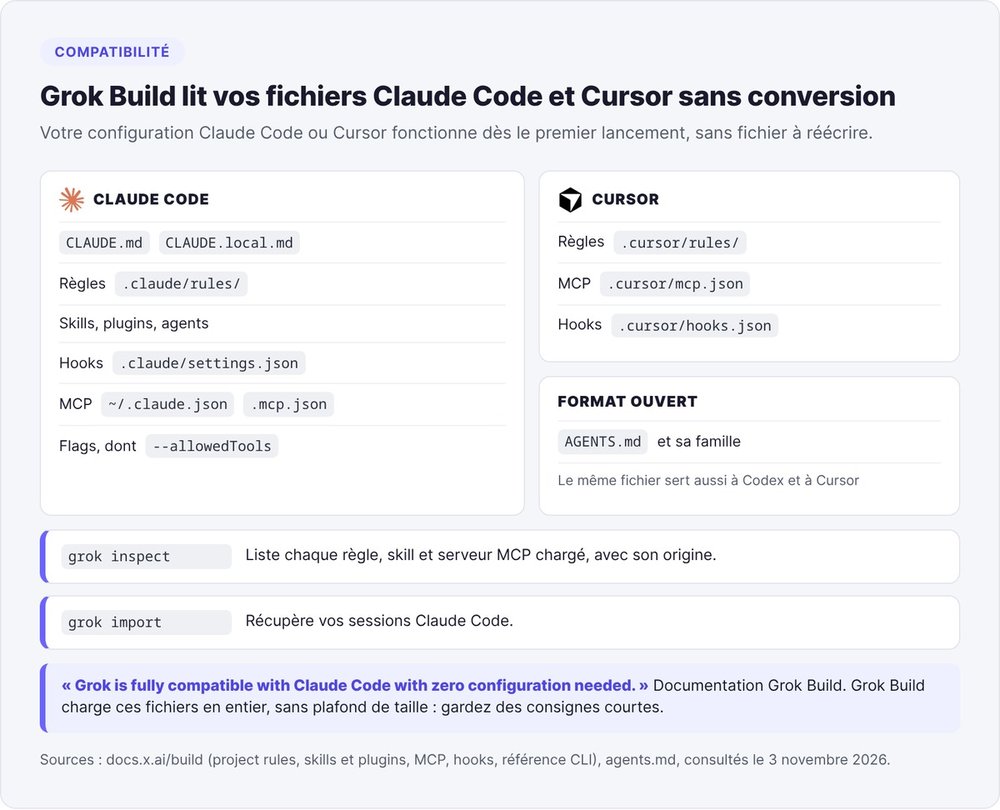
Grok Build has the same building blocks as Claude Code (plan mode, subagents, skills, hooks, MCP, headless mode), and it reads both Claude Code and Cursor files without any conversion.
Plan mode: nothing changes without your approval
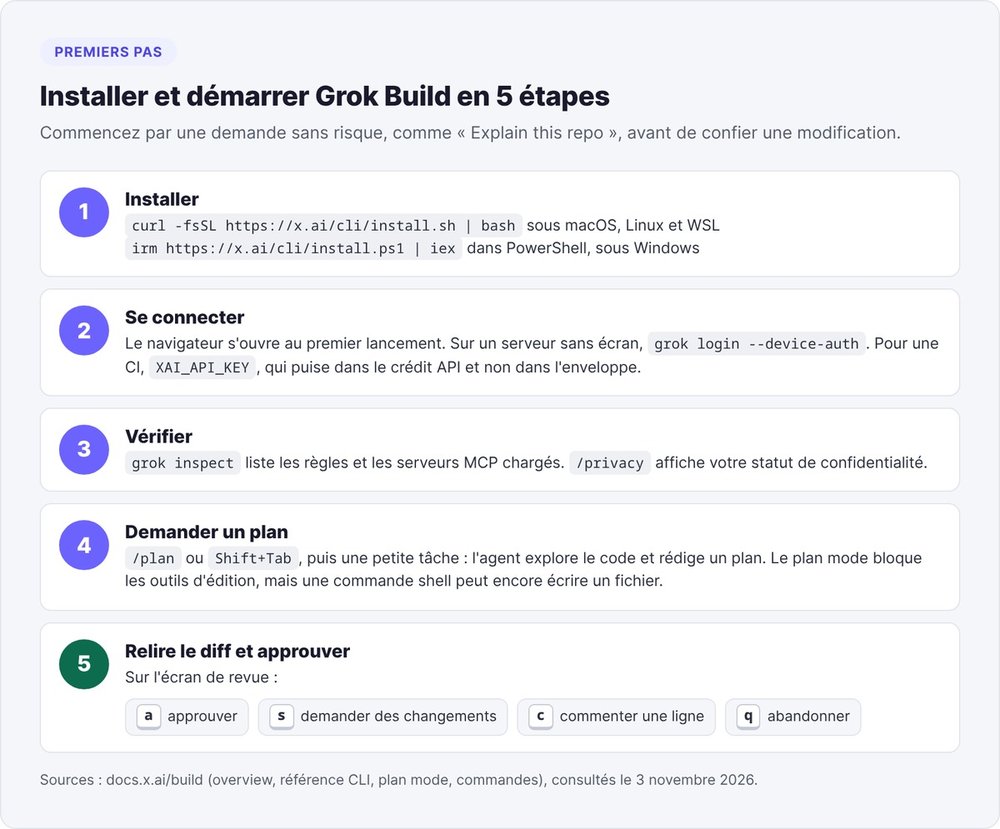
Type /plan or press Shift+Tab and the agent explores the code and writes a plan before touching a single file. On the review screen, a approves, s asks for changes, c comments on a line and q aborts. SpaceXSI recommends this mode for a refactor or an unclear architecture and considers it overkill for a simple rename. Plan mode blocks the editing tools but still allows shell commands, so a bash command can write to a file through redirection.
Parallel subagents in worktrees
For a large task, Grok Build spins up subagents, each with its own context, which report a summary back to the main agent. It ships three types (general-purpose, a read-only explore, and plan), and you can define your own in .grok/agents/. Each subagent can work in a worktree, an isolated copy of the repo, so two agents don't overwrite each other's files. grok -w opens a session in a new worktree. Our guide to Claude Code subagents describes the same approach at Anthropic.
Skills, plugins, hooks, MCP servers
- A skill is a folder with a
SKILL.mdfile and scripts that you call with/name./skillifycreates one from a session. - A plugin bundles skills, agents, hooks or MCP servers into a single install, from a marketplace or a Git repo.
- A hook runs a script or calls a URL on a given event, before a tool runs or after an edit. Only
PreToolUsecan block an action, and a project's hooks need your approval before they run (/hooks-trust). - An MCP server connects Linear, Sentry, a Postgres database or a browser.
grok mcp addadds one andgrok mcp doctordiagnoses the connection.
Grok Build reads these building blocks in Claude Code format, which our guides to Claude Code skills, MCP in Claude Code and Claude Code hooks cover in detail.
Your Claude Code setup, reused as is
SpaceXSI says so in its documentation: "Grok is fully compatible with Claude Code with zero configuration needed." Grok Build reads your CLAUDE.md and .claude/rules/, along with your Claude Code skills, plugins and agents. It also loads MCP servers from ~/.claude.json or .mcp.json, hooks from .claude/settings.json, and the AGENTS.md family of files. On the Cursor side, it reads .cursor/rules/, .cursor/mcp.json and .cursor/hooks.json. grok import brings in your Claude Code sessions, and the CLI accepts Claude Code flags such as --allowedTools.
grok inspect lists every item it finds and where each one comes from. Grok Build loads these files in full with no size cap, and short instructions tend to be followed more reliably.
Memory across sessions and workflows
Grok Build saves every conversation in ~/.grok/sessions/. grok -c resumes the last one, /rewind restores your files to the state they were in at an earlier message, and /compact summarizes the history. Cross-session memory is opt-in ([memory] enabled). When it's on, the agent keeps a MEMORY.md index and /remember adds a note to it. /workflow manages chains of agents running in the background.
Headless mode for CI and scripts
grok -p "your prompt" runs a task without the interface and returns the result as text or JSON. You can call it from a script or a CI step, adding --no-auto-update to skip update checks. grok agent stdio exposes the agent over ACP so you can embed it in your own tool.
Plugging in another model with config.toml
In ~/.grok/config.toml, declare a compatible model's ID, its API URL and the environment variable that holds its key, then select it with -m or /model. You pay that model's provider directly, outside the subscription. The official sample configuration recommends the grok-build model for code.
Grok Build pricing in the X Subscription
Since October 12, 2026, Grok Build's price has depended on the X Subscription, the plan that bundles Grok, Grok Bot, Cursor and X Premium. The previous plans (SuperGrok at $30, X Premium+ at $40) are no longer available to new customers. The prices below come from SpaceXSI's official pricing page, checked on November 3, 2026.
Is Grok Build free?
Yes, with limited access. The $0 Free plan shows "Limited" on the Grok Build line, and the product page says "Available to try for Free". SpaceXSI doesn't publish a usage quota for it, so treat it as a way to try the tool, with daily use left to the paid plans.
The Plus, Premium, Super and Ultra plans
Plus, at $8 a month excl. tax, gives you Grok Build, the chat, the Grok API and Cursor, with the base usage allowance. Premium, at $30, quadruples that allowance and adds Grok Bot. SpaceXSI pitches it as SuperGrok, Cursor Pro and X Premium+ combined, which together used to cost $90 a month. Super ($100) and Ultra ($200) offer 15 and 50 times the usage of Plus. Teams uses the same prices per seat, starting at $30.
A usage pool shared with Cursor, reset every week
Every paid plan includes a single allowance shared by Grok and Cursor, and each product draws from it at its own rate. The allowance resets every week. Once it runs out, you either wait for the reset or buy top-ups, up to a spending cap if you set one. On Teams, each seat gets its own allowance. SpaceXSI claims every plan gives at least twice as much coding usage with its own models as the equivalent Cursor plan.
Why the quota runs out fast (and how to track it)
On Reddit, several users in r/GrokBuild and r/grok find the limits lower than Claude Code's or Codex's at the same price, while others find them generous. Three things explain the difference. The allowance also covers Cursor, each subagent consumes its own context, and a long session rereads its whole history on every turn.
To see your remaining usage and the reset date, type /usage in Grok Build or open your account settings on grok.com. Compact long sessions with /compact and use subagents only for tasks that need them.
Pay as you go with an API key
SpaceXSI bills the API separately, at each model's rate, outside the allowance. Grok 4.7 costs $2 per million input tokens and $6 per million output tokens, and grok-build-0.1 costs $1 and $2. If you set an XAI_API_KEY variable, Grok Build runs on your API account instead. That's handy for CI, but costs can add up for a team that codes all day.
Existing SuperGrok and X Premium+ subscribers
Existing SuperGrok, Cursor and X Premium subscribers keep their plan and price. If you switch to the X Subscription, SpaceXSI cancels your old subscriptions and refunds them pro rata, and according to the documentation, support can't reverse the switch. Compare the two allowances before you switch.
Pricing table (excl. tax, in US dollars)
Prices checked on November 3, 2026 on x.ai/pricing. SpaceXSI doesn't publish euro prices, and VAT is added on top of these pre-tax amounts.
| Plan | Price per month (excl. tax) | Grok Build | Included usage | Cursor | Extras |
|---|---|---|---|---|---|
| Free | $0 | Limited | Limited | Starter allowance | Limited chat |
| Plus | $8 | Yes | Base | Yes | Grok API (billed separately) |
| Premium | $30 | Yes | 4x Plus | Yes | Grok Bot, cloud agents, code reviews |
| Super | $100 | Yes | 15x Plus | Yes | Priority access |
| Ultra | $200 | Yes | 50x Plus | Yes | Maximum usage |
| Teams | from $30 per seat | Yes | 4x to 50x Plus | Yes | SSO, centralized billing |
| API | pay as you go | With XAI_API_KEY |
Outside the allowance | No | Grok 4.7: $2 / $6 per million tokens |
Third-party models in Cursor (Claude, GPT) are still billed at API rates, outside the allowance.
Install Grok Build in 5 minutes
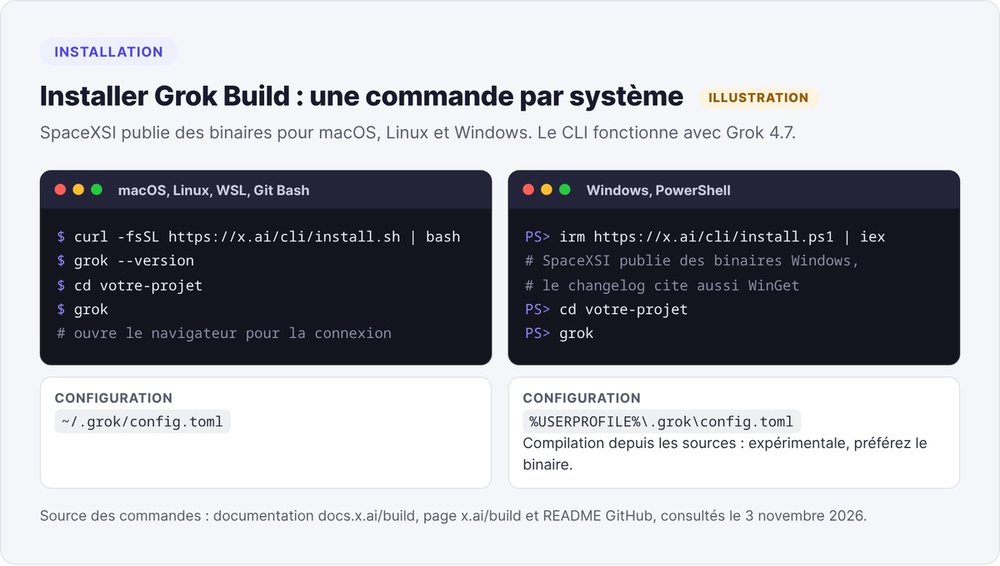
Installation takes a single command, and you sign in with your Grok account.
macOS, Linux and WSL
curl -fsSL https://x.ai/cli/install.sh | bash
grok --version
The same command works in WSL and Git Bash on Windows.
Windows with PowerShell
irm https://x.ai/cli/install.ps1 | iex
SpaceXSI publishes Windows binaries, and the changelog also mentions WinGet. The configuration file lives at %USERPROFILE%\.grok\config.toml. The README describes building from source on Windows as experimental, so use the binary.
Signing in: browser, device code or API key
On first launch, grok opens your browser so you can sign in. On a server without a browser, grok login --device-auth shows a code that you enter from another device. For CI, export an API key. It draws on your API credit, separate from the subscription allowance:
export XAI_API_KEY="xai-..."
grok
First commands to run on your repo
cd your-projectthengrokto open the interface.grok inspectto see which rules and MCP servers are loaded.- A low-risk request: "Explain this repo."
/planfollowed by a small task, so you can review a plan before any change happens./privacyto check your privacy settings.
VS Code, Cursor and other editors via ACP
SpaceXSI doesn't publish an official VS Code extension. The CLI does expose ACP (Agent Client Protocol) through grok agent stdio, and developers have released community extensions for VS Code and Cursor that use it. Read their code before you trust them with your account. The simplest option is still your editor's built-in terminal.
Is Grok Build safe for your startup's code?
A startup repo often contains API keys and credentials for the production database. Before you run an agent on it, check what the agent sends out and what you can lock down.
The July 2026 incident: entire repos uploaded to the cloud
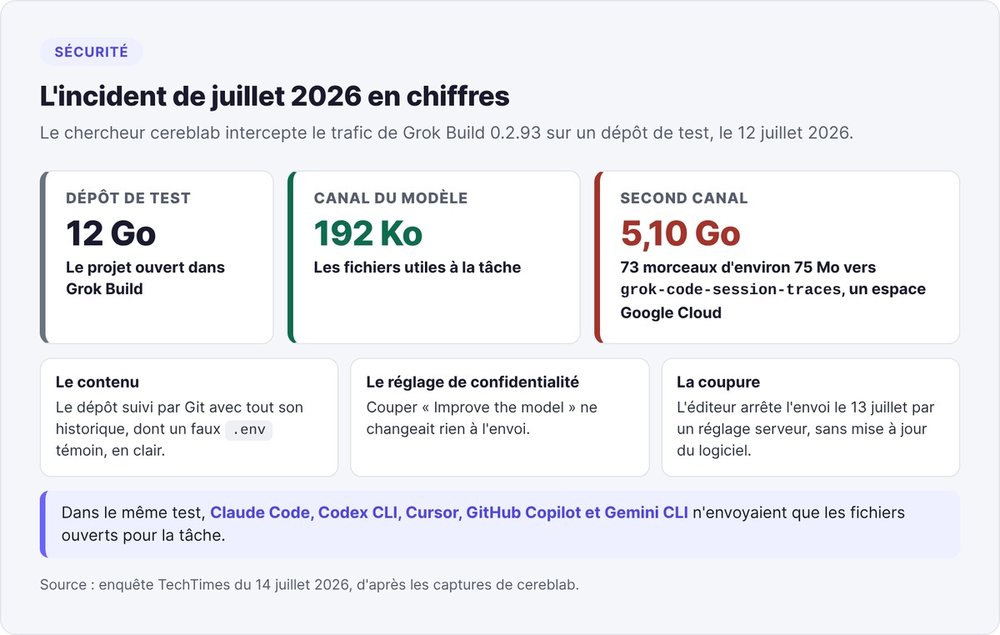
On July 12, 2026, security researcher cereblab intercepted the network traffic of Grok Build version 0.2.93. On a 12 GB test repo, the model channel carried about 192 KB, which matched the files needed for the task. A second channel sent 5.10 GB in 73 chunks of about 75 MB each to a Google Cloud bucket named grok-code-session-traces. That upload contained every Git-tracked file in the repo and its full history, including a decoy .env file planted as a canary, which was sent in plain text.
Turning off the "Improve the model" setting made no difference. TechTimes' July 14, 2026 investigation shows the captured traffic in detail. In the same test, Claude Code, Codex CLI, Cursor, GitHub Copilot and Gemini CLI sent only the files opened for the task.
What has changed since: the shutoff, /privacy and zero data retention
SpaceXSI stopped the upload on July 13 by changing a server-side setting, with no software update. The same day, Elon Musk promised on X that all data already uploaded would be deleted.
SpaceXSI's teams pointed users to two settings. /privacy shows and changes your privacy status, and according to Grok Build's lead, changing it also deletes data synced before. Zero data retention (ZDR) can be enabled for a team or company, in which case inference stores neither prompts nor code. As of July 14, TechTimes reported that no formal security advisory had been published.
The changelog has since added two safeguards. Setting DISABLE_TELEMETRY to any value turns off telemetry (v1.0.65), and in an untrusted folder, only hooks managed by your organization run (v1.0.64). SpaceXSI also publishes a data processing agreement (DPA) and offers data residency on the Enterprise plan.
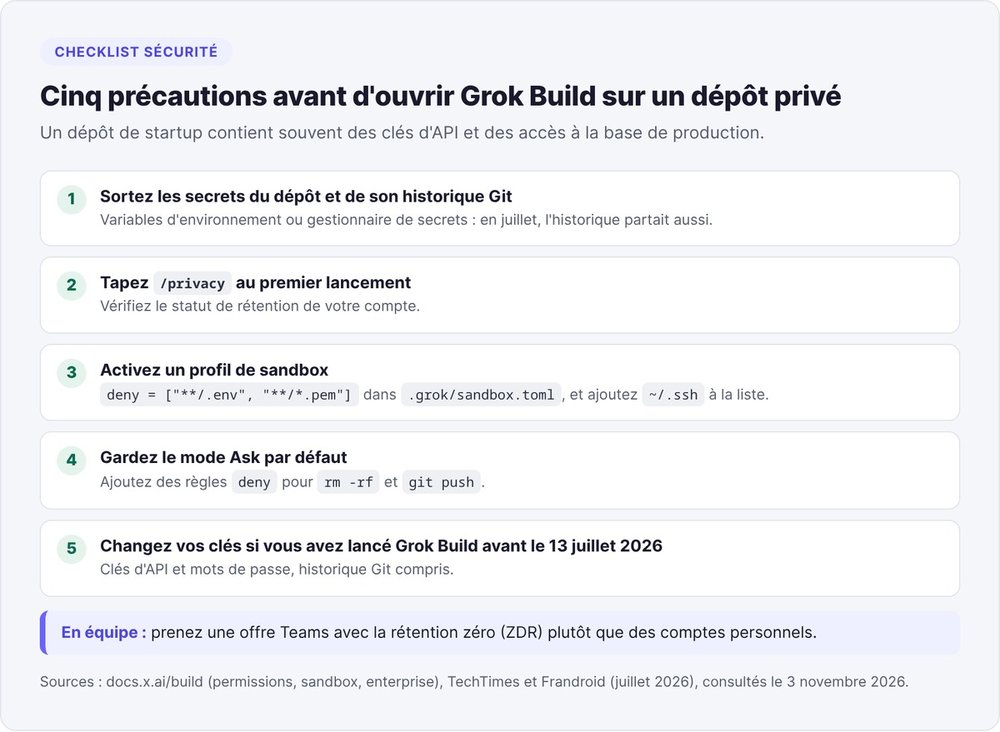
Five precautions before opening it on a private repo
- Move secrets out of the repo and its Git history and into environment variables or a secrets manager. In July, the history was uploaded too.
- Type
/privacyon first launch and check your account's retention status. - Enable a sandbox profile that blocks sensitive files, for example
deny = ["**/.env", "**/*.pem"]in.grok/sandbox.toml. - Keep Ask as the default mode and add
denyrules forrm -rfandgit push. - If you ran Grok Build on a private repo before July 13, 2026, rotate your API keys and passwords, including any that appear in your Git history.
For a team, a Teams plan with zero data retention is a safer choice than personal accounts.
Permissions, the sandbox and auto mode
Grok Build has three permission modes. Ask, the default, requests your approval for any action that isn't already allowed. Auto lets a classifier approve tools it judges safe. Always-approve (--yolo) accepts everything except what your deny rules and hooks block. A deny rule always takes precedence over an allow rule.
The sandbox is off by default. When enabled, it limits what an approved command can access on disk and on the network, using Landlock on Linux and Seatbelt on macOS. The workspace profile restricts writes to the current folder, read-only suits an audit, and strict cuts network access when you're working on an unfamiliar repo. SpaceXSI warns that the built-in profiles don't protect ~/.ssh, so add that path to your deny list.
Grok Build vs Claude Code: which should you choose?
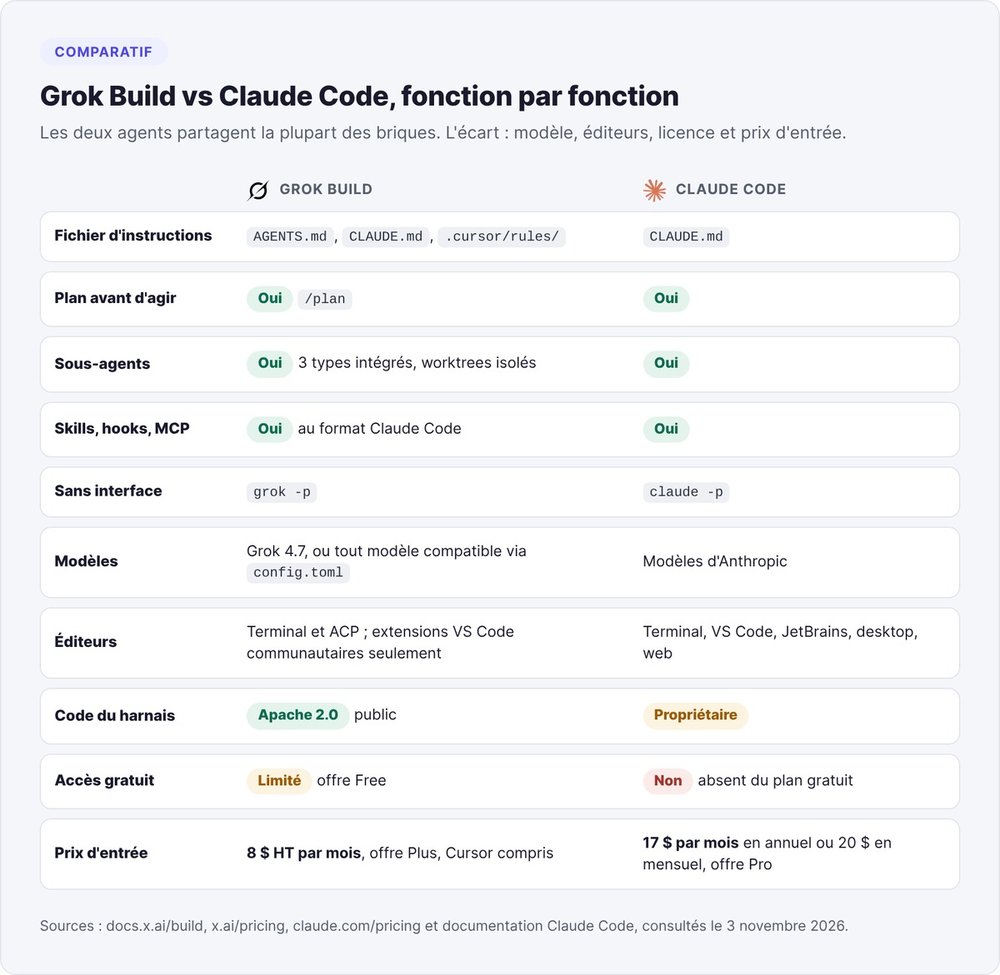
Grok Build reads Claude Code's configuration, and the two agents work in very similar ways. The choice comes down to the model, the entry price, which editors are supported and how much risk you're willing to accept after the July incident.
What they have in common
Both are terminal coding agents that read an instructions file at the project root (CLAUDE.md, AGENTS.md). Both propose a plan before acting, launch subagents, load skills, hooks and MCP servers, and run headless in a script (claude -p or grok -p). Our Claude Code definition explains how it works.
Where Claude Code comes out ahead
Claude Code runs on Anthropic's models and is available as a VS Code and JetBrains extension, a desktop app and on the web. Anthropic includes it in the Pro plan at $17 a month billed annually or $20 billed monthly, according to its pricing page on November 3, 2026.
On Reddit, users often prefer Claude for long sessions. One Grok Build user reported that after ten days, the agent was rewriting code they hadn't asked it to change. In cereblab's test, Claude Code sent only the files opened for the task.
Where Grok Build stands out
- A lower entry price: $8 a month excl. tax plus limited free access, while Claude's free plan doesn't include Claude Code.
- An open-source harness under Apache 2.0 that you can read and build yourself.
- Support for any compatible model through
config.toml, billed by its provider. - Cursor in the same subscription, drawing on the same allowance.
- Easy migration: your Claude Code files, skills, hooks and sessions work as is.
SpaceXSI also says Grok 4.7 is "at the frontier in price-performance" on CursorBench 4.0, a benchmark of long coding tasks. That claim comes from the publisher and hasn't been independently verified.
Grok Build or Cursor, now in the same subscription
Cursor is a code editor built on VS Code with an agent built in, while Grok Build is an agent that runs in the terminal. Since October 12, the Plus plan has given you both on the same allowance. Use Cursor when you want to see and edit the code in an editor, and Grok Build when you want to hand off long tasks or run them from a script. Our full Cursor review covers its pricing and its acquisition by SpaceX, and our Claude Code vs Cursor comparison looks at the same choice on the Anthropic side.
Grok Build or Codex
Codex, OpenAI's coding agent, comes with a ChatGPT subscription (Plus at $20 a month) and also reads AGENTS.md. If your team already pays for ChatGPT, Codex costs you nothing extra, and the same AGENTS.md files work with both tools. For a European terminal alternative, look at Mistral Vibe.
Which to choose, by situation
| Your situation | Our advice |
|---|---|
| You code with Claude Code and its limits are enough for you | Stay on Claude Code, and try Grok Build on a repo with no secrets. Your configuration works as is |
| You often hit your Claude Code limits | Add Grok Build as a second agent on the $8 (excl. tax) Plus plan, after taking the five precautions |
| You mostly work in Cursor | Move to the X Subscription, where Cursor and Grok Build share the same allowance |
| Your team already pays for ChatGPT | Start with Codex, which your subscription already includes |
| You don't code | Use Grok Build on grok.com, or Lovable or Bolt.new for a prototype |
| Your repo holds customer or regulated data | Use a Teams plan with zero data retention and the strict sandbox, or choose another tool |
Our take on Grok Build
This review is based on the official documentation, the changelog, the pricing page and user feedback as of November 3, 2026. We didn't benchmark its performance on a real project.
Strengths
Grok Build starts at $8 a month excl. tax with Cursor included, and because it's compatible with Claude Code, you can try it without any setup. The harness code is public, so you can check exactly what the tool does. The changelog shows several releases a week.
Limitations reported by users
- Usage limits that some Reddit users find low, and no published quota on the Free plan.
- The July incident, fixed with a server-side setting and with no formal security advisory as of July 14.
- A sandbox that's off by default, and a plan mode that still allows shell commands.
- No official extension for VS Code or JetBrains.
Who should try Grok Build
Grok Build is worth trying for three kinds of users:
- developers on Claude Code who want a cheaper second agent;
- teams already on Cursor, who now get it in the same subscription;
- non-technical founders who prototype on grok.com and later move to the terminal.
For a sensitive repo, wait until you have zero data retention on a Teams plan. Our roundup of AI tools for startups shows where Grok Build fits in your stack. You can also use Grok models through the API in an agent environment such as Hermes Agent.
FAQ
Is Grok Build free?
Grok Build is free with limited access on the X Subscription's Free plan, which has no published quota. Regular use requires the Plus plan at $8 a month excl. tax, which also includes Cursor.
Is Grok Build open source?
Yes. SpaceXSI published the CLI's code on July 15, 2026 under the Apache 2.0 license, in the xai-org/grok-build GitHub repo. SpaceXSI doesn't accept outside contributions, and the Grok 4.7 model runs on its own servers.
Do you need to know how to code to use Grok Build?
For the CLI, yes: you need to be able to review a diff, run tests and manage a Git repo. On grok.com and in the mobile apps, no. You describe the app in plain language, and Grok builds it and publishes it at a grok.me address.
What's the difference between Grok Build and Grok Bot?
Grok Build is a coding agent that works on your repo or builds an app on grok.com. Grok Bot creates agents that run on an always-on cloud computer and handle tasks beyond coding. It requires the Premium plan, at $30 a month excl. tax.
Does Grok Build work on Windows?
Yes. Install it in PowerShell with irm https://x.ai/cli/install.ps1 | iex, or with the curl command in WSL or Git Bash. SpaceXSI publishes ready-to-use Windows binaries.
Is there a Grok Build desktop app?
No. As of November 3, 2026, the Grok Build page only offers a command-line install, which you can use from the built-in terminal in VS Code or Cursor. The no-code version is available on grok.com and in the Grok apps for iOS and Android.
Which model does Grok Build use?
Grok Build has run on Grok 4.7 since September 20, 2026, according to the product page and the changelog. You can declare a third-party model in ~/.grok/config.toml and pay its provider directly.
At $8 a month, Grok Build is easy to try with your existing Claude Code setup, as long as you lock down your secrets before the first launch.