Claude Design is Anthropic's tool for creating mockups, clickable prototypes, slides and one-pagers by chatting with Claude. Describe what you need, and Claude builds a first version on a canvas that you then refine through chat, comments or with your mouse. Since September 16, 2026, Claude Design works in any Claude conversation and on every plan, including the free one. The old standalone site, claude.ai/design, shuts down on December 14, 2026.
Our quick take: Claude Design is built for the founder without a designer who needs to show a deck, a landing page or an app flow this week. Exports cover PowerPoint, PDF, Google Slides and HTML. To ship an actual product, you then hand the design off to Claude Code or Lovable.
The facts below come from Anthropic's announcement, the official help center guide and the pricing page on claude.com, all checked on November 11, 2026.
What is Claude Design?
Claude Design pairs a conversation with a canvas: you type in the chat, and the design updates alongside it.
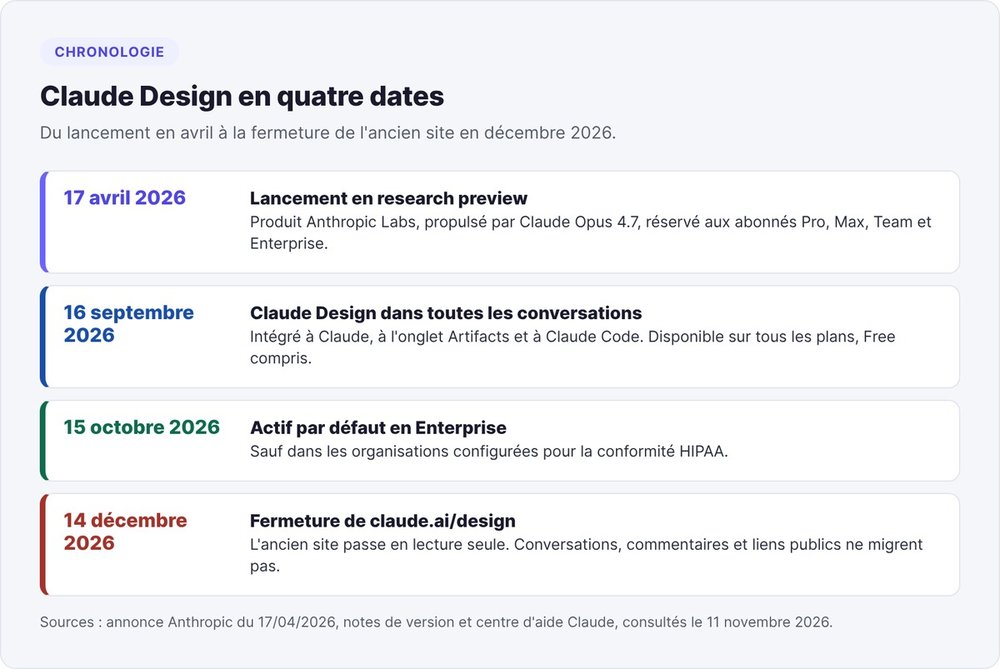
An Anthropic Labs product launched on April 17, 2026
Anthropic launched Claude Design on April 17, 2026 under the Anthropic Labs brand, its experimental products unit. At launch, the tool ran on Claude Opus 4.7 as a research preview for Pro, Max, Team and Enterprise subscribers.
The announcement names its target audience: founders, product managers and marketers who have an idea but no design training. TechCrunch picks up that framing and notes that Anthropic positions the tool as a complement to Canva.
What Claude Design produces
The launch announcement lists six use cases:
- interactive prototypes built from static mockups, ready for user testing;
- wireframes of product flows, then handed off to Claude Code;
- explorations of visual directions;
- decks, which a founder can take "from a rough outline to a complete, on-brand deck";
- marketing assets: landing pages, social media visuals, campaign visuals;
- coded prototypes with voice, video, shaders or 3D.
The product page adds the sales one-pager built from a proposal.
Where to find Claude Design since September 2026
On September 16, 2026, Anthropic folded Claude Design into Claude. As of November 11, the help center lists five entry points:
- in a conversation, by asking for a design or choosing Output > Design in the message box;
- in the Artifacts tab, starting from a Design template;
- in Claude Code, with the
/designcommand, on desktop or in the terminal; - in the Claude app for iOS and Android: start the request, then come back to view the result full screen;
- on claude.ai/design, the legacy version, open until December 14, 2026.
Is Claude Design free? Pricing as of November 11, 2026
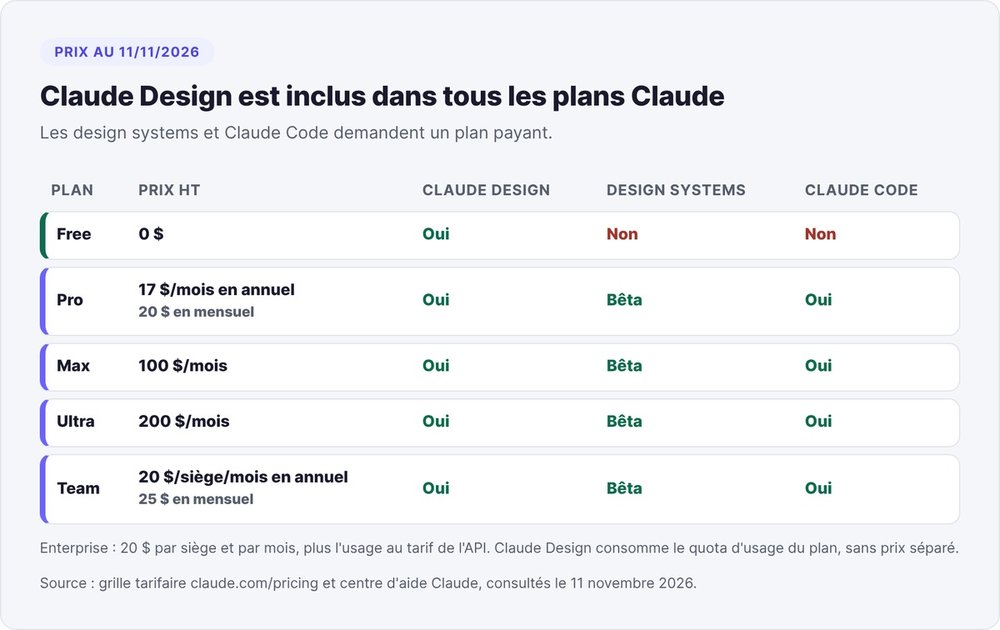
Yes. Claude Design is part of all six Claude plans: Free, Pro, Max, Ultra, Team and Enterprise. Anthropic doesn't charge for it separately: each design draws on your plan's usage allowance.
Included in every plan, Free too
Prices on claude.com as of November 11, 2026, excluding tax: Free at $0, Pro at $17 per month billed annually or $20 billed monthly. Max costs $100 per month, Ultra $200. Team costs $20 per seat per month billed annually, $25 billed monthly; Enterprise is $20 per seat plus usage at API rates.
On Enterprise, Claude Design has been on by default since October 15, 2026, except in organizations configured for HIPAA compliance.
Limits of the Free plan
On the free plan, the pricing page describes usage as "limited," without a number. Two building blocks are missing. Design systems, which apply your colors, fonts and components to every project, are in beta on paid plans only. Claude Code isn't included in Free either, so going from design to code requires at least the Pro plan.
One usage allowance shared with Claude Code
At launch, Claude Design had its own weekly quota. Anthropic has since merged it: every design draws from the same pool as your conversations and Claude Code. The help center warns that a deck or a full design uses more than a regular message. Once you hit the limit, Claude Design is unavailable until the reset, unless you've turned on usage credits.
How to use Claude Design, step by step
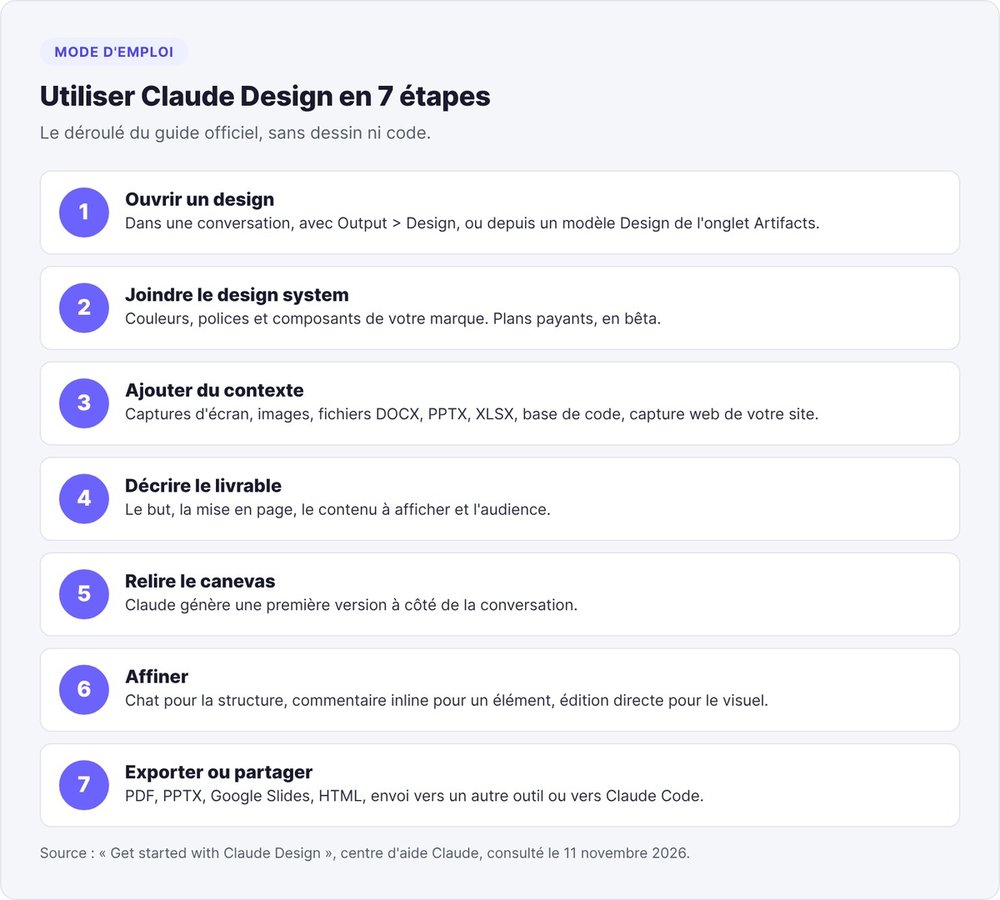
The help center lays out a seven-step process, with no drawing or code required.
Open a design
In a conversation, ask something like "make a one-pager from this proposal." You can also choose Output > Design in the message box, or pick a Design template in the Artifacts tab.
Give Claude context
Attach images, competitor screenshots, DOCX, PPTX or XLSX files, or point it at a codebase. The web capture tool pulls elements from your site so the prototype looks like your existing product.
On a paid plan, the design system saves the most time. Claude builds it from a GitHub repository, Figma files, an on-brand deck, your logos and your fonts. Before showing you a design, Claude checks its output against that design system and fixes any mismatches.
Write the request
The official formula has four parts: the goal, the layout, the content to display and the audience. Claude asks clarifying questions if one is missing. Example from the help center: "build a landing page for our new API product, with a hero section, code examples and pricing."
Refine through chat, comments or direct editing
Use the chat for structural changes: reorganizing a page, adding a section, asking for two or three variations. Inline comments target a specific element, like a button that feels cramped. Direct editing handles visual tweaks: drag, resize, align, or play with the spacing and color sliders Claude creates for the project.
You can also ask for a critique: according to the help center, Claude reviews a design for accessibility, contrast and information hierarchy.
What can you export from Claude Design?
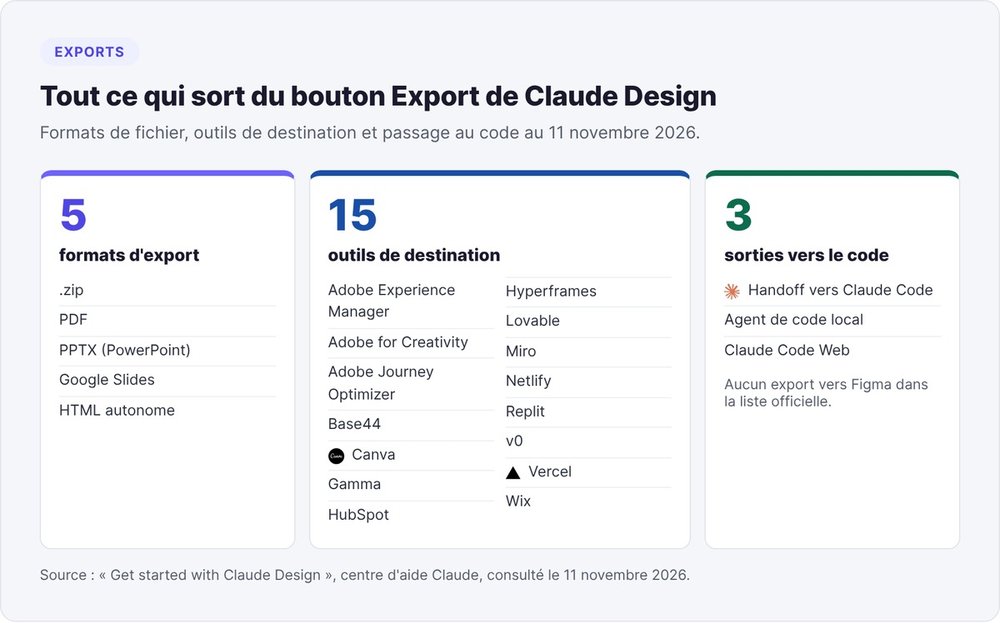
As of November 11, 2026, the Export button in the top right of a project offers three kinds of output.
The five formats in the Export button
You can download your work as a .zip archive, as a PDF, as a PPTX for PowerPoint, send it to Google Slides, or save it as a standalone HTML file. A deck exported to PPTX or Google Slides can be finished in the tool you already use.
The fifteen destination tools
You can also send your work to fifteen tools: Adobe Experience Manager, Adobe for Creativity, Adobe Journey Optimizer, Base44, Canva, Gamma, HubSpot, Hyperframes, Lovable, Miro, Netlify, Replit, v0, Vercel and Wix. Canva was the first destination, mentioned back in April in the Claude for Creative Work announcement. According to TechCrunch, a design sent to Canva stays editable and collaborative there.
Claude Design and Figma as of November 11, 2026
The official list includes no Figma export. The connection runs the other way: Claude reads your Figma files to build a design system. If your designer maintains mockups in Figma, plan to rebuild by hand whatever you approved in Claude Design.
Moving to Claude Code
When a design needs to become software, there are three paths: the handoff to Claude Code, sending it to a local coding agent, and sending it to Claude Code Web. Claude Code then picks up the existing work instead of starting from a screenshot. In the other direction, /design-sync imports React components from a codebase. To get started with the coding tool, read our Claude Code guide.
Three founder deliverables to build with Claude Design
The requests below follow the official four-part formula. Treat them as templates to adapt: we're not publishing any results from them.
A deck for a fundraise or a client meeting
The launch announcement cites this exact case: a founder goes from a rough outline to a complete deck, then exports it to PPTX or sends it to Canva. Attach your outline as a DOCX and your old deck as a PPTX so Claude picks up your branding.
Request template: "create a deck presenting [startup] to angel investors, based on the attached outline. One idea per slide, traction numbers in large type, branding from the attached deck." The substance of the deck is still on you: our guide to building a winning pitch deck covers the slide order.
A landing page before you write any code
To test a value proposition before building the product, export the landing page as standalone HTML, or send it to Vercel, Netlify or Wix.
Request template: "build a landing page for [product], aimed at [audience]. A hero section with the value proposition, three benefits, a pricing table, a waitlist form." A plain HTML file won't capture any signups, so plug in a form service or go through Lovable.
A clickable prototype for customer interviews
The help center gives the example of a four-screen mobile onboarding flow. This format works well in a customer interview: the person clicks through while you watch where they get stuck.
Request template: "design the mobile signup flow for [product] in 4 screens. Account creation, goal selection, first usage screen, designed for one-handed use."
Claude Design's documented limits
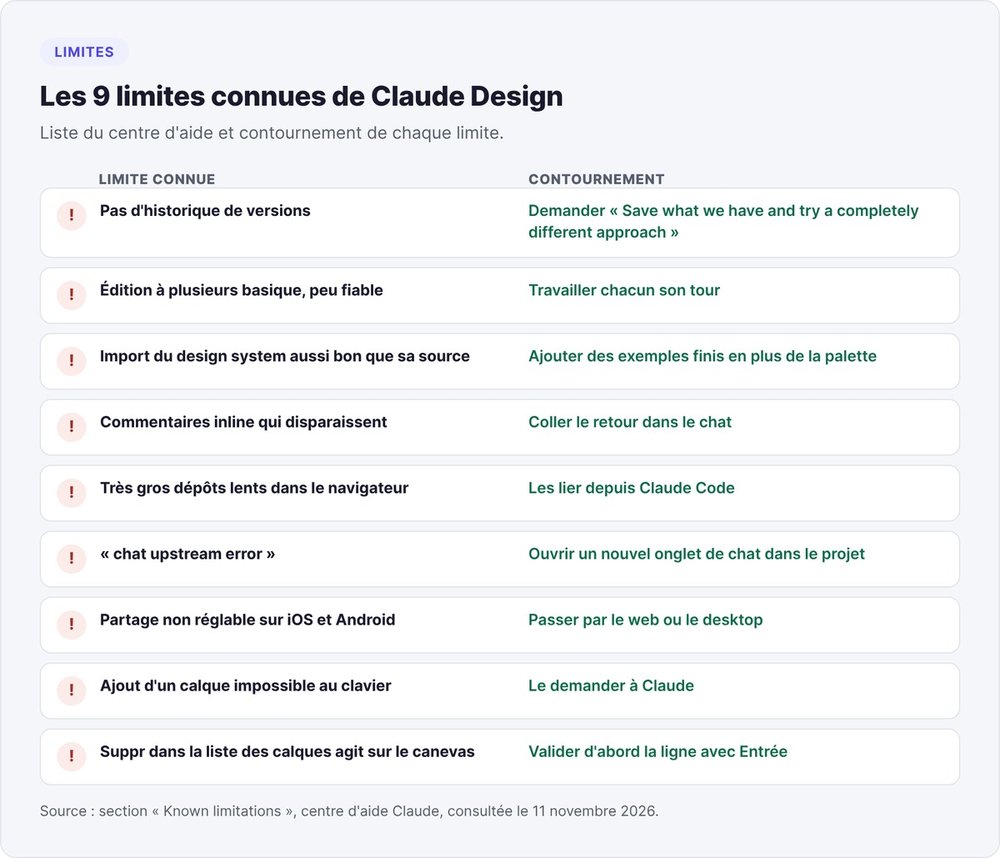
The help center publishes nine known limitations, each with a workaround.
No version history
Claude Design doesn't have version history yet. The official workaround is a single sentence: "Save what we have and try a completely different approach." Claude saves the project's current state and tells you where, before exploring another direction.
Multi-user editing is still basic
The docs describe simultaneous editing of the same project as "basic" and warn that it may not work well. If you're working with a cofounder, take turns on the project.
Design system import quality
According to the help center, an import is only as good as its source: a messy codebase shows up in the designs. The design system guide recommends adding finished examples, like a live landing page, alongside the color palette.
Known bugs and their workarounds
- Inline comments sometimes disappear: paste your feedback into the chat.
- Very large repositories slow down the browser: link them from Claude Code.
- A "chat upstream error" goes away if you open a new chat tab in the same project.
- On iOS and Android, sharing settings are unavailable: use the web or desktop.
- Adding a layer or a shape requires a mouse or trackpad: if you're on a keyboard, ask Claude to do it.
- In the layers list, Delete acts on the canvas selection: confirm the row with Enter first.
Before December 14, 2026: back up your claude.ai/design projects
If you used Claude Design before September, your projects still live on claude.ai/design. On December 14, 2026, Anthropic shuts that site down: it becomes read-only and stops accepting new projects.
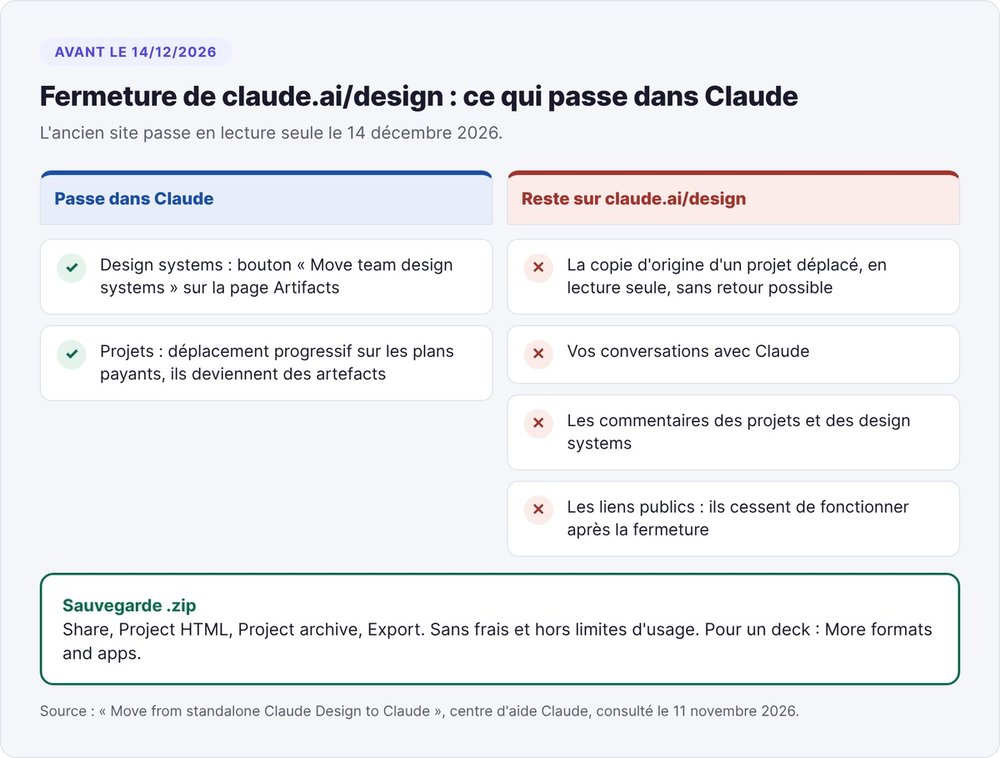
What moves over and what gets lost
Anthropic's migration page spells out the split. You move your design systems from the Artifacts page with the "Move team design systems" button. Project migration is rolling out gradually on paid plans. A moved project becomes an artifact, and its original copy becomes read-only, with no way back.
Your conversations with Claude and project comments don't migrate. Public links from the old site stop working after the shutdown: if you sent customers a prototype through one of those links, send them a new version.
Download a project as a .zip
Open the project on claude.ai/design, click Share, choose Project HTML, leave Project archive checked and click Export. For a deck, the option sits under More formats and apps. You get a .zip with every file in the project, free of charge and outside your usage limits.
Claude Design, Lovable, Claude Code, Canva or Figma: which tool should you pick?
Start from the deliverable, then pick the tool. Claude Design produces what you show. Lovable and Claude Code produce what your customers use.
The deliverable table
| Deliverable | Tool | Why |
|---|---|---|
| Fundraising or sales deck | Claude Design | PPTX export, Google Slides or send to Canva |
| Sales one-pager | Claude Design | Use case cited on the product page |
| Landing page to show | Claude Design | Standalone HTML, send to Vercel or Netlify |
| Landing page that collects signups | Lovable or Claude Code | An HTML file stores no data |
| Clickable prototype for interviews | Claude Design | Interactive prototypes, fast variations |
| App with accounts and payments | Lovable or Claude Code | Requires a database and a backend |
| Social media visuals to adapt | Canva, from Claude Design | Editable, collaborative files in Canva |
| Mockup maintained by a designer | Figma | No Claude Design export to Figma as of 11/11 |
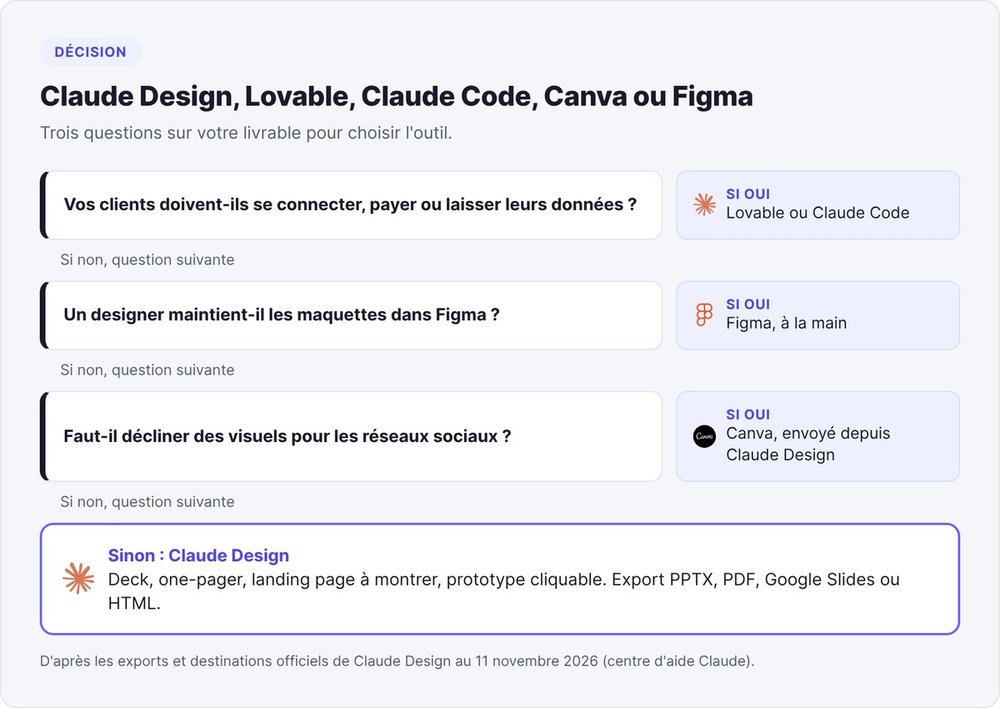
From Claude Design prototype to live product
The "lovable vs claude design" debate is settled by chaining them, since Lovable is one of Claude Design's destinations. On the product page, the Lovable team writes that these ideas become "production-ready" applications there. Nail the look in Claude Design, then send it to Lovable for the database and user accounts. Our Lovable guide covers its pricing and limits.
To keep the code in-house, use the handoff to Claude Code, then lock in your conventions with Claude Code skills. For the rest of the stack, see Claude Cowork, our roundup of AI tools for startups and the Claude for Startups program.
Claude Design spares you the wait for a designer. Building the product still comes afterward.
FAQ
Is Claude Design free?
Yes. Since September 16, 2026, Anthropic includes Claude Design in every Claude plan, Free included, with no separate price: each design draws on your plan's allowance. Design systems and Claude Code remain limited to paid plans, starting with Pro at $17 per month billed annually.
How do I access Claude Design?
In a Claude conversation (web, desktop or mobile), ask for a design or choose Output > Design. Other entry points: a Design template in the Artifacts tab, or /design in Claude Code. The old claude.ai/design site shuts down on December 14, 2026.
Does Claude Design work on mobile?
Yes, in the Claude app for iOS and Android: ask for a design, then open the result full screen in the Artifacts tab to edit it. Sharing settings can only be changed on the web or desktop.
Can I export a Claude design to Figma?
No. As of November 11, 2026, Figma appears neither among the export formats nor among the fifteen official destinations. Claude can, however, read Figma files to build a design system.
Does Claude Design export to PowerPoint?
Yes. The Export button offers the PPTX format, which opens in PowerPoint, plus an export to Google Slides. A PPTX file attached as input can also be used to pick up the branding of an old deck.
How do I install the Frontend design skill on Claude?
Frontend design is an Anthropic skill, separate from Claude Design, that steers Claude toward less generic interfaces. In Claude Code, type /plugin marketplace add anthropics/skills, then /plugin install example-skills@anthropic-agent-skills. On claude.ai, the official repository states that these example skills are already available on paid plans.
What's the difference between Claude Design and Claude Code?
Claude Design produces designs, prototypes and slides on a canvas, with no code. Claude Code writes an application's code. A design goes to Claude Code through a handoff, and /design-sync imports components from a codebase into Claude Design.