Supabase is an open source backend platform built on PostgreSQL. Every Supabase project gets its own Postgres database, plus authentication, file storage, Edge Functions, realtime and vector search. As of November 11, 2026, the Free plan costs $0 (500 MB database, 50,000 monthly active users), the Pro plan starts at $25 per month and the Team plan at $599 per month.
Lovable Cloud and Bolt Cloud run on Supabase, and Claude Code connects to it through an official MCP server. According to Supabase, more than 60% of new databases on the platform come from an AI tool.
All prices come from the official Supabase pricing page, checked on November 11, 2026.
What is Supabase?
Supabase calls itself "the Postgres development platform." You create a project in the dashboard and get a complete backend: a database, user accounts, file storage and APIs ready to call from your frontend.
A full Postgres database per project
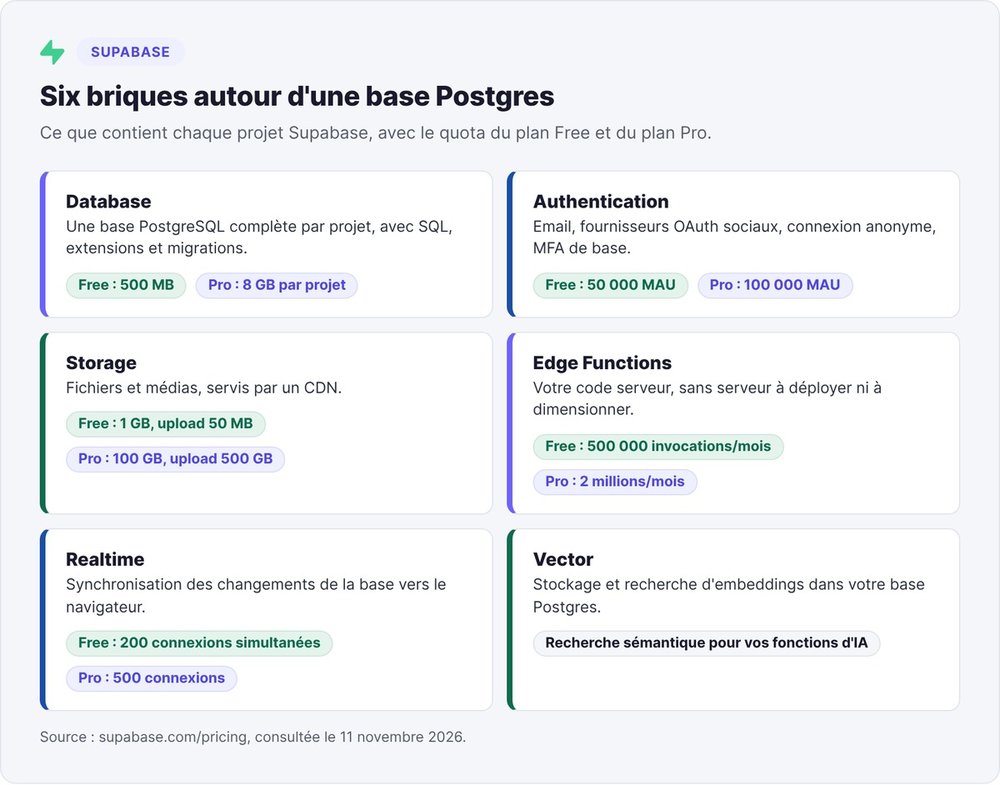
Every Supabase project is a complete PostgreSQL database, with SQL, extensions and migrations. Supabase describes it as "100% portable": what you get is standard Postgres. The Free plan provides a 500 MB database on a shared CPU with 500 MB of RAM. The Pro plan raises that to 8 GB of disk per project.
The building blocks around the database
Supabase adds six building blocks around Postgres:
- Authentication: email sign-up and login, social OAuth providers, anonymous sign-in, basic MFA. Supabase puts no cap on total users on any plan: only monthly active users (MAU) count toward the quota.
- Storage: files and media, with a maximum upload size of 50 MB on Free and 500 GB on Pro.
- Edge Functions: your server-side code, run without deploying or sizing a server, with 500,000 invocations per month on Free and 2 million on Pro.
- Realtime: syncs database changes to the browser, with 200 concurrent connections on Free and 500 on Pro.
- Vector: stores and searches embeddings for AI features such as semantic search.
- Data APIs: a REST API generated from your tables.
The Supabase product menu also lists Cron (scheduled jobs), Queues (message queues) and Supabase Compute, in private alpha since October 27, 2026, for running agents inside your project.
Open source under the Apache 2.0 license
Supabase's code is public on GitHub under the Apache 2.0 license, with 114,800 stars as of November 11, 2026. You can self-host Supabase for free with Docker or the CLI.
A $500M raise in June 2026
Supabase raised a $100M Series E at a $5 billion pre-money valuation on October 3, 2025, led by Accel and Peak XV. On June 4, 2026, the company announced a $500M Series F at $10 billion pre-money, led by GIC, Singapore's sovereign wealth fund. Stripe invested for the second time.
In the same announcement, Supabase shared three figures: database launches grew 600% in one year, nearly 10 million developers build on the platform, and more than 60% of new databases come from an AI tool. The company credits Claude Code and Codex as growth drivers since January 2026.
How does Supabase work?
With Supabase, you call the database directly from your frontend, with no middle-tier server to write.
An API generated from your tables
When you create a todos table, Supabase immediately exposes a REST route to read and write it. On the frontend, the @supabase/supabase-js library keeps the syntax short: supabase.from('todos').select('*') returns the table's rows.
A public key in the browser, security in the database
Your app calls this API with a public key (the publishable key, formerly the anon key). Supabase spells it out in its security checklist: this key ships inside your app, and the API exposes your tables to anyone who has it. Protection is configured in Postgres, table by table, with Row Level Security (RLS). An RLS policy works like adding a WHERE clause to every query: the logged-in user only sees their own rows.
That means a table without RLS stays open to everyone.
The dashboard, the SQL Editor and the Supabase CLI
The dashboard gives you a spreadsheet-style table editor, a SQL Editor and an RLS policy editor. To work locally, install the Supabase CLI with npm install supabase --save-dev (Node.js 20 or later). npx supabase init creates the project folder, then npx supabase start runs the whole stack locally in Docker containers.
Is Supabase free? The Free plan limits
Yes, Supabase is free to start, and the Free plan is enough for a prototype. Four limits matter before you launch.
Free plan quotas
The Free plan includes unlimited API requests, 50,000 MAU, a 500 MB database, 1 GB of file storage, 5 GB of egress (outbound data) and 5 GB of cached egress. Support comes from the community.

Pausing after one week of inactivity
Supabase pauses Free projects after one week of inactivity and limits each account to two active projects. A paused project stops responding until you restore it from the dashboard.
Backups and emails: two limits to fix before launch
The Free plan includes no automatic backups, and Supabase states in its documentation that you cannot download backups of a Free project. A table deleted by mistake is gone for good.
Without a custom SMTP server, Supabase Auth sends at most 2 emails per hour (sign-up confirmations, password resets). Supabase has enforced this cap since September 3, 2024, according to its production checklist. By the third sign-up in the same hour, the confirmation email never goes out. With your own SMTP (SendGrid or AWS SES, for example), the default limit rises to 30 new users per hour, and you can adjust it under Authentication > Rate Limits.
Supabase pricing in 2026: Free, Pro, Team and Enterprise
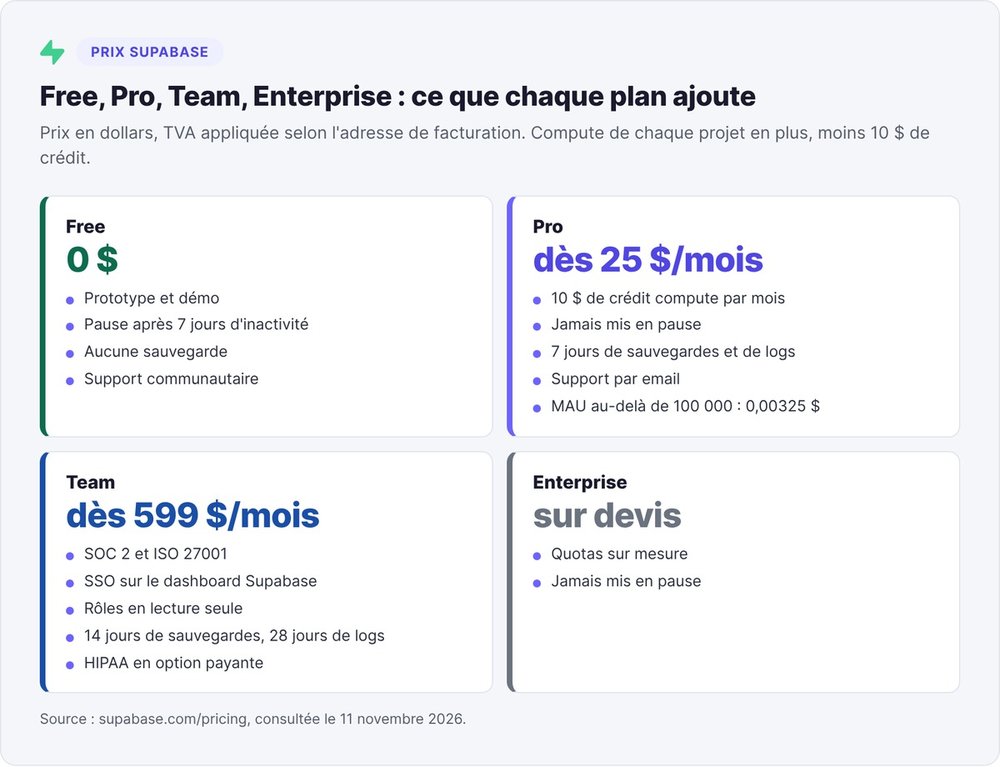
Supabase bills a subscription per organization, plus compute for each project and any usage beyond the quotas. Prices are in US dollars. Supabase applies VAT based on your billing address.
| Plan | Price | Active users included | Database | File storage | Backups | Pausing |
|---|---|---|---|---|---|---|
| Free | $0 | 50,000 | 500 MB | 1 GB | none | after 7 days of inactivity |
| Pro | from $25/month | 100,000, then $0.00325/MAU | 8 GB, then $0.125/GB | 100 GB, then $0.0213/GB | 7 days | never |
| Team | from $599/month | 100,000, then $0.00325/MAU | 8 GB, then $0.125/GB | 100 GB, then $0.0213/GB | 14 days | never |
| Enterprise | custom quote | custom | custom | custom | custom | never |
Pro at $25 per month with $10 in compute credit
The Pro plan costs $25 per month and includes your first project. It adds 250 GB of egress (then $0.09/GB), 7 days of logs and email support. Every paid plan gets $10 of compute credit per month, which covers a Micro instance. Each additional project costs at least $10 per month.
Team at $599 per month for compliance
The Team plan adds SOC 2 and ISO 27001 reports, SSO for the Supabase dashboard, read-only roles, 14 days of backups and 28 days of logs. HIPAA is available as a paid add-on.
Compute pricing by instance size
Each project runs on its own Postgres instance, billed hourly. You can change the size at any time in the dashboard:
| Size | Monthly price | CPU | Memory |
|---|---|---|---|
| Micro | $10 | shared | 1 GB |
| Small | $15 | shared | 2 GB |
| Medium | $60 | shared | 4 GB |
| Large | $110 | 2 dedicated vCPUs | 8 GB |
| XL | $210 | 4 dedicated vCPUs | 16 GB |
| 16XL | $3,730 | 64 dedicated vCPUs | 256 GB |
You pay $25 for the Pro subscription, then the instance size of each project. Supabase deducts the $10 credit from any size.
The spend cap, on by default
On the Pro plan, Supabase turns on a spend cap by default: you pay nothing for usage beyond the quotas. To go past 100,000 MAU or 250 GB of egress, turn it off in the dashboard.
How much does Supabase cost at each stage of your startup?
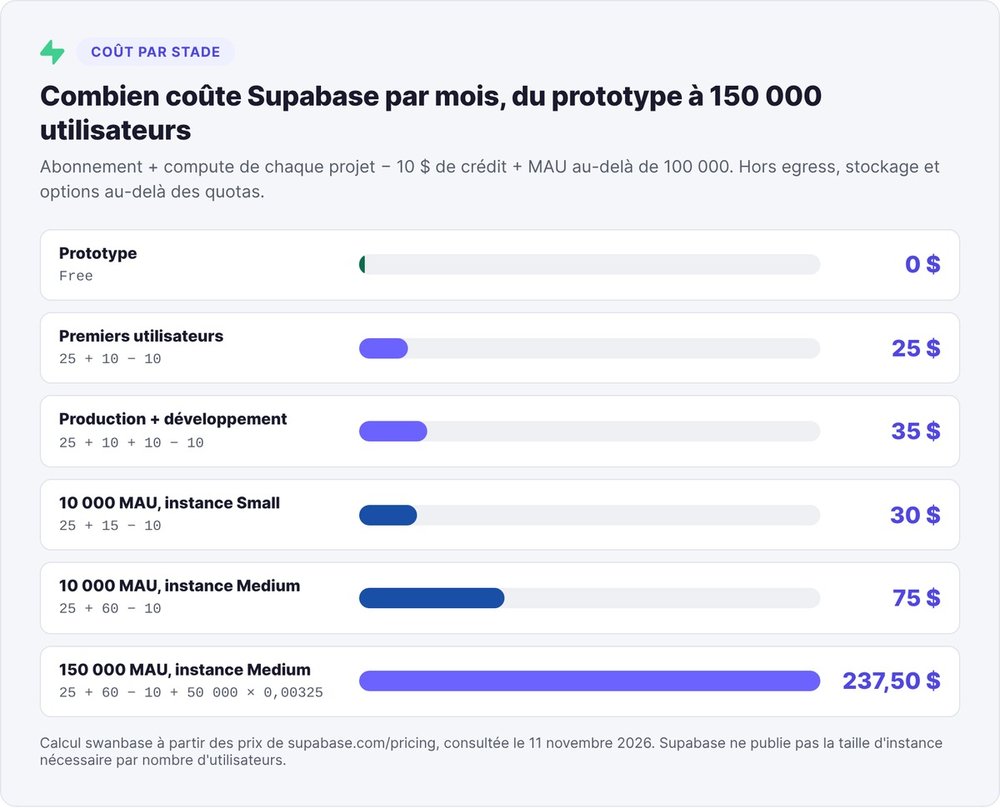
We combined the unit prices from the pricing page for six common scenarios, with the formula for each row. The calculation only counts the subscription, compute and MAU beyond the quota: egress, file storage and paid add-ons come on top if you exceed their quotas.
| Stage | Setup | Formula | Monthly total |
|---|---|---|---|
| Prototype | Free, 1 or 2 projects | $0 | $0 |
| First users in production | Pro, 1 Micro project | 25 + 10 − 10 | $25 |
| Separate production and development | Pro, 2 Micro projects | 25 + 10 + 10 − 10 | $35 |
| 10,000 MAU, Small instance | Pro, 1 Small project | 25 + 15 − 10 | $30 |
| 10,000 MAU, Medium instance | Pro, 1 Medium project | 25 + 60 − 10 | $75 |
| 150,000 MAU, Medium instance | Pro, Medium, 50,000 MAU over quota | 25 + 60 − 10 + 50,000 × 0.00325 | $237.50 |
Prototype
To test an idea, the Free plan is enough. After seven days without activity, you'll have to restore the demo by hand before every meeting.
First users in production
As soon as paying customers depend on the app, move to Pro: no pausing, and 7 days of backups. Supabase deducts the $10 credit from the price of the Micro instance, so the total stays at $25. A development project alongside production adds $10.
10,000 monthly active users
10,000 MAU is well under the Pro plan's 100,000 quota, so authentication costs nothing extra. Supabase publishes no mapping between user count and instance size, because load depends on your queries. So we priced two sizes: Small ($30 total) and Medium ($75 total). Track your project's consumption on the dashboard's Usage page before changing size.
Beyond 100,000 active users
Each MAU above 100,000 costs $0.00325. At 150,000 MAU, the extra 50,000 MAU add $162.50 per month, for a total of $237.50 with a Medium instance. At that point, turn off the spend cap, or you'll stay capped at the plan's quotas.
Why Lovable, Bolt and Claude Code use Supabase
Lovable and Bolt generate the interface, and every generated project needs a ready-to-use backend. Supabase's selling point is instant setup: database, authentication, storage and Edge Functions arrive together.
Lovable Cloud and Bolt Cloud run on Supabase
On September 29, 2025, Supabase announced that every project created in Lovable Cloud runs on Supabase. The next day, Bolt launched Bolt Cloud: Supabase hosts every Bolt Cloud project that needs a backend. Supabase said at the time that Bolt had already connected its apps to more than 600,000 Supabase backends.
If you're new to these tools, our Lovable and Bolt.new guides walk through the connection step by step. For the full method, read our guide to building a vibe-coded MVP as a non-technical founder.
Claude Code and the official Claude connector
With Claude Code, you connect Supabase through the MCP server. Since February 3, 2026, this server is also listed among Claude's official connectors. The connector works with every Supabase plan and every paid Claude plan (Pro, Team, Max, Enterprise).
On June 30, 2026, Supabase also published a guide to building on Supabase with OpenCode, the open source coding agent.
Connecting the Supabase MCP server to your agent
With the Supabase MCP server, your coding agent (Claude Code, Cursor, OpenCode) gets direct access to your Supabase projects. To understand the protocol first, read our Claude Code and MCP guide.
Install the remote server with one command
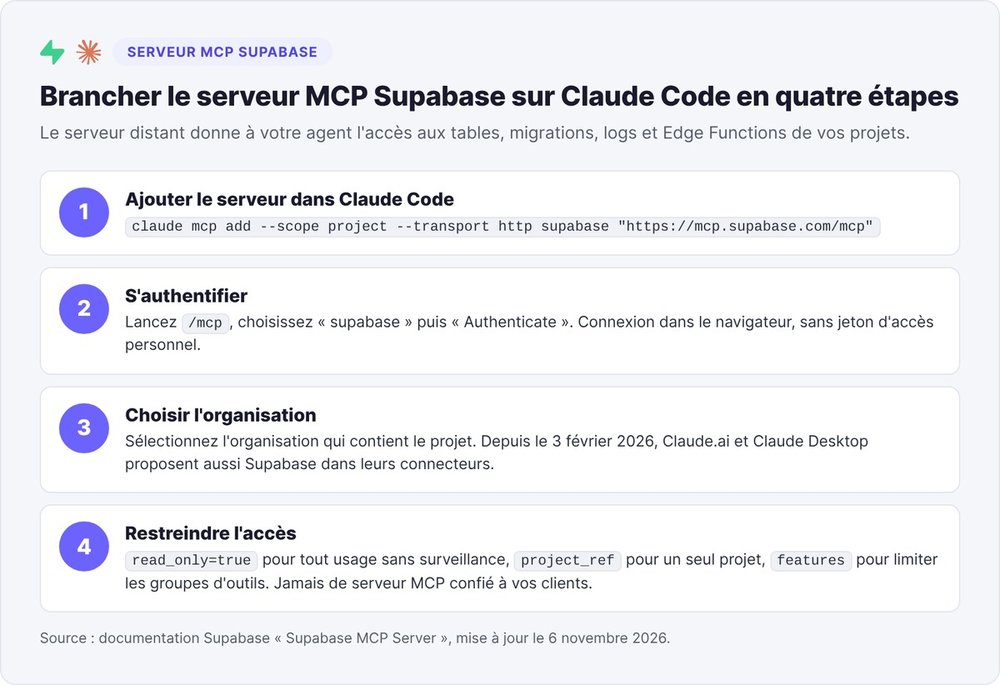
Supabase hosts the server at https://mcp.supabase.com/mcp, described in the Supabase MCP server documentation. In Claude Code, one command does it:
claude mcp add --scope project --transport http supabase "https://mcp.supabase.com/mcp"
Then run /mcp in Claude Code, pick "supabase" and then "Authenticate". Log in through the browser and choose the project's organization. You don't need a personal access token.
Available MCP tools
Supabase groups the tools in its documentation:
- Database:
list_tables,apply_migration,execute_sql. - Debugging:
query_logs, andget_advisorsto read security and performance alerts. - Development and Edge Functions:
generate_typescript_types,deploy_edge_function. - Account:
create_project,pause_project. - Branching, paid plans only: development branches of the database.
Before a billable project or branch is created, you confirm the cost shown in your MCP client.
Security settings to turn on
Supabase's MCP documentation describes one specific risk: prompt injection. Its example: a customer writes an instruction into a support ticket asking for a sensitive table to be copied into the reply. A developer later asks their agent to read that ticket, and the agent tries to carry out the instruction with the developer's permissions.
Supabase recommends five settings:
- Turn on read-only mode (
read_only=true) for any unsupervised use: the agent then runs SQL as a read-only Postgres user. - Scope the server to a single project (
project_ref), so the agent can't see your other databases. - Restrict tool groups with the
featuresoption. - Connect the agent to production only when the task requires it, and test on a development branch.
- Never give the MCP server to your customers: it runs with your developer permissions.
Also keep manual approval of every tool call turned on in your client.
Securing a vibe-coded app: the RLS checklist before going live
An AI-generated app can work fine in a demo with its tables wide open. The other traps are covered in our article on vibe coding mistakes.
Why a table without RLS is public
Supabase states it in its RLS documentation, updated November 3, 2026: a table in an exposed schema without RLS can be read and modified by any role with a grant on it. On existing projects, a new table in the public schema gets full privileges by default for the anon (logged-out visitor), authenticated and service_role roles. Adding policies does not revoke those privileges.
In practice, a visitor opens your site's network inspector, spots the public key and adds ?select=* to a request against the exposed table.
The CVE-2025-48757 precedent
On May 30, 2025, the US vulnerability database NVD published CVE-2025-48757: insufficient RLS policies in sites generated by Lovable up to April 15, 2025 let unauthenticated attackers read or write to tables. Lovable disputes the classification, arguing that each customer remains responsible for protecting their application's data.
The lesson applies to every tool: the vendor generates the code, and you are accountable for your users' data.
The ten-point checklist
Every item comes from Supabase's official documentation (the RLS page and the production security checklist, updated November 2 and 3, 2026).
- Enable RLS on every table in an exposed schema:
alter table public.ma_table enable row level security;. - Revoke the default privileges (
revoke all on table public.ma_table from anon, authenticated;), then grant only the operations you need. - Write one policy per operation (select, insert, update, delete), such as
using ((select auth.uid()) = user_id). - Reserve
to anon using (true)policies for public data: with them, any visitor can read every row. - Keep the
service_rolekey on the server: it bypasses RLS. - Check your SQL views: they bypass RLS by default, because Postgres creates them with their creator's privileges.
- Enable RLS and policies on every table broadcast through Realtime. RLS does not filter DELETE events from Postgres Changes.
- Test: write a
.sqlfile insupabase/tests/covering allowed and denied access foranonandauthenticated, then runsupabase test db. - Run the dashboard's Security Advisor, or ask your agent to call
get_advisorsthrough the read-only MCP server. - Configure authentication: email confirmation, one-time codes valid for 3,600 seconds at most, custom SMTP, MFA on your Supabase account and at least two owners in the organization.
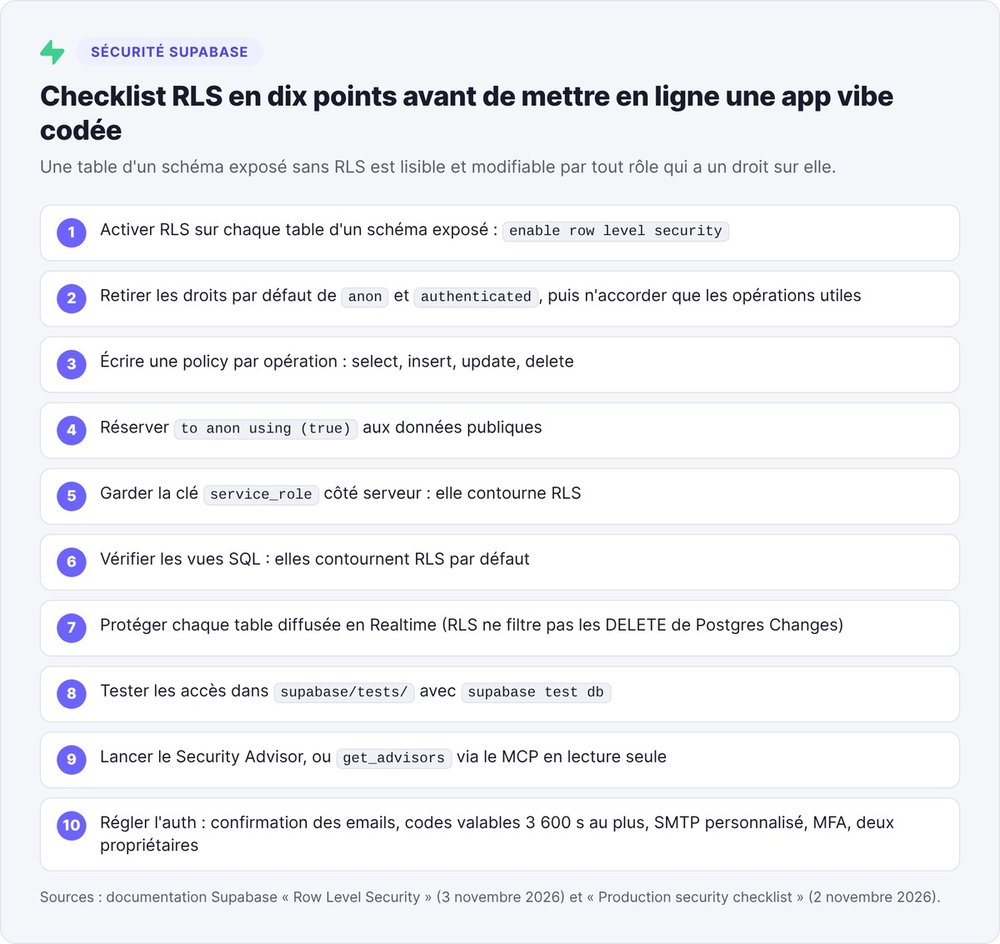
On its checklist page, Supabase publishes a prompt to paste into your agent: the agent audits the project in read-only mode and marks each item as passed, failed or unverifiable.
Supabase vs Firebase, Neon, Convex or PocketBase?
Four alternatives come up most often for founders. Key facts from their pricing pages, checked on November 11, 2026:
| Supabase | Firebase | Neon | Convex | PocketBase | |
|---|---|---|---|---|---|
| Database | PostgreSQL | Cloud Firestore (documents) | PostgreSQL | Convex reactive database | embedded SQLite |
| Free tier | 500 MB, 50,000 MAU, 2 active projects | Spark: 1 GiB stored, 50,000 reads per day | 100 projects, 1 GB per project | 0.5 GB database, 1 to 6 developers | free, MIT license |
| Paid tier | Pro from $25/month | Blaze, pay as you go | Launch, $0.106 per compute hour | Professional, $25 per developer per month | you pay for hosting |
| Authentication | included, 50,000 MAU on Free | included, 50,000 MAU at no cost | managed Better Auth | included | included |
| Watch out for | Free pauses after 7 days | Spark quotas reset daily | compute sleeps after 5 minutes idle | priced per developer | no v1.0 yet, compatibility not guaranteed |
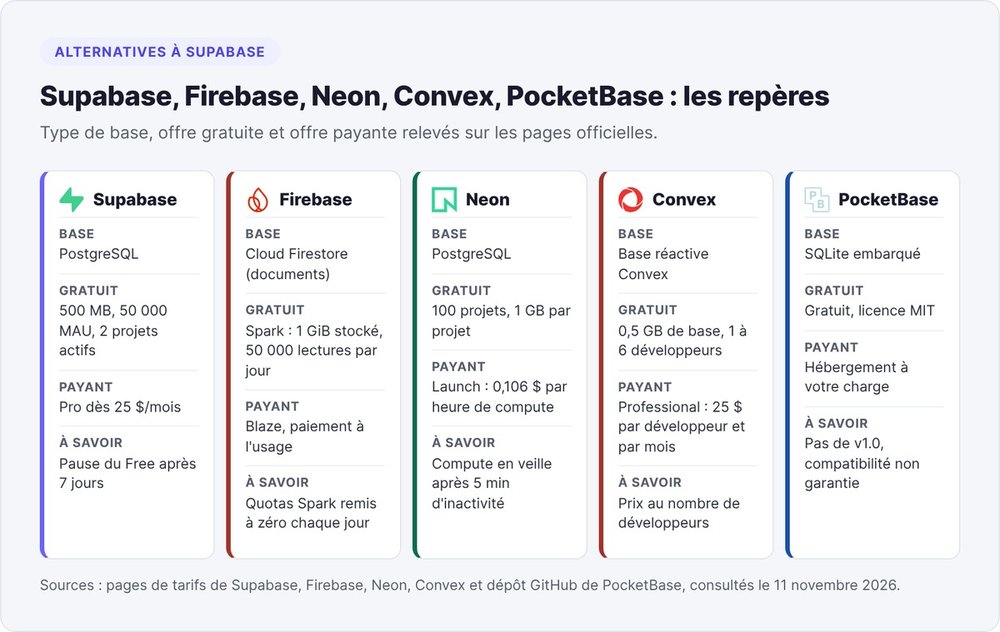
With Firebase, your data lives in a Google document database. Neon is the closest to Supabase, also on Postgres, while Convex bills per developer. PocketBase fits in a single file you host yourself, which makes it handy for an internal tool.
To compare free credits from cloud providers and AI APIs, see our guide to cloud and AI credits for startups.
Our take on Supabase for startups
Supabase is the default choice if you're building a SaaS with a vibe coding tool: Lovable and Bolt plug into it natively, you can drive it from Claude Code over MCP, and your data stays in standard Postgres.
Upgrade to Pro as soon as you land your first customer, because Free projects pause and have no backups. Set up SMTP before any public launch. Run the RLS checklist before you share the link: anyone can find an open table with a single request.
Up to 100,000 active users, budget $25 to $75 per month with a Micro to Medium instance, based on the November 11, 2026 price list.
FAQ
What is Supabase?
Supabase is an open source backend platform (Apache 2.0 license) built on PostgreSQL. Each project includes a Postgres database, authentication, file storage, Edge Functions, realtime and vector search, with an API generated from your tables.
Is Supabase free?
Yes, the Free plan costs $0 and includes a 500 MB database, 50,000 monthly active users and two active projects. Supabase pauses Free projects after one week of inactivity and includes no automatic backups on that plan.
How much does Supabase cost?
As of November 11, 2026, the Pro plan starts at $25 per month, the Team plan at $599 per month, and Enterprise is priced on quote. Every paid plan includes $10 of compute credit per month, enough for one Micro instance.
How does Supabase work?
You create tables in Postgres, and Supabase generates a REST API to read and write them from your frontend with a public key. Row Level Security rules written in SQL define which rows each user can see or modify.
Does Supabase pause inactive projects?
Yes, on the Free plan only: Supabase pauses a project after one week of inactivity. You restore it from the dashboard. Supabase never pauses Pro, Team or Enterprise projects.
How do I use Supabase with Claude?
Add the remote MCP server https://mcp.supabase.com/mcp to Claude Code with claude mcp add, then authenticate with /mcp. In Claude.ai or Claude Desktop, pick Supabase from the connectors menu, available on paid Claude plans since February 3, 2026.
Can I self-host Supabase?
Yes. Supabase confirms on its pricing page that self-hosting is free, using Docker or the Supabase CLI.