OpenCode is an open source coding agent released under the MIT license by Anomaly, the company that also publishes the SST framework. You describe a task, and the agent reads your repository, edits files and runs the commands you approve. OpenCode is available as a desktop app, a terminal interface, an editor extension, an iPhone app and an SDK.
OpenCode is free. It starts with free models that need no account and supports more than 200 model providers, plus local models. The OpenCode Go subscription, starting at $10 a month, is optional.
The prices and commands in this guide come from the official OpenCode documentation, the GitHub repository and the pricing pages, all read on November 11, 2026. The reference version is v2.2.7, released on November 10. We did not benchmark OpenCode ourselves, so this guide contains no test results.
What is OpenCode?
An open source coding agent from Anomaly
A coding agent works inside your project. You write your request in plain language, then the agent proposes a plan, shows each change and waits for your approval before running a command. OpenCode belongs to the same family as Claude Code and Codex. Two things set it apart: the source code is public, and you pick the model.
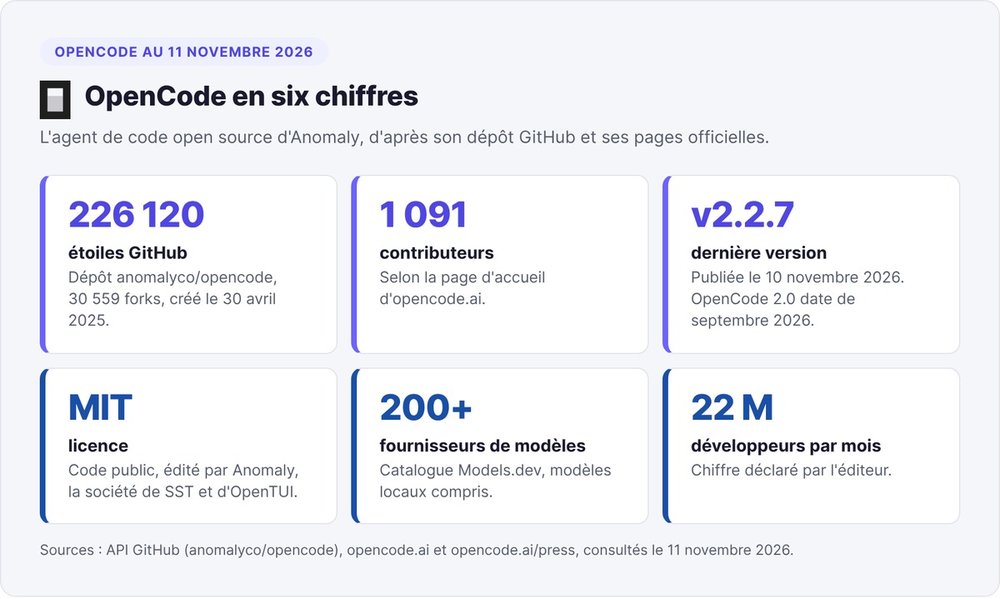
Anomaly publishes the code in the anomalyco/opencode repository. On November 11, 2026, the GitHub API showed 226,120 stars and 30,559 forks for a repository created on April 30, 2025. Anomaly also reports 1,091 contributors and 22 million developers a month.
Anomaly also publishes SST, an open framework since 2020, and OpenTUI, the terminal library OpenCode uses in production.
OpenCode 2, the current version
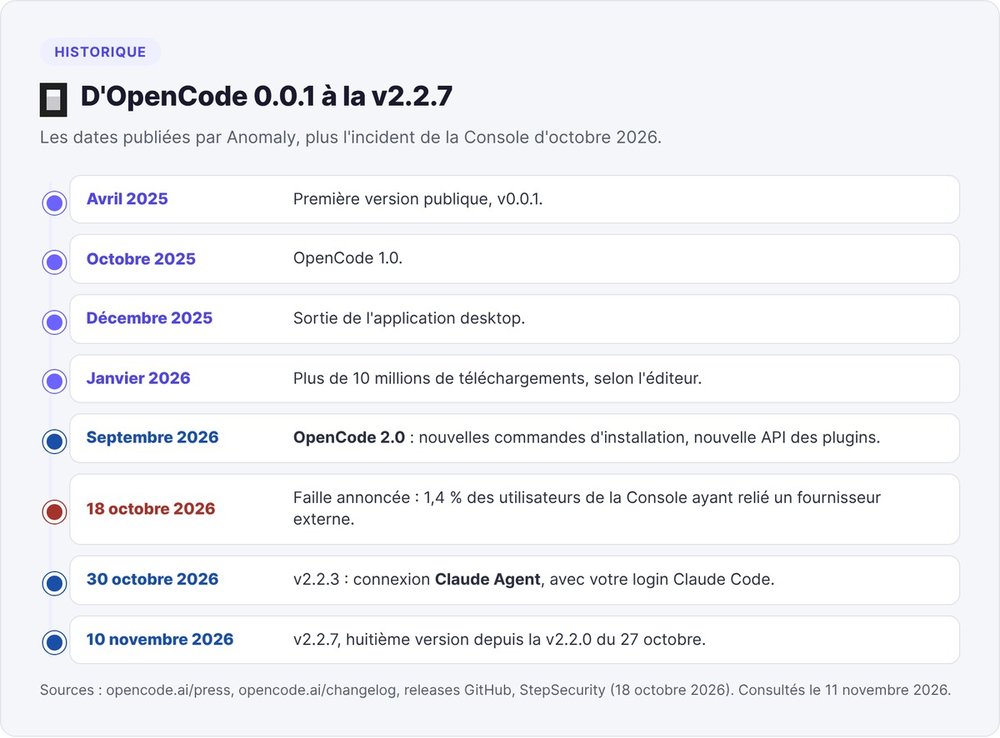
Anomaly released v0.0.1 in April 2025, OpenCode 1.0 in October 2025 and the desktop app in December 2025. The company announced more than 10 million downloads in January 2026, then shipped OpenCode 2.0 in September 2026. Between v2.2.0 on October 27, 2026 and v2.2.7 on November 10, the team shipped eight releases.
If a guide mentions opencode.ai/install or "75 providers", it is describing v1. According to the migration guide, v2 breaks compatibility with both the plugin API and the server API.
Desktop, terminal, IDE and mobile
- Desktop: tabbed sessions and a built-in browser, on macOS, Windows and Linux.
- Terminal: a text interface for any shell or remote server;
opencode runsends a single message and prints the response. - IDE: in VS Code, Cursor, Windsurf or VSCodium, run
opencodein the integrated terminal and the extension installs itself. Zed and JetBrains IDEs go throughopencode acp. - Mobile: a public beta on iPhone via TestFlight, with Android announced as "coming soon", for driving the sessions running on your computer.
- Web:
opencode pairopens the web interface with a single-use link valid for 5 minutes. - SDK: a TypeScript client for your scripts and CI.
How to install OpenCode
The official v2 commands
On macOS and Linux, run the official script:
curl -fsSL https://opencode.ai/v2/install | bash
Other methods listed in the documentation as of November 11, 2026:
| Method | Command |
|---|---|
| Homebrew | brew install anomalyco/tap/opencode-v2 |
| npm | npm install -g @opencode/cli |
| Bun | bun install -g --trust @opencode/cli |
| pnpm | pnpm add -g --allow-build=@opencode/cli @opencode/cli |
| Yarn | yarn global add @opencode/cli |
| mise | mise use -g opencode |
| Arch Linux (AUR) | paru -S opencode-beta |
With mise, you need version 2026.10.9 or later, since earlier versions still install OpenCode 1. For servers, Anomaly publishes versioned Docker images such as ghcr.io/anomalyco/opencode:2.0.0.
Installing OpenCode on Windows
According to the docs, OpenCode does not support Windows package managers. Download the Windows CLI binary (x64 or ARM64) from the docs introduction page, or install the Windows desktop app, available for x64 and ARM64.
Moving from OpenCode 1 to OpenCode 2
Both versions use the same opencode command and can no longer be installed side by side. If you installed v1 with a package manager, remove it first; the v2 curl script replaces the v1 binary.
Your configuration files stay in the same locations. Agents and skills in the .opencode/ folder keep working. You will need to port your v1 plugins and any integrations that call the server API.
First launch: Build, Plan and AGENTS.md
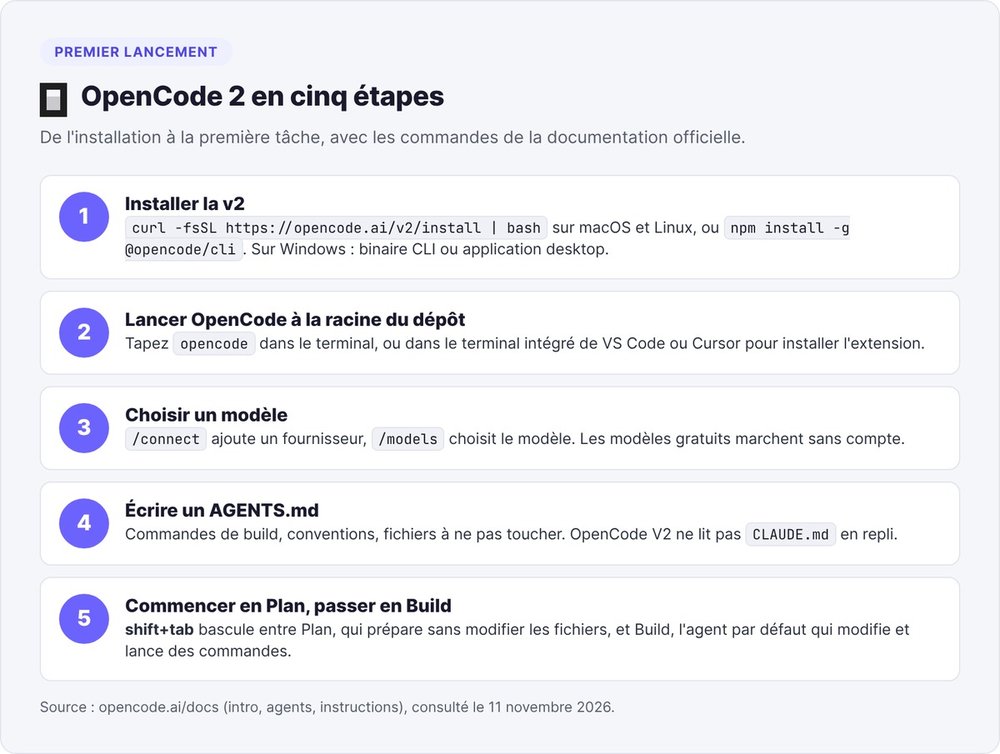
Go to the root of your repository and type opencode. OpenCode ships with two primary agents:
- Build, the default agent, edits files and runs commands;
- Plan explores the code and drafts a plan without changing any project files.
Switch between them with shift+tab. On a codebase you don't know yet, start in Plan.
Next, create an AGENTS.md file at the root with your build commands, conventions and the files the agent should leave alone. Commit it so the whole team works from the same instructions. If you're coming from Claude Code, copy your CLAUDE.md over: according to the docs, OpenCode V2 only recognizes AGENTS.md and does not fall back to reading CLAUDE.md.
Connecting OpenCode to Claude, GPT, Mistral or a local model
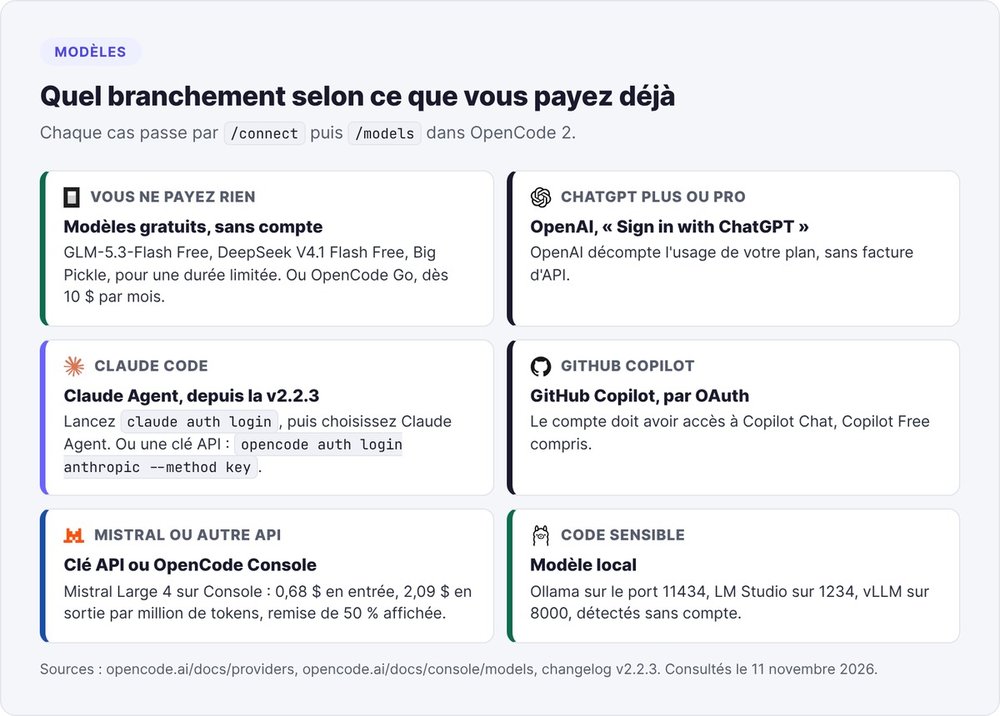
In the interface, /connect adds a provider and /models selects the model. From the command line, type opencode auth login.
Free models, no account needed
As of November 11, 2026, OpenCode offers models such as GLM-5.3-Flash Free, DeepSeek V4.1 Flash Free and Big Pickle without an account, all free "for a limited time".
During their free period, Big Pickle, Iceman Free and MiMo-V2.6-Flash Free may reuse your data to improve the model. To hide these models, set the OPENCODE_DISABLE_FREE_MODELS=1 variable.
Your ChatGPT or GitHub Copilot subscription
With a ChatGPT Plus or Pro plan, choose OpenAI in /connect, then "Sign in with ChatGPT". OpenAI then counts usage against your plan, with no API bill. By default, OpenCode caps context at the Codex level: 500,000 tokens for GPT-6.1 Sol and newer models.
A GitHub Copilot account connects through OAuth, and according to the docs that includes Copilot Free.
Claude in OpenCode: Claude Agent or an API key
The first route, available since v2.2.3 on October 30, 2026: install Claude Code, run claude auth login, then choose Claude Agent in /connect. OpenCode then uses your Claude Code login and models. Anthropic includes Claude Code in the Claude Pro plan, at $17 a month billed annually or $20 billed monthly.
The second route is an Anthropic API key, billed by usage by Anthropic: opencode auth login anthropic --method key.
Mistral and other providers
The catalog comes from Models.dev, an open database from Anomaly that lists more than 8,900 models from more than 200 providers. For Mistral, OpenCode Console offers Mistral Large 4, shown with a 50% discount at $0.68 per million input tokens and $2.09 per million output tokens.
To add a provider that isn't in the catalog, declare it in opencode.jsonc with its OpenAI-compatible URL. Mistral also publishes its own coding agent, Mistral Vibe, which we compare below.
A local model with Ollama, LM Studio or vLLM
Start Ollama and download a model with ollama serve, then ollama pull qwen3:8b. OpenCode queries the server at 127.0.0.1:11434 and adds its models to /models, with no account required. LM Studio (port 1234) and vLLM (port 8000) connect the same way.
Documented limitations: only Ollama models with the "completion" capability show up, and vLLM models start with tools disabled.
How much OpenCode costs: Go, Go Plus and Console
Do you need a subscription to use OpenCode?
No. The official FAQ says it plainly: "OpenCode is 100% free to use". You only pay the provider you connect. With the free models, a ChatGPT or Copilot subscription you already pay for, or a local model, OpenCode costs you nothing extra.
The three OpenCode Go plans
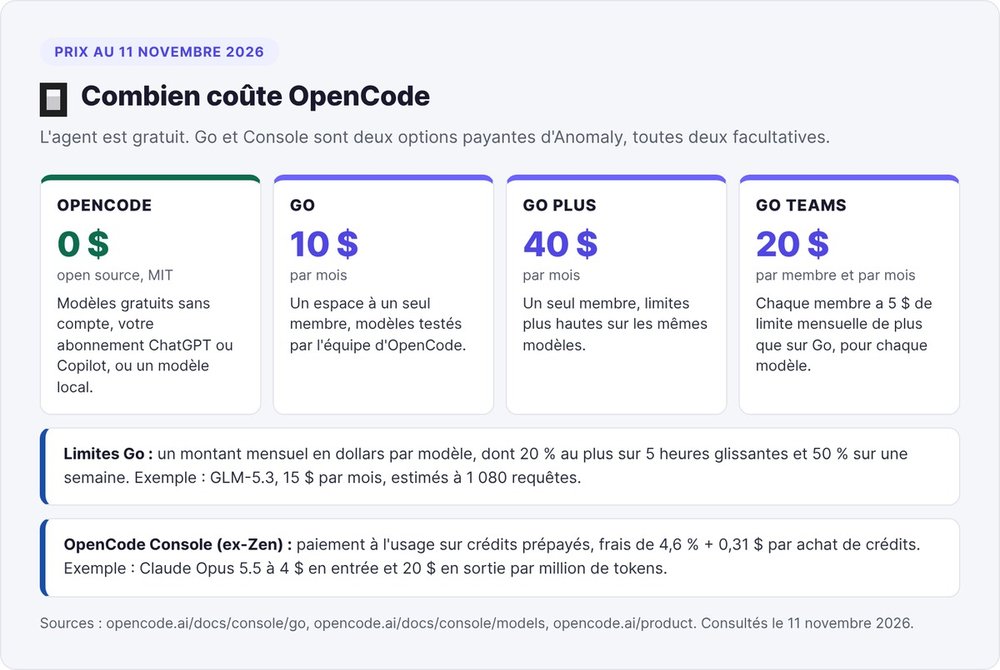
According to the OpenCode Go page in the documentation, read on November 11, 2026, Go costs $10 a month and Go Plus $40 a month, both for a single-member workspace. Go Plus raises the limits on the same models. Go Teams costs $20 per member per month, and each member gets a monthly limit $5 higher than on Go, for every model.
Go gives you access to models tested by the OpenCode team, mostly open ones: GLM-5.3, Kimi K3, Qwen3.8 Max or DeepSeek V4 Pro. The list also includes Claude Haiku 5.5 and GPT 6 Luna, and the team updates it as testing goes on. The docs list Claude Code, Codex and Hermes Agent among the clients validated for Go.
Dollar limits per model
On Go, Anomaly doesn't count your messages. Each model has a monthly limit expressed in dollars, consumed at the per-token price. Over a rolling 5-hour window you can use at most 20% of that limit, and over a week 50%.
On Go, GLM-5.3 gets $15 a month, which Anomaly estimates at 1,080 requests. Kimi K3 also gets $15, or 490 requests a month by the same estimate. Once you hit the limit, the Extra Usage option switches to your credit balance so the request goes through.
On the data side, Go blocks by default any paid endpoints that train their models on your requests. Only the Europe and United States regions are enabled by default; an admin can open the Global region for specific models.
OpenCode Zen is now called Console
The Zen name no longer appears in the v2 documentation. On November 11, 2026, the opencode.ai/zen address redirects to OpenCode Console, Anomaly's gateway: models tested for coding, paid by usage from prepaid credits.
Anomaly says it sells at cost, with a processing fee of 4.6% plus $0.31 per credit purchase. For example, Claude Opus 5.5 costs $4 per million input tokens and $20 per million output tokens there, the same rate shown on Anthropic's pricing page. Anomaly hosts these models in the United States and the European Union, and offers teams per-member budgets, SSO and SCIM.
OpenCode vs Claude Code, Codex and Mistral Vibe
| OpenCode | Claude Code | Codex | Mistral Vibe | |
|---|---|---|---|---|
| Publisher | Anomaly | Anthropic | OpenAI | Mistral AI |
| License | MIT | proprietary | CLI under Apache 2.0 | CLI under Apache 2.0 |
| Models | more than 200 providers, local models | Claude models | OpenAI models | Mistral models |
| Entry price | $0, Go from $10 a month | Claude Pro, $17 a month billed annually | ChatGPT Free at $0, Plus at $20 a month | Free at €0, Pro at €14.99 excl. VAT a month |
| Usable in OpenCode | yes | yes, via Claude Agent | yes, via ChatGPT Plus or Pro | Mistral Large 4 via Console |
Prices checked on November 11, 2026 on each publisher's official pages.
OpenCode or Claude Code
Claude Code runs on Anthropic's models and requires a paid Claude subscription; the Free plan doesn't include it. In OpenCode, you can switch models from one session to the next, Claude included via Claude Agent.
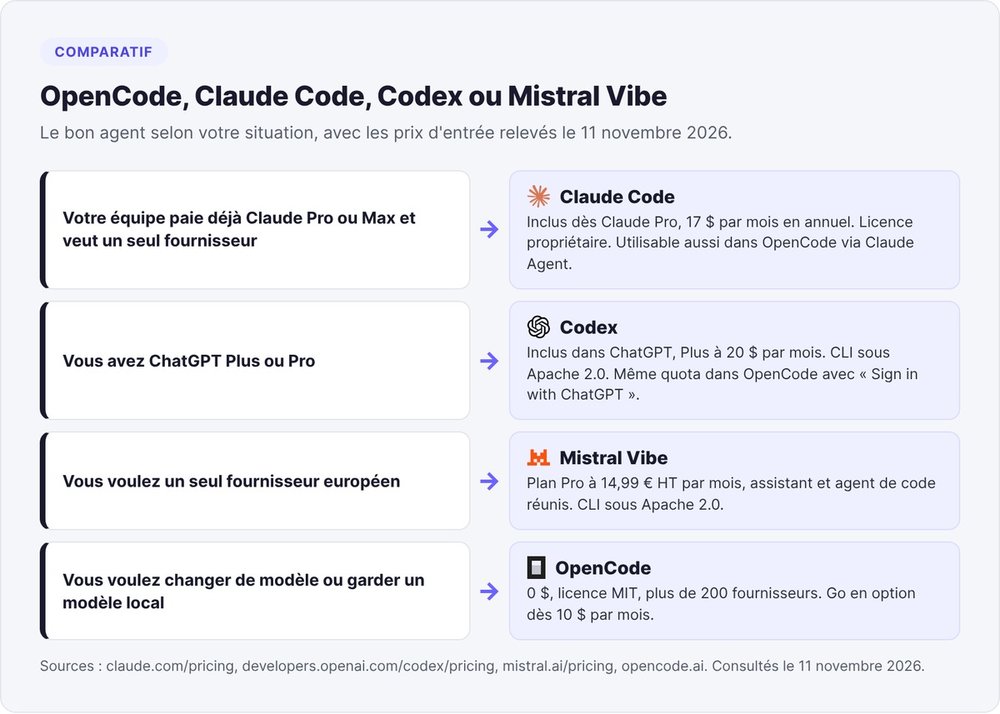
Stick with Claude Code if your team already pays for Claude Pro or Max and wants a single provider. Switch to OpenCode if you want to try several models, keep a local model for sensitive code or pay for an open model through Go. See also our comparisons Claude Code vs Codex and Claude Code vs Cursor.
OpenCode or Codex
OpenAI includes Codex in every ChatGPT plan: Free at $0, Go at $8, Plus at $20 and Pro from $100 a month. With a Plus or Pro plan, you use the same quota in OpenCode through "Sign in with ChatGPT". The choice then comes down to the interface, and OpenCode lets you add other models alongside.
OpenCode or Mistral Vibe
Mistral Vibe bundles Mistral AI's assistant and coding agent into one subscription, at €14.99 excl. VAT a month for the Pro plan. A startup that wants a single European provider gets a complete package from Mistral, while OpenCode puts Mistral Large 4 next to models from other publishers.
OpenCode in Cursor
Cursor is a code editor, while OpenCode is an agent that runs in a terminal. Run opencode in Cursor's integrated terminal and the extension installs from Open VSX; the Cmd+Esc shortcut (Ctrl+Esc outside Mac) then opens OpenCode next to your code.
Protecting your keys before running OpenCode on a repository
The Console incident of October 18, 2026
On October 18, 2026, OpenCode announced on X a security breach tied to "a large-scale distillation attack". According to the message quoted in StepSecurity's analysis, the breach affected 1.4% of Console users who had linked an external provider: Anthropic, OpenAI or Google.
The OpenCode team emailed affected accounts that same morning, so if you didn't get an email, you weren't affected. As of that analysis, OpenCode had published neither the cause nor which data was accessed. The announcement concerns Console accounts and doesn't mention the locally installed agent.
Settings to check before working on a client repository
Before you open a client repository, keep command approval on: the --auto option allows any action you haven't explicitly denied. OpenCode stores provider credentials in ~/.local/share/opencode/auth.json on macOS and Linux; after an incident, rotate every key listed there. On client code, avoid free models that keep your data, such as Big Pickle or Iceman Free.
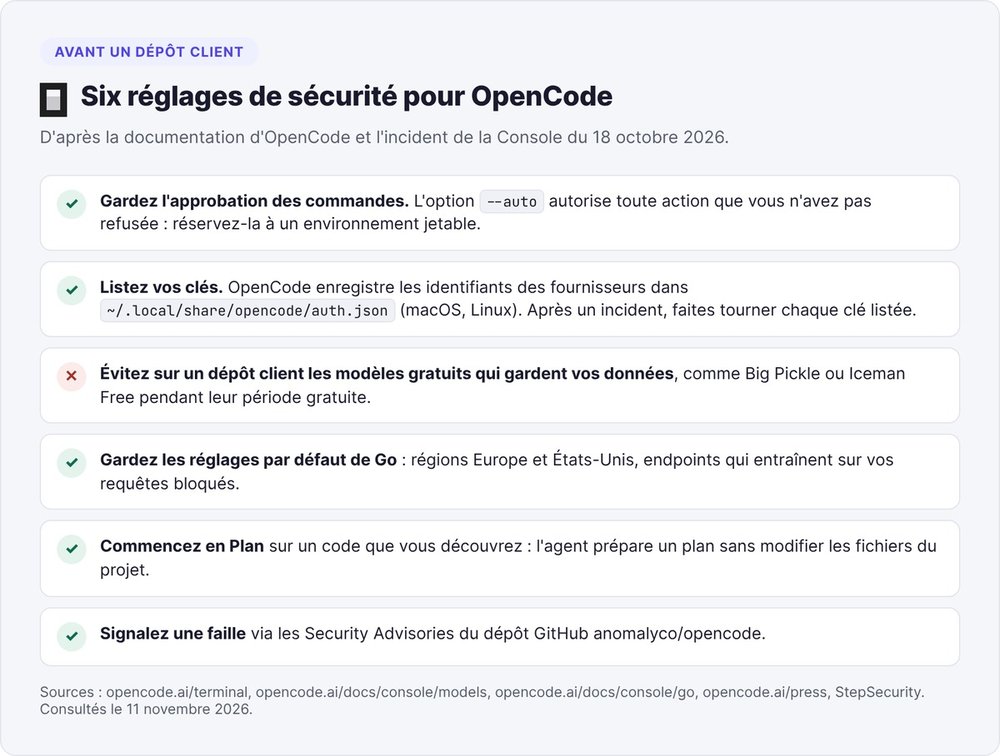
To report a vulnerability in OpenCode, use the Security Advisories on the GitHub repository.
Our take: is OpenCode right for your startup?
OpenCode suits founders who code and want to stay independent of any single model provider: you start without paying, then switch models depending on the task.
The trade-off is that choosing the model and reading its data terms falls on you. You also have to keep up with the release pace: Anomaly shipped eight v2 releases between October 27 and November 10, 2026. If you already have Claude Pro or ChatGPT Plus, your team can try OpenCode at no extra cost, since both subscriptions plug into it.
If you don't code, start by understanding vibe coding before picking an agent. To compare OpenCode with other open source AI agents, see our roundup of OpenClaw alternatives.
FAQ
Is OpenCode free?
Yes. OpenCode is open source under the MIT license and offers free models with no account required. You only pay the provider you connect, or the optional OpenCode Go subscription, from $10 a month.
How do I install OpenCode?
On macOS and Linux, run curl -fsSL https://opencode.ai/v2/install | bash, or brew install anomalyco/tap/opencode-v2. With npm, the command is npm install -g @opencode/cli. Then type opencode at the root of your project, followed by /connect to choose a provider.
What is the difference between OpenCode and Claude Code?
Claude Code is Anthropic's agent: it uses Claude models and requires a paid Claude subscription, starting at $17 a month billed annually. OpenCode is open source under the MIT license and supports more than 200 providers, including Claude through your Claude Code login.
Can I use Claude in OpenCode?
Yes, in two ways. Since v2.2.3, you can install Claude Code, run claude auth login, then choose Claude Agent in /connect. Otherwise, connect an Anthropic API key with opencode auth login anthropic --method key.
How much does OpenCode Go cost?
As of November 11, 2026, Go costs $10 a month, Go Plus $40 a month and Go Teams $20 per member per month. Each model has a monthly dollar limit, with at most 20% usable over 5 hours and 50% over a week.
What is OpenCode Zen?
The OpenCode Zen name no longer appears in the v2 documentation. On November 11, 2026, the opencode.ai/zen address redirects to OpenCode Console, where Anomaly sells tested models on a pay-as-you-go basis, with a fee of 4.6% plus $0.31 per credit purchase.
Does OpenCode work on Windows?
Yes, with the Windows CLI binary (x64 or ARM64) or the Windows desktop app. According to the official documentation, OpenCode does not support Windows package managers.
Does OpenCode work with VS Code?
Yes. Run opencode in the VS Code integrated terminal and the extension installs itself. The OpenCode extension is also available on Open VSX for Cursor, Windsurf and VSCodium.