A Claude Code skill is a folder containing a SKILL.md file with reusable instructions. Claude loads it on its own when your task matches, or you trigger it by hand with /skill-name. Claude Code Skills follow the open Agent Skills standard, so the same format works across several AI tools. A CLAUDE.md file is always loaded into memory, but a skill's body only loads when it's actually needed: your reference documentation costs next to nothing until you use it. In practice, a skill saves you from pasting the same instructions into the chat every session. Here's what a skill is, how to install one, how to build your own, and above all when to reach for a skill instead of CLAUDE.md, a slash command or an MCP.
What is a Claude Code skill?
A Claude Code skill is a capability you give Claude in the form of a text file. You write a SKILL.md, Claude adds it to its toolbox, and uses it when it's relevant. There's no plugin to compile and no dependency to install: one folder, one markdown file, and it's live.
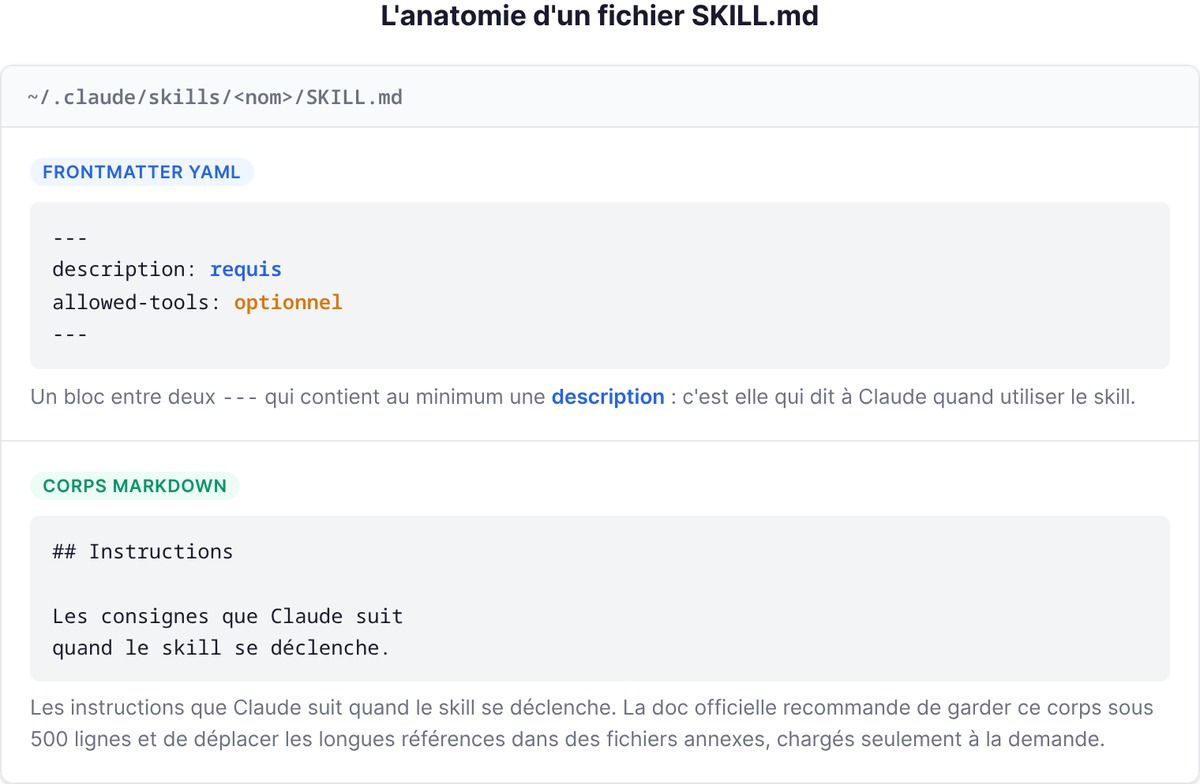
The file has two parts. First comes a YAML frontmatter block between two --- lines, which contains at least a description: this is what tells Claude when to use the skill. Then comes the markdown body, with the instructions Claude follows when the skill fires. The official docs recommend keeping the body under 500 lines and moving long reference material into supporting files that load only on demand.
Skills exist because you keep repeating yourself. You paste the same deployment checklist, the same commit format, the same API conventions into the chat, session after session. With a skill, you write that procedure once. And where CLAUDE.md keeps those instructions in context permanently (paying their token cost on every turn), a skill only loads its content when it runs. That's the structural difference to remember: CLAUDE.md is permanent memory, a skill is on-demand know-how.
If you're coming from an older version of Claude Code, note that custom commands have been merged into skills. A .claude/commands/deploy.md file and a .claude/skills/deploy/SKILL.md skill both create the /deploy command and behave the same way, so your old commands keep working. Skills simply add extra options: a folder for supporting files, frontmatter to control who triggers what, and the ability for Claude to load the skill automatically.
How to install and activate a skill
Installing a Claude Code skill means two very different things depending on where it comes from: either you drop it into the right folder yourself, or you install it from a plugin marketplace.
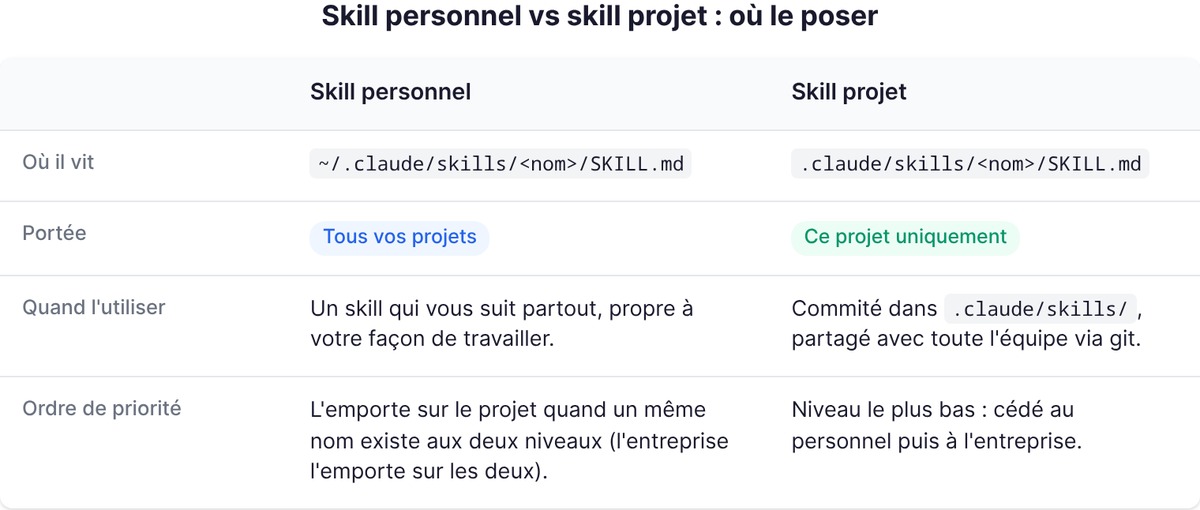
The simplest case: a skill is a folder, you put it in the right place, and it's active. The location determines who can use it.
| Location | Path | Applies to |
|---|---|---|
| Personal | ~/.claude/skills/<nom>/SKILL.md |
All your projects |
| Project | .claude/skills/<nom>/SKILL.md |
This project only |
| Plugin | <plugin>/skills/<nom>/SKILL.md |
Wherever you enable the plugin |
| Enterprise | Via managed settings | The whole organization |
A personal skill follows you everywhere. A project skill, committed to .claude/skills/, reaches your whole team through git. When the same name exists at several levels, enterprise wins over personal, which wins over project. Claude Code watches skill folders live: adding or editing a SKILL.md under ~/.claude/skills/ takes effect in the current session, with no restart.
The second case: installing from a marketplace. Claude Code has an official plugin system. For example, to install the skill-creator plugin, which helps you build and test your own skills, you type:
/plugin install skill-creator@claude-plugins-official
Once the skill is in place, there are two ways to activate it. You trigger it by hand by typing /skill-name, or you let Claude load it on its own when your request matches its description. Everything hinges on the description: if it contains the words you'd naturally use, Claude finds the skill. If it doesn't, Claude misses it. To check that Claude recognizes a skill, ask it "what skills are available?".
Build your own skill in three steps
Example: a skill that summarizes the uncommitted changes in your git repo and flags risky spots, built in three steps.
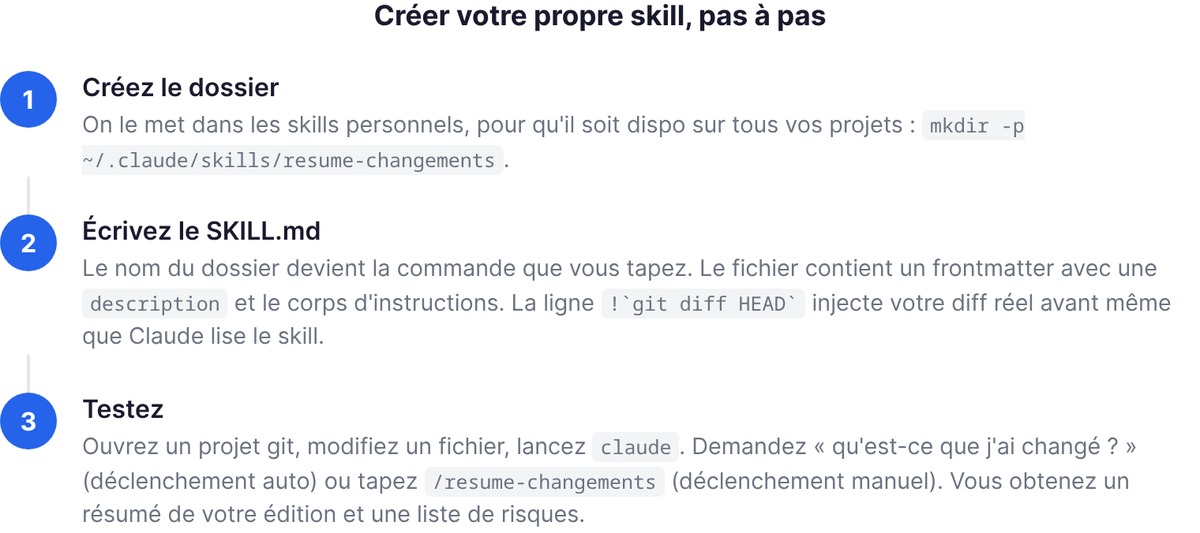
1. Create the folder. We'll put it in your personal skills so it's available across all your projects:
mkdir -p ~/.claude/skills/resume-changements
2. Write the SKILL.md. The folder name becomes the command you type. Save this in ~/.claude/skills/resume-changements/SKILL.md:
---
description: Résume les changements non commités et signale ce qui est risqué. À utiliser quand l'utilisateur demande ce qui a changé, veut un message de commit, ou une revue de son diff.
---

## Changements en cours

!`git diff HEAD`

## Instructions

Résume les changements ci-dessus en deux ou trois puces, puis liste les risques : gestion d'erreur manquante, valeurs codées en dur, tests à mettre à jour. Si le diff est vide, dis qu'il n'y a rien de non commité.
The !`git diff HEAD` line injects dynamic context: Claude Code runs the command and replaces the line with its output before Claude even reads the skill. So the instructions arrive with your actual diff already inserted. Instead of reasoning about what Claude imagines your code looks like, the skill works from your real working tree. This !`command` syntax works with any shell command.
3. Test it. Open a git project, edit a file, and run claude. Ask "what did I change?" (Claude triggers the skill on its own) or type /resume-changements (manual trigger). Either way, you get a summary of your edit and a list of risks.
Want to go further? Add supporting files to the folder: a reference.md with detailed docs, a scripts/ directory with a Python script for Claude to run. The SKILL.md stays short and points to those files, which only load when they're needed.
CLAUDE.md, skills, slash commands or MCP: which one for what
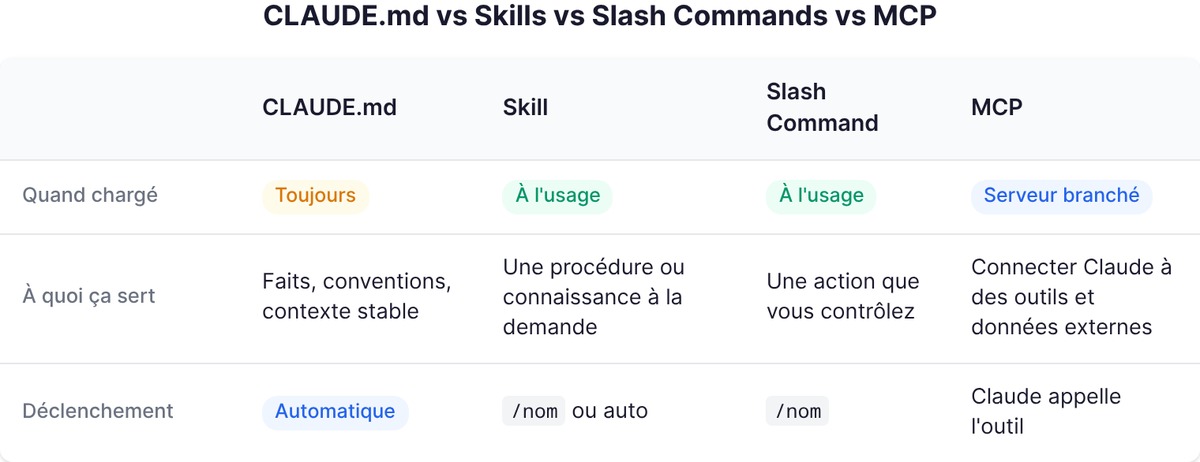
Four mechanisms that people often mix up:
| Mechanism | When Claude loads it | What it's for | How it's triggered |
|---|---|---|---|
| CLAUDE.md | Always, permanently | Facts, conventions, stable project context | Automatic, never invoked |
| Skill | Only when used | A procedure or knowledge on demand | /name or automatically by Claude |
| Slash command | When used, on your command | An action you want to control | /name only |
| MCP | Server connected continuously | Connecting Claude to external tools and data | Claude calls the tool |
The logic boils down to one sentence per row.
CLAUDE.md is memory. Facts Claude should always have in front of it: the stack, naming conventions, the architecture. It's always loaded, so keep it short. If a section of your CLAUDE.md has turned into a multi-step procedure rather than a fact, that's your signal: it should become a skill.
A skill is know-how. A procedure Claude pulls off the shelf when it's useful and puts back afterward. Since the merge, a slash command is just a skill you trigger by hand: set disable-model-invocation: true in the frontmatter and Claude will never launch it on its own (handy for a /deploy you definitely don't want firing because "the code looks ready"). Conversely, user-invocable: false hides the skill from the menu so only Claude can use it, which is useful for background knowledge that isn't an action.
An MCP is a plug. The Model Context Protocol doesn't load instructions. It connects Claude to an external tool or data source: your GitHub, a database, a browser. To settle the most common confusion: a skill tells Claude how to do something, an MCP gives it access to something. If you want Claude to follow your review process, write a skill. If you want it to read your GitHub issues live, connect an MCP. The two work together in the same project.
The most useful skills for founders
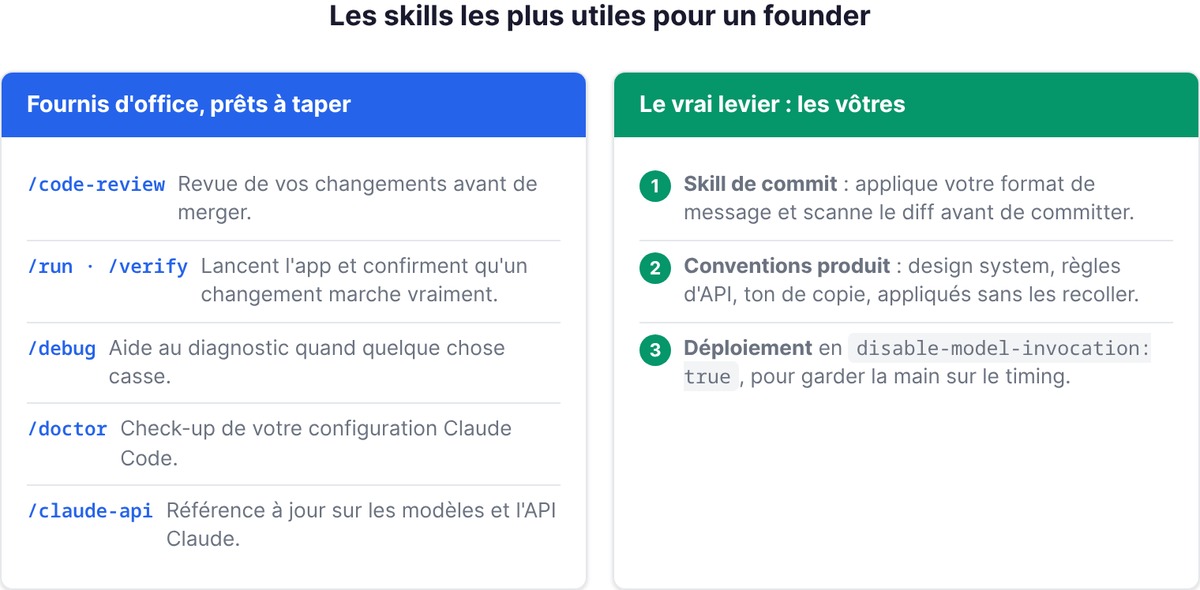
If you're building solo or with a small team, you don't have time to reinvent workflows. Claude Code ships with built-in skills, ready to type. The ones that pay off most when you're shipping an MVP: /code-review reviews your changes before you merge, the safety net you're missing when you're the only dev. /run and /verify launch your app and confirm a change actually works, instead of relying on tests alone; for a non-technical founder who's never quite sure "it runs," that's invaluable. /debug helps you diagnose things when something breaks and you don't know where to start. /doctor gives your Claude Code setup a health check. /claude-api provides up-to-date reference on Claude models and the API, useful as soon as you wire Claude into your product.
The biggest lever, though, is writing your own, because they encode the way you work. Three obvious candidates for a founder:
- A commit skill that enforces your message format and scans the diff before committing (like the example above, in an extended version).
- A product conventions skill: your design system, your API rules, your copy tone. Claude applies them without you pasting them in.
- A deployment skill with
disable-model-invocation: true, so you stay in control of the timing.
And if you want to industrialize the process, the skill-creator plugin goes further: it generates test cases, runs each skill in an isolated subagent, and compares results with and without the skill. You measure whether your skill works instead of guessing.
One last habit: a skill is only useful if Claude finds it. When a skill "doesn't trigger," reread its description first. If it's too vague, Claude misses it. Write it using the words you actually type in the chat, without jargon.
Further reading
- the Claude Code guide for founders
- connect Claude to your tools with MCP
- delegate tasks to subagents
FAQ
What is a skill in Claude Code?
A skill is a folder containing a SKILL.md file (YAML frontmatter plus markdown instructions) that extends what Claude can do. Claude loads it automatically when the task matches its description, or you trigger it by hand with /skill-name. Skills follow the open Agent Skills standard, so the same file works across several AI tools.
How do I install a skill in Claude Code?
There are two ways. Either you place the skill folder in the right location: ~/.claude/skills/<nom>/ to use it across all your projects, or .claude/skills/<nom>/ for a single project. Or you install it from a plugin marketplace, for example /plugin install skill-creator@claude-plugins-official. Claude Code picks up new skills live, with no restart.
What's the difference between a skill and an MCP?
A skill gives Claude instructions on how to do something (a procedure, conventions). An MCP (Model Context Protocol) connects Claude to an external tool or data source, such as GitHub or a database. The skill explains how, the MCP provides access to what. The two work together.
CLAUDE.md or skill: which should I choose?
Use CLAUDE.md for stable facts Claude should always keep in mind (stack, conventions, architecture): Claude loads it permanently. Use a skill for a procedure Claude only pulls out when it's useful: its body only loads when used, so it doesn't cost tokens all the time. Simple rule: if a section of your CLAUDE.md has become a step-by-step procedure, turn it into a skill.
Which skills are most useful to get started?
The built-in skills help right away: /code-review to review your changes, /run and /verify to confirm a change works, /debug to diagnose a failure, /doctor to check your setup. After that, the best return comes from writing your own skills (commit, product conventions, deployment) because they encode the way you work.