Cursor AI is an AI-powered code editor built on Visual Studio Code by the US company Anysphere, which has been a SpaceX subsidiary since August 14, 2026. You write code just as you would in VS Code, plus you get predictive autocomplete, an agent that edits several files at once, and a choice of models from multiple AI labs.
Our take in short: Cursor suits founders who can read code and want to stay in control of every change. The free plan is enough for a one-week trial. To code every day with the agent, budget for the $20/month Pro plan and keep an eye on usage: Cursor itself estimates that someone who relies on the agent daily spends $60 to $100 a month in total.
All prices and features below come from Cursor's pricing page and its documentation, checked on September 26, 2026.
Cursor AI, Anysphere's code editor
Cursor installs on your computer and runs on Windows, macOS or Linux. It reuses the interface of Visual Studio Code, Microsoft's free editor, and adds AI to every panel: suggestions as you type, edits on a selection, and an agent in a sidebar.
Who makes Cursor
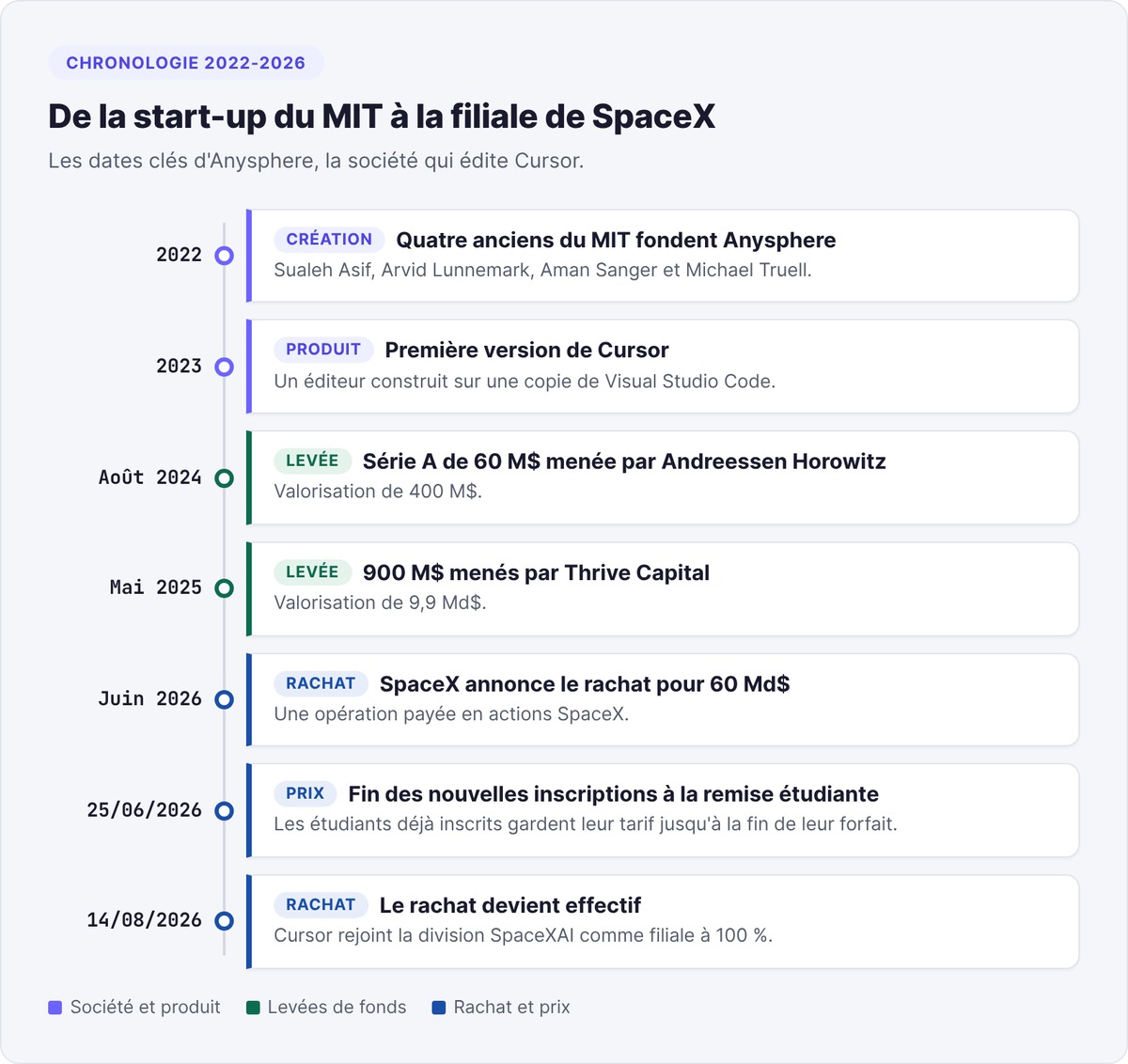
Four MIT alumni founded Anysphere in 2022 and released the first version of Cursor in 2023, according to Wikipedia. The company raised $60 million in August 2024 from Andreessen Horowitz, then $900 million in May 2025 led by Thrive Capital, at a $9.9 billion valuation.
The 2026 SpaceX acquisition
In June 2026, SpaceX announced it would acquire Anysphere for $60 billion in stock, according to CNBC. The deal closed on August 14, 2026, based on an SEC filing reported by Yahoo Finance. Cursor now operates as a wholly owned subsidiary within the SpaceXAI division.
The acquisition already shows in the product. The pricing page highlights the Grok models, and the documentation describes Grok 4.7, 4.6 and 4.5 as "trained jointly by Cursor and SpaceXAI." Analysts quoted by Yahoo Finance expect the Cursor brand to eventually give way to Grok.
Cursor's features
Cursor offers five ways to work with AI, from suggesting a single line to handing off an entire feature.

Tab, predictive autocomplete
Tab suggests what comes next in your code as grayed-out text, based on your recent edits, surrounding code and linter errors. A suggestion can span several lines and add a missing import. Once you accept a suggestion, pressing Tab again jumps to the next likely edit, even in another file.
Inline editing with Cmd+K
Select a block, press Cmd+K (Ctrl+K on Windows and Linux) and describe the change, for example "make this function async." Cursor applies the inline edit in place, without opening a panel.
The agent and Plan mode
The agent opens with Cmd+I. It searches your project and the web, edits files, runs terminal commands and drives a browser to check how a page renders. You then review its changes in a diff view.
For a task that touches several files, turn on Plan mode with Shift+Tab in the agent input. The agent then studies the code, asks you questions, drafts a plan and waits for your approval before writing a single line, according to the quickstart guide.
Rules and AGENTS.md
Rules give the agent standing instructions. Project rules live in the .cursor/rules folder as .mdc files versioned alongside your code. User rules apply to all your projects. If you prefer a plain Markdown file, an AGENTS.md at the repo root does the same job.
Use it to spell out your conventions and the tests to run before each change.
Available models
Cursor gives you models from several labs in a single picker. On September 26, 2026, the models and pricing page listed, among others, Anthropic's Claude Opus 5.5 and Claude Sonnet 5, OpenAI's GPT-5.6 Sol, Google's Gemini 3.1 Pro, plus the in-house models Composer 2.5 and Grok 4.7. Auto mode picks the model for you and bills the request at that model's price.
Paid plans add MCP servers, skills and hooks, cloud agents that keep running while your computer is off, and Bugbot, an automated pull request reviewer billed by usage.
Cursor pricing in 2026
The pricing page lists six self-serve plans, plus an Enterprise offer priced on request. Prices exclude tax: VAT is added to the invoice.
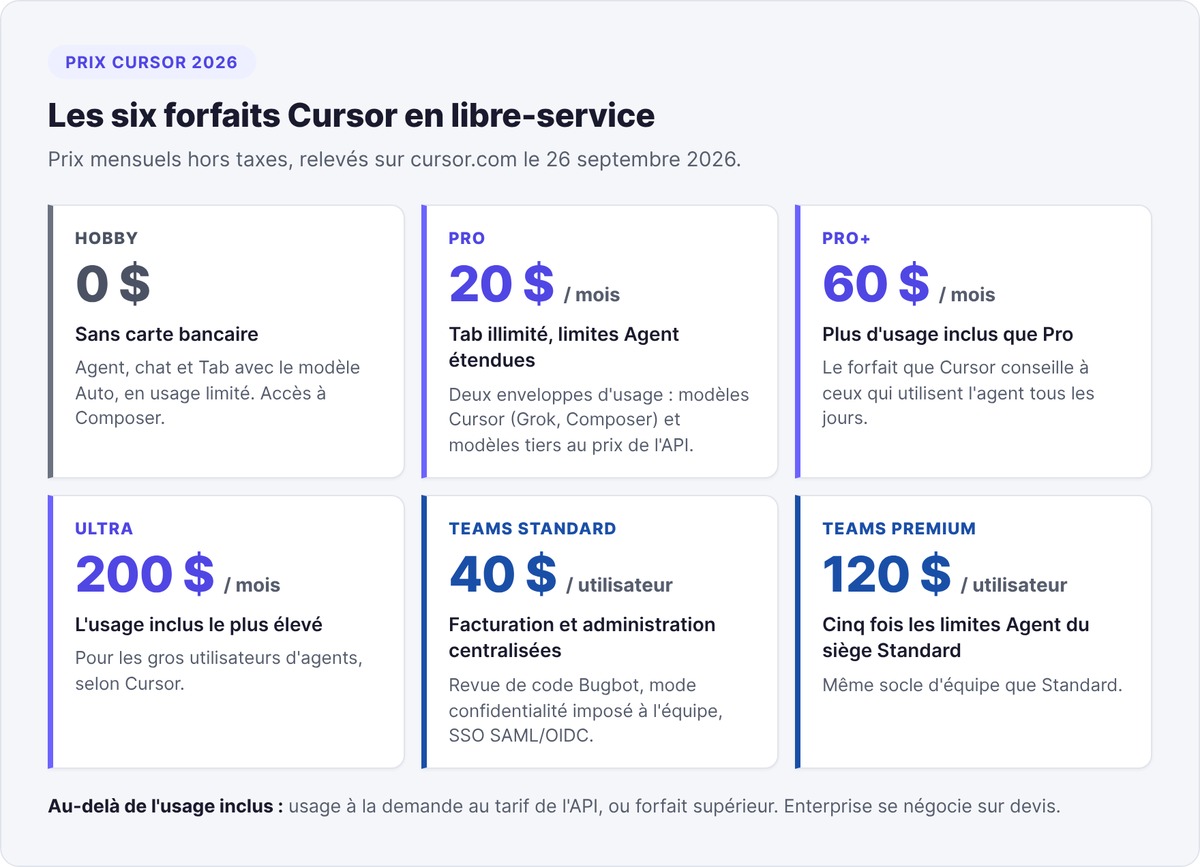
| Plan | Monthly price excl. tax | Who it's for, according to Cursor |
|---|---|---|
| Hobby | Free | Trying out the tool |
| Pro | $20 | Regular individual use |
| Pro+ | $60 | Daily agent use |
| Ultra | $200 | Heavy agent users |
| Teams Standard | $40 per user | Teams that need centralized billing |
| Teams Premium | $120 per user | Teams that lean heavily on the agent |
Pro, Pro+ and Ultra: two usage pools
The three paid individual plans include unlimited Tab and extended agent limits. Each one comes with two usage pools that reset every month:
- Cursor models: Grok 4.7, 4.6, 4.5 and Composer 2.5, with a more generous allowance.
- Other models: Claude, GPT, Gemini and other third-party models, counted at their API price.
Unused usage does not roll over to the next month. When you hit the limit, the editor lets you know. You can then turn on on-demand usage, billed at the same API rates at the end of the month, or upgrade to a higher plan.
Estimating your real budget
The pricing documentation gives ballpark figures. Someone who mostly uses Tab usually stays within the included usage. Daily agent use typically comes to $60 to $100 a month in total, and users running several agents often go past $200.
Model choice matters a lot. Composer 2.5 costs $0.50 per million input tokens, while Claude Opus 5.5 costs $4. To stay within the $20 Pro plan, save the most expensive models for hard tasks.
Teams plans
Teams Standard, at $40 per user, adds centralized billing, an internal catalog of rules and skills, usage analytics, team-wide enforced privacy mode and SAML/OIDC SSO. The $120 Premium seat raises agent limits fivefold.
On Teams and Enterprise, Cursor adds a $0.25 per million tokens fee to every request sent to a third-party model, even when you use your own API key. Grok and Composer are exempt from this fee.
Cursor AI for free: the Hobby plan and its limits
The Hobby plan requires no credit card. According to Cursor's help center, it gives you limited access to the agent, chat and Tab with the Auto model. The pricing page also mentions access to Composer.
Cursor does not publish any figures for these limits. Hobby is enough to test the interface or have the agent walk you through a project. You'll hit the ceiling quickly if you hand it entire features.
Bring your own API key
You can plug in your own API keys from OpenAI, Anthropic, Google, Azure or AWS Bedrock under Settings, then Models. The provider bills you directly. On the individual Pro, Pro+ and Ultra plans, these requests don't count against your included usage. Keys only work for chat models: Tab keeps using Cursor's own models.
The end of the student discount
Cursor closed new sign-ups for its student discount on June 25, 2026, according to its help page. Students already enrolled keep their rate until their plan ends.
Installing Cursor and using it in French
Installation takes a few minutes. Cursor requires macOS 12 or later, Windows 10 or later, or a Linux distribution with apt, dnf or an AppImage file.
- Download Cursor from cursor.com and install it.
- Sign in with your Cursor account.
- If you're coming from VS Code, open Cursor's settings (Cmd+Shift+J), then General, Account, and click Import under VS Code Import. Your extensions and settings come over in one click, shortcuts included, according to the migration guide.
- Open a project folder and ask the agent to explain the code to you.
The French interface
Cursor's interface is in English by default. Cursor installs extensions from the Open VSX registry, which hosts the VS Code French language pack. Install that pack from the Extensions panel, then run the "Configure Display Language" command from the palette (Ctrl+Shift+P) and choose "fr".
The agent understands instructions in French. To make it always reply in French, add a user rule such as "Réponds en français." The cursor.com website also has a French version, pricing included.
Our verdict on Cursor AI
We based our review on the official documentation and the pricing as of September 26, 2026. It doesn't replace a trial on your own project.
Strengths
- Instant familiarity for VS Code users. Same shortcuts, one-click settings import, and your habits carry over.
- Model choice. Anthropic, OpenAI, Google and in-house models sit side by side in the same picker. You switch models depending on how hard the task is.
- Control before code gets written. Plan mode gets your sign-off on the approach before touching code, and the diff view shows every changed line.
- Versioned instructions. Project rules travel with the repo, so a new developer inherits your conventions from their very first clone.
- A privacy mode. Once enabled, Cursor guarantees that neither it nor its model providers train AI on your code, according to the FAQ on the pricing page.
Limitations
- A bill that's hard to predict. The Pro plan costs $20, yet Cursor itself estimates daily agent use at $60 to $100 a month. Set a spending limit before turning on on-demand usage.
- Vague free-tier limits. Cursor doesn't quantify Hobby plan requests.
- A recent change of ownership. Since the acquisition, Grok models take center stage. Keep an eye on pricing and terms of use over the coming months.
- An incomplete extension catalog. Some extensions from Microsoft's marketplace are missing on Open VSX. Check yours before migrating a team.
Cursor, Claude Code or Lovable
These three tools serve three kinds of founders. Our Claude Code vs Cursor comparison covers the head-to-head between the first two, and our Cursor, Lovable and Bolt comparison covers the app builders.
| Cursor | Claude Code | Lovable | |
|---|---|---|---|
| Tool type | AI code editor | Coding agent, from terminal to desktop app | In-browser app builder |
| Company | Anysphere, a SpaceX subsidiary | Anthropic | Lovable |
| Skill level required | Can read code | Comfortable with a terminal | None |
| Free plan | Hobby, limited usage | None | 5 credits per day, up to 30 per month |
| Entry paid plan | Pro, $20 per month | Pro, $20 per month or $17 billed annually | See Lovable's pricing |
Sources: cursor.com/pricing, claude.com/pricing and lovable.dev/pricing, checked on September 26, 2026.
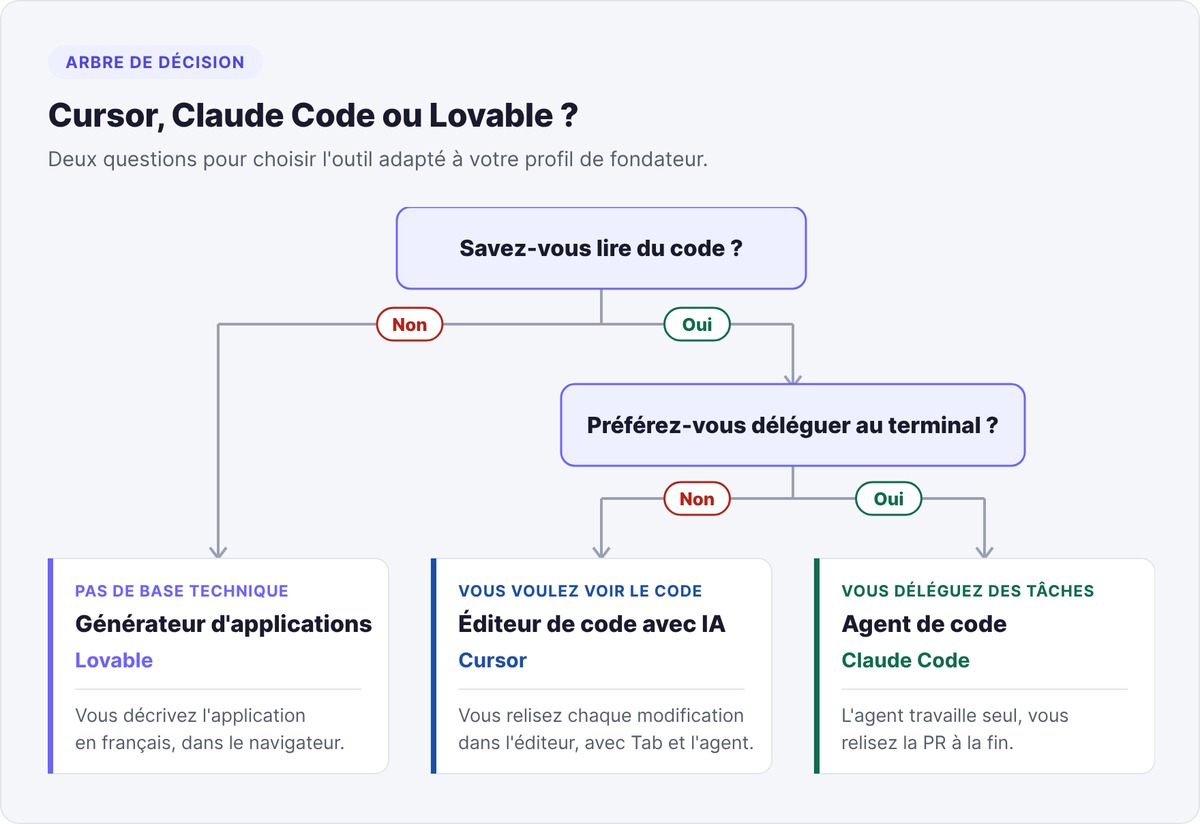
Claude Code works more autonomously: it reads the project, edits files, runs tests and hands you a pull request to review. Our guide What is Claude Code explains how it works. Lovable targets non-technical founders who want a live app built from a plain-language description.
Cursor for startup founders
Cursor serves technical founders and CTOs building an MVP who want to review every change. It also fits founders who started on a builder like Lovable, exported their code to GitHub and now want to take it over themselves.
Start with the Hobby plan for a week on a real project. Move to Pro when you hit the limits, and set a spending cap on on-demand usage. Write an AGENTS.md from day one: your conventions will outlive any switch of tools. To see where Cursor fits in the rest of your stack, check out our roundup of AI tools for startups, and for the working method, our guide to vibe coding.
Building your MVP with Cursor and looking for long-term support? swanbase backs early-stage founders in Paris and remotely, at no cost, by application; swanbase takes equity. Apply.
FAQ
Is Cursor AI free?
Yes, with the Hobby plan, no credit card required. It gives you limited access to the agent, chat and Tab autocomplete with the Auto model. Cursor doesn't quantify these limits. The first paid plan, Pro, costs $20 a month excluding tax.
What is Cursor AI?
Cursor AI is a code editor built on Visual Studio Code, with predictive autocomplete, editing on a selection and an agent that can modify multiple files and run commands. The US company Anysphere has published it since 2023.
Cursor or ChatGPT: which is better for coding?
For working on a project, Cursor goes further: its agent reads your files, edits them and runs commands, whereas ChatGPT has you copy and paste code. Cursor also gives you access to OpenAI's models, including GPT-5.6 Sol.
Does Elon Musk own Cursor?
Cursor belongs to SpaceX, the company founded by Elon Musk. SpaceX acquired Anysphere, the company behind Cursor, for $60 billion in stock. The deal has been effective since August 14, 2026, and Cursor operates as a subsidiary within the SpaceXAI division.
Is Cursor available in French?
The interface is in English by default. You can install the VS Code French language pack from Open VSX, then select French with the Configure Display Language command. The agent understands instructions in French, and the cursor.com website has a French version.
How much does Cursor Pro cost?
Cursor Pro costs $20 a month excluding tax. Above that, Pro+ costs $60 and Ultra $200. For teams, Teams starts at $40 per user per month.