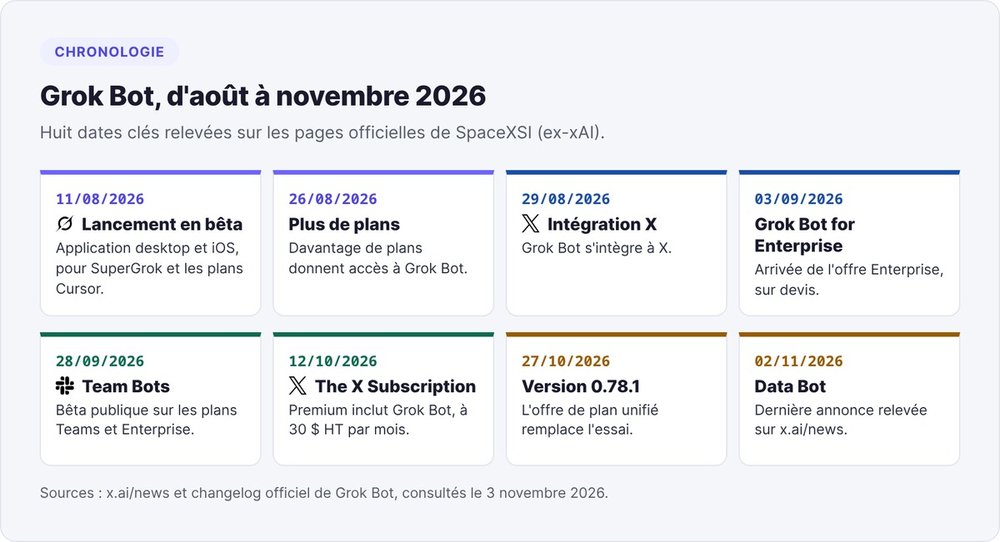
Grok Bot is the AI agent app that SpaceXSI (formerly xAI) launched in beta on August 11, 2026. You create named Bots, each with a job: prospecting, support, reporting. Every Bot works on an always-on cloud computer with a browser, files and a terminal. The Bot connects to your tools, makes progress on its own and checks back with you when an action needs your approval. Grok Bot is a separate product from the @grok account that replies on X and from the Grok bots on Telegram or Discord.
Since October 12, 2026, SpaceXSI has included Grok Bot in The X Subscription starting with the Premium plan, at $30 per month excluding taxes. The $8 Plus plan leaves it out. Before rolling it out at a startup, keep two limits in mind: all your Bots share the same computer and the same connections, and you can't choose the model. The prices and rules below come from SpaceXSI's official pages, checked on November 3, 2026.
What is Grok Bot?
A chatbot drafts a reply. A Bot opens your CRM, updates a record, prepares three email drafts and leaves the decision to send with you. Grok Bot lets you hand an AI work that spans several apps and keeps running overnight.
A team of Bots on their own cloud computer
The documentation describes "AI teammates with names, jobs, and context that compounds over time". Create a Bot, give it a name and a job in its first message, then write to it the way you would to a colleague, by keyboard or by voice.
Each Bot keeps its own memory: stable preferences, context about its role, summaries of past work. Your Bots only share a few facts about you with each other, such as your name and time zone. Close the app or your laptop and the current task and routines keep running on the cloud computer.
Launched on August 11, 2026 by SpaceXSI (formerly xAI) with Cursor
SpaceXSI introduced Grok Bot on August 11, 2026 as "your team of always-on agents". According to the launch announcement, the tool started as an internal prototype. The company's teams used it for prospecting, marketing, back-office operations and bug fixing.
The Cursor connection comes down to ownership. SpaceX announced its acquisition of xAI on February 2, 2026, then closed the acquisition of Anysphere, the company behind Cursor, in August, as covered in our Cursor review. You sign in to Grok Bot with a Cursor account, and the Bots' computers run in Cursor's cloud.
Grok Bot, Grok, @grok, Telegram bots: five products under one name
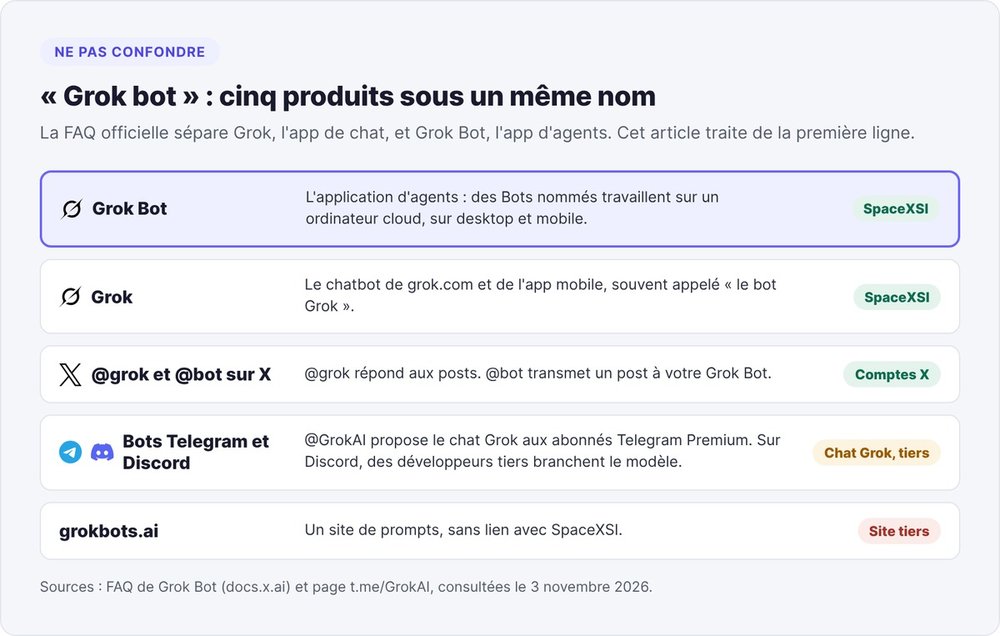
The official FAQ is clear: Grok, SpaceXSI's chat app, and Grok Bot are two different applications. Five things carry the name:
- Grok Bot, the agent app covered here, on desktop and mobile;
- Grok, the chatbot on grok.com and in the mobile app, often called "the Grok bot";
- @grok on X, the account that replies to posts (a different account, @bot, forwards a post to your Grok Bot);
- Grok bots on Telegram and Discord: on Telegram, the @GrokAI bot offers Grok to Telegram Premium subscribers; on Discord, third-party developers plug in the model;
- grokbots.ai, a third-party prompt site with no connection to SpaceXSI.
How Grok Bot works
Grok Bot rests on five building blocks: a shared computer, connections to your tools, skills and routines, coordination between Bots, and an approval system.
One cloud computer shared by all your Bots
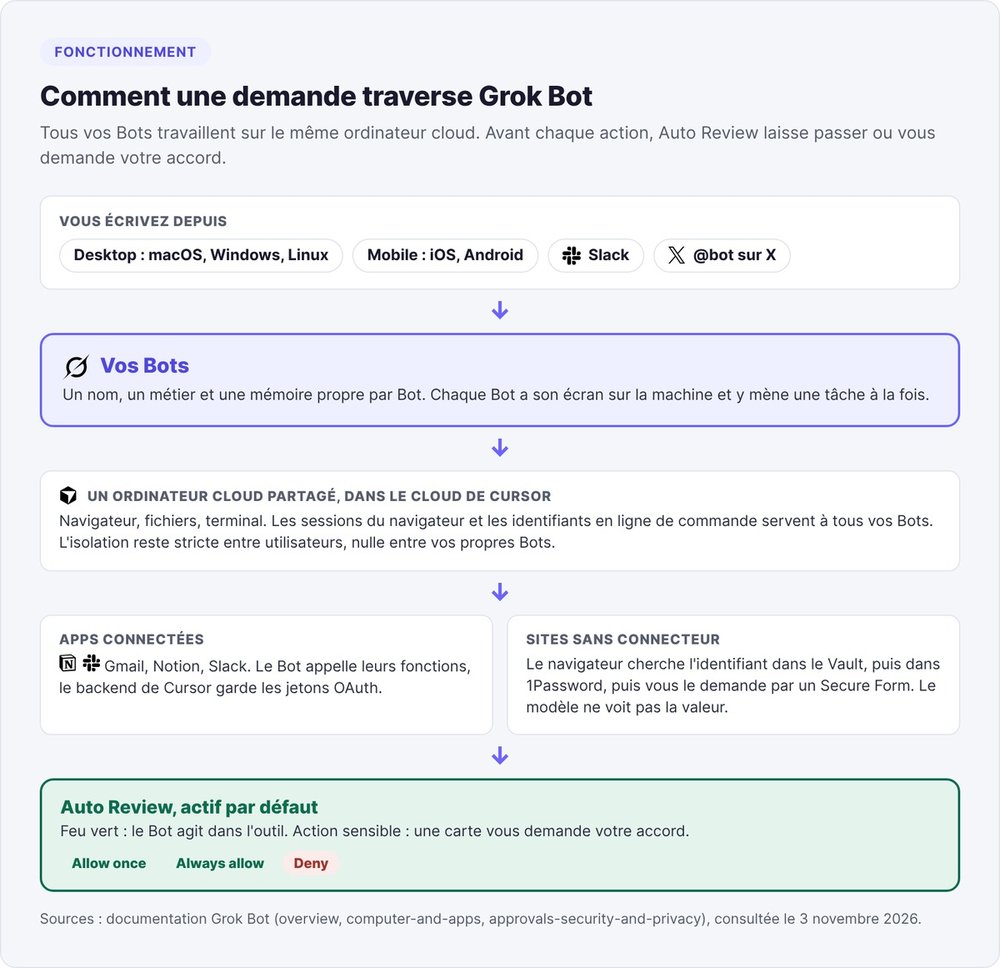
All your Bots use the same cloud computer. They share its files, browser sessions and command-line credentials. One Bot can therefore pick up another's work with no setup. Each Bot gets its own screen on the machine and runs one task at a time there.
The documentation assigns the computer to your account, not to a Bot. Between two users, isolation is strict, down to the hardware level. Between your own Bots, there is no partition at all. The FAQ spells it out: "Do not use separate Bots as a security boundary".
Connectors, the browser and the Vault to get into your tools
A Bot reaches your tools in two ways. The first goes through a connected app such as Gmail, Notion or Slack. The Bot calls its functions without seeing the OAuth token, which Cursor's backend holds.
The second goes through the browser, for sites with no connector. The Bot looks for a credential in the Vault, then in a password manager such as 1Password, then asks you for it through a Secure Form. The model never sees the value you enter. For an SSO login, a passkey or a CAPTCHA, the Bot hands control of the computer back to you.
Skills, routines and Teach a task
A skill describes how to carry out a task: steps, decision rules, expected format, actions that need approval. A routine assigns that workflow to a Bot. It fires on a schedule or on an event: a Slack message, a GitHub, Linear, Sentry or PagerDuty alert, an email, a webhook call.
Teach a task swaps the written description for a demonstration: you record the flow once in the browser, and the Bot turns it into a draft skill. Recordings last ten minutes at most, without the microphone. The documentation also sets caps: 50 routines per Bot, 300 runs per hour across all your routines, and at least five minutes between two scheduled times.
Several Bots in one thread, Team Bots in Slack
Your Bots work in parallel, message each other and hand tasks off. Put them in a group and they coordinate on their own, only pulling you in when a call needs to be made.
Team Bots, in public beta since September 28, 2026 on the Teams and Enterprise plans, extend the idea to the whole team. A Team Bot brings together context, plugins, credentials and memories. Each team member talks to it privately, and the Team Bot keeps separate context for each person. With its own Slack identity, it can work in a shared channel.
Auto Review and approval cards
Auto Review is on by default. Before each action, a check decides whether it goes ahead on its own or whether the Bot asks for your approval with a card: Allow once, Always allow or Deny. You can add up to 20 "Allow automatically" rules and 20 "Ask first" rules, 1,000 characters each. When they conflict, Ask first wins.
Auto Review only counts your own messages: an instruction slipped into an email or a web page doesn't count as a request. A card triggered by a routine expires after 30 minutes, and the Bot then drops the action.
Handing a post to @bot on X
On X, you mention @bot in reply to a post, for example to send a thread summary to your Slack. @bot confirms publicly and your main Bot handles the request. The feature is unavailable in France: as of November 3, 2026, the documentation excludes X accounts based in the European Union, the United Kingdom and Australia, among others. A VPN doesn't change that.
How much does Grok Bot cost? Pricing by plan
Grok Bot has no standalone subscription. You get it through a plan that includes it, and every task draws from a usage allowance shared with your other SpaceXSI tools. What Grok Bot costs you therefore depends on the plan and on what your Bots consume each week.
The X Subscription: Premium at $30, Super at $100, Ultra at $200
The official pricing page, checked on November 3, 2026, lists monthly prices in dollars, excluding taxes and VAT.
| Plan | Monthly price excl. tax | Grok Bot | Stated usage |
|---|---|---|---|
| Free | $0 | No | Limited |
| Plus | $8 | No | Base usage |
| Premium | $30 | Yes | 4x Plus |
| Super | $100 | Yes | 15x Plus |
| Ultra | $200 | Yes | 50x Plus |
| Teams | from $30 per user | Yes, on every paid seat | 4x to 50x Plus depending on seat |
| Enterprise | custom quote | Yes | pooled usage |
The x.ai/bot page frames the gaps differently: Super gives 3.5 times Premium's usage, Ultra 12 times. SpaceXSI recommends Premium for new users, Super for people who run agents every day and Ultra for heavy use.
The $8 Plus plan doesn't include Grok Bot
Plus gives you Grok chat, Imagine, Voice, Grok Build, the API and Cursor, but no Grok Bot. For Grok Bot, you need Premium or higher. If you pay for Plus to get the X badge and chat, expect to pay $22 more per month.
Legacy Cursor and SuperGrok plans
Existing subscribers keep their plan until they switch. On a legacy Cursor plan, every paid individual plan includes Grok Bot, and you can link a SuperGrok or X Premium+ subscription to your Cursor account.
Three FAQ rules help you avoid surprises. A Cursor plan and a linked SuperGrok don't stack: Grok Bot uses whichever is more generous. A SuperGrok link is permanent. Switching to The X Subscription can't be undone, and support can't reverse it.
Is Grok Bot free? The usage-credit trial
Grok Bot has no free plan. The FAQ describes a trial offered to some accounts: a usage credit valid for a seven-day window, which never converts into a subscription. A single large task can use it up. Don't base your decision on it: since version 0.78.1 on October 27, 2026, the app has replaced the trial offer with a unified plan offer.
A weekly usage pool shared with Cursor
Each plan includes an AI usage allowance shared between Grok and Cursor, refilled every week. Once it runs out, you wait for the refill or buy credits. A developer coding in Cursor all week and Bots prospecting overnight therefore draw from the same pool. The routines documentation warns that an hourly schedule or a Slack trigger on a busy channel "can use a week of usage in a day".
Grok Bot reviews on Reddit point the same way. On r/cursor, a user who says they're on a $200 plan reports hitting their limit in three to four days. Set a monthly cap on extra spending, keeping in mind that it won't stop a Bot in the middle of a task.
Grok for Startups: credits for funded startups
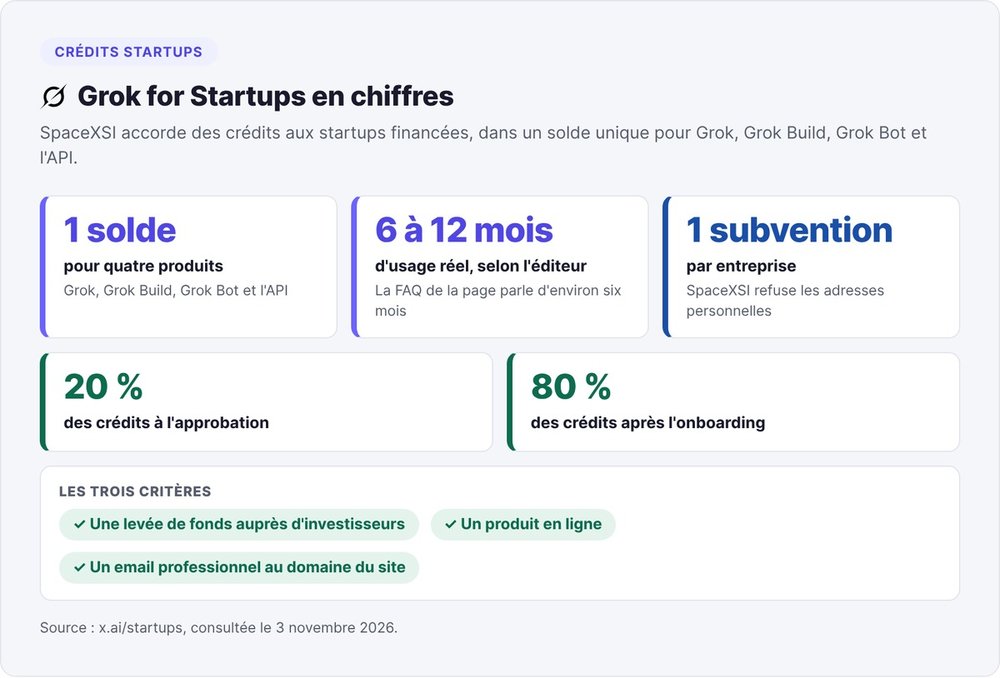
According to the Grok for Startups page, SpaceXSI gives startups credits usable across Grok, Grok Build, Grok Bot and the API, in a single balance. The company targets six to twelve months of real usage, and its FAQ mentions around six months. You receive 20% of the credits on approval, then the remaining 80% after onboarding.
The criteria: funding raised from investors, a live product, and a work email that matches your website. SpaceXSI rejects personal addresses and grants one award per company. To compare with other programs, see our guide to cloud and AI credits for startups.
What to hand Grok Bot at a startup
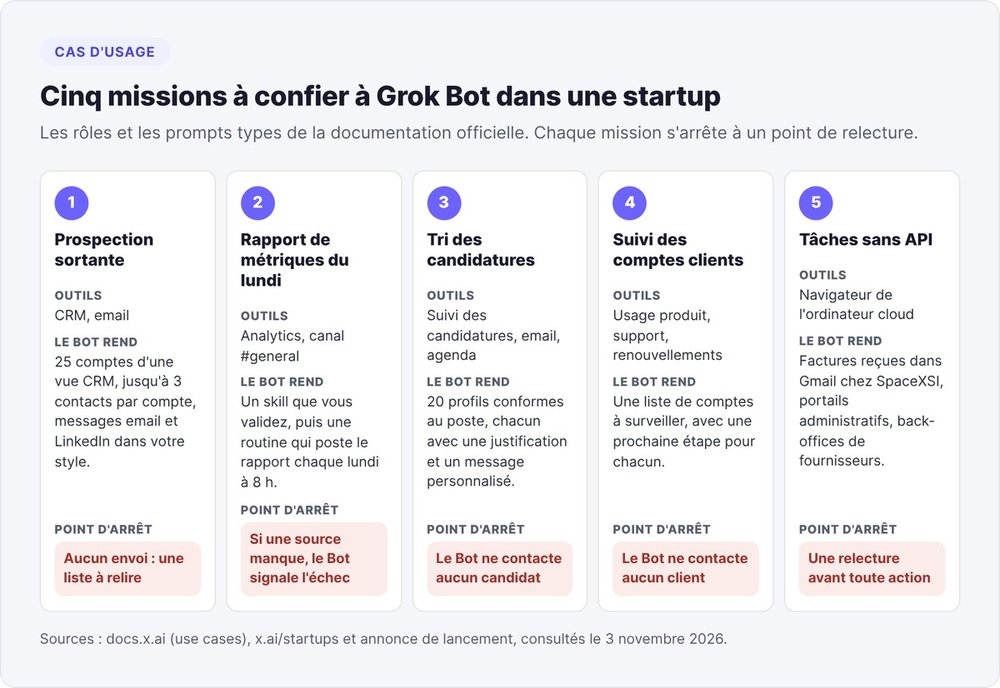
SpaceXSI pitches Grok Bot to startups with the tagline "Run the company and GTM with Grok Bot". The five jobs below follow the roles and sample prompts in the official documentation. Each one stops at a review checkpoint, as the company recommends.
Outbound prospecting, with drafts to approve
The "Sales outbound" role connects to your CRM and email. Its sample prompt has the Bot research 25 accounts from a CRM view and find up to three contacts per account. The Bot then writes email and LinkedIn messages in your voice and returns a list for review, without sending anything. Keep sending behind an approval: on r/GrokBot, a user reports that LinkedIn flagged the prospecting activity run from their Bot's computer.
The Monday metrics report
The startups page shows a "Metrics Bot" that posts the weekly report in #general. The official method: produce the report once with the Bot, fix the format, save it as a skill, then create a routine for "every Monday at 8 a.m.". If a source is missing, the documentation advises flagging the failure rather than reusing stale data.
Screening applicants and booking interviews
The "Talent scout" role plugs into your applicant tracking system, email and calendar. Its sample prompt asks for 20 profiles matching a role's criteria, with a rationale and a personalized message for each, without contacting anyone.
Account and support monitoring
The "Account health" role cross-references product usage, support escalations and renewal dates. The Bot returns a list of accounts to watch, with a next step for each, without contacting customers. On September 22, 2026, SpaceXSI published its own case study: the shared support team for SpaceXSI and Cursor now runs on Grok Bot.
Repetitive tasks in tools without an API
The cloud computer can open tools that have no API or connector. The launch announcement makes the point: Bots work "including platforms with no clean API or MCP". At SpaceXSI, an operations Bot uses this to process invoices that arrive in Gmail. For a startup, think government portals and supplier back offices.
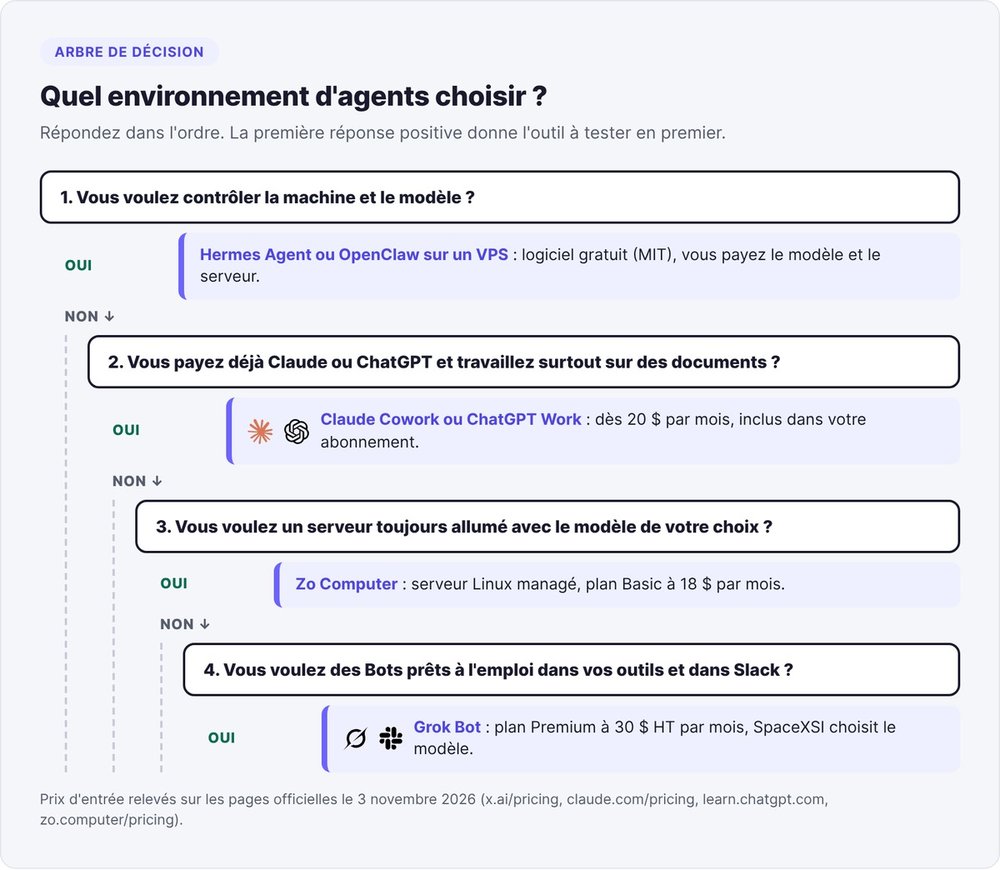
Grok Bot, Hermes, OpenClaw or Claude Cowork: which agent environment should you pick?
All six of these tools give an agent a machine, a memory and access to your tools. They differ on two points: who hosts the machine and who picks the model.
Agent environment vs. model provider
There are two layers. The model provider sells the intelligence: a Claude Code subscription from Anthropic, Codex from OpenAI, or an API key. The environment provides the agent's workplace: machine, memory, connections, scheduled tasks, chat channels. Hermes Agent, OpenClaw, Zo Computer and Grok Bot belong to this second layer.
Grok Bot locks the two layers together. Hermes, OpenClaw and Zo let you plug in the model of your choice, whereas Grok Bot picks it for you, task by task. Claude Cowork and ChatGPT Work are Anthropic's and OpenAI's in-house environments, included in their subscriptions and limited to each company's own models. Manus follows the same hosted-agent approach; see our Manus AI review.
Grok Bot vs. Hermes Agent
Hermes Agent is Nous Research's open-source agent, MIT-licensed according to its GitHub repository as of November 3, 2026. Hermes installs on a computer or a VPS, uses whichever model you select with hermes model, and replies on WhatsApp, Discord, Telegram or Signal. You pay for the model and the server.
Grok Bot vs. Hermes boils down to one question: who runs the machine. With Hermes, you manage the server, keep the agent's data and switch models whenever you like. With Grok Bot, SpaceXSI provides the computer, browser, connectors and approvals from the moment you sign up, in exchange for an imposed model and capped usage. Our Hermes Agent test covers installation and VPS costs.
Grok Bot vs. OpenClaw
OpenClaw, also MIT-licensed, describes itself as a "local-first" personal agent. OpenClaw runs on a Mac mini, a server or a Raspberry Pi, keeps its memory on your machine and replies on WhatsApp, Telegram, Slack, Discord, Signal or iMessage. Our OpenClaw explainer covers its architecture.
OpenClaw wins on control and messaging apps. Grok Bot wins on the pieces OpenClaw leaves you to assemble: a cloud computer with a browser, Vault-protected logins, approval cards and coordination between Bots. See also our OpenClaw alternatives.
Grok Bot vs. Claude Cowork and ChatGPT Work
Claude Cowork comes with paid Claude subscriptions, starting with the Pro plan at $20 per month. Anthropic's product page, checked on November 3, 2026, says Cowork is gradually being merged into Claude. Work continues with your laptop closed, and a built-in browser, separate from yours, fills in forms. Our Claude Cowork guide breaks down the plans.
ChatGPT Work, ChatGPT's agent mode, is available on the web from the Plus plan at $20 per month and shares its credits with Codex. Our ChatGPT Work page compares its limits with Cowork's.
Cowork and Work deliver tasks: a deck, a spreadsheet, an analysis. Grok Bot sets up named teammates that keep a computer, logged-in sessions and routines, for $30 instead of $20.
Grok Bot vs. Zo Computer or a VPS
A managed server like Zo Computer sits between Grok Bot and a bare VPS. Zo provides an always-on Linux server, an agent that acts on your files and services, scheduled automations and integrations. According to its pricing page, checked on November 3, 2026, the Basic plan costs $18 per month, with $10 in monthly AI credits and access to every model.
Zo lets you choose the model and also hosts websites and APIs. A bare VPS running Hermes or OpenClaw costs less, but all the administration falls to you.
Using your Grok subscription in Hermes or OpenClaw
You can also pay SpaceXSI without using Grok Bot. Since May 15, 2026, a Grok subscription works in Hermes Agent through the "xAI Grok OAuth" provider in hermes model. Since May 19, 2026, a SuperGrok or X Premium subscription works in OpenClaw. SpaceXSI opens both connections to every plan. You keep the Grok models and an environment under your control, but you lose Grok Bot's cloud computer and approvals.
The comparison table
| Environment | Hosting | Model choice | Isolation between agents | Channels | Entry price as of 11/03/2026 |
|---|---|---|---|---|---|
| Grok Bot | cloud computer in Cursor's cloud | no, automatic routing | none between your Bots, strict between users | desktop, iOS, Android, Slack, X | $30 excl. tax per month (Premium) |
| Hermes Agent | your machine or your VPS | yes | whatever your server provides | WhatsApp, Telegram, Discord, Signal | free software (MIT), plus model and server |
| OpenClaw | your machine or your VPS | yes | whatever your server provides | WhatsApp, Telegram, Slack, Discord, Signal, iMessage | free software (MIT), plus model and server |
| Claude Cowork | Anthropic's cloud and your computer | Claude models | cloud tasks isolated from your computer | desktop, web, mobile | $20 per month (Pro) |
| ChatGPT Work | OpenAI's cloud and your computer | OpenAI models | isolated cloud environment | web, desktop | $20 per month on the web (Plus) |
| Zo Computer | managed Linux server | yes | whatever your server provides | web, SMS | $18 per month (Basic) |
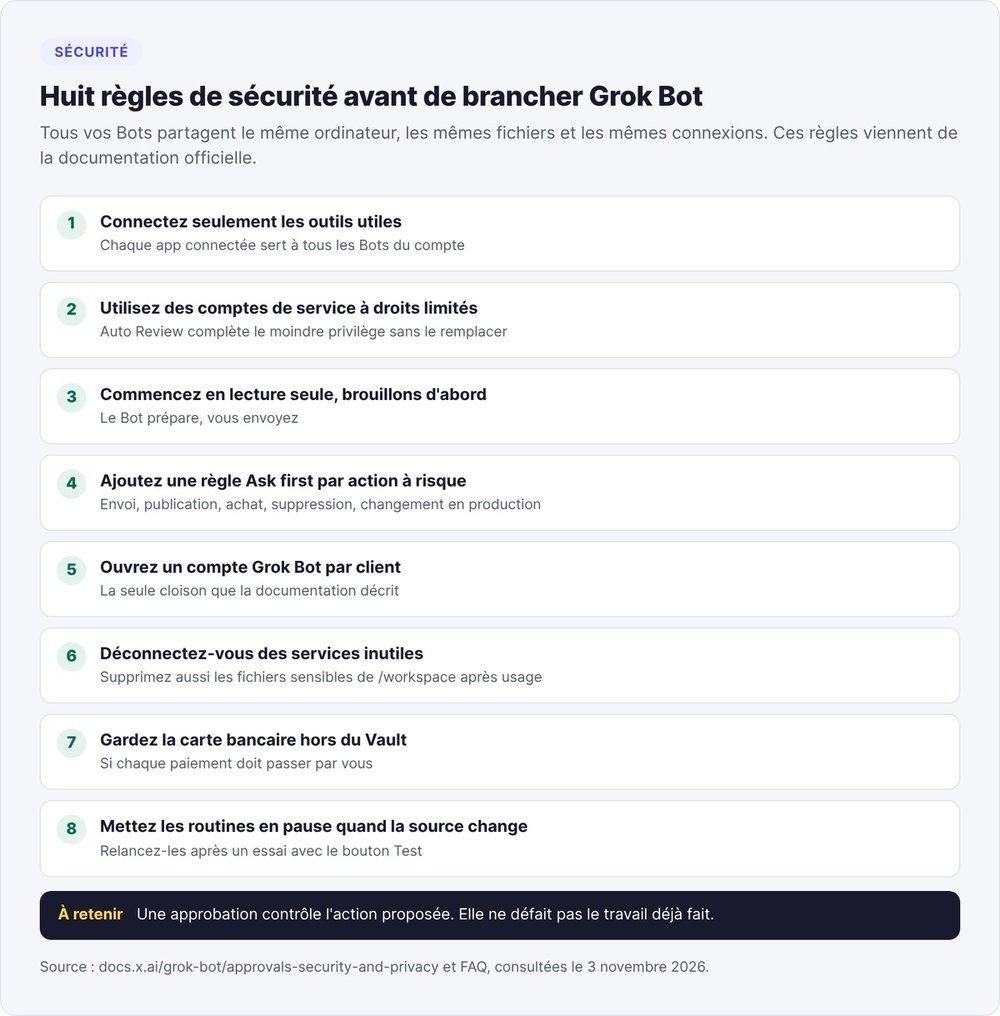
Grok Bot's limits to weigh before you set it up
Six limits matter before you trust Grok Bot with a customer account or a credit card.
A shared computer is no security boundary
A file dropped in for the accounting Bot stays readable by the prospecting Bot, and an open banking session is available to all your Bots. Every connected app also serves every Bot on the account. The documentation gives the workaround. Keep any credential off the computer if another Bot shouldn't use it, log out of services you don't need and delete sensitive files after use. If you work for several clients, one Grok Bot account per client is the only partition the documentation describes.
No model choice
The FAQ puts it bluntly: "Grok Bot picks the model for each task, and there is no model picker." The model can come from SpaceXSI or from a third-party provider, and can change from one request to the next. The FAQ even gives the example of a task routed to Opus 5.5, Anthropic's model. So you can't reproduce a result by pinning the model, and your team's allowed-model list in Cursor doesn't apply to Grok Bot.
An approval doesn't undo work already done
The security and approvals page puts it this way: "An approval controls the proposed action. It does not reverse work already completed." The card asks permission to send the email. It doesn't roll back the CRM record the Bot edited three steps earlier. The same page points out that Auto Review relies on a model and supplements least privilege rather than replacing it. Write one narrow rule per action, such as "Ask first before sending any external email".
Your data: Cursor account, mandatory cloud storage, hosting
Grok Bot uses the authentication and data settings of your Cursor account. It requires cloud data storage and therefore doesn't work with Cursor's Legacy Privacy Mode. The documentation says the computers run "in Cursor's cloud" without naming the region. The pricing page places data residency controls in the Enterprise plan: for GDPR-regulated processing, ask before connecting customer data.
Deleting a Bot erases its profile and routines, but leaves its files and connections on the shared computer. Deleting your Grok Bot account deletes your entire Cursor account, and the data is gone within 30 days.
Sites that block agents
A site may block automation, show a CAPTCHA or reject traffic from cloud computers. The Bot then hands control back to you, and the "Route traffic through this computer" option sends the traffic through your own connection.
Six releases in two weeks
The official changelog lists six releases between October 14 and 27, 2026, up to 0.78.1. The last two added product cards for purchases, a Payments tab in the Vault and templates that cancel subscriptions. Recheck prices and usage rules before every decision.
Getting started with Grok Bot in 6 steps
These steps follow the official getting-started guide and the security page.
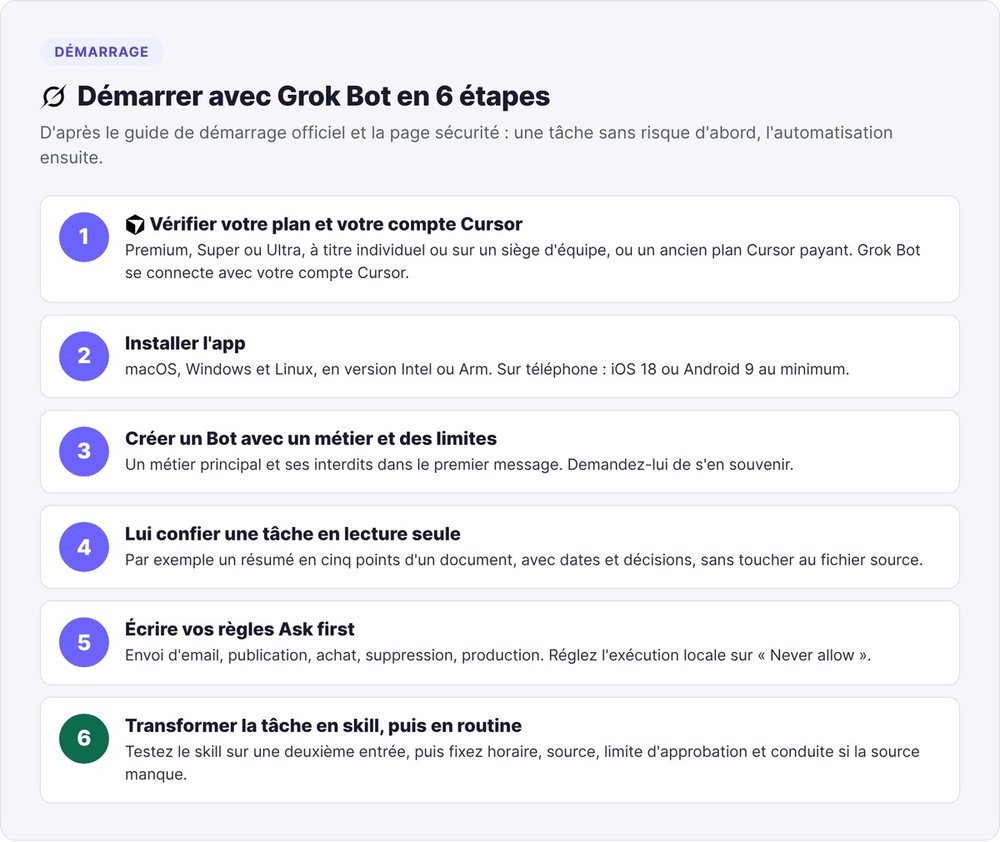
1. Check your plan and your Cursor account
You need Premium, Super or Ultra on The X Subscription, either individually or on a team seat, or a paid legacy Cursor plan. Grok Bot signs in with your Cursor account. If your access comes from SuperGrok, link the subscription when the app prompts you.
2. Install the app on desktop or mobile
The desktop app runs on macOS, Windows and Linux, in Intel or Arm builds, downloadable from x.ai/bot. On mobile, you need at least iOS 18 or Android 9.
3. Create a first Bot with a job and boundaries
When you sign in, Grok Bot creates a first Bot named "Grok Bot". Add more with the + button. Give each one a main job and its off-limits actions in the first message, and ask it to remember them.
4. Give it a read-only task
Start with a risk-free task that has a clear end. The guide suggests attaching a document and asking for a five-point summary, with dates and decisions, without touching the source file.
5. Write your Ask first rules
Before a Bot changes any external system, add an Ask first rule for each risky action: sending email, publishing, purchasing, deleting, changing production. Set execution on your local computer to "Never allow", and keep your card out of the Vault if every payment needs to go through you.
6. Turn the task into a skill, then a routine
When a task produces an approved result with no edits, ask the Bot to save it as a skill, then test that skill on a second input. Then create the routine with a schedule, a source, an approval limit and what to do if the source is missing. The Test button runs it right away.
Is Grok Bot worth it for a startup?
This answer draws on the documentation and public pricing; we haven't tested it in-house.
Who Grok Bot suits
Grok Bot suits a small non-technical team that wants ready-to-use agents with no server to manage. It makes the most sense if your work runs through web tools without APIs and your team lives in Slack. For prospecting, reporting and account monitoring, the documentation provides a role, a sample prompt and a checkpoint.
When a self-hosted agent makes more sense
Choose Hermes Agent or OpenClaw if you want to pick the model, keep data on your own machine or isolate each agent on its own machine. Zo covers the same need without a VPS to manage. Be careful with sensitive personal data in Europe: the public pages don't state the hosting region.
If your main need is code, look at Grok Build instead, the same company's terminal coding agent, which our Grok Build guide compares with Claude Code. Grok Bot is worth the Premium price once you can name the first task you'll hand it on Monday morning.
FAQ
What is Grok Bot?
Grok Bot is the AI agent app from SpaceXSI (formerly xAI), launched in beta on August 11, 2026. You create named Bots that work on a persistent cloud computer with a browser and files. These Bots connect to your tools and ask for your approval before sensitive actions.
Is Grok Bot free?
Grok Bot has no free plan: you need at least the Premium plan of The X Subscription, at $30 per month excluding taxes. Some accounts were able to try it with a usage credit valid for seven days, but the October 27, 2026 changelog replaces that offer with a unified plan offer.
How much does Grok Bot cost per month?
As of November 3, 2026, Grok Bot costs $30 per month excl. tax with Premium, $100 with Super and $200 with Ultra. Teams starts at $30 per user, and Enterprise is priced on quote. Each plan includes a weekly usage allowance shared with Grok and Cursor, and you can buy credits beyond it.
What's the difference between Grok, @grok and Grok Bot?
Grok is SpaceXSI's chatbot on grok.com and mobile, and @grok is its account on X that replies to posts. Grok Bot is a separate app, tied to your Cursor account, where agents work in your tools on a cloud computer.
Do you need a Cursor account to use Grok Bot?
Yes, Grok Bot signs in with a Cursor account and has no login of its own. You don't need a separate Cursor subscription: The X Subscription covers Grok, Grok Bot and Cursor. Deleting your Grok Bot account also deletes your Cursor account.
Can you choose Grok Bot's model?
No, Grok Bot has no model picker. For each task it picks a model from SpaceXSI or a third-party provider, which can change from one request to the next. To choose the model, use Hermes Agent, OpenClaw or Zo Computer.
Is Grok Bot available in French?
The interface is: the desktop app offers 37 languages according to the FAQ, and the settings page lists French. The mobile app offers 12. A new Bot writes to you in the app's language, unless you write to it in another one.
Is there a Grok bot on Telegram or Discord?
On Telegram, the @GrokAI bot offers the Grok chatbot to Telegram Premium subscribers. The "Grok" bots on Discord come from third-party developers. Neither gives access to Grok Bot, which you use from its app, Slack or X.
Does Grok Bot keep working with your computer off?
Yes: the work runs on the Bot's cloud computer, and closing the app, your laptop or your phone stops neither a running task nor a routine. After a long stretch with no response from you, Grok Bot may pause your routines to limit usage.