Claude Cowork is the agent mode of Claude, Anthropic's assistant. You describe the outcome you want, and Claude carries out a multi-step task on its own inside the folders and tools you give it access to, then hands back finished files for you to review. Anthropic built it for non-coding office work: research, analysis, and document writing.
Our quick take: Cowork is for founders who spend their evenings on low-value background tasks like sorting invoices, summarizing contracts, or putting together a report. It requires a paid subscription, starting with the Pro plan at $20 per month. It edits your files directly, so start with a dedicated folder and a backup.
All features and prices below come from the official pages on claude.com and the Anthropic Help Center, checked on September 26, 2026.
What is Claude Cowork?
Cowork is a mode inside the Claude app. In regular chat, you ask a question and Claude answers. With Cowork, you hand over an entire task: Claude breaks the request into steps, opens the files it needs, produces the deliverables, and returns them to you for approval.
Claude Code's architecture, without the terminal
According to the Help Center, Cowork runs on the same agentic architecture as Claude Code, minus the terminal.
Anthropic's announcement spells out the target: knowledge work outside of software development. In Cowork, Claude can edit and create files in the folders you designate. So it finishes the task itself instead of explaining how you should do it.
Cowork and chat merged into a single conversation
Anthropic is gradually rolling out a new version of Claude that merges Cowork and chat. The pricing page sums it up this way: "Claude Cowork is now just Claude". The Help Center describes the change:
- you state your request and Claude picks the right tool, from a quick answer to a report or spreadsheet delivered as a file;
- the rollout starts with the Pro and Max plans, on web, desktop, and mobile, with other plans to follow;
- your Cowork tasks and projects stay in place, along with their connectors;
- once the new version is enabled on your account, you can't go back to the two separate options.
If your message box still shows two options, "Chat" and "Cowork", your account hasn't received the new version yet.
Key dates in 2026
The announcement page lists several dated updates. On February 24, 2026, admins gained private plugin catalogs. On April 9, 2026, Anthropic opened up enterprise deployment, with access management, spend controls, and usage tracking. On August 26, 2026, Cowork got a built-in browser.
What Cowork does on your computer and with your files
Every kind of access Cowork has depends on a setting you control.
Access to your folders
You connect one or more folders on your computer. Claude reads and writes only within those folders, according to the getting started guide. It can also permanently delete files, but Cowork asks for your explicit permission before each deletion, per the Use Claude Cowork safely page.
For local files and the browser, the Claude Desktop app for macOS or Windows needs to stay open and connected.
Finished office deliverables
Cowork produces formatted documents, spreadsheets with working formulas, and PowerPoint presentations. It also synthesizes research and organizes folders. For large projects, the product page says Claude splits the work into chunks processed in parallel.
The Help Center notes that tasks can run in the cloud, in beta, inside an isolated environment on Anthropic's servers, separate from your computer and your network. The work keeps going when you close your laptop.
The built-in browser and computer control
Since August 2026, Claude can open websites, fill out forms, and complete web tasks in a browser built into Cowork. This browser appears in a side panel and leaves your own browser untouched.
Computer control goes further. On the Pro and Max plans, in the macOS or Windows desktop app, Claude uses the mouse and keyboard to operate your applications the way you would, according to the Let Claude use your computer page. It asks your permission before accessing each application. Anthropic blocks certain categories by default, including investment, trading, and cryptocurrency platforms, and you can add your own apps to a blocklist.
Connectors, plugins, and skills
Connectors link Cowork to your tools. The product page lists Amplitude, Microsoft 365, Google Drive, and Slack. Plugins add domain expertise, for example Brand Voice, Legal, or Finance.
Skills follow the same logic already available in Claude Code: a reusable instruction file that Claude loads when a task calls for it. Our guide to Claude Code skills explains their format and how to write your own.
Scheduled tasks and Dispatch from your phone
You can schedule a task at whatever cadence you choose. The Help Center gives three examples: checking your email every morning, pulling your metrics every week, compiling a report on Fridays.
Dispatch lets you send a task from your phone, on iOS or Android, then pick it up on your computer. This feature is available on the Pro and Max plans. Dispatch runs the task on your computer, so it has to stay on, with the Claude Desktop app open.
What's the difference between Claude Code and Claude Cowork?
Both tools share the same agentic engine and serve two different audiences.
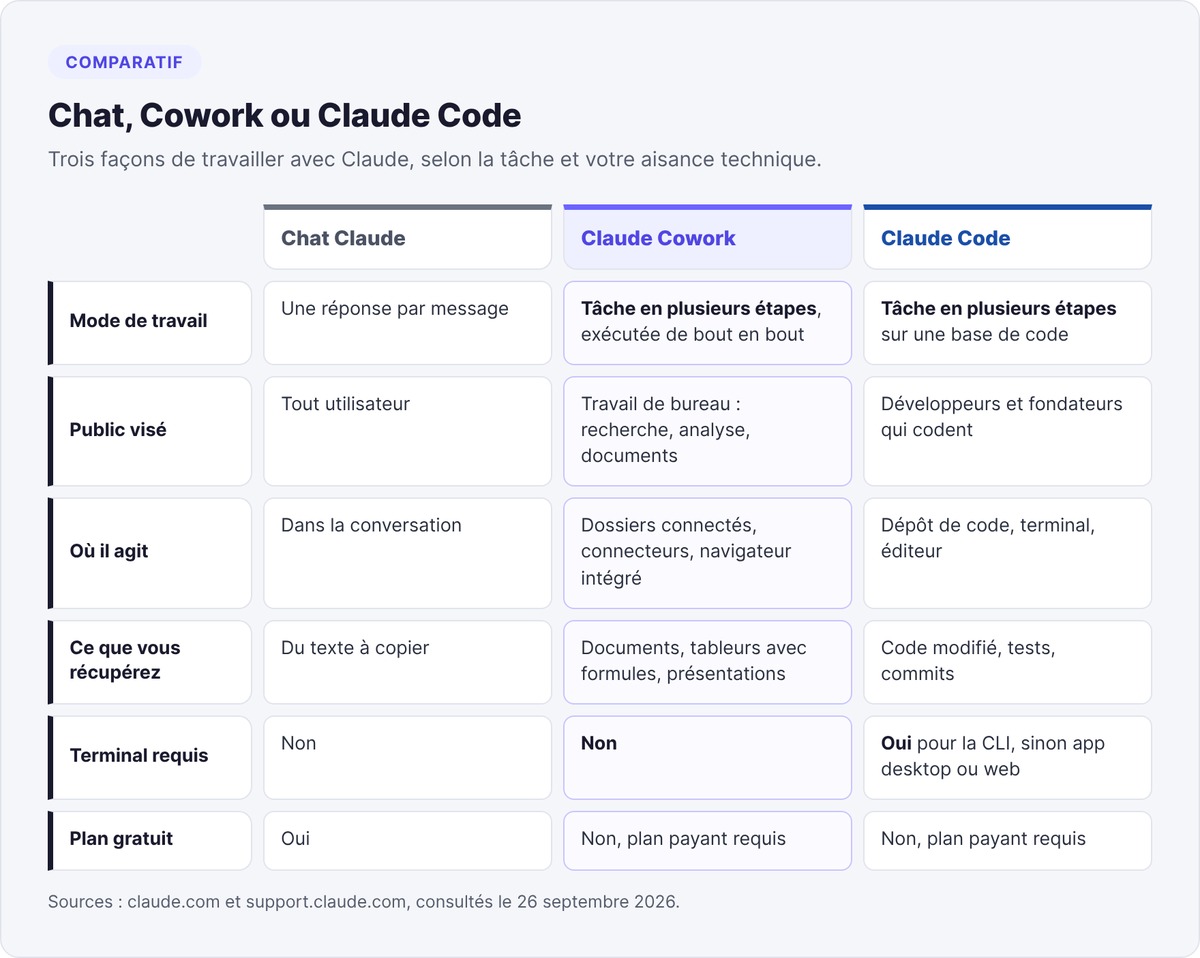
Claude Code for code, Cowork for documents
Claude Code works on a codebase: it reads the repository, runs commands, writes tests, and creates commits. You use it in the terminal, in an editor like VS Code, in the desktop app, or on the web.
Cowork works on your document folders and business applications. You never open a terminal, and you get office files back: a spreadsheet, a memo, a presentation. Computer control is available in both tools, on the Pro and Max plans.
Chat, Cowork, Claude Code, or a code editor
Pick based on the task:
- Chat for a question, an email draft, or a rewrite.
- Cowork for a task that spans several files or applications and ends with a deliverable.
- Claude Code to build or modify a software product.
- An editor like Cursor if you write code and want to approve every change line by line. Our Cursor AI review covers its pricing and limitations.
To run an agent in production inside your own product, Anthropic offers Claude Managed Agents, an API-driven infrastructure.
Claude Cowork pricing in 2026
Cowork has no standalone price. It comes with the paid Claude subscriptions: Pro, Max, Team, and Enterprise, according to the getting started guide. Anthropic lists its prices in US dollars, excluding tax.
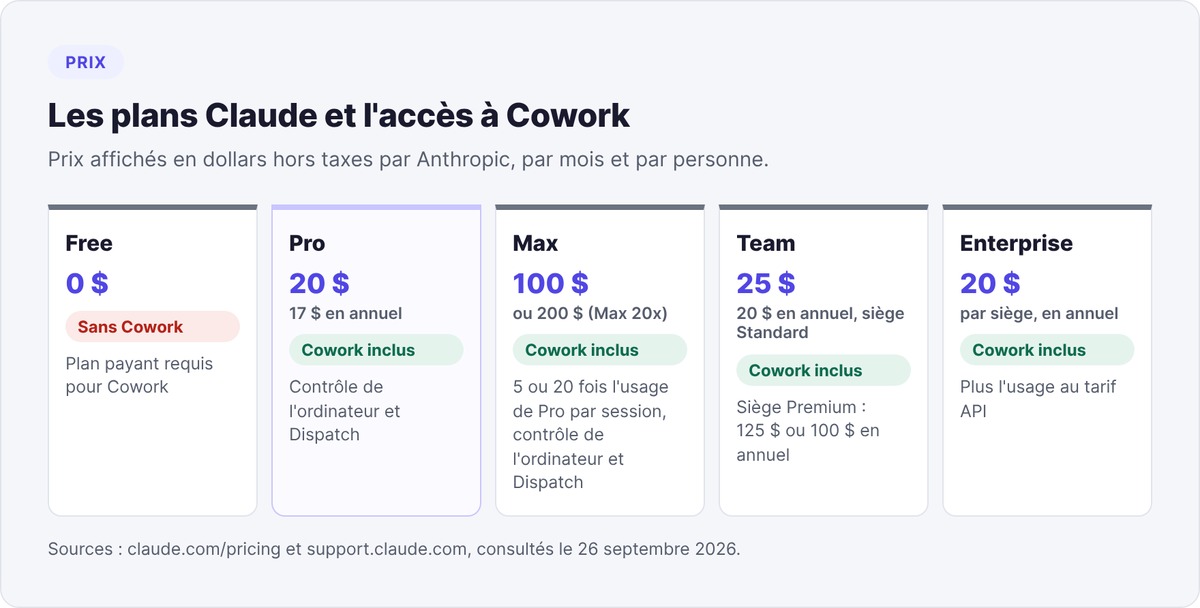
| Plan | Monthly price | Cowork |
|---|---|---|
| Free | $0 | No |
| Pro | $20, or $17 billed annually ($200 paid upfront) | Yes |
| Max 5x | $100 | Yes |
| Max 20x | $200 | Yes |
| Team, Standard seat | $25, or $20 billed annually | Yes |
| Team, Premium seat | $125, or $100 billed annually | Yes |
| Enterprise | $20 per seat billed annually, plus usage at API rates | Yes |
Sources: Claude pricing page and Max plan page. Max 5x gives five times the per-session usage of the Pro plan, and Max 20x gives twenty times.
Is Claude Cowork free?
No. The product page limits Cowork to paid plans and points Free plan users toward a subscription.
Usage consumption: higher in Cowork
Multi-step tasks use more of your allowance than a quick question, especially when Claude runs code, creates files, or operates your applications and the browser. Auto mode also consumes more than the other permission modes, according to the Help Center.
As a founder, start with Pro. Move up to Max 5x if you hit the usage limit several times a week. For a team of several people with centralized administration, go with Team.
How to use Claude Cowork
You need a paid subscription and the Claude app.
Install the Claude Desktop app
Download Claude Desktop from claude.com. The page offers versions for macOS, Windows (x64 and arm64), ChromeOS, and Linux. Cowork also works on web and mobile, in beta. To work on your local files and use the browser, keep the macOS or Windows desktop app open.
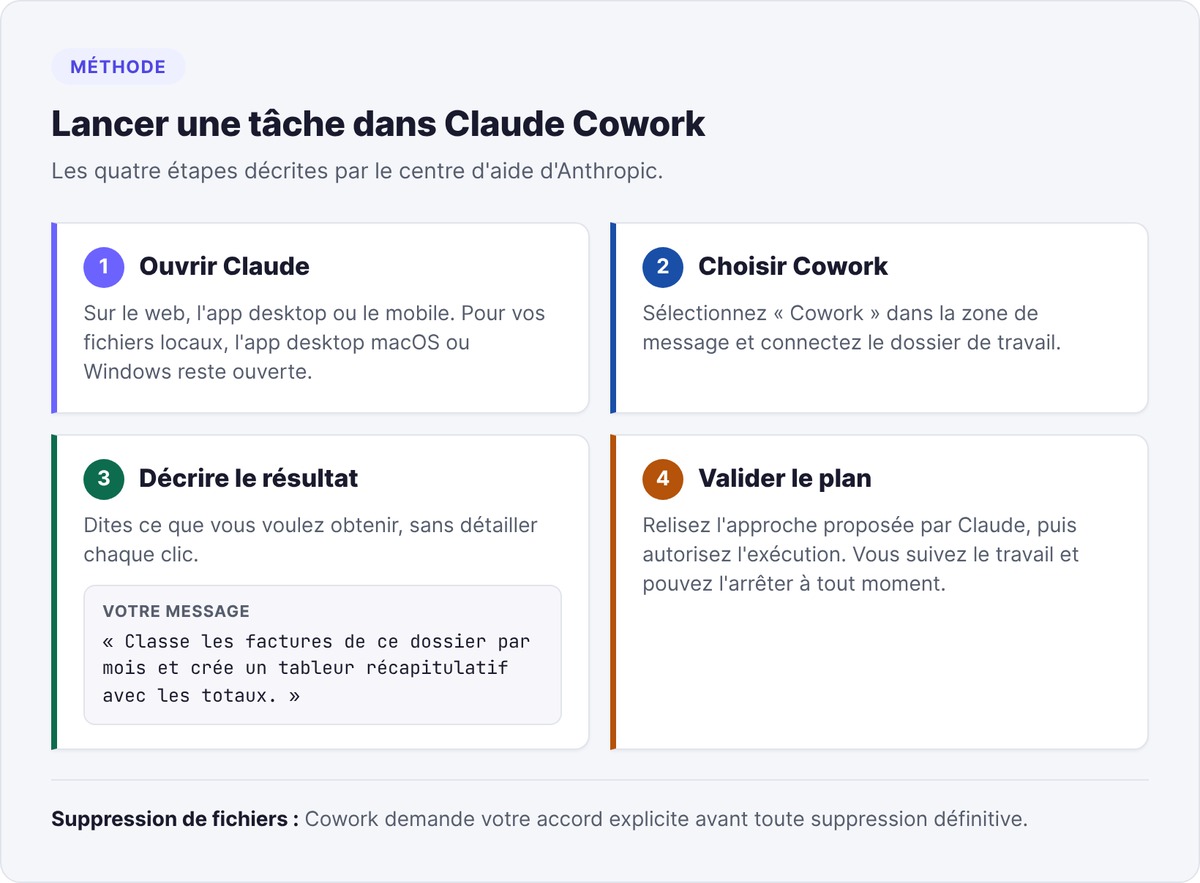
Launch a task in four steps
The getting started guide describes the sequence:
- Open Claude on web, desktop, or mobile.
- Select "Cowork" in the message box.
- Describe the task you want done.
- Review the approach Claude proposes, then approve execution.
You can watch the work live and stop it at any step.
Describe the outcome you expect
Anthropic sums up the method in one line on its product page: "Say what, not how". Describe the deliverable, its format, and who it's for. Let Claude choose the steps.
A precise prompt sets the scope and the format: "Rename the PDFs in the Invoices folder using the YYYY-MM-supplier format, then create a spreadsheet with one row per invoice and a total per month."
Three use cases for a non-technical founder
Cowork earns its keep on repetitive tasks that touch several files. Here are three use cases that match the features Anthropic describes.
Sort and rename files
Connect a downloads folder or a folder of accounting documents. Ask Claude to sort the files by type and by month, rename them according to a naming convention, and list the duplicates. Cowork will ask for your approval before deleting anything.
Summarize documents
Drop contracts or customer interview notes into a folder. Ask for a summary memo covering common points, differences, and open questions, delivered as a formatted document. Check every quote against the source file before reusing it: an agent can get a detail wrong.
Automate reporting
With a Google Drive or Microsoft 365 connector, Claude reads your sales or acquisition exports and produces a spreadsheet with formulas plus a summary. Then schedule the task for every Friday. When it's time for your monthly investor update, you start from a table that's already current.
To see where Cowork fits among the other tools an early-stage startup uses, from prospecting to customer support, check out our AI tool stack for startups in 2026.
Limitations and precautions
Cowork acts directly on your files and accounts. Anthropic publishes a dedicated safety page, Use Claude Cowork safely, and its recommendations apply from your very first task.
File access
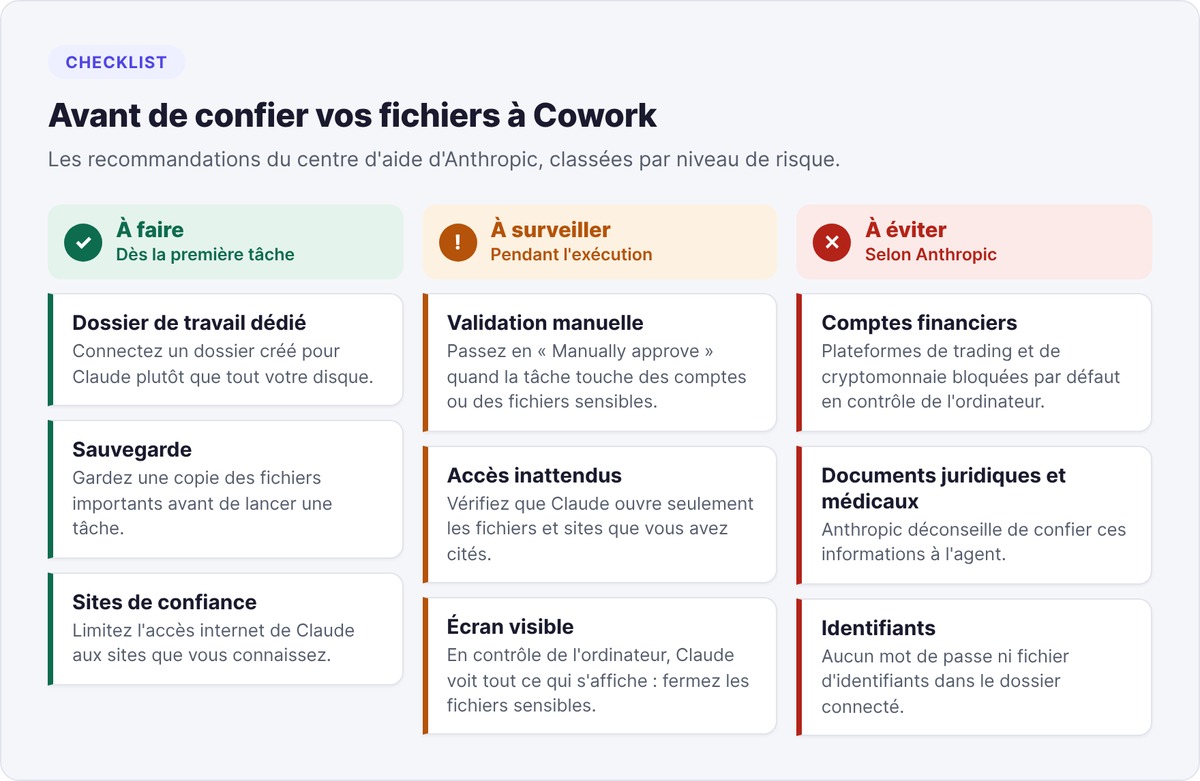
Claude can edit and permanently delete files in connected folders. Anthropic recommends creating a dedicated working folder rather than granting broad access, and keeping a backup of important files. Keep financial documents, credentials, and personal files out of it.
Prompt injection
A prompt injection hides malicious instructions inside content Claude reads during a legitimate task: an email, a document, a web page. Anthropic gives the example of a booby-trapped email instructing Claude to wire $1,000 to an account. Anthropic scans external content with classifiers that flag likely injections. On your end, limit Claude's internet access to trusted sites and switch to "Manually approve" mode when the task involves sensitive accounts or files.
Computer control
To navigate, Claude takes screenshots, so it sees everything on your screen. Close sensitive files before launching a task. Anthropic advises against letting the agent manage financial accounts, legal documents, or medical records, and reminds users that no safeguard is perfect.
If your folders contain customers' personal data, have your lawyer or data protection officer approve the processing framework before opening them up to an agent.
Sharing and review
You can't share a Cowork session with a co-founder, only the files it produces. Review every deliverable before sending it to a customer or an investor.
Building your startup and looking for long-term support? swanbase backs early-stage founders in Paris and remotely, at €0 cost, by application. swanbase takes equity. Apply.
FAQ
What is Cowork in Claude?
Cowork is the agent mode of Claude, Anthropic's assistant. You describe an outcome and Claude carries out a multi-step task on its own in the folders and applications you give it access to, then hands back documents, spreadsheets, or presentations for you to review.
What's the difference between Claude Code and Claude Cowork?
Both tools share the same agentic architecture. Claude Code works on a codebase, through a terminal or an editor. Cowork targets non-coding office work, with no terminal, and delivers office files.
How do you use Claude Cowork?
Open Claude on web, desktop, or mobile, select Cowork in the message box, describe the task, review the proposed approach, then approve execution. For local files, keep the Claude Desktop app for macOS or Windows open.
Is Claude Cowork free?
No. Cowork requires a paid subscription: Pro, Max, Team, or Enterprise. The Free plan gives access to Claude chat without Cowork.
How much does Claude Cowork cost?
Anthropic includes Cowork in Claude's paid plans. Pro costs $20 per month, or $17 billed annually. Max costs $100 or $200 per month. Team starts at $25 per seat per month, or $20 billed annually. Prices exclude tax and were checked on September 26, 2026.
Does Claude Cowork work on Windows?
Yes. The Claude Desktop app is available for Windows on x64 and arm64, as well as for macOS. Local file access and computer control go through the macOS or Windows desktop app.