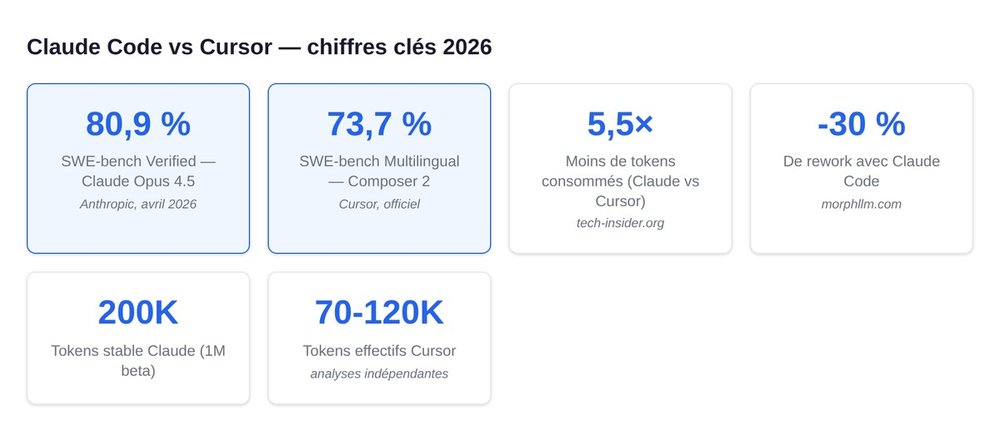
Claude Code and Cursor are the two dominant tools for AI coding in 2026. The difference fits in one line: Claude Code is an autonomous agent driven from the terminal ("the AI drives, you supervise"), while Cursor is an IDE (a VS Code fork) where the AI assists on every keystroke ("you drive, the AI assists"). On SWE-bench Verified, Claude Opus 4.5 hits 80.9%, and the latest versions (Opus 4.7, April 2026) climb to around 87.6%. Cursor publishes its own results for its Composer 2 model: 73.7% on SWE-bench Multilingual, 61.7% on Terminal-Bench 2.0, and 61.3% on CursorBench (official Cursor source). Claude Code uses 5.5x fewer tokens per task and produces roughly 30% less rework according to independent analyses. On pricing: Claude Code Pro at $20/month, Cursor Pro at $20/month, Cursor Hobby free (2,000 completions/month), Claude Max at $100 or $200/month depending on the tier. For a founder who vibe-codes: Cursor to get started, with Claude Code added the moment you want to parallelize tasks or delegate. The combo, at roughly $40/month (~€37 excl. VAT), is the most productive AI dev stack available today.
Claude Code vs Cursor: quick comparison (TL;DR)
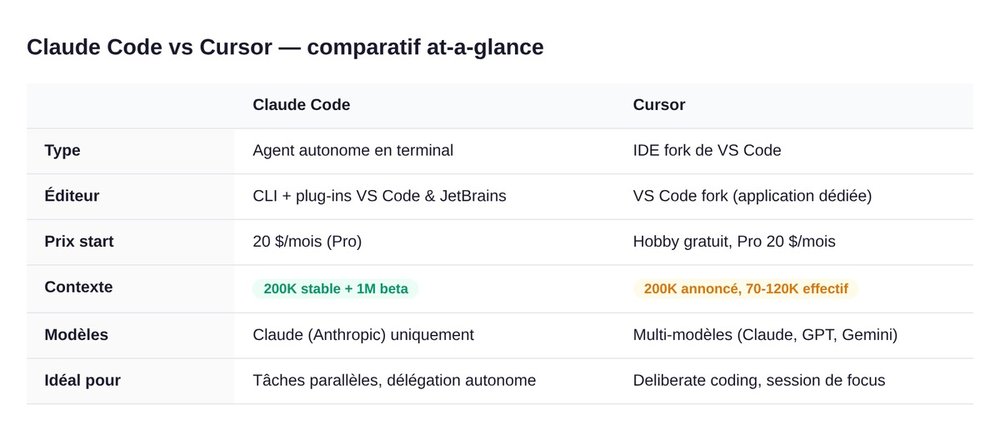
| Dimension | Claude Code | Cursor |
|---|---|---|
| Type | Autonomous terminal agent | IDE (VS Code fork) with built-in AI |
| Editor | CLI + VS Code and JetBrains integrations | Standalone IDE (VS Code fork) |
| Starting price | Pro $20/month, Max $100 / $200 | Hobby free, Pro $20, Business $40/user |
| Context | 200K tokens stable, 1M in beta | 200K advertised, 70K-120K effective reported |
| Models | Claude (Sonnet, Opus) | Multi-model (Claude, GPT, Gemini, Auto) |
| Reference benchmark 2026 | SWE-bench Verified: 80.9% (Opus 4.5) → 87.6% (Opus 4.7) | Composer 2: 73.7% SWE-bench Multilingual, 61.3% CursorBench |
| Best for | Parallel tasks, refactors, scoped bugs | Deliberate coding sessions, design, debugging |
The rest of the article unpacks each row in detail. If you're in a hurry: try Cursor Hobby first (free), then add Claude Code Pro ($20) as soon as you're running several tasks in parallel. The two together cost around €37 excl. VAT/month and cover 90% of founder use cases in 2026.
The 2 philosophies: agent-first vs IDE-first
The real choice isn't about price, it's about philosophy. Both tools solve the same problem (coding faster with AI) using two opposing paradigms.
Claude Code, the autonomous terminal agent
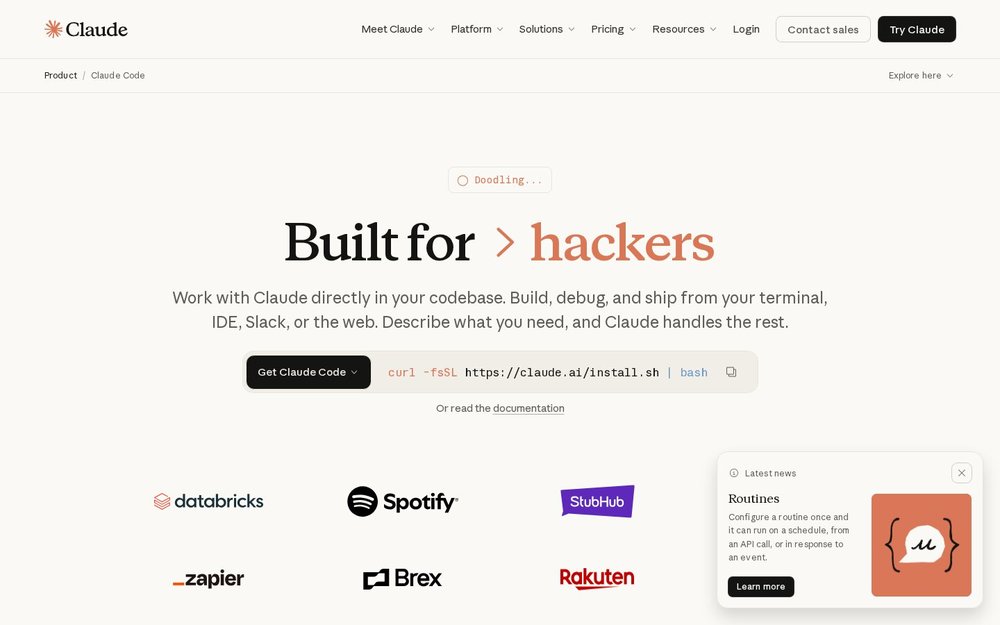
Claude Code is a CLI (command-line interface). You run the command in your terminal, at the root of your project. You describe a task in natural language. The agent reads the code, plans, edits files, runs the tests, commits. You step in to approve or correct. The AI drives. You're the copilot.
Extensions available in 2026: Claude Code for VS Code and for JetBrains, which bring the same agent logic into a side panel of your usual IDE. Same underlying model (Sonnet or Opus depending on your plan), same philosophy: the AI works, you supervise.
Cursor, the IDE rebuilt around AI
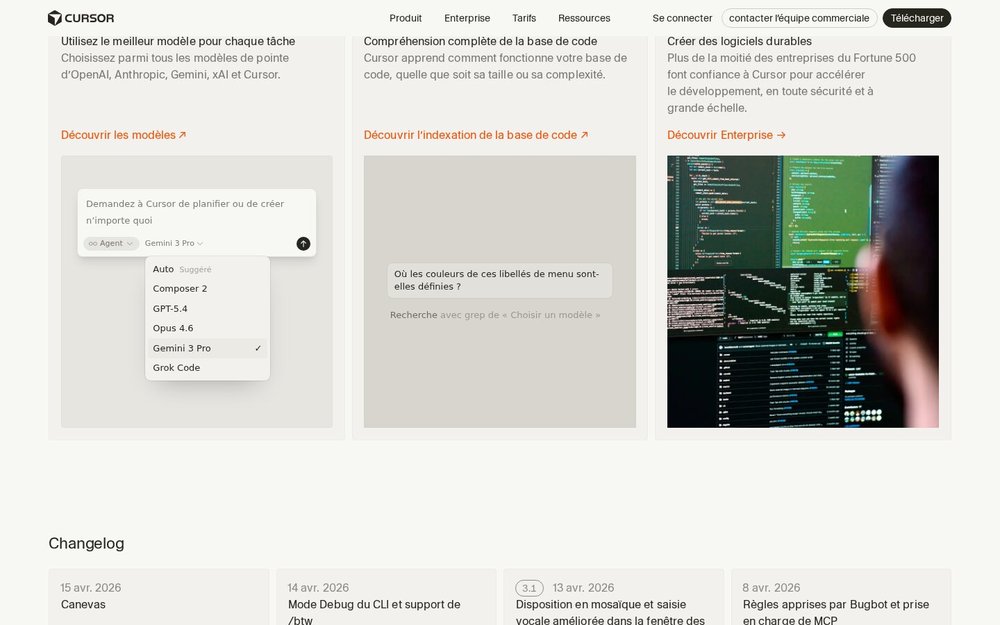
Cursor is a full IDE, a fork of VS Code. You code in it exactly like in VS Code, with the same shortcuts, the same extensions, the same UI. The AI is integrated in three places:
- Tab (aggressive autocomplete, multi-line, cross-file)
- Cmd+K (inline editing: select some code, ask for a change)
- Agent (a side panel that can plan and edit, in a more autonomous mode)
The dominant model varies with your selection: Auto (the cheapest, chosen by Cursor), Claude Sonnet/Opus, GPT, Gemini. You stay the driver. The AI assists.
Why this philosophical choice changes everything
Picture two workshops. In the first (Claude Code), you hire a developer who works in the background while you do something else. They bring you a pull request that you review. In the second (Cursor), a developer sits next to you and finishes your sentences as you type.
Both are useful, at different moments of your day. The "Claude Code or Cursor" conflict is really a false dilemma in many setups: the true question is when to use which, and we answer that below in the hybrid workflow section.
Features compared point by point
Context window
Claude Code exposes a stable 200,000 tokens and a 1 million token mode in beta. These tokens correspond to the amount of code and context the agent can read at once. Cursor also advertises 200K tokens, but several analyses report 70K to 120K effective depending on the selected model and the internal compaction mode. In practice: on a monorepo with 50 files to read before making changes, Claude Code manages to keep everything in mind, while Cursor sometimes has to go back and forth.
Supported models
- Claude Code: the Claude family only (Sonnet for simple tasks, Opus for complex reasoning). Guaranteed consistency, but no diversification.
- Cursor: multi-model. You select Claude, GPT, Gemini, Grok, or let Auto route. Handy if you have a per-task preference (GPT for legacy, Claude for architecture).
IDE integration
- Claude Code: native CLI + VS Code extension + JetBrains extension. It also runs in any terminal (iTerm, Warp, tmux).
- Cursor: standalone IDE, a VS Code fork. You migrate your VS Code setup in one click (settings, extensions, themes).
If your dev workflow is already heavily VS Code or JetBrains: both integrate. If you're terminal-first or write your code across a mix of apps: Claude Code adapts better.
Multiple agents and parallel tasks
Claude Code natively handles several sessions in parallel. You can launch 3 terminals with 3 instances of Claude Code on 3 sub-tasks of the same repo (refactor, tests, docs). In 2025, Cursor added a Cloud Agents mode that runs tasks in the background, but fine-grained parallelization is still smoother on the Claude Code side.
Automated code review
Both do reviews, from different angles. Claude Code reviews an entire diff via claude review and flags risks, missing tests, and possible regressions. Cursor builds review into its agent panel, with the option to request refactors during the review.
Benchmark performance
Figures published in April 2026 (sources cited at the end of the article):
- SWE-bench Verified: Claude Opus 4.5 reaches 80.9%. Opus 4.6 sits around 72.5%. Opus 4.7 takes back the lead at ~87.6% (April 2026). Cursor doesn't publish a SWE-bench Verified score, but reports on its in-house model Composer 2: 73.7% on SWE-bench Multilingual and 61.3% on CursorBench (Cursor, Nov. 2025). GitHub Copilot Workspace: 55%.
- HumanEval: 97.8% for Opus 4.6.
- Cursor Inline Acceptance Rate (share of Tab suggestions accepted): 42-45%.
- Token efficiency: Claude Code consumes on average 5.5x fewer tokens for equivalent tasks (one-off benchmark: 33,000 tokens vs 188,000 tokens for the same task).
- Rework: 30% less rework with Claude Code according to morphllm.com.
Read with nuance: benchmarks shift every quarter, and each new Claude or Cursor model reshuffles the deck. The philosophy/workflow gap matters more in your daily use than 5 points of SWE-bench.
2026 pricing in euros and real-world usage
Claude Code Pro ($20/month) and the Max plan
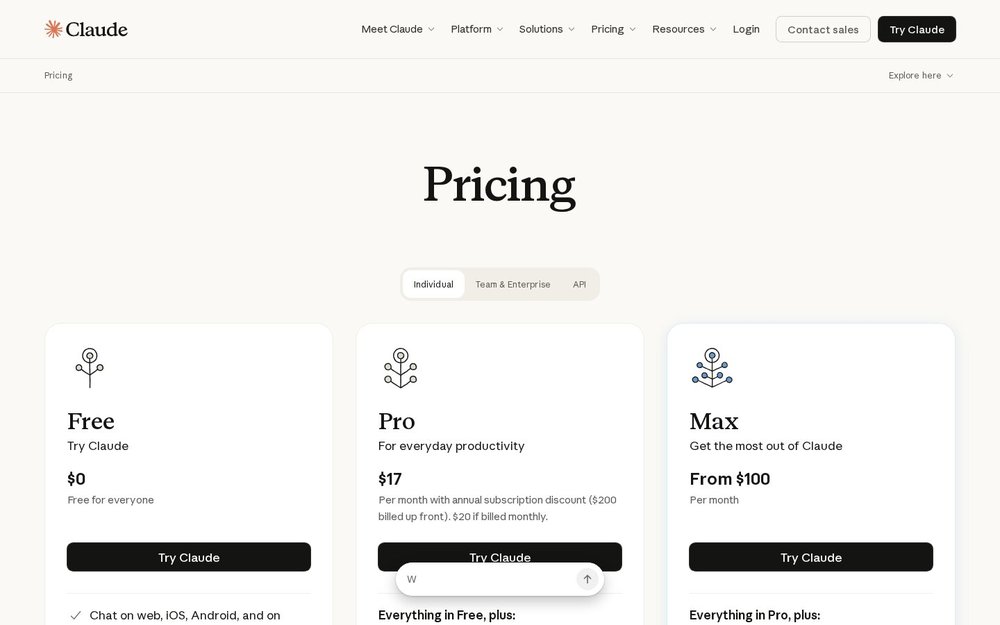
- Pro ($20/month, ~€18.50 excl. VAT): moderate daily use. Enough quota for a solo founder doing 2-3 hours of coding per day.
- Max 5x ($100/month, ~€92 excl. VAT): 5 times the Pro limits. Aimed at intensive developers.
- Max 20x ($200/month, ~€185 excl. VAT): 20 times the Pro limits. For power users who run Claude Code all day across several projects.
Cursor Hobby free, Pro $20/month, Business $40/user/month
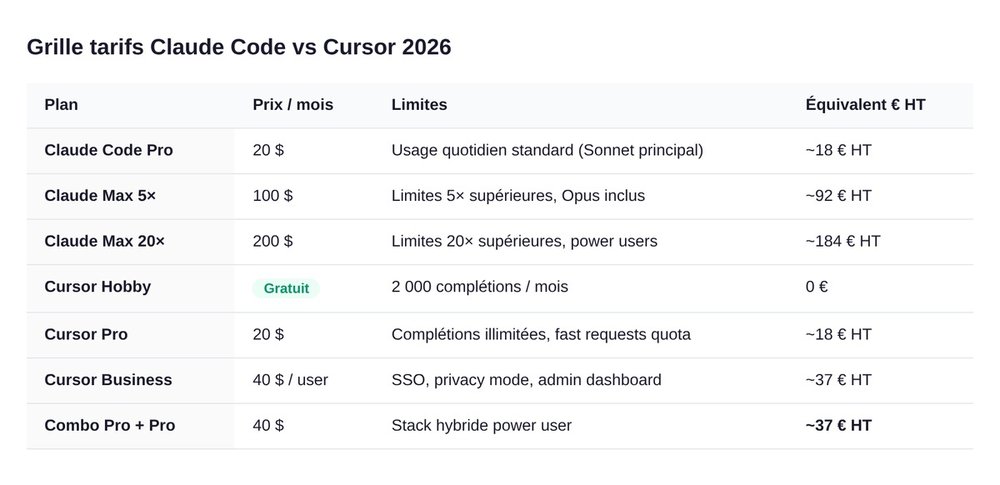
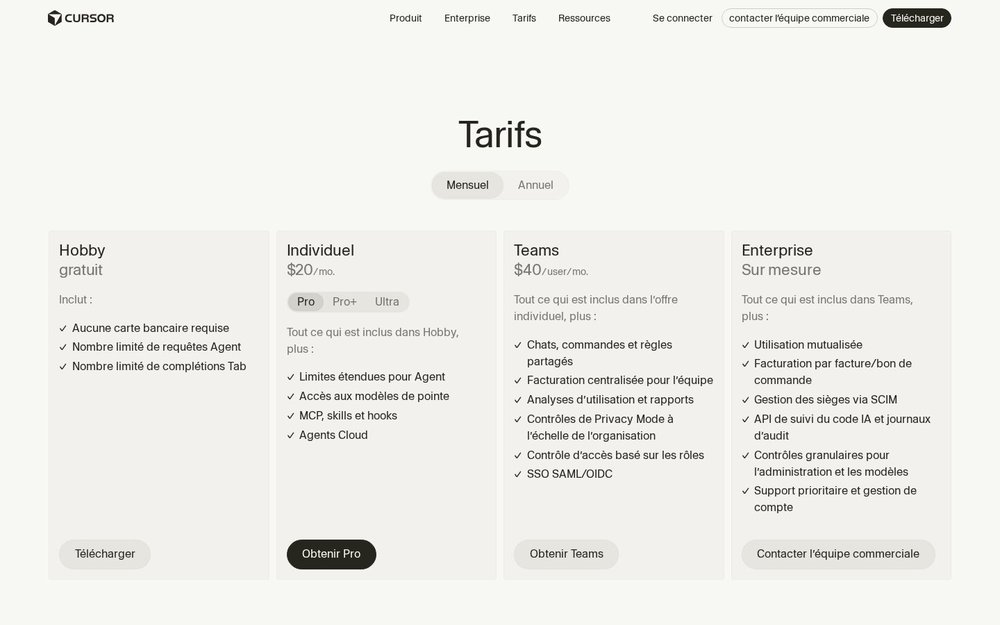
- Hobby (free): 2,000 Tab completions per month, a handful of agent requests. Fine for testing or very occasional use.
- Pro ($20/month, ~€18.50 excl. VAT): unlimited Tab completions, access to frontier models (Claude, GPT, Gemini), MCPs, skills, hooks, cloud agents.
- Business ($40/user/month, ~€37 excl. VAT): org features (shared chats, centralized billing, role-based access).
Since mid-2025, Cursor has run on credits. Auto mode is unlimited. Selecting a frontier model (Opus, GPT-5) consumes credits from the monthly pool included in your plan. In practice: a founder on the Pro plan who lets Auto run pays nothing extra. Someone who forces Opus on every request can burn through their pool in 2 weeks.
What a solo founder who vibe-codes 6h/day actually pays
Concrete case (April 2026, rate €1 ≈ $1.08):
- Cursor Pro alone: $20/month (~€18.50 excl. VAT), Auto mode dominant, a few occasional Opus credits. The most common setup to get started.
- Claude Code Pro alone: $20/month (~€18.50 excl. VAT). Enough for a solo who knows the CLI.
- Cursor Pro + Claude Code Pro combo:
$40/month (€37 excl. VAT). The recommended setup for anyone who wants the hybrid workflow (see below). - Cursor Pro + Claude Max 5x combo:
$120/month (€111 excl. VAT). For power users running tasks in parallel all day long.
The Anthropic API key option
If you want to pay per use rather than a flat rate, Claude Code accepts a personal Anthropic API key. Pricing (April 2026):
- Sonnet: $3 input / $15 output per million tokens.
- Opus: $15 input / $75 output per million tokens.
In practice, for daily use, the Pro or Max subscription costs less than the API. The API becomes worthwhile if your usage is very irregular (one big coding session every 3 weeks) or if you plug Claude Code into an automated pipeline.
Which one to choose based on your profile
Non-technical founder building their MVP
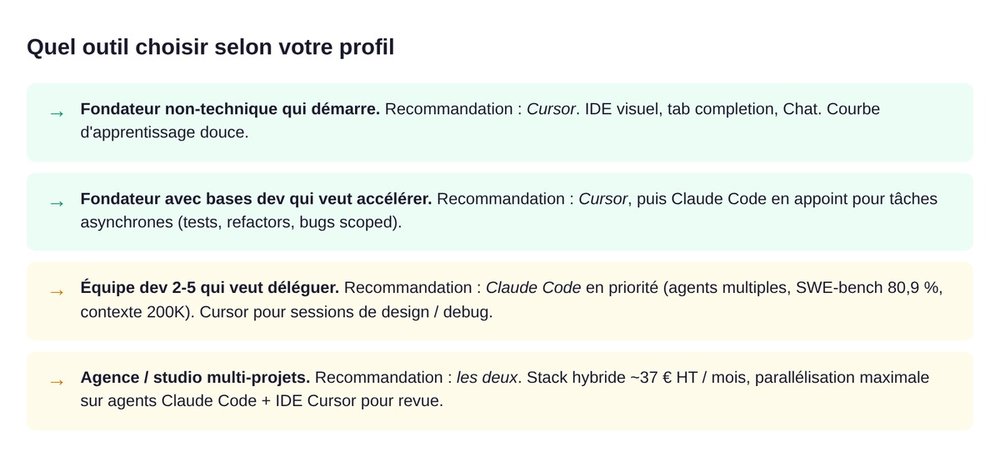
Recommendation: Cursor Hobby then Pro. Cursor is more intuitive when you're discovering an IDE. Visible Tab completion, direct Cmd+K, an agent panel for when you get stuck. You see the AI work in real time, you understand what's happening. Claude Code in the CLI requires being comfortable with a terminal: that's a learning curve that doesn't help when you're simply trying to ship an MVP.
Founder with some dev basics who wants to speed up
Recommendation: Cursor Pro + Claude Code Pro. You get the comfort of a familiar IDE (Cursor) and gain the ability to send tasks to the background (Claude Code). You code in Cursor and delegate the side tasks (tests, fixtures, docs, cosmetic refactors) to Claude Code in the terminal while you stay focused on the main feature.
Dev team of 2 to 5 that wants to delegate async tasks
Recommendation: Claude Code (Pro or Max) for each dev + Cursor as an option. A team comfortable with the CLI will get the biggest ROI from Claude Code: you assign tickets to the agent, and it delivers PRs the team reviews. Cursor stays handy for group debugging sessions or AI pair programming.
Agency / studio delivering several projects in parallel
Recommendation: both, with Claude Code Max. You need massive parallelism (3, 4, 5 projects at once) and the ability to delegate entire tasks. Claude Code Max gives you the quota, Cursor gives you the IDE comfort for deliberate work on the project of the moment.
Hybrid workflow: using both together
The most productive choice in 2026 isn't Claude Code or Cursor. It's both, at different moments. This combination is documented by haihai.ai and morphllm.com in English, and rarely translated into French.
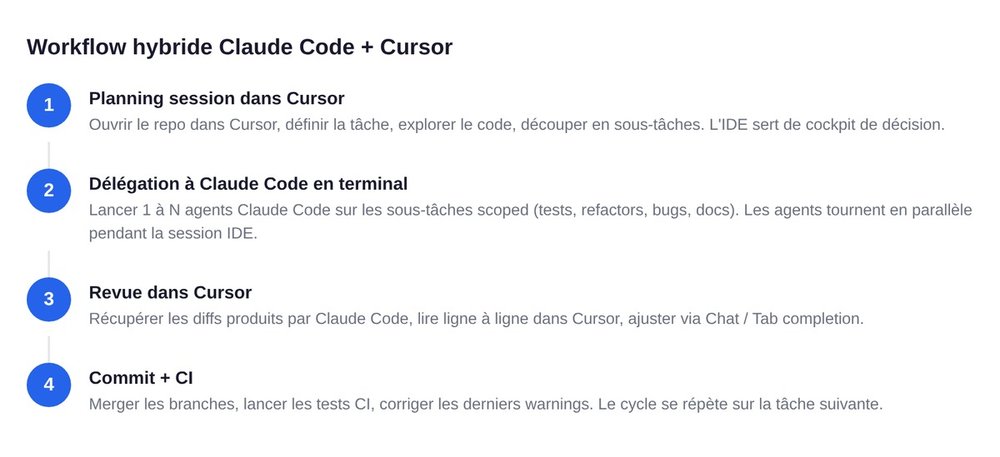
Claude Code for background tasks
- Missing unit tests on a freshly coded feature.
- Scoped refactors (renaming an entity across the whole repo, extracting a module).
- Fixing a well-described bug, with enough context.
- Writing or updating the docs.
- Generating fixtures, seeds, mocks.
You launch claude in the terminal, describe the task, and carry on with your main work. The agent delivers, you review, you merge.
Cursor for deliberate coding sessions
- Designing a new feature (thinking, structure, naming).
- Debugging a complex bug that requires exploring several main files.
- Pair programming with Cmd+K on sensitive code (auth, payment, data).
- Exploring a legacy repo to understand what's already there.
You code in Cursor. Tab suggests, Cmd+K edits, and the agent panel answers structure questions.
Combined cost and real ROI
The Cursor Pro + Claude Code Pro combo = $40/month (€37 excl. VAT). Productivity gains reported by power users: 2x to 3x more features shipped per week vs Cursor alone, with less rework thanks to Claude's quality control on delegated tasks. The ROI is structurally favorable as soon as a founder values their time at more than €15 an hour.
Concrete examples of a hybrid stack
- Solo B2B SaaS founder: Cursor Pro for deliberate work, Claude Code Pro for background tasks (tests, overnight refactors via cron).
- French dev studio (5 devs): Cursor Pro for each of them, a shared Claude Code Max for heavy tasks (migration, audit, large refactor).
- Product founder + 1 dev: Cursor Pro for the dev, Claude Code Pro for the founder (who writes specs as tasks and lets the agent produce drafts).
When to stop vibe-coding and bring in a freelance dev
There's a ceiling. Nobody talks about it. We will.
The 3 signals that mark the tipping point
- You can no longer review the generated PRs without accepting them blindly. Which means: the project has outgrown your ability to understand it. You're shipping code you no longer control.
- Production bugs become hard to diagnose. When the AI has written 60% of the code and you haven't kept hold of the architectural thread, debugging becomes exponential. A real developer rebuilds readability.
- You spend more time orchestrating the AI than producing. If your day is 8 hours of prompts and 1 hour of value, that's a structural signal.
What the AI still doesn't do well
- Long-term architecture: the AI optimizes locally, not globally. Structural technical debt piles up silently.
- Sensitive security: auth, payment, secrets management. A senior developer has to review it systematically.
- Fine-grained performance: DB bottlenecks, N+1 queries, indexing. The AI sometimes sees them, sometimes not.
- Borderline product/tech decisions: framework choice, migration, scalability. This needs a human who knows your business.
The right time to hire isn't when everything is going wrong. It's when you feel velocity plateauing despite the AI.
Going further
- Vibe coding: definition and complete guide
- Claude Code: definition and features
- Vibe coding tools compared: Cursor, Lovable, Bolt
- swanbase, acceleration program in Paris + remote worldwide
FAQ: Claude Code vs Cursor
What's the main difference between Claude Code and Cursor?
Claude Code is an autonomous agent driven from the terminal (CLI). You give it a task, it reads the code, edits, tests, and delivers you a result. Cursor is an IDE (VS Code fork) where the AI assists on every keystroke: Tab autocomplete, Cmd+K inline editing, an agent panel. Opposite philosophies: one drives, the other assists.
Is Claude Code free?
No. Claude Code starts at $20/month (Pro plan). The Max tiers cost $100 or $200/month. There's a pay-per-use option via a personal Anthropic API key (Sonnet $3/$15, Opus $15/$75 per million tokens) if you'd rather pay per request than a flat rate.
Does Cursor use Claude?
Yes, Cursor is multi-model and includes Claude (Sonnet, Opus) among the options. You select the model per request, or let Cursor route automatically via Auto mode. Cursor also includes GPT, Gemini, and other frontier models.
Can you use Claude Code and Cursor at the same time?
Yes, and it's the most productive setup in 2026. Cursor for deliberate coding sessions (design, debugging, exploration). Claude Code for tasks delegated to the background (tests, refactors, fixtures, docs). Combined cost: around $40/month (Cursor Pro $20 + Claude Code Pro $20), or ~€37 excl. VAT.
How much does Claude Code cost per month in France?
Pro: $20/month, or roughly €18.50 excl. VAT at an April 2026 exchange rate. Max 5x: $100/month (€92 excl. VAT). Max 20x: $200/month (€185 excl. VAT). VAT is added depending on your status (French auto-entrepreneurs pay VAT on EU B2C services, while companies with an intra-community VAT number don't pay it under reverse charge).
Does Claude Code replace a developer?
No, not in 2026. Claude Code amplifies a developer or lets a non-technical founder produce an MVP. The limits remain real on long-term architecture, sensitive security, fine-grained performance, and strategic product/tech decisions. A senior developer stays necessary as soon as the project moves beyond the MVP stage, or on any critical system (payment, sensitive data, compliance).
Which is best for a beginner?
Cursor on the Hobby plan (free). The IDE is familiar if you've already touched VS Code. Tab autocomplete teaches you as you read. Claude Code requires being comfortable with a terminal and needs a subscription from the start, which creates needless friction if you're new to development.