A Claude Code skill is a folder containing a SKILL.md file with reusable instructions that Claude loads on its own when your task matches, or that you trigger manually with /skill-name. Claude Code Skills follow the open Agent Skills standard, so the same format works across several AI tools. Unlike a CLAUDE.md file, which is always held in memory, a skill's body only loads when it's actually needed: your reference documentation costs almost nothing until you use it. In practice, a skill saves you from pasting the same instructions into the chat every session. Here's what a skill is, how to install one, how to build your own, and above all when to use a skill instead of a CLAUDE.md, a slash command, or an MCP.
What is a Claude Code skill?
A Claude Code skill is a capability you add to Claude in the form of a text file. You write a SKILL.md, Claude adds it to its toolkit, and it uses it when it's relevant. That's it. No plugin to compile, no dependency to install: a folder, a markdown file, and it's live.
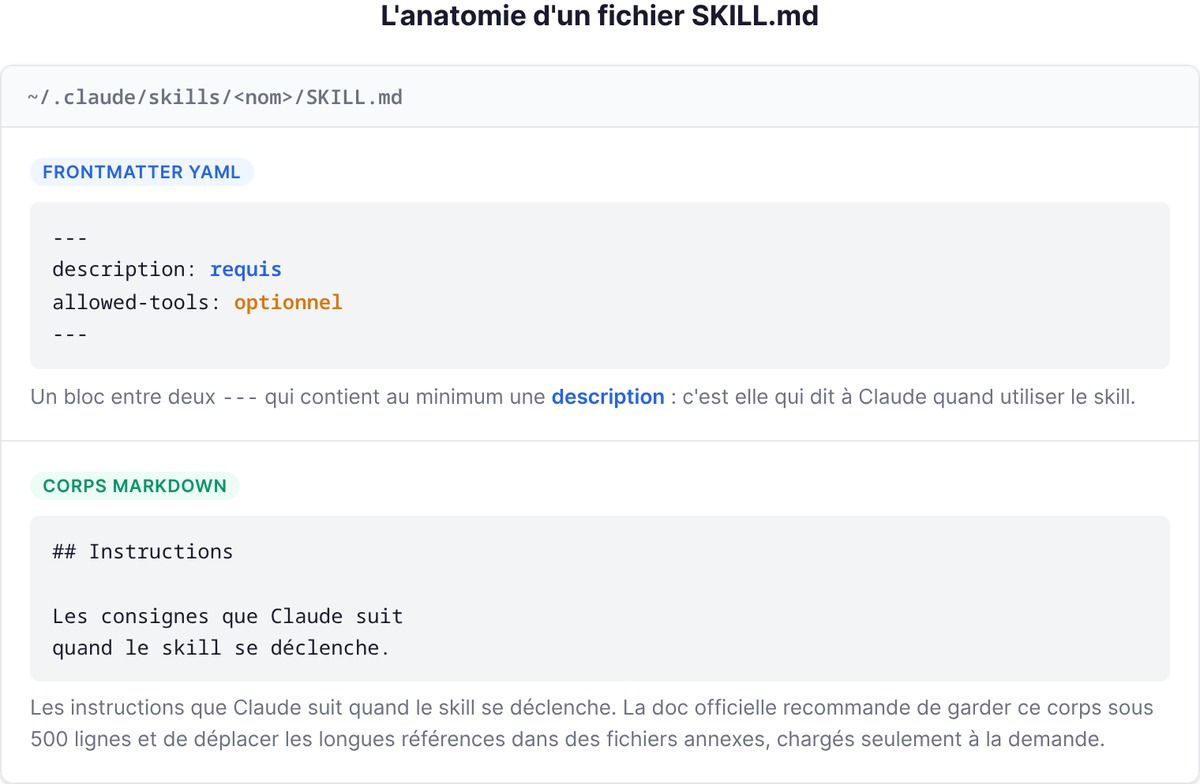
The file has two parts. First, a YAML frontmatter block between two --- markers, which at minimum contains a description: that's what tells Claude when to use the skill. Then the markdown body, which holds the instructions Claude follows when the skill fires. The official documentation recommends keeping that body under 500 lines and moving long references into companion files, loaded only on demand.
The real question isn't "what is a skill," it's "why does it exist." The answer: because you repeat yourself. You paste the same deployment checklist, the same commit format, the same API conventions into the chat, session after session. A skill captures that procedure once. And where a CLAUDE.md keeps those instructions permanently in context (so it pays their token cost on every turn), a skill only loads its content while it runs. That's the structural difference to remember: CLAUDE.md is permanent memory, a skill is an on-demand capability.
One detail that matters for anyone coming from the older version of Claude Code: custom commands have merged into skills. A .claude/commands/deploy.md file and a .claude/skills/deploy/SKILL.md skill both create the /deploy command and work the same way. Your old commands still work. Skills just add more options: a folder for companion files, frontmatter to control who triggers what, and the ability for Claude to load the skill automatically.
How to install and activate a skill
Installing a Claude Code skill means two very different things depending on where it comes from: either you drop it into the right folder yourself, or you install it from a plugin marketplace.
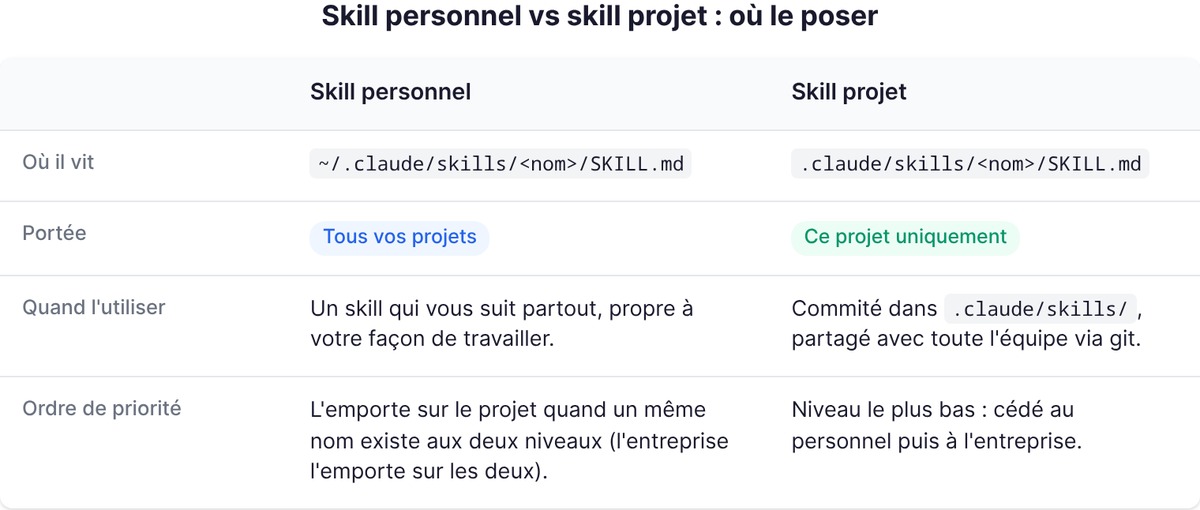
The simplest case: a skill is a folder, you put it in the right place, and it activates. The location decides who can use it.
| Location | Path | Applies to |
|---|---|---|
| Personal | ~/.claude/skills/<name>/SKILL.md |
All your projects |
| Project | .claude/skills/<name>/SKILL.md |
This project only |
| Plugin | <plugin>/skills/<name>/SKILL.md |
Wherever the plugin is enabled |
| Enterprise | Via managed settings | The whole organization |
A personal skill follows you everywhere. A project skill, committed to .claude/skills/, is shared with your whole team through git. When the same name exists at several levels, enterprise wins over personal, which wins over project. Claude Code watches skill folders live: adding or editing a SKILL.md under ~/.claude/skills/ takes effect in the current session, no restart needed.
The second case: installing from a marketplace. Claude Code has an official plugin system. For example, to install the skill-creator plugin, which helps you build and test your own skills, you type:
/plugin install skill-creator@claude-plugins-official
Once the skill is in place, there are two ways to activate it. You trigger it manually by typing /skill-name, or you let Claude load it on its own when your request matches its description. This is where the quality of the description makes all the difference: if it contains the words you'd say naturally, Claude finds the skill. If not, it misses it. To check that a skill is properly recognized, just ask Claude "which skills are available?"
Building your own skill, step by step
This is where most French-language tutorials stop at the theory. Let's get concrete. Let's build a skill that summarizes your repo's uncommitted changes and flags anything risky. Three steps.
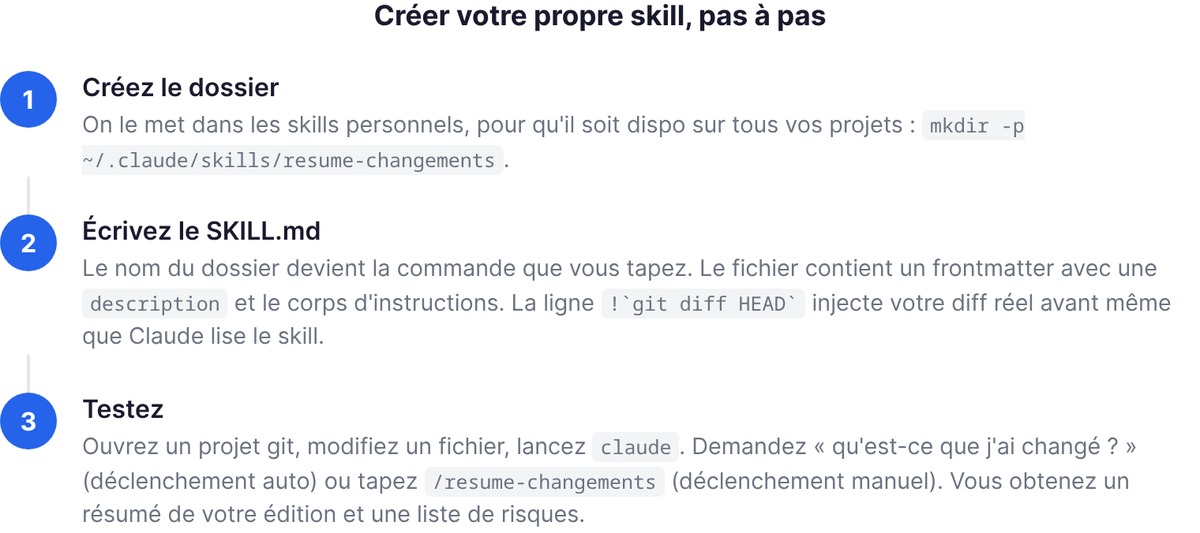
1. Create the folder. We'll put it in personal skills, so it's available across all your projects:
mkdir -p ~/.claude/skills/summarize-changes
2. Write the SKILL.md. The folder name becomes the command you type. Save this to ~/.claude/skills/summarize-changes/SKILL.md:
---
description: Summarizes uncommitted changes and flags anything risky. Use when the user asks what changed, wants a commit message, or wants a review of their diff.
---

## Current changes

!`git diff HEAD`

## Instructions

Summarize the changes above in two or three bullets, then list the risks: missing error handling, hardcoded values, tests to update. If the diff is empty, say there's nothing uncommitted.
The !`git diff HEAD` line is the real trick. It's dynamic context injection: Claude Code runs the command and replaces the line with its output before Claude even reads the skill. The result: the instructions arrive with your real diff already inserted. The skill doesn't reason about what Claude imagines your code looks like, it reasons about your actual working tree. This !`command` syntax works for any shell command.
3. Test it. Open a git project, edit a file, run claude. Ask "what did I change?" (Claude fires the skill on its own) or type /summarize-changes (manual trigger). Either way, you get a summary of your edit and a list of risks.
Want to go further? Add companion files to the folder: a reference.md with detailed docs, a scripts/ folder with a Python script that Claude runs. The SKILL.md stays short and points to those files, which only load when they're needed. That's the principle: the skill stays light, the heavy knowledge waits in the wings.
CLAUDE.md vs Skills vs Slash Commands vs MCP: which one for what
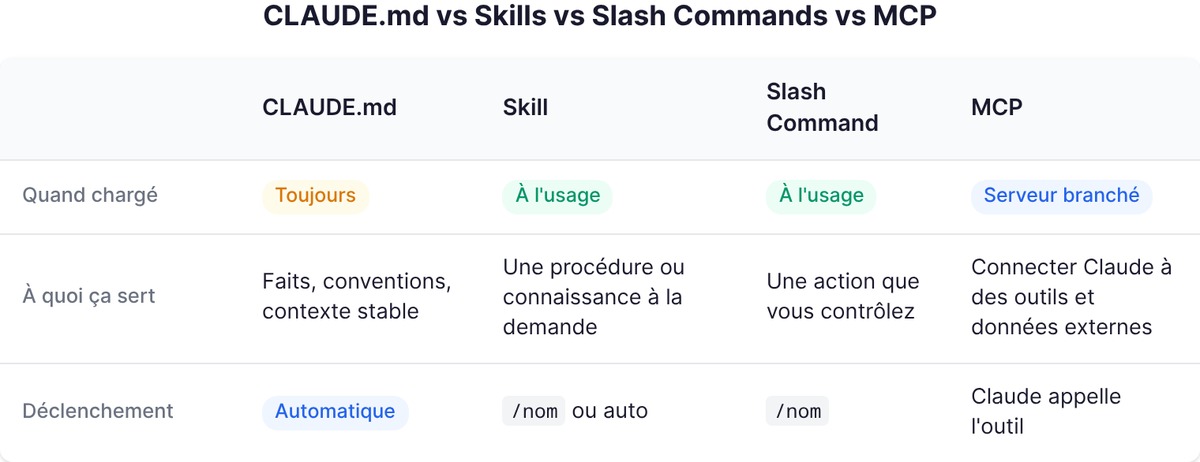
Here's the question everyone asks on the forums and no one settles cleanly in French. Four mechanisms, we mix them up, and we use the wrong one. Let's lay them out flat.
| Mechanism | When it's loaded | What it's for | How you trigger it |
|---|---|---|---|
| CLAUDE.md | Always, permanently | Facts, conventions, stable project context | Automatic, never invoked |
| Skill | Only when used | A procedure or knowledge on demand | /name or auto by Claude |
| Slash command | On use, on your command | An action you want to control | /name only |
| MCP | Server connected continuously | Connecting Claude to external tools and data | Claude calls the tool |
The logic boils down to one sentence per row.
CLAUDE.md is memory. Facts Claude should always have in front of it: the stack, naming conventions, the architecture. Always loaded, so keep it short. If a section of your CLAUDE.md has become a multi-step procedure rather than a fact, that's the signal: it should become a skill.
A skill is a capability. A procedure Claude pulls off the shelf when it's needed, then puts back. Since the merge, a slash command is just a skill you trigger by hand: put disable-model-invocation: true in the frontmatter and Claude will never launch it on its own (handy for a /deploy you really don't want firing off just because "the code looks ready"). Conversely, user-invocable: false hides the skill from the menu so only Claude can use it, useful for background knowledge that isn't an action.
An MCP is a socket. The Model Context Protocol doesn't load instructions, it plugs Claude into an external tool or data source: your GitHub, a database, a browser. This is the most common confusion, so let's be clear: a skill tells Claude how to do something, an MCP gives it access to something. Want Claude to follow your review process? Skill. Want it to read your GitHub issues live? MCP. The two complement each other, they don't replace each other.
The most useful skills for a founder
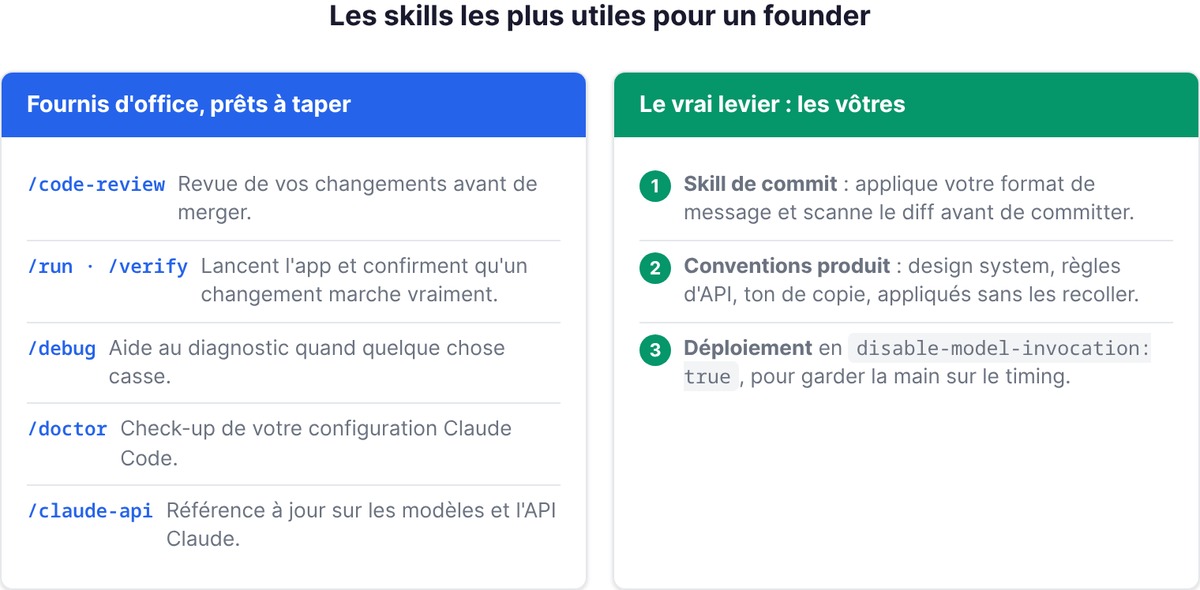
If you're building solo or in a small team, you don't have time to reinvent workflows. Good news: Claude Code ships with skills out of the box, ready to type. The ones that pay off most when you're shipping an MVP:
/code-review: a review of your changes before you merge. The safety net you don't have when you're the only dev./runand/verify: launch your app and confirm a change actually works, instead of trusting the tests. For a non-technical founder who's never sure "it runs," that's valuable./debug: diagnostic help when something breaks and you don't know where to start./doctor: a check-up of your Claude Code setup./claude-api: the up-to-date reference on Claude models and the API, useful the moment you wire Claude into your product.
But the real leverage isn't the built-in skills. It's writing your own, because they encode how you work. Three obvious candidates for a founder:
- A commit skill that applies your message format and scans the diff before committing (like the example above, in an extended version).
- A product conventions skill: your design system, your API rules, your copy tone. Claude applies them without you pasting them in.
- A deployment skill with
disable-model-invocation: true, to keep control of the timing.
And if you want to industrialize this, the skill-creator plugin goes further: it generates test cases, runs each skill in an isolated subagent, and compares the result with and without the skill. You don't guess whether your skill works, you measure it. That's exactly the discipline we apply internally at swanbase when we tool up the founders we support: a workflow you don't measure is a workflow you assume is effective.
One last reflex. A skill is only useful if Claude finds it. The number one cause of a skill that "won't trigger" isn't a bug, it's a description that's too vague. Write it with the words you'd actually say, not with jargon. The description is the only bridge between your need and your skill.
Going further
FAQ
What is a skill in Claude Code?
A skill is a folder containing a SKILL.md file (YAML frontmatter plus markdown instructions) that extends what Claude knows how to do. Claude loads it automatically when the task matches its description, or you trigger it by hand with /skill-name. Skills follow the open Agent Skills standard, so the same file works across several AI tools.
How do I install a skill in Claude Code?
Two ways. Either you place the skill's folder in the right spot: ~/.claude/skills/<name>/ for use across all your projects, or .claude/skills/<name>/ for a single project. Or you install it from a plugin marketplace, for example /plugin install skill-creator@claude-plugins-official. Claude Code detects new skills live, no restart needed.
What's the difference between a skill and an MCP?
A skill gives Claude instructions on how to do something (a procedure, some conventions). An MCP (Model Context Protocol) plugs Claude into an external tool or data source, like GitHub or a database. In short: a skill says how to do it, an MCP gives access to what to do. The two combine.
CLAUDE.md or skill: which should I choose?
Use CLAUDE.md for stable facts Claude should always keep in mind (stack, conventions, architecture): it's always loaded. Use a skill for a procedure Claude only pulls out when it's useful: its body only loads on use, so it doesn't cost tokens permanently. Simple rule: if a section of your CLAUDE.md has become a step-by-step procedure, turn it into a skill.
Which skills are most useful to get started?
The built-in skills help right away: /code-review to review your changes, /run and /verify to confirm a change works, /debug to diagnose a failure, /doctor to check your config. After that, the biggest payoff is writing your own skills (commit, product conventions, deployment) because they encode the way you work.