Friday night, 10pm. You open your terminal, type claude, paste in the Linear ticket "fix the double-billing bug on Stripe," and head off to grab a coffee. When you come back, the bug is identified, fixed across three files, the tests pass, the commit is ready, and the PR is open with a clear message. You sign off. That is what Claude Code is in 2026: a development agent that lives in your terminal, reads your entire codebase, writes, tests, commits, and opens PRs on your behalf. It isn't an editor extension or a souped-up autocomplete. It's a colleague that makes decisions, right in the console you already have open. Anthropic ships it with its Claude Sonnet 4.6 and Opus 4.7 models and includes it directly in the Pro plan at $17/month. The rest of this article gets concrete: what it does, how to install it, how to configure it so it becomes genuinely useful, and where it beats (or doesn't) Cursor, GitHub Copilot, and Codex.
What exactly is Claude Code?
Claude Code is an agentic coding tool built by Anthropic. Agentic means two specific things. One, it makes decisions without being hand-held. Two, it acts: it reads files, runs shell commands, launches tests, edits code, and makes Git commits. It doesn't just suggest.
The official docs sum it up as "an agentic coding tool that reads your codebase, edits files, runs commands, and integrates with your development tools." It's available in the terminal, VS Code, JetBrains, the desktop app, the web (claude.ai/code), and even iOS through the Claude app.
The difference from Claude.ai (the web version)
Claude.ai is the chat in your browser. You paste code, you talk, you pull back snippets of the answer. Everything goes through copy-paste. Handy for brainstorming, but the context doesn't survive the session, and the tool never touches your project.
Claude Code is the opposite. You give it a folder. It reads the file tree, understands the dependencies, and opens the files it judges relevant. It keeps your CLAUDE.md in mind, along with your history and your conventions. It edits in place. It commits. It's the difference between a consultant you call on the phone and a senior dev you've hired full-time.
For anyone who wants to place Claude Code within the new generation of tools where you code with AI rather than alongside it, the conceptual frame is vibe coding: you describe the intent, the agent executes.
What Claude Code does, concretely
A few real cases that come up every day:
- Reading a repo you're seeing for the first time and explaining its architecture in 30 seconds
- Writing the missing tests on an untested module, running them, and fixing the failures
- Refactoring a function across ten files at once
- Reproducing a bug from an error message, pinpointing the root cause, and proposing a fix
- Creating a clean commit with a descriptive message and opening the PR
- Updating dependencies and resolving merge conflicts
- Translating a set of strings into ten languages through a CI script
You stay in your terminal. You approve or reject. The context never leaks.
Installing Claude Code and getting started in 3 minutes
Installation takes about as long as a coffee. Anthropic recommends the native install, which creates a standalone binary that updates itself.
# macOS, Linux, WSL
curl -fsSL https://claude.ai/install.sh | bash

# Windows PowerShell
irm https://claude.ai/install.ps1 | iex

# Homebrew (macOS)
brew install --cask claude-code

# WinGet (Windows)
winget install Anthropic.ClaudeCode

# npm (legacy but still works)
npm install -g @anthropic-ai/claude-code
On native Windows, Git for Windows is required (WSL2 remains the most stable option). On npm, NEVER use sudo: it creates broken permissions that take more than an hour to untangle.
First launch and authentication
cd chemin/vers/votre/projet
claude
Claude asks you to authenticate. There are three options: a Claude Pro or Max account (unified billing with claude.ai, recommended for solos), Claude Console via OAuth (pay-as-you-go through the API), or Bedrock / Vertex AI / Microsoft Foundry for teams in constrained cloud environments.
The free Claude account does not give access to Claude Code. You need a Pro plan at minimum.
Once launched, type /help for the list of commands, /resume to pick up your last session, and /permissions to manage authorizations. You're ready to go.
CLAUDE.md: the file that changes everything
Here's the detail most tutorials skip that nonetheless accounts for 80% of how good the experience is: the CLAUDE.md file.
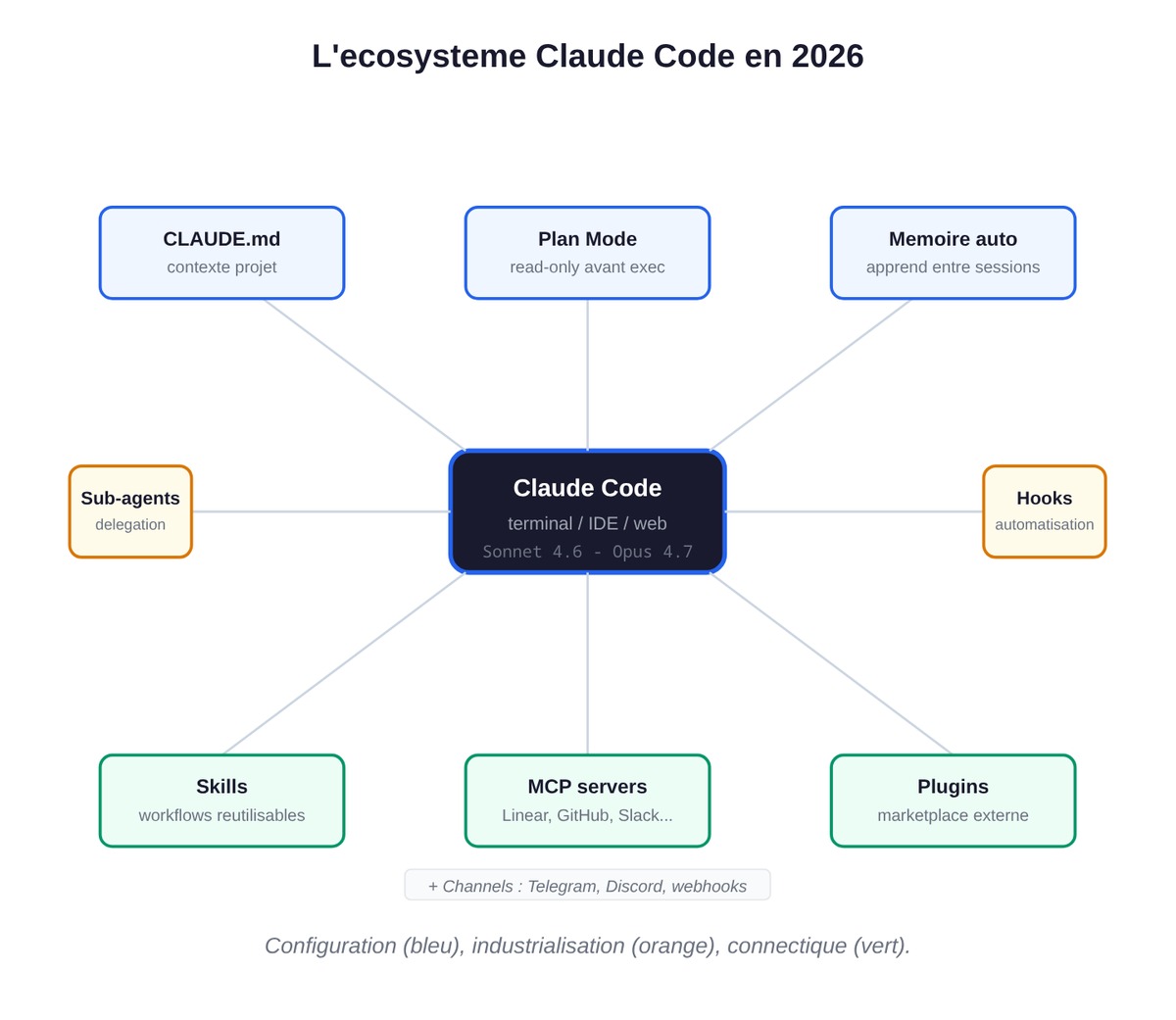
It's a markdown file you place at the root of your project. Claude Code reads it at the start of every session. You put in it everything you'd want to explain to a new dev joining the team: the stack, the conventions, the gotchas, the commands that work, and the ones that break. There's no required syntax. Plain markdown.
Minimal example for an Astro / TypeScript stack
# CLAUDE.md

## Stack
- Astro 5 + Tailwind 4 + strict TypeScript
- Content in `content/fr/blog/` (markdown with frontmatter)
- Deploy via `npm run build && npm run deploy`

## Conventions
- No `any`: use `unknown`, then narrow
- All components in `.astro` (no React unless already present)
- Slug = kebab-case, never any accents

## Useful commands
- `npm run lint` before every commit
- `npm run check` for the Astro TypeScript check
- Tests via `vitest run`

## Known gotchas
- Never touch `content/_entry_example.md` (template)
- Images live on media.swanbase.co (CDN), not in the repo
Configuration levels
There are two places to drop a CLAUDE.md: at the repo root (tracked by Git, shared with the team), and ~/.claude/CLAUDE.md at the user level (your personal preferences, favorite frameworks, and style, which apply across all your projects).
Since 2026, the official docs add another layer: automatic memory. Claude Code learns while it works, saving the build commands that work, the gotchas it hits, and the implicit conventions. It enriches your context on its own, between sessions.
The llms.txt format follows the same logic on the AI SEO side: you document the terrain so agents can find their way around. We cover it in how to use llms.txt.
Plan Mode: think before you code
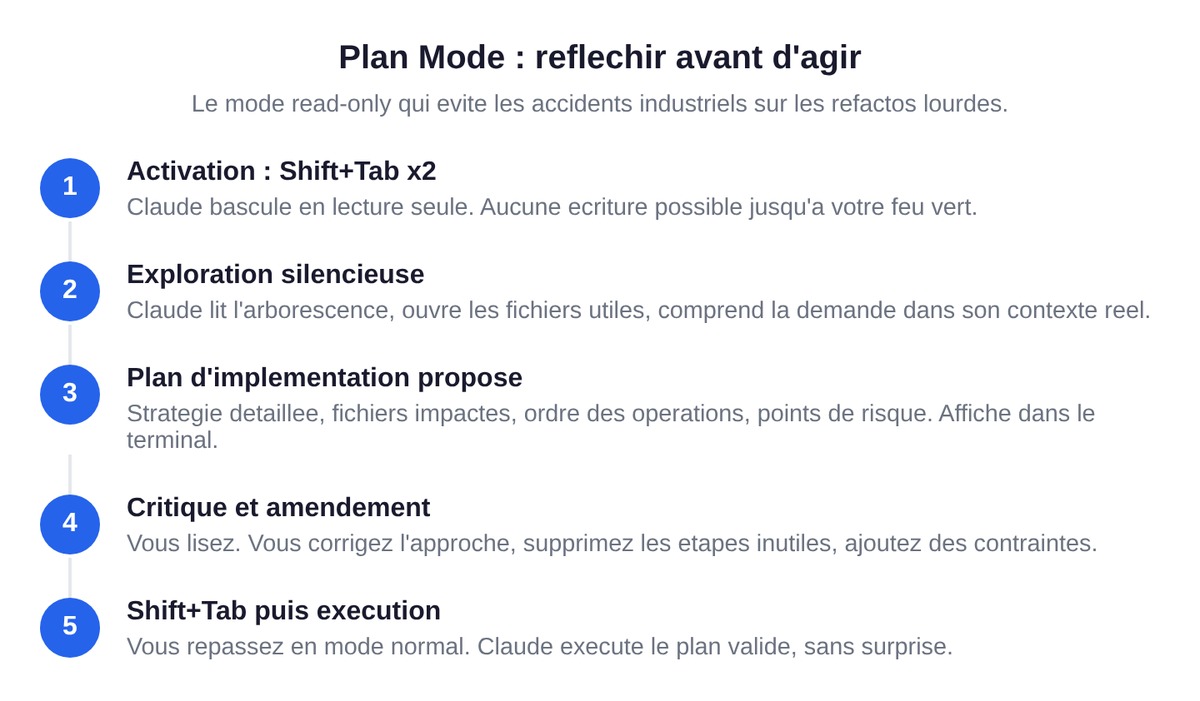
Plan Mode is the feature that separates good usage from industrial accidents. You turn it on by pressing Shift+Tab twice (on Windows, sometimes Alt+M depending on the version).
The principle is simple. Claude switches to read-only. It explores your project, understands the request, and presents you with an implementation plan before making a single change. You read it. You correct it. You approve it. Only then does it execute.
Why this matters: on a refactor that touches fifty files, an agent charging in headfirst can cleanly break your build and cost three hours of cleanup. Plan Mode forces the moment where the agent lays out its strategy before writing the first line. If the approach is shaky, you catch it there, not after the carnage.
It's also the mode you keep on for sensitive projects: production, finance, healthcare. A "look but don't touch" mode until you've said "okay, go ahead."
A typical workflow: Shift+Tab twice, you explain the complex task ("add multi-tenant support to all the API routes"), Claude proposes a structured plan, you critique and amend it, Shift+Tab to go back to normal mode, and Claude executes the approved plan. Three hours saved on heavy tasks, guaranteed.
Sub-agents, hooks, skills, plugins: the industrialization layer
Claude Code out of the box is powerful. Claude Code configured is a different category of tool altogether. The features in this section are the ones that turn solo use into a team machine.
Sub-agents: delegating to specialists
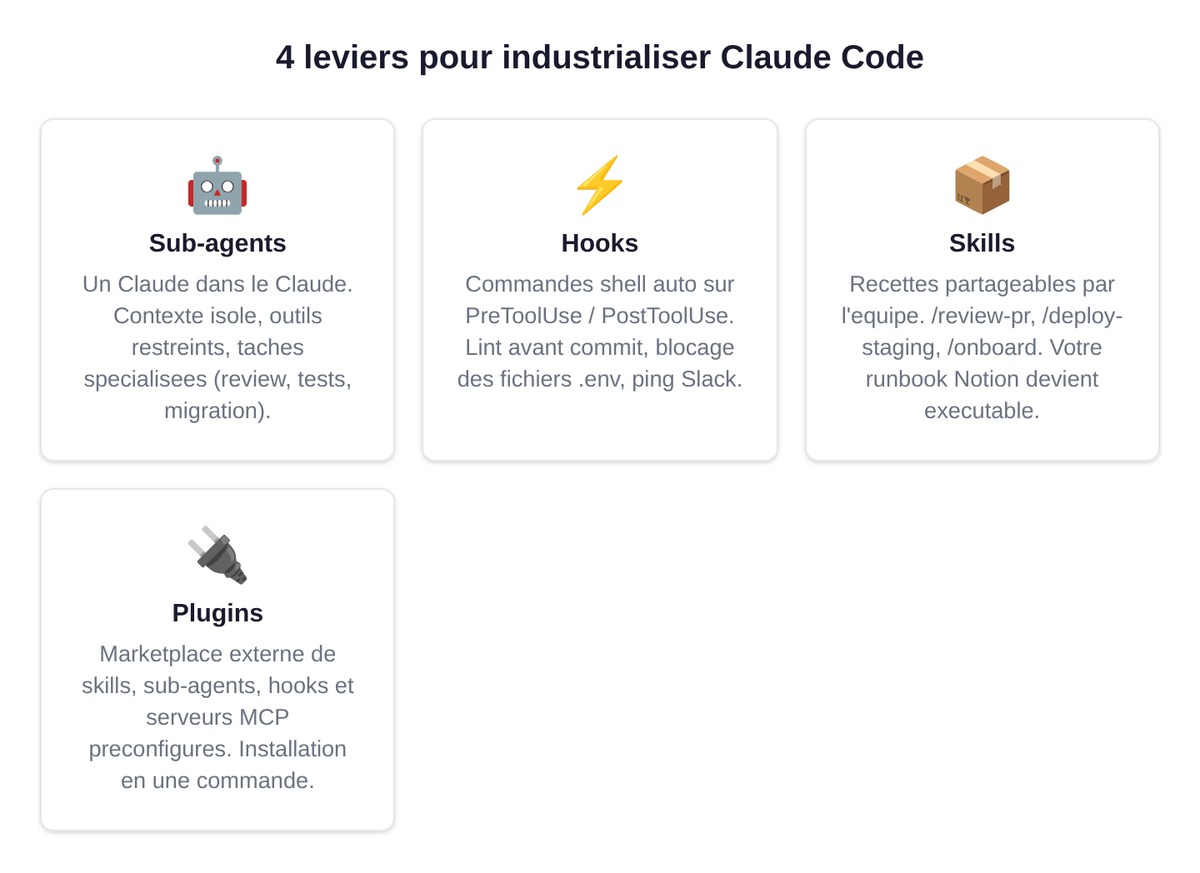
A sub-agent is a Claude Code inside Claude Code. It runs in its own context window, with its own system prompt, and has access to a subset of tools. The main agent coordinates, the sub-agent handles one precise task.
A typical use case: a code-reviewer agent that can only read and comment on code (never edit), a test-writer that writes only tests, a migrator that touches only database migration scripts. You separate the responsibilities. You limit the possible damage.
You create a sub-agent via /agents, then "Create new agent." Storage: .claude/agents/ at project level, ~/.claude/agents/ at user level. Format: markdown with YAML frontmatter. You version them in Git, and your teammates get them automatically.
Hooks: automating what should be automated
A hook is a shell command that fires automatically at specific moments in the Claude Code cycle. You ask for nothing; it runs on its own.
The key events:
PreToolUse: before a tool call (useful for blocking anything that touches.envorsecrets/)PostToolUse: after (perfect forprettier --writeafter every edit)Notification: when Claude is waiting for a reply (to ping Slack or play a sound)
A concrete example: a PostToolUse hook that runs eslint --fix on every modified .ts file. Never again a PR with badly formatted code. Configure it via /hooks.
Skills: packaging repeatable workflows
Skills (formerly custom commands) are recipes you write once and share with the whole team. /review-pr, /deploy-staging, /migrate-db. Each is a mini-prompt with its own tools, rules, and steps.
This is where you turn your Notion runbook.md into living automations. A new dev shows up, types /onboard, and Claude sets up their environment, configures their keys, and shows them the useful commands.
Plugins: the external ecosystem
Plugins extend Claude Code with preconfigured skills, sub-agents, hooks, and MCP servers. They install through a marketplace or by direct reference in the config. This is the point where Claude Code pulls ahead in 2026.
MCP and Channels: connecting Claude to the rest of your stack
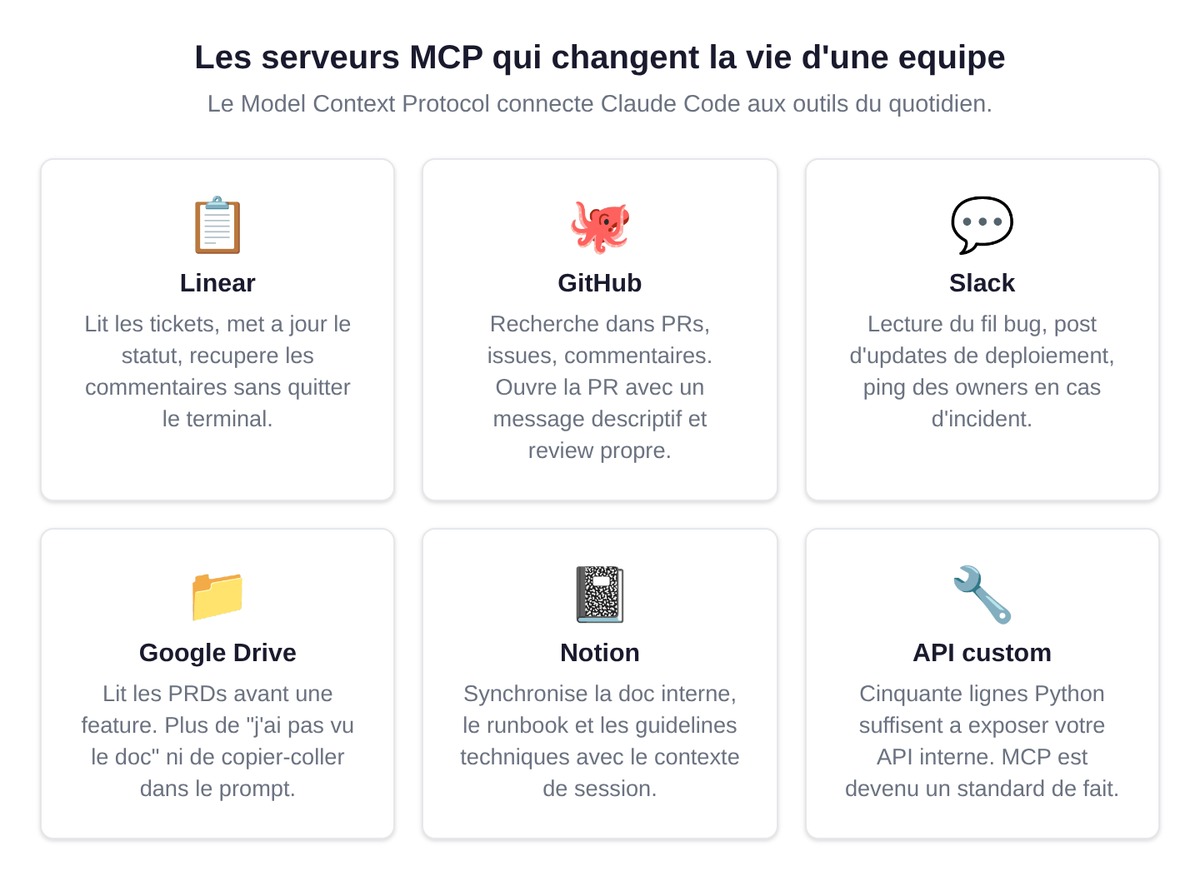
The Model Context Protocol (MCP) is an open standard for connecting AI tools to external data sources. Anthropic published it. It's becoming the de facto standard, with GitHub, OpenAI, and many others having adopted it.
An MCP server exposes tools Claude Code can call: "read Linear ticket #234," "create a GitHub issue," "list the Slack messages where I'm mentioned." You install the MCP server, you authorize it, and Claude drives the tool.
The ones that change a team's life: Linear (Claude reads and updates tickets), GitHub (search across PRs, issues, comments), Slack (reading the bug thread, posting updates), Google Drive (reading PRDs before a feature), Notion (syncing internal docs), and your internal APIs through a fifty-line custom MCP.
Channels: Telegram, Discord, webhooks
Channels are a layer built on top of MCP that pushes external events into a running Claude Code session. A bug report lands on Telegram, you forward it to your channel, and your open session picks up the context with no copy-paste. The support Discord, the founder's Telegram, the Stripe webhook for failed payments: everything converges into the dev session.
When you position Claude Code within a 2026 startup stack, you judge it on this integration dimension: an isolated tool is nice, but a tool connected to your whole stack has a multiplier effect. That's the analytical lens we apply in our review of AI tools for startups in 2026.
Practical case: from Linear ticket to merged PR
Theory is fine, execution is better. The typical scenario: a Linear ticket, "The Stripe webhook stopped processing refunds after the move to API v2."
1. Pulling the ticket via MCP: /mcp linear get-issue ENG-432. Claude reads the summary, the comments, the assignee. No back-and-forth between Linear and the terminal.
2. Switching to Plan Mode (Shift+Tab twice). You give the context: "Read src/webhooks/stripe.ts, identify what changed in v2, propose a fix plan with tests." Claude spots that the v2 payload uses a new refund_reason field where the handler expects reason. It proposes: add the mapping, write a test for the old and the new format, and log unknown payloads.
3. You approve. Shift+Tab to exit Plan Mode. Claude writes the code, runs the tests, two pass, two scenarios covered.
4. "Commit and open the PR." Claude writes a descriptive message, pushes, opens the PR on GitHub, and the Linear ticket moves to "In Review" automatically via MCP.
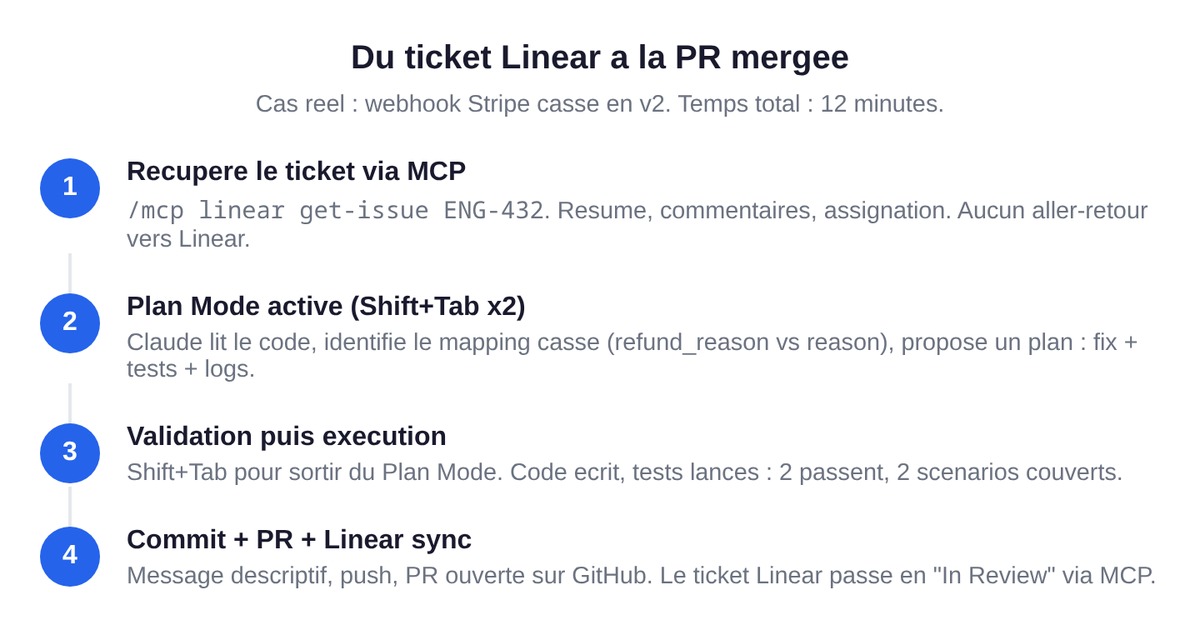
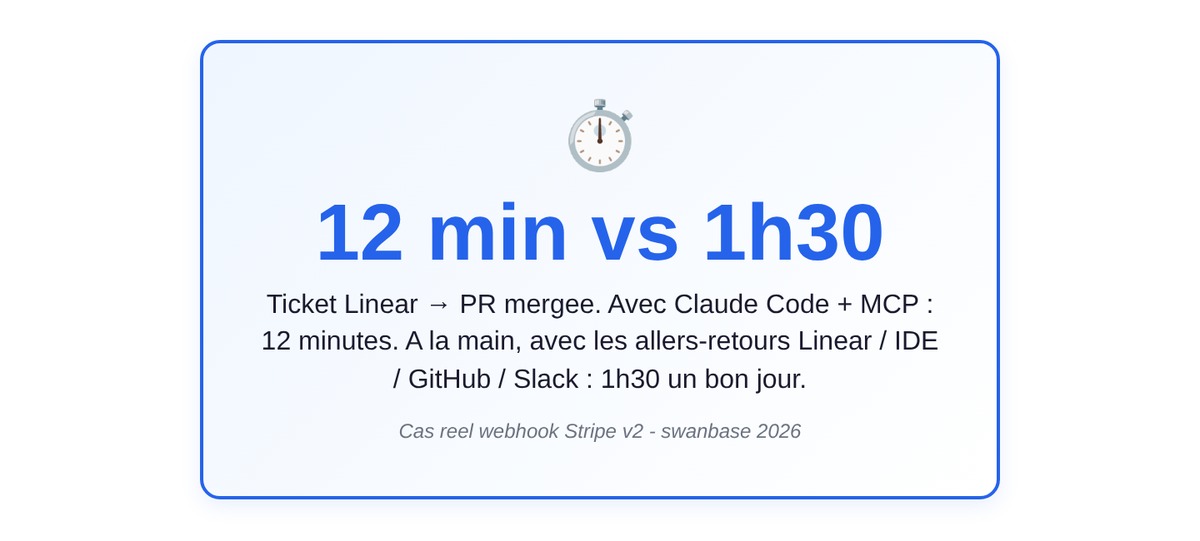
Total time: twelve minutes. The same task by hand, with the back-and-forth between Linear, IDE, GitHub, and Slack, is an hour and a half on a good day. You sign off.
Claude Code vs Cursor, Copilot, Codex in 2026
The question comes up in every demo. All four tools are good; they just don't cover the same need.
| Criterion | Claude Code | Cursor | GitHub Copilot | Codex CLI |
|---|---|---|---|---|
| Main surface | Terminal, IDE, Web, Slack | Editor (VS Code fork) | Editor (VS Code extension, JetBrains) | Terminal |
| Agentic mode | Yes, native (sub-agents, plan mode) | Yes (Composer, Agent mode) | Limited (recent Agent mode) | Yes |
| Full codebase reading | Yes (CLAUDE.md + auto memory) | Yes (indexing) | Limited to open context | Yes |
| MCP support | Native, large ecosystem | Partial | No at the time of writing | Limited |
| Sub-agents | Yes | No (single agent) | No | No |
| Dedicated Plan Mode | Yes (Shift+Tab) | Not explicit | No | Implicit |
| Automatic shell hooks | Yes | No | No | No |
| Channels (Telegram, Discord) | Yes | No | No | No |
| Models | Sonnet 4.6, Opus 4.7 | GPT-5, Claude, Gemini | GPT family | GPT family |
| Entry price | $17/mo (Pro) | $20/mo (Pro) | $10/mo (Pro) | Included with ChatGPT Plus |
Three lines to sum it up.
Cursor stays unbeatable for anyone who lives in their editor and wants "VS Code but with a copilot everywhere." If your day-to-day is clicking around an IDE, it's an excellent choice.
GitHub Copilot is an autocomplete standard. It does the job on snippets, but its agentic version still trails Claude Code and Cursor.
Codex CLI is OpenAI's option in the terminal. It's younger, with a thinner MCP ecosystem in 2026.
Claude Code wins on pure agentic work, multi-surface reach (terminal, IDE, web, Slack, mobile), MCP, sub-agents, and plan mode. It's the tool for teams that want to industrialize, not just type faster.
For a detailed head-to-head that gets into RAM, speed, and pricing by real usage, we have a dedicated comparison: Claude Code vs Cursor.
Pricing and plans in 2026
Anthropic's public pricing is in dollars. Here's the state of things at the time of writing, verified on the official page.
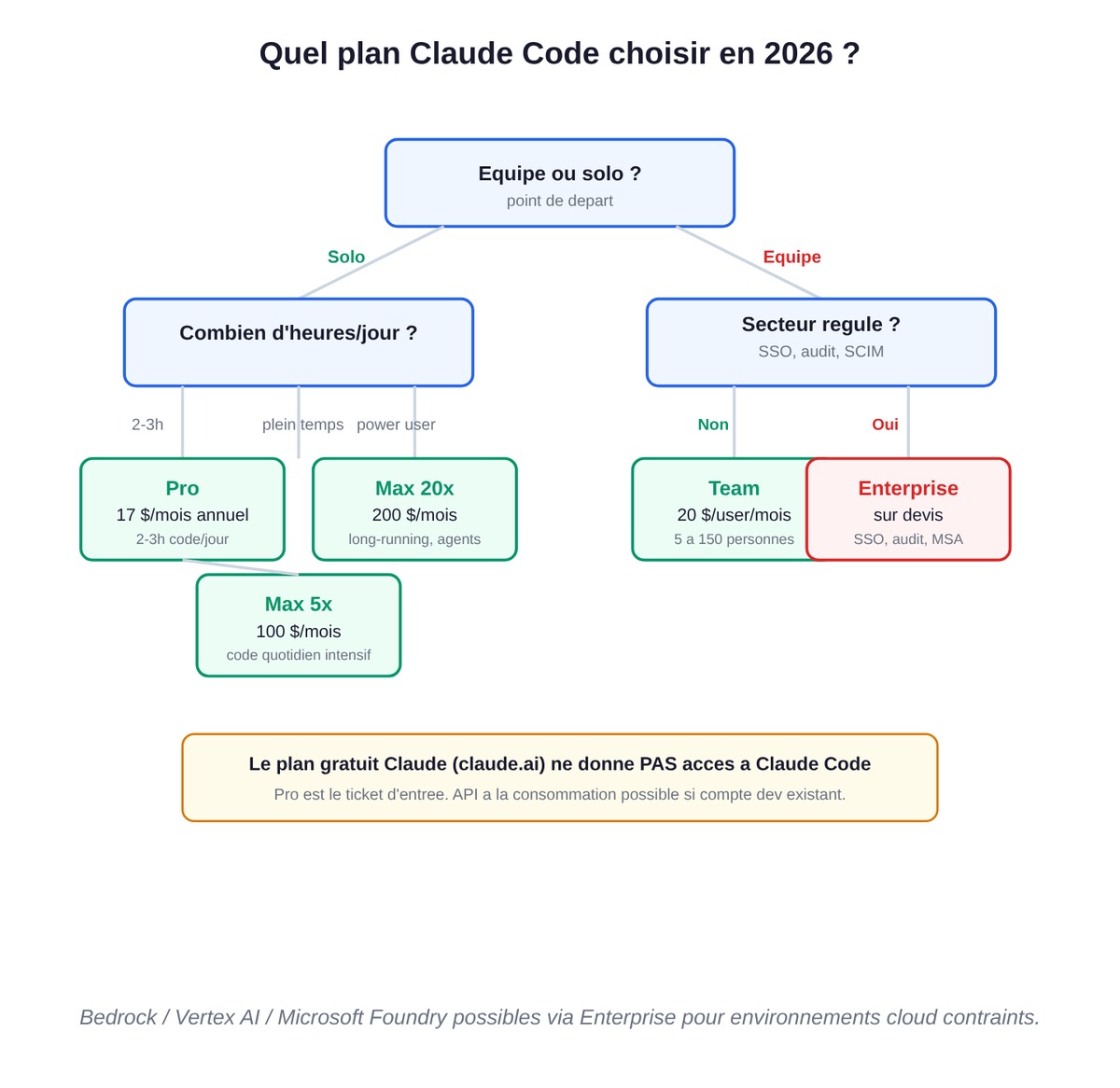
| Plan | Price | Who it's for |
|---|---|---|
| Free | $0 | Not Claude Code |
| Pro | $17/mo annual or $20/mo | Solo devs, short sprints |
| Max 5x | $100/mo | Intensive daily use |
| Max 20x | $200/mo | Power users, long-running projects |
| Team | $20/user/mo | Teams of 5 to 150 |
| Enterprise | Custom quote | SCIM, audit logs, SSO, MSA |
On the pay-as-you-go API: Opus 4.7 at $5/M input tokens and $25/M output, Sonnet 4.6 at $3 and $15, Haiku 4.5 at $1 and $5. Prompt caching cuts input costs by 10x on repeated contexts, which is no small thing with a large CLAUDE.md.
The right instinct: Pro for 2-3h of coding a day, Max 5x once you're coding full-time, Team for a team with centralized admin, Enterprise for regulated sectors. The free plan does NOT give access to Claude Code, so don't waste time looking for how to enable it.
FAQ
Is Claude Code free?
No. Claude Code is included starting from the Pro plan at $17 per month billed annually or $20 monthly. The free Claude plan (claude.ai) does not let you use Claude Code. You can also go through the Anthropic API on a pay-as-you-go basis if you already have an active developer account.
Which models does Claude Code use in 2026?
Claude Code uses Anthropic's current Claude models: Sonnet 4.6 for the speed/quality balance, Opus 4.7 for complex tasks that need advanced reasoning, and Haiku 4.5 for fast, economical operations. The choice adapts to your subscription plan and can be set within the session.
How do I install Claude Code?
The recommended installation uses the native script. On macOS, Linux, or WSL: curl -fsSL https://claude.ai/install.sh | bash. On Windows: irm https://claude.ai/install.ps1 | iex in PowerShell, or winget install Anthropic.ClaudeCode. Homebrew and npm are still supported.
Can Claude Code modify my files without permission?
No. By default, Claude Code asks for authorization before any file change or shell command. Read-only operations pass automatically, while writes and Bash commands require an approval that can become permanent for the session. The acceptEdits mode automatically accepts writes, and the plan mode forbids any change until you explicitly approve it.
What's the difference between Claude Code and Claude.ai (web)?
Claude.ai is the chat interface in your browser: you paste code and talk in question/answer mode. Claude Code is an agent that lives in your terminal, your IDE, or your desktop: it reads your entire project, edits files, runs commands, and makes Git commits. Claude.ai is an occasional consultant, Claude Code is a developer embedded in your environment.
Can I use Claude Code in VS Code?
Yes. Anthropic publishes an official extension in the VS Code Marketplace, providing inline diffs, @ mentions, plan review, and conversation history inside the editor. The same extension works for Cursor. JetBrains IDEs (IntelliJ, PyCharm, WebStorm) have their own plugin on the JetBrains Marketplace.
How much does Claude Code cost in 2026?
The Pro plan at $17/mo billed annually (or $20 monthly) includes Claude Code and is enough for most solo devs. Max 5x at $100/mo and Max 20x at $200/mo give 5x and 20x more usage. Team is $20 per user per month (5 to 150 people). On the pay-as-you-go API: Sonnet 4.6 at $3/M input tokens and $15/M output, Opus 4.7 at $5 and $25.
How does CLAUDE.md work?
CLAUDE.md is a markdown file placed at the root of your project. Claude Code reads it automatically at the start of every session to understand your stack, your conventions, your commands, and the gotchas. A ~/.claude/CLAUDE.md at the user level applies your preferences across all your projects. Since 2026, Claude Code also builds an automatic memory between sessions.
What is Plan Mode and how do I activate it?
Plan Mode is a read-only mode where Claude analyzes your request and presents a detailed implementation plan before making any change. You turn it on by pressing Shift+Tab twice (on some Windows versions, the shortcut is Alt+M). It's valuable for complex refactors and sensitive projects. Once the plan is approved, you switch back to normal mode and Claude executes.
Is Claude Code secure for proprietary code?
The Pro and Max plans are not used to train the models by default. Team and Enterprise add SSO, access controls, audit logging, and advanced compliance. For regulated environments, Claude Code can be routed through Amazon Bedrock, Google Vertex AI, or Microsoft Foundry. Hooks also let you programmatically block access to sensitive files.
Does Claude Code replace a developer?
No, and the question is framed wrong. Claude Code changes the developer's role, shifting them from executor to supervising architect. The dev defines the intent, validates the approaches, and reads the diffs. The agent handles the mechanical writing, the tests, the commits, and the research. The effect is a multiplier, not a replacement.