To write a LinkedIn post with AI that doesn't sound like AI, split the work into two jobs. The model (Claude, ChatGPT) writes from a brief that already contains your facts. Two automated checks then run on its text. The first looks for what the post must not contain (em dashes, two-step corrections, objects acting in place of people). The second verifies what it must deliver (a concrete first sentence, a direct address to the reader). You publish when both come back with zero blocking alerts.
This tutorial follows the process we use for swanbase's own copy. The thresholds and measurements come from our files, rerun on October 12, 2026. One measurement sums up the problem: across 18 runs of our writing agent, all produced before the check existed, the script flags 263 blocking alerts for 21,301 words, or 12.3 per 1,000 words. On human prose (Flaubert, Hugo, Wikipedia), the same kind of check flags 0.13.
Why an AI-written LinkedIn post gets spotted
The telltale phrasings of generated text can be counted and named. Our check script tracks 31 families of them in French. The prompt, patterns and script in this tutorial are their English versions. The first ones came from manual corrections to our texts between August 7 and 11, 2026. The rest came from a reference sheet on AI writing tics, cross-checked against our blog articles to set the thresholds.
Surface tics
The most frequent ones in a generated post:
- the two-step correction: a negation, then the claim it was setting up, in the same sentence;
- the negative tag at the end of a sentence, after a comma;
- the em dash used for asides, which models produce far more often than most writers;
- the object acting in place of a person: results that speak, a dashboard that decides;
- the filler present participle at the end of a sentence (ensuring, enabling, highlighting);
- four-word sentences chained in threes, and the question followed by its two-word answer;
- the dramatic announcement of a reveal, which delays the fact;
- the vague crowd (a majority of founders, with no data behind it).
Our own tool falls into the same traps. We give the model a reference file with examples for each of our writing agent's seven styles. That file scores 77 blocking alerts on the check, including 50 em dashes and 4 subheadings written as relative clauses. The examples we fed the model carried the very tics we wanted to remove.
Flat text with no tics at all
The second category slips past any script. A post with no tics can still contain no numbers and speak to no one. On August 15, 2026, an email to participants in one of our programs came out at zero alerts, and one of the founders sent it back with a reply that included the word "incomprehensible." The text broke no rule and delivered nothing. That rejection gave us the second check.
Step 1: prepare a brief with your facts
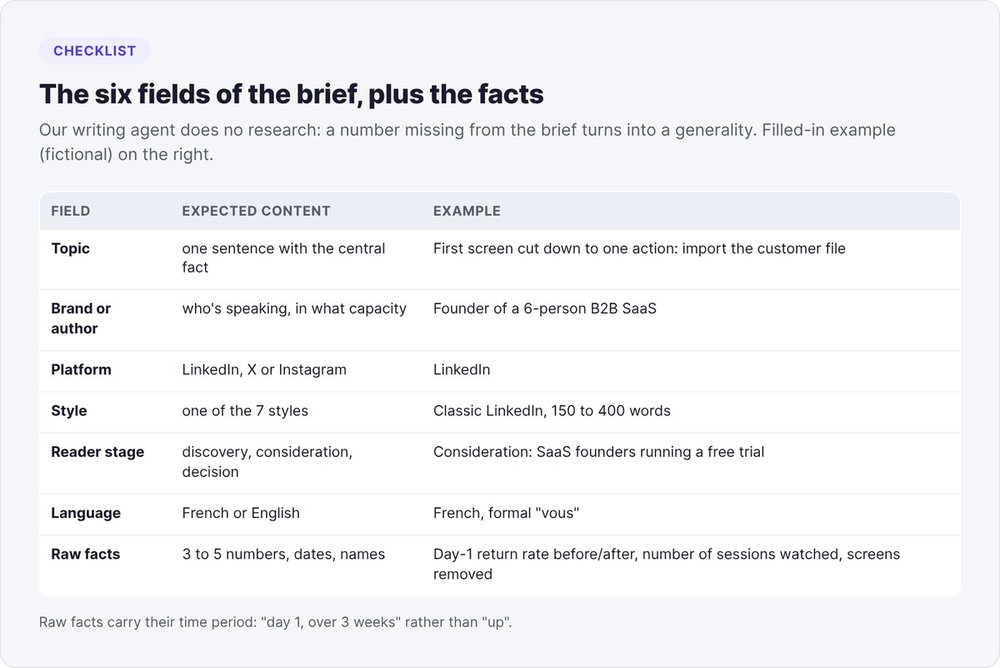
A model invents whatever you don't give it. Our writing agent follows a "no research" instruction: it writes from the brief and nothing else. A number missing from the brief turns into a generality or a made-up figure.
The six fields of the brief
Our agent's minimal brief has six fields. Fill them in before opening Claude or ChatGPT:
- Topic: one sentence, with the central fact (a number, a date, a decision).
- Brand or author: who's speaking, and in what capacity.
- Platform: LinkedIn, X or Instagram. Length depends on it.
- Style: one of the seven styles (details in step 2).
- Reader stage: discovery, consideration or decision.
- Language: French or English.
Below the brief, add three to five raw facts: numbers with their time period, tool names, dates, a client quote used with their permission.
Choose the angle based on the reader's stage
Our agent proposes two or three angles before writing, then picks one based on the stage:
- Discovery (the reader doesn't know you): a stance, or a data point that contradicts conventional wisdom. The call to action is limited to a light question.
- Consideration (they know the problem): a quantified breakdown, a before/after, a method. The call to action invites a comment or a save.
- Decision (they're comparing solutions): proof, a client result, an offer. The call to action moves to a DM or a link.
For the publishing strategy around these posts (frequency, platform, measurement), see our guide to founder-led content.
Step 2: write the LinkedIn post with AI (prompt and formats)
The prompt to copy
The prompt restates the brief, sets the format and bans the most common tics up front. The ban reduces how often they appear without eliminating them, which is why step 3 adds a check.
You are writing a LinkedIn post in English for [author, role].
Topic: [one sentence with the central fact].
Facts to use, and no other numbers: [3 to 5 raw facts].
Reader: [who], stage [discovery | consideration | decision].
Style: [classic-linkedin | punchy | storytelling...], [150 to 400] words.
Constraints:
- The first two lines carry the central fact, with a number or a name.
- Address the reader as "you". Paragraphs of 2 to 4 lines. No hashtags.
- Banned: em dashes; "it's not X, it's Y" and its variants;
  an object or concept as the subject of a human verb (decides, speaks, demands);
  "in a world where"; "changes everything"; rhetorical questions.
- One call to action only, on the last line.
Return the post, then 3 alternative first lines.
Length and format by style
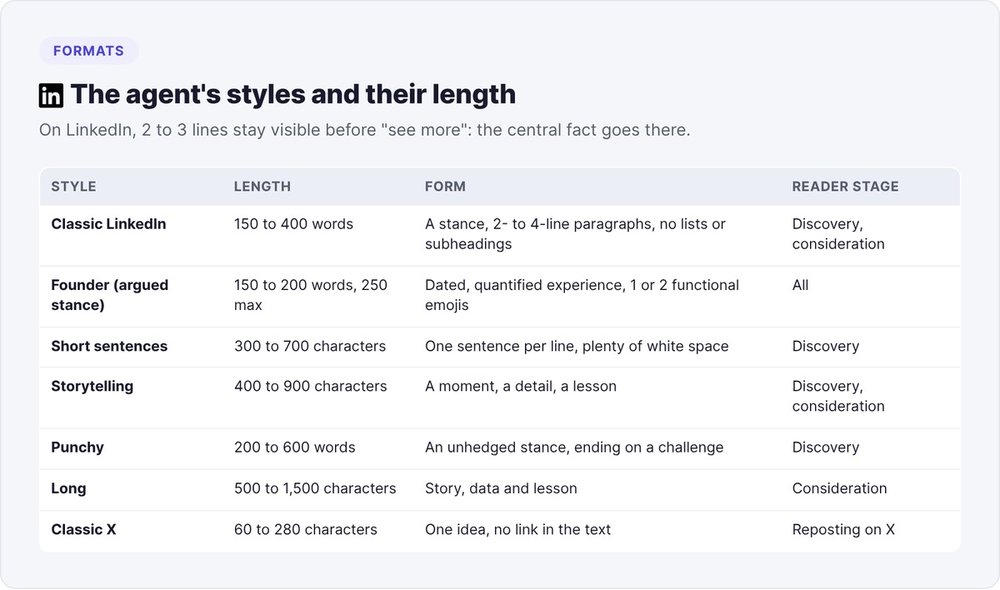
Each of the agent's seven styles sets its own length. On LinkedIn:
| Style | Length | Form |
|---|---|---|
| Classic LinkedIn | 150 to 400 words | a stance, 2- to 4-line paragraphs, no lists or subheadings |
| Founder (argued stance) | 150 to 200 words, 250 max | dated, quantified experience, 1 or 2 functional emojis |
| Short sentences | 300 to 700 characters | one sentence per line, plenty of white space |
| Storytelling | 400 to 900 characters | a moment, a detail, a lesson |
| Punchy | 200 to 600 words | an unhedged stance, ending on a challenge |
| Long | 500 to 1,500 characters | story, data and lesson |
The classic X style (60 to 280 characters) is for reposting the idea on X.
The first two lines
LinkedIn shows the first two or three lines before the "see more" link. Our agent puts the central fact there, with a number or a name, and skips any preamble. To get those lines in front of the right audience, see also how to get views on LinkedIn and find clients.
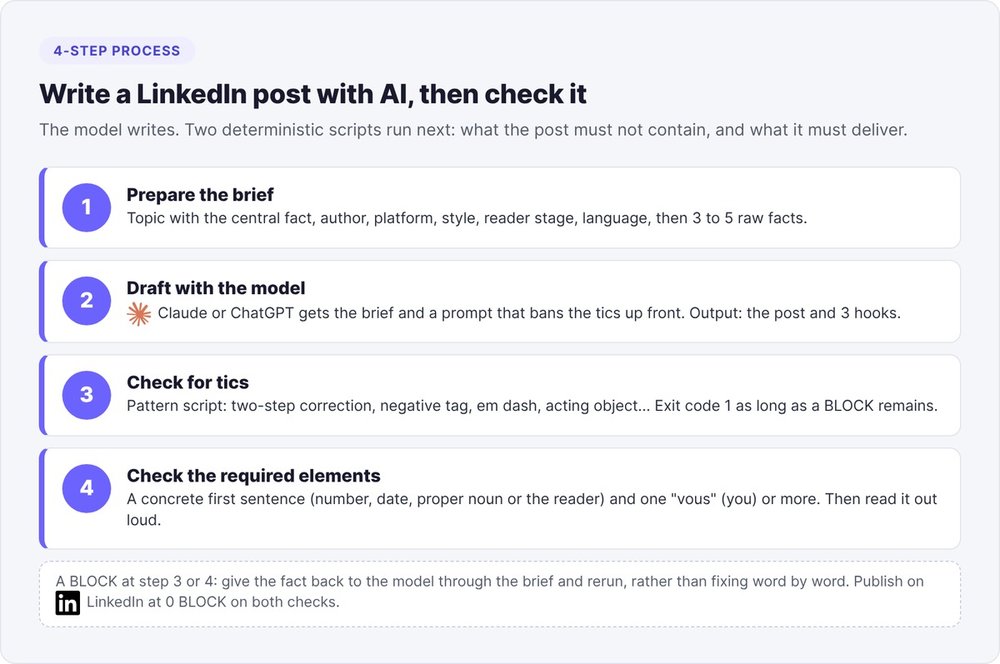
Step 3: remove the tics with an automated check
A style instruction stays probabilistic: the model follows it on some texts and misses it on others. A pattern script is deterministic: on the same text, it gives the same result every run. Our check runs in two seconds, skips code blocks and returns exit code 1 as long as a blocking alert remains.
Tic families and their patterns
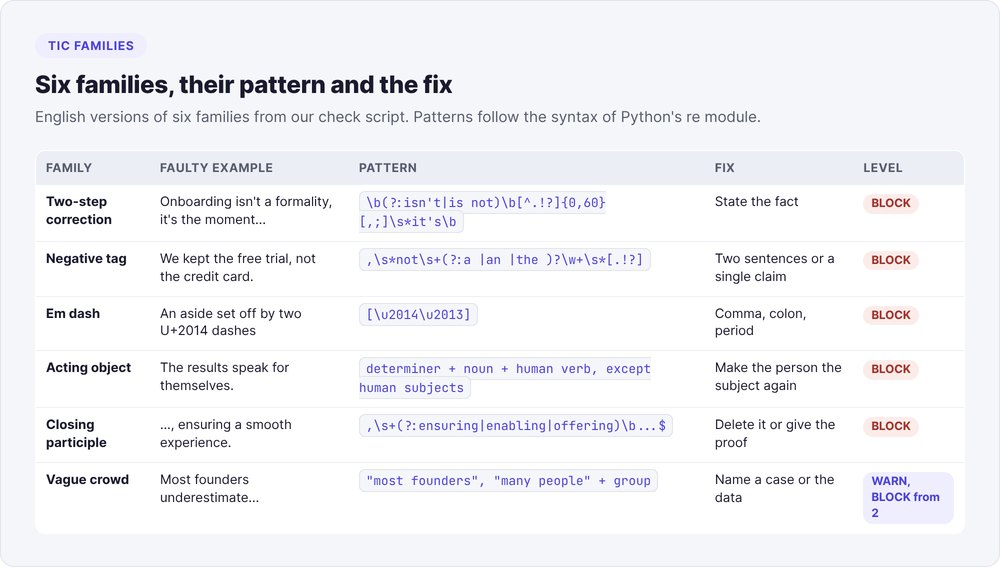
Each family maps to a regular expression. Three of them, in their English version:
two-step correction   \b(?:isn't|is not|it's not)\b[^.!?]{0,60}[,;]\s*(?:it's|it is)\b
negative tag          ,\s*not\s+(?:a |an |the )?\w+\s*[.!?]
em dash               [\u2014\u2013]
The acting object needs an exception list. The pattern looks for a determiner, a noun, then a human action verb (decides, speaks, tells, demands, knows). It skips cases where the noun refers to a person: our French list holds about 150 human subjects, such as founder, client and jury. Without that list, "the client decides" would trigger an alert.
Run the check on your post
The full script covers 31 families. To get started, a 39-line Python version is enough. It covers seven tic families and the two requirements from step 4:
import re, sys

# 1. What the post must not contain (BLOCK)
PATTERNS = {
    "two-step-correction": r"\b(?:isn't|is not|it's not)\b[^.!?]{0,60}[,;]\s*(?:it's|it is)\b",
    "negative-tag": r",\s*not\s+(?:a |an |the )?\w+\s*[.!?]",
    "em-dash": r"[\u2014\u2013]",
    "changes-everything": r"\b(?:changes everything|game[- ]changer)\b",
    "in-a-world-where": r"\b(?:in a world where|in an era where)\b",
    "acting-object": r"\b(?:the|this|that|these|your|our) (?!founders?|clients?|customers?|team|readers?|users?)\w+ "
                     r"(?:decides?|speaks?|speak|tells?|demands?|knows?)\b",
    "closing-participle": r",\s+(?:ensuring|enabling|offering|highlighting|reinforcing)\b[^.!?]*[.!?]?\s*$",
}
# 2. What the post must deliver (BLOCK if missing)
READER = r"\b(?:you|your|yours)\b"

def check(text):
    text = re.sub(r"(?<!\n)\n(?!\n)", " ", text)  # one paragraph per line
    alerts = []
    for n, para in enumerate([p for p in text.split("\n") if p.strip()], 1):
        for code, pattern in PATTERNS.items():
            m = re.search(pattern, para, re.I)
            if m:
                alerts.append(f"BLOCK p.{n} [{code}] {m.group(0)!r}")
    sentences = [s for s in re.split(r"(?<=[.!?])\s+", text.strip()) if s]
    first = sentences[0] if sentences else ""
    if not re.search(r"\d|\byou\b|(?<!^)\b[A-Z][a-z]{2,}", first):
        alerts.append(f"BLOCK [abstract-opening] {first[:70]!r}")
    if not re.search(READER, text, re.I):
        alerts.append("BLOCK [no-reader] no you / your")
    for s in sentences:
        if len(s.split()) > 30:
            alerts.append(f"WARN [long-sentence] {len(s.split())} words")
    return alerts

if __name__ == "__main__":
    alerts = check(open(sys.argv[1], encoding="utf-8").read())
    print("\n".join(alerts) or "0 alerts")
    sys.exit(1 if any(a.startswith("BLOCK") for a in alerts) else 0)
Paste the post into a text file and run:
python3 check_post.py linkedin-post.md
In Claude Code, ask the agent to run this command after each draft and keep fixing until there are zero BLOCKs. A Claude Code hook can trigger it on every file write, and a skill can bundle the step 2 prompt and the command together. The pattern syntax follows Python's re module.
BLOCK or WARN: the sorting rule
Our script files each alert under one of two levels:
- BLOCK: the pattern almost never comes from a human writer. It gets fixed, and no justification is accepted.
- WARN: the pattern has legitimate uses. You reread it, and keep it if the sentence carries a fact.
Passive voice gets a WARN: we allow one passive per paragraph when the agent of the action is unknown or irrelevant. Four constructions become BLOCKs through accumulation: the three-adjective list from four occurrences in the text, the weak verb (like "constitutes") from three, and the analogy and the coined concept from two each. One triad reads as normal, while four of them create a machine rhythm.
Step 4: check the post's required elements
A concrete opening and a reader
For a post, our second script requires two elements, both as blocking alerts:
- A concrete opening: the first sentence contains a number, a date, a proper noun or an address to the reader. "Onboarding is won or lost on the very first screen" fails, while "Our free trials lasted 14 days" passes.
- An address to the reader: at least one "you" or "your". A post that describes things without talking to anyone reads like a user manual.
Two non-blocking alerts round out the check: a sentence over 30 words, and an unbroken block of more than 90 words.
A full before-and-after example
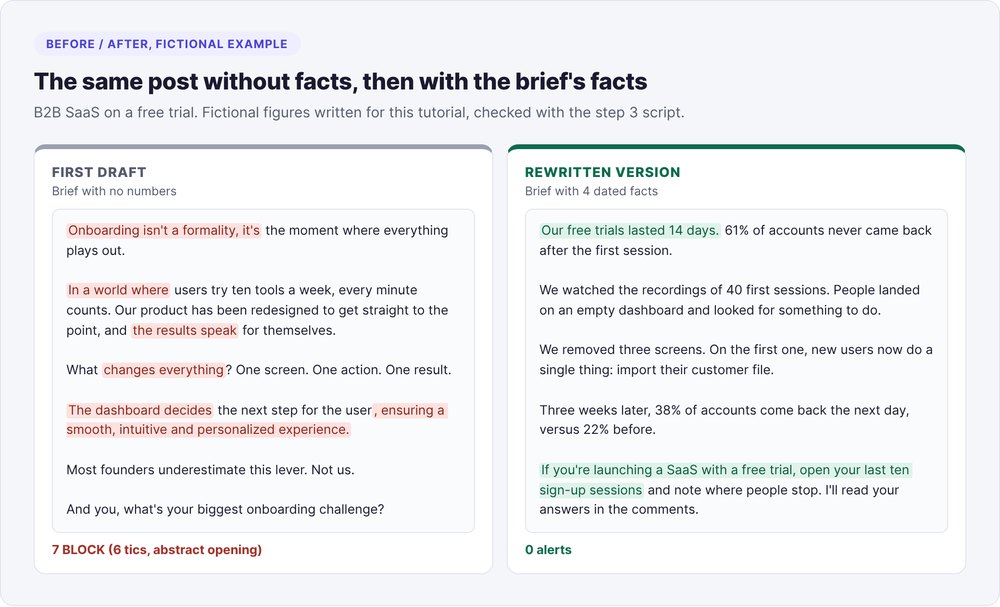
A model's first draft, with no quantified brief, for a B2B SaaS founder (example written for this tutorial):
Onboarding isn't a formality, it's the moment where everything plays out.

In a world where users try ten tools a week, every minute counts. Our
product has been redesigned to get straight to the point, and the
results speak for themselves.

What changes everything? One screen. One action. One result.

The dashboard decides the next step for the user, ensuring a smooth,
intuitive and personalized experience.

Most founders underestimate this lever. Not us.

And you, what's your biggest onboarding challenge?
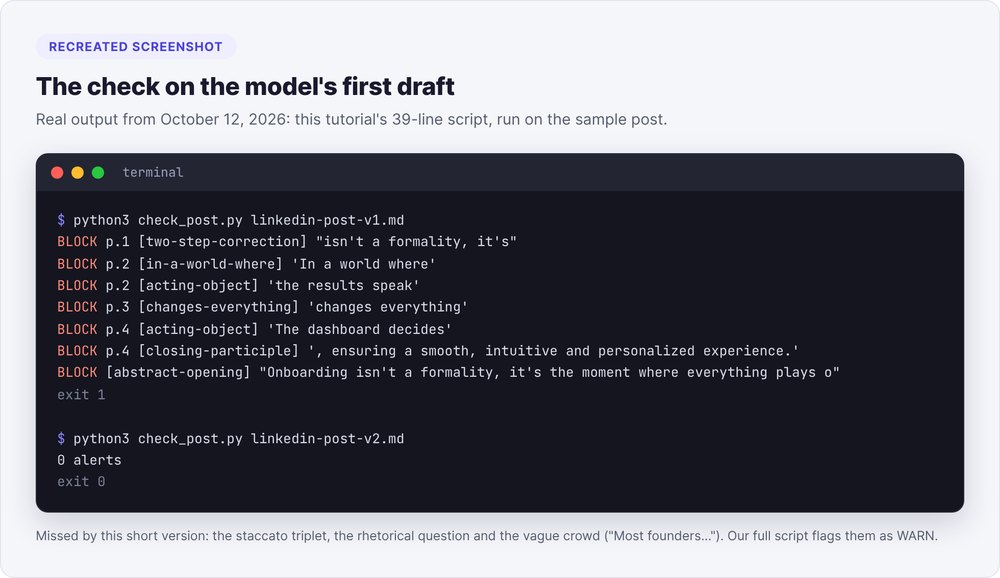
The step 3 script flags 7 BLOCKs: the two-step correction, the era-setting opener, two acting objects ("the results speak", "the dashboard decides"), "changes everything", the closing participle and the abstract opening. It misses the staccato triplet, the rhetorical question and the vague crowd ("Most founders underestimate..."). Our full script flags those three as WARNs.
The fix goes through the brief: we give the model the free-trial facts (fictional figures for this example) and run it again.
Our free trials lasted 14 days. 61% of accounts never came back after
the first session.

We watched the recordings of 40 first sessions. People landed on an
empty dashboard and looked for something to do.

We removed three screens. On the first one, new users now do a single
thing: import their customer file.

Three weeks later, 38% of accounts come back the next day, versus 22%
before.

If you're launching a SaaS with a free trial, open your last ten sign-up
sessions and note where people stop. I'll read your answers in the
comments.
Result: 0 alerts. The second version adds facts, a reader and an action, with no stock phrases.
Humanizing AI text: humanizer tools or rewriting
A humanizer is a tool that rephrases generated text to fool detectors. Your reader is looking for a fact or a reason to reply, and automated rephrasing adds neither.
Humanizing AI text for LinkedIn comes down to three moves:
- Put the facts back: reopen the brief, add the missing number, date or name, then rerun the draft.
- Remove the tics flagged by the step 3 check, rewriting the whole sentence instead of swapping out a word.
- Read it out loud: our agent's prompt asks whether a founder would actually say each sentence out loud. No script can measure whether the tone rings true.
A humanizer rephrases without knowing your facts, so run both checks on its output just as you would on the model's.
Detecting AI text: our measurements
Commercial detectors return a probability score. A pattern check returns a list of sentences, each with the rule it broke. It leaves authorship open and points you to the phrasings worth rereading.
Calibrating on human prose
We measured our French-language check on October 9, 2026 against two corpora:
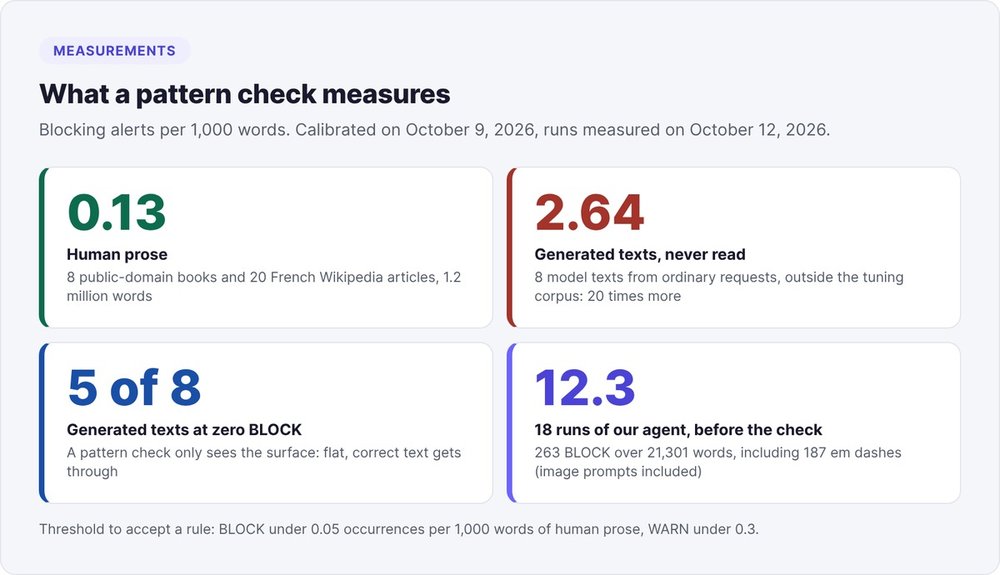
- Human prose: eight public-domain books (Voltaire, Dumas, Flaubert, Hugo, Proust, Zola, Verne, Descartes, 990,000 words) and twenty French Wikipedia articles (245,000 words). Result: 0.12 blocking alerts per 1,000 words on the books and 0.16 on Wikipedia, or roughly one alert per 7,700 words.
- Generated text: eight texts written by a model from ordinary requests (LinkedIn post, prospecting email, product page...), none of which were read while writing the rules. Result: 2.64 per 1,000 words, twenty times more.
The same benchmark also shows the limit: five of the eight generated texts come out with no blocking alert at all. Models from 2026 produce fewer surface tics than those from 2023, and a pattern check misses flat, correct text. That's why the second check and a human reread are still needed.
The Wikipedia page Signs of AI writing, maintained by the encyclopedia's editors, catalogs English-language markers. The study by Kobak et al. on excess vocabulary in biomedical publications tracks the vocabulary of more than 15 million abstracts indexed by PubMed between 2010 and 2024. Our English rules build on these two sources.
Add your own patterns
Your model has its own tics, and your readers will spot others. We add a pattern in this order:
- Write the faulty sentence into a test file and confirm the pattern triggers on it.
- Run the check on a human-reviewed corpus (for us, the blog's articles, 119 as of October 10, 2026) and count the new alerts.
- Read a sample of the new alerts (twelve per rule in our case) and set the severity: the rule stays at BLOCK if the sample contains no clear false positive.
- Set the threshold: BLOCK under 0.05 occurrences per 1,000 words of human prose, WARN under 0.3, and rejected above that.
A detector that flags 138 blocking alerts on a human-reviewed corpus has its threshold wrong. On human prose, our noisiest rules are still the em dash (0.066 per 1,000 words, in Dumas's and Hugo's asides) and the adjective "véritable", meaning "genuine" (0.021).
The pitfalls
- Faulty examples in the prompt. Our style examples contained 50 em dashes. Run your post templates through the check before handing them to the AI.
- A number invented to fill space. With no facts in the brief, the model produces a percentage of founders with no source. Our check blocks any population percentage without a source in the same sentence.
- Treating zero alerts as approval. A post with no tics can still be empty. The reader check and reading aloud remain mandatory.
- Word-for-word fixes. Swapping an em dash for a comma leaves the sentence intact. Rewrite the sentence, or give the fact back to the model.
- One draft for both LinkedIn and X. The classic X style fits in 280 characters, so start again from the brief.
If you're after clients rather than an audience, our tutorial on the AI LinkedIn prospecting agent applies the same principle to the first message, written by the model and checked by script.
FAQ
Which AI should I use to write a LinkedIn post?
The process in this tutorial works with any model: the brief, the prompt and the two checks apply to Claude just as they do to ChatGPT. Across our 18 runs, the em dash alone accounted for 187 of the 263 blocking alerts, image prompts included. An automated check removes it whatever the model.
How do you humanize AI-written text?
Put facts (numbers, dates, names) back into the brief and rerun the draft, then remove the tics flagged by a pattern check by rewriting each flagged sentence. Finish by reading it out loud. A humanizer tool rephrases to fool a detector and adds no information for your reader.
How can you tell if AI wrote a text?
Look for specific phrasings: two-step corrections, em dashes used for asides, objects as subjects of human verbs, filler participles at the end of sentences, chained four-word sentences. On our benchmark, a pattern check flags 2.64 blocking alerts per 1,000 words of generated text versus 0.13 in human prose, but five of eight generated texts pass with no alert.
How long should an AI-written LinkedIn post be?
Between 150 and 400 words for a classic post, 150 to 200 for an argued stance, and 400 to 900 characters for a short story. LinkedIn shows the first two or three lines before "see more", so the central fact has to fit there.
Should you tell your audience you write your posts with AI?
Your reader judges the facts and the experience, and those come from you through the brief. The model shapes them. If you publish under your own name, reread every post and stand behind every number.