You publish a carefully crafted post, collect a handful of polite likes (one of them from your mom), and conclude that LinkedIn doesn't work. That diagnosis is almost always wrong. Getting views on LinkedIn and finding clients are one problem, and you solve it by tackling the pieces in the right order. If your posts fall flat, the algorithm isn't to blame. You are mixing up visibility with selling, and starting from the wrong end.
This guide is meant to stay open in a browser tab. It brings together the mechanics you need to understand, hook templates to copy, complete post structures to reuse, and the handful of tactical moves that separate a dormant profile from one that starts conversations. Take what you need today and come back for the rest.
The method that works has six parts: understand how attention time drives reach, turn your profile into a landing page, structure your content as a funnel, write hooks that stop the scroll, build the relationship before you pitch, and stay consistent over time. LinkedIn is still one of the few places where a stranger with zero ad budget can reach hundreds of targeted people with a simple block of text. The cost of entry is absurdly low. When "it doesn't work," what's usually missing is an understanding of the mechanics. So that's where we start.
Getting views on LinkedIn: how attention time works
Let's start with the one thing LinkedIn really measures: time.
LinkedIn doesn't try to judge whether your post is good. It counts how long people spend on it. That attention time has a name, dwell time, and it decides everything. Every post starts with minimal reach: LinkedIn first shows it to a small slice of your network, watches what happens, then decides. If people stop, read, comment, and reply to comments, the post clears the first wave and spreads to a wider circle. If that second wave holds up, distribution continues. If people scroll past without slowing down, your post quickly stops spreading. Nobody censored it. It simply failed to hold attention long enough to earn the next wave.
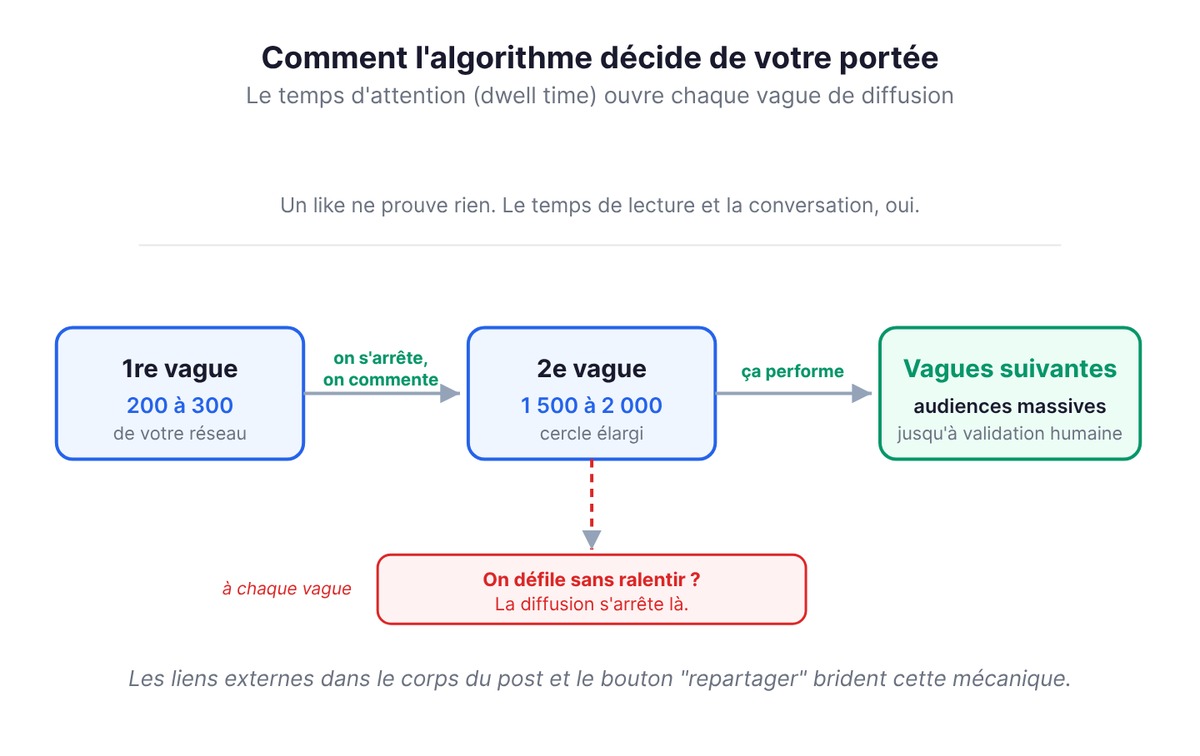
This wave mechanic has an uncomfortable consequence: likes aren't enough. A like takes no attention and proves nothing. What counts is reading time and, above all, conversation. A comment you reply to, which sparks another comment, keeps two people on your post for several minutes, and that is exactly the signal the platform rewards. So treat every post as the opening of a discussion rather than a display window.
Two mistakes follow from this, and they sabotage even good posts.
The first is an external link in the body of the post. You write a solid piece of thinking and end with "here's the link to the full article." You've just told LinkedIn: "this content sends people elsewhere." External links tend to throttle reach, since the platform has little interest in promoting content that drains its feed. The fix fits in one line: put the link in the first comment and let the post stand on its own.
The second is the "repost" button. A plain reshare of someone else's post adds almost no value of its own, and its reach gets limited. Went to an event and want to share it? Skip the "repost" button. Create your own post with the original photo and your take on it, and tag the organizer. You turn an invisible gesture into content that lives.
One last basic reflex: readability. A dense wall of text drives people away. Add plenty of line breaks, one idea per line, and one or two well-placed emojis to guide the eye. People read LinkedIn with their thumb, on the subway, half distracted. Text with room to breathe holds readers longer than a dense block, and holding them longer is exactly what the algorithm rewards.
The goal is to hold attention. Approval is a side effect.
Your LinkedIn profile is a landing page
Imagine a post finally does its job. Someone stops, reads you, raises an eyebrow, and clicks your name. What do they see?
Very often, a résumé. A hierarchical job title ("Partner at Whatever Inc."), a photo cropped from a wedding, the default blue banner, and an "About" section that's either empty or full of corporate jargon. In the blink of an eye, the prospect who was intrigued a moment ago leaves. You had their attention, and you lost it on your own page.
Treat your profile as a landing page with a single goal: turning a curious visitor into a contact. Every element should work toward that.
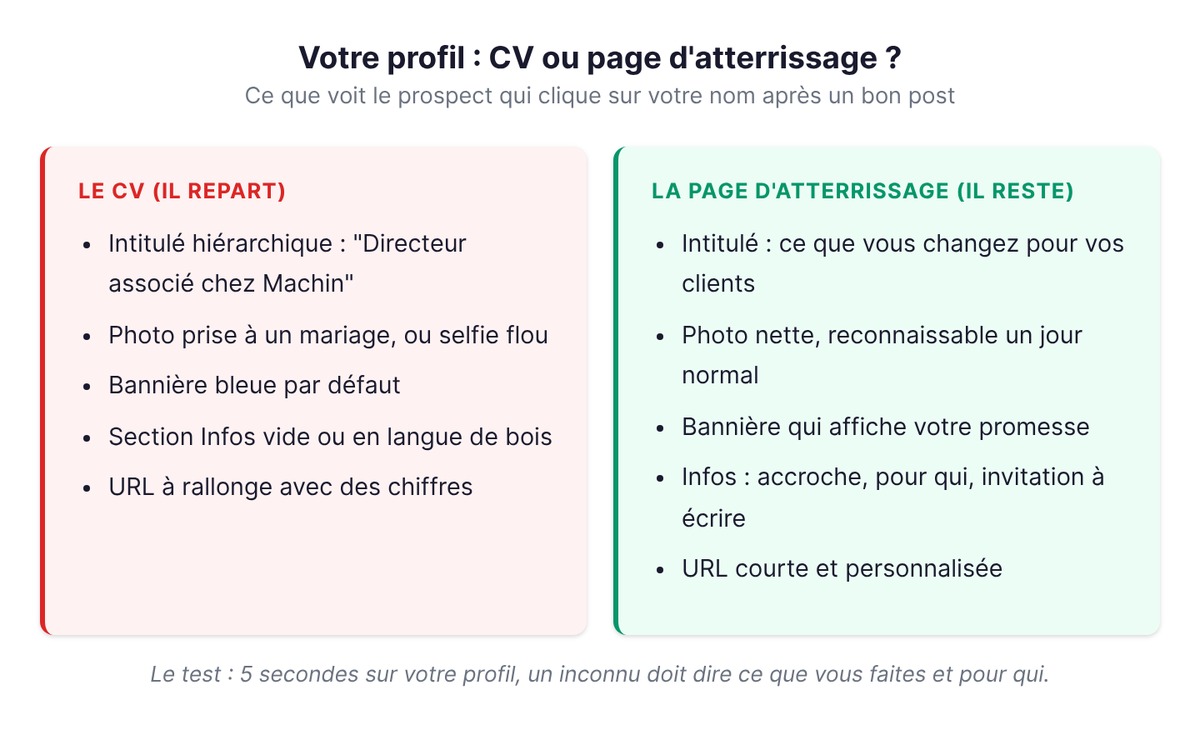
- Your headline describes what you bring rather than your rank: instead of "Senior Consultant," say what you concretely change for the people you help.
- Your photo is recognizable and looks like you on a normal day, far from a blurry selfie or a cold logo.
- Your banner repeats your value proposition or key message, instead of leaving default blue on the best ad space on your profile.
- Your "About" section opens with a hook that makes people want to keep reading, moves on to what you do and for whom, and ends with a clear invitation to get in touch.
- Your URL is customized, short, and something you can share without blushing.
The test is simple: show your profile to someone who doesn't know you for five seconds, then ask them what you do and who you work with. If they hesitate, your landing page is leaking.
To act on this right away, here's the checklist to tick off before your next post:
- Custom URL (linkedin.com/in/your-name), short and clean.
- Sharp photo, framed on your face, recognizable on a normal day.
- A banner that shows your promise in place of the default blue.
- A headline that says what you change for your clients rather than your rank.
- "About" section: hook, what you do and for whom, invitation to message you.
- A contact link or resource that's clearly visible.
A visitor intrigued by your post won't forgive a profile that leaves them guessing.
LinkedIn content strategy: the three-stage funnel
This is where a lot of LinkedIn advice falls apart. You keep hearing "post valuable content," as if "value" were a single category. It isn't. Content that gets you known and content that books a meeting look nothing alike, and blending the two means writing posts that hit neither goal.
A serious content strategy is organized in three stages, borrowed from funnel logic. If you're also posting to prepare a fundraise, read our article on founder-led content before a raise.
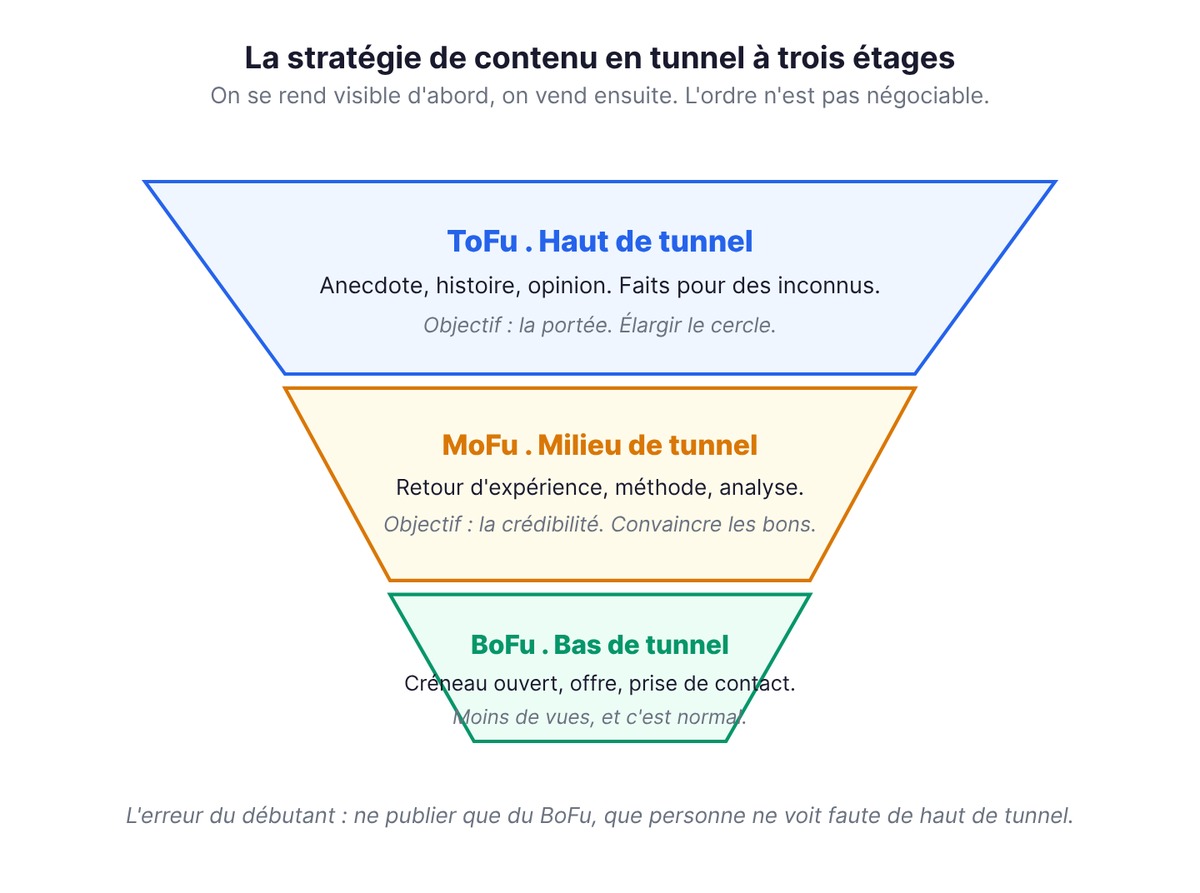
Top of the funnel (ToFu). Broad, accessible content, written for people who don't know you yet. An anecdote, a personal story, a win, a mildly provocative opinion. These posts sell nothing. Their only job is reach: widening the circle of people who know you exist.
Middle of the funnel (MoFu). More specialized content, speaking to people already interested in your topic. A detailed lessons-learned post, a method, an analysis. Here you're trying to convince the right people rather than reach the most people. This content builds your credibility and makes you a go-to reference on a specific problem.
Bottom of the funnel (BoFu). Action-oriented content. You open up a slot, announce an offer, invite people to reach out. These posts often get fewer views, and that's normal: they only speak to people who are already far along in their thinking.
The beginner's mistake is posting only BoFu, because it's the only stage that "sells." The result: nobody sees it, because the top of the funnel that feeds everything else was never built. When you're starting out, you write mostly top-of-funnel content. Get visible first, sell second.
7 LinkedIn hook templates to copy
Back to the mechanics of time. If everything hinges on attention, the first line of your post decides its fate. It's the only line LinkedIn shows before "see more." If it doesn't stop the scroll, the rest doesn't exist, however brilliant it is.
A good hook owes more to templates than to talent. Here are seven that work because each one taps into a human reflex. For each template, you get the structure to fill in, then an example so you can see what it looks like fully dressed. Copy the frame, replace the brackets, keep the rhythm.
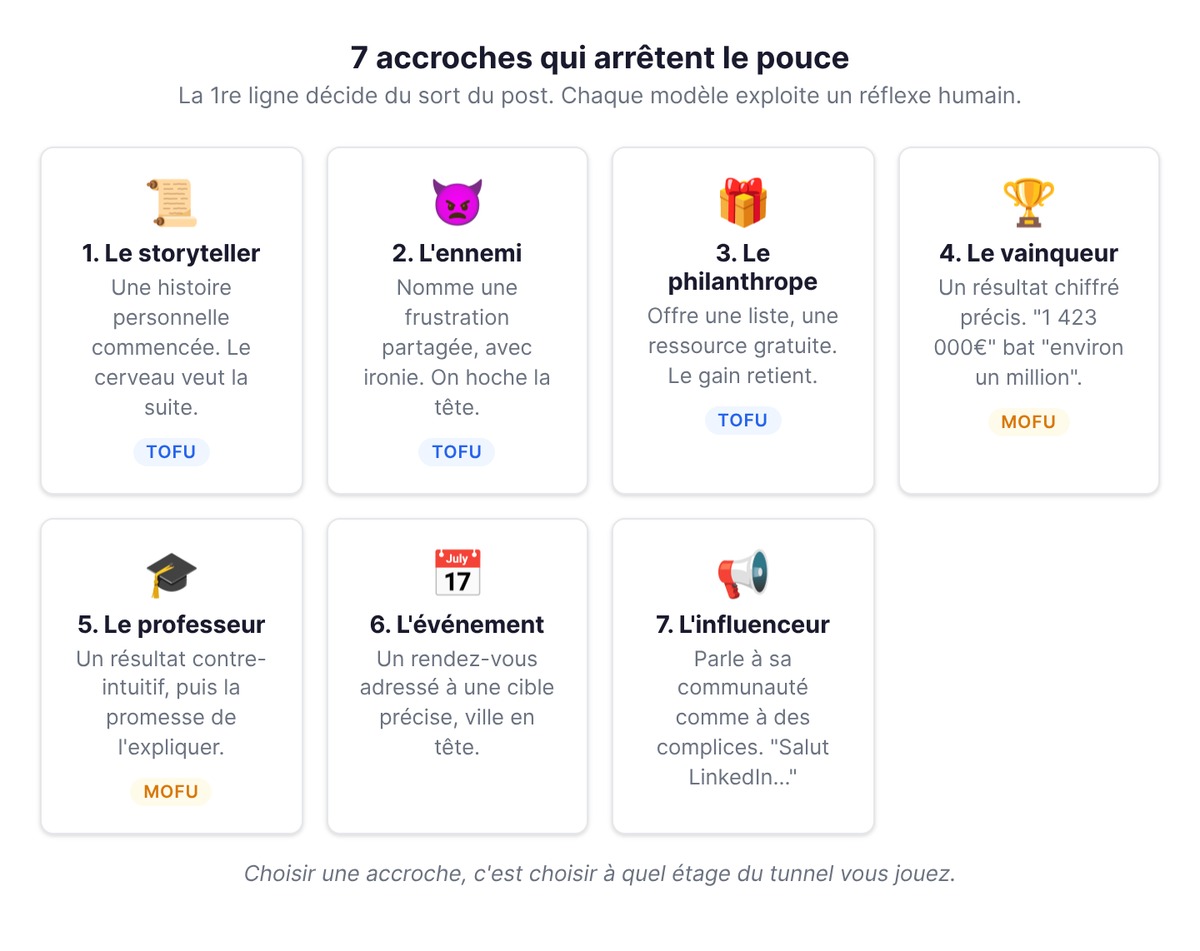
1. The storyteller tells a personal story. The brain always wants to know how a story it has started ends.
Template: "A few days ago, on my way to [do something], I came across [something odd]." Example: "A few days ago, on my way to catch the tram, I came across this vandalized billboard."
Another frame in the same vein, even more effective with strangers: "At [age], I [did something bold]." Example: "I quit my job at 21." People want to know what happened next.
2. The common enemy names what annoys your audience, with a touch of irony. People always stop to nod along to a shared frustration.
Template: "[Common enemy]: "[ridiculous fake quote caricaturing them]"" Example: "Recruiters: "Boo hoo, nobody answers job ads anymore, it's a talent shortage, do people just not want to work?? 😢""
3. The philanthropist gives something away. The promise of a free win keeps people reading.
Template: "The best-known [tools / resources] aren't always the best. Here are [number] [cheaper] alternatives to famous [things] 👇" Example: "Here are 12 cheaper alternatives to famous tools (and sometimes much better ones) 👇"
4. The winner has won and says so, numbers included, before lifting the hood.
Template: "Today I'm celebrating [big number] 💰 To be exact, [exact number]." Example: "Today I'm celebrating €1 million 💰 To be exact, €1,423,000."
The precision of the exact figure is what makes it credible: "€1,423,000" sticks better than "about a million." A method-focused variant: "In [year], we [quantified result] for [target]. With only [constraint]. How did we do it?"
5. The teacher announces a counterintuitive result, then promises to explain it.
Template: "I just made [quantified result] in [time period], with [small constraint] on [channel]. One single action will let you multiply your [KPI], here's how 👇" Example: "I just made €5,800 in 2 days, with €76 on Facebook Ads. One single action will let you multiply your ROAS, here's how 👇"
6. The event announces a date to your target audience.
Template: "[CITY - WORKSHOP] [goal] [under constraint]. Calling all [target], join me on [date and time] for a hands-on workshop." Example: "[MONTPELLIER - WORKSHOP] Hack your project in 48 hours with Lean Startup. Calling all startuppers, join me Tuesday from 9:30 to 11:30 a.m. for a hands-on workshop."
7. The LinkedIn influencer speaks directly to their community, as if to partners in crime.
Template: "Hi LinkedIn, we've got a slightly crazy [concept]." Example: "Hi LinkedIn, we had a slightly crazy idea."
These hooks don't exist in a vacuum: they serve the funnel. The storyteller, the enemy, and the philanthropist pull toward the top of the funnel, where you're after reach among strangers. The teacher and the winner work the middle, where you build credibility with people already interested in your topic. Choosing a hook starts with choosing which stage you're playing at.
All these templates create tension in the first line and resolve it in the rest of the post. That small gap between the question raised and the answer promised keeps the reader around long enough for the algorithm to push the post further.
Calls to action that keep the conversation going
A post without a call to action ends in silence, and silence kills reach. Remember: what makes a post climb is comments and replies rather than likes. Your last line has a single job, which is to open the discussion. Here's a small library of closing lines ready to paste under your posts.
- Take the mic (let the audience complete the list): "I'm surely missing some, so help grow the list in the comments! Now's your chance to share your favorite [tools / methods] 😁"
- What about you? (turn the question back to the reader): "Have you ever taken the time to [do this action]?" or, more lightly, "So, [option A] or [option B]?"
- Take the temperature (test an idea before launching it): "What if we [made this resource] for free? Drop a comment if you're interested 👋"
- Click, please (send people to a resource, link in the comments): "If you want to [goal], meet me over at [the resource], the link is in the comments."
- The coach (end on a short, memorable lesson): "Anyway, [small win]. I stand by my view: [short lesson]."
The reflex to keep: ask an open question people actually want to answer rather than a rhetorical one. And once the replies arrive, go beyond a simple "thanks." We'll come back to this in the toolbox, because the second wave of distribution is won right there.
Four complete post structures to reuse
A hook and a call to action give you the beginning and the end. That leaves the middle. Here are four proven, complete post skeletons you can fill in today. Each combines a hook, a clearly structured body, and a closing line.
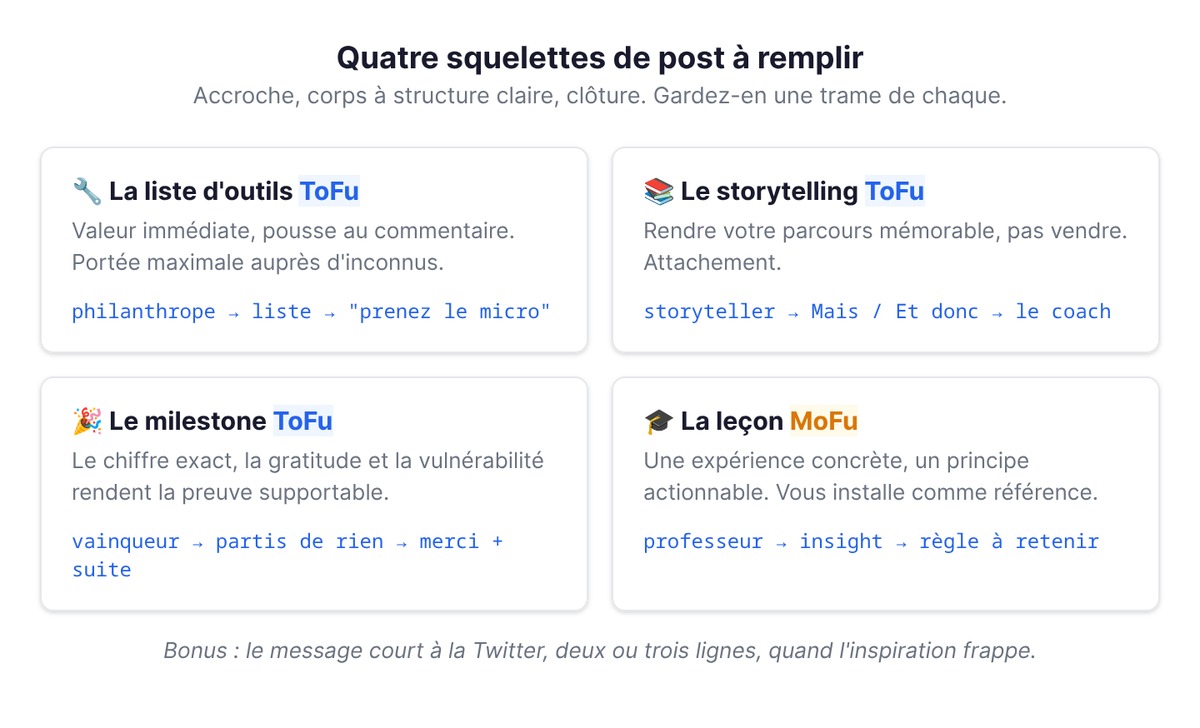
The tool list (top of funnel, maximum reach). A "philanthropist" hook, then a straightforward list, then a "take the mic" call to action. It's an easy format to deploy for reaching strangers, because it offers immediate value and prompts comments. Sample frame:
The best-known tools aren't always the best. Here are 12 cheaper alternatives 👇
- For stylish forms: Typeform ➝ Tally
- To remove an image background: remove.bg ➝ erase.bg
- To automate processes: Zapier ➝ n8n
- For project management: Asana ➝ ClickUp (…) Using other alternatives? Share them in the comments!
The story (top of funnel, connection). A "storyteller" hook, a body built on a "But / And so" structure (a situation, a twist, a lesson), and a "coach" or "influencer" closing. You start from a specific moment ("I quit my job at 21"), walk through what changed, and end with an invitation to take the leap. The goal: make your journey memorable.
The milestone (top of funnel, proof). A "winner" hook with the exact figure, a body built on "But / even though / and so" (we started from nothing, it was hard, here's where we are now), sincere thank-yous, and a nod to what's next. Sample outline: "Today I'm celebrating €1,423,000. That's what we generated for our clients this year. With just the two of us. We started from almost nothing…" Gratitude and vulnerability make the number feel earned rather than arrogant.
The lesson (middle of funnel, credibility). A "teacher" hook, then you take a concrete experience and draw an applicable principle from it. The template: a surprising result, the mistake or cause behind it, the rule to remember. Sample angle: "If you're not [goal] yet, it's probably because you [counterintuitive diagnosis]." This is the format that establishes you as a reference on a specific topic.
Bonus: the short, Twitter-style post. Two or three lines, one idea, one punchline. Perfect when inspiration strikes and you want to post on a whim. On LinkedIn, a text post costs so little to produce that these spontaneous flashes let you share a simple idea without overproducing, and they often perform very well.
Keep one frame from each category in a document. On days when you have no ideas, you won't face a blank page: you'll have a skeleton to fill in.
Finding clients on LinkedIn: social selling, step by step
Here's the part nobody wants to hear, yet it's what separates a profile that generates clients from one that generates polite emptiness.
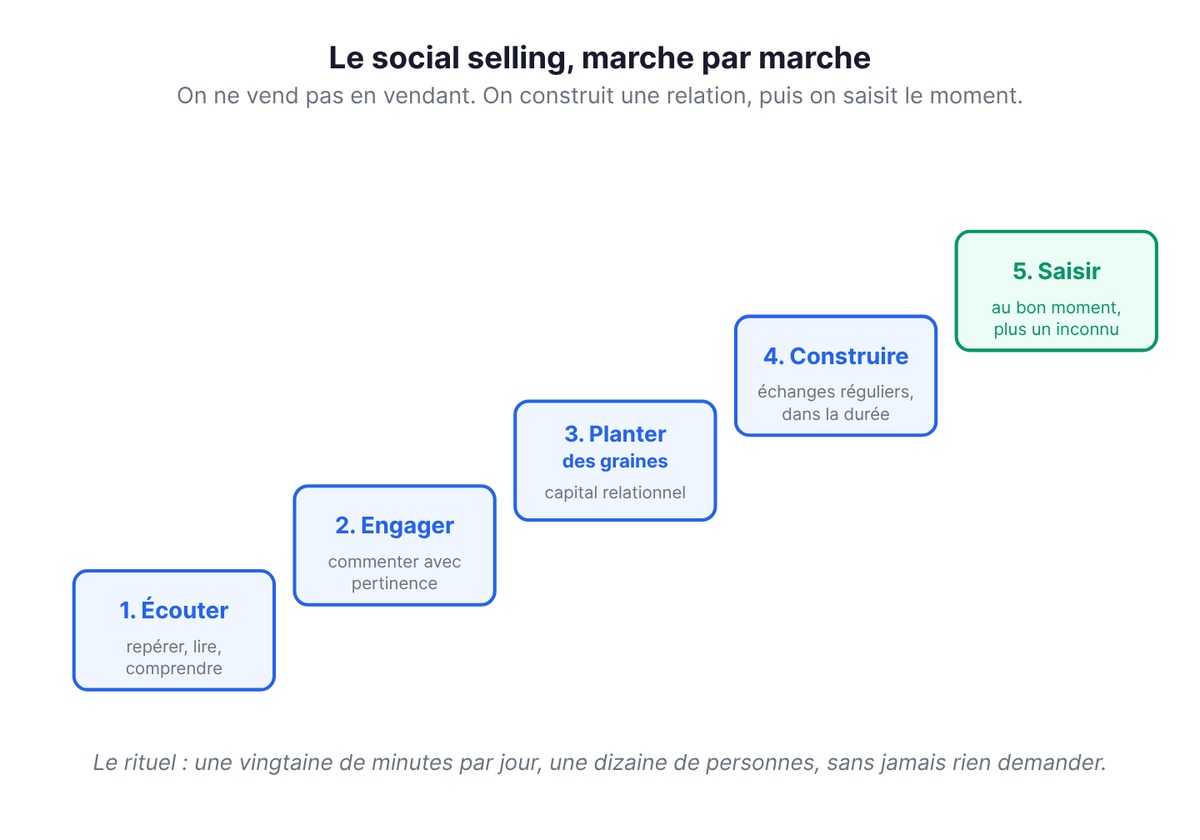
That's the whole principle of social selling: on LinkedIn, you sell by building a relationship and then seizing the right moment, rather than by pitching. It's slow and unspectacular, and it preserves trust where cold outreach wears it down. The approach has five steps, and they apply to B2B and B2C alike.
- Listen. Identify the people who matter in your ecosystem: potential clients, peers, referrers. Read what they post. Understand their current priorities. You can't win over someone whose concerns you know nothing about.
- Engage. Leave thoughtful comments, something better than "great post 👏." A comment that adds an idea makes you visible to that person and their entire audience at once.
- Plant seeds. A word of encouragement, sincere congratulations on a success, a useful resource sent with no strings attached. This is how you build relationship capital, and you spend that capital later. You can plant a seed years before you harvest it.
- Build. Keep up regular exchanges. Be available, responsive, and supportive. Relationships grow stronger through repetition, far more than through one perfect message sent once.
- Seize. When a window opens (a new role, a fundraise, a launch, a problem you know how to solve), you make your offer. And this time, you're someone they already know rather than a stranger interrupting their day.
The concrete habit that keeps this machine running: block, say, twenty minutes a day to interact with around ten people in your network, on a regular schedule. A comment here, congratulations there, a helpful reply somewhere else. This ritual keeps you in their field of vision, among the first people who come to mind, without ever asking for anything. The day the need appears, you're the one they think of.
Cold outreach does the opposite: it jumps straight to step five without climbing the first four. That's why it damages your reputation a little more with every send, especially when the message is pushy.
The toolbox: moves that boost your LinkedIn visibility
With the core principles in place, here are the specific tactics insiders pass along to each other. Each one is quick to put into practice and strengthens your LinkedIn visibility.
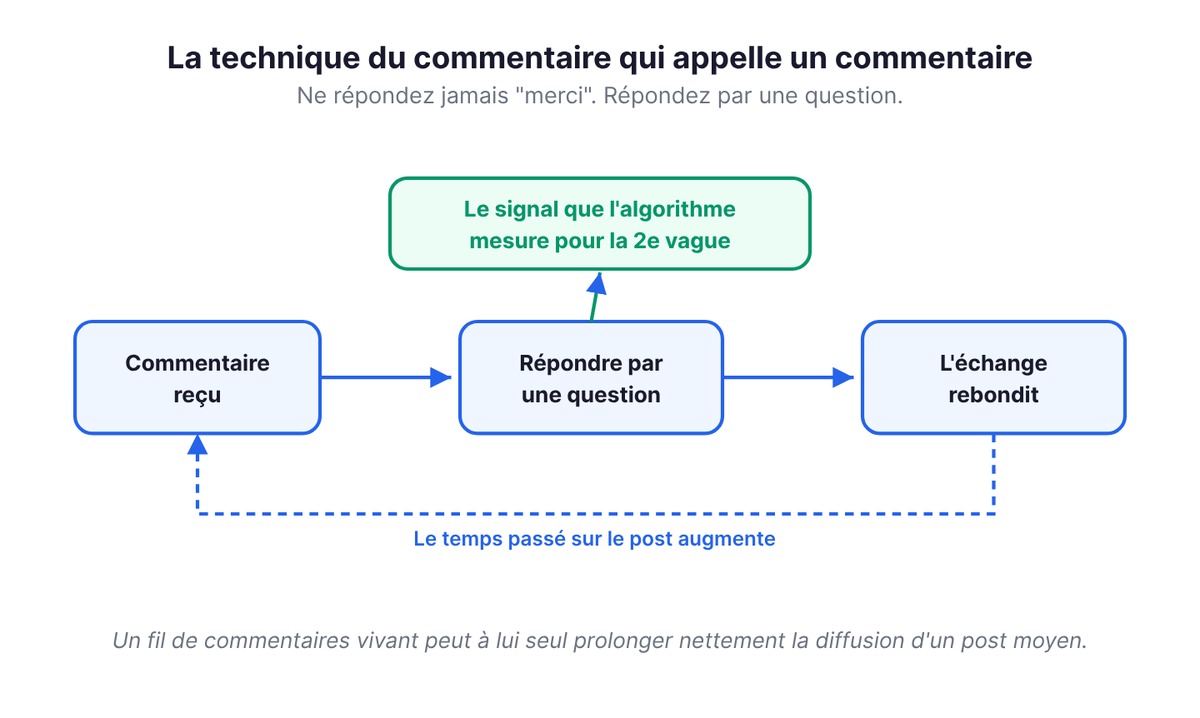
The comment-that-invites-a-comment technique. When someone comments on your post, reply with a question instead of "thanks." Each question restarts the exchange, each exchange extends the time spent on the post, and that time is exactly what the algorithm measures when deciding on the second wave. By running the thread yourself, you significantly extend the reach of an average post.
The custom feed (the URL trick). LinkedIn's default feed is a mess. You can build a custom one that shows only posts from your prospects or targets. Here's how: search for a person, open the "Posts" tab, then in the results page URL, delete the keywords=… parameter (your search term) while keeping the member ID. Then add other people to the search to stack their IDs. You end up with a feed that shows only their posts. Bookmark that URL: you now have a dedicated watch wall for your prospects, where commenting at the right moment becomes effortless. You can stack several IDs in the same feed.
Video, multiplied across all your channels. Video captures attention time well, and above all it can be recycled everywhere: a single video can be recut for LinkedIn, Instagram, TikTok, YouTube, and the rest. For subtitles, which boost watch rates when the sound is off, tools like Captions generate captions automatically in a few minutes.
Accessing your post analytics. LinkedIn tells you exactly what works, but the info is tucked away. Under each of your posts, click "View analytics": you'll get impressions, members reached, and an audience breakdown. On a video, keep an eye on the hook rate, the total time spent watching it. Read these numbers after every post and you'll know which format to double down on.
Documenting your journey so you never run out of ideas. Creative block comes from the false belief that you have to "produce content." In reality, your content is your day-to-day: a problem you ran into, a decision, a lesson learned, a behind-the-scenes moment. Keep a running backlog of ideas, turn them into drafts, and structure them when you have time. You don't need to invent topics, just write them down.
None of these tips replaces strategy. But layered on top of a good strategy, they make the difference between a post that plateaus and a post that takes off.
Pacing and mistakes to avoid
Without habits to carry it, your strategy stays on paper. Consistency matters more than perfection, and engagement more than volume.
A few reflexes hold up over time:
- Post regularly, at a pace you can sustain long term, so you stay present without overwhelming people. A modest rhythm kept up every week beats a burst followed by a long silence.
- Mix formats (text, image, carousel, video), because each one catches a different kind of reader.
- Reply to every comment with care, ask questions, keep things going. You extend the post's life and strengthen the relationship in the same move.
- Create rather than repost. A plain reshare doesn't belong to you. Original content on the same topic does.
And the pitfalls, just as important to know, because they cancel out everything else:
- Posting at the wrong time, when your audience is asleep.
- Neglecting to interact with others, especially early on, when your visibility is still fragile and depends entirely on the network you nurture.
- Ignoring comments under your own posts. Nothing discourages a budding audience faster.
- Spreading yourself across ten topics with no editorial line, so nobody knows what to follow you for.
- Reaching for cold outreach and pushy messages, which burn through patiently built capital in one go.
All these mistakes come from a lack of consistency or attention to your audience. Fixing them takes discipline more than talent.
Frequently asked questions
How many times a week should you post on LinkedIn? A good starting benchmark is around two or three posts a week, enough to stay present in the feed without overwhelming your audience. But consistency matters more than frequency: a few polished posts every week, sustained over time, beat a big burst followed by a long silence. Both the algorithm and your audience reward steadiness over sporadic spikes.
Should you put links in your LinkedIn posts? Keep them out of the body of the post. An external link in the text sends readers off the platform, which LinkedIn penalizes by reducing reach. Best practice is to put the link in the first comment and let the post stand on its own. That way you keep your reach intact while still offering the resource to those who want it.
How long before you find clients through LinkedIn? There's no reliable timeline, because everything depends on consistency and the quality of the relationships you build. The logic is relational and gradual: you listen, engage, plant seeds, build, then seize the opportunity. The signal to watch for is qualified conversations appearing in your inbox once your profile and content have established trust, rather than a date on the calendar.
Do you need a big network to get views? No. LinkedIn generally tests your content with a first circle of your network, and the engagement it generates decides what happens next, regardless of your starting size. A small, highly engaged network often spreads content better than a large, passive one. Interacting with others, especially early on, remains the fastest way to grow that base.
Video or text: which should you prioritize on LinkedIn? Both have a role. Video captures attention time well and has a decisive advantage: with a simple recut, it can be recycled on all your other channels. Text costs almost nothing to produce, which lets you post often and on a whim, whereas video takes planning and editing. A good routine alternates regular text posts with less frequent videos, subtitled so they stay readable with the sound off.
Are LinkedIn groups still useful? In practice, hardly: they rarely bring visibility these days. Your time is much better spent posting on your own profile and engaging with posts from the people you're targeting. To follow those people closely, build yourself a custom feed using the URL trick described above.
Can B2C work on LinkedIn, or is it only for B2B? B2C works, as long as you strike the right tone. LinkedIn is seen as a B2B platform, but consumer brands break through by focusing on branding, behind-the-scenes content, and entrepreneurial stories rather than head-on product promotion. The relationship ladder and the content funnel apply in exactly the same way: become visible and likable first, convert second.
Should you schedule your posts in advance? Nothing stops you from scheduling. Many people still prefer to post on impulse, while the message's energy is still intact. The best system is a hybrid: keep a backlog of ideas and drafts ready, then post when inspiration strikes. What matters is consistency and the right tone. Don't go hunting for a universal "best time to post" either, since it doesn't exist; just make sure you're not posting while your audience is asleep.