AI sales prospecting means handing a language model two jobs: researching each prospect and writing the messages. Scripts then check its work before anything goes out. You end up with a sequence of four to six emails, and the first one opens with a dated, sourced fact about the person reading it.
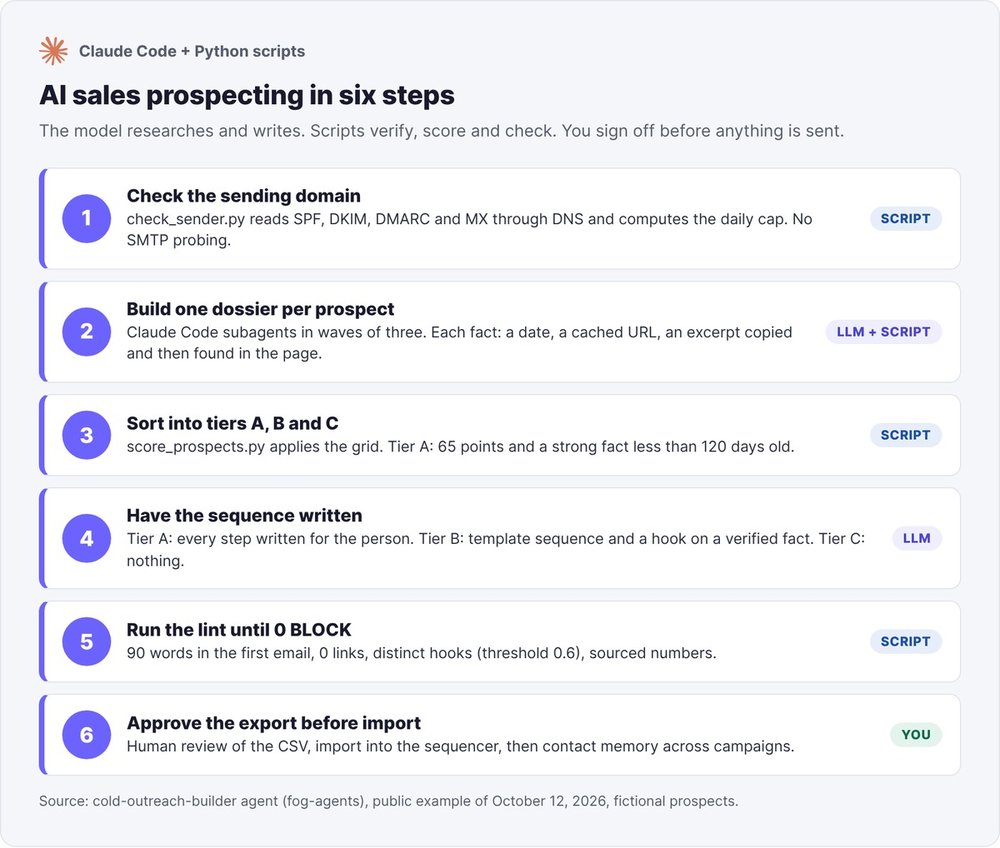
You run everything from Claude Code. First you check your sending domain over DNS. Next you build a verified dossier for each prospect, sort prospects into tiers A, B and C by script, and have the model write the sequence. Then you run a lint in a loop until nothing is blocked, and you review the export before importing it into your sending tool.
The agent never sends anything. Sending stays in your hands.
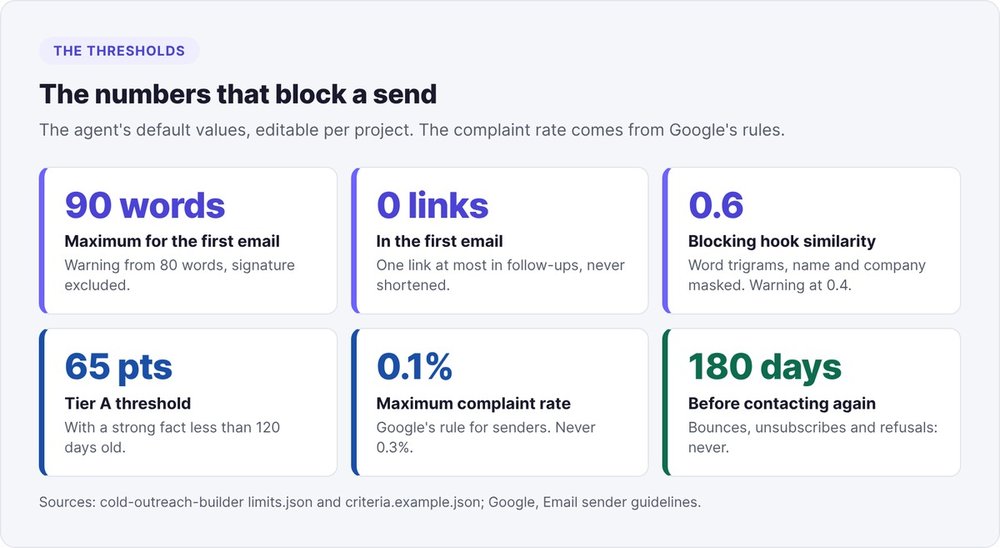
A prospect reaches tier A with at least 65 points and a strong fact less than 120 days old. A first email over 90 words, or one containing a link, gets blocked by the lint.
For the general method (segmentation, subject lines, legal framework), read our guide to B2B cold email. This article walks through the AI process one command at a time.
What is AI sales prospecting?
Every use of AI in prospecting runs into the same risk. A language model confidently writes something false about your prospect, and your "personalization" turns into a mistake with your name on it.
So every fact about a prospect carries a date, the URL of the page it came from and an excerpt copied word for word. A script searches for that excerpt in the local copy of the page. If the excerpt isn't there, the fact is dropped from the dossier.
The model researches and writes, the scripts verify
The model finds a prospect's public pages, pulls facts from them and writes the messages. Python scripts handle the mechanical side: finding each excerpt, assigning points, building the CSV, counting words and links, comparing hooks.
The model never changes a tier. To change a ranking, you change the scoring grid or add a sourced fact.
Who it's for, and what list size
The method is built for a founder with a clear target and a list of 20 to 200 people. It leaves out mass sends to thousands of addresses and purchased lists. People you already know go into tier C: they deserve a personal message written by you.
Prerequisites
A written target and a two-sentence offer
The agent needs two things to start: your offer in two sentences and your target (role, company size, industry, geography). Everything else has a default:
- the goal: a reply, a call, a trial, a partnership, or a relationship with no ask for partners or investors;
- the channel: email by default, LinkedIn as an option;
- the sending domain and its DKIM selector, for step 1;
- the age of your sending inbox and the list size, to work out the sending pace.
If the target is vague, say "founders", the agent proposes a narrower definition and records the assumption in its report.
Claude Code and a working folder
You run the agent in Claude Code. The scripts need Python 3.9 or later and use only the standard library. DNS lookups go through dig, with DNS over HTTPS as the fallback.
Each campaign lives in its own folder:
<project>/cold-outreach-builder/
  state/state.json            # who was contacted, at which step, who replied
  outreach-YYYYMMDD/
    leads.csv
    cache/<hash>.txt          # every page read
    dossiers/<id>/prospect.json
    tiers.json
    cold-outreach-output.json # the template sequence
    messages.json             # hooks and tier A messages
    sequence-export.csv
    sender-check.json  lint.json
Step 1: check your sending domain
Start with the domain. A perfect sequence sent from a badly configured domain lands in spam.
python3 scripts/check_sender.py --domain outreach.votre-startup.fr \
  --dkim-selector s1 --inbox-age-days 20 --list-size 60 --out sender-check.json
SPF, DKIM, DMARC and MX read over DNS
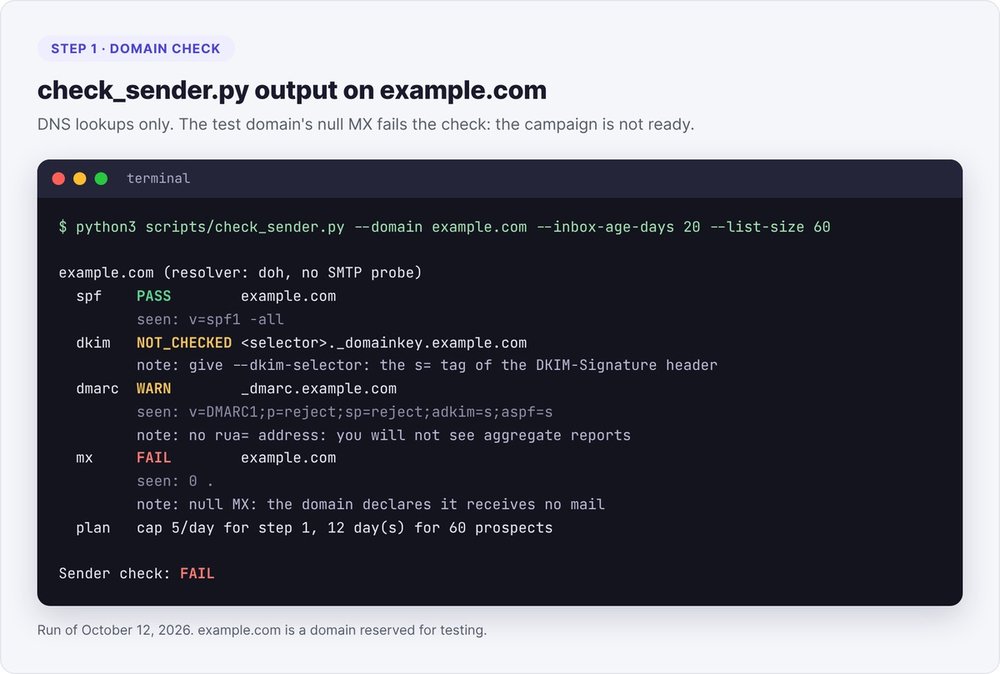
The script reads four records:
- SPF: a single
v=spf1record ending in-allor~all, with at most 10 terms that trigger a DNS lookup. A+allfails. - DKIM: a non-empty public key under
<selector>._domainkey.<domain>. You find the selector in thes=tag of the DKIM-Signature header of any email sent from that domain. - DMARC: a
v=DMARC1record.p=nonepasses with a warning. Without arua=address, you get no aggregate reports. - MX: the domain has to receive replies and bounces. A null MX fails the check.
The script exits with code 1 if any check fails. Here is its actual output on example.com, a test domain that declares it accepts no email:
Send from a dedicated subdomain with its own SPF, DKIM and DMARC, so your main domain keeps its reputation if the campaign goes wrong. Google requires all three for bulk senders in its email sender guidelines.
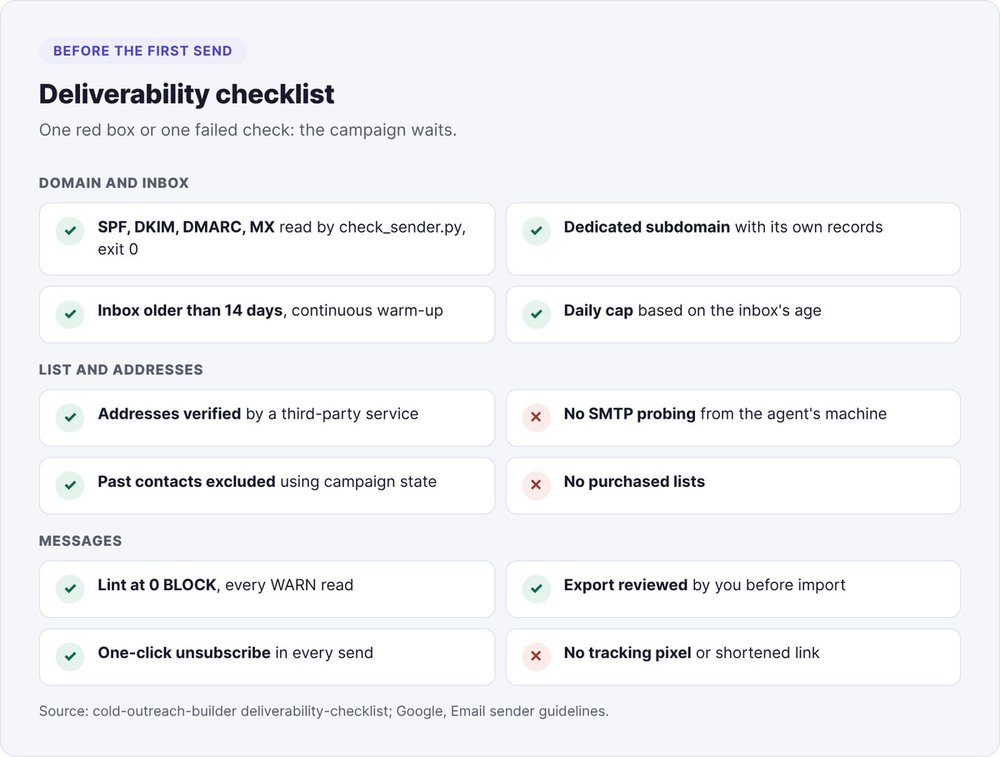
Never use SMTP probes to verify an address
An SMTP probe queries the recipient's server (with the RCPT TO command) to find out whether an address exists. We paid for this in August 2026: after several thousand probes in one day from our server, its IP address landed on the Spamhaus blocklist. Servers hosted by Microsoft then rejected every address, including ones they had confirmed as valid a few hours earlier.
Leave address verification to a specialized third-party service, and never send probes from the machine running the agent. After a wave of rejections, recheck an address you know is good before trusting the wave. check_sender.py opens no connection on port 25.
Daily volume by inbox age
A new inbox has no reputation. The agent applies these default caps, chosen to be cautious (no provider publishes a cap for cold email):
| Sending inbox age | First emails per day |
|---|---|
| Under 14 days | 0 (warm-up only) |
| 14 to 30 days | 5 to 10 |
| 30 to 60 days | 20 to 30 |
| Over 60 days | 30 to 50 |
Beyond 50 sends a day, add inboxes. Then watch your complaint rate in Postmaster Tools: Google asks senders to stay under 0.1% and never reach 0.3%.
Step 2: build a verified dossier for each prospect
python3 scripts/run_dossiers.py prepare --leads leads.csv --run-dir outreach-20261012 \
  --state state/state.json
This command filters out prospects already in a sequence, unsubscribed or contacted too recently, then writes a brief.md file for each remaining prospect. Claude Code works through these briefs with subagents, three at a time, each one given only its own brief. A dossier counts as done when its file exists on disk and passes the check, whatever the subagent's message says.
Which sources to read, in order
The model reads the company's website and blog, press coverage, public registries, job postings, conference and podcast pages, public posts, and finally the prospect's personal site. It looks first for events from the last 120 days: a funding round, a company founding, a launch, a hire, a new role. Two to five facts are enough.
The agent never reads a LinkedIn profile or company page. Those pages only display after login, and LinkedIn's terms prohibit scraping them. Public posts stay readable, and a post's ID gives its exact date.
One fact = a date, a URL, a copied excerpt
Every page goes through the local cache first:
python3 scripts/cache_page.py --cache outreach-20261012/cache <url>
The model then writes the fact into prospect.json, as in our public example from October 12, 2026 (fictional prospect, name and URL masked):
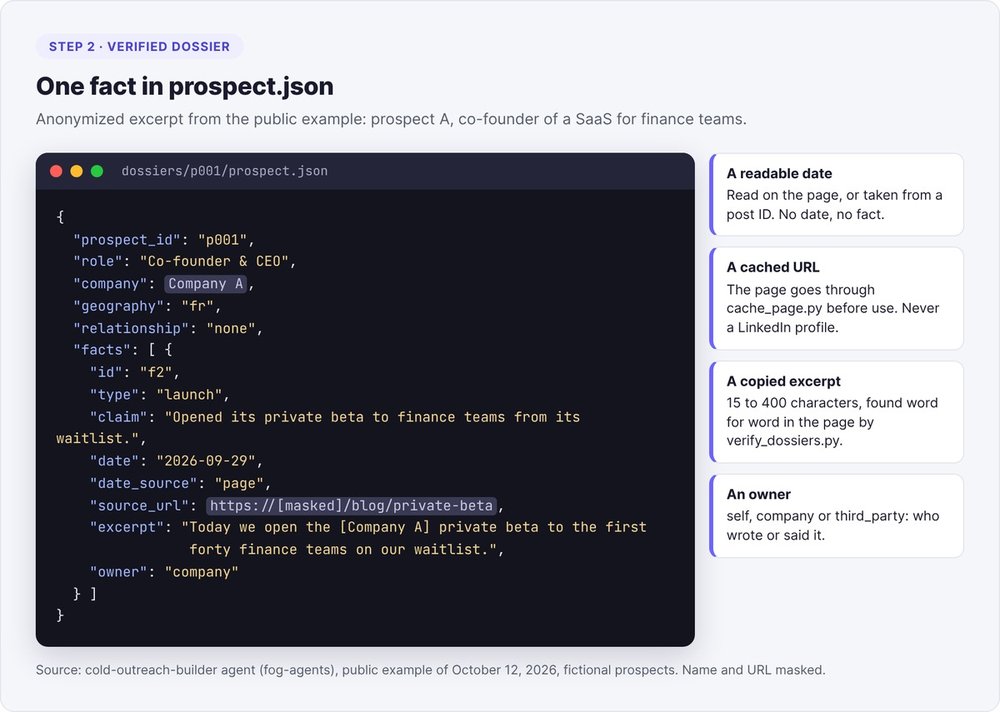
The excerpt runs between 15 and 400 characters, copied exactly. A fact without a readable date stays out of the dossier. The email address comes from your list or from a verified public page: the model never guesses it from a firstname.lastname pattern.
With no dated, verifiable fact, the dossier stays empty and the prospect goes to tier C, because the only alternative would be making something up.
The scripted check
python3 scripts/verify_dossiers.py outreach-20261012/dossiers --cache outreach-20261012/cache
The script flags a page missing from the cache (not-cached), an excerpt it can't find on the page (excerpt-not-found), a date in the future, a post dated by anything other than its ID, and an email address missing from the cited page. It exits with code 1 as long as an error remains. You then fix the dossier: copy the exact words, cache the page, or delete the fact. The script and the cache stay untouched. On our example, the check returns "3 dossier(s), 3 ok; facts: 4 verified, 0 stale, 0 failed".
Step 3: sort your prospects into tiers A, B and C
python3 scripts/score_prospects.py outreach-20261012/dossiers --criteria criteria.json
The scoring grid
You adapt the grid, a plain JSON file, to your target. It has five components:
- verified facts: funding round or company founding 25 points, launch or hire 20, new role 15, post or talk 12, press article 10, other 5, capped at 40 points;
- recency of the freshest fact: 15 points under 30 days, 10 under 90 days, 5 under 180 days;
- role: founder or CEO 25 points, leadership 15, other 5;
- geography: 10 points inside your area, 3 if it's unknown;
- your target keywords in the facts: 5 points each, 10 at most.
Tier A: at least 65 points plus a strong fact (funding, founding, launch, hire, new role) less than 120 days old. Tier B: at least 35 points plus one verified fact. Everyone else goes to tier C, with the reason written down. A fact older than two years stays in the dossier but earns no points and can't be used as a hook.
Example: three prospects, three tiers
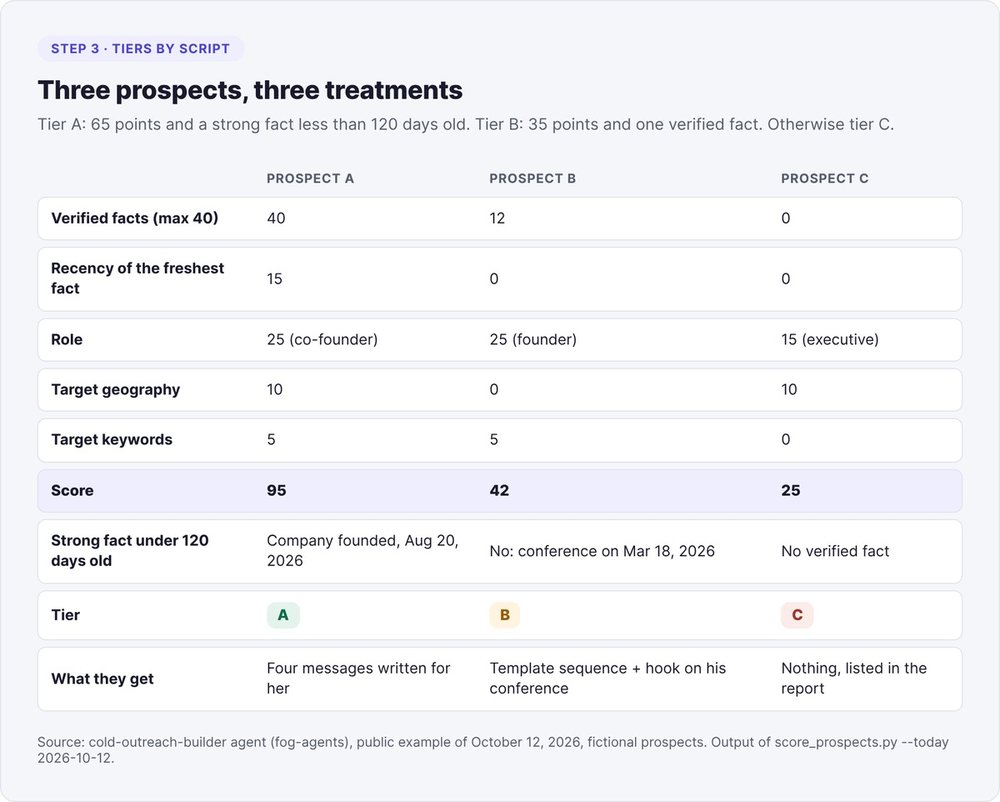
In our example, prospect A scores 95 points. She founded her company on August 20, 2026, a strong fact less than 120 days old, so she lands in tier A. Prospect B gave a conference talk in March 2026, outside the 120-day window: 42 points, tier B. Prospect C has no verified fact: 25 points, tier C, and no message.
If your whole list falls into tier C, keep the grid as it is. Look for better sources or a better list.
Step 4: have the AI write the sequence
Tier A gets messages written for the individual at every step. Tier B gets the shared template sequence, with a hook built on one of their verified facts. Tier C gets nothing.
The skeleton: steps, days, one ask per message
The model lays out the skeleton before writing a line. The gaps between messages grow longer, so a late reply never feels late:
| Message | 6-step sequence | 4-step sequence |
|---|---|---|
| Hook | D0 | D0 |
| Short follow-up | D+3 | (none) |
| Useful content | D+7 | D+5 |
| Proof or point of view | D+12 | (none) |
| Direct ask | D+18 | D+12 |
| Closing message | D+26 | D+21 |
Each message uses a single persuasion lever (reciprocity, commitment, authority, liking, belonging) and a single ask. A six-message sequence uses at least four different levers. On LinkedIn, the connection request fits in 200 characters with no pitch, and the first message goes out between D+1 and D+3.
In French, the agent defaults to the formal vous. It switches to the informal tu only when the dossier shows, with a URL to back it up, that the person uses tu in public.
The hook prompt
The instruction the model gets for each hook:
For each tier A or B prospect, write one hook sentence built
on ONE verified fact (hook_fact_id). The hook says nothing beyond
the fact's excerpt. It differs from every other prospect's hook.
For tier A, write each step for the person, around their facts.
Language and register (tu or vous) come from the dossier.
No reply rates, no invented clients, no unsourced numbers.
Excerpt from a tier A sequence
The first email written for prospect A, with names replaced:
Subject: your design partners, told to an investor

Hi [first name],

[Company] opened its private beta on September 29, and your note about your
first ten design partners ends on a question: how to turn them into a story
an investor can follow.

We work on exactly that question with founders at swanbase, a Paris
accelerator for people launching their first startup. We wrote a one-page
checklist on what investors ask about early users. Want me to send it
before your pre-seed?

{{sender_first_name}}
The hook draws on two verified facts from the dossier.
Step 5: run the lint until 0 BLOCK
python3 scripts/lint_outreach.py outreach-20261012/sequence-export.csv \
  --dossiers outreach-20261012/dossiers --sequence outreach-20261012/cold-outreach-output.json \
  --out outreach-20261012/lint.json
The lint exits with code 1 as long as a BLOCK remains.
The mechanical limits
- Length: the first email triggers a warning at 80 words and gets blocked above 90 (signature excluded). On LinkedIn, the first message is capped at 45 words and 200 characters.
- Links: none in the first email, at most one in follow-ups, no URL shorteners.
- Subject line: required on the first email, 50 characters max.
- Hooks: compared across prospects using word trigrams, after masking the name and company. A similarity of 0.6 blocks, 0.4 triggers a warning.
- Numbers: any figure must appear in one of the prospect's verified facts or in your declared proof points. Dates and durations pass.
- Format: no emoji, no bullet points, no leftover variables, and a signature on the last line.
The lint also blocks stock phrases: "I hope this message finds you well", "I'm taking the liberty of reaching out", "I'll keep this short", "this isn't a pitch", generic flattery ("great post", "impressive background") and fake scarcity ("only 3 spots left").
What blocked in our test
To stress-test the loop, we deliberately broke the October 12 example: a shortened link and a numerical promise in prospect A's first email, and her hook copied over to prospect B. The result:
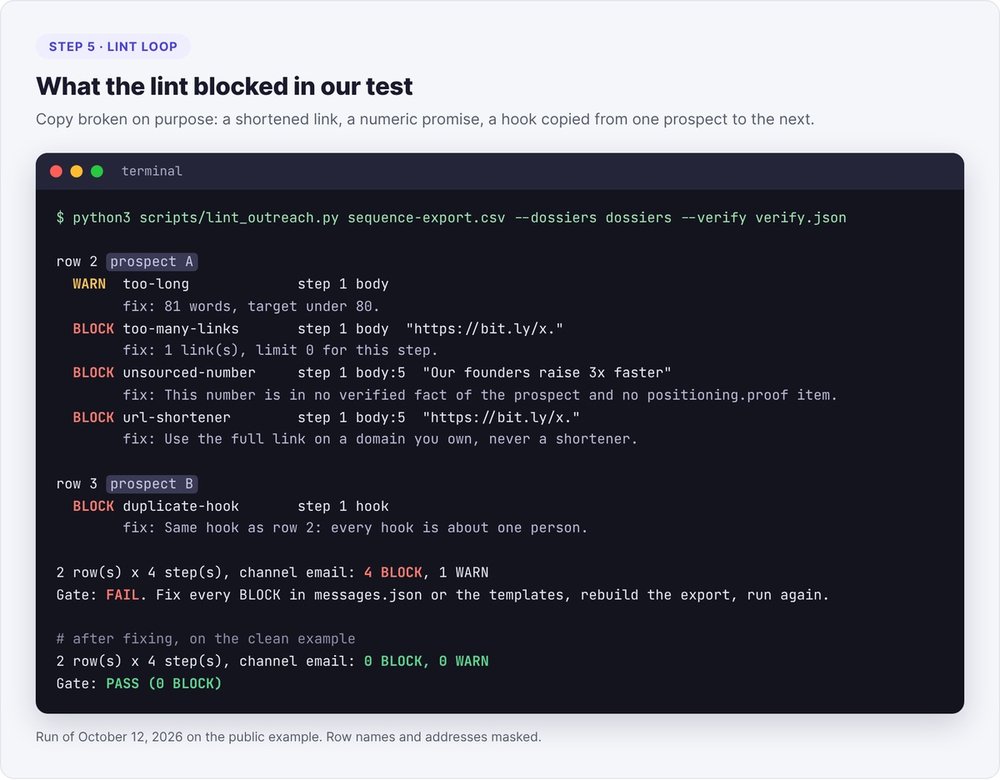
You fix each BLOCK where it was written, in messages.json or in the template sequence, rebuild the export and rerun. After three passes, a prospect who is still blocked goes on hold (hold) with the reason, and stays out of the export. Never touch the limits or the script to push a message through. On the clean example, the lint returns "2 row(s) x 4 step(s), channel email: 0 BLOCK, 0 WARN".
A human read follows the lint: does the hook say what the fact says, and can the prospect reply in one line? Write every message in full sentences with a subject, a verb and an object. An email built from fragments and colon-separated labels reads like a generated data sheet.
Step 6: approve, import, track replies
The CSV export and human sign-off
python3 scripts/build_sequence_export.py --sequence cold-outreach-output.json --leads leads.csv \
  --tiers tiers.json --messages messages.json --dossiers dossiers --out sequence-export.csv
The export is a generic CSV with one row per prospect and one column per step. You import it into a sequencer that supports custom fields, such as Lemlist, or into a mail merge from a spreadsheet. Tier C prospects, excluded prospects and rows with an empty variable go into a skipped.csv file, each with its reason.
You review the export before importing it. This is the agent's only human checkpoint, and it is mandatory.
Memory between campaigns
After the import, record the sends in the contact state:
python3 scripts/outreach_state.py register --state state/state.json \
  --export sequence-export.csv --sequence-id outreach-20261012 --start-date 2026-10-14 --channel email
On later campaigns, a script classifies the exported replies and updates the state. Bounced addresses, unsubscribes and negative replies never come back. Everyone else waits 180 days before a new contact. The agent drafts the replies; you approve them and send them yourself.
Common mistakes in AI prospecting
Generating templates without a list
Our first run, on April 28, 2026, produced a LinkedIn sequence with no prospect list. The agent delivered templates with generic hooks and sending advice full of unsourced numbers. The October version always starts from a dossier per person, and a prospect without a verified fact gets nothing.
Letting the AI write numbers
A model will happily add "our founders raise three times faster" to strengthen a message. The lint blocks any number that isn't in the verified facts or your declared proof points. The same rule catches promised reply rates and invented clients.
Reusing the same hook
A "personalized" hook copied from one prospect to the next with only the first name changed is still a mail merge. The comparison masks the name and company before measuring similarity, and our test caught the copy on the first pass.
Which tools for AI sales prospecting?
| Role | Tool | Note |
|---|---|---|
| Research, writing, orchestration | Claude Code and its subagents | three dossiers in parallel |
| List enrichment | Clay or your spreadsheet | the agent starts from your list |
| Address verification | a specialized third-party service | no SMTP probes from your machine |
| Domain check | check_sender.py or dig |
DNS only |
| Sending and follow-ups | a sequencer such as Lemlist | imports the generic CSV |
Our comparison of B2B prospecting tools covers sequencers and contact databases in detail. The cold-outreach-builder agent, with its scripts and the example from this article, is available at fog-agents.com.
FAQ
Can AI handle all of your sales prospecting?
No. AI handles the research on each prospect and writes the messages, scripts verify the facts and check the messages, and you approve the export before anything is sent. You also write or approve the replies to prospects.
What is the best AI tool for sales prospecting?
A model that can read pages, write files and run scripts, such as Claude Code, covers research and writing. Add a sequencer for sending and an address verification service.
How do you find clients with AI?
Start from a list of 20 to 200 people who match your target. Have a dossier of dated, sourced facts built for each one, then write to those with a recent fact, using a short first message with no link that opens on that fact.
How many prospecting emails should you send per day?
None during the first 14 days of a new inbox, 5 to 10 up to 30 days, 20 to 30 up to 60 days, then 30 to 50. These cautious caps come from our method: beyond 50 a day, add inboxes.
Is AI email prospecting legal?
In B2B, France's data protection authority, the CNIL, allows email prospecting without prior consent if the message relates to the person's profession, you inform them, and they can easily opt out. AI changes nothing about these rules: include an unsubscribe link and honor every refusal.
How do you build an AI prospecting agent?
A prospecting agent combines instructions for the model with control scripts. In Claude Code, you can package it as a skill or start from fog-agents' cold-outreach-builder agent, which ships the scripts used in this article.