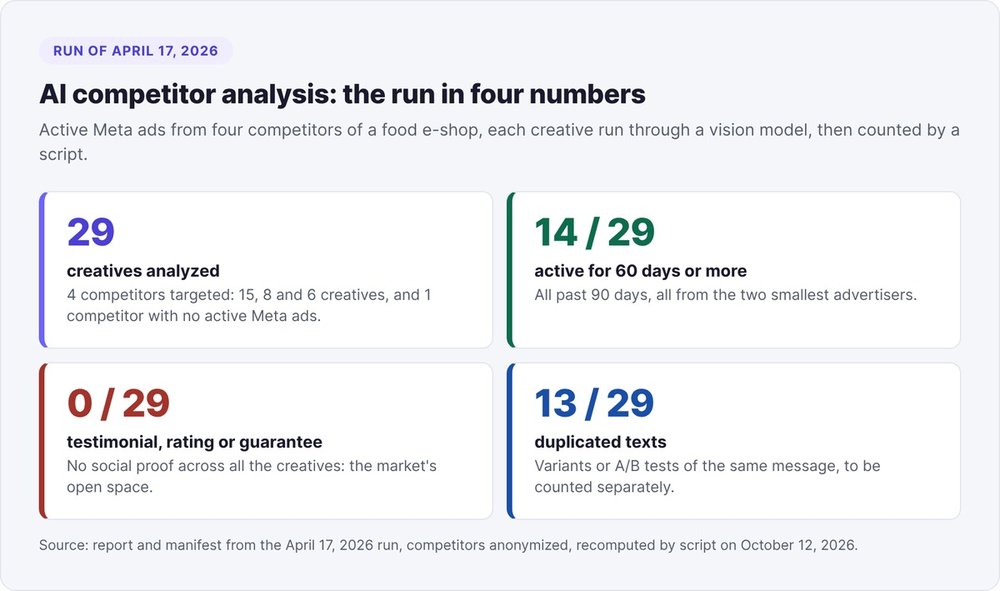
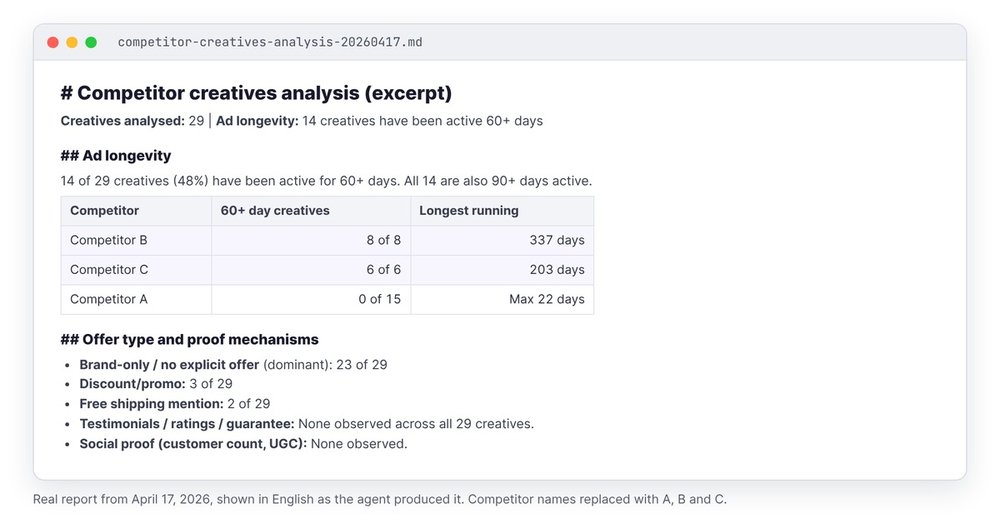
On April 17, 2026, we ran an AI competitive analysis on 29 Meta ads from four competitors of a food e-commerce shop. A vision model described each creative, then a script did the counting. Two facts stood out: 14 of the 29 creatives had been running for 60 days or more, and none of them showed a testimonial, a rating, or a guarantee.
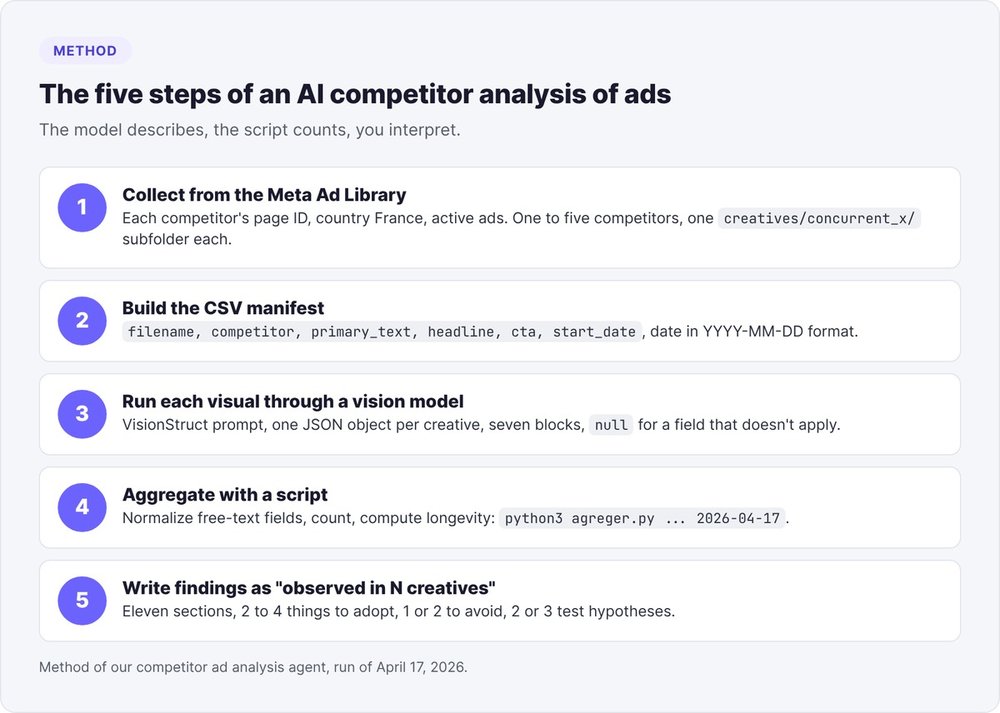
To reproduce it, you collect your competitors' active ads from the Meta Ad Library, list them in a CSV manifest, and run each visual through a vision model that returns JSON (composition, hex colors, text, call-to-action button). Then you aggregate those JSON files with a script and write findings anchored as "observed in N creatives."
This tutorial adapts the method for a SaaS, with the commands, the prompt, the script, and seven pitfalls we actually hit.
What is AI competitive analysis applied to ads?
AI competitive analysis applied to ads describes each competitor ad in a structured format, then counts the recurring patterns. The vision model handles the description, a script handles the counting, and you keep the interpretation.
Classic competitive analysis tools
The guides that rank for this query list keyword, traffic, or social listening tools. They rarely describe what the ads actually contain: the message, the image, the call-to-action button.
What the Meta Ad Library shows
The Meta Ad Library displays active and inactive ads from any Facebook or Instagram page: the visual, the primary text, the headline, the call-to-action button, and the date the ad started running.
The analysis blind spots
The library shows neither the budget nor the results of a commercial ad. So our method relies on an indirect signal: an ad active for 60 days or more counts as a "probable winner," because advertisers rarely keep an ad running for two months if it brings in nothing. The report presents this signal as a hypothesis.
Step 1: Collect the ads from the Meta Ad Library
Our agent accepts one to five competitors per run, with one image subfolder per competitor (creatives/concurrent_a/, creatives/concurrent_b/).
Searching in the web interface
Search for each competitor by page name, then filter by country (France, in our case) and by active ads. A results page URL follows this pattern:
https://www.facebook.com/ads/library/?active_status=active&ad_type=all&country=FR&search_type=page&view_all_page_id=<PAGE_ID>
Write down each competitor's page ID (view_all_page_id). A keyword search mixes advertisers together, while the page ID isolates a single competitor.
The Ad Library API and the ad_snapshot_url field
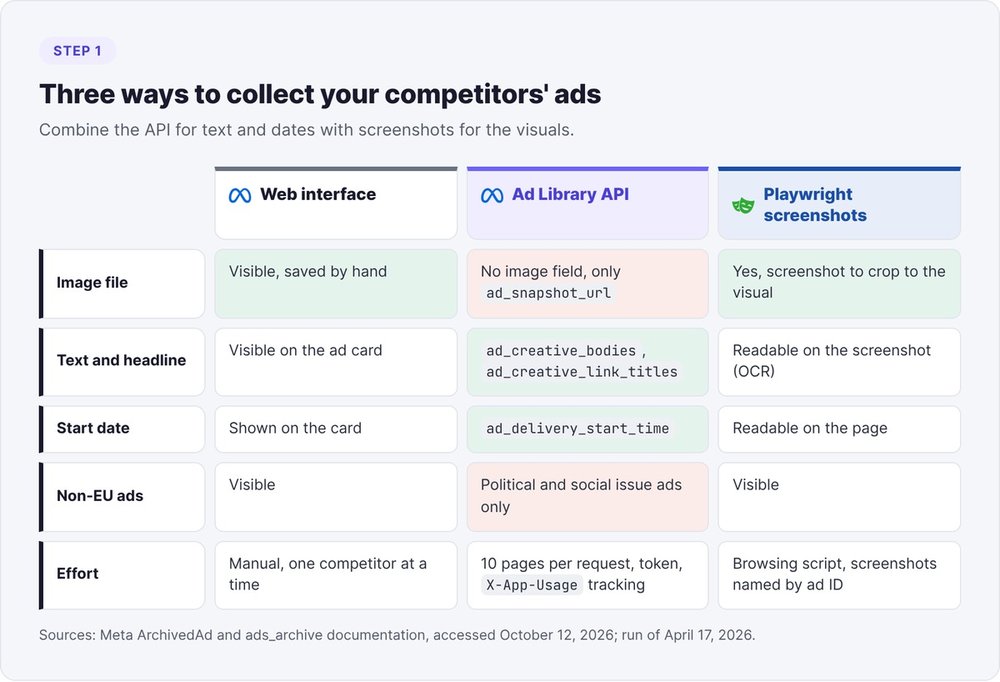
The official API accepts up to ten page IDs per request (search_page_ids). It returns each ad's text, headline, delivery start date, and platforms. According to the ArchivedAd object reference, no field returns the image file: you get an ad_snapshot_url, an HTML page that renders the ad.
curl -G "https://graph.facebook.com/<version>/ads_archive" \
  --data-urlencode "search_page_ids=<ID_A>,<ID_B>,<ID_C>" \
  --data-urlencode "ad_reached_countries=['FR']" \
  --data-urlencode "ad_active_status=ACTIVE" \
  --data-urlencode "fields=id,page_name,ad_delivery_start_time,ad_creative_bodies,ad_creative_link_titles,ad_snapshot_url,publisher_platforms" \
  --data-urlencode "access_token=$TOKEN"
There are two limits. First, the ads_archive endpoint documentation states that an ad which reached no European Union country only shows up if it concerns politics or social issues, so a US competitor that doesn't run ads in Europe stays invisible on the commercial side. Second, Meta tracks your usage in the X-App-Usage header: our automated collection plan pauses at 75% and pulls 50 ads per competitor by default.
Capturing the visuals with Playwright
For the images, save each creative manually from the library or capture the pages with an automated browser. Our April 17 run used Playwright screenshots. Name each file after the ad's library ID: that name becomes the join key with the manifest.
Crop each screenshot to the visual. If the screenshot keeps the library interface (the "Learn More" button, the domain name, the "Sponsored" label), the model reads those elements as ad copy. That's pitfall #2.
Step 2: Build the CSV manifest
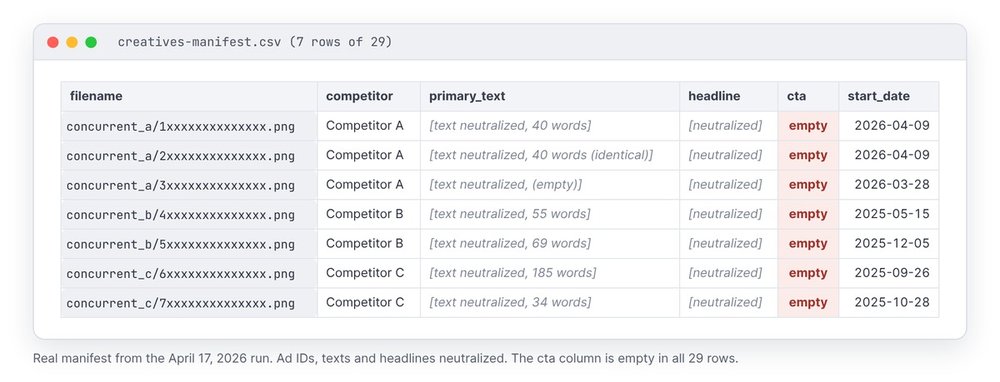
The manifest links each image to what the visual doesn't show: the advertiser, the full text, the start date.
The six columns
filename,competitor,primary_text,headline,cta,start_date
concurrent_a/120200000000001.png,Competitor A,"Close your books in 2 hours...",14-day free trial,Sign Up,2026-09-02
concurrent_b/120200000000002.png,Competitor B,"Your reminders go out on their own...",20-minute demo,Book Now,2026-07-18
The date must use ISO format (YYYY-MM-DD), otherwise the duration calculation breaks.
Calculating days in delivery
An ad's duration is the run date minus start_date. Our script flags every creative active for 60 days or more. Pin the run date in the command: rerun a week later, the same manifest would produce different durations.
Step 3: Turn each visual into JSON with a vision model
Claude Code reads the images in a folder and writes the output file. Our spec produces a single file for all creatives: structured/creatives-structured.json.
The prompt
Here's an excerpt from our prompt, VisionStruct, which forbids summarizing:
You are a visual serialization engine. For the provided image, return a single
JSON object, with no code block and no surrounding sentence.
Do not summarize. Every detail present in the pixels must exist in the JSON.
Before writing, make three silent passes:
1. the scene, the lighting, the main subjects;
2. the details, the textures, and all visible text (OCR);
3. the relationships between objects (holds, hides, next to).
Required keys: meta, global_context, color_palette, composition,
objects, text_ocr, semantic_relationships. Field not applicable: null.
If your screenshots keep the library interface, add: "Ignore the ad library frame (call-to-action button, domain name, Sponsored label) and describe only the creative."
In Claude Code, start the processing from the project folder:
Read every image in creatives/ and its subfolders. For each one, apply
prompt-vision.md and append {"filename": ..., "competitor": ..., "data": {...}}
to the array in structured/creatives-structured.json. If an image fails,
log it in _skipped and keep going.
The JSON schema per creative
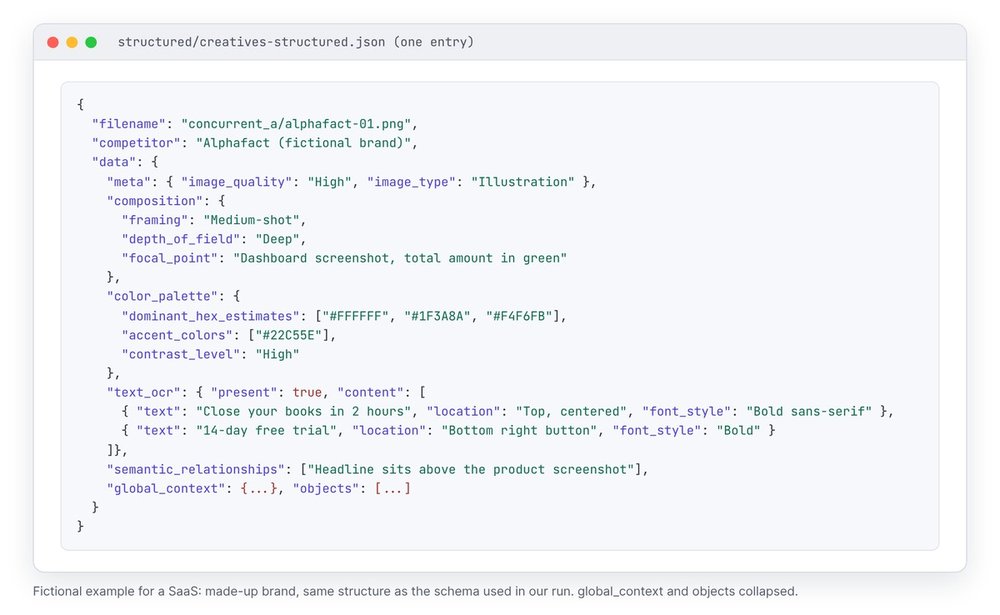
Each creative produces seven blocks. composition gives the angle, framing, depth of field, and focal point. color_palette lists the dominant colors in hex and the contrast level. text_ocr transcribes every piece of text with its position and style. A field that doesn't apply is set to null and never disappears, so the script reads the same structure for every creative.
If the model returns malformed JSON, retry once with the instruction "valid JSON only." If it fails a second time, skip the image, log it, and continue the batch.
How much JSON you get
On our run, each creative produced about 5,900 characters of JSON, or 225 KB for 29 creatives. Nobody rereads that volume by hand, which is why step 4 exists.
Step 4: Aggregate with a script instead of counting by eye
Hand the counting to a script. A model that reads 29 JSON files and announces "most ads use a medium shot" gives you an impression. The script gives you 18 out of 29.
Normalizing free-text fields
The model fills framing as free text. On our run, it produced seven labels for four concepts: "Medium-shot", "Medium-shot (video thumbnail crop)", "Close-up to medium-shot", and so on. Map every free-text field to a closed list before counting, otherwise each variant becomes its own one-creative category.
The aggregation script
Tested on the data from the April 17 run:
import csv, json, sys, datetime, collections

json_path, csv_path, date_run = sys.argv[1], sys.argv[2], sys.argv[3]
creas = json.load(open(json_path))
manifest = {r["filename"]: r for r in csv.DictReader(open(csv_path, encoding="utf-8"))}
jour = datetime.date.fromisoformat(date_run)

def cadrage(v):
    v = (v or "").lower()
    if "close" in v: return "close-up"
    if "medium" in v: return "medium shot"
    if "wide" in v or "full" in v: return "wide shot"
    return "other"

compte = collections.Counter()
par_concurrent = collections.defaultdict(lambda: [0, 0])
textes = collections.Counter()
for c in creas:
    d, m = c["data"], manifest.get(c["filename"], {})
    conc = c.get("competitor") or m.get("competitor", "?")
    compte["framing: " + cadrage(d["composition"].get("framing"))] += 1
    compte["contrast: " + str(d["color_palette"].get("contrast_level"))] += 1
    if d["text_ocr"].get("present"): compte["text on image"] += 1
    textes[m.get("primary_text", "")] += 1
    par_concurrent[conc][0] += 1
    if m.get("start_date"):
        if (jour - datetime.date.fromisoformat(m["start_date"])).days >= 60:
            par_concurrent[conc][1] += 1

n = len(creas)
for k, v in sorted(compte.items()):
    print(f"{k}: observed in {v}/{n} creatives")
for conc, (tot, longues) in par_concurrent.items():
    print(f"{conc}: {tot} creatives, {longues} active for 60 days or more")
doublons = sum(v for t, v in textes.items() if t and v > 1)
print(f"creatives sharing their text with another: {doublons}/{n}")
python3 agreger.py structured/creatives-structured.json creatives-manifest.csv 2026-04-17
Output from our run, with competitors anonymized:
framing: close-up: observed in 8/29 creatives
framing: medium shot: observed in 18/29 creatives
contrast: Medium: observed in 20/29 creatives
text on image: observed in 29/29 creatives
Competitor A: 15 creatives, 0 active for 60 days or more
Competitor B: 8 creatives, 8 active for 60 days or more
Competitor C: 6 creatives, 6 active for 60 days or more
creatives sharing their text with another: 13/29
The "text on image: 29/29" line is wrong. See pitfall #2.
Step 5: Write findings as "observed in N creatives"
Our rule: no invented statistics. Every finding carries its count ("observed in 20 of 29 creatives").
The 11 report sections
Our template requires eleven sections in this order: header (date, source, number of creatives), a two-to-four-sentence summary, formats and placements, visual patterns, colors and style, copy and hooks, offers and proof, longevity, notes per advertiser, recommendations, testable hypotheses. Keep the recommendations bounded: two to four things to adopt, one or two to avoid, one or two open spaces.
In the April 17 run, the offers and proof section read like this: no explicit offer in 23 of 29 creatives, a hook tied to a seasonal occasion in 20 of 29, and zero testimonials, customer ratings, guarantees, or social proof across all 29. The longevity section revealed two opposite strategies: the largest advertiser was rotating 15 recent creatives (all launched less than four weeks earlier), while the two smaller ones kept all of theirs running for more than 90 days.
From findings to test hypotheses
The report ends with two or three concrete tests drawn from the gaps you observed. With zero social proof across 29 creatives, the obvious test pits a creative with a customer quote against the same creative without it. Phrase the test without predicting the outcome. To turn these tests into visuals, follow our method to create an ad with AI.
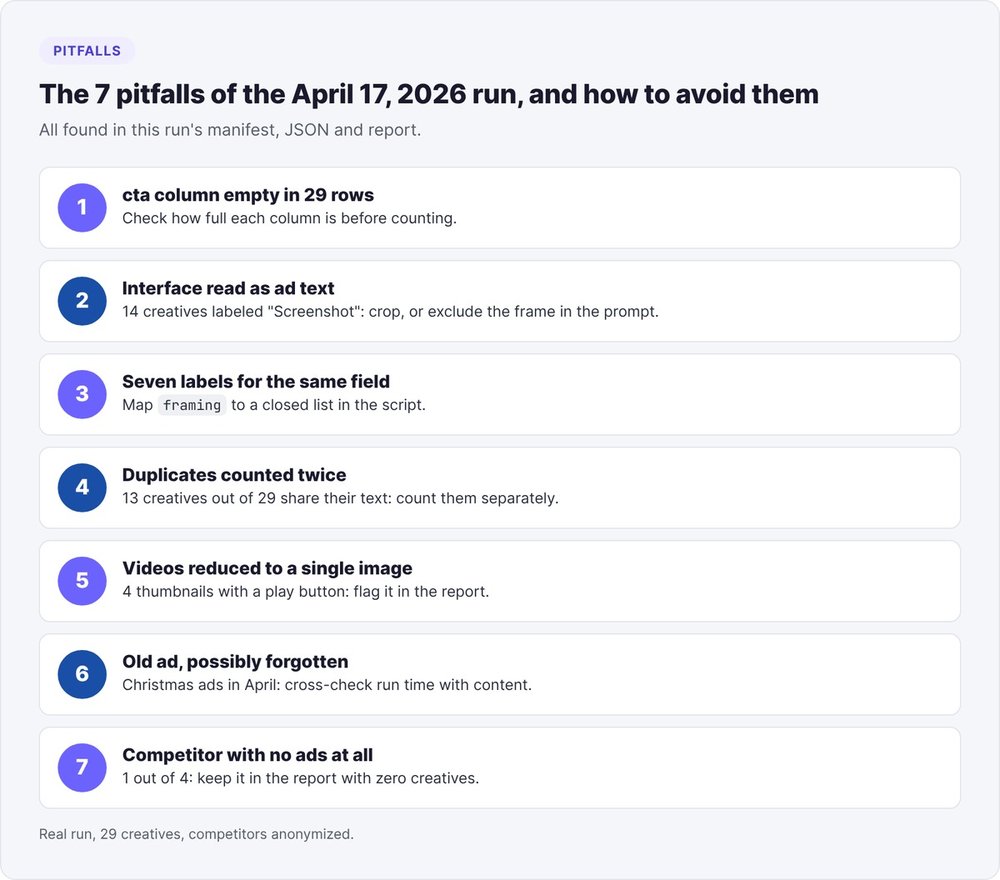
The 7 pitfalls from our April 17, 2026 run
1. The empty CTA column
The cta column in the manifest stayed empty on all 29 rows: the call-to-action button only existed in the model's OCR. Check how completely each column is filled before you count anything.
2. The library interface read as ad copy
The model classified 14 of 29 creatives as "Screenshot" and transcribed the "Learn More" button and the domain name as creative text. That explains the script's "29/29," compared with 18 creatives that actually had text embedded in the visual on manual review. Crop the screenshots or add the exclusion line to the prompt.
3. Seven labels for one field
Framing came out in seven variants for four concepts. Normalize with a closed list, as the script does.
4. Duplicates counted twice
13 of 29 creatives shared their primary text with another one: variants or A/B tests of the same message. Count them separately, otherwise a message tested twice counts double in your percentages.
5. Videos reduced to a single frame
Four creatives were videos, analyzed from their thumbnail alone. Flag them in the report.
6. An old ad might be a forgotten one
Christmas ads were still running in April. After 60 days, an ad can reflect a sustained budget or a forgotten campaign. Cross-check the duration against the content before calling anything a winner.
7. A competitor with no ads at all
One of the four targeted competitors had no active Meta ads. Keep it in the report with zero creatives and note that it acquires customers through other channels.
Adapting AI competitive analysis to a SaaS
The method stays the same for a SaaS. Only the fields you count change.
Pick 3 to 5 competitors
Choose two direct competitors, one competitor bigger than you, and one indirect competitor: software from a neighboring category that your customers use instead of yours. First check that they run ads in Europe, otherwise the API won't return anything commercial. If a competitor has no ads, map its other channels with our growth marketing guide for startups.
Fields to track for a SaaS
Add these SaaS-specific fields to the manifest and the script:
- the call-to-action type: free trial, demo, sign-up, download;
- whether the visual includes a screenshot of the product interface (
objectsin the JSON); - a quantified promise in the headline (time saved, number of tools replaced);
- the proof displayed: customer logos, a rating on a review platform, a quote.
Then compare your own ads against these findings by connecting your account with our Meta Ads MCP in Claude tutorial. To see where this analysis fits in your tooling, check our AI tool stack for startups, and for the voice of the customer, our market research with Claude method.
Twenty-nine JSON files and a script of about forty lines turn your competitors' advertising into a table you can verify line by line.
FAQ
Which AI should you use for competitive analysis?
Use a vision model that returns strict JSON, such as Claude driven from Claude Code, to describe the images. Then do the counting with a Python script, which is more reliable than a model for adding up 29 records.
Does the Meta Ad Library API return ad images?
No. The API returns the text, headline, start date, platforms, and an ad_snapshot_url, an HTML page that renders the ad. For the images, save each creative from the library or capture the pages with Playwright.
How long does an ad need to run to count as a winner?
Our method uses 60 days of activity as the "probable winner" signal. That signal is indirect. Meta publishes neither budget nor results for commercial ads, and a forgotten ad runs just as long.
Can you see ads from US competitors?
In the web interface, yes. Through the API, an ad that reached no European Union country only shows up if it concerns politics or social issues. For a competitor that only advertises in the United States, use the interface and fill in the manifest by hand.
How many creatives do you need to draw conclusions?
Across our 29 creatives from three active advertisers, a pattern present in 20, or missing from all 29, read without ambiguity. Below roughly ten creatives per competitor, present your findings as leads and always give the exact count.
Is it legal to download your competitors' ads?
The API documentation states that you can download individual creatives, images and text, to analyze them, in compliance with Meta's terms of use. Bulk download is not offered. Keep these files for internal analysis and don't republish the visuals.