
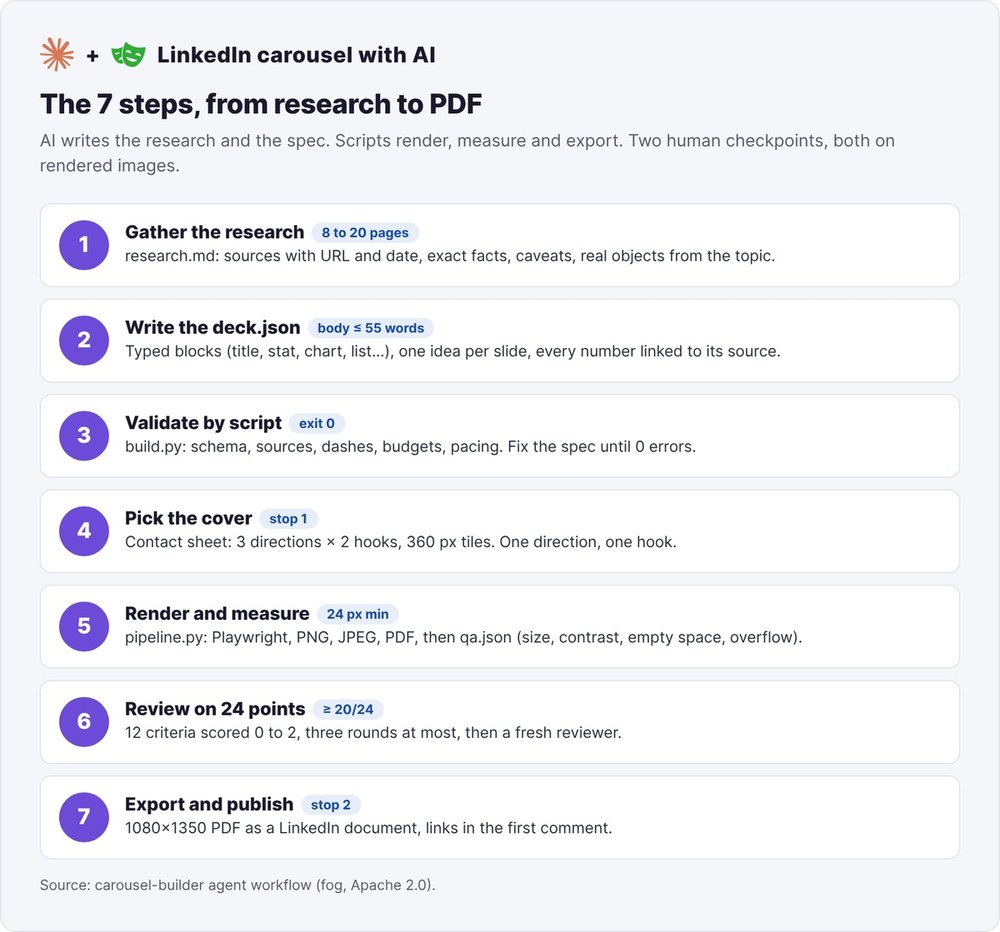
To make a LinkedIn carousel with AI that doesn't look like a generated deck, keep the writing separate from the rendering. The AI finds the sources and writes the slide content into a spec file, deck.json. Scripts then turn that file into HTML, render it with Playwright, measure every slide and export a 1080×1350 pixel PDF that you publish as a LinkedIn document.
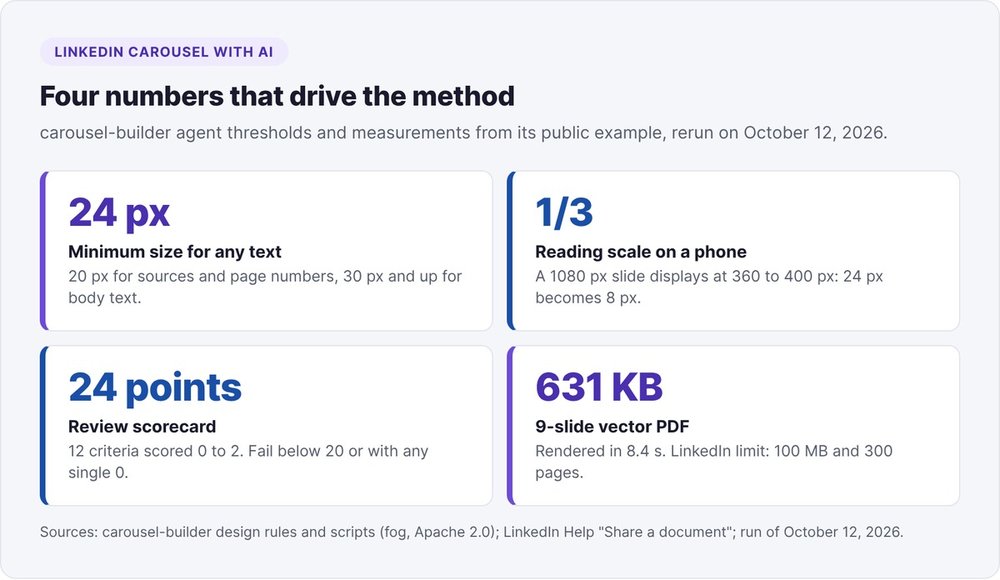
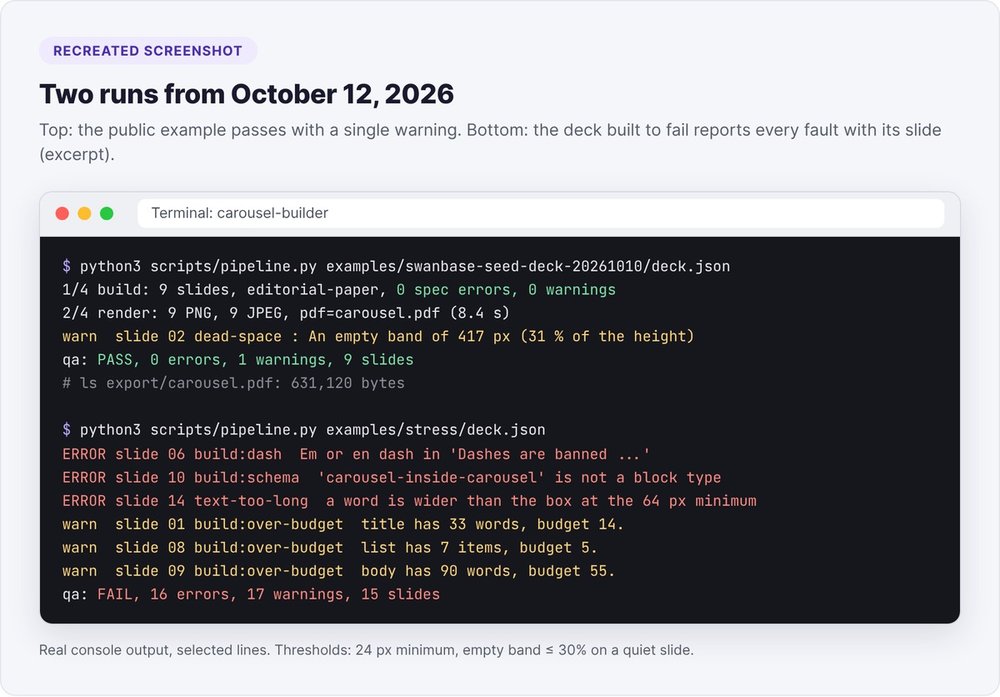
The seven steps are sourced research, deck.json, script validation, picking the cover from a contact sheet, rendering and measurement, review against a 24-point scorecard, and export. This is how carousel-builder works, the carousel agent in the open source fog stack. We reran it on October 12, 2026 against its public example: 9 slides rendered in 8.4 seconds, a 631 KB PDF, zero errors and a single warning.
The thresholds in this article come from its design rules and check scripts.
Making a LinkedIn carousel with AI that doesn't look generated
A LinkedIn carousel is a document post: you upload a PDF, LinkedIn shows it page by page in the feed, and readers swipe through the slides. AI tools can produce that PDF in a minute, and your readers will spot the generated deck at first glance.
LinkedIn carousel format in 2026
LinkedIn accepts PDF, PPT, PPTX, DOC and DOCX files up to 100 MB and 300 pages, according to its help page on sharing documents. Every page must be the same size.
The format that takes up the most room in the feed is 4:5, or 1080×1350 pixels (810×1012.5 points in the PDF). A 1080×1080 square also displays full width, but takes up less height. The same 4:5 file works on Instagram too, which accepts up to 20 images per carousel.
Three constraints of LinkedIn documents change the way you write:
- Links inside the PDF aren't clickable in the feed. Put them in the first comment.
- Post text shows roughly 210 characters before "see more" on desktop, fewer on mobile. Put your thesis in the first 125.
- LinkedIn doesn't take alt text per page. Describe the content in the post or the first comment.
The tells of an AI-generated carousel
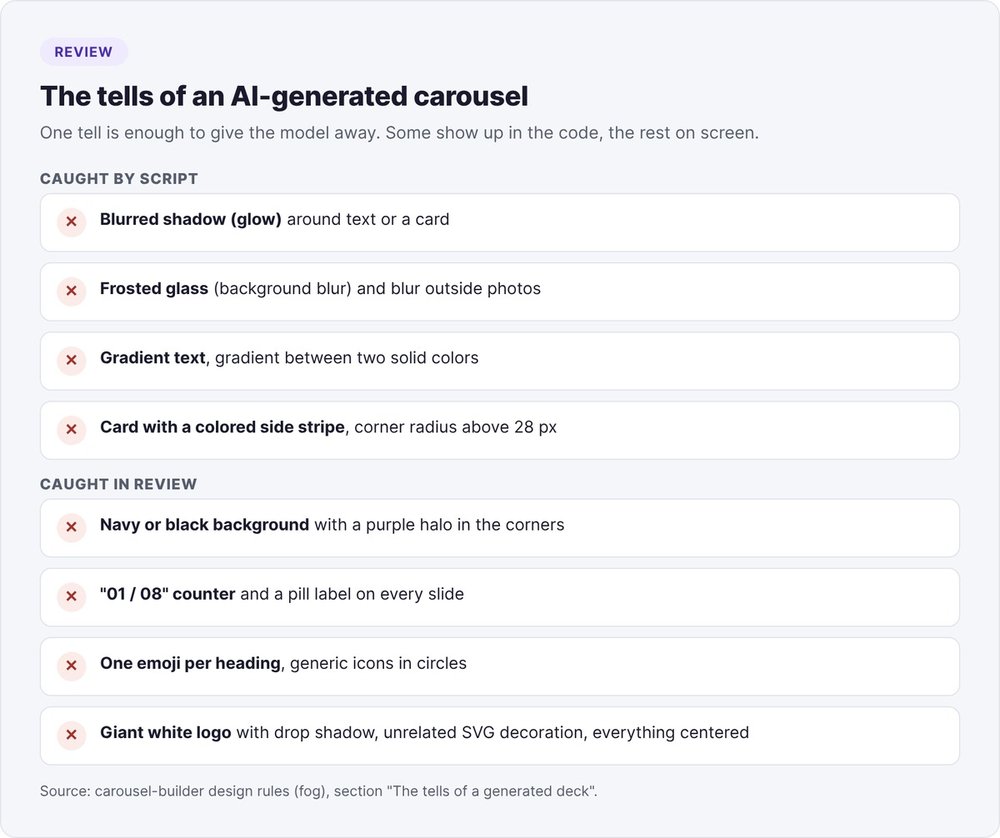
carousel-builder's design rules list the tells that give a generated deck away. The check script catches some of them in the slide code: a blurred shadow around text or a card (the "glow"), frosted-glass background blur, gradient text, a gradient between two solid colors, cards with a colored stripe down one side, corner radii above 28 px.
The rest you catch by eye during review:
- a navy or black background with a purple halo;
- identical card grids from one slide to the next;
- a small pill-shaped label repeated at the top of every slide;
- an "01 / 08" counter on every slide;
- one emoji per heading, generic icons in circles;
- a giant white logo with a drop shadow;
- SVG decoration unrelated to the topic (hexagons, waves);
- everything centered.
Our own old slide generator had the first one: navy background and purple halos.
Step 1: gather the research before writing a single slide
A carousel written from memory looks like every other carousel on the same topic. With research, slide 3 carries a fact the reader didn't know, backed by a number they can check.
The research.md file
Ask Claude Code to read your notes and URLs, then go find the primary sources: the study itself rather than the article quoting it, the latest version of a figure. Plan on 8 to 20 pages read for an explainer carousel, more for a contrarian thesis.
The research.md file holds five tables: sources read (ID, URL, access date), usable facts with their exact value, unit and scope, caveats, objects from the topic you could draw, and the real material available (photos, screenshots, logos).
One rule sits above the others: a number without a source never makes it onto a slide. No values "for illustration." A carousel with no numbers can still be published. A carousel with a made-up number can't.
DocSend's seed deck study gives a reading time per section. Those times add up to 7 min 30 s, while DocSend reports an average of 3 min 44 s per deck: each average only covers the decks that include that section. The carousel's chart shows this caveat as a footnote. The same research also showed that one guide was still quoting the 2022 figure (3 min 20 s), while the DocSend study updated on March 10, 2026 gives 3 min 44 s.
An object from the topic beats a generic diagram
List in research.md the objects from the topic you can show: the ranking itself, a form, a page from your product, a screenshot of the source. An object drawn from the topic beats any all-purpose diagram. Keep generic diagrams (timeline, 2x2 matrix, cycle) to one per carousel at most.
We learned this the hard way. On September 30, 2026, a batch of 24 carousel outlines got thrown out in review: angles written from memory, six searches per outline, and 29 of 47 visuals reduced to comparisons or timelines. Readers saw the same diagram every time. Since then we require 25 to 40 sources read per carousel, one visual drawn from an object in the story, and a reviewer who didn't write the copy.
Step 2: write the carousel in a deck.json
deck.json is the only file the AI writes for the visual side. Claude Code never writes HTML. Every later fix goes back into this file.
File structure
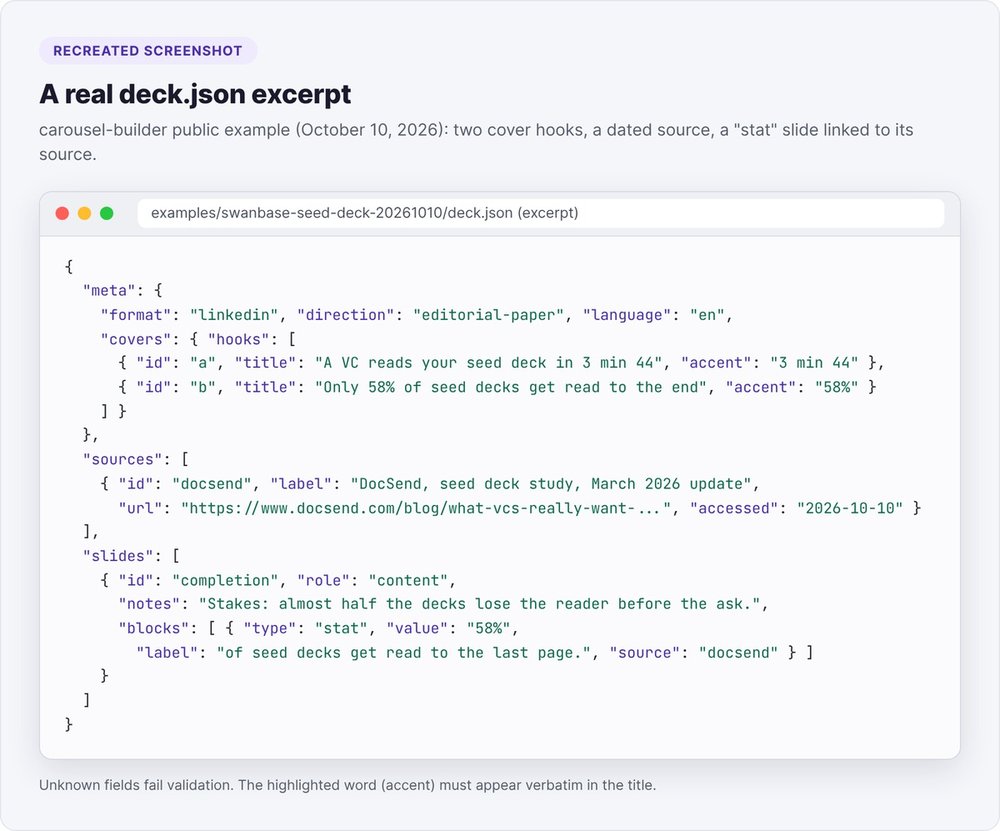
The file has three parts. meta holds the format, art direction, language, two or three cover hooks and the post copy. sources lists the sources with their URL and access date. slides contains the slides, each built from typed blocks: title, body, list, stat, chart, photo, screenshot, quote, logo-row, visual, cta.
Every stat, chart or quote block points to a source. A number written into a title or paragraph also needs a source on the slide.
Word budgets per slide
One slide carries one idea. One title per slide, one chart per slide. If a slide needs two ideas, make it two slides.
| Element | Budget |
|---|---|
| Cover hook | 6 to 12 words |
| Slide title | 14 words max |
Paragraph (body) |
55 words max, in two short paragraphs |
| List | 5 items max, numbered only for sequential steps |
| Slide count | 6 to 10 by default, warning above 12, error above 15 |
The cover gives the start of the answer: the number, the twist, the name. The subline gives half the mechanism. Slide 2 sets up the stakes, with context and the surprising result, so the reader keeps swiping. Teaser hooks ("The truth about…") and rhetorical questions on the cover are out.
Alternate quiet slides (one number, a quote, a photo) with dense ones (chart, list, screenshot). The script counts any slide over 30 words as dense and warns you after three dense slides in a row.
The prompt to give Claude Code
Install the dependencies once:
pip install -r agents/carousel-builder/scripts/requirements.txt
playwright install chromium
Then run the agent from Claude Code with a prompt along these lines:
Read agents/carousel-builder/AGENT_CAROUSEL_BUILDER.md in full.
Run carousel-builder for the acme project.
Topic: what our first 50 customers taught us about pricing.
Sources: notes/entretiens-pricing.md and the URLs I paste below.
Language: en. Format: linkedin. 8 slides.
Stop after the cover contact sheet.
The agent then follows its instruction file: it loads the research, proposes 3 to 5 ranked angles with two hooks each, writes the deck.json, then stops to show you the covers.
Step 3: validate the deck.json by script
Before any rendering, run the validation:
python3 scripts/build.py <run>/deck.json
What build.py checks
The script checks the schema, sources, dashes, word budgets and pacing, then runs every piece of text through the copy check. Exit code 0: clean spec. Code 1: errors, each with its JSON path. Code 2: unreadable file.
Any unknown field counts as an error. Without that rule, a typo in a field name would make a block silently disappear. The highlighted word in a title (accent) must appear verbatim in the text.
We also ran the "stress" deck that ships with the agent, built to fail: 15 slides, 16 errors, 17 warnings. The build flags an em dash, an unknown block type, a word too wide to fit at 64 px, a 33-word title against a budget of 14, a 7-item list against 5, and a 90-word paragraph against 55.
Where to fix an error
When a check fails, fix the deck.json: shorten the text, split the slide in two, change the block type. Never touch the generated HTML or the images. If the same error comes back two rounds in a row, the slide itself is the problem: change its block type or merge it with the next one.
Step 4: pick the cover from a feed-sized contact sheet
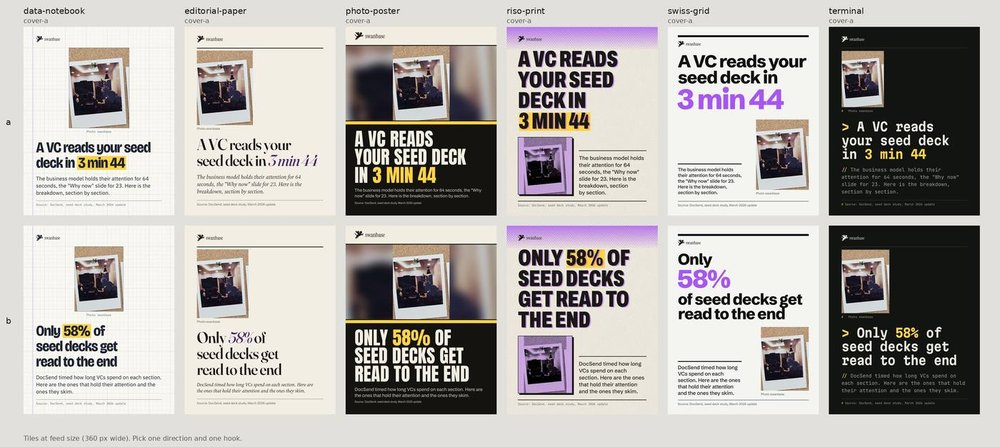
A style choice takes one second on an image and an hour on adjectives. Render the same cover in three art directions with your two hooks:
python3 scripts/pipeline.py <run>/deck.json --covers --directions swiss-grid,data-notebook,editorial-paper --first-layout
The contact sheet puts hooks in rows and directions in columns, each tile 360 px wide: the width of a phone feed. A tile with an error shows up outlined in red.
There are six directions: editorial paper, riso print, Swiss grid, photo poster, data notebook, terminal. Choose based on the content: a numbers-heavy carousel goes to Swiss grid or data notebook, a developer tool to terminal, a photo of the subject to the poster. Before showing the sheet, check at 360 px that the hook reads in one second. A hook that needs five lines at minimum size is too long.
Step 5: render the slides with Playwright and measure them
One command chains the build, text fitting, rendering, measurements and captions:
python3 scripts/pipeline.py <run>/deck.json
Rendering runs through Chromium driven by Playwright. The script first prints the vector PDF with Playwright's page.pdf function, one page per slide, then an exact PNG per slide and a 1080 px JPEG at quality 88 for Instagram. Before rendering, every piece of text gets the largest size that fits its line budget (calculated by fit.js), never below the direction's minimum.
24 px minimum for a slide read at a third of its size
On a phone, LinkedIn shows a document page 360 to 400 px wide. Your 1080 px slide is therefore read at about a third of its size: 24 px text on the slide comes out at 8 px on screen. The check script rejects any text under 24 px, and under 20 px for sources, page numbers and axis ticks. The directions keep body text at 30 px or more.
Contrast, white space and pacing
Contrast is measured text by text, against whatever actually sits behind it, using WCAG thresholds: 4.5:1 for normal text, 3:1 from 40 px up, 7:1 for text on a highlight.
White space gets measured too. The flaw this check targets is the vertically centered slide with 40 to 50% of its height empty. The script warns you when the largest empty band exceeds 24% of the height, or 30% on a quiet slide. In the public example, slide 2 (a single number) leaves a 417 px empty band, or 31%: one warning, to fix or justify.
The qa.json report also covers overflow, safe margins, block collisions, missing images, fonts and file dimensions, plus a contact sheet at 25%.
Step 6: review against a 24-point scorecard
Scripts catch what can be counted. The rest takes eyes: yours or a vision model's, then a reviewer who didn't write the deck.
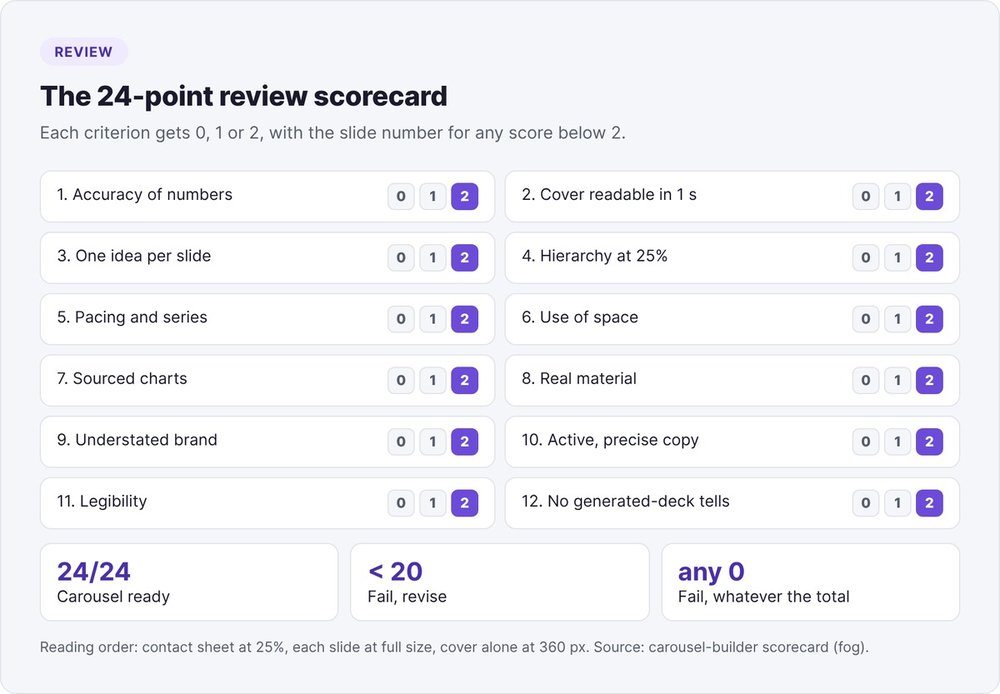
The scorecard has 12 criteria scored 0, 1 or 2: accuracy, cover, one idea per slide, hierarchy, pacing and series consistency, space, charts, real material, brand, copy, legibility, and absence of generated-deck tells. The total is out of 24. Below 20, or with any single 0, the carousel fails.
Read in this order: the contact sheet at 25% (series, pacing, hierarchy), then each PNG at full size (copy, contrast, alignment), then the cover alone at 360 px wide.
Fix in the deck.json and rerun, three rounds at most. The fresh reviewer then reads the research, the deck, the measurement report and the contact sheet, scores the card and suggests fixes without rewriting. You revise once. A second pass from the same session doesn't count as a fresh review.
Step 7: export the 1080×1350 PDF and publish
The final export contains the PDF for LinkedIn, the JPEGs for Instagram, the PNGs, a captions.md file and the contact sheet. The agent never publishes: you approve and you post.
PDF file size
The vector PDF keeps text as text, with fonts embedded. In the public example, the 9 pages weigh 631 KB, far below LinkedIn's 100 MB ceiling. Aim for under 15 MB so the upload and the viewer stay fast.
The post and the first comment
The captions.md file contains the LinkedIn post copy, the first comment with links and full source titles, the Instagram caption and alt text for each slide. The public example's post runs 820 characters out of the 3,000 allowed. It opens on the thesis with its number and closes on a question.
When uploading, give the document the carousel's title, paste the post, then add the links as the first comment.
For your publishing strategy, read our guide to founder-led content and the one on LinkedIn views that bring in customers.
Which AI tool should you use for a LinkedIn carousel?
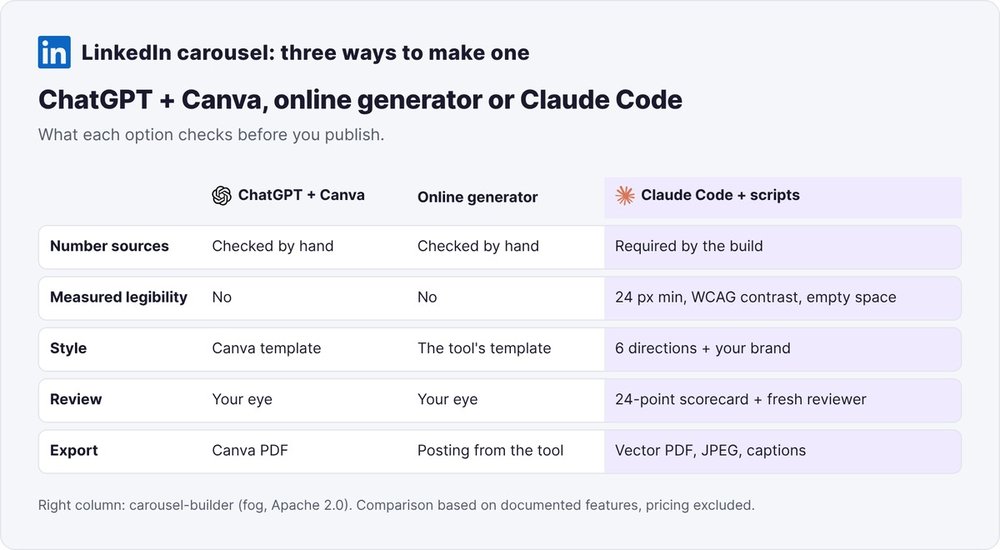
ChatGPT and Canva. ChatGPT writes the outline and copy, and you assemble the slides in a Canva template. It's fast for a first carousel. Quality control stays manual: nothing measures text size or contrast, and Canva templates often push you into the identical card grid.
Online generators. Tools like Taplio and dedicated carousel generators produce copy and layout from an idea or a URL, with your logo and colors. You save time and publish straight from the tool. Checking where the numbers come from and whether the slides are legible is still on you.
Claude Code and scripts. The method in this article: sourced research, a validated spec, local rendering, measurements and a review scorecard. It runs locally, with no design-tool subscription, and suits you if you publish often and want carousels nobody mistakes for a template.
If you're new to Claude Code, start with Claude Code skills, the reusable instruction format the agent also follows. For the full stack, read our article on fog's AI marketing agents. The carousel-builder code is freely available at fog-agents.com, under the Apache 2.0 license.
FAQ
How do you make a LinkedIn carousel with AI?
Have the AI write sourced research and then a slide spec (deck.json), validate it by script, render it to HTML with Playwright and export a 1080×1350 PDF. Publish that PDF as a LinkedIn document, with the links in the first comment.
What size should a LinkedIn carousel be in 2026?
4:5 at 1080×1350 pixels takes up the most room in the feed. A 1080×1080 square works too. The file can be up to 100 MB and 300 pages, with every page the same size.
Does 1920×1080 work on LinkedIn?
Yes, LinkedIn accepts a 16:9 document as long as every page is the same size. A landscape page takes up less height in the feed than a 4:5 page, so its text displays smaller on a phone.
How many slides and how many words per slide?
Aim for 6 to 10 slides, one idea per slide. Keep titles under 14 words and paragraphs under 55 words. Above 15 slides, carousel-builder raises an error.
Can you make a carousel with ChatGPT and Canva?
Yes: ChatGPT writes the outline and copy, Canva handles the layout. Neither tool measures legibility. Check the sources, text size (24 px minimum on 1080 px) and contrast yourself.
Do you need to know how to code to use this method?
No. You install two dependencies and talk to Claude Code in plain English. The only file to review is the deck.json, and the agent fixes it itself when a check fails.