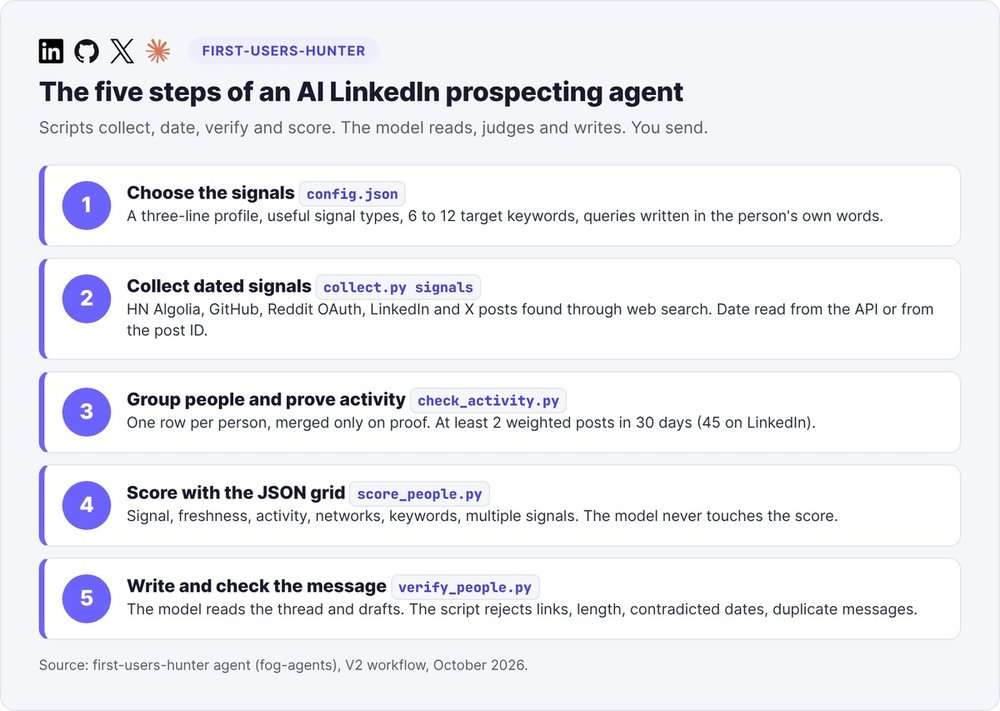
A useful AI LinkedIn prospecting agent starts by looking for people who have voiced a need in public, on a known date: a request for recommendations, a complaint about a tool, an announced switch to another tool. It groups those signals by person, checks that each person still posts, calculates a score with a fixed grid, then drafts a first message. You review it and send it yourself.
This tutorial follows first-users-hunter, the open source agent from fog-agents, which we run in Claude Code. The commands, thresholds and outputs come from its files and from a sample run we reran on October 12, 2026. The people in this example are fictional and appear here under pseudonyms. For the overall strategy, see our guide to finding your first customers.
What is an AI LinkedIn prospecting agent?
Most guides on AI-powered LinkedIn prospecting describe sending tools: invitation sequences, follow-ups, ChatGPT-generated messages built from a Sales Navigator profile (our Waalaxy review and our comparison of B2B prospecting tools cover them). These tools help you send faster. When you're hunting for the first ten users of your SaaS, you still don't know who to write to this week, or what to say.
Automating outreach vs finding the right people
A profile headline ("CEO, B2B SaaS, 11-50 employees") tells you who someone is. It tells you nothing about what they need right now. The agent's query file actually lists "treating a profile as a signal" among the mistakes to reject.
A dated signal changes the conversation. A founder who wrote "can anyone recommend a tool for X" nine days ago is waiting for an answer. You reply in her own thread, on her topic, and you show up as someone useful.
How work is split between the model and the scripts
The agent rests on one rule: collectors and scripts gather, date, check and score; the model reads threads, judges fit and writes messages; a script checks every row before it goes out. The language model never sets a score and never guesses a date. The agent publishes nothing and sends nothing: sending is up to you.
Step 1: choose the signals to look for
First, you write a three-line profile: the person's role, their stage or industry, and the moment the need shows up. Then you pick the signal types that matter for your product.
Seven signal types and their points
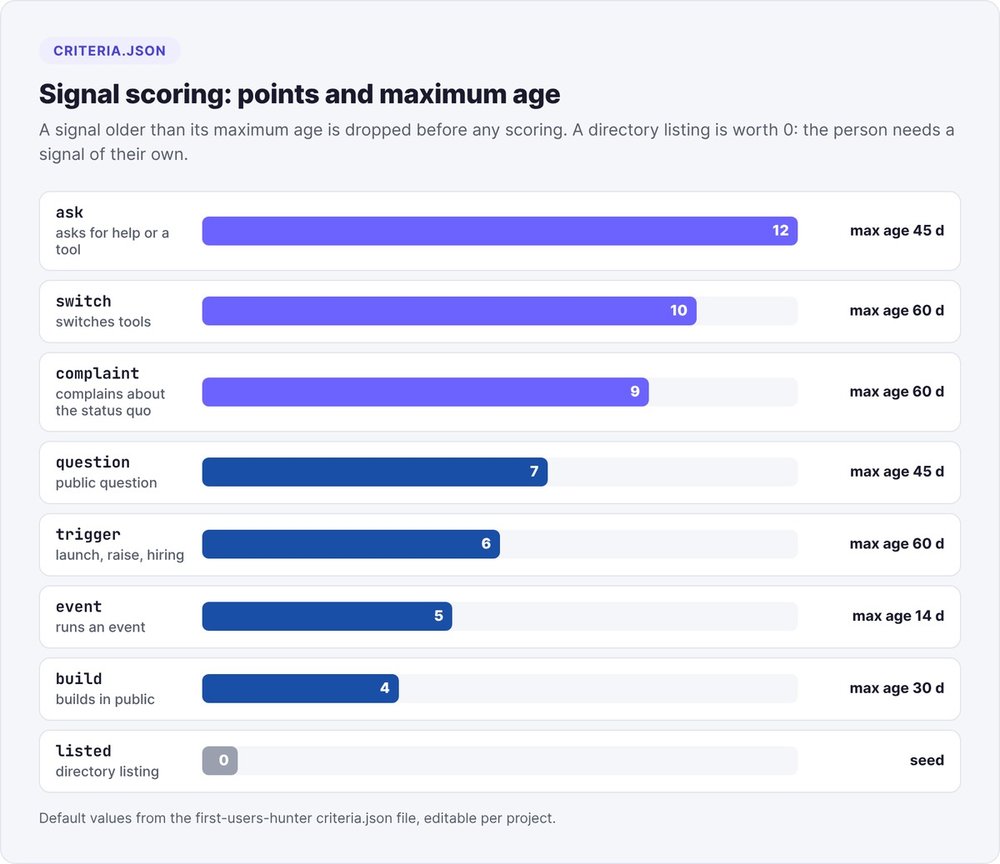
The criteria.json file sets the points and the maximum age for each type. A signal that is too old is dropped before any scoring.
| Type | What the person does | Points | Maximum age |
|---|---|---|---|
| ask | asks for help, a recommendation, a tool | 12 | 45 days |
| switch | leaves or replaces a tool, looks for an alternative | 10 | 60 days |
| complaint | complains about the status quo or a competitor | 9 | 60 days |
| question | asks a public question about the problem | 7 | 45 days |
| trigger | dated event: company founded, funding round, hiring | 6 | 60 days |
| event | organizes or hosts an event on the topic | 5 | 14 days (60 upcoming) |
| build | builds in public in an adjacent field | 4 | 30 days |
A directory listing is worth 0 points: it's a seed, and the person still has to publish a signal of their own. The file presents these points as defaults with no study behind them. You change them, rerun, and compare the rankings.
Write queries in your future customers' words
Queries reuse the phrases the person would write themselves: "any recommendation", "looking for a", "alternative to", "tired of" in English. The classifier also recognizes the French phrases "je cherche", "vous conseillez", "passer de", "marre de" and "galère". It tests types in the order switch, ask, complaint, question, and keeps the first one that matches. Plan for 6 to 12 target keywords: a signal containing none of them is dropped from the list.
Step 2: collect dated signals
Hacker News, GitHub, Reddit: the free APIs
Three collectors run without a subscription. For Hacker News, the agent uses the Algolia search API, with no key and a filter on creation date. For GitHub, it queries issue search without a token, at 10 requests per minute according to the GitHub search API documentation. Reddit requires official OAuth with the keys of a free app: from a server, the anonymous JSON returns 403 (tested October 10, 2026).
python3 scripts/collect.py signals --config <project>/first-users-hunter/config.json --run-dir <run>
Every record goes through a JSON schema. A collector with no key, or one that gets blocked, shows up as skipped in source-health.json, and the run continues.
LinkedIn and X posts via web search
The agent never logs into LinkedIn and never opens a profile page. It queries a search engine for public posts:
site:linkedin.com/posts "any recommendation" "<problem keyword>"
site:linkedin.com/posts "alternative to <current tool>"
site:linkedin.com/posts "tired of" "<problem keyword>"
site:linkedin.com/posts "we just raised" "pre-seed"
Keep a URL only if it carries a post ID (activity-<id>, ugcPost-<id>, share-<id>, or /status/<id> on X). The post text goes into manual-signals.csv, then you rerun the same collect command. To see what your own profile attracts, our article on LinkedIn views complements this search.
Date a LinkedIn post from its ID
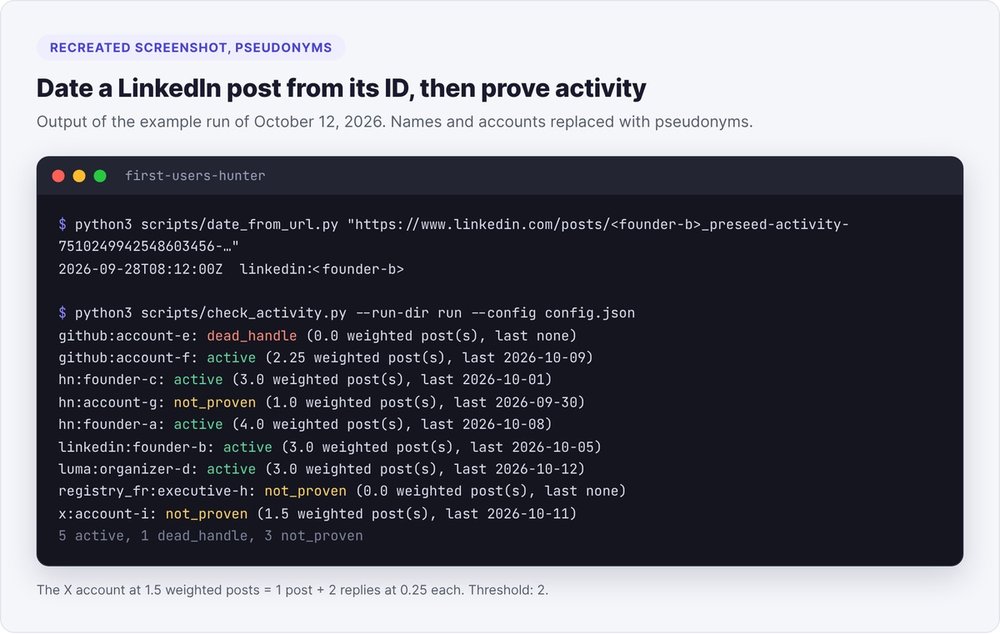
LinkedIn post IDs contain their creation date: the first 41 bits give a Unix time in milliseconds, so (id >> 22) / 1000 seconds. On X, you add the Twitter epoch: ((id >> 22) + 1288834974657) / 1000.
python3 scripts/date_from_url.py "<post url>"
# 2026-09-28T08:12:00Z  linkedin:<author slug>  <url>
The script also prints the author named in the URL. That way you catch a post where someone merely tagged your target: it belongs to someone else and doesn't count. Without the script, three lines of Python are enough:
from datetime import datetime, timezone
post_id = 7510249942548603456  # the number after "activity-"
print(datetime.fromtimestamp((post_id >> 22) / 1000, tz=timezone.utc))
Step 3: group by person and prove activity
One person, several accounts
The candidates.py script groups signals by account. It merges two accounts only when a source publishes the link itself, for example a Hacker News profile pointing to a LinkedIn profile. For any other merge, you write the proof in identities.json. A matching name is never enough. The same pass drops signals that are too old, bare directory rows, and people already in your ledger.
The two-posts-in-30-days filter
Someone who no longer posts won't read your reply. You require at least two weighted posts in the window: 30 days, or 45 on LinkedIn, because search engines only index part of LinkedIn's posts. A post, a comment, an issue or a pull request counts as 1. A reply, a repost or a push counts as 0.25.
python3 scripts/collect.py activity --config <cfg> --run-dir <run>
python3 scripts/check_activity.py --run-dir <run> --config <cfg>
You get three statuses: active, dead_handle (the account no longer exists) and not_proven. Zero posts found on LinkedIn gives not_proven, and the person leaves this run. If they matter to you, open their recent activity in your browser and paste their post URLs into activity-manual.csv. When fewer than five people pass, broaden your queries or extend the window for the ask and complaint types to 90 days, and log that you did. The activity threshold stays at two.
Step 4: score with a JSON grid
python3 scripts/score_people.py --run-dir <run> --config <cfg>
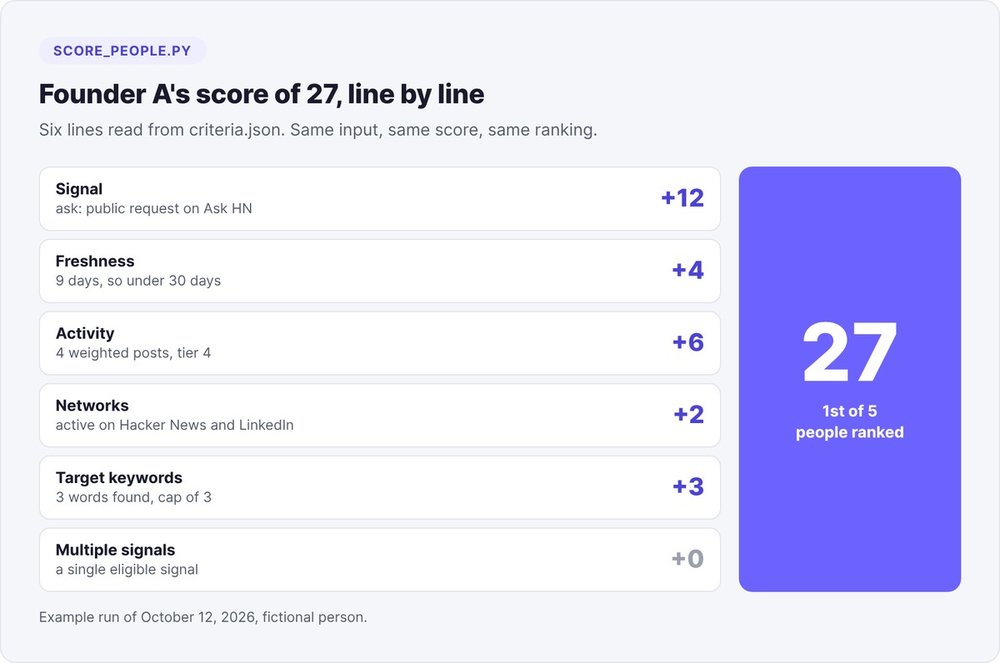
The score adds up six lines, all read from criteria.json: the points of the best signal; freshness (6 points under 7 days, 4 under 30, 2 under 90); activity (4 points from 2 posts, 6 from 4, 8 from 8); 2 points if the person is active on two networks; 1 point per target keyword (3 max); 2 points if they have two eligible signals.
Breaking down a score of 27
In the sample run, founder A comes out on top. Nine days before the run, he asked on Ask HN where pre-seed founders find their first users. His score: 12 for the ask, 4 for freshness, 6 for four weighted posts, 2 for two active networks (Hacker News and LinkedIn), 3 for keywords. Total: 27.
Why the model never touches the score
A score assigned by a language model varies from run to run, and you can't argue with it. With a JSON grid, you rerun the same run and get the same ranking. You change a weight, rerun, compare. At the final check, a score retyped by hand in the deliverable blocks the row.
Step 5: write a first message checked by script
Before writing, the model reads the full signal thread, cached with cache_page.py. It notes what the person asked, what the replies have already given them, their language and, in French, whether they use "tu" or "vous".
First contact happens in the signal's thread
The first contact is a reply in the signal's thread: a LinkedIn comment, an HN or GitHub reply. It runs one to four sentences and addresses the person's point with a concrete angle or a question that moves their problem forward. It contains no link, no call request, no opening compliment, no "I'm X from Y". Your offer appears only if the person asked for exactly what you sell. Limits: 600 characters in a thread, 280 on X, 200 for a LinkedIn connection note.
If the person's need doesn't overlap with your offer, they leave the list with their reason recorded. In the example, one person was looking for a waitlist tool for beta testers: a real signal, an active person, and nothing to do with an accelerator. She was dropped.
The second contact carries a single ask
The second contact goes out after the first, as a direct message or a connection note. It recalls the first one in one clause, says who's writing in another, and carries at most one small ask and one link. The signature stays a variable, {{sender_first_name}}.
The checks in verify_people.py
python3 scripts/verify_people.py <project>/first-users-hunter/people-<date>.jsonl --run-dir <run> --config <cfg>
A row fails in any of these cases: excerpt missing from the cached page, signal older than its type's maximum age, date contradicted by the post ID (by more than a day), URL author different from the person, activity or score different from the script outputs, a link in the first contact, length out of bounds, unfilled variable, em-dash, the same first message for two people. You fix the row, never the check. After three failed passes, the person is dropped with their error.
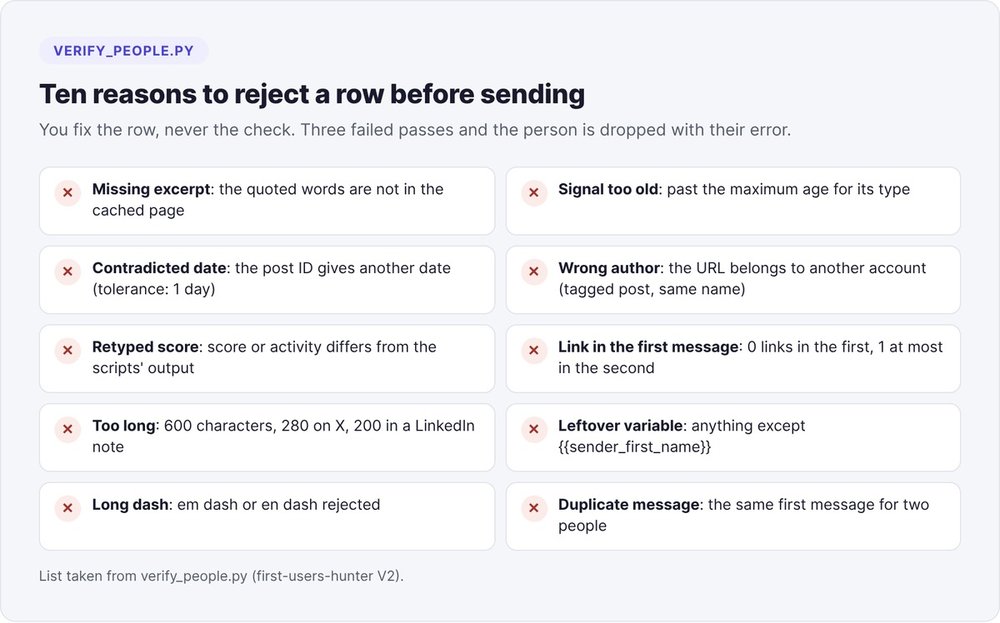
A review grid complements the script: eight criteria scored 0 to 2, with at least 1 on each and 12 out of 16 overall. Three faults block a row whatever the score: invented evidence, a guessed email, a message that throws a public complaint back at its author.
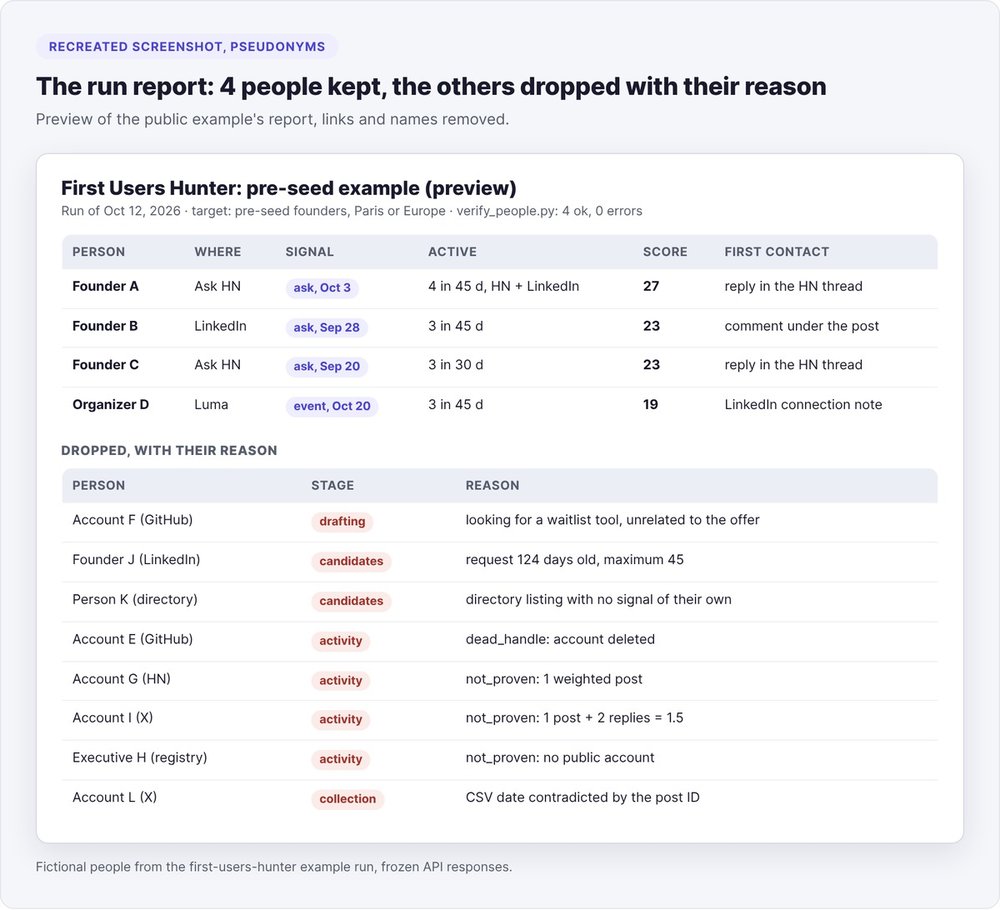
Results from a sample run: 4 people kept, 7 rejected
The repo includes a sample run built for swanbase, with fictional people and frozen API responses, so it runs offline. Rerun on October 12, 2026, it produces the same output every time:
- 9 candidates after grouping, 2 of them dropped right away: a LinkedIn ask 124 days old against a 45-day maximum, and a directory row with no signal of its own;
- 9 accounts checked, 19 posts found: 5 active, 1 deleted GitHub account, 3
not_proven(including an X account with one post and two replies, i.e. 1.5 weighted posts); - 5 people ranked, 1 dropped at the drafting stage, 4 kept;
verify_people.pyreturns 4 valid rows and 0 errors.
A seventh person never made it to sorting: the date entered in the CSV contradicted their post ID, and the row was dropped at collection. The repo's test suite passes 159 out of 159.
AI-powered LinkedIn prospecting: the rules to follow
Automation guides devote a section to account restrictions. With this method, the issue never comes up: the agent doesn't log into LinkedIn, doesn't visit any profile and doesn't send any message. Posts arrive through a search engine, and you post every reply by hand.
Personal data follows rules written into the agent. It keeps only professional data the person published, each item with its source URL, and makes no inferences about health, politics, religion or family. It keeps an email only if the person published it for professional contact. Anyone who asks to opt out moves to do_not_contact and never comes back. You purge rows that were never contacted after 60 days.
If you also search for profiles in Sales Navigator, type boolean operators in caps (AND, OR, NOT) and stay under about fifteen operators: beyond that, LinkedIn silently truncates the query. A profile found this way still has to publish a dated signal before it enters the list.
The mistakes in our first version
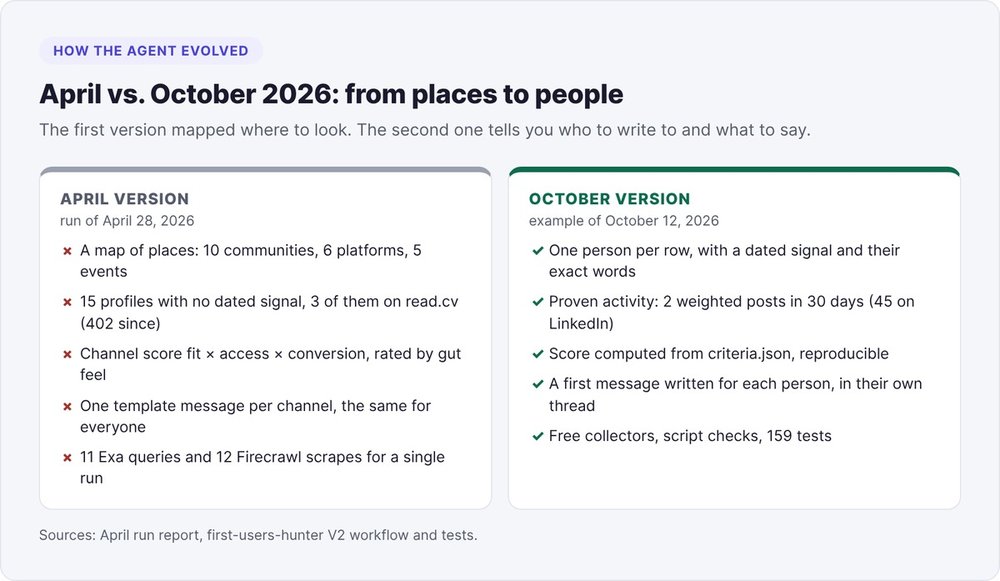
The April 2026 version mapped places. The April 28 run used 11 Exa queries and 12 Firecrawl scrapes to deliver 10 communities, 6 platforms, 5 events and 15 profiles, none with a dated signal. The channel score multiplied fit, access and conversion, each rated 1 to 5 by gut feel: the report said so itself, "judgment-based, not a measurement".
Three of that version's sources have stopped responding from a server: read.cv (error 402, even though 3 of the 15 profiles came from it), Reddit's anonymous JSON (403) and Discord servers (login page). On Exa, the --include-domains linkedin.com filter mostly returned home pages. The October version keeps one person per row, with a dated signal, proof of activity, a calculated score and a checked message.
Rerun the agent every one to two weeks. The ledger excludes people you've already contacted; someone already listed comes back only with a newer signal. The agent and its sample run are available on fog-agents.com, alongside fog's other AI marketing agents.
FAQ
Can an AI LinkedIn prospecting agent get your account restricted?
The method in this tutorial doesn't touch your account: the agent reads public posts found through web search, doesn't log into LinkedIn and sends nothing. Restrictions apply to tools that drive your session to send invitations and messages at volume.
How much does a signal-based LinkedIn prospecting agent cost?
The first-users-hunter collectors use free endpoints: Hacker News Algolia with no key, GitHub with no token, Reddit with free app keys. You pay the subscription for the model that runs the agent, Claude Code for example. Add a web search service if needed.
Do you need Sales Navigator to prospect with AI?
No. Signals come from public posts and free APIs. Sales Navigator is for searching profiles by role and company size. A profile found that way still has to publish a dated signal before it enters the list.
How do you find the date of a LinkedIn post?
Take the number after activity- in the post URL, shift it 22 bits to the right and divide by 1,000: you get a Unix time in seconds. Example: the post activity-7510249942548603456 dates from September 28, 2026 at 8:12 UTC.
How long should a first LinkedIn message be?
In this agent, 600 characters max for a thread reply or a direct message, 200 for a connection note, 280 for a reply on X. The first message contains no link.