Welcome to swanbase. This guide covers how Jev works, what it costs and the mistakes to avoid.
Updated September 21, 2026 at 12:27 pm, from Paris. Jev AI takes in a state, evaluates closed questions and returns typed decisions with probabilities. Jev doesn't write text. It classifies, scores, routes or blocks an action inside your software.
Jev works alongside a generative LLM rather than replacing it. You can hand it the decision "which workflow should run?" and then let a model like Claude or GPT produce the content. Its main risk is easy to state: an answer can match the requested type and still be wrong.
What is Jev AI?
TypeSafe AI introduced Jev on September 15, 2026 as its first "System One" model, available in early access. The company trained it to answer structured questions using a method it calls Reinforcement Learning for Calibrated Decisions, or RLCD. TypeSafe AI's launch post describes the approach and credits it for Jev's early speed and cost results.
A decision engine built for code
A chatbot turns an input into a string of characters. Jev turns a state into values your code already knows in advance. You don't ask it to "reply to this customer." You ask whether the message is urgent, which team owns it and how much risk it carries.
That difference removes a fragile step from the pipeline. With a standard LLM, your app often asks for JSON, gets text back, tries to parse it and then checks the fields. With Jev, the question defines the shape of the answer. The result drops straight into an if, a router or a review queue.
The type doesn't guarantee correctness. It only guarantees that your program receives the expected shape.
TypeSafe's System One model
The name refers to the fast, intuitive system described by Daniel Kahneman. TypeSafe positions Jev for quick judgments: recognizing an intent, picking a category, estimating a level or deciding whether a condition applies. If a question needs several steps, break it down or hand it to another model.
Jev receives a state, as text or structured data, followed by several questions. Each question reads the same state, and TypeSafe processes them separately and in parallel.
Jev is a typed decision model: it reads a context and returns choices, scores or probabilities your code can act on, without generating prose.
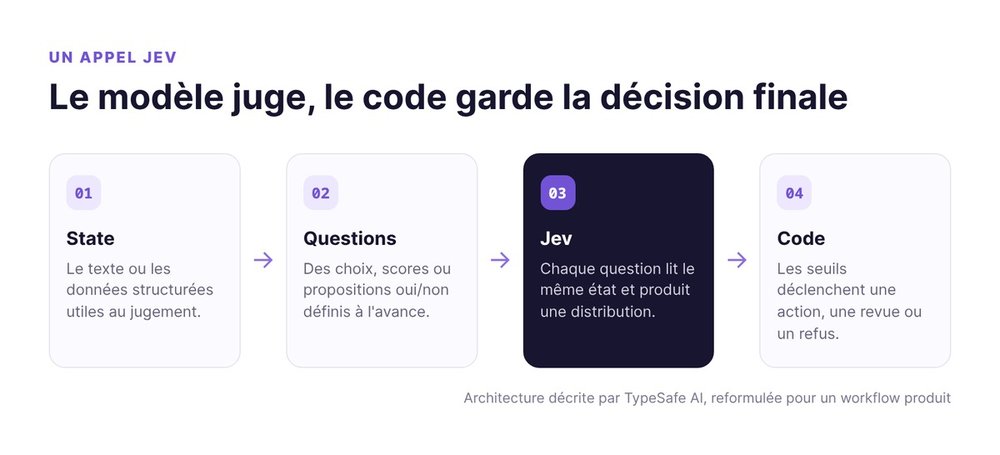
How Jev turns a state into a typed decision
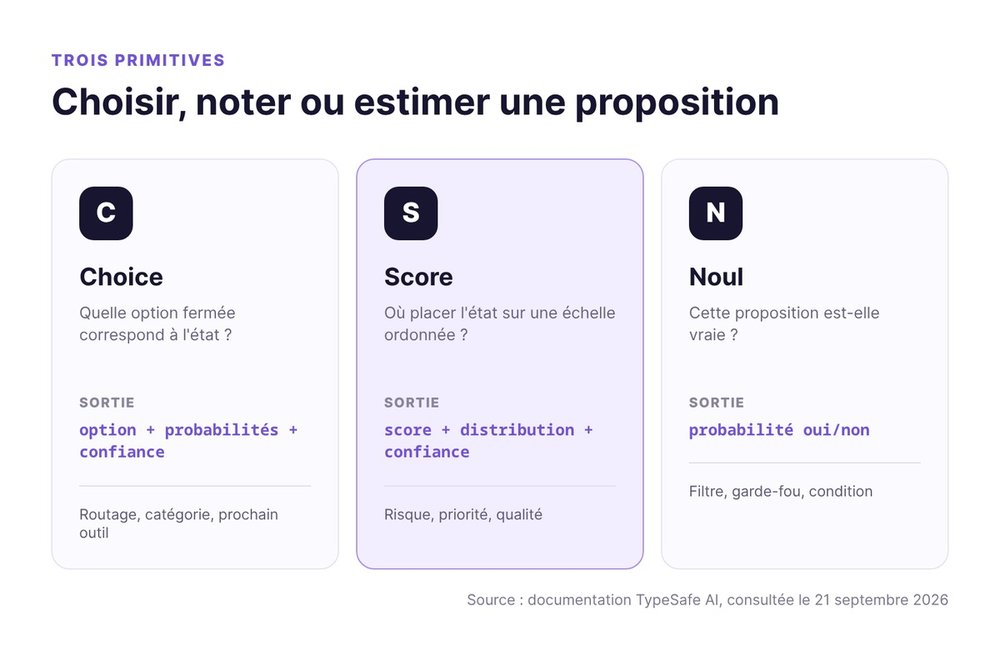
The Jev API exposes three primitives. The right one depends on what your software needs to do with the answer.
Choice picks from a closed list
choice fits when the allowed outputs are known, for example billing, support, sales or spam. Jev returns the winning option, the probability of each option and a confidence score based on how spread out those probabilities are.
Use it to route a ticket, select a model or choose an agent's next tool. Add an "other" option when your taxonomy doesn't cover every case. Otherwise you force the model to pick a wrong answer.
Score places an input on a scale
score handles ordered levels: low, medium or high risk; a weak or priority lead; an off-topic or solid answer. The result includes a score, the distribution across levels and a confidence value.
Describe observable situations. "Good, average, bad" gives the model little to work with, while "the need and the deadline are both explicit" gives it a verifiable criterion.
Noul estimates a yes-or-no probability
noul answers a binary proposition. It returns the probability that the proposition is true. You can ask whether a message contains a refund request, whether a tool call is dangerous or whether a passage contradicts a source.
Keep Noul from becoming a disguised business rule. Compute exact conditions in code. Use the model when the decision depends on what a text means, and leave comparing two amounts or counting items to your code.
Where to plug Jev into a startup
Jev fits best between fuzzy data and a branch in your code. If your team asks an LLM to answer with a label, Jev is worth a test. If a human has to read the output, stick with a generative model.
Triage and route incoming requests
A support inbox receives free-form text, while the team runs on specific queues. Jev can pick the queue, assess urgency and flag risk in a single call. Your code then assigns the ticket, applies SLAs and asks for a review when the probability is too low.
The same pattern works for leads, user feedback or applications. The hard part is the taxonomy rather than the API call: which categories exist, and which mistake costs the most?
Filter an agent's tool calls
An agent wants to delete a file, send an email or edit an invoice. Before execution, Jev can estimate whether the action is destructive, consistent with the request and sufficiently documented. Your code then decides whether to allow, block or escalate.
This filter alone won't make an agent safe. You still need permissions, deterministic checks and logs. For more on this architecture, see our guide to AI agents in production.
Choose a model before a task
Some requests deserve a different model than others. Jev can send a local fix to a fast model, a migration to a robust model and a sensitive operation to a human.
This router pays off once your rules pile up exceptions. If a few deterministic conditions are enough, an if stays more readable and more reliable.
Keep code in charge of the workflow
The model provides a judgment. The code keeps the calculations, permissions, spending limits and irreversible effects.
That's also what separates Jev from an orchestrator. Paperclip coordinates multiple agents, while Jev answers one decision inside that orchestration. Planning the project and tracking its state stay on your side.
Jev AI or a generative LLM: which engine for which task?
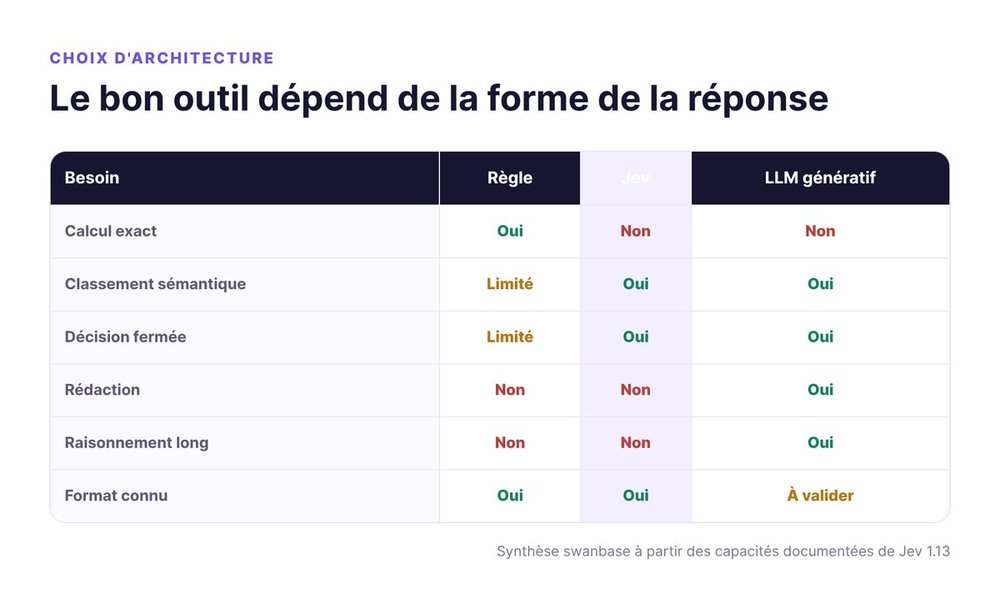
Jev AI doesn't try to beat an LLM at its own game. It plays a different one.
| Need | Deterministic rule | Jev | Generative LLM |
|---|---|---|---|
| Exact calculation | Yes | No | No |
| Semantic classification | Limited | Yes | Yes |
| Score or closed decision | Limited | Yes | Yes |
| Writing | No | No | Yes |
| Long reasoning | No | No | Yes |
| Format known in advance | Yes | Yes | Needs validation |
Less parsing, fewer retries
Jev cuts out text generation, the parsing of free-form answers and some of the format-related retries. It also gives you the probability distribution, so you can separate clear-cut cases from ambiguous ones.
Confidence measures how sharp the model's distribution is. Check on your own data whether confident cases really are correct more often.
Writing stays with the LLM
You still need an LLM to write, summarize, produce code or explore an open question. An LLM creates output that wasn't on the original list, which is exactly what Jev gives up.
One simple rule prevents architecture mistakes. Test Jev when the answer space is closed. Use an LLM to create the answer. Write code for exact calculations.
Why they work well together
An agent can receive a request, ask Jev to pick a route, let an LLM carry out the task, then run the result through a second typed check. The code holds the thresholds and the consequences.
This split mostly benefits products that repeat the same judgment at high volume. At a few operations a week, the gain may not cover the maintenance cost. Our roundup of AI tools for startups shows where Jev fits in the rest of the stack.
Jev's pricing, speed and capacity
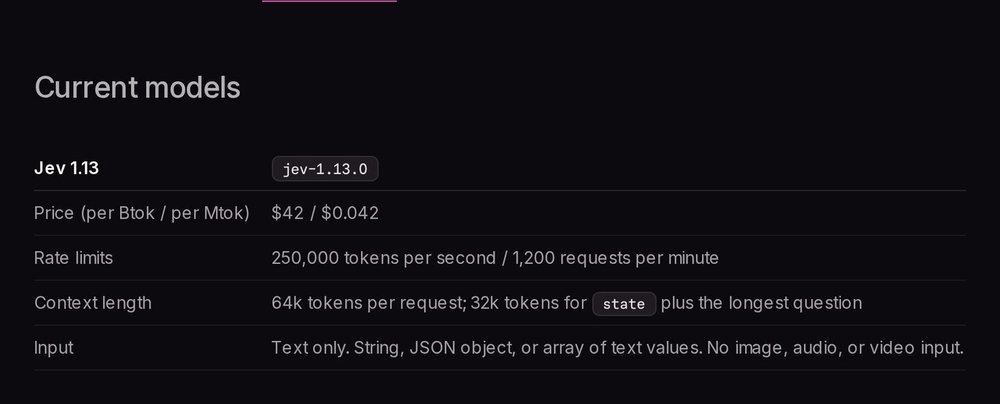
The official Jev 1.13 spec sheet lists a price of $0.042 per million input tokens. Output tokens are free. The model accepts text, a JSON object or an array of text values, but no images, audio or video.
Official Jev 1.13 pricing
This pricing makes small decisions cheap. Keep a close eye on the size of the state. Sending the same full file for every question wipes out part of the savings. Group questions that read the same context and strip out anything unnecessary.
The published price applies to TypeSafe's own service. A gateway can apply its own pricing, so check which provider you're actually calling, beyond the model name.
Context and rate limits
TypeSafe documents a limit of 64,000 tokens per request, with a 32,000-token cap on the state plus the longest question. The page also lists 250,000 tokens per second and 1,200 requests per minute, noting that these limits will change during early access.
According to TypeSafe, English is the main training language and the most accurate one. Jev accepts French, but TypeSafe asks you to test it on your own content. For a French startup, that matters more than any multiplier measured on an English corpus.
How to read the advertised multipliers
TypeSafe advertises latency of 70 to 500 milliseconds and gains of forty to two hundred times on decision-shaped requests. The company also explains that its biggest gaps come from its own workflows and sit at the top of the real-world range.
Treat these figures as a direction, and measure your own result. Time the full path, from the user's request to the product's action.
Limits to know before production
TypeSafe documents Jev 1.13's weaknesses.
A typed output can still be wrong
At TypeSafe, "zero hallucination" means the output can't leave the schema. Jev won't invent a fourth category if you defined three. It can still pick the wrong category inside a perfectly valid object.
A probability isn't proof. It becomes useful once calibrated on your dataset: above which threshold do automated decisions reach the quality you need? Below which threshold should you ask for a review? Without that measurement, the number gives you a feeling of control rather than actual control.
Exact tasks and difficult contexts
The official page on Jev 1.13's known limits lists literal reading, calculations, counting and date comparisons. It also flags indirect instructions, cluttered states and adversarial content. TypeSafe recommends keeping exact operations in code.
Ask an atomic question with explicit criteria. Keep interpretation separate from counting, and keep dates and penalties in code. Break the judgment down, then assemble the results.
French, data and availability
French support sits a tier below English. So build French examples with your own abbreviations, real typos and ambiguous cases. Testing on cleanly translated sentences would paint too flattering a picture of the product.
TypeSafe states that Jev isn't trained on customer requests and responses. Zero retention is reserved for enterprise customers. If your state contains sensitive data, validate the contract terms before integrating.
jev-latest is a moving alias. Pin the version you tested, log the model returned and choose when to migrate.
How to evaluate Jev on your own data
Start by replaying decisions you've already made, before touching any model in production.
Build a set of annotated cases
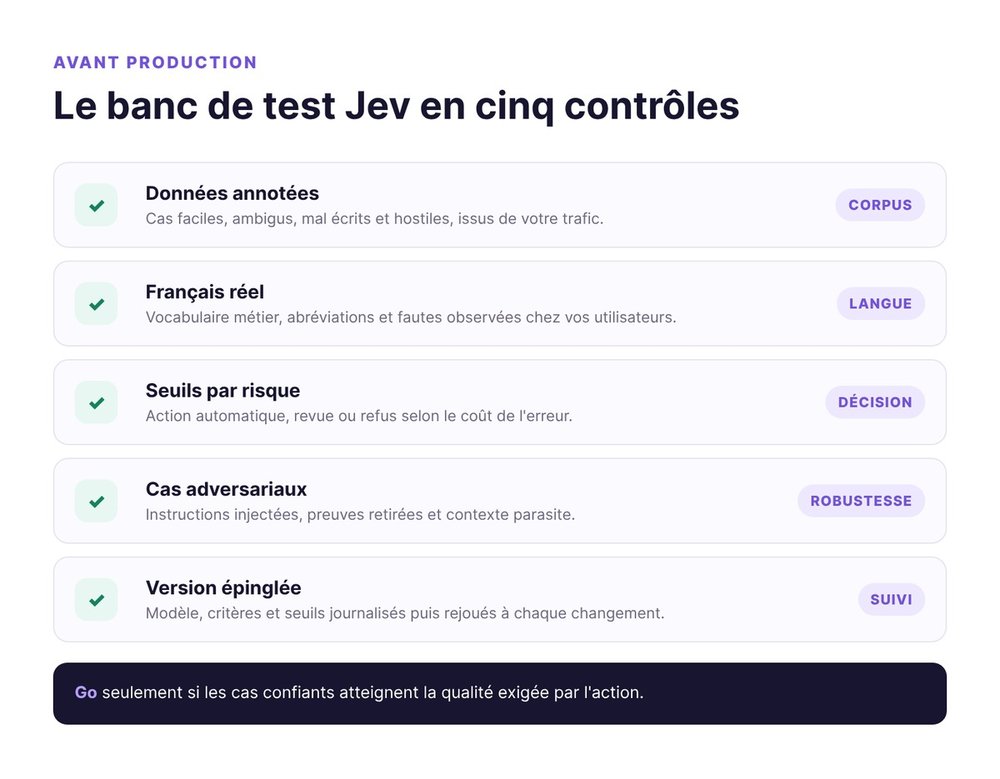
Take real, anonymized inputs. Have them annotated using the taxonomy your product already uses. Include easy, ambiguous, badly written and hostile cases. A demo made only of obvious examples mostly measures your skill at picking good examples.
Keep tuning data and evaluation data separate. Refine the instructions on the first batch, then measure on the second.
Measure quality by confidence threshold
Go beyond a single average accuracy. Sort answers by confidence and check the quality of each band. Your goal is to find a zone where the system can act on its own, a zone that needs verification and a zone it should refuse.
The threshold depends on the cost of a mistake. Routing a screen to the wrong tab is reversible. Approving a refund or running a destructive command is permanent. One score can't govern both actions.
Test adversarial cases and version changes
Put sentences in the state that try to change the instructions, then flip the wording. Add irrelevant information and remove the evidence the decision needs. Evaluate the model on real traffic as well as in the playground.
Version your criteria, thresholds and model. Rerun the test suite on every change. That discipline costs less than a bad decision repeated automatically.
Sample API call to route a ticket
The HTTP call fits in a single object. The real work lies in the quality of your categories and in what happens after the response.
Minimal HTTP request
The official quickstart uses the /v1/systemone endpoint and the jev-latest model.
curl -X POST https://api.typesafe.ai/v1/systemone \
  -H "Authorization: Bearer $TYPESAFE_API_KEY" \
  -H "Content-Type: application/json" \
  -d '{
    "model": "jev-latest",
    "state": "Le paiement est passé deux fois et je veux un remboursement.",
    "questions": {
      "route": {
        "type": "choice",
        "instructions": "Quelle équipe doit traiter ce message ?",
        "criteria": {
          "billing": "Paiement, facture ou remboursement",
          "technical": "Bug, panne ou intégration",
          "other": "Aucune des catégories précédentes"
        }
      },
      "urgent": {
        "type": "noul",
        "instructions": "Ce message exige-t-il une intervention immédiate ?"
      }
    }
  }'
Decide in code after the response
Your app reads answers.route.choice, its probability distribution and answers.urgent.noul. The code applies the measured thresholds, checks permissions and keeps a review path available instead of blindly executing the winning option.
Routing, urgency and risk are separate judgments. Separate questions make errors observable and criteria easy to adjust.
Our verdict on Jev by TypeSafe AI
Jev brings a useful primitive to a spot where many teams oversize their LLMs: closed, repetitive decisions. Its value goes beyond the "cheaper" pitch. It comes from an interface designed for code, with known outputs and uncertainty you can act on.
When to build a prototype
Test Jev if your product classifies text at steady volume, already forces an LLM to answer in JSON or needs to decide when to escalate to a human. Base the prototype on annotated history, in French if your users write in French.
Jev can also serve as a building block in an automated company, alongside the tools covered in our NanoCorp review. Orchestration, memory and generation have to come from elsewhere. Think of Jev as a reflex, with the central brain living in other parts of your stack.
When to stick with rules or an LLM
Stick with rules if the decision is exact and stable. Keep an LLM if the answer has to be created, explained or built in several steps. Keep a human review whenever a mistake touches money, rights, sensitive data or an irreversible action.
Our verdict: Jev deserves a targeted test bench, well short of a full migration. Its typed contract eliminates one class of errors. Your evaluation still has to prove it makes the right decisions in your context.
Jev AI FAQ
Does Jev replace ChatGPT or Claude?
No. Jev picks, scores or estimates a probability within a defined answer space. ChatGPT and Claude remain the right fit for writing, conversation, code and open-ended reasoning. Both engines can run in the same workflow.
Can Jev generate text?
No. Jev 1.13 isn't trained to generate text strings. For a customer reply, use Jev to decide the route or the tone, then a generative model to write it.
Does Jev work in French?
Jev accepts French, but TypeSafe says English remains its strongest language. Before production, evaluate it on real French messages, with your vocabulary and your common mistakes.
How much does Jev cost?
TypeSafe lists $0.042 per million input tokens for Jev 1.13, with no charge for output tokens. A third-party gateway may charge a different rate.
Can Jev make a bad decision?
Yes. The answer respects the requested type, but the choice or probability can be wrong. Measure quality on your data, set thresholds that match the risk and plan a review for uncertain cases.
Take twenty decisions your team has already settled, anonymize them and turn them into your first Jev test bench. Log every error before deciding whether the model earns a place in your product.