To connect Google Search Console to Claude Code, you need a Google OAuth client, a tool that calls the Search Console API (a CLI or an MCP server) and a 90-day page × query export. Claude Code then sorts that export using numeric rules. At swanbase, a query counts as a quick win when it ranks between position 4 and 20 with at least 20 impressions. A CTR anomaly starts below 5% clicks between 4th and 7th place.
Two findings before you start. Over 89 days, 76% of swanbase.co impressions came from queries Google does not show. Our CLI's OAuth token expired three times in six months, and on October 12 the status command still said "authenticated". Here are our commands, our thresholds and our fixes.
Why connect Google Search Console to Claude Code?
To pick which pages to rework, you have to cross thousands of query × page rows, compare two periods and apply the same thresholds every run. In your terminal, Claude runs the export, executes the triage script and reads your site's files before proposing a change.
The limits of the Search Console interface
The interface export stops at 1,000 rows. The Search Analytics API returns up to 25,000 rows per request and 50,000 rows per day, per site and per search type, according to Google's article on performance data filtering and limits. Our September 26, 2026 export held 5,988 query × page rows for 4,622 distinct queries. Through the interface, you would have seen a sixth of them.
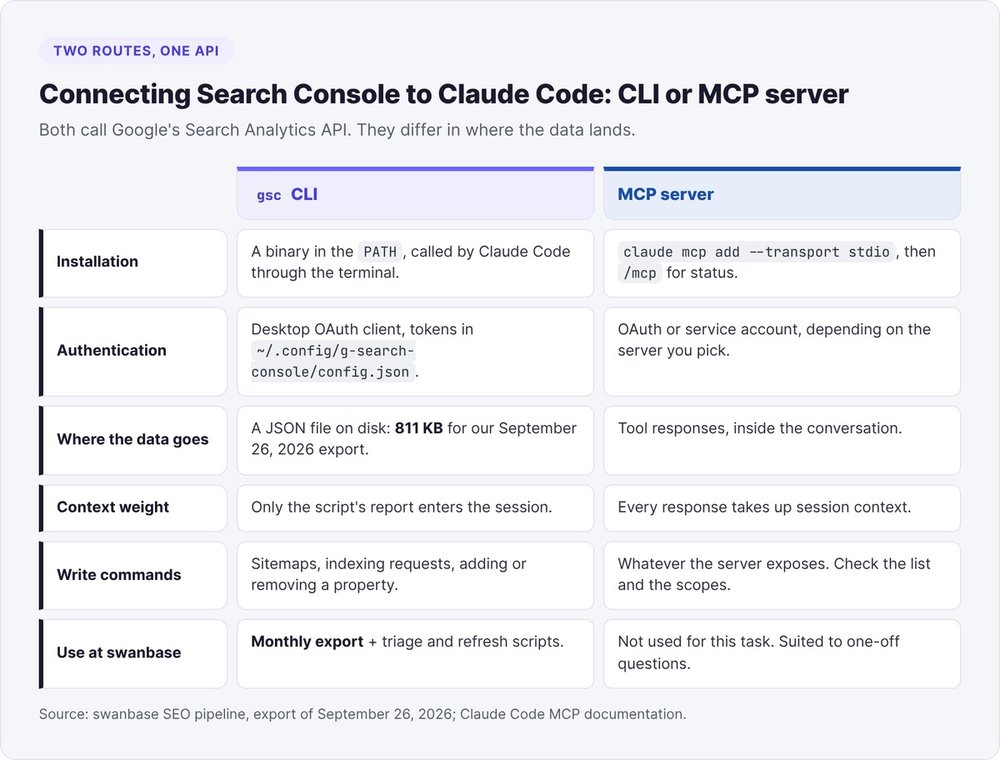
CLI or MCP server: two routes to the same API
- An MCP server exposes the API as tools Claude calls during the conversation. Handy for a one-off question ("which pages lost clicks this week"). The responses land in the session context.
- A CLI writes the export to a file. Claude Code runs a script on that file and reads only the report. Our Sept. 26 export weighs 811 KB of JSON: we keep it on disk, out of the context.
We use the gsc CLI, a Go binary that covers analytics, URL inspection, sitemaps and the Indexing API. If the protocol is new to you, start with our Claude Code MCP guide.
Connect Search Console to Claude Code in five steps
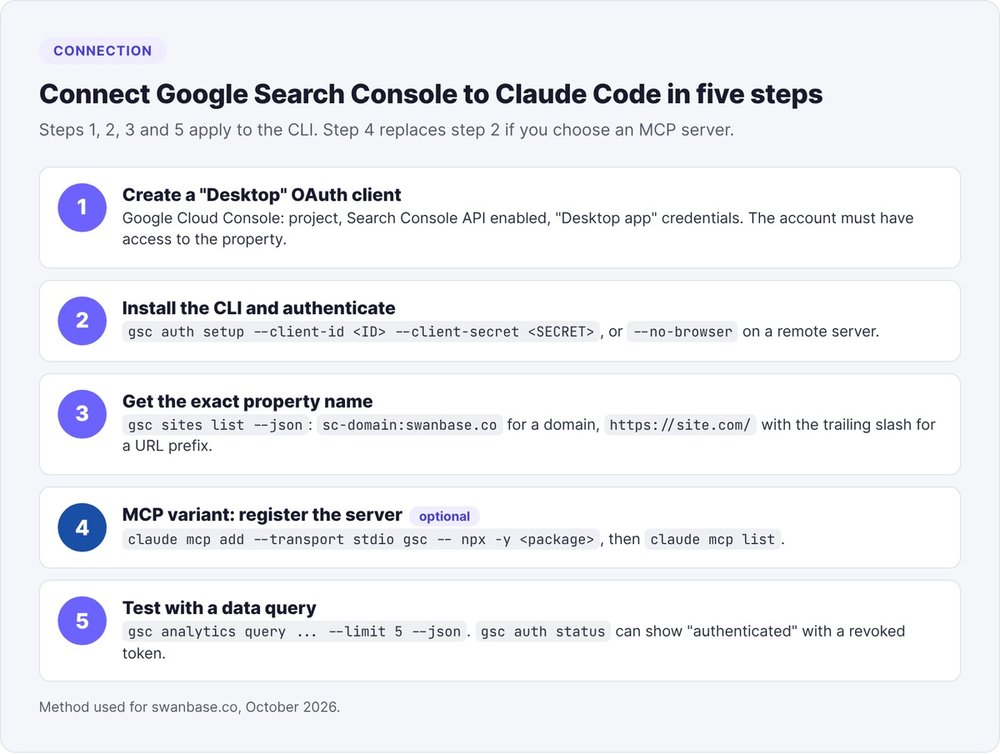
Steps 1, 2, 3 and 5 apply to the CLI. Step 4 replaces step 2 if you prefer an MCP server.
Step 1: create a "Desktop" OAuth client and enable the API
In Google Cloud Console, create a project, enable "Google Search Console API", then create OAuth credentials of type "Desktop app". You get a client_id and a client_secret. The Google account that grants access must be an owner or user of the Search Console property.
Step 2: install the gsc CLI and run authentication
gsc auth setup --client-id <ID> --client-secret <SECRET>
# remote server without a browser:
gsc auth setup --credentials credentials.json --no-browser
On Linux, the CLI stores tokens in ~/.config/g-search-console/config.json. That file holds your refresh token: keep it out of your Git repository.
Step 3: get the exact property name
gsc sites list --json
Copy the string as is. A domain property looks like sc-domain:swanbase.co, a URL-prefix property like https://swanbase.co/ with the trailing slash. An approximate string gets you a permission error.
Step 4 (MCP variant): register the server with claude mcp add
For a community MCP server, one command is enough, according to the Claude Code MCP documentation:
claude mcp add --transport stdio gsc \
  --env GOOGLE_APPLICATION_CREDENTIALS=/path/to/key.json \
  -- npx -y <server-package>
claude mcp list
Claude Code passes everything after -- to the server. Inside a session, /mcp shows the status of each server.
Step 5: test with a data query
gsc auth status is not enough; the next section explains why.
gsc analytics query --site "sc-domain:swanbase.co" \
  --start 2026-09-01 --end 2026-09-07 --dimensions query --limit 5 --json
If five query rows come back, the connection works.
Fix an expired OAuth token (invalid_grant)
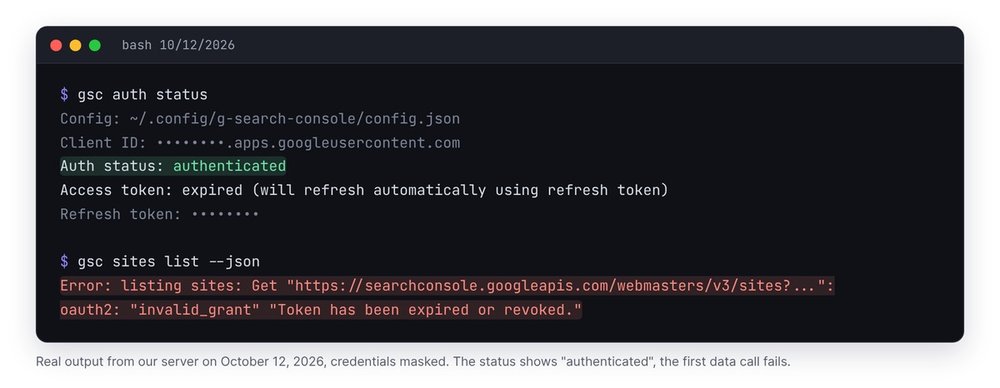
We hit this trap three times. On April 14, 2026, we redid an entire tracking report that had been produced with an expired token. On September 23, the last token dated from the 5th. On October 12, while preparing this article, gsc sites list returned the error while the status command said "authenticated".
The symptom: "authenticated" in status, invalid_grant on the call
$ gsc auth status
Auth status: authenticated
Access token: expired (will refresh automatically using refresh token)

$ gsc sites list --json
Error: listing sites: oauth2: "invalid_grant" "Token has been expired or revoked."
The status command does not test the refresh token against Google. You only find out about the revocation on the first data call. If your agent checks only the status, it hands you an empty or stale report: that is what happened to us in April.
The two-call fix, with no browser on the server
gsc auth setup opens a browser or waits for a callback on localhost:8080, which breaks on a remote machine. We use a small two-call script instead:
python3 gsc_reconnect.py urlprints a Google authorization URL (access_type=offline,prompt=consent, redirecthttp://localhost:8080, scopeswebmastersandindexing).- Open the URL in your own browser and authorize the owner account. The
localhostpage will not load, which is expected: copy the full URL from the address bar, which containscode=. python3 gsc_reconnect.py exchange "<pasted URL>"exchanges that code for a new token and rewritesconfig.json, then you rerungsc sites list.
The core of the exchange:
data = urllib.parse.urlencode({
    "code": code, "client_id": cid, "client_secret": csec,
    "redirect_uri": "http://localhost:8080",
    "grant_type": "authorization_code",
}).encode()
tok = json.load(urllib.request.urlopen(
    urllib.request.Request("https://oauth2.googleapis.com/token", data=data)))
cfg["refresh_token"] = tok.get("refresh_token", cfg["refresh_token"])
With prompt=consent, Google returns a fresh refresh token. Without that parameter, you sometimes get only an access token, valid for one hour.
The lasting fix: move the app out of Testing mode
Google issues a refresh token valid for 7 days when the OAuth consent screen stays in "Testing" mode for external users, according to Google's OAuth 2.0 documentation. Publish the app (Testing to Production) in Google Cloud Console: your tokens then last until revoked, and your monthly analysis no longer needs a repair.
Export 90 days of page × query data
The export command
SITE="sc-domain:swanbase.co"
END=$(date -d "2 days ago" +%F)     # Search Console publishes with a ~2-day lag
START=$(date -d "92 days ago" +%F)
gsc analytics query --site "$SITE" --start "$START" --end "$END" \
  --dimensions query,page --limit 25000 --json > data/gsc-raw-$(date +%Y%m%d).json
gsc analytics query --site "$SITE" --start "$START" --end "$END" \
  --dimensions page --limit 25000 --json > data/gsc-raw-page-$(date +%Y%m%d).json
The query × page cross tells you which page Google shows for which query, at which position. The second export, by page only, is used to measure hidden queries. To compare two periods, rerun the first command on the previous 90 days: our Sept. 26 tracking compared June 26 to Sept. 24 against March 27 to June 25.
The JSON shape and its missing keys
{"responseAggregationType": "byProperty",
 "rows": [{"clicks": 188, "ctr": 0.61, "impressions": 308,
           "keys": ["swanbase", "https://swanbase.co/"], "position": 1.22}]}
The keys follow the order of --dimensions. Trap: rows with no clicks have neither clicks nor ctr. In our Sept. 26 export, 5,853 of 5,988 rows lacked those keys. A script that reads r["clicks"] crashes on the first pass (we did exactly that on October 12). Always read r.get("clicks", 0).
Getting past the row limit
--limit ranges from 1 to 25,000, with 1,000 by default. Beyond that, paginate with --start-row 25000, within the 50,000-rows-per-day limit. Our by-page export had 580 rows: a site with a few hundred pages fits in a single request.
Why your per-query totals don't add up
Add up the impressions in the query × page export and compare them to the site total: most of them are missing. Google removes "anonymized" queries from its tables: queries typed by a few dozen users at most over two to three months. It still counts them in the totals.
76% of impressions with no visible query
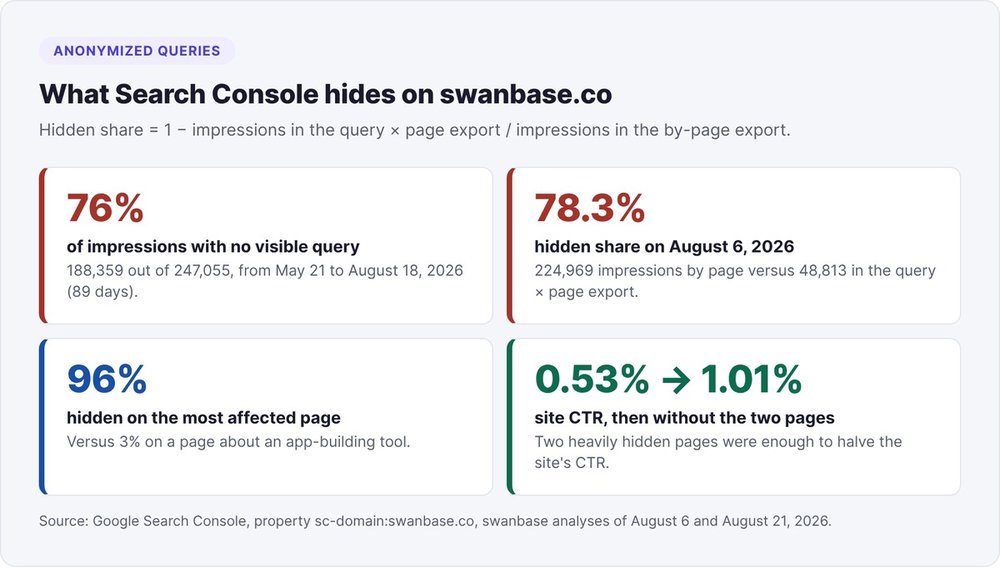
On swanbase.co, from May 21 to August 18, 2026, 188,359 of 247,055 impressions matched no visible query, or 76%. On August 6, over a different window, the hidden share reached 78.3%. Google hid 96% and 97% of impressions for our two pages on the BSA AIR, and only 3% on a page about an app-building tool.
Our overall CTR showed 0.53%, and 1.01% without those two pages. Before concluding that a title isn't working, check how much of the page you can actually see.
Measure your hidden share
python3 - <<'EOF'
import json
tot = lambda f: sum(r.get("impressions", 0) for r in json.load(open(f))["rows"])
qp, p = tot("data/gsc-raw-20260926.json"), tot("data/gsc-raw-page-20260926.json")
print(f"visible queries: {qp} / {p} impressions, hidden: {1 - qp / p:.0%}")
EOF
Run the calculation page by page too. On our most affected BSA AIR page, 54% of named impressions came from queries of 8 words or more, for 0 clicks. Phrasings like "bsa air investisseur pas actionnaire avant conversion" look like sub-questions written by a machine. We logged this as a hypothesis: the API's searchAppearance dimension returns only VIDEO for our property, so the API gives no way to isolate AI overviews.
Anchors and slash variants in the counts
Google counts links to a section (/blog/lovable/#faqs) as separate pages. Over 89 days, we had 461 "page" rows for 347 real URLs: 114 anchor URLs, 17,071 impressions, 0 clicks. In the Sept. 26 export, 722 query × page rows carried an anchor, and "trouver un cofondateur" surfaced among the quick wins on #comment-valuer-un-cofondateur-avant-d....
Exclude URLs containing # from every CTR calculation. Also merge the variants with and without a trailing slash: one of our pages had 6 impressions, 5 of them on the URL without the slash.
The six numeric rules for triaging your Search Console queries
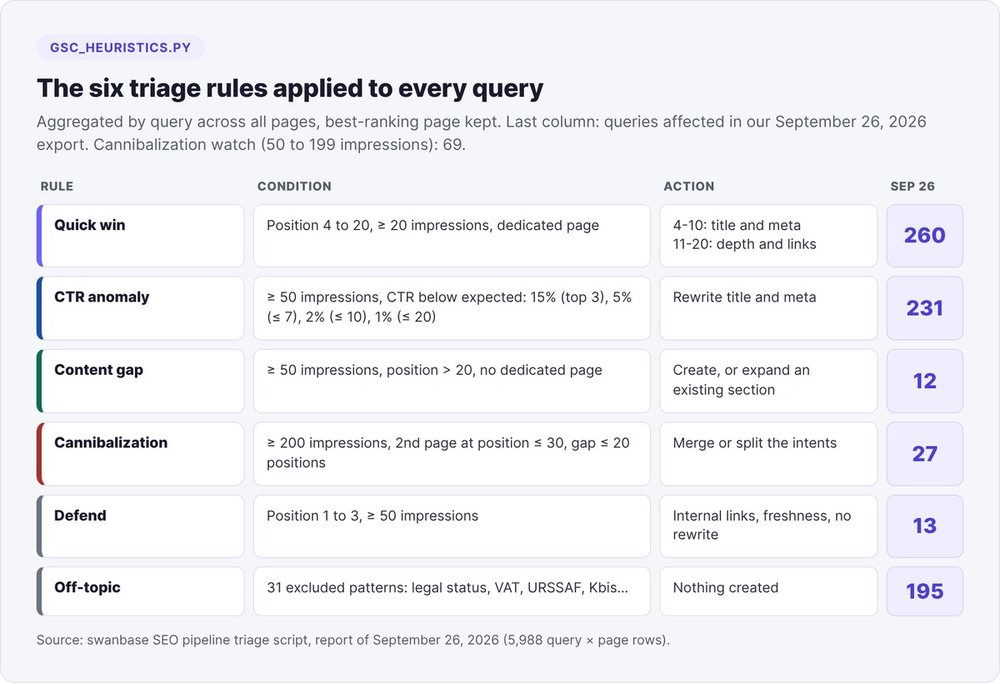
Our gsc_heuristics.py script aggregates the export by query, across every page that ranks for it, and keeps the best-ranked page. We then apply six rules to each query.
Quick win: position 4 to 20, at least 20 impressions
A query between position 4 and 20, with at least 20 impressions and a dedicated page, becomes a quick win. Between 4 and 10, you rework the title and meta description. Between 11 and 20, you add depth and internal links. On September 26, 260 queries passed this filter.
The notion of a "dedicated page" rests on a rough heuristic: at least half of the query's words (longer than two letters) appear in the slug. That same day, "webstorm annuel prix" came out as a content gap, attached to our Claude Code definition article.
CTR anomaly: expected CTR by position band
EXPECTED_CTR = [(3, 0.15), (7, 0.05), (10, 0.02), (20, 0.01)] # beyond: 0.5%
With at least 50 impressions, a query below the expected CTR for its band goes into a title and meta rewrite: 15% up to 3rd place, 5% up to 7th, 2% up to 10th, 1% up to 20th. On Sept. 26, we counted 231.
One inconsistency cost us a review pass: our documentation said 20% for the top 3 while the script applied 15%. Keep a single source for thresholds: the code you actually run.
Content gap: 50 impressions beyond position 20
At least 50 impressions, a position beyond 20 and no dedicated page: the topic may deserve an article. Priority is impressions divided by position. First check that no section of an existing article already covers the topic: if one does, you enrich that page instead of creating a new one.
Cannibalization: 200 impressions and two close pages
Two pages compete for a query when it totals at least 200 impressions, the second page ranks 30th or better and the gap between them is 20 places or less. Between 50 and 199 impressions, with a second page in the top 20, the query goes on a watch list. If every page sits beyond 40th place, ignore it.
Rule out two false positives by hand: anchor URLs, and French/English pairs. On our site, the FR/EN duplicates in the report came from brand queries typed in several countries, with hreflang tags in place.
Defend the top 3 and set aside off-topic queries
A query in position 1 to 3 with at least 50 impressions goes into defense: internal linking, freshness, no overhaul. The sixth rule excludes 31 patterns from any new content (legal status, VAT, URSSAF, Kbis, taxation). On Sept. 26, 195 queries fell into this filter, including a run of "convertisseur tva" queries landing on our HT/TTC calculator.
Run the triage and read the report
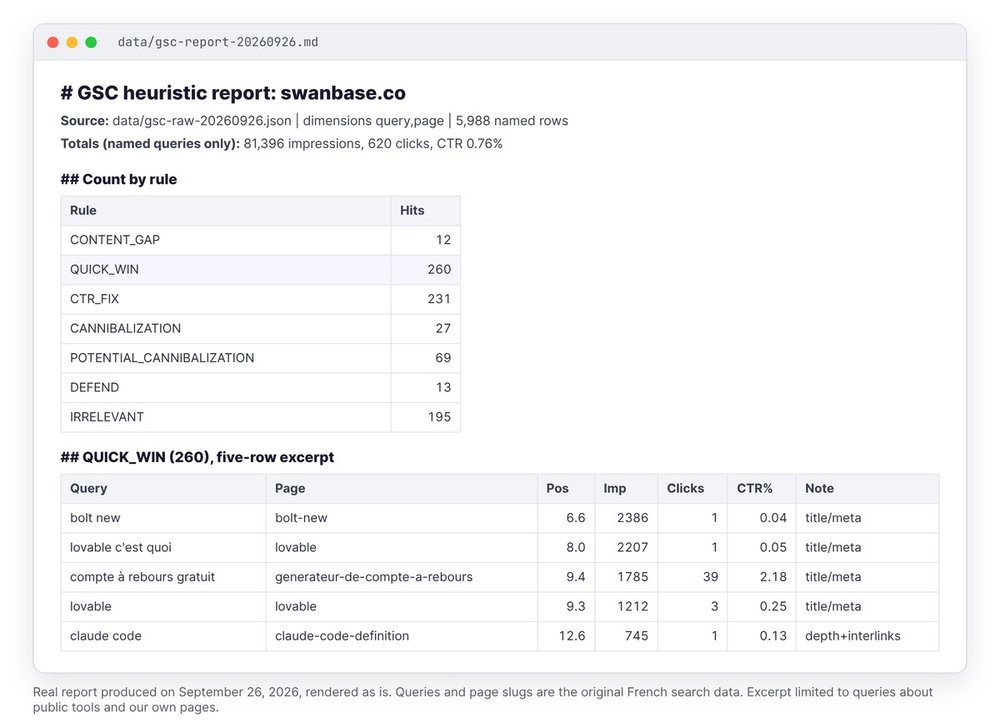
python3 scripts/gsc_heuristics.py data/gsc-raw-20260926.json \
  --period-a data/gsc-raw-period-a-20260926.json \
  --out data/gsc-report-20260926.md --trend-out data/gsc-trend-20260926.md
The report lists, rule by rule, the 40 most-viewed queries. The trend file classifies each query × page pair with at least 20 impressions: up if it gained more than 3 places, down if it lost more than 3, lost if it had 50 impressions in the previous period and disappeared. On Sept. 26: 56 down, 33 up, 210 stable, 317 new, 2 lost.
The prompts to give Claude Code
Without instructions, an agent jumps from a position to a content diagnosis in a single sentence. We give it two prompts.
The export and triage prompt
Export Search Console for sc-domain:swanbase.co over the last 90 days
(end = today - 2 days), dimensions query,page, then the same window with
dimension page. Calculate the share of hidden impressions. Run
scripts/gsc_heuristics.py with the previous period as --period-a.
Exclude URLs containing # from every CTR calculation.
Give me the 10 quick wins with the most impressions, without changing anything.
The page-by-page diagnosis prompt
We wrote these instructions into our SEO orchestrator after a report described intros and FAQs it had never opened:
No verdict on a page's content without reading the whole file.
GSC signals say "this page underperforms", never "the intro is narrative".
Tag every recommendation [measured] or [hypothesis to verify].
Zero invented numbers: a number comes from GSC, or you show the formula.
Add a production check before marking an action "not done": curl -s https://votre-site/url/ | grep -E "title|canonical". On April 19, our rewrite queue marked four rewrites as "not deployed" that were already live.
Choose which pages to refresh
To decide which page to rework first, we group the export by page and keep, for each one, its most-viewed query.
The score: impressions × distance to the top 3
opportunite = impressions * max(0, position - 3)
score = opportunite * (1.3 if page_en_baisse else 1.0)
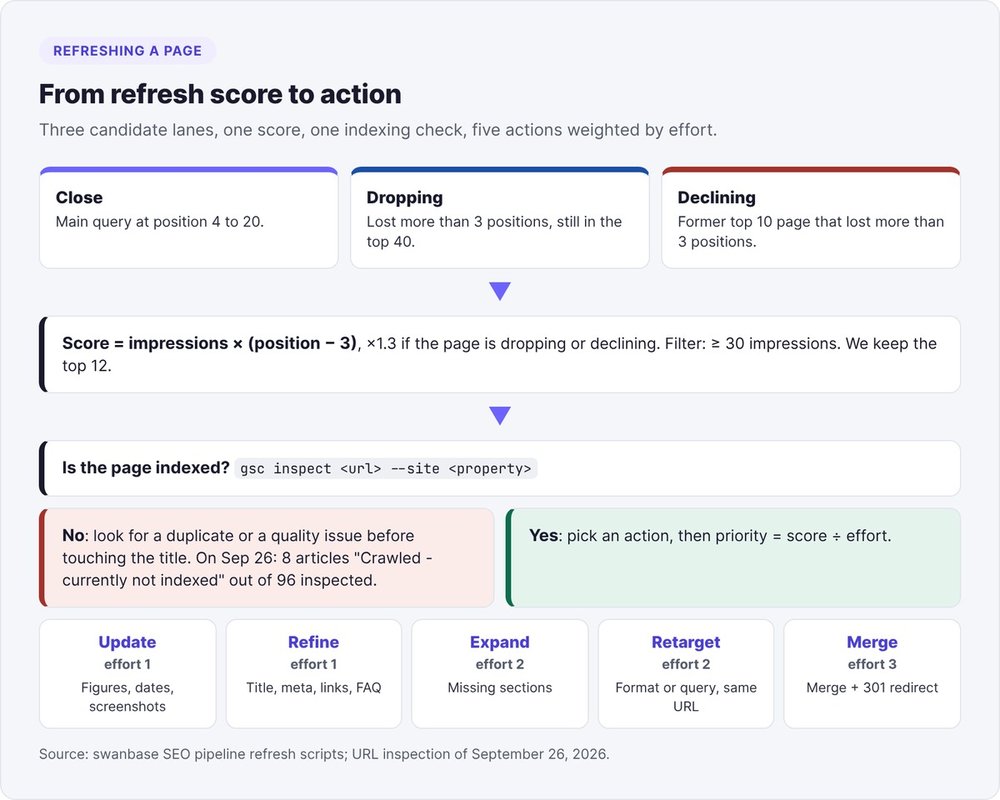
Three lanes feed the list: proximity (position 4 to 20), drop (more than 3 places lost, still in the top 40) and decline (a former top-10 page that lost more than 3 places). We discard pages under 30 impressions and keep the top 12:
python3 refresh_candidates.py --current data/gsc-raw-20260926.json \
  --baseline data/gsc-raw-period-a-20260926.json \
  --site https://swanbase.co --min-impressions 30 --top 12 --output-dir data/
Five actions, five costs
Divide the score by the effort of the chosen action to get the final priority:
- Update (effort 1): outdated figures, dates and screenshots, without touching the structure.
- Refine (1): title, meta, internal links and FAQ, for a page between 4 and 10 with a weak CTR.
- Expand (2): sections missing compared with competing pages.
- Retarget (2): change the format or target query while keeping the URL.
- Merge (3): two pages on the same intent, merged with a 301 redirect.
Only change the last-updated date for Expand, Retarget or an Update that touches several sections. For contested articles, we aim for a refresh every 90 to 120 days.
Check indexing before rewriting
A page missing from the index won't climb with a better title. On September 26, we ran gsc inspect on our 96 articles with fewer than 100 impressions:
gsc inspect "https://swanbase.co/blog/<slug>/" --site "sc-domain:swanbase.co" --json
Result: 84 indexed, 8 "Crawled - currently not indexed", 1 "Discovered - currently not indexed", 3 unknown to Google. The eight include our overview of AI tools for startups and our growth marketing guide, which nonetheless receives 17 internal links. For these pages, we look for a duplicate or a quality issue before touching the title.
Results of the method on swanbase.co
Three results from our gains log:
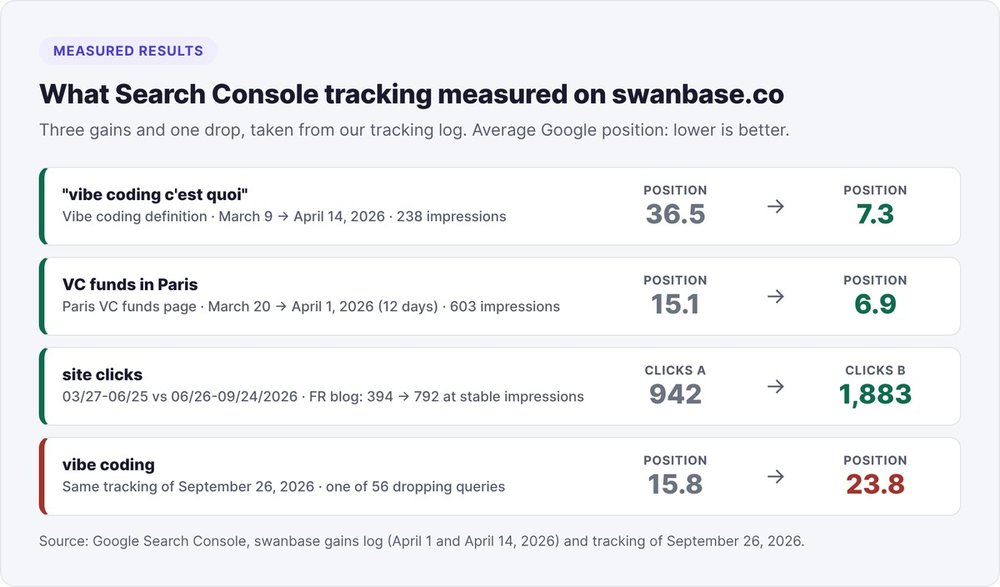
- Our vibe coding definition moved from position 36.5 to 7.3 on "vibe coding c'est quoi" between March 9 and April 14, 2026, on 238 impressions.
- Our page on VC funds in Paris moved from 15.1 to 6.9 between March 20 and April 1, in twelve days, on 603 impressions.
- Between two three-month periods (March 27 to June 25, then June 26 to Sept. 24), site clicks went from 942 to 1,883. On the French blog, impressions held steady (157,019 then 160,239) and clicks doubled (394 then 792).
The same Sept. 26 tracking counted 56 queries in decline, including "vibe coding", which slid from 15.8 to 23.8. No rule guarantees a position. With written thresholds, you know where to look each month.
To turn these commands into a reusable skill, read our guide to Claude Code skills. To chain several agents, see our AI marketing agents. If you're new to the tool, start with our Claude Code definition.
FAQ
Is there an official Search Console MCP server?
The common Search Console MCP servers, such as mcp-gsc or mcp-server-gsc, are community projects. They call the same Search Analytics API as any CLI. Review the code and the OAuth scopes they request before trusting them with your account.
Service account or OAuth: which should you choose?
We use a Desktop OAuth client tied to the property owner's account. A service account avoids token expiry, provided you add its email address to the Search Console property's users. With OAuth, publish the app to get out of 7-day tokens.
How many rows can you export from Search Console?
The interface exports 1,000 rows. The API returns 1,000 rows by default, up to 25,000 per request with rowLimit, and 50,000 per day, per site and per search type, paginating with startRow. These limits come from Google Search Central (October 2022).
Why are impressions missing from the query total?
Google removes anonymized queries from its tables, those typed by a few dozen users at most over two to three months, but still counts them in the totals. On swanbase.co, they accounted for 76% of impressions over 89 days in 2026. Measure your share by comparing the by-page export with the query × page export.
Can you do the same thing with ChatGPT?
Yes for the analysis: the export is a JSON file and the rules fit in a Python script, usable by any assistant that can read a file or run a command. Claude Code adds access to your terminal and your site's files, and you can have it read a page before judging it.
Can Claude Code modify my Search Console?
Yes, if you give it the means: the gsc CLI can submit or delete a sitemap, add a property and request indexing. For analysis only, request just the webmasters.readonly scope. Claude Code also asks for your permission before each new command.
How often should you rerun the analysis?
We run the tracking once a month, on a rolling 90 days compared with the previous 90 days. Search Console publishes its data with about a two-day lag. For reworked pages, we plan a new pass every 90 to 120 days.