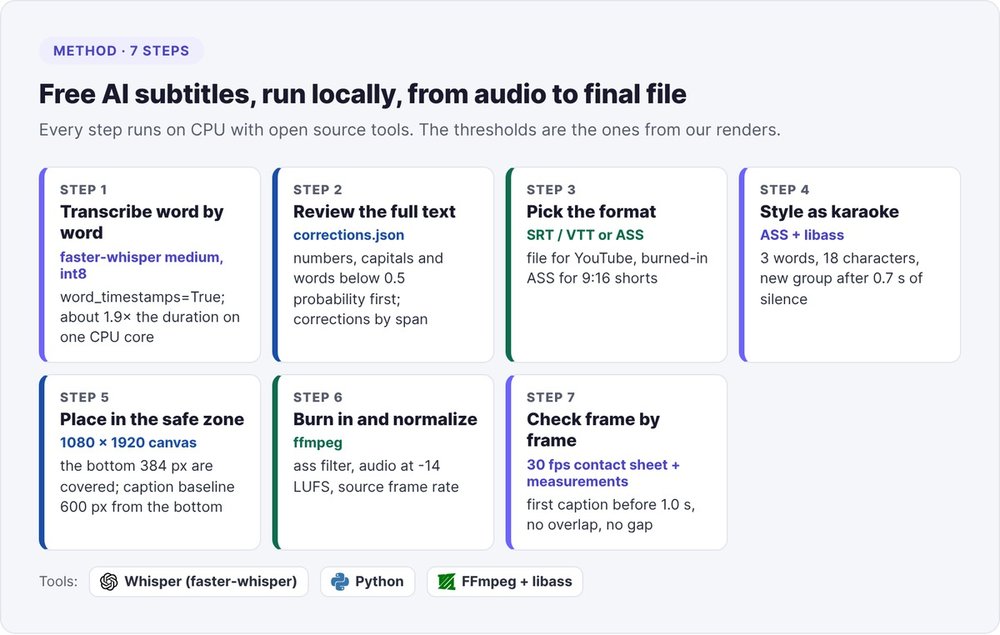
To get free AI subtitles with no quota and no watermark, run speech recognition on your own machine. It takes five operations: transcribe the audio word by word with faster-whisper, review the entire transcript, pick a format (SRT file or burned-in captions), style the captions as karaoke, then burn them in with ffmpeg and check the result frame by frame. Every component is open source and runs on CPU, with no graphics card and no subscription.
We use this method on filmed talks and pitches, reframed to 9:16 for social media. On a single CPU core, Whisper's medium model transcribes a clip in roughly 1.9 times its duration, and it still makes enough mistakes that we review every word before it goes on screen. This tutorial shares our commands, our thresholds (3 words per group, a break after 0.7 seconds of silence, audio at -14 LUFS) and the pitfalls that cost us the most versions. To cut a long video into several clips, see our guide to creating shorts with AI.
Free AI subtitles: online tool or local pipeline
Free online subtitle generators (YouTube Studio, CapCut, VEED, Submagic) all follow the same path: upload, transcription, correction in an editor, export.
The limits of free online plans
Free tiers cost you in minutes per day or per month, in watermarks, or in exports capped by resolution or number of videos. YouTube Studio's automatic AI captions stay free with no limit, but they live on YouTube and offer little control over styling. Publish one clip a week and you hit these caps fast.
Locally, you only pay in compute time, you control everything (model, review, font, color, position) and your videos stay on your machine.
The local setup
- Python 3.9 or later and faster-whisper, the Whisper reimplementation that claims up to 4 times the speed of openai/whisper at the same accuracy, with int8 quantization usable on CPU, under the MIT license.
- ffmpeg built with libass, the library that draws ASS subtitles onto the image. Check with
ffmpeg -h filter=ass. - The fonts for your captions, installed on the system (
fc-list | grep Inter).
pip install faster-whisper
# if pip answers "externally-managed-environment":
pip install --break-system-packages faster-whisper
That second case blocked us on our first attempt: on recent distributions, pip install fails outside a virtual environment.
Step 1: transcribe word by word with faster-whisper
Karaoke captions need a timestamp for each word. Request them with word_timestamps=True, after extracting the audio as 16 kHz mono:
ffmpeg -i video.mp4 -vn -ac 1 -ar 16000 audio.wav
import json
from faster_whisper import WhisperModel

model = WhisperModel("medium", device="cpu", compute_type="int8")
segments, info = model.transcribe(
    "audio.wav", language="fr", word_timestamps=True,
    initial_prompt="FirstName LastName, CompanyName, SaaS, ARR, onboarding.",
    vad_filter=True, vad_parameters=dict(min_silence_duration_ms=400))

words = [{"word": w.word.strip(), "start": round(w.start, 3),
          "end": round(w.end, 3), "prob": round(w.probability, 2)}
         for s in segments for w in (s.words or []) if w.word.strip()]
json.dump(words, open("words.json", "w"), ensure_ascii=False, indent=1)
Keep each word's probability. You will need it during review. Our videos are in French, hence language="fr": set your own language code (en for English). The errors quoted in this tutorial come from those French recordings.
Choose medium for French
| Model | Time on one CPU core | Use |
|---|---|---|
small |
faster | locating passages, never for display |
medium |
about 1.9 times the audio duration | French subtitles, our default |
large-v3 |
about 6 times the duration, more memory | a difficult passage, cut out and run on its own |
With small, we got "le vélamin" instead of "levez la main" ("raise your hand") on a pitch. With large-v3, you wait three times longer than with medium for a rare gain, so we keep it for the ambiguous windows in step 2. Transcription takes longer than the video itself, so run it in the background.
Prime the proper nouns
In French, Whisper mangles English names. On one pitch, we watched a startup's name, three English words, come out as a single made-up word, in that very startup's promo video. Two safeguards:
- The prompt. Pass
initial_prompta short sentence that spells out the speaker, the company, the product and the industry acronyms. Keep it brief: a long prompt can leak into the transcript. - The replacement table. A dictionary
{"wrong word in lowercase": "Correct Spelling"}, applied after transcription. The replacement reuses the start and end of the original token, so the karaoke stays in sync and a multi-word name lights up as one block.
For unexpected mistakes, you have to review.
Step 2: review the entire transcript
We read every word of the transcript before burning in a single caption, and we never ship an unreviewed clip: an absurd word on screen costs as much as a misspelled brand name.
Whisper's mistakes on everyday French
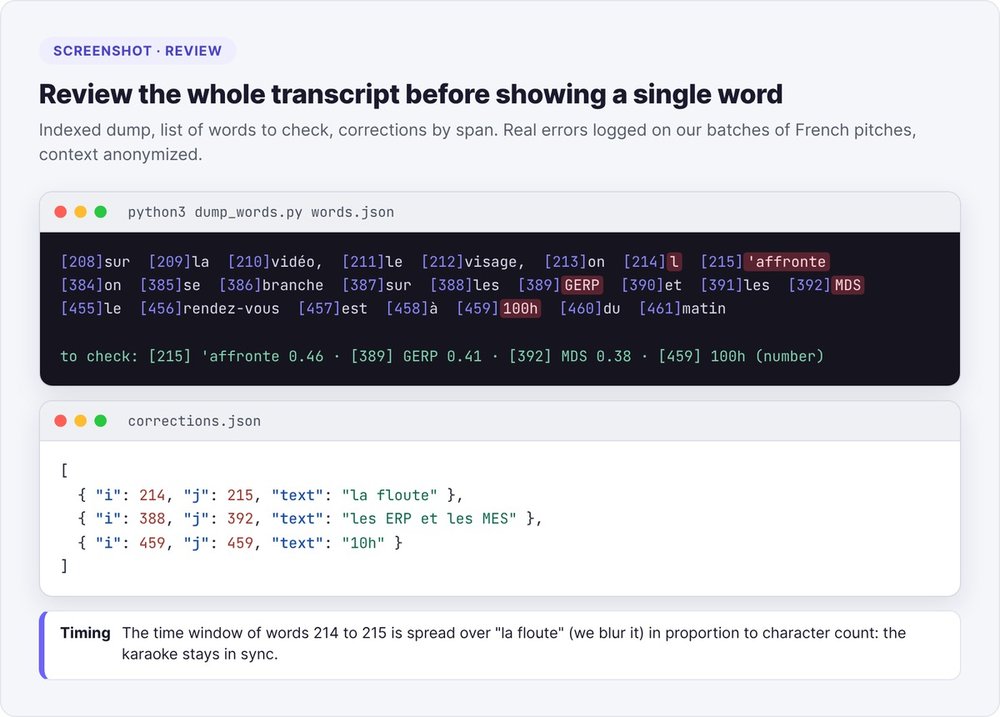
Across our batches of pitches, we logged these errors, none of them involving proper nouns:
- with
medium: "on la floute" (we blur it) became "on l'affronte" (we confront it), "les ERP et les MES" became "les GERP et les MDS", "le numéro de l'EAN" (the EAN number) became "le numéro de l'eau" (the water number); - with
small: "10h du matin" (10 a.m.) became "100h du matin", "cofondatrice" (co-founder) became "confonatrice", "fonds américains" (American funds) became "fois américains", "travaillé" (worked) became "trahi" (betrayed), "joueurs actifs mensuels" (monthly active players) became "joueurs actifs mondes suels".
The day we reviewed only the startup names, "le vélamin" made it all the way to the speaker.
To read fast, print each word with its index and start with the risky ones: numbers, capitalized words (names and acronyms) and words whose probability falls below 0.5.
import json
w = json.load(open("words.json"))
for i in range(0, len(w), 8):
    print("  ".join(f"[{i+k}]{x['word']}" for k, x in enumerate(w[i:i+8])))
print("to check:", [(i, x["word"], x["prob"]) for i, x in enumerate(w)
       if x["prob"] < 0.5 or any(c.isdigit() for c in x["word"]) or x["word"][:1].isupper()])
Correct by span without breaking the timing
Each correction replaces a span of words, from index i to index j inclusive:
[
  {"i": 214, "j": 215, "text": "la floute"},
  {"i": 388, "j": 392, "text": "les ERP et les MES"},
  {"i": 507, "j": 507, "text": ""}
]
The word count often changes: "le vélamin" has two words, "levez la main" has three. We then spread the span's time window across the new words in proportion to their length in characters, and the highlighting stays in sync. An empty text deletes the span, for a false start or applause transcribed as words.
def apply_span(words, i, j, text):
    t0, t1 = words[i]["start"], words[j]["end"]
    new = text.split()
    total = sum(len(x) for x in new) or 1
    out, t = [], t0
    for x in new:
        d = (t1 - t0) * len(x) / total
        out.append({"word": x, "start": round(t, 3), "end": round(t + d, 3)})
        t += d
    return words[:i] + out + words[j + 1:]
Three rules to avoid double corrections:
- Keep a raw copy (
words.raw.json) and always reapply corrections from it, so rerunning the script never corrects anything twice. - Apply spans from last to first, with no overlap, so the indexes stay valid.
- Restore what the speaker said, without rewriting their sentence into better French.
In our rendering agent, we then compute the sha256 fingerprint of the corrected file: with no valid signature, or after any modification, it refuses to burn.
Settle an ambiguous passage
When medium outputs a non-word and you can't reconstruct the sentence, don't guess a proper noun. Cut out the audio window and re-transcribe it on its own with large-v3, primed with the industry vocabulary:
ffmpeg -ss 41.2 -to 44.0 -i video.mp4 -ar 16000 -ac 1 win.wav
big = WhisperModel("large-v3", device="cpu", compute_type="int8")
seg, _ = big.transcribe("win.wav", language="fr",
                        initial_prompt="KYC, onboarding, fintech, conformité")
print(" ".join(s.text for s in seg))
On a fintech demo, this pass returned "petit KYC" where medium heard "petit kawaii". Load the large model once for all windows. If doubt remains, cut the passage from the clip rather than display a guess.
Step 3: choose between an SRT file and burned-in captions
Two families of subtitles coexist, and you choose based on the platform you publish to.
SRT or VTT for YouTube and LinkedIn
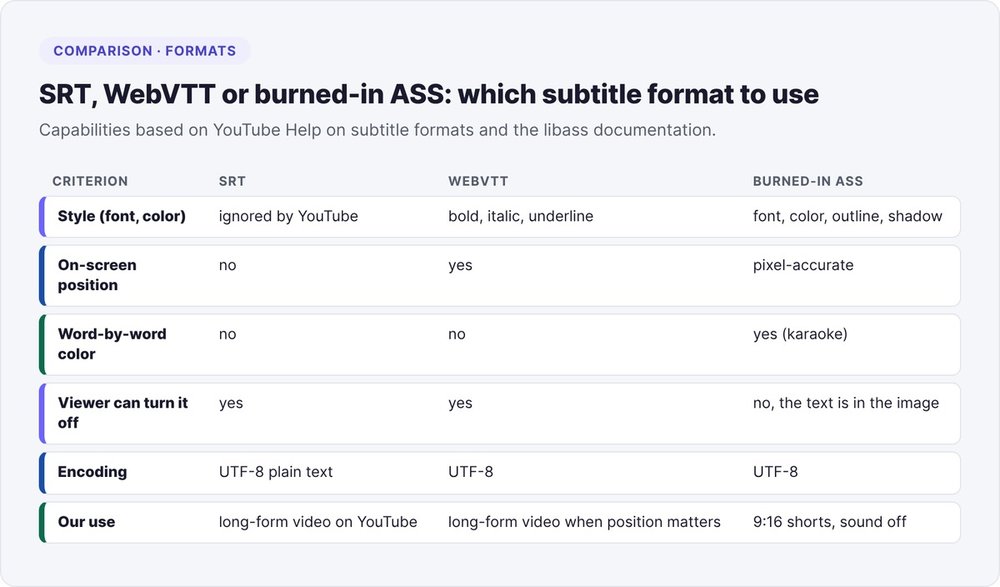
An SRT (SubRip) file lists numbered blocks: a start timestamp, an end timestamp, and one or two lines of text. Viewers turn it on or off, and the platform can index it. YouTube accepts SRT as plain UTF-8 text and ignores all styling information; WebVTT keeps positioning there, plus bold, italics and underline.
You write the SRT from faster-whisper's segments:
def ts(s):
    ms = int(round(s * 1000)); h, ms = divmod(ms, 3600000)
    m, ms = divmod(ms, 60000); sec, ms = divmod(ms, 1000)
    return f"{h:02}:{m:02}:{sec:02},{ms:03}"

segments, _ = model.transcribe("audio.wav", language="fr")
with open("video.srt", "w", encoding="utf-8") as f:
    for n, s in enumerate(segments, 1):
        f.write(f"{n}\n{ts(s.start)} --> {ts(s.end)}\n{s.text.strip()}\n\n")
Review this file as carefully as words.json: the platform will display your mistakes exactly as written.
Going the other way, an existing SRT (exported from YouTube Studio or a captioning tool) can serve as the basis for karaoke. Per-word timings are then estimated in proportion to the characters in each block, so review the render more closely.
Burned-in ASS for shorts
On Reels, TikTok and Shorts, some viewers watch with the sound off, and you have no control over how the platform displays captions. So we burn the text into the image, in ASS (Advanced SubStation Alpha) format, rendered by libass. In ASS, you set the font, color, outline, shadow, pixel-precise position and the color of each word.
Step 4: write karaoke captions in ASS
An ASS file starts with a header (canvas size, styles), then lists Dialogue events. For a 1080 × 1920 short, declare PlayResX: 1080 and PlayResY: 1920, so sizes and positions are expressed in output pixels. Each of our rules fixes a defect we saw on a delivered clip.
Three words, 18 characters, a break at 0.7 seconds
We group words in threes at most, and start a new group after any silence longer than 0.7 seconds or at the end of a sentence. Our public version also caps the line at 18 characters for an 84-pixel font and shrinks any word longer than 13 characters.
MAXW, GAP, MAXC = 3, 0.7, 18
groups, cur = [], []
for w in items:
    if cur:
        chars = sum(len(x["t"]) for x in cur) + len(cur) + len(w["t"])
        if len(cur) >= MAXW or chars > MAXC or w["start"] - cur[-1]["end"] > GAP:
            groups.append(cur); cur = []
    cur.append(w)
if cur: groups.append(cur)
One active word in color, at a constant size
For each word in the group, we write an event that displays the whole group, with the spoken word in the accent color:
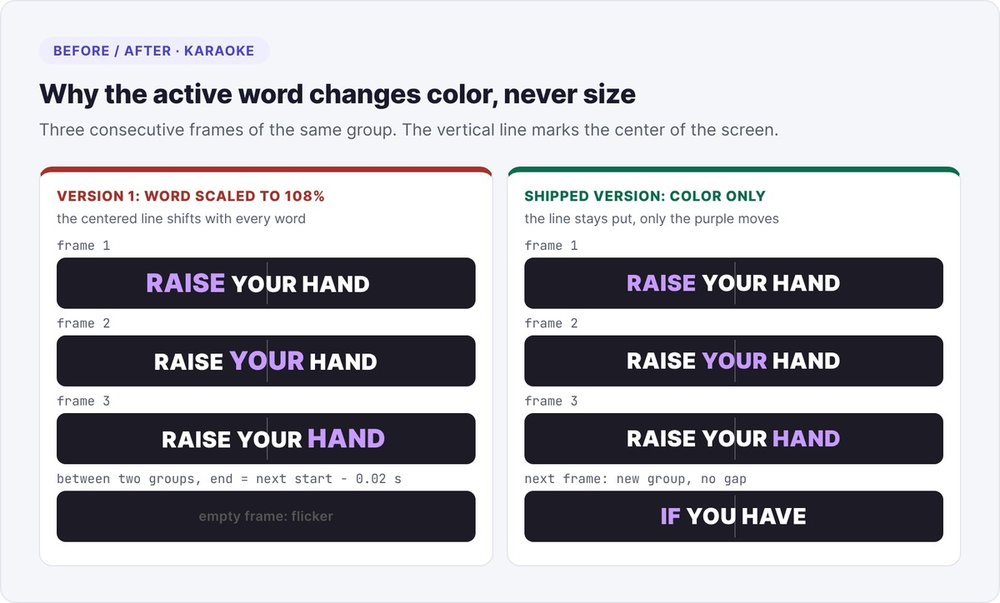
Dialogue: 0,0:00:01.20,0:00:01.46,Cap,0,0,0,,{\1c&HF755A8&}LEVEZ{\r} LA MAIN
Dialogue: 0,0:00:01.46,0:00:01.61,Cap,0,0,0,,LEVEZ {\1c&HF755A8&}LA{\r} MAIN
Dialogue: 0,0:00:01.61,0:00:02.05,Cap,0,0,0,,LEVEZ LA {\1c&HF755A8&}MAIN{\r}
Our first version also enlarged the active word by 8% (\fscx108\fscy108). Since we center the line, every enlargement shifted it, and on screen the captions jittered. Now only the color changes.
Contiguous events and rejoined elisions
Two timing defects cause flickering:
- the gap: if one event ends a hundredth of a second before the next, a frame falls into the void. Make each word end exactly when the next one starts, and each group end at most 0.35 seconds after its last word, without running past the start of the next group (
min(fin + 0.35, debut_suivant)); - the overlap: never lengthen a short word "so it shows", because you would push it onto the next word and two lines would display at once.
French adds a trap: faster-whisper splits elisions into two tokens, "l" and "'IA", "c" and "'est", "aujourd" and "'hui". Before grouping, attach any token that starts with an apostrophe to the previous one, taking over its end time. Skip this step and one group ends on "L" while the next starts with "'IA".
merged = []
for w in words:
    if merged and w["word"].lstrip().startswith("'"):
        merged[-1]["word"] += w["word"].lstrip(); merged[-1]["end"] = w["end"]
    else:
        merged.append(dict(w))
Two ASS syntax traps
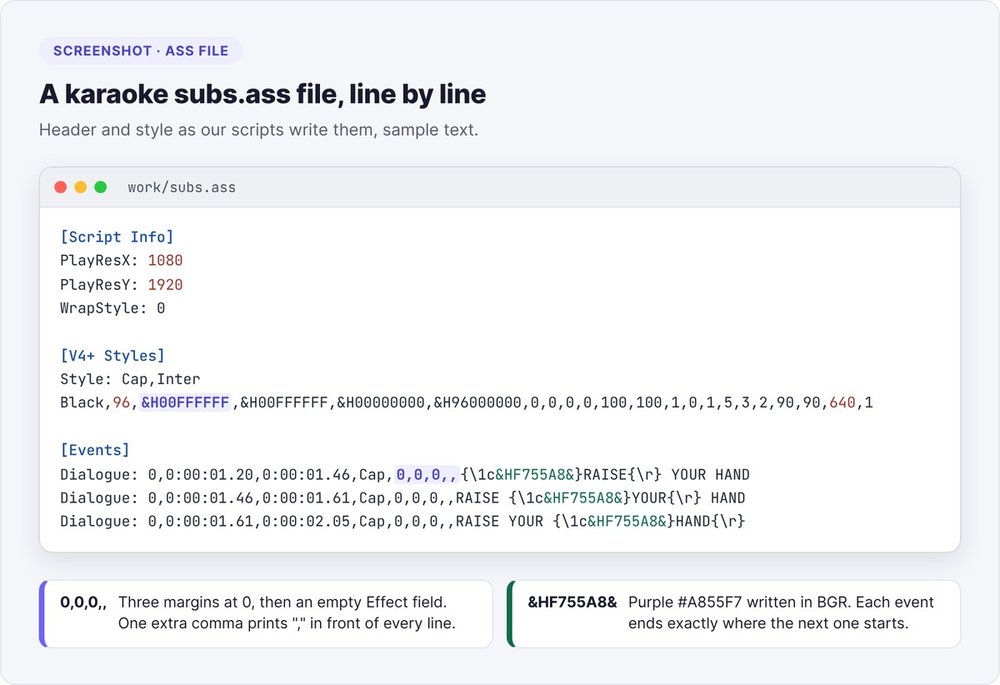
The phantom comma. One day, every one of our captions appeared with a leading comma (",MERCI"). We tested six font and outline variants before finding the cause: one comma too many in the Dialogue line. The exact format has nine fields, Dialogue: <couche>,<début>,<fin>,<Style>,0,0,0,,<texte>: three margins at 0, an empty Effect field, then the text.
The reversed color. In ffmpeg, our purple is written in RGB (0xA855F7); in ASS, it is written in reversed BGR: &HF755A8& in the text, &H00F755A8 in the Style line, where 00 sets the opacity. Copy the hex code as is and your purple comes out hot pink.
Step 5: place captions inside the 9:16 safe zone
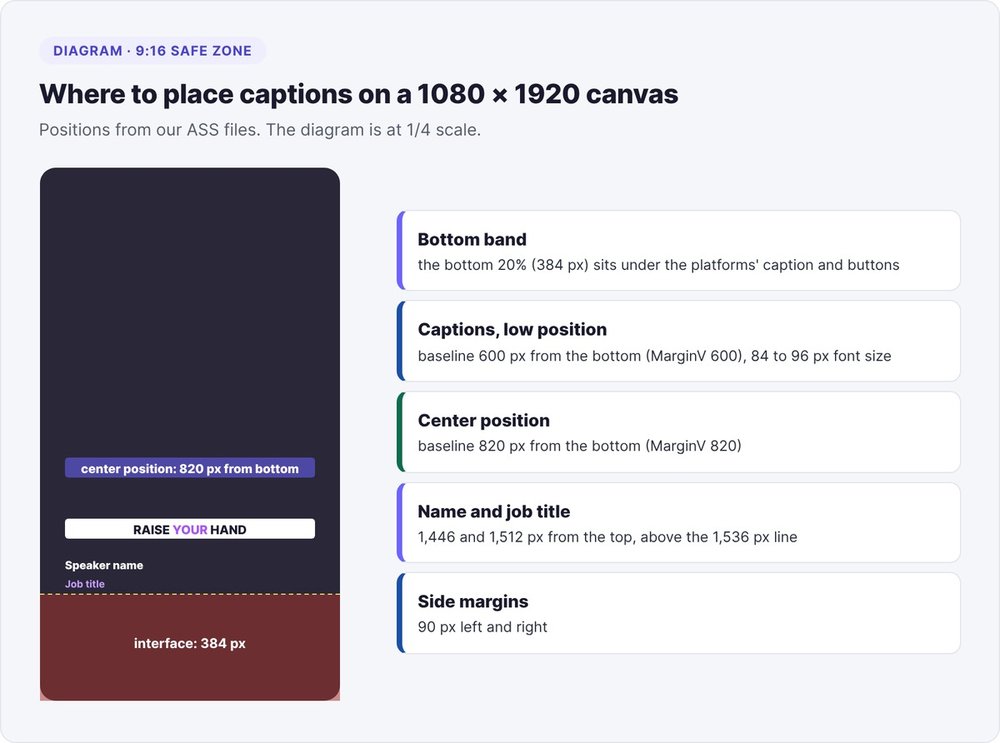
On a 1,920-pixel vertical screen, the platform interface (caption, buttons, account name) covers roughly the bottom 20%, or 384 pixels.
Our settings, on a 1080 × 1920 ASS canvas:
- the caption line sits with its baseline 600 pixels from the bottom (
MarginV: 600) in the low position, and 820 in the center position; - the speaker's name, shown for the first few seconds, sits 1,446 pixels from the top and their title at 1,512, above the 1,536-pixel safety line;
- left and right margins stay at 90 pixels.
Check the font too: if it is missing, libass silently swaps in another one. So we compare its name against the output of fc-list and, if it is absent, fall back to DejaVu Sans with a font-fallback warning.
Step 6: burn in the captions and normalize the audio
The ffmpeg command
With an ASS file, the ass filter is enough. With an SRT, the subtitles filter accepts a force_style option to set font and size. Both go through libass, as the documentation for the ffmpeg subtitles filter explains.
# ASS karaoke on a clip already in 1080x1920
ffmpeg -i clip_9x16.mp4 -vf "ass=subs.ass" \
  -c:v libx264 -crf 20 -preset medium -pix_fmt yuv420p \
  -af "aresample=48000,highpass=f=85,afftdn=nr=10:nf=-25,loudnorm=I=-14:TP=-1.5:LRA=11" \
  -ar 48000 -c:a aac -b:a 192k clip_sous-titre.mp4

# simple SRT on a horizontal video
ffmpeg -i video.mp4 -vf "subtitles=video.srt:force_style='Fontname=Inter,Fontsize=20'" \
  -c:a copy video_sous-titree.mp4
Don't set a frame rate (-r) in these commands. For vertical reframing on the speaker, done before burning in, follow the guide on creating shorts with AI. One rule to remember from it: the output keeps the source frame rate. A render forced to 30 frames per second from a 50 fps source drops two frames out of five on an irregular cadence, and the frame stutters on every pan.
Audio at -14 LUFS
Our audio chain, in order:
aresample=48000: our pitches filmed in event rooms often arrive at 96 kHz, and you publish at 48 kHz, the standard format for platforms;highpass=f=85against room rumble;afftdn=nr=10for light denoising, since a stronger setting makes the audio sound "underwater";loudnorm=I=-14:TP=-1.5:LRA=11, EBU R128 normalization to -14 LUFS, true peak at -1.5 dB.
Our public version first measures the level, then normalizes in two passes, which is more accurate on a short clip. Our full shorts pipeline has since moved to -12 LUFS with a compressor; the companion guide explains why.
Step 7: check the captions frame by frame
At normal speed, a one-frame flicker or a clipped word goes unnoticed. So we slice the caption band frame by frame and read it like a contact sheet:
ffmpeg -ss 9.3 -t 1.8 -i clip_sous-titre.mp4 \
  -vf "fps=30,crop=1080:170:0:1180,scale=540:85" cap/c_%03d.png
montage cap/c_*.png -tile 6x -geometry +1+1 -background black cap_grid.png
Read the sheet left to right: the line stays in the same place, only the purple word moves forward, no cell is empty mid-sentence, and every word stays whole. Adjust the crop to where your captions sit.
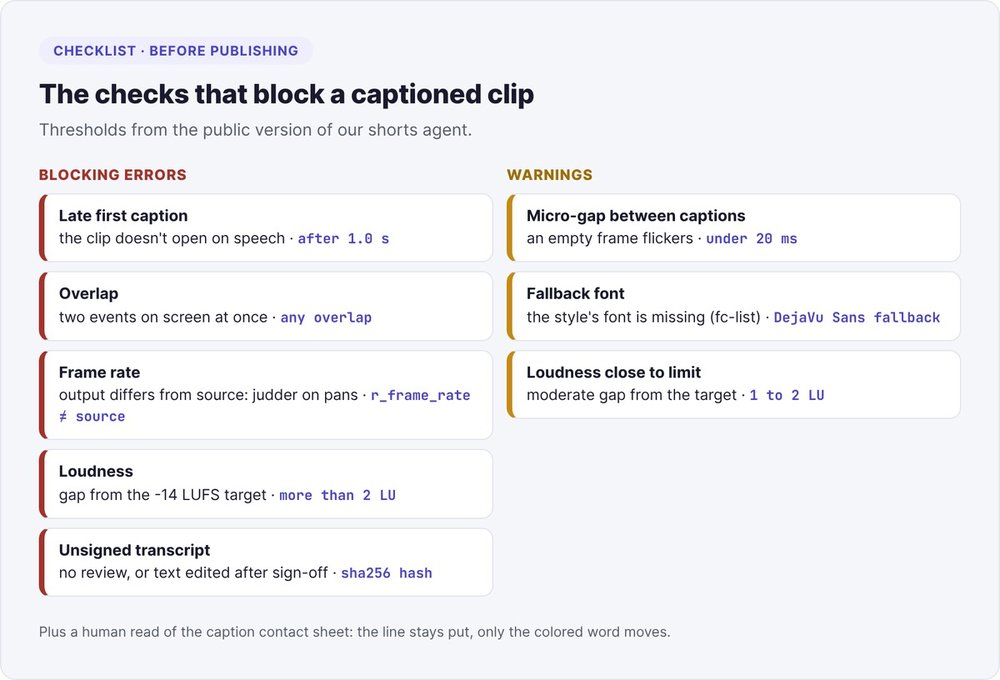
In the public version of our shorts agent, delivery is blocked by a first caption after 1.0 second, an overlap, a frame rate different from the source, audio more than 2 LU off target, or an unsigned transcript. It warns on a gap under 20 milliseconds or a fallback font.
Audio and frame rate take two commands to check; the two r_frame_rate values must be identical:
ffmpeg -i clip_sous-titre.mp4 -af ebur128=peak=true -f null - 2>&1 | grep -A3 Summary
ffprobe -v error -select_streams v:0 -show_entries stream=r_frame_rate \
  -of csv=p=0 video.mp4 clip_sous-titre.mp4
Hand the pipeline to Claude Code
If you already use Claude Code, split the work the way our shorts agent does:
- the model reads and judges: it reviews the whole transcript page by page, writes
corrections.json, and picks the position and color; - scripts execute the transcription, grouping, ASS writing, burn-in and measurements;
- a verification loop: the model reads the caption contact sheet and the measurements, then fixes the transcript or the style (never the video), for three rounds at most.
An excerpt from our review instructions for the model:
Read every page of the transcript, not only the names. For each sentence,
check that it makes sense and that a person would say it here.
Check first: numbers, capitalised words, words with probability under 0.5.
Write corrections as {"i", "j", "text"} spans over the raw word indexes.
Never rewrite what the speaker said into better prose.
If a word stays ambiguous, re-transcribe the window with large-v3;
if it is still unclear, cut the span. Never guess a proper noun.
You receive the files and a report, and you publish yourself. For the editorial angle of these videos, see our guide to founder-led content.
What free local AI subtitles mostly buy you is time to review: a free model checked word by word beats a paid tool nobody reviews.
FAQ
Which free AI should I use to caption a video?
Whisper, in its faster-whisper version, is free, open source (MIT license) and runs locally on CPU. For French, the medium model offers the best trade-off: about 1.9 times the audio duration on one core, with a full review required. YouTube Studio remains the simplest free option if your captions stay on YouTube.
Can I generate subtitles without an internet connection?
Yes. Once the model is downloaded on first launch, faster-whisper and ffmpeg work offline. The video stays on your machine, with no minute quota and no watermark.
What is an SRT file?
A text file listing numbered blocks: a start and end timestamp in the format 00:00:01,200 --> 00:00:03,100, followed by the text. YouTube accepts it in UTF-8 and ignores any styling. For word-by-word color, you need an ASS file burned into the image.
How do I permanently burn subtitles into a video?
With ffmpeg built with libass: ffmpeg -i video.mp4 -vf "ass=subs.ass" sortie.mp4 for an ASS file, or the subtitles=video.srt filter for an SRT. The text then becomes part of the image and shows on every platform, including with the sound off.
How do I fix out-of-sync subtitles?
Start from per-word timestamps (word_timestamps=True) and correct the text by span, spreading the span's duration across the new words in proportion to their length. Make each caption end exactly when the next one starts. An imported SRT only has per-block timings: per-word timings are estimated, and the render needs a careful review.
Can I caption an MP3 audio file?
Yes: faster-whisper transcribes an MP3 or WAV just like a video, and you write the SRT from the segments. To burn in captions, you then need an image, for example a still background assembled with ffmpeg.