To create shorts with AI from a long video (a talk, interview, product demo or podcast), you chain five operations: a word-level transcript, a language model that picks the passages, a cut accurate to the word, a vertical 9:16 reframe that follows the speaker, then karaoke captions and export. Every building block exists in open source: faster-whisper transcribes, an LLM like Claude picks, ffmpeg cuts and renders, OpenCV tracks the face, and libass burns in the captions.
At swanbase, we have run this pipeline locally, on CPU, since July 2026. It has rendered 40 shorts from 6 source videos, ranging from a one-minute recruiting clip to talks of nearly an hour and a half. This guide shares our commands, our settings and the pitfalls that cost us the most time. On format, YouTube has accepted Shorts up to three minutes long since October 15, 2024. Our clips have a median length of 38.9 seconds.
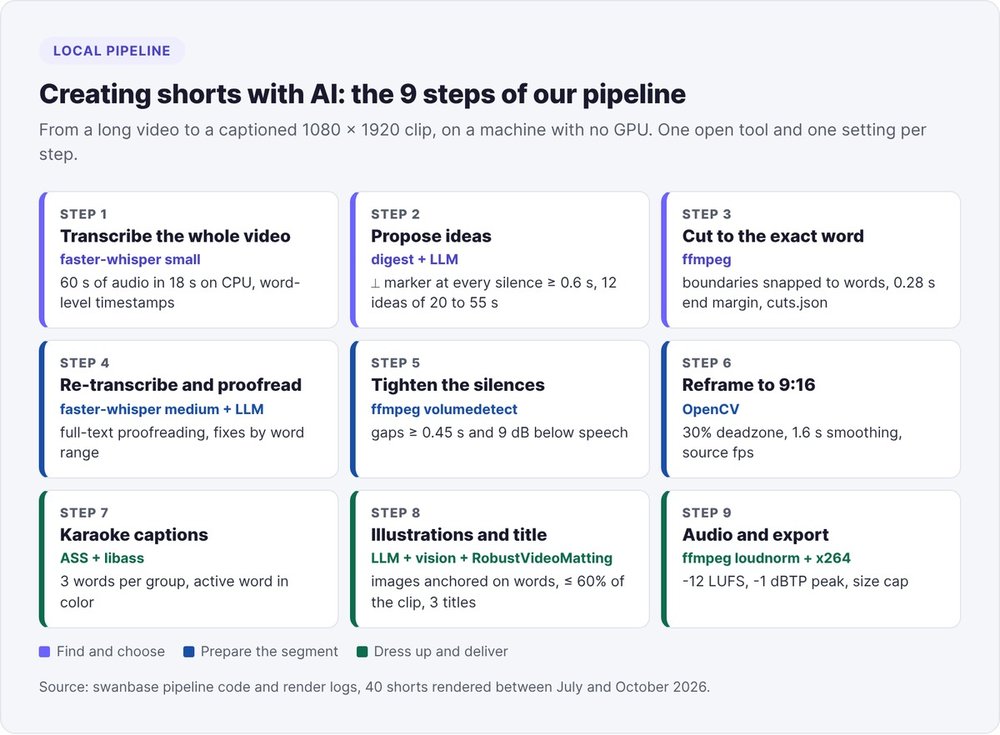
Create shorts with AI: the 9-step pipeline
The online tools that rank on Google's first page (Vizard, Opus Clip, Vmaker, Braiv) boil the method down to three buttons: upload, let the AI work, export. Behind those buttons run the same steps, with settings you never get to see.
The open tools in the pipeline
- faster-whisper transcribes the audio with a timestamp for every word. This reimplementation of Whisper claims up to 4 times the speed of openai/whisper at the same accuracy, with int8 quantization that works on CPU.
- An LLM (Claude in our case, though any OpenAI-compatible model works) proposes the passages.
- ffmpeg cuts, reframes, burns in captions and masters the audio.
- OpenCV detects the face for reframing, and RobustVideoMatting cuts the speaker out from the background.
Everything runs without a GPU, on Python 3.10 or later with ffmpeg compiled with libass.
Scripts for the mechanics, the model for the choices
Our first attempt stalled because it mixed the two. Since then, scripts handle extraction, transcription and rendering, while the model picks the moments. It never guesses a timestamp: it quotes the transcript. If you already work with Claude Code, the agent can fill this role. It reads the transcript, writes the ideas as JSON and launches the renders.
Step 1: transcribe the whole video word by word with Whisper
We don't re-encode the long video (6 GB on a single core means hours lost). We extract the audio and cut segments on demand later.
JOB=runs/$(date +%Y%m%d-%H%M)-montalk
ffmpeg -i talk.mp4 -vn -ac 1 -ar 16000 -c:a pcm_s16le "$JOB/audio.wav"
python3 pipeline/transcribe.py --job "$JOB" --model small --lang fr \
  --prompt "Speaker name, company name, product names"
Two passes: small, then medium
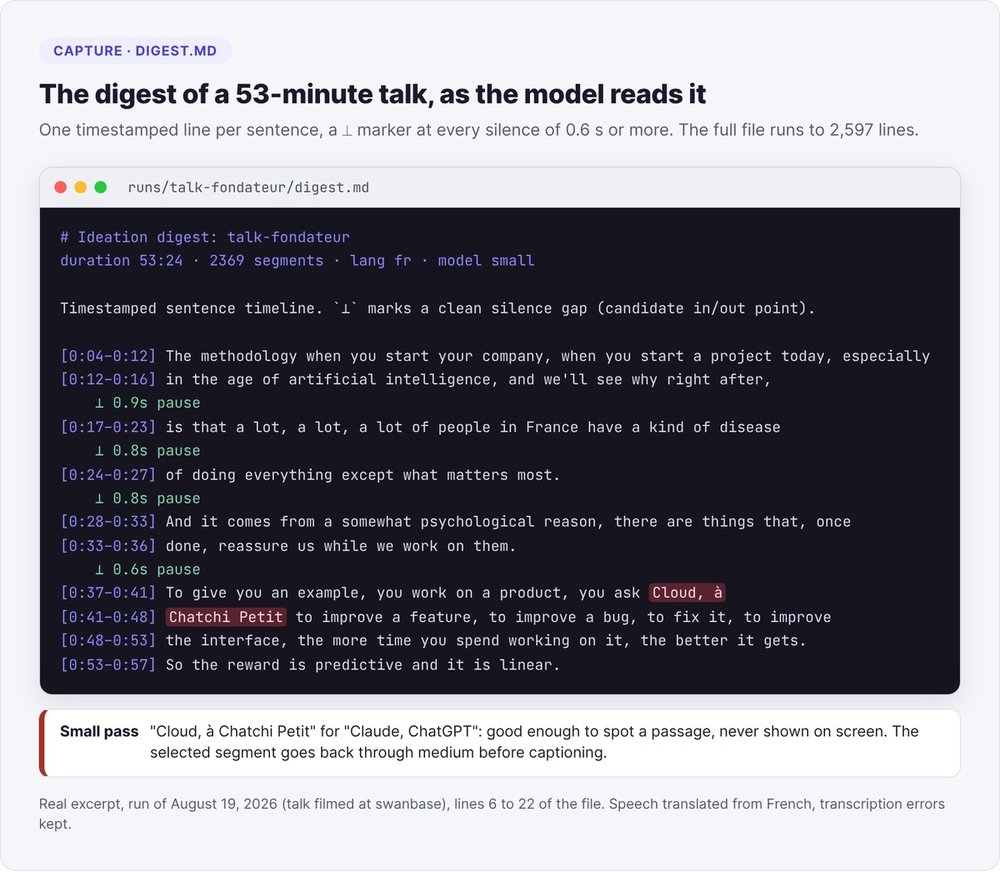
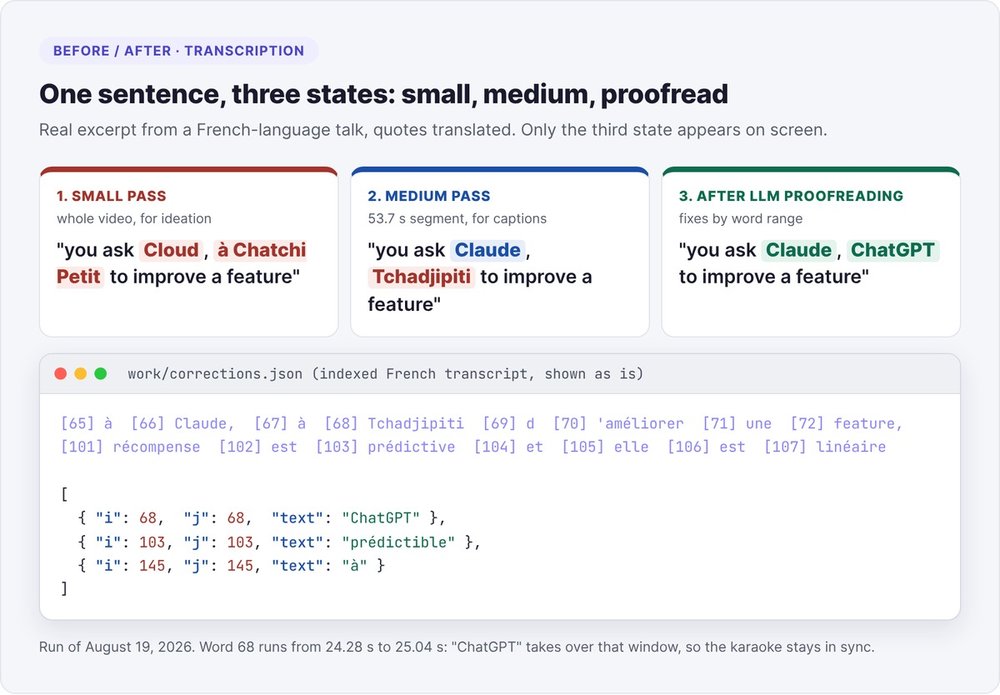
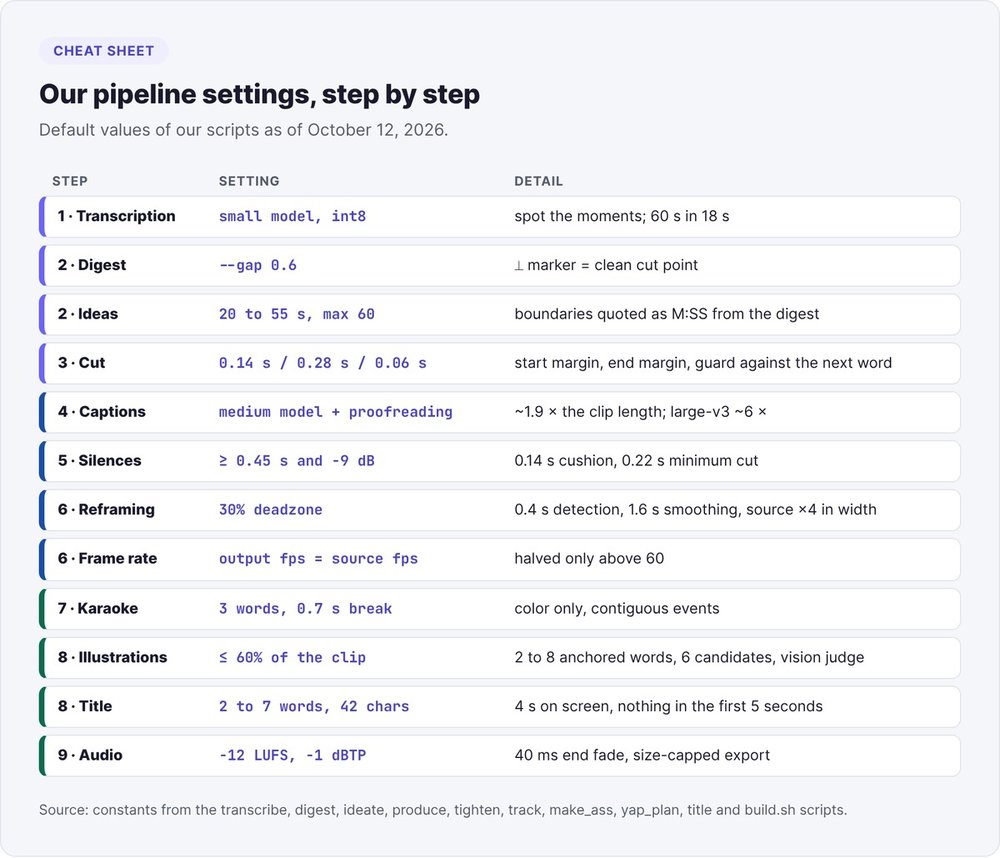
This pass exists to spot the moments, so it uses the small model. On our machine, small transcribes 60 seconds of audio in 18 seconds. An 88-minute video took about 40 minutes of CPU time. small is good enough for choosing, but too rough for on-screen text: on one talk, it heard "à Cloud, à Chatchi Petit" instead of "Claude, ChatGPT". Every passage we keep goes back through medium in step 4.
Three faster-whisper settings for French
Here is the configuration for the rendering pass:
model = WhisperModel("medium", device="cpu", compute_type="int8",
                     cpu_threads=len(os.sched_getaffinity(0)))
segments, info = model.transcribe(
    src, language="fr", word_timestamps=True, initial_prompt=prompt,
    beam_size=5, vad_filter=True,
    vad_parameters=dict(threshold=0.2, min_silence_duration_ms=700,
                        speech_pad_ms=400))
- A VAD threshold of 0.2 instead of 0.5. The default silence filter swallows quiet words at the edge of a pause (liaisons, word endings). At 0.2, we recover about 7% of lost words on French talking-head footage, with no loss of speed.
- Threads. Inside a service,
cpu_threads=0followsOMP_NUM_THREADS, which is often set to 1. By requesting the real core count (4 on our machine), transcribing a 30-second clip drops from 44 to 34 seconds. - Name priming.
initial_promptreceives the names of the speaker, the company and the products. Without it, Whisper flattens English brand names spoken in French into a single wrong word.
Our talks are in French, hence language="fr". Set your own language code (en for English).
When a segment ends mid-word, Whisper still names the fragment, with zero duration, at the very end. Drop that last token if it lasts less than 0.02 seconds and sits within 0.10 seconds of the end. Otherwise the caption shows a word that isn't in the audio.
Step 2: have an LLM propose ideas from a timestamped digest
Online tools talk about a "virality score". In our pipeline, the model makes the choice, with two safeguards: it reads a timestamped transcript and it quotes real boundaries.
The digest
The digest reduces the transcript to one timestamped line per sentence. It inserts a ⟂ marker at every silence of 0.6 seconds or more, and these markers flag clean entry and exit points.
python3 pipeline/digest.py --job "$JOB" --gap 0.6
For a 53-minute talk, the digest runs to 2,597 lines. The one for a 65-minute talk weighed 41,000 tokens. We handed it to a Claude Code subagent to protect the main context, then checked 7 of the 12 proposed boundaries by hand.
The ideation prompt
The prompt, placed before the full digest:
Propose the 12 strongest self-contained short-clip ideas for vertical 9:16.
RULES
- Each clip 20-55s (hard max 60, never under 15).
- start/end MUST match real segment boundaries shown in the digest (cite exact M:SS).
- Each clip = a complete thought a stranger follows with zero context,
  strong hook first sentence.
- Spread picks across the whole talk (beginning/middle/end), not clustered.
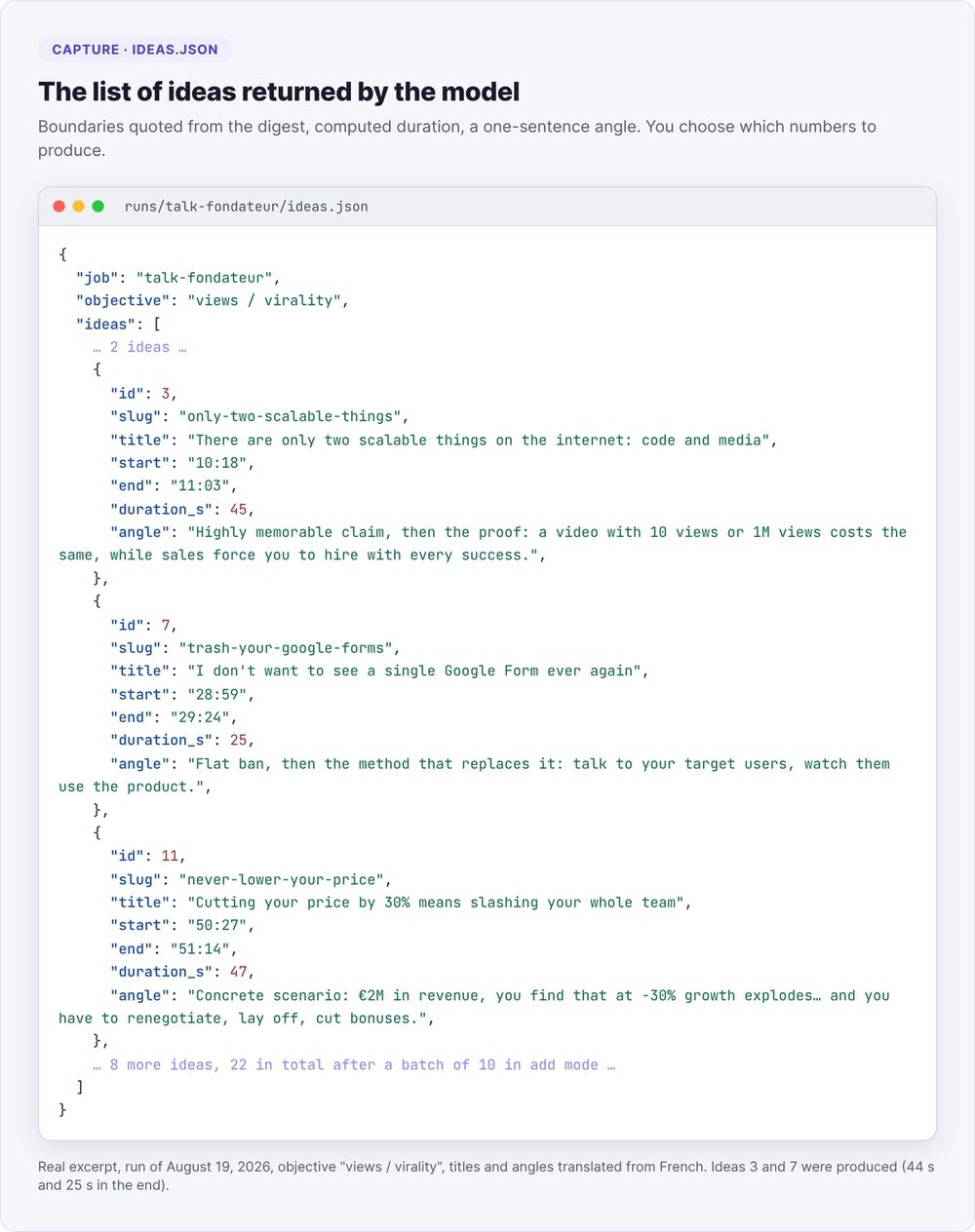
Return ONLY a JSON array: id, slug, title, angle, start, end, duration_s, why_objective
Pass the prompt through standard input (claude -p reads stdin): a long digest exceeds the 128 KB limit on a single argument and the command crashes. For an extra batch, we feed back the ideas already proposed with an instruction not to rephrase them, and we discard any idea that overlaps another by 70% or more. Our runs produced 12, 22 and 32 ideas: a first batch of 12, then batches of 10.
Choosing by goal
The same talk yields different clips depending on the goal you declare up front:
- Views: the strongest hooks, reversals, and the payoff placed early.
- Sales: problem, realization, implied solution, with an end card pointing to the offer.
- Authority: a strong point of view, teaching moments, and lines that are easy to quote.
The model presents a numbered menu (hook, duration, argument) and you reply "1, 4, 7". For the editorial angle, see our guide to founder-led content.
Step 3: cut the segment to the exact word
Snapping boundaries to words
An LLM reading a digest gives round seconds, which often land mid-word: the clip ends on "cont" instead of "contenu". Before cutting, we snap both boundaries to the word timestamps:
- at the start, a word straddling the boundary is either kept whole or dropped whole, and we step back 0.14 seconds into the preceding silence;
- at the end, the last word stays whole, with a 0.28-second margin, because Whisper timestamps word endings too early;
- we leave 0.06 seconds of silence against the neighboring word.
In French, add a rule for elisions. Whisper splits "d'arriver" into two tokens, "d" and "'arriver". The pair has to travel together when cutting, or the clip ends on "c'était l" instead of "c'était l'enfer". In our render logs, the snapping looks like this:
== snap 17.00-70.00 -> 17.04-70.78 ("que…" … "…absolument formidable.") ==
The cut itself is one command, with -ss before the input for speed and a re-encode for accuracy:
ffmpeg -ss 17.04 -i talk.mp4 -t 53.74 -c:v libx264 -preset veryfast -crf 18 \
  -c:a aac -b:a 192k segment.mp4
Removing a passage with cuts.json
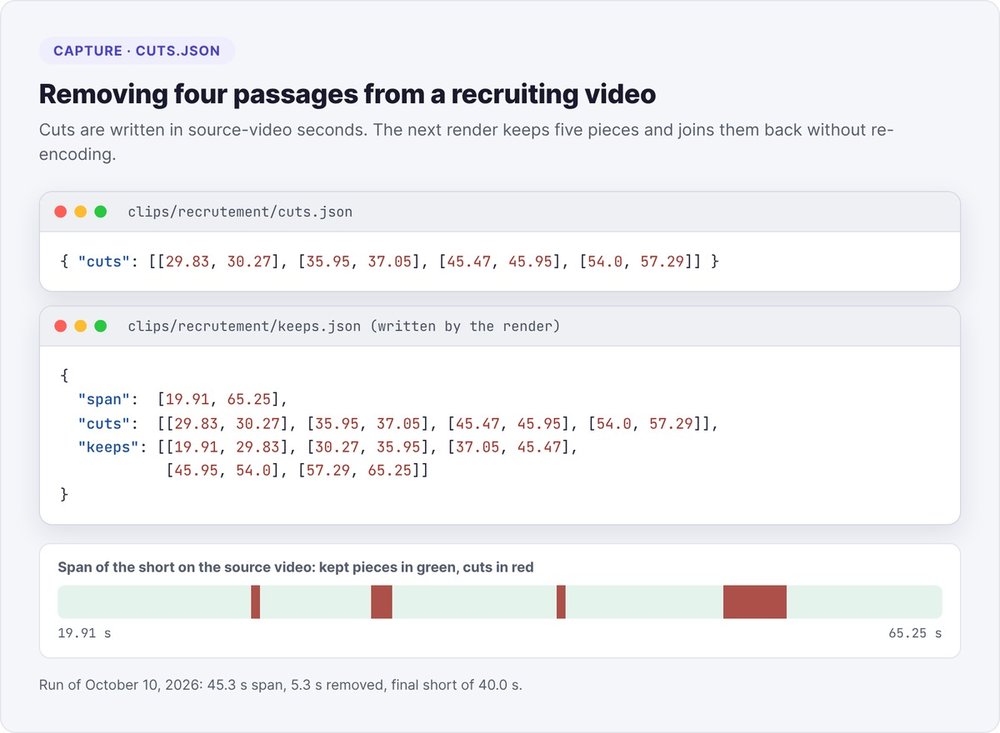
To remove a hesitation after a first render, note the passage in cuts.json, in seconds of the source video, and rerun the same render:
echo '{"cuts": [[29.83, 30.27], [35.95, 37.05], [45.47, 45.95], [54.0, 57.29]]}' \
  > "$JOB/clips/recrutement/cuts.json"
python3 pipeline/produce.py --job "$JOB" --idea 1 --brand brands/marque/brand.json
Source coordinates survive every re-render, since each render cuts again from the original. On a recruiting video, these four cuts left five pieces, joined back together without re-encoding. An empty file restores the short.
Step 4: re-transcribe the segment and proofread the whole text
Each segment goes back through medium, the right trade-off for French on CPU: about 1.9 times the clip length on one core, versus 6 times for large-v3, which is rarely worth the wait. small hears "le vélamin" instead of "levez la main" ("raise your hand").
medium still makes mistakes. On our batches, it wrote "on l'affronte" for "on la floute" ("we blur it") and "les GERP et les MDS" for "les ERP et les MES". With small, we logged "100h du matin" for "10h du matin" (10 a.m.), "Ochamp" for "Auchan", and "Diolingo" for "Duolingo". None of these words is a brand you would list in advance, so a proper-noun replacement table won't catch them.
Our rule: proofread the entire transcript before burning in a single caption. We give this proofreading to an LLM, with a deliberately cautious prompt:
You are a strict, conservative transcription proofreader. Your ONLY job is to fix
words it clearly got WRONG: phonetic mistakes and mangled proper / brand names.
Do NOT paraphrase, do NOT change style.
- PROTECT domain vocabulary: agent, prompt, RAG, LLM, token, pipeline, growth, pitch, SaaS.
- If the transcript reads correctly, return exactly []. Prefer [] over a risky fix.
Return: [{"i": <first index>, "j": <last index>, "text": "<corrected words>"}]
We then spread each range's duration across the corrected words, in proportion to their length, so the karaoke stays in sync even when the word count changes. On one talk, the same sentence went through three states:
When a passage stays unintelligible, don't guess. Cut out that audio window and re-transcribe it on its own with large-v3, using an initial_prompt that contains the domain vocabulary:
ffmpeg -ss 41.2 -to 44.0 -i segment.mp4 -ar 16000 -ac 1 win.wav
Once the corrections are written, rerun the render with SKIP_TRANSCRIBE=1 to save the two minutes of transcription. That is how we corrected "col-col" to "cold call", the last word of a clip about prospecting.
Step 5: tighten the silences
The pauses in a filmed talk slow a short down. We remove them with a cautious policy:
- only gaps of 0.45 seconds or more between two words become candidates;
- we keep 0.14 seconds of silence around each word;
- we skip any cut shorter than 0.22 seconds, which would produce a visible jump;
- a gap counts as silent if it drops 9 dB or more below the clip's speech level.
A fixed -30 dB threshold fails as soon as room noise rises above it. Our relative threshold adapts to each recording and keeps laughter and applause.
There are two ffmpeg traps. The volumedetect filter writes its measurements at the info log level: with -v error, every gap measures 0.0 dB and you never cut anything. To join the pieces back together, use trim, atrim and concat, because the select filter shifts the audio.
Across our 16 clips that kept a trace of this pass, we count 24 cuts and 10.5 seconds removed, and seven clips had no cuts at all. Caution costs a little pace but never eats a syllable.
Step 6: reframe to 9:16 on the speaker
A 1080p source gives a vertical window 608 pixels wide (the height × 9/16), which we scale up to 1080 × 1920. What remains is placing that window on every frame.
The deadzone
We detect the face every 0.4 seconds with an OpenCV Haar classifier. Recentering on every detection makes the image shake, so we apply a deadzone. The frame stays still as long as the face stays within 30% of the frame width from its center, then slides just far enough to bring it back to the edge of that zone. A 1.6-second moving average smooths these moves.
On a 43-second clip, the log shows deadzone=±182px leash_moves=15: fifteen moves, and a fixed frame the rest of the time.
The crop filter only accepts integer positions, and one source pixel equals 1.78 output pixels, so a slow pan moves in steps. We scale the source up 4 times horizontally before cropping, which brings each step down to 0.44 pixels. And because the smoothing shifted the frame at the start, we anchor the first 0.8 seconds on the first detected face.
Keep the source frame rate
This problem cost us six versions. The frame stuttered during pans, we fixed the crop calculation, and the stutter came back on the next video. The cause was elsewhere: the render forced -r 30 on a 50 fps source. Going from 50 to 30 drops two frames out of five at an irregular cadence, invisible on a still speaker and glaring as soon as the camera moves.
The fix is a single rule: the output keeps the source frame rate, halved only above 60. Check it on every file:
ffprobe -v error -select_streams v:0 -show_entries stream=r_frame_rate \
  -of csv=p=0 source.mp4 final.mp4
Both values must match. Our clips from a 23.976 fps source come out at 2997/125, the same exact value.
To break the monotony of a static shot, we add sharp 13% zooms on sentence openings, spaced at least 3.2 seconds apart. We layer them with overlay, because changing a crop size mid-render via sendcmd hangs ffmpeg.
Step 7: add karaoke captions
We burn the captions into the image, so they show on every platform, including with the sound off. The details of proofreading and ASS pitfalls are in our free AI subtitles tutorial. Our rules, written in ASS and rendered by libass:
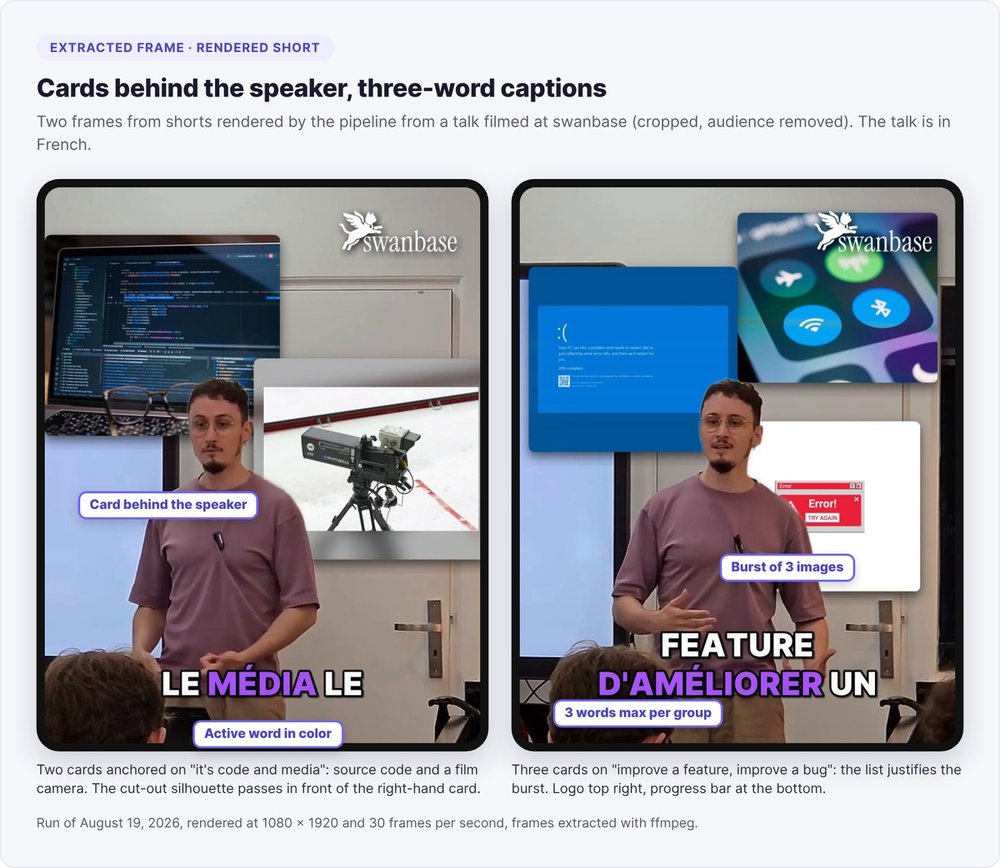
- Three words per group at most, with a new group after any silence longer than 0.7 seconds.
- The spoken word changes color, never size. A word that grows recenters the whole line and makes it jitter.
- Contiguous events: each word's end time equals the next word's start time exactly, otherwise a blank frame flickers between words.
- Elisions rejoined: any token starting with an apostrophe joins the previous one, and "l'IA" stays a single word.
- Numbers in the accent color, 8% larger for the whole duration of the group.
Each group enters by scaling from 88% to 100% of its size over 90 milliseconds, on its first word only. One syntax trap had us testing six font variants before we found the cause: an extra comma in the Dialogue: line displays a comma in front of every caption. The exact format is Dialogue: <layer>,<start>,<end>,<Style>,0,0,0,,<texte>.
Step 8: add illustrations and a hook title
Images anchored to spoken words
The "yapping" style on Instagram and TikTok pops image cards up around the speaker, mostly behind them. We reproduce it with three safeguards.
The model plans within a strict frame. Cards cover at most 60% of the clip's duration, and that ceiling is a limit rather than a target. Nothing appears in the first second or the last 2.5. Each appearance lasts 1.6 to 3.2 seconds and shows 1 to 4 images, with 3 or 4 reserved for lists. At most one card in five goes in front of the speaker.
Each card quotes the spoken words. The model copies 2 to 8 exact words from the transcript, and if we can't find them at that point in the clip, the card is dropped. The prompt also bans visual metaphors: no key for "the key is", no light bulb for an idea. Searches run in English, the indexing language of image banks.
A vision model checks. For each card, we fetch 6 candidates (Wikidata, Wikimedia Commons, Openverse, Pexels, image search) and show them to the model on a contact sheet. The model picks a number or answers "none". On the clips from a single source video, it rejected every candidate 17 times, mostly interface screenshots that would be unreadable on a phone ("Reddit user profile page", "Stripe revenue dashboard"). A shot with no image beats a shot with the wrong one.
To place cards behind the speaker, we cut out their silhouette with RobustVideoMatting, in the MobileNetV3 ONNX version, which runs on CPU. Do this compositing on the clean video, before captions and the logo. Otherwise the matting treats the burned-in text as background, and a card covers it.
Three hook titles
Once the clip is rendered, the model writes three titles of 2 to 7 words, 42 characters at most, shown at the top of the screen for the first 4 seconds. Each title follows an angle:
- the stakes: what the viewer gains or risks;
- the fact: a number, name or concrete fact taken from the clip;
- the tension: the contradiction the clip resolves, without giving the answer.
A title must never repeat the words heard at the same moment. The script compares its words with the first 5 seconds of speech and rejects the title if 60% of its content words appear there. The prompt also bans clickbait formulas like "the secret" or "the truth about", as well as the informal "tu" form of address. Swapping titles costs one overlay pass of about a minute, with no full re-render:
python3 pipeline/title.py --clip-dir "$JOB/clips/idea3" --select 2
We never put a title card before the content: a "LA PROMESSE" ("THE PROMISE") card tested as an opener created dead air in the first seconds, exactly when viewers are deciding whether to stay. The first frame shows the speaker.
Step 9: mix the audio and export
Our audio chain: 48 kHz, an 85 Hz high-pass against room rumble, light denoising (any stronger and the sound turns "underwater"), a gentle compressor, then normalization to -12 LUFS with true peak capped at -1 dBTP. We originally aimed for -14 LUFS. The ceiling stays below 0 dBTP because AAC decoding clips peaks sitting at 0.
# AOUT_ST = clip duration - 0.04 s
-af "aresample=48000,highpass=f=85,afftdn=nr=10:nf=-25,\
acompressor=threshold=0.09:ratio=2.8:attack=15:release=250:knee=6:makeup=1.5,\
loudnorm=I=-12:TP=-1.0:LRA=9,afade=t=out:st=${AOUT_ST}:d=0.04"
Drop long fade-outs. Our 0.6-second fade swallowed the last word of every clip, so we now keep a 40-millisecond ramp to prevent the cut click.
On export, set a size cap rather than a bitrate. Under the cap, we copy the master as is. Above it, a two-pass x264 encode fills the budget exactly. Our cap is 57 MB, or 9 MB for Discord, which rejected a 23 MB master. Don't add -r, or you will bring back the stutter from step 6.
The same 1080 × 1920 file works on Shorts, Reels, TikTok and LinkedIn. For LinkedIn, see how to turn your LinkedIn views into customers.
Our numbers from 40 shorts rendered from 6 videos
Between July and October 2026, the pipeline rendered 40 shorts from 6 source videos: talks, a CEO interview and a recruiting video. The measurements come from our render files.
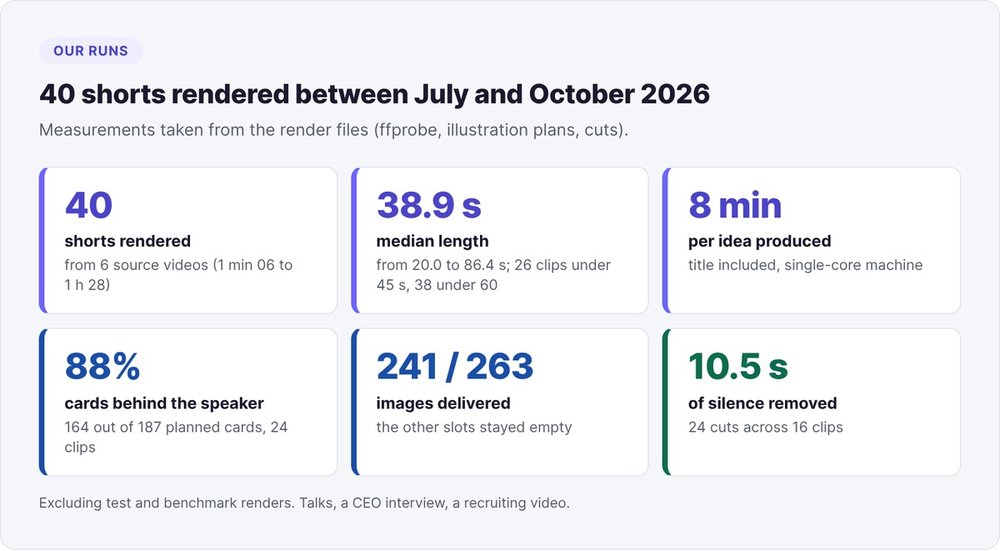
Lengths range from 20.0 to 86.4 seconds, with a median of 38.9. 26 clips stay under 45 seconds and 38 under 60. The two longest, at 77 and 86 seconds, come from the same video and exceed the prompt's instruction: the instruction steers the model, but you still have to check by hand.
One idea goes end to end in 8 minutes, title included, on a single-core machine. A carousel taken from the same clip comes out in parallel in about 40 seconds.
On illustrations, the model planned 187 cards across 24 clips, 164 of them behind the speaker (88%). It requested 263 images and delivered 241: slots without a validated image simply stayed empty. Removed silences total 10.5 seconds across 16 clips, under a second per clip.
Finally, plan for restarts: our server rebooted during a long transcription. Since then, our job queue puts any task left "in progress" back in the queue on startup.
SaaS tool or local pipeline: how to choose
The online editors that dominate searches for "AI that cuts videos" (Opus Clip, Vizard, Submagic) save time on the first try. They are enough if you publish a few clips a month and their captions suit you.
A local pipeline makes sense in three cases:
- you want to tune the transcription model, the proofreading, the image anchoring and the loudness yourself;
- you produce at volume from your talks, interviews or product demos, with your brand guidelines (fonts, colors, logo) in a brand file;
- you already work with a coding agent. Searches for "opus clip alternative open source" point to repos that assemble the same building blocks (faster-whisper, an LLM, OpenCV, ffmpeg). With Claude Code, you can build and tune your own version starting from the thresholds in this guide.
The cost of a local pipeline is maintaining the pitfalls described here. Our overview of AI tools for startups covers the rest of the stack.
To create shorts with AI without giving up your evenings, follow the priority order from our runs: proofread the transcript, keep the source frame rate, and cut on the word.
FAQ
What is the maximum length of a YouTube Short?
YouTube accepts Shorts up to three minutes long for videos uploaded after October 15, 2024, in square or vertical format. Our shorts have a median length of 38.9 seconds: our prompt targets 20 to 55 seconds, with a ceiling at 60.
Which Whisper model should you choose for French?
small to spot moments in the long video, medium for captions. On CPU, medium takes about 1.9 times the clip length and large-v3 about 6 times. Even medium needs a full proofread.
Can you create shorts with AI for free?
Yes for the processing blocks: faster-whisper, ffmpeg, OpenCV and RobustVideoMatting run on CPU with no paid license. The paid items in our pipeline are the LLM and, optionally, an image search API.
How long does it take to produce a short?
On our single-core machine, one idea comes out in 8 minutes with its title. Add the initial transcription of the long video: about 0.3 times its length with small on our one-minute test, or about 40 minutes for an 88-minute video.
How do you make reels with AI from a horizontal video?
Reframe to 9:16 around the speaker's face with a deadzone, so the frame stays still while they move only slightly, and keep the source frame rate. The same 1080 × 1920 file works for Reels, Shorts and TikTok.
Do you need to know how to code to build this pipeline?
You need to be able to run Python and ffmpeg commands and read a JSON file. An agent like Claude Code can write the scripts if you give it the thresholds from this guide and have it check every render frame by frame.