Clay is a B2B data enrichment and orchestration platform. Starting from a simple list of prospects, Clay hunts down emails, information, and signals across 150+ providers in a cascade, then automates sorting and copywriting through AI agents. In plain terms: you start with a name, and Clay hands you back a complete, ready-to-contact profile. This article explains what Clay is, how it works, what it really costs, and when it becomes overkill for a founder.
What is Clay?
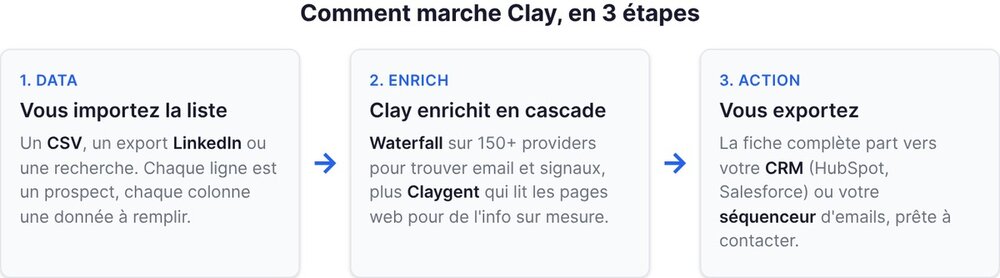
Clay is not an email-sending tool, nor a static database like a directory. It is the layer that comes before: the one that builds and enriches your list of prospects. You import a list (or generate it from LinkedIn, a CSV import, a search), and Clay takes care of filling it in. For each row, it queries dozens of sources until it finds the work email, the job title, the company, the company size, the tech stack, a recent fundraise, a job change. Everything that would help you know who to contact and what to say to them.
The difference with a classic tool like Apollo or ZoomInfo: those sell you their own database. Clay queries theirs, plus 150 others, and takes the best result. You are no longer dependent on the coverage of a single provider. Add to that the AI agents that read a website or a profile to pull out a tailored piece of information, and you get a machine for preparing ultra-targeted prospecting, in place of an intern copy-pasting rows into a spreadsheet.
If you are just discovering the ecosystem, our overview of B2B prospecting tools places Clay against the rest of the market.
How Clay works (enrichment + waterfalls)
The heart of Clay rests on a simple principle: never depend on a single source. Here is how it breaks down.
The enrichment sources (waterfall)
The waterfall, or cascade enrichment, is Clay's signature mechanism. Let's take a concrete example: you want a prospect's work email. Instead of querying a single provider and accepting its "email not found," Clay queries the first provider. If it comes up empty, it moves to the second. Then the third. And so on, until it gets a result or exhausts the list of 150+ connected sources.
The result: a coverage rate far higher than any single-source tool can offer. Where Apollo alone might find 60% of the emails on a list, a well-configured waterfall climbs significantly higher, because it stacks the coverage of every provider. You only pay for data when a source finds it, and you put the cheapest sources at the top of the cascade.
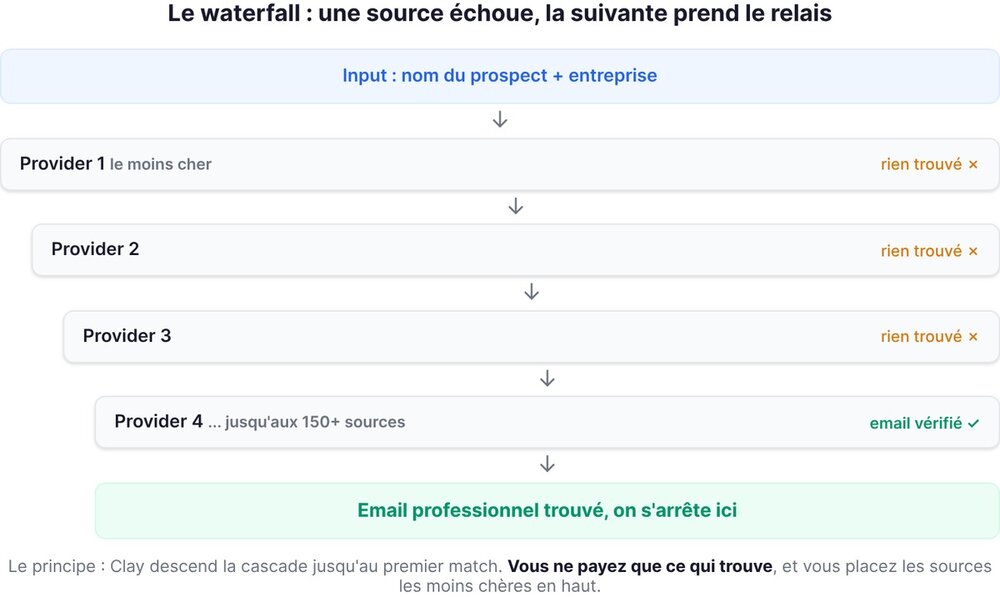
This has a direct impact on your budget, and this is where you need to be clear-eyed: the more providers you leave in the cascade, the more credits you burn per row when the first ones fail. We come back to this in the pricing section, because it is the point most guides gloss over.
The AI agents (Claygent)
Claygent is the AI agent built into Clay. You give it an instruction in plain language and a URL (the company website, a LinkedIn profile, a product page), and it reads the page to extract what you asked for. Real usage examples: "does this company have a sales team?", "what is their main offering?", "find the founder's name and their latest public statement."
This is what sets Clay apart from a simple structured-data enricher. An email or a job title, any tool can retrieve. A qualitative read of a website to judge whether the prospect matches your target, that is new, and it replaces hours of manual research. Every call to Claygent consumes credits, so it is powerful but not free at scale.
The integrations & tables
Clay's interface looks like a supercharged spreadsheet. Each row is a prospect, each column a piece of data you enrich, filter, or generate. You add an "email" column, a "fundraise signal" column, an "AI-written opening line" column, and Clay fills it all in row by row.
On the connection side, Clay integrates with CRMs (HubSpot, Salesforce, Pipedrive), sending tools (Lemlist, Smartlead, La Growth Machine), LinkedIn, and via webhooks and API just about everything else. The logic: Clay prepares and qualifies the data, then pushes it to the tool that runs the campaign. It sits at the center of your stack, not in place of your existing tools.
Key features
A summary of what Clay does in practice, to size up the tool at a glance.
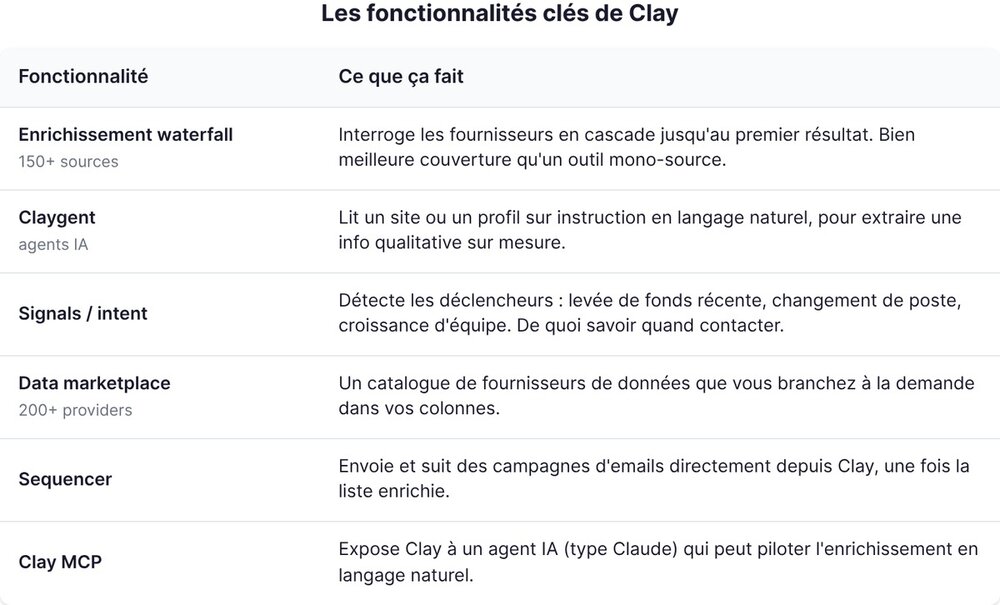
The points that really matter for a founder:
- Data coverage. This is the real reason to use Clay. Multi-source cascade, you get emails and phone numbers that your single-source tools miss.
- AI automation. Claygent turns manual research into an automated column. A real time saver as soon as you handle more than a few dozen prospects.
- Flexibility. Everything is configurable. It is both a strength and a trap: the tool does nothing until you have built it out, unlike a turnkey directory.
Clay pricing 2026
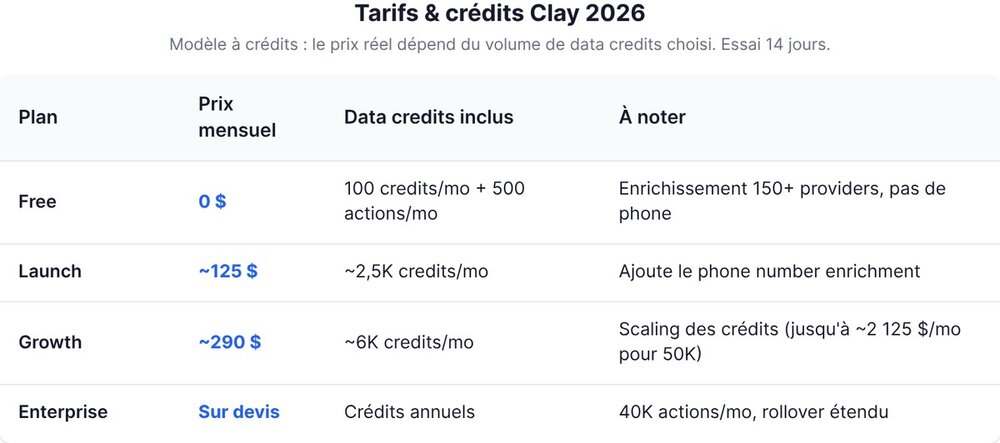
Here is the point to read carefully, because the sticker price tells you very little about what you will actually pay. Clay does not work like a flat subscription: it is a credit system. The official grid is on Clay's pricing page. Free 14-day trial, and 10% off with annual billing.
The plan breakdown:
- Free: 500 actions/month and 100 data credits/month. Enrichment via 150+ providers is already included, which is enough to test the mechanics on a small list. No phone number enrichment.
- Launch: around $125/month, with roughly 2,500 data credits/month. This plan unlocks phone number enrichment, useful if you do cold calling on top of cold email.
- Growth: around $290/month for roughly 6,000 data credits/month, and above all the option to push your credit volume much higher. As an example, a volume of 50,000 credits/month runs around $2,125/month.
- Enterprise: custom quote. Credits billed annually, 40,000 actions/month, extended rollover.
Two mechanisms cut the bill, worth knowing: cached enrichments cost 50% fewer credits (if a data point has already been found, finding it again costs half price), and unused credits roll over up to 2x your monthly quota, capped at 20,000 credits on the Launch and Growth plans.
The credit system (and why it climbs fast)
Here is the angle nobody explains clearly. Clay's entry price is deceptively low, because what you really pay for is credit volume, and credit volume depends on your actual usage.
Every action consumes credits: every source queried in a waterfall, every Claygent call, every phone number enrichment. Concretely, if you configure an aggressive ten-provider waterfall and run it on 5,000 rows, you can burn through your monthly credits in a single campaign. The good news: credits get cheaper per unit as you scale up your volume, and the cache limits the damage on lists you re-enrich.
The practical takeaway for a founder: don't look at the plan price, estimate your consumption. How many prospects per month, how many enriched columns per prospect, how many AI calls. That calculation is what gives you your true cost, and it can go from $125 to several thousand without you changing plans, just by increasing your credit volume. Clay is honest about this in its pricing grid, but the "I'll take the $125 plan and I'm done" reflex does not hold up.
Clay for a founder: concrete use cases (and when it's overkill)
Let's be direct on this, because Clay is a magnificent tool that is not made for everyone.
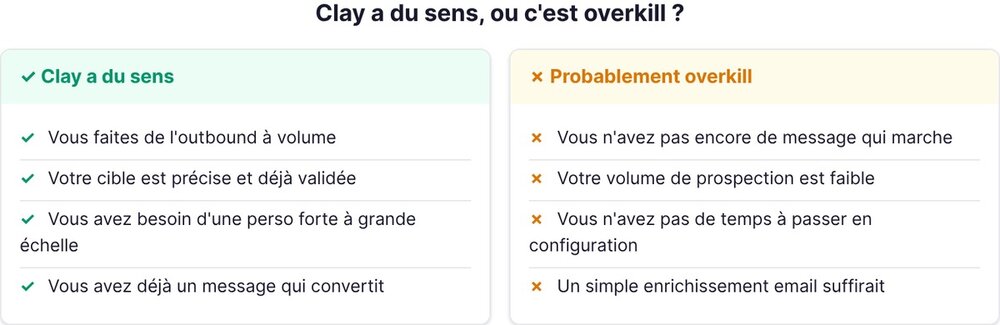
Clay makes sense for you if you do high-volume outbound, on a precise target, with a strong need for personalization. Examples where it shines: building a list of 2,000 French SaaS companies that raised this year and pulling the email of their head of growth, enriching a LinkedIn Sales Navigator export with the missing emails, generating a personalized opening line per prospect from their website. As soon as manual research becomes unmanageable, Clay earns its price.
Clay is overkill if you are at your first 50 prospects, if you don't yet know who your target is, or if you just want to send a simple email sequence. In those cases, an all-in-one prospecting tool does the job without Clay's learning curve. And if your real need is sending and tracking campaigns more than enrichment, take a look at our Lemlist review before investing in Clay.
The classic trap: building a Clay Rube Goldberg machine before you've validated that your message converts. Enriching 5,000 perfect prospects is pointless if your email triggers no replies. Clay amplifies prospecting that already works, it doesn't create it. Start small, prove that your approach converts on 50 prospects found by hand, then move to Clay to industrialize it.
Alternatives to Clay
Clay isn't alone in its niche, and depending on your need an alternative may be enough, or even a better fit.
- Apollo: an all-in-one database + sequencer. Less flexible than Clay on multi-source enrichment, but far easier to get started with, thanks to its own built-in contact database. A good starting point for standard volume.
- Dropcontact: a French specialist in email enrichment and verification, with strong GDPR compliance. More focused and simpler than Clay, without the AI orchestration layer.
- ZoomInfo: the big, long-standing B2B database, very rich on the US market, with a high entry ticket and geared toward large sales teams.
- Pharow: a French sourcing and enrichment tool built for the French B2B market, more accessible than Clay for targeting specific French companies.
The right question isn't "which is the best tool" but "do I need orchestration." If yes, Clay. If you just want a clean contact database and a sequencer, a simpler alternative will save you time and money.
Going further
- B2B prospecting tools: the founder's guide
- Waalaxy: review, features, and pricing
- Lemlist: review, features, and pricing
- Product-Led Growth: definition and principles
- Growth marketing for startups: the guide
FAQ
Does Clay replace Apollo / ZoomInfo?
Not exactly, because they don't play the same role. Apollo and ZoomInfo sell their own database. Clay queries hundreds of sources (potentially including those) in a cascade and takes the best result. So Clay can replace their enrichment function with better coverage, but it demands more configuration. If you want a turnkey database with no setup, stick with Apollo. If you want the best possible data coverage, Clay.
Is Clay a good fit for a beginner?
Honestly, it's a demanding tool. The supercharged-spreadsheet logic, the waterfalls, and the credit system take real time to learn. A founder who is completely new to prospecting will move faster with an all-in-one tool. Clay becomes relevant once you know precisely who you're targeting and manual research is costing you too much time.
How much does enrichment cost at scale?
It depends entirely on your volume, and that's the real trap with Clay. The sticker price (from around $125/month) doesn't reflect your actual cost, which follows your credit consumption. The more prospects you enrich, the more cascade sources and AI calls you add, the higher the bill climbs. Heavy usage can reach several thousand dollars per month. Estimate your volume before committing, and use the official grid to project your cost.