A Claude Code subagent is a secondary AI assistant that runs in its own context window, with its own system prompt, its own set of tools, and its own permissions. When a side task (digging through the codebase, reviewing a diff, looking something up) risks flooding your main conversation with results you'll never read again, Claude hands that work off to a subagent: it runs the task separately and returns only the summary. Claude Code subagents therefore do two things at once: keep your context clean, and hand a subtask to a specialized worker you can constrain (limited tools, cheaper model). Here's what a subagent is, how to create one, when to prefer a subagent over a skill or a hook, and three concrete use cases for building solo.
What is a Claude Code subagent?
A subagent is a worker Claude calls up for a specific mission, then dismisses once the job is done. What sets it apart from Claude itself comes down to one word: isolation. Every Claude Code subagent has its own context window. Whatever it reads, searches, and tests stays with it. Your main conversation only gets the conclusion.
That solves a very concrete problem. When you ask Claude "where is authentication handled in this project?", it opens ten files, reads three thousand lines, and all of that stays in your context even after you've moved on to something else. An Explore subagent runs the same search inside its own bubble and hands you three lines: the file, the function, the entry point. The noise stays outside.
Claude Code ships with subagents out of the box:
- Explore: a fast, read-only agent for searching and understanding a codebase. Write and Edit are off-limits.
- Plan: a research agent used in plan mode to gather context before proposing a plan. Read-only as well.
- general-purpose: a full agent, all tools, for tasks that mix exploration and modification.
Beyond these three, you write your own. And that's where the subagent becomes real leverage, because a custom subagent lets you set four things Claude won't set on its own: which model it uses, which tools it's allowed to employ, which permissions it gets, and how it should behave (via its system prompt). Want a code reviewer that can't modify anything and runs on a cheap model? Describe it, and it exists.
It's also a cost tool. Routing a mechanical task to a faster, cheaper model like Haiku, rather than running it on the model driving your session, is a one-line setting. When you're counting every euro of API spend, that's not a detail.
Subagent vs skill vs hook: which to use when
Three ways to extend Claude Code, often confused, that do completely different things. The table first, the explanation after.
| Mechanism | What it is | Context | When to use it |
|---|---|---|---|
| Subagent | A delegated AI worker, with its own context window | Isolated from yours | A heavy subtask (research, review) where you only want the result |
| Skill | Instructions or a procedure Claude loads | In your main context | Teaching Claude how to do something recurring |
| Hook | A script triggered automatically on an event | Outside the AI, deterministic | Guaranteeing an action (format, block) every time, without fail |
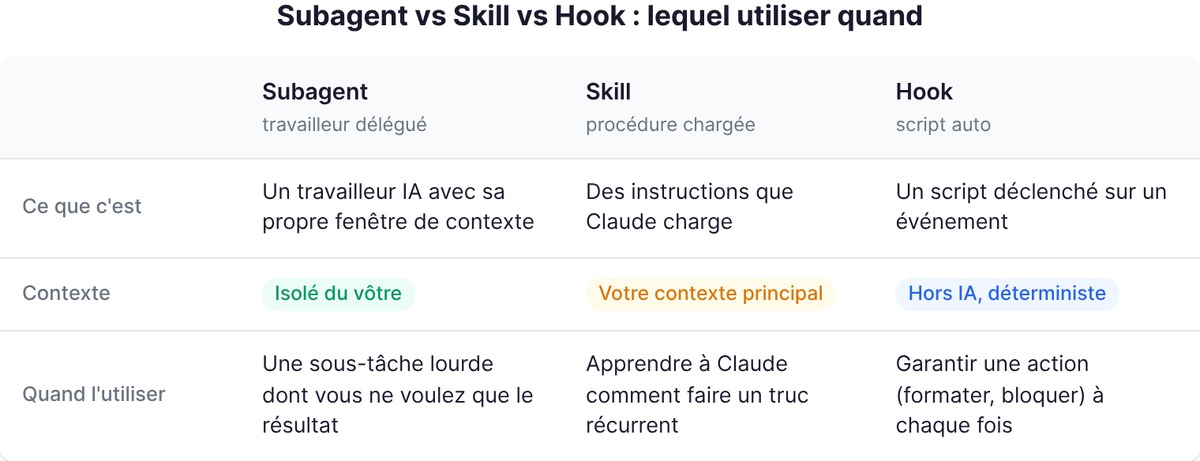
The distinction turns on two axes: context isolation and degree of control.
A skill lives in your context. It loads instructions that Claude applies during your conversation. It's a skill on demand, but it reasons alongside you, in the same bubble. If the task is going to generate a lot of noise (logs, files), the skill dumps it into your context.
A subagent lives beside you. It takes the same procedure but runs it in its own window and returns only the summary. The simple rule: if you just want Claude to know how to do something, that's a skill. If you want it to go do the thing elsewhere and come back with the answer, that's a subagent. The two combine, in fact: a subagent can preload a skill as reference material.
A hook isn't AI at all. It's a script that Claude Code runs automatically at a precise moment (before a tool runs, after an edit). It doesn't decide, it executes. Where a subagent is a smart but fallible collaborator, a hook is a mechanical guarantee: it fires every time, no judgment. Want a formatter to run after every edit, no exceptions? Hook, not subagent.
Structuring and creating a subagent
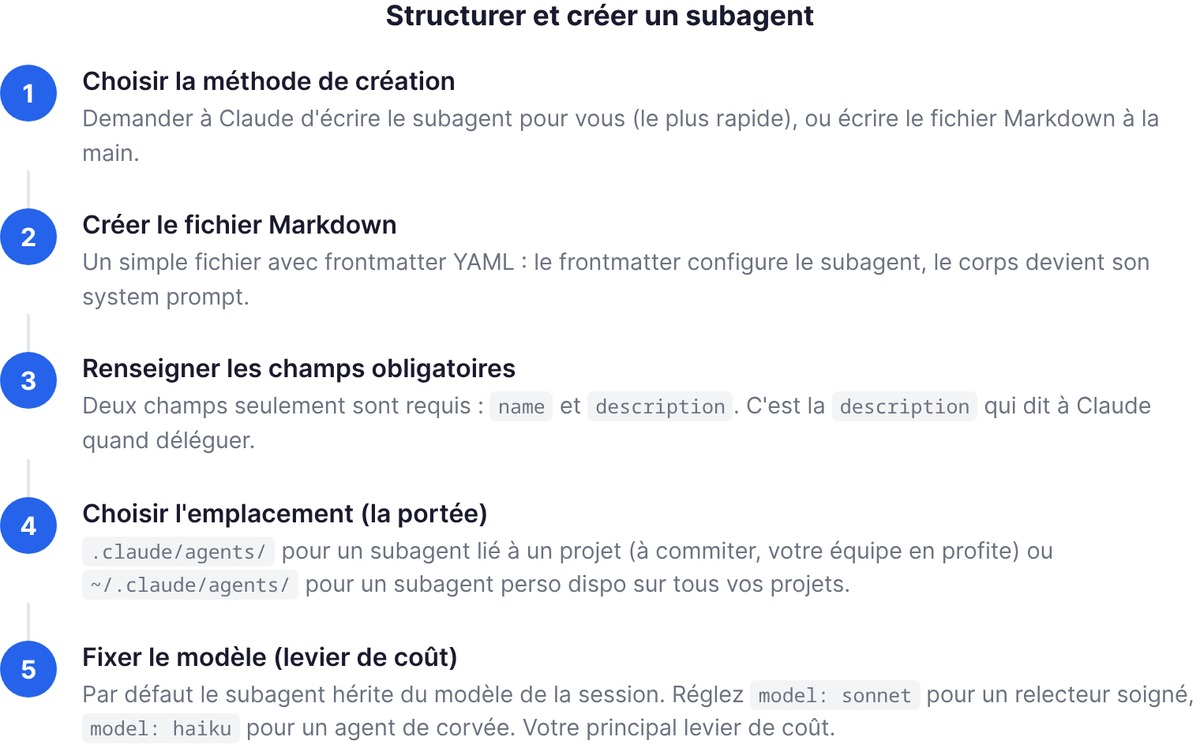
A subagent is just a Markdown file with YAML frontmatter. The frontmatter configures the subagent, the body becomes its system prompt. You can create one two ways: ask Claude to write it for you (the fastest route), or write the file by hand.
Here's what a code reviewer looks like, saved to ~/.claude/agents/code-reviewer.md:
---
name: code-reviewer
description: Reviews code for quality and best practices. Use after writing or modifying code.
tools: Read, Grep, Glob
model: sonnet
---

You are a code reviewer. When invoked, analyze the code and give precise, actionable feedback on quality, security, and best practices.
Only two fields are required: name and description. It's the description that tells Claude when to delegate, exactly like with a skill. The location decides the scope: .claude/agents/ for a project-scoped subagent (commit it, and your team gets it too), ~/.claude/agents/ for a personal subagent available across all your projects. One trap worth knowing: if the agents/ folder didn't exist when your session started, restart Claude Code so it gets picked up. Otherwise, detection is live: edit an existing agent file, and the next delegation uses the updated version within seconds, no restart needed.
An important point on how it works. A subagent only receives its system prompt (the body of the file) plus a bit of environment info like the working directory. It inherits neither your conversation history nor Claude Code's full system prompt. That's precisely what makes it lightweight and predictable: it starts clean, with only the instructions you give it. The flip side is that the body of the file has to stand on its own. A vague system prompt gives you a vague agent.
The model field deserves a word too. By default a subagent inherits your session's model, but you can pin it: model: sonnet for a careful reviewer, model: haiku for a grunt-work agent you don't want to pay top rate for. This one-line setting is your main cost lever.
Automatic vs manual invocation
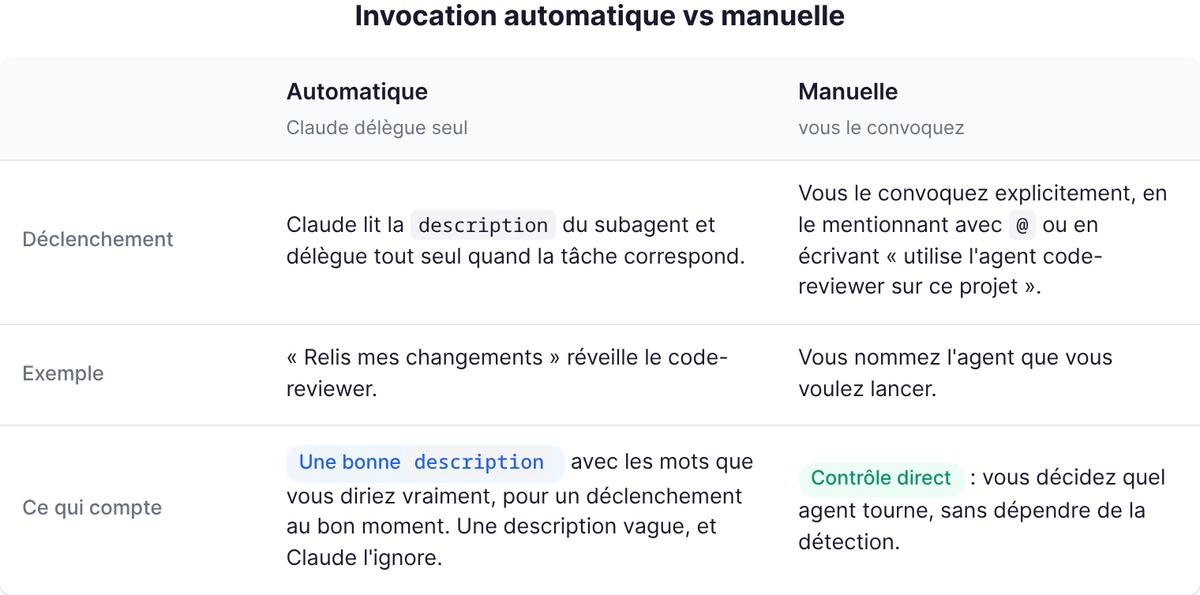
A subagent fires in one of two ways. Automatic: Claude reads its description and delegates on its own when the task matches ("review my changes" wakes up the code-reviewer). Manual: you summon it explicitly, mentioning it with @ or writing "use the code-reviewer agent on this project." The rule that matters: a good description, written with the words you'd actually use, is what makes a subagent fire at the right moment. A vague description, and Claude ignores it.
Scoping tools (least-privilege principle)
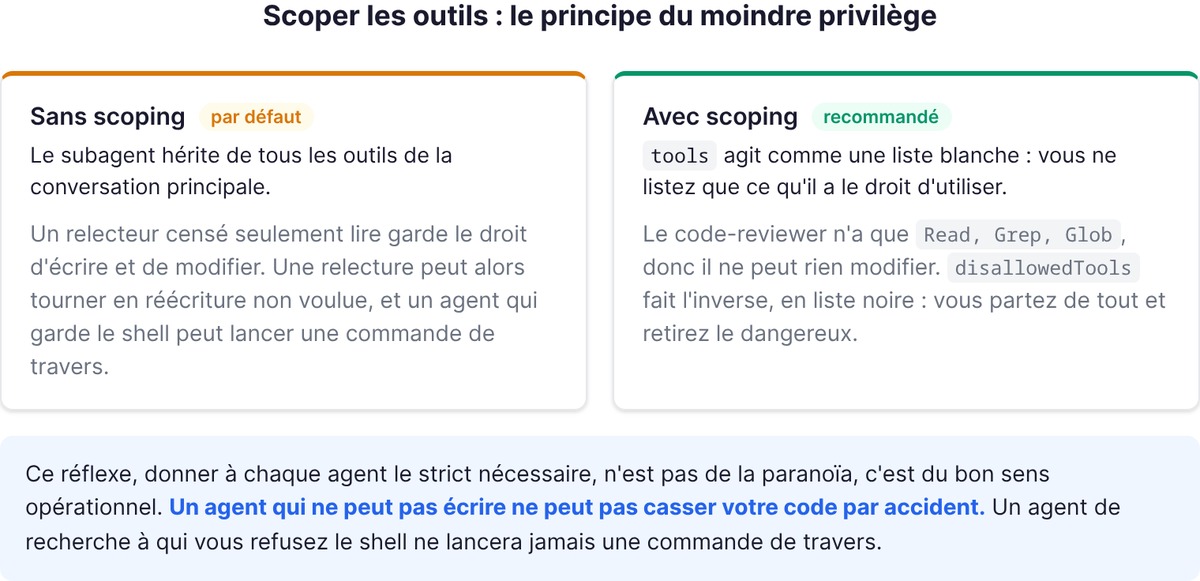
By default, a subagent inherits all the tools of the main conversation. That's rarely what you want. Two levers to rein it in:
toolsacts as an allowlist: you list only what it's allowed to use. Our code-reviewer only hasRead, Grep, Glob, so it can't modify anything. No way for a review to turn into an unwanted rewrite.disallowedToolsacts as a blocklist: you start with everything and strip out the dangerous parts.
This reflex (giving each agent the strict minimum) isn't paranoia, it's operational common sense. An agent that can't write can't break your code by accident. A research agent you deny shell access will never run a command sideways.
Note too that some tools are never available to a subagent, even if listed in tools: the ones that depend on your session's interface, like the ability to ask you a question live. A subagent works autonomously. It can't stop midway to ask for your opinion, it sees its mission through and returns its result. That's a constraint to bake in when you write its system prompt: give it enough to decide on its own, not enough to hesitate.
3 concrete founder use cases
The theory is worth nothing until you plug it into your day-to-day as a founder who builds. Three uses where the subagent saves real time.
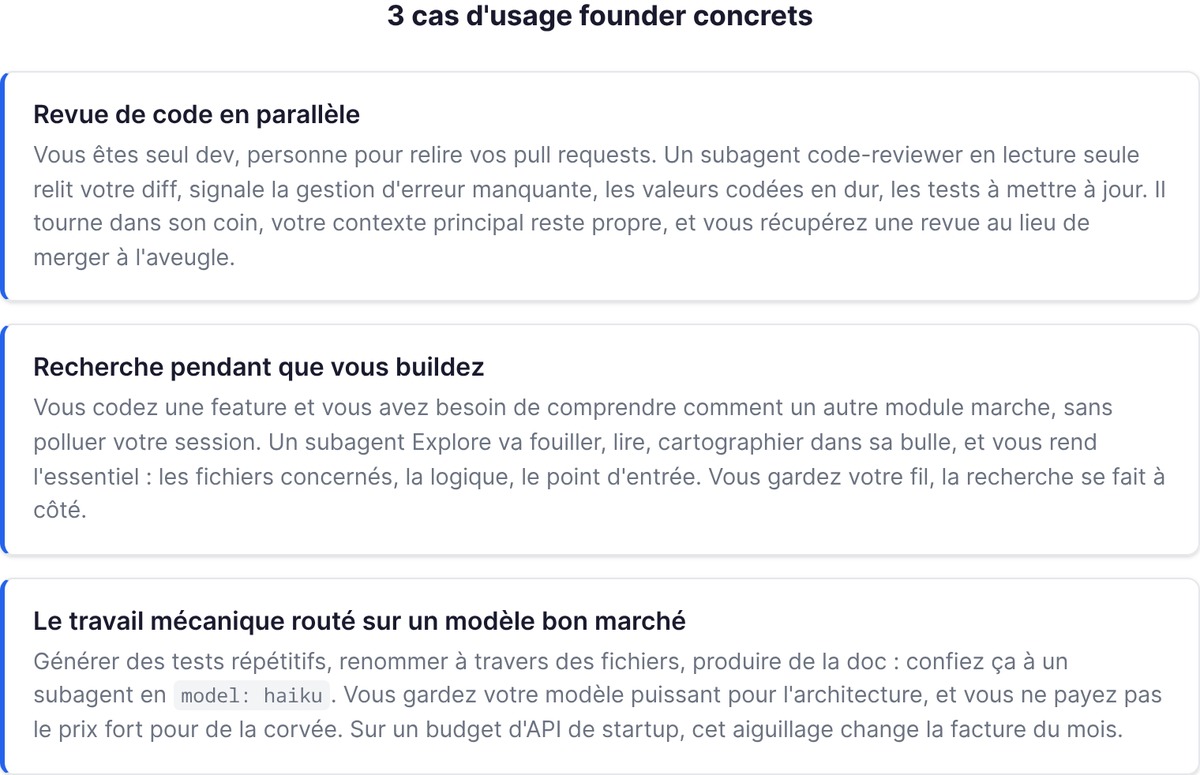
Code review in parallel
You're the only dev, with nobody to review your pull requests. A read-only code-reviewer subagent, on a decent model, does that job: it reviews your diff, flags the missing error handling, the hard-coded values, the tests that need updating. It runs off to the side, your main context stays clean, and you get a review instead of merging blind.
Research while you build
You're coding a feature and you need to understand how another module works, without polluting your current session. An Explore subagent goes off to dig, read, and map inside its own bubble, then hands you the essentials: the files involved, the logic, the entry point. You keep your train of thought, the research happens beside you. Good to know: when Claude calls up Explore, it picks a depth level based on the need, from a targeted lookup to a very deep analysis. You don't have to set it by hand, but you can ask for it explicitly when you want an exhaustive exploration before a big architecture decision.
The third use, the most underrated: mechanical work routed to a cheap model. Generating repetitive tests, renaming across files, producing docs: hand that to a subagent on model: haiku. You keep your powerful model for architecture, and you don't pay top rate for grunt work. On a startup API budget, this simple routing changes the monthly bill.
Toward Agent Teams
A subagent has a limit: it works within a single session, and Claude only delegates one subtask at a time before taking back control. That's enough for 90% of cases. But when you take on a project that demands sustained parallelism, several workers making progress at the same time on different pieces, or agents that need to talk to each other, you move past what a subagent can do.
That's where Agent Teams come in, a separate building block of Claude Code where each worker has its own independent context window and where agents can exchange messages. Good news: your subagent definitions carry over to this terrain. When you assemble a team, you can reference an existing subagent type, and the teammate picks up its tools and its model. The work you put into structuring your subagents isn't thrown away, it becomes the building block for your teams.
The logical progression, for a founder: start with one or two subagents (a reviewer, a researcher), build the habit of delegating, and only step up to Agent Teams the day a single session no longer holds the project.
Going further
FAQ
What is a subagent in Claude Code?
A subagent is a specialized AI assistant that runs in its own context window, with a custom system prompt, specific tools, and independent permissions. Claude delegates a subtask to it (research, review, debugging), it runs the task separately and returns only the summary. That keeps your main conversation clean and lets you finely constrain what the agent can do.
What's the difference between a subagent and a skill?
A skill loads instructions into your main context: it teaches Claude how to do something. A subagent runs the task in an isolated context and returns only the result. Simple rule: if you want Claude to know how to do something, that's a skill; if you want it to go do the thing elsewhere and come back with the answer, that's a subagent. The two combine, with a subagent able to preload a skill.
How do you create a Claude Code subagent?
The fastest route is to ask Claude to write it for you, describing what you want and where to save it. Otherwise, create a Markdown file with YAML frontmatter by hand in ~/.claude/agents/ (personal, all projects) or .claude/agents/ (a single project). Only name and description are required; add tools, model, and a system prompt in the body.
How do you limit a subagent's tools?
Use the tools field as an allowlist to permit only certain tools (for example Read, Grep, Glob for a read-only agent), or disallowedTools as a blocklist to strip out the dangerous ones. Without these fields, the subagent inherits all of the session's tools. The least-privilege principle keeps an agent from breaking your code by accident.
Subagents or Agent Teams: which should you choose?
Subagents are enough for delegating one subtask at a time within a single session. Move to Agent Teams when you need several workers in parallel, on independent contexts, communicating with each other. Your subagent definitions carry over as building blocks for a team.