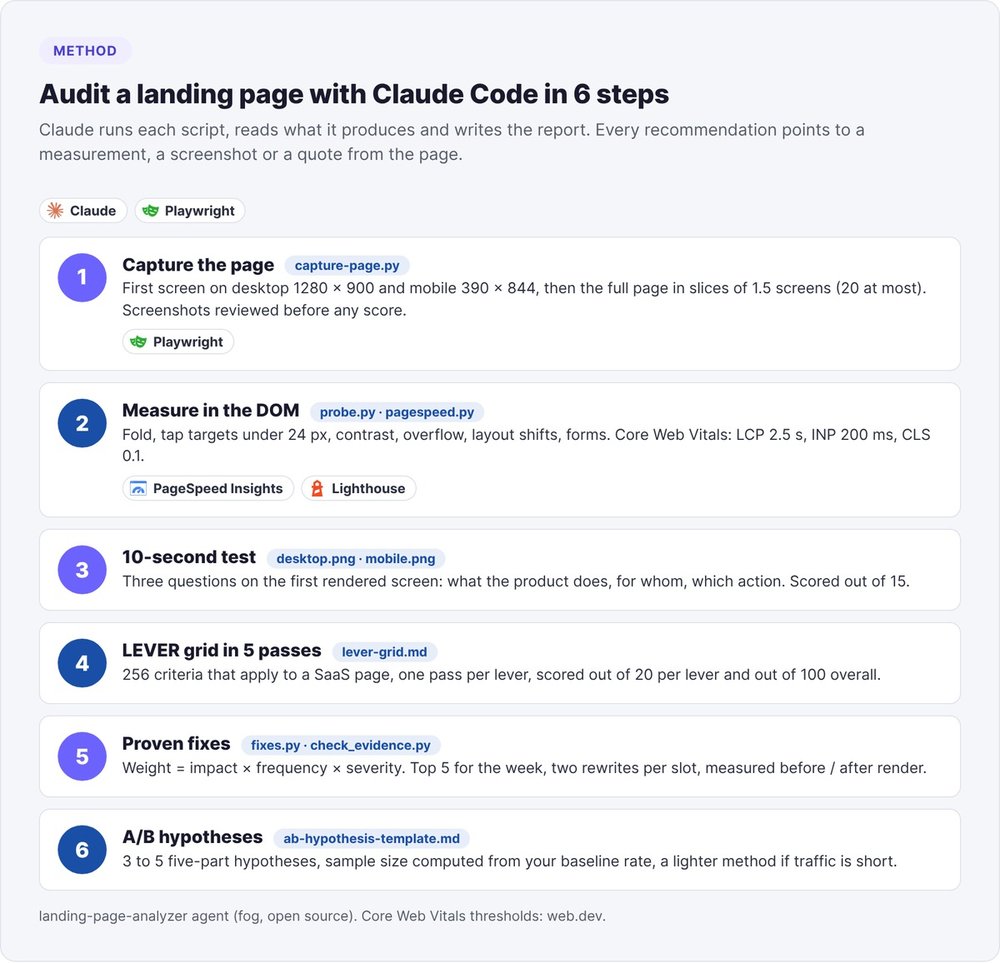
To audit a landing page with Claude Code, have Playwright capture the page on desktop (1280 × 900) and mobile (390 × 844), measure the first screen and the Core Web Vitals, then score the page criterion by criterion against a weighted grid. Claude then ranks the fixes by impact and ease, renders each fix before and after, and writes 3 to 5 A/B test hypotheses with their sample size.
Two data points to start. For a SaaS page, our grid keeps 256 of its 340 criteria, spread across five levers. And on October 12, 2026, we found that our probe was reading a mobile CLS of zero on a page that was visibly shifting, because Chromium's mobile emulation attributes every shift to the user. Here is the method, with its commands, its thresholds and what it found on swanbase.co.
Why audit a landing page with Claude Code?
A landing page audit looks for whatever stops a qualified visitor from clicking your main button. Reviewing by eye, you miss what matters most: you know your product, you read the page on desktop, and you no longer see what a rushed visitor misses on a phone.
With Claude Code, the audit runs in your terminal. Claude launches the capture and measurement scripts, reads the images they produce, applies the grid and writes a report where every recommendation points back to a measurement, a screenshot or a quote from the page.
Landing page skill or audit agent
Claude skills for landing pages fall into two families: those that build a page, and those that review it and give it a score (6 dimensions out of 100 for one, 8 dimensions graded A to F for another, 10 points on the first screen for a third). Those scores always start from a screenshot or from the text.
Our agent, landing-page-analyzer, is part of fog, our open source stack of marketing agents (see our guide to AI marketing agents). It adds measurements taken in the DOM, a grid where every line cites its source, and an evidence check. For the format itself, read our article on Claude Code skills.
Prerequisites
- Claude Code installed (see Claude Code: definition and use cases).
- Python 3.8 or later, and Playwright with Chromium.
- Node.js if you want to run Lighthouse locally when PageSpeed Insights doesn't respond.
- The page URL, the goal of the main button (sign-up, demo, trial) and your target audience in one sentence.
You don't need any paid API. PageSpeed Insights answers without a key at low volume.
Step 1: capture the landing page on desktop and mobile
The capture provides the evidence for every visual criterion: the first screen as a visitor sees it, then the rest of the page in a format a vision model can read.
Run the capture with Playwright
pip install -r agents/landing-page-analyzer/scripts/requirements.txt
playwright install chromium
python3 agents/landing-page-analyzer/scripts/capture-page.py ./captures-20261012 "https://votre-saas.com/"
You get desktop.png (1280 × 900) and mobile.png (390 × 844), which show exactly the first screen, then the full page in slices of 1.5 screen heights (20 at most), taken after a scroll to the bottom that loads deferred sections. A full-page screenshot of a long page, scaled down for the model, becomes unreadable. That's why the script slices.
The script waits 1.5 seconds after load, dismisses common cookie banners (Cookiebot, OneTrust) and, on a 404, gives a client-side redirect 5 seconds to kick in.
Review the screenshots before scoring
Before scoring a single criterion, Claude reviews the screenshots with three checks: a banner, loader or chat widget hiding the page; dimensions that differ from what was expected; a slice cut through the middle of a section. A failed capture gets fixed at the source (longer wait, different method), never by editing the image, in three rounds at most. Beyond that, the affected visual criteria are marked "not verified".
Step 2: measure the fold, tap targets and Core Web Vitals
A screenshot shows you what the page looks like. It won't tell you exactly where the bottom of the button sits, or how far a banner shifts the layout after first render. For those questions, the agent measures.
Six DOM measurements instead of an opinion
python3 agents/landing-page-analyzer/scripts/probe.py "https://votre-saas.com/" --out ./mesures-20261012 --cta "Essai gratuit"
probe.py loads the page on desktop, then on mobile, and records:
- The fold: the position of the bottom of the main button relative to the visible height.
- Tap targets: clickable elements under 24 × 24 CSS pixels, the minimum set by WCAG 2.2 criterion 2.5.8, and those under 44 pixels, Apple's guideline.
- Contrast of every text against the color painted beneath it (4.5:1, or 3:1 for large text).
- Horizontal overflow on mobile, including the offending element.
- Layout shifts during load, with the elements that moved.
- Images and forms: images without dimensions, a lazy-loaded hero image, fields without a visible label.
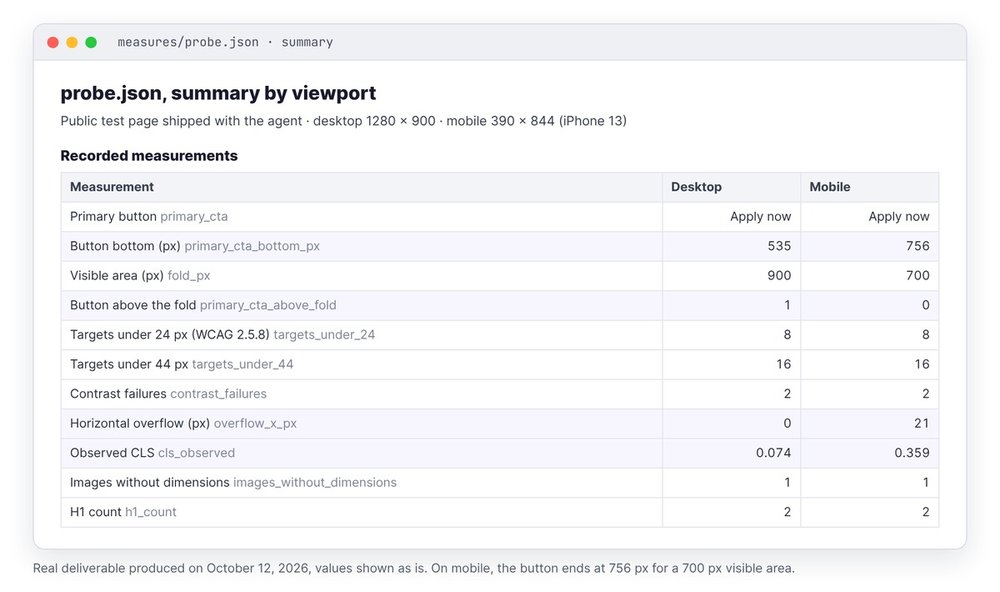
On October 12, 2026, on the public test page bundled with the agent, the "Apply now" button ended at 756 pixels on mobile for a 700-pixel visible area (invisible without scrolling), versus 535 pixels out of 900 on desktop. The same pass flagged 8 targets under 24 pixels, 2 texts below minimum contrast and 21 pixels of overflow caused by a table.
Measure Core Web Vitals with PageSpeed Insights
python3 agents/landing-page-analyzer/scripts/pagespeed.py ./mesures-20261012 "https://votre-saas.com/"
PageSpeed Insights responds for mobile, Lighthouse takes over locally if the API fails, and each value is compared with the thresholds on web.dev's Web Vitals page: LCP under 2.5 seconds, INP under 200 milliseconds, CLS under 0.1, measured at the 75th percentile of visits.
When Google has field data for the URL (CrUX), the summary uses it. Otherwise it falls back to lab values. INP can't be measured in the lab, so you get Total Blocking Time instead. Read the source line of the summary before drawing conclusions.
The zero mobile CLS trap
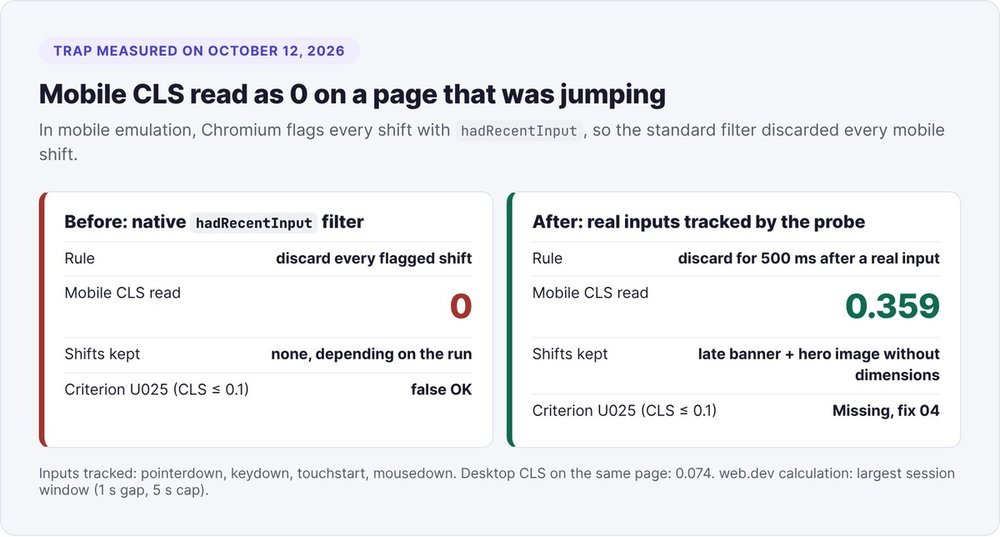
We track shifts with the browser's layout-shift API and, as web.dev recommends, we discard those that follow a user action (the hadRecentInput attribute). On the test page, a promo banner inserted after first render pushed all the content down. Depending on the run, the mobile measurement showed 0.
We found the cause on October 12, 2026: in mobile emulation, Chromium sets hadRecentInput on every shift, because the viewport resize after a horizontal overflow counts as input. Every mobile shift was being thrown away. The probe now records real inputs itself (pointer, keyboard, touch) and only discards a shift that occurs within 500 milliseconds of one of them. The measured mobile CLS jumped to 0.359. Once the probe was fixed, we also caught a second shift: the hero image, loaded without dimensions.
If you write your own probe, test it first on a page where you've planted a known shift.
Step 3: the 10-second test, scored out of 15
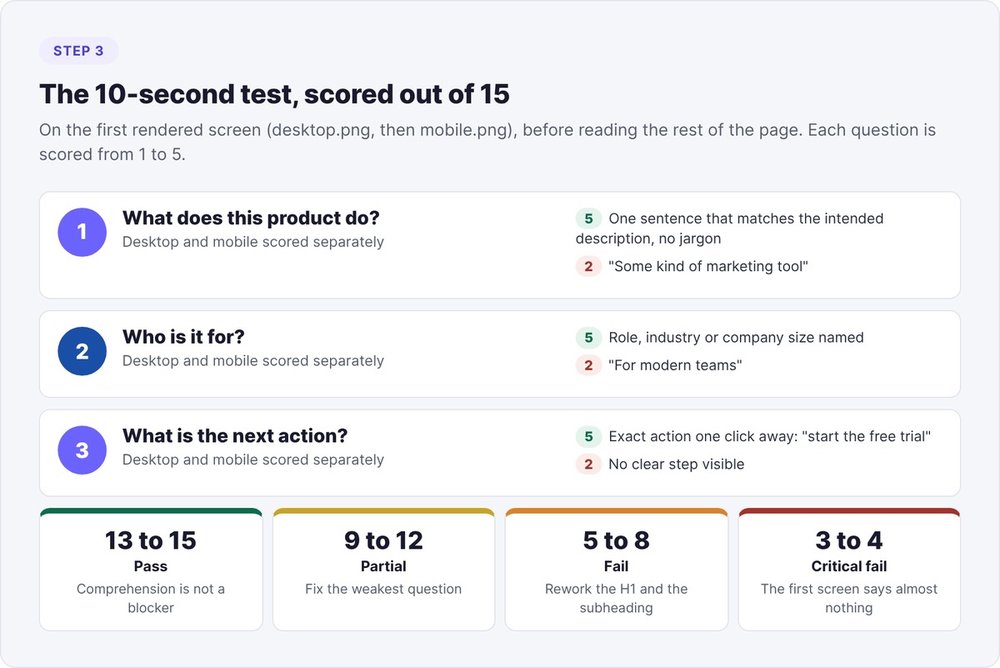
The 10-second test simulates a visitor who only reads the first screen. Claude runs it on desktop.png and mobile.png, never on a mockup, before reading the full text.
Three questions about the rendered first screen
- What does this product do? A jargon-free sentence that matches the founder's intended description scores 5. "Some kind of marketing tool" scores 2.
- Who is it for? A named role, industry or company size scores 5. "For modern teams" scores 2.
- What's the next step? An exact action ("start the free trial") one click away scores 5. Several buttons of equal weight drop the score to 4, and conflicting buttons drop it to 1.
Mobile is scored separately, often lower for lack of space. Our rule: if Claude has to read the fourth paragraph to answer the first question, the test has already failed.
Reading the score
| Total out of 15 | Verdict | Action |
|---|---|---|
| 13 to 15 | Pass | Comprehension isn't the blocker, look elsewhere |
| 9 to 12 | Partial | One question at 3 or below: fix the weakest one first |
| 5 to 8 | Fail | Comprehension is the blocker: rework the H1 and the subheadline |
| 3 to 4 | Critical fail | The first screen says almost nothing |
For a major redesign, back up this single-evaluator test with five real people looking at the live page.
Step 4: score the SaaS landing page on the LEVER grid
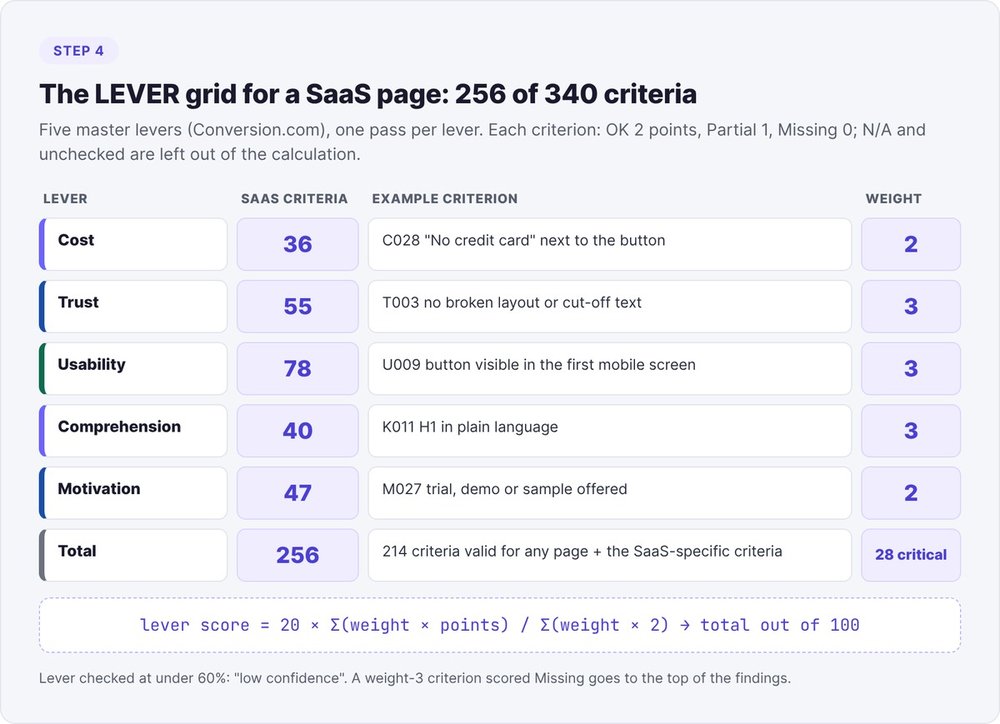
The LEVER grid follows the tree of the Lever Framework published by Conversion.com in December 2022: five master levers (Cost, Trust, Usability, Comprehension, Motivation), broken down into 22 levers and 48 sub-levers. Our version has 340 verifiable criteria, each with its scope, the evidence it requires, its weight and its source.
256 criteria for a SaaS page
Each criterion applies either to every page or to specific types (saas, ecom, local, lead, app). For a SaaS page, 256 criteria apply: 36 in Cost, 55 in Trust, 78 in Usability, 40 in Comprehension, 47 in Motivation. So the report states "256 applicable criteria", never "340 criteria checked".
Each criterion also specifies the evidence it expects: screenshot (S), page text (M), HTML code (H), PageSpeed data (P) or interaction (X). Without that evidence, Claude marks the criterion "not verified" instead of guessing.
Score one lever per pass
Claude scores all the Cost criteria, writes the results to the JSON file, and only then opens the Trust criteria, and so on. Score 256 lines in one go and attention drops, so the last lines end up rubber-stamped.
Each criterion gets OK (2 points), Partial (1), Missing (0), N/A or Not verified. Visual criteria are scored separately on desktop and mobile, then averaged. Any score other than OK carries a comment of 12 words or fewer, quoted from the page when possible.
Calculating the lever score
lever score = 20 × Σ(weight × points) / Σ(weight × 2)
The sum covers applicable, verified criteria, with a weight of 3 (critical), 2 (important) or 1 (hygiene). The five levers add up to a score out of 100. Two safeguards apply: a lever with less than 60% of its criteria verified is flagged "low confidence", and any weight-3 criterion scored Missing moves to the top of the findings, whatever the lever's score.
Five high-weight SaaS criteria
Five criteria in the grid target SaaS pages or their first screen directly:
- C028 (weight 2): "No credit card required" appears near the button when it's true. The visitor reads the answer to their objection at the exact moment they hesitate to click.
- C020 (weight 3): the page says what happens when the trial ends (automatic billing or not).
- U009 (weight 3): the main button stays visible in the first mobile screen at 390 pixels wide.
- K011 (weight 3): the H1 says what the product does in plain language.
- U023 (weight 3): LCP of 2.5 seconds or less on mobile.
For how to display prices and how to choose between a trial and a free plan, see our guide to pricing for an early-stage startup and our guide to product-led growth.
Step 5: rank the fixes and prove them
Finding weight and this week's top 5
Each Partial or Missing criterion gets three scores from 1 to 5: impact on conversion, frequency (5 above the fold, 2 in the footer) and severity (5 when the defect makes the visitor leave). Their product, 125 at most, sorts the findings.
You then classify each fix as quick (an hour or less: copy, button, image) or heavy (a day or more: layout, section, performance). The "ship this week" top 5 draws from the quick fixes first, sorted by impact × ease.
Two rewrites per slot
For the H1, the main button and the value proposition block, the agent names the defect it detected (jargon, a feature list, a generic button like "Get started") and proposes exactly two rewrites that differ on one axis: concise versus precise, benefit versus problem. With two options, you make an informed call, and you already have both versions of your A/B test.
The agent follows a strict rule for these rewrites: a number, a customer name or a testimonial only goes in if it already appears on the page, in the evidence the founder provided or behind a source URL. Otherwise, the rewrite ships without proof points.
Render each fix before and after
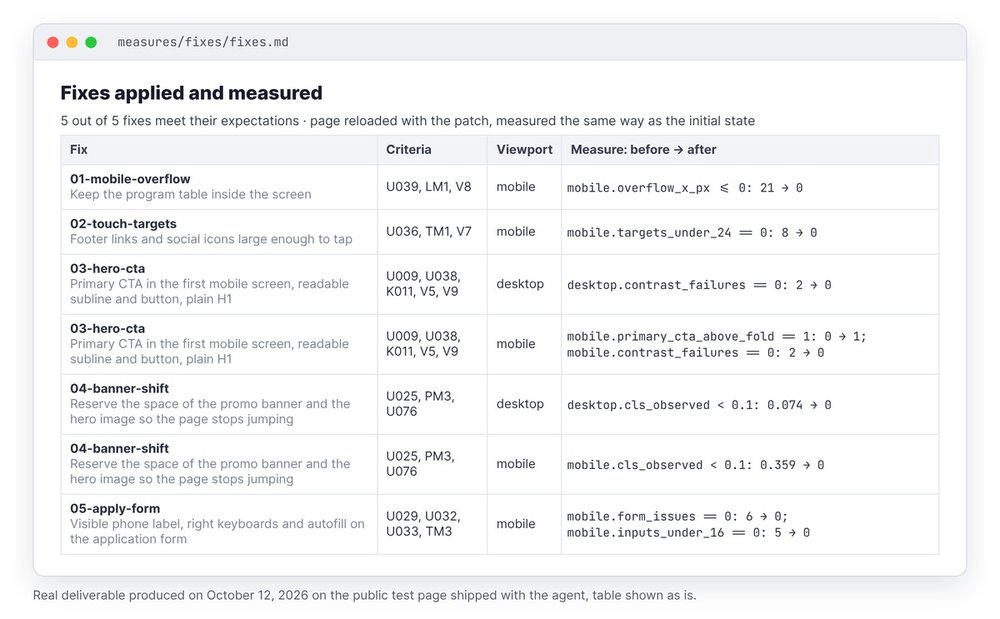
Claude writes each fix into fixes.json: the CSS, copy or attributes to change, and the expected measurement. The script applies it to the live page, reloads it and measures before and after.
python3 agents/landing-page-analyzer/scripts/fixes.py fixes.json --out ./mesures-20261012
On the test page, on October 12, 2026, all five fixes hit their targets: mobile overflow from 21 to 0 pixels, targets under 24 pixels from 8 to 0, main button brought back into the first mobile screen, mobile CLS from 0.359 to 0, form issues from 6 to 0. Your developer gets a patch.css and a patch.js for each one.
Step 6: write 3 to 5 quantified A/B hypotheses
A heuristic audit produces hypotheses. To settle them, you run an A/B test, provided you have enough traffic.
The five-part template
Because the 10-second test can't tell what the product does from the current H1, we believe replacing the H1 with a sentence that names the outcome and the timeframe will increase the sign-up rate for mobile visitors coming from a paid campaign because the visitor understands the offer before deciding whether to scroll.
The agent never predicts the size of the lift, since no benchmark exists for any given page. Any hypothesis that lacks a sourced observation, a mechanism or a way to lose gets dropped from the list.
How many sessions per version
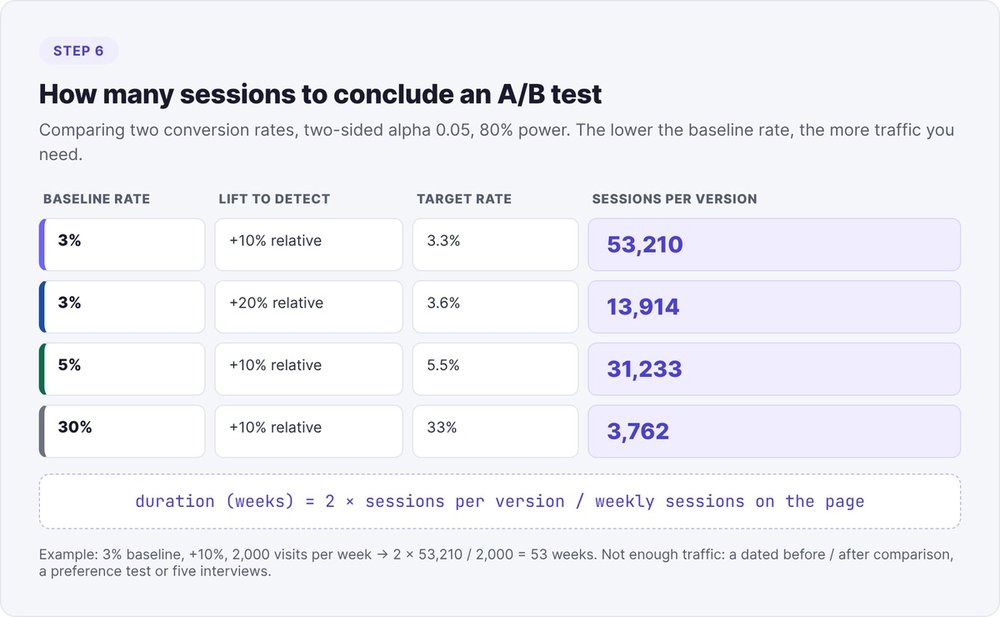
Sessions needed per version to compare two conversion rates (two-sided alpha of 0.05, 80% power):
| Baseline rate | Relative lift to detect | Sessions per version |
|---|---|---|
| 3% | +10% (3% to 3.3%) | 53,210 |
| 3% | +20% (3% to 3.6%) | 13,914 |
| 5% | +10% | 31,233 |
| 30% | +10% | 3,762 |
Run the numbers with your own baseline rate:
python3 -c "from statistics import NormalDist as N; from math import sqrt; p1,rel=0.03,0.10; p2=p1*(1+rel); pa=(p1+p2)/2; za,zb=N().inv_cdf(0.975),N().inv_cdf(0.8); print(round((za*sqrt(2*pa*(1-pa))+zb*sqrt(p1*(1-p1)+p2*(1-p2)))**2/(p2-p1)**2))"
The duration follows: 2 × sessions per version / weekly sessions on the tested page.
When traffic falls short
At 3% conversion and a +10% lift to detect, you need 106,420 sessions in total: a landing page getting 2,000 visits a week would take 53 weeks to separate the two versions. In that case the agent flags it and suggests a lighter method: a dated before/after comparison, a preference test or five interviews with visitors from your target audience. To choose which metrics to track over those weeks, see our growth marketing guide for startups.
Audit results on swanbase.co
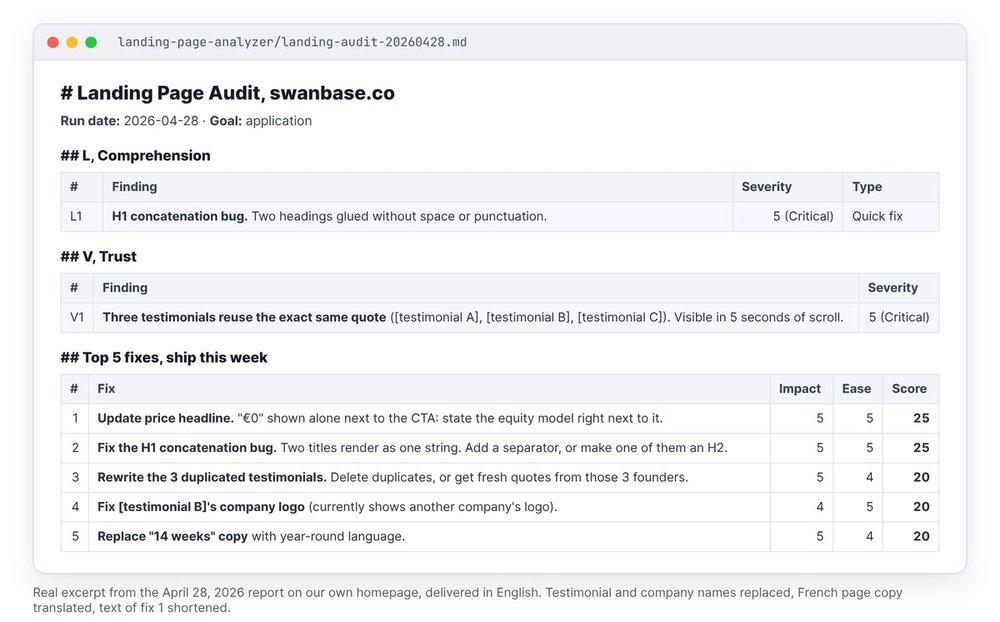
On April 28, 2026, we ran the first version of the agent on our own home page, with applications as the goal. Five findings stood out:
- A broken H1. Two headlines rendered stuck together, with no space or punctuation. Severity 5, quick fix.
- Duplicate testimonials. Three testimonials repeated the same quote word for word, two others shared a second quote, and one displayed another company's logo. Five seconds of scrolling is enough to spot it.
- A lone "€0" near the button. The page showed the price without saying that swanbase takes equity, so applicants would only have found out at signing. Severity 5.
- An outdated promise. The page advertised a 14-week program, while swanbase supports founders year-round.
- Two buttons with no clear difference. "Join" opened an external form, "Apply" opened a page on the site.
The top 5 gave 25 points (impact 5 × ease 5) to the price and the H1, and 20 to the testimonials. The most useful finding came from comparing the page with our actual positioning, a step the agent didn't have back then. The current version loads the project context from the start. That day, we couldn't audit mobile because the CLI we used had no mobile scraping option. That gap led to the 390 × 844 Playwright captures in the next version.
The prompt to give Claude Code
Open Claude Code at the root of the agent's repository and give it the URL, the goal and the target audience:
Run the landing-page-analyzer agent (agents/landing-page-analyzer/).
URL: https://votre-saas.com/
Goal: free trial sign-ups.
Audience: B2B sales ops leads, SaaS companies with 50 to 500 employees.
Page type: saas. Report language: en.
For each missing piece of information, the agent applies a default and records it in the report's methodology (the URL is the only input without a default). You get the report in markdown along with a JSON file. Then run check_evidence.py: it flags any recommendation that doesn't point to a measurement, a screenshot or a quote present on the page.
The agent is open source and free. You'll find it with the rest of the stack at fog-agents.com. Once the page is fixed, set up organic traffic tracking with our Search Console and Claude Code method.
FAQ
Is a Claude skill enough to audit a landing page?
A skill that reads a screenshot gives you a first opinion. It estimates button position, tap targets and page stability by eye, without measuring them. To decide what to fix before you buy traffic, add DOM measurements and a grid where every criterion requires evidence.
Do you need a paid API to audit a landing page?
No. Capture runs locally through Playwright, PageSpeed Insights answers without a key at low volume and Lighthouse runs locally as a fallback. Your only cost is the Claude Code subscription.
Could the audit submit your form?
No. The journey script blocks every write (POST, PUT, PATCH, DELETE) during the final submission and toward payment services, and it only accepts test emails on a reserved domain like example.com. On October 12, 2026, on the test page, the script blocked 4 submissions and no write reached the network.
Can you audit a page behind a login?
Not directly, because the capture doesn't handle logins. Drop your screenshots into the output folder and paste the visible text. The agent marks everything else "not verified".
10-second test or 5-second test?
The 10-second test is the default. The 5-second test asks the same questions with a stricter scale. Save it for dense pages or pages that receive paid traffic.
What data should you bring to the audit?
The URL, the goal of the main button and the target audience. To size the A/B tests, add your current conversion rate and the page's weekly traffic. Without those two numbers, the agent leaves the sample size blank rather than make one up.