To create ads with AI without garbled text, let the AI handle strategy and copywriting, and leave the text inside the image to code. You pick one angle per ad, write each ad's brief in a JSON file, render that file to HTML on your own machine in 1:1, 4:5 and 9:16, have every displayed word proofread by someone who never saw the brief, then import everything into Meta Ads Manager with the ads paused.
Local rendering costs $0. On October 12, 2026, our public example of three ads in three formats produced 9 visuals in 12.4 seconds, with 0 QA errors and 9 out of 9 clean proofreads. An image model only comes in for a text-free photographic background, after two human approvals.
This tutorial follows static-ads-builder, the open-source agent from the fog stack that you run inside Claude Code. The commands and thresholds come from our own runs.
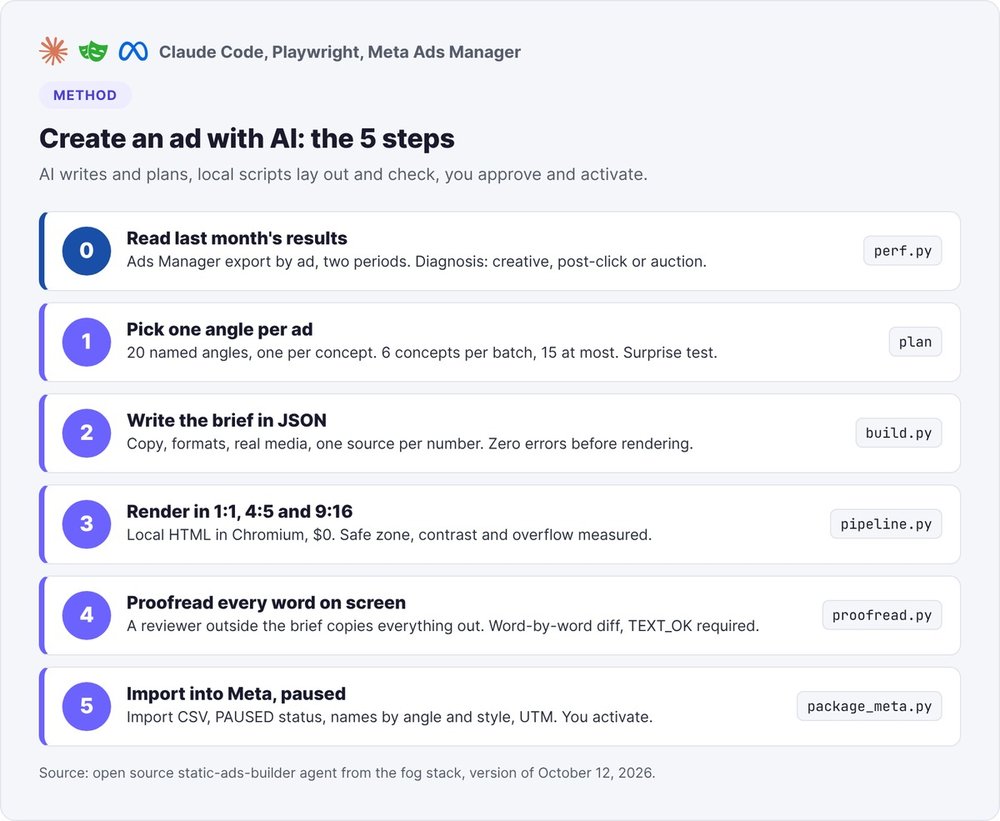
Creating ads with AI: who does what
Most AI ad generators ask an image model to produce the entire visual, text included. On an ad, that is the number one source of errors.
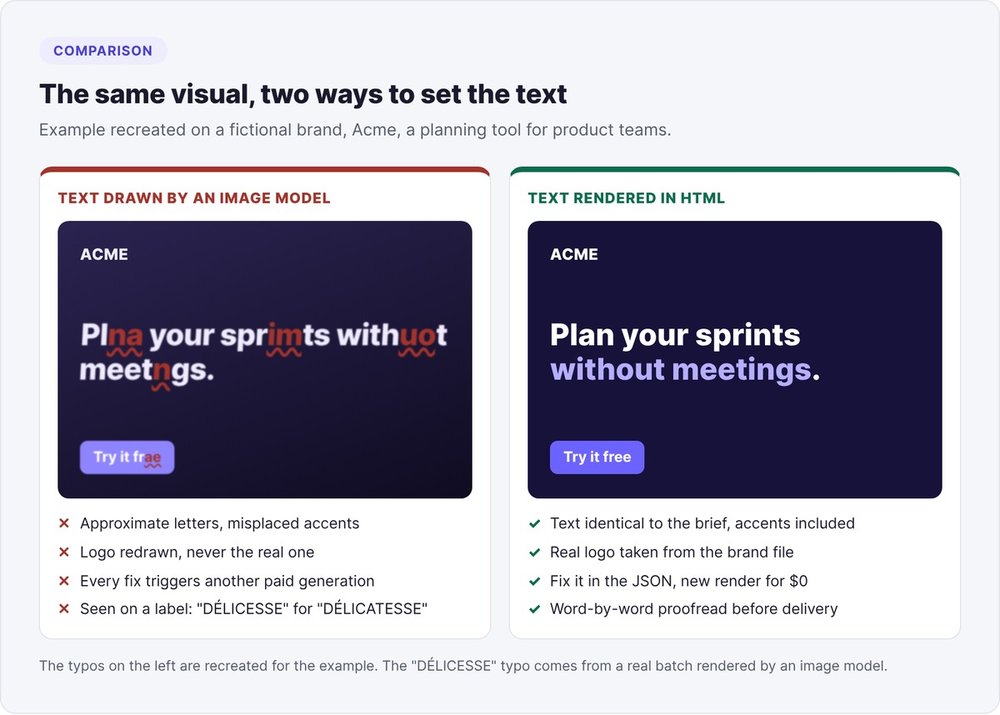
Text never goes through the image model
An image model draws letters as a texture and approximates them. In one batch rendered this way, a visual came out reading "DÉLICESSE" instead of "DÉLICATESSE". The QA check at the time didn't read the text drawn on the product, so the typo slipped through.
Hence the core rule. Claude writes a spec, the ads.json file. Your scripts render that spec as HTML and CSS in Chromium, then measure the result. Headlines, numbers and buttons come out exactly as you wrote them, accents included.
| Task | Who does it |
|---|---|
| Review results, choose angles, write the copy | The AI (Claude Code) |
| Lay out, size the text, export the PNGs | Local scripts (HTML, Playwright) |
| Check overflow, safe zones, contrast | Local scripts |
| Proofread every displayed word | A reviewer who never saw the brief |
| Text-free photo background, when no real photo exists | Image model, after two approvals |
| Turn the ads on | You |
What a batch costs
Local rendering runs on Python, Pillow and Playwright for Python with Chromium, at no cost. You only pay for your coding assistant subscription. According to the script's pricing table as of October 12, 2026, a generated background costs between $0.05 and $0.21 per 1K image depending on the model and quality. For a SaaS, most batches skip generated backgrounds entirely: the interface and the logo are enough.
Before you create: review last month's results
Fresh visuals only fix one problem: people aren't clicking. When they click but don't sign up, new ads just burn through your budget faster.
Export results at the ad level
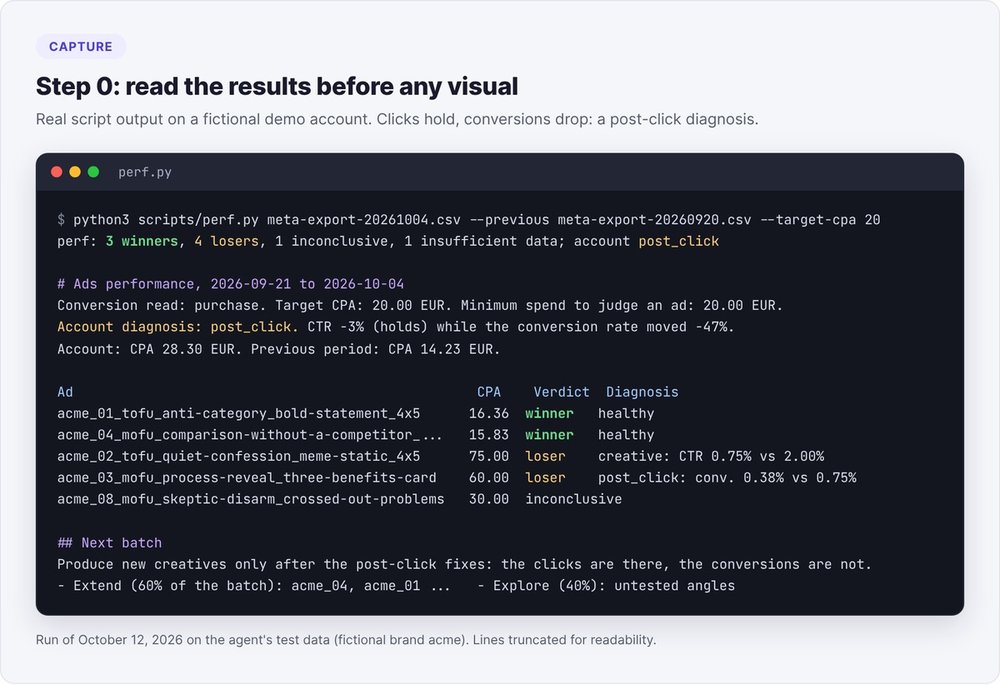
In Ads Manager, export a CSV report broken down by ad (spend, impressions, link clicks, landing page views, optimized conversion) for the last period and the one before it. Then run:
python3 scripts/perf.py exports/meta-2026-10.csv \
  --previous exports/meta-2026-09.csv \
  --target-cpa 20 \
  --out ads-performance-20261012.json --md ads-performance-20261012.md
Without a target CPA, the script uses the account's median CPA and flags it in the report.
Creative problem or post-click problem
Comparing the two periods gives you an account-level diagnosis:
- Post-click: click-through rate holds (change better than -15%) but conversion rate drops. Work on the page, the offer, the signup form or retargeting people who clicked.
- Creative: click-through rate drops by more than 15%. The visuals are wearing out, and a new batch is justified.
- Auction: CPM rises by more than 25% while click-through and conversion rates stay stable. The visuals are the wrong lever.
With fewer than 15 conversions in the period, treat every classification as a hint.
We ran into this trap ourselves in late September 2026 on an ad account we manage: click-through rate held steady while the share of clicks ending in a purchase fell by almost half in a week. The diagnosis came before the visuals, and the fixes went to the website first.
Step 1: choose one angle per ad
Meta finds the audience from the visual itself. Ten variations of the same idea reach the same people, while ten different angles reach ten different audiences.
The 20 angles, sorted by funnel stage
The agent's library names 20 angles: 8 for discovery (the anti-category, the origin number, the confession…), 6 for consideration (the process revealed, the disarmed skeptic, the competitor-free comparison…) and 6 for conversion (the easy first step, the reframed cost, the guarantee as headline…).
Two rules hold the batch together:
- One angle per concept, never used twice in the same batch.
- The same visual style appears at most twice across six concepts.
The default batch has 6 concepts, with a maximum of 15. Each row of the plan lists the stage, angle, style, formats, real material, and whether the concept extends a previous winner.
The surprise test
Before writing any copy, the agent puts the batch through one question: if someone who has seen 1,000 ads in your category scrolled past these concepts, how many would make them stop? If it's fewer than a third, the batch is too safe, and the most predictable concepts go back for a rewrite.
For a SaaS, show the interface
A SaaS has an interface and a logo to show. In a SaaS batch, at least half the concepts display a real screenshot of the interface, and nearly all carry the logo. A SaaS ad with neither interface nor logo could easily pass for a competitor's.
Step 2: write each ad's brief in JSON
Everything starts from the ads.json file: every word on every visual, every row of the import file and every name in next month's export comes from it. The HTML is rebuilt from it, and you never touch the HTML by hand.
The file's fields
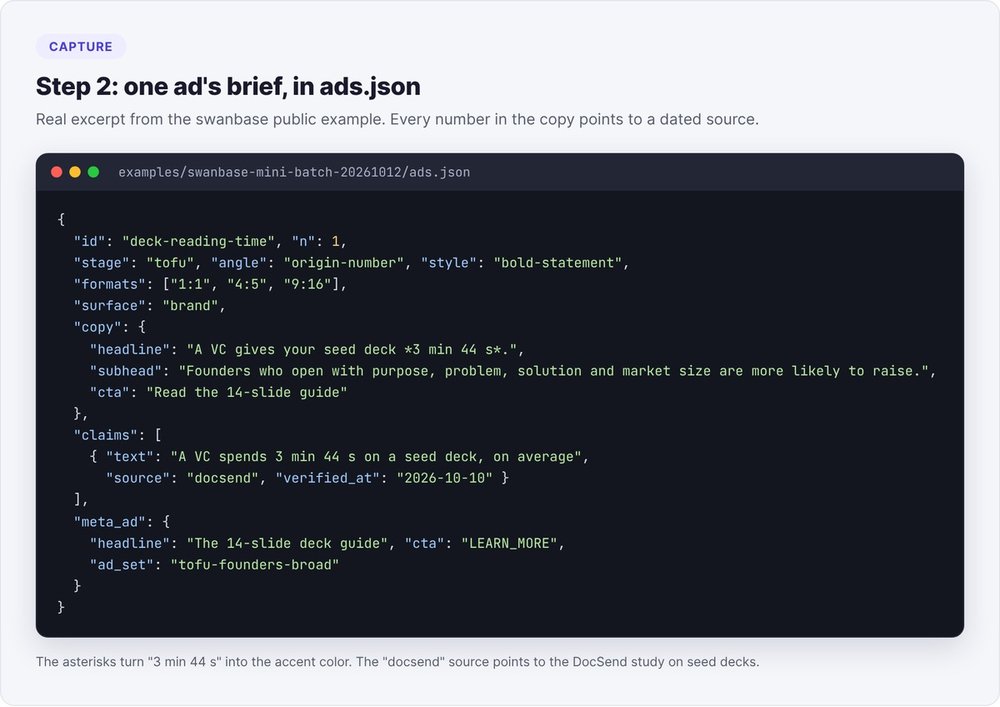
Each ad has an ID, a stage (tofu, mofu, bofu), an angle, a style, its formats, the copy (headline, subheadline or bullets, button), its claims, its real media and the Meta ad text. Here's an excerpt from our public example:
{
  "id": "deck-reading-time", "n": 1,
  "stage": "tofu", "angle": "origin-number", "style": "bold-statement",
  "formats": ["1:1", "4:5", "9:16"],
  "copy": {
    "headline": "A VC gives your seed deck *3 min 44 s*.",
    "cta": "Read the 14-slide guide"
  },
  "claims": [{ "text": "A VC spends 3 min 44 s on a seed deck, on average",
               "source": "docsend", "verified_at": "2026-10-10" }],
  "meta_ad": { "headline": "The 14-slide deck guide", "cta": "LEARN_MORE",
               "ad_set": "tofu-founders-broad" }
}
The asterisks mark the only group of words the style switches to the accent color. The on-image button is 1 to 4 words long. The Meta button type goes in meta_ad.cta: LEARN_MORE for discovery, and never SHOP_NOW at that stage.
One source per number
Every displayed number must appear in a claims[] entry tied to a source with a URL, or to proof declared in the project context. Otherwise, the build script rejects the file with an unsourced-number error. For a real photo, the visible_text field lists every word printed on it (t-shirt, screen, sign), and proofreading will expect exactly those words.
python3 scripts/build.py campagne-20261012/ads.json
Rerun until you hit zero errors. Each error gives its JSON path.
Writing copy in French
The library's rule for French campaigns: think in French, write a full sentence. A French headline carries a verb and a point of view. Fragments separated by periods ("Simple. Rapide. Puissant.") sound like a translated English slogan. Keep every accent, capitals included: an accent lost in the JSON gets printed as-is on the ad.
Step 3: render the ad in 1:1, 4:5 and 9:16
Install and run the render
Install the dependencies once, then run one command per batch:
pip install -r scripts/requirements.txt
playwright install chromium

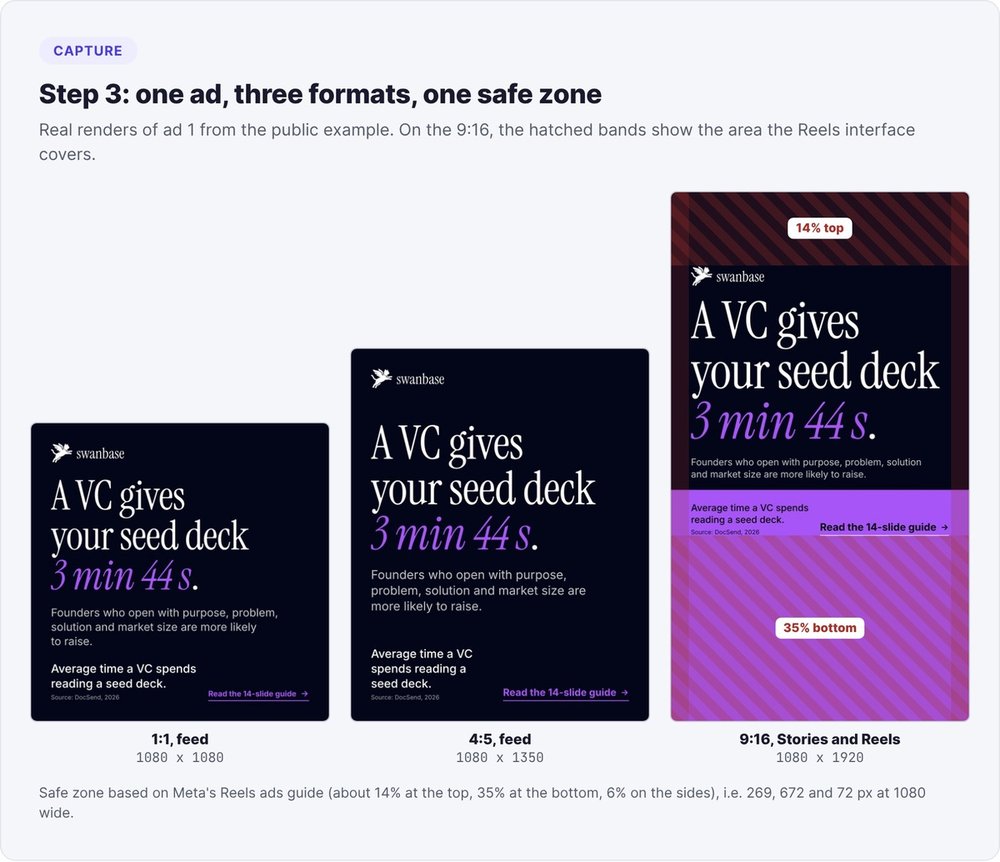
python3 scripts/pipeline.py campagne-20261012/ads.json --package
You get pixel-exact PNGs and JPEGs at 1080x1080, 1080x1350 and 1080x1920, a qa.json file and a contact sheet. With --width 1440, you switch to the width that Meta's feed format guide recommends for 4:5.
The 9:16 safe zone
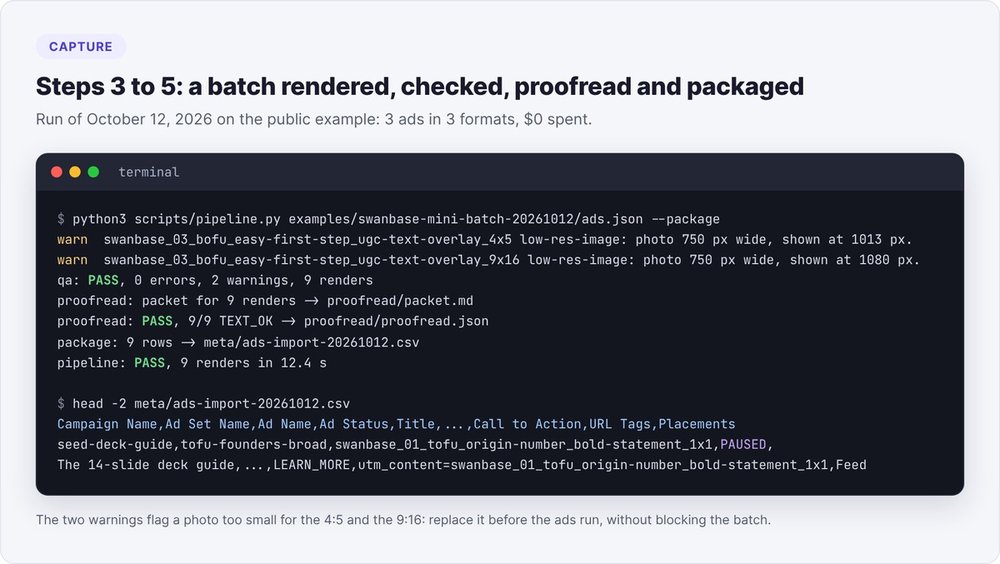
In Reels and Stories, Instagram's interface covers the top and bottom of the screen. Meta's guide for Reels ads asks you to keep roughly 14% at the top, 35% at the bottom and 6% on each side free of text, logos and key elements. On a 1080 px wide canvas, our script turns that into 269 px at the top, 672 px at the bottom and 72 px on the sides. In feed, it's a 72 px margin all around.
A 4:5 stretched to 9:16 leaves a big empty gap. In our renders, the photo or a color panel runs through the bottom band, and the button sits just above it.
Automated checks
For each render, qa.json lists the blocking errors:
- text too long or overflowing its block;
- text outside the safe zone;
- text below 28 px (22 px for a source or a label);
- contrast below WCAG thresholds;
- telltale signs of generated design: blurry drop shadow around text, background blur, gradient text.
Fix issues in ads.json (shorter copy, a different style, a taller format), never in the HTML or the PNG. Then review the contact sheet at feed size: the hook reads first, the button reads last, and a concept's three formats look like one single ad. Allow three review rounds at most, and any remaining defect goes into the report.
When should you generate an image with AI?
Rarely, for a SaaS. A screenshot or a photo of the team almost always does the job.
A background with no text, no logo, no product
The image model only produces a photographic background, which the agent calls a "plate". The prompt always ends with the same exclusion: no text, no letters, no logo, no product. The HTML then layers everything else on top.
Two approvals before you pay
python3 scripts/plates.py prepare campagne-20261012/ads.json
python3 scripts/render_ads.py --estimate --provider fal --count 2 \
  --model fal-ai/nano-banana-2 --resolution 1K
At the first approval, you choose which backgrounds to generate, weighed against the alternative of using real media. At the second, you confirm the model and the total amount with an explicit answer. A "yes" at the first step doesn't count for the second. Each background gets one attempt: a retry is a new expense and goes back through the second approval. The --provider manual option writes the prompts out for your own tool, at $0.
Step 4: proofread every word on every visual
The HTML check can't see what the pixels actually show: a glyph missing from the font, a word hidden behind a shape, a label on a photo.
A reviewer who has never seen ads.json opens each PNG at full size and transcribes every visible word, logo included. In Claude Code, a fresh subagent works fine, and so does a second model or you. The reviewer flags an illegible word (unreadable: true) instead of guessing it. Then:
python3 scripts/proofread.py check campagne-20261012/html \
  campagne-20261012/proofread/transcript.json
The comparison preserves case and accents and ignores word order. Each render gets a verdict: TEXT_OK, TEXT_MISMATCH (wrong, missing or extra word), ASSET_TEXT_MISMATCH (a word on a photo differs from the real one), TEXT_UNREADABLE or NOT_PROOFREAD. Any verdict other than TEXT_OK blocks delivery.
Step 5: import the ads into Meta, paused
The import file
package_meta.py writes a bulk import CSV for Ads Manager, with one row per ad per format and every ad set to PAUSED. The UTM links carry the ad name in utm_content.
Names follow the format <project>_<NN>_<stage>_<angle>_<style>_<ratio>, for example swanbase_01_tofu_origin-number_bold-statement_4x5. These names let you tie next month's export back to the angles you tested.
You get a warning when the primary text falls outside the 50 to 150 character range or when the headline exceeds 27 characters. Before your first import, export a blank template from Ads Manager to align the headers, since Meta renames its columns over time.
Check each ad against its page
Before importing, compare every promise with the landing page: price, offer, trial length, dates. Fix any contradiction before the import, either in the ad or on the page. To go further on the page itself, follow our SaaS landing page audit with Claude. Only then should you turn the ads on.
How do you spot a winning ad?
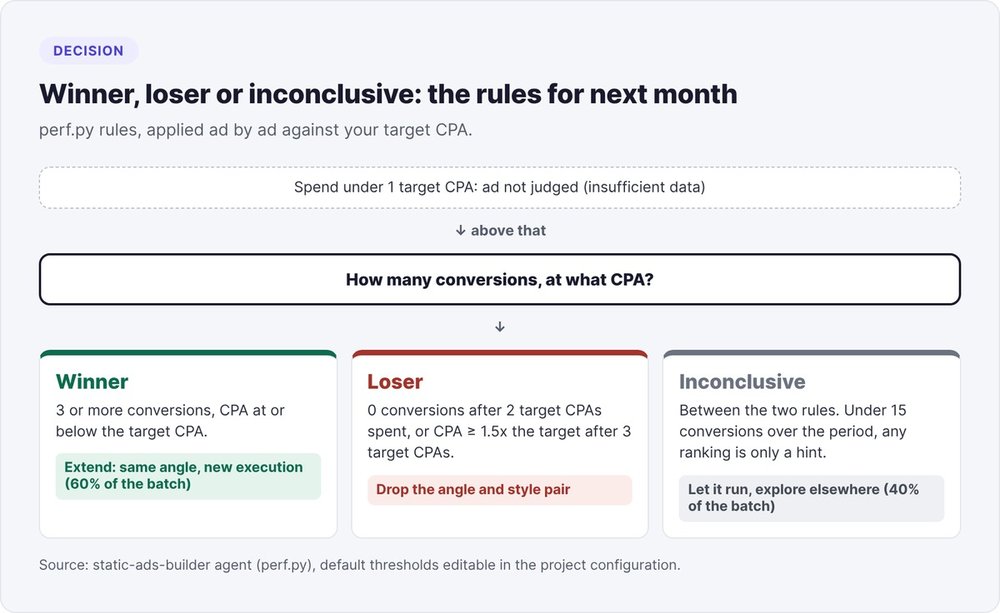
The following month, perf.py applies rules written in advance:
- Winner: 3 or more conversions, at a CPA at or below the target CPA.
- Loser: no conversions after spending two target CPAs, or a CPA of at least 1.5 times the target after spending three target CPAs.
- Inconclusive: anything in between. Below one target CPA spent, the ad isn't judged at all.
The next batch devotes 60% of its concepts to winners (same angle, new execution: a different style, a different format, a sharper hook) and 40% to angles never tested before. Losing angle and style pairs drop out of the plan.
To read your account numbers directly in Claude, connect the Meta Ads MCP connector instead of using the CSV export.
AI ad generator or local method: which should you choose?
Online generators work well for testing a single idea in a few clicks. For a SaaS founder who tracks batches month after month, the local method delivers exact text, proof for every number, ad names that link the export back to your angles, and free rendering.
In return, it requires a Python environment and Claude Code (or Cursor, Codex CLI, Gemini CLI). To see where this agent fits among other tools, check our roundup of AI tools for startups and how the fog stack of AI marketing agents works. The static-ads-builder agent is open source under the Apache 2.0 license, at fog-agents.com.
FAQ
Can you create ads with AI for free?
Yes, for the rendering: HTML layout, PNG export with Playwright and the checks all run on your machine for $0. Only your AI assistant subscription costs money. A generated photo background costs $0.05 to $0.21 at 1K depending on the model, and the manual option lets you produce it in your own tool.
How many ads should you produce per batch?
Six concepts by default, fifteen at most, each one adapted to its formats. Every concept carries a different angle: a small, varied batch reaches more audiences than a large batch of variations on the same idea.
Why not let the AI write the text inside the image?
An image model approximates letters ("DÉLICESSE" for "DÉLICATESSE" in one of our batches). In HTML, the displayed text matches the spec exactly, accents included, and a word-by-word proofread confirms it.
What image formats should you use for a Meta ad?
1:1 (1080x1080) and 4:5 (1080x1350, or 1440x1800 per Meta's guide) for the feed, and 9:16 (1080x1920) for Stories and Reels. In 9:16, keep roughly 14% at the top, 35% at the bottom and 6% on the sides free of text.
When is an ad a winner?
When it gets at least 3 conversions at a CPA at or below your target CPA. With fewer than 15 conversions in the period, treat any classification as a hint.
Do you need new ads when signups drop?
Only if click-through rate drops too. If clicks hold steady while conversions fall, the problem is after the click: the page, the offer, the form. New visuals won't change that.