The Meta Ads MCP is Meta's official connector for linking a Facebook and Instagram ad account to Claude. Setup takes a few minutes at https://mcp.facebook.com/ads. After that, Claude can read your campaigns in detail, including creatives and the pixel, with no export needed. Meta opened it as a beta on April 29, 2026.
Between April and September 2026, we produced six Meta Ads deliverables on real accounts, four of them full audits. Since June, we have pulled their data through this connector. The largest account had 155 campaigns, and 147 of them had spent nothing over 90 days. We also kept a list of the data we couldn't reach. In June 2026, our queries for ad set targeting, the optimization event and the Advantage+ audience setting all returned errors.
This guide walks through our method: connection, level-by-level extraction, then a 10-area audit with numeric thresholds.
What is the Meta Ads MCP?
MCP (Model Context Protocol) is an open standard that lets an AI assistant call external tools. Meta publishes an MCP server for its ad platform. Claude calls its named tools with specific parameters and gets your account data back. You may also see it called the Facebook Ads MCP, since it covers both Facebook and Instagram.
Meta's official connector
Meta introduced the MCP server and a command-line interface in its Meta ads AI connectors announcement on April 29, 2026. For the MCP, Meta says you need no developer credentials, no API setup and no code. A July 16, 2026 update lets anyone with full control of a business portfolio set what AI agents are allowed to do on the account.
The MCP server developer documentation groups the tools into seven families: reporting; ad creation and management; catalogs; signals and datasets; help; A/B tests and lift studies; activity history.
Read and write: what Claude can do
On the read side, Claude can see the account structure, metrics at every level, creatives (primary text, headline, button, carousels), audiences, pixels and change history.
The catalog also includes write tools such as ads_create_campaign, ads_update_entity and ads_activate_entity. Our audit agent only calls read tools, because a budget changed by mistake costs real money.
How do you connect Meta Ads to Claude?
In Claude (web or desktop)
- Open Claude's settings and go to Connectors.
- Add the Meta Ads connector, or a custom connector with the URL
https://mcp.facebook.com/ads. - Authorize access with the Facebook account that manages your ad accounts.
- Open a conversation and ask for a list of your ad accounts.
On our machine, the connector added on claude.ai also shows up in Claude Code, with the prefix mcp__claude_ai_Meta_Ads__ in front of each tool (ads_get_ad_accounts, ads_get_ad_entities...).
In Claude Code
To connect Meta Ads to Claude Code, register the server:
claude mcp add --transport http meta-ads https://mcp.facebook.com/ads
Then run /mcp to authenticate. The Meta tools are "deferred": Claude knows only their names until it loads their schemas. So our agent starts by loading them:
ToolSearch(query="select:ads_get_ad_accounts,ads_get_ad_entities,ads_get_field_context,ads_get_creatives,ads_get_ad_account_custom_audiences,ads_get_custom_audience,ads_get_datasets")
The MCP protocol works the same way for every server. Our Claude Code MCP guide covers the setup in detail.
Check access before your first question
Before any analysis, our agent calls ads_get_ad_accounts and reads two fields for the target account:
is_ads_mcp_enabled: if false, don't use this account;is_queryable: if false, Claude can't callads_get_ad_entities, and the response includes anot_queryable_reasonthat you should read as is.
Users on forums describe this exact problem: the connection succeeds, then permission is denied at the account level.
One last trap: the connector authenticates inside an interactive session, so a scheduled task may run without it. Our rule: if the tools don't load, we stop and say so, with no silent fallback to other data.
How do you extract data from a Meta Ads account?
In April, our old command-line tool pulled the whole account in one go (audit-export). With the MCP, you make one request per level and merge the results by ID.
The nine-call sequence
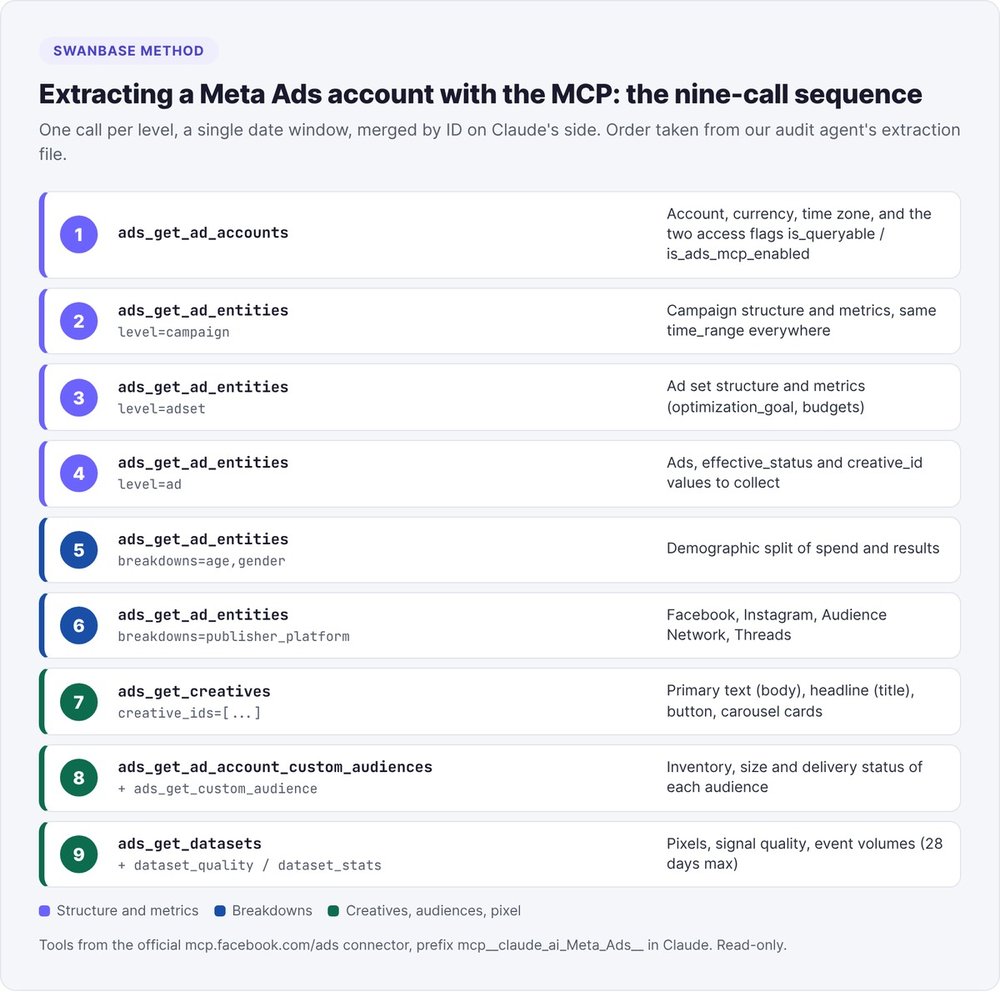
Our agent runs these nine calls in order:
ads_get_ad_accounts: account, currency, time zone, access.ads_get_ad_entitieswithlevel=campaign: campaign structure and metrics.ads_get_ad_entitieswithlevel=adset: ad set structure and metrics.ads_get_ad_entitieswithlevel=ad: ads and theircreative_id.ads_get_ad_entitieswithbreakdowns=["age","gender"]: demographic split.ads_get_ad_entitieswithbreakdowns=["publisher_platform"]: split by platform.ads_get_creativeson the collectedcreative_idvalues: copy, headlines, buttons, carousel cards.ads_get_ad_account_custom_audiencesthenads_get_custom_audience: audience inventory and details.ads_get_datasets, thenads_get_dataset_qualityandads_get_dataset_stats: pixels, signal quality, volumes.
The fields to request at each level
Request fields explicitly. Without a list, you only get id, name and amount_spent. Here are our lists:
campaign : id,name,status,effective_status,objective,daily_budget,lifetime_budget,bid_strategy,buying_type
adset    : id,name,campaign_id,status,effective_status,optimization_goal,bid_strategy,daily_budget,lifetime_budget,attribution_setting
ad       : id,name,adset_id,status,effective_status,creative_id
metrics  : amount_spent,impressions,reach,cpm,cpc,frequency,clicks,ctr,link_click,omni_purchase,omni_complete_registration,lead,purchase_roas,video_thruplay_watched_actions,3_second_video_plays
Count active entities with effective_status. On an e-shop we audited in June, several ad sets showed ACTIVE under a paused campaign, with an effective_status of CAMPAIGN_PAUSED.
Five format traps
- The default period. Without
date_presetortime_range, you get the last 28 days. Set an explicittime_rangeand reuse it on every call, breakdowns included, so your numbers reconcile. Never pass both parameters together. - Field names. Spend is called
amount_spent, neverspend. Conversions come back as flattened keys (omni_purchase,lead), andactionsdoesn't exist as a standalone field. If a field is rejected,ads_get_field_contextresolves the alias. - Values as text. Metrics come back as formatted strings:
"268,73 € (EUR)","24 928"with a thin space,"2,01%". Normalize them before any calculation. A0is real data; the string"Not available"means the data is missing. - The account ID.
ads_get_ad_entitiesexpects the numeric ID, without theact_prefix. - The 1,000-entity limit per call. On a large account, call twice, with
sort=amount_spent_descendingthenamount_spent_ascending, and merge byid. On the 155-campaign account, our agent sorted by spend.
The Meta Ads MCP's blind spots
Video tutorials cover the connection. The audit depends on the fields Claude can't get.
Targeting, optimization event, Advantage+: rejected in June 2026
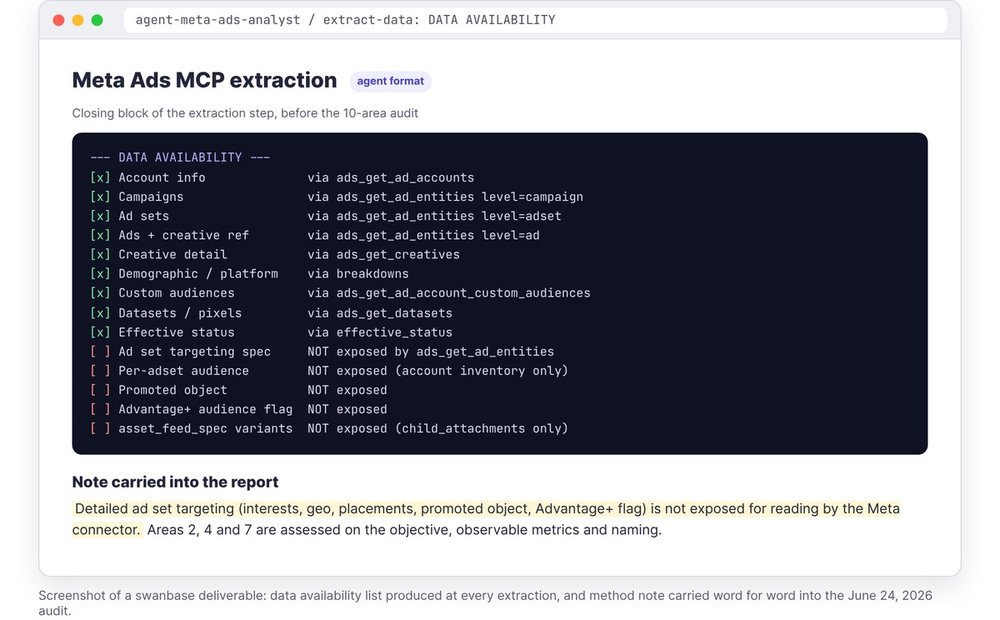
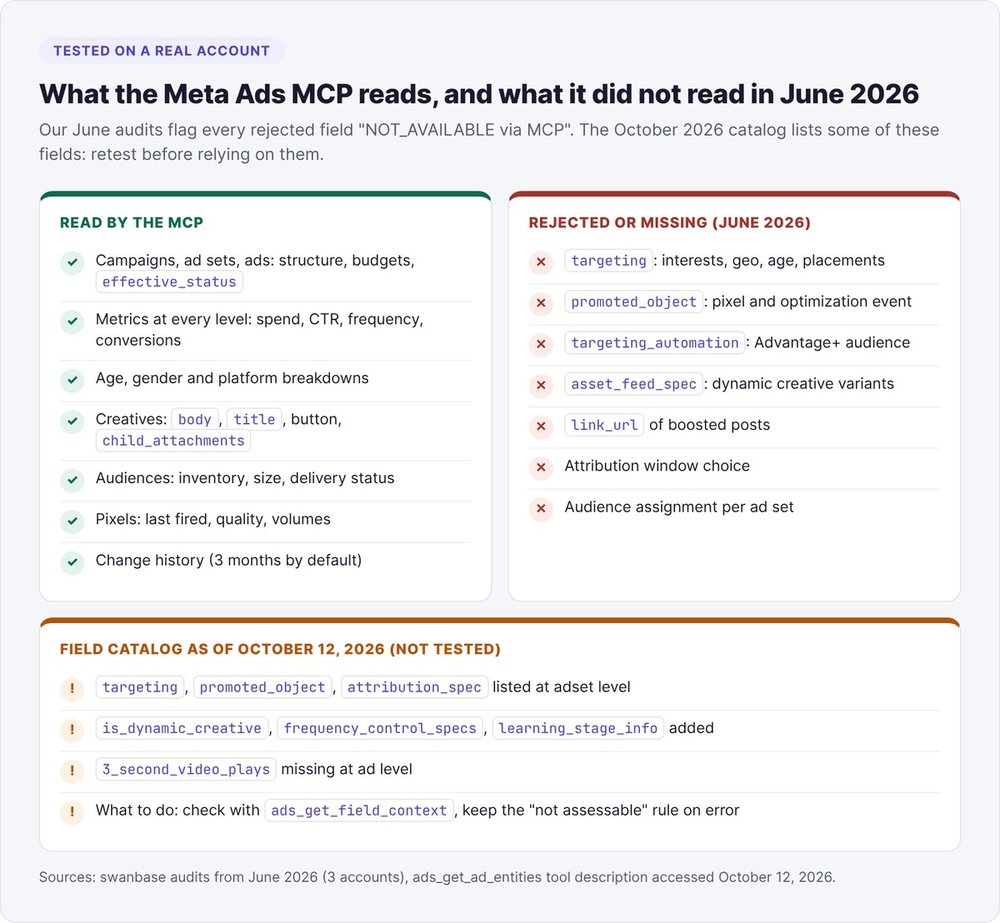
We tested this on a real account in June 2026. At the ad set level, our ads_get_ad_entities requests for targeting, promoted_object, attribution_spec, pacing_type, destination_type, billing_event and bid_amount returned errors. The Advantage+ audience setting (targeting_automation) and dynamic creative variants (asset_feed_spec) were missing too.
In April, using the old command-line tool, our audit of an e-shop stated "Advantage Audience: OFF on all ad sets" and listed the audience exclusions. In June, on the same account via the MCP, the methodology note flagged that detailed ad set targeting was missing (interests, geo, placements, promoted object, Advantage+ flag).
Three audit areas lose their direct source: pixel and optimization event, targeting, and Advantage+.
The October 2026 field catalog
As of October 12, 2026, the description of ads_get_ad_entities lists targeting, promoted_object, attribution_spec, is_dynamic_creative, frequency_control_specs and learning_stage_info at the ad set level. We haven't tested this yet. Check these fields with ads_get_field_context, and fall back on the rule below if they return an error.
One more detail: 3_second_video_plays is available at the account, campaign and ad set levels but missing at the ad level, which makes it harder to calculate the hook ratio ad by ad.
The "not assessable" rule
Our extraction rule: any field missing from the response becomes NOT_AVAILABLE via MCP, and Claude never infers it from a campaign name. Each audit area ends with a "Not assessable" line, for example: "detailed custom event setup, Conversions API (CAPI), signal quality".
Claude will happily fill a gap with a plausible guess (that's practically its specialty). The "Not assessable" line tells you where to check in Ads Manager.
Destination URL and attribution window
- Post URLs. For post-type creatives (video or existing post),
link_urlis missing. To compare the three landing pages of a SaaS, we reasoned by time period and campaign name, without attribution down to the cent. - Attribution. The MCP doesn't let you choose the attribution window. For a CPA plan in September, we went through the Graph API to isolate 7-day click purchases: over 30 days, 8 of 41 purchases came from 1-day view alone.
How do you audit an account across 10 areas with numeric thresholds?
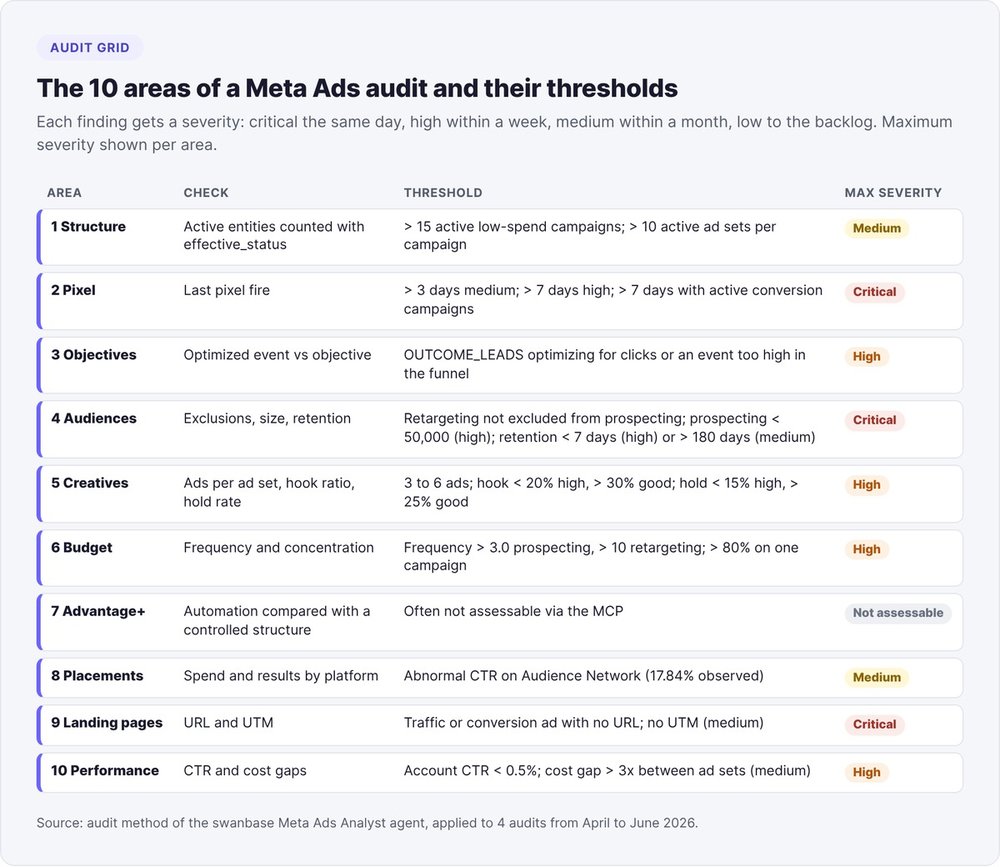
Our agent works through ten areas, ordered by impact. Every finding carries a severity level and quotes an exact figure from the account, with no ~.
Areas 1 to 3: structure, pixel, objectives
- Area 1, account structure. More than 15 active low-spend campaigns signals a diluted budget. More than 10 active ad sets in one campaign fragments the audience.
- Area 2, pixel and conversions. Last fired more than 3 days ago: medium. More than 7 days: high. More than 7 days with active conversion campaigns: critical. Multiple pixels on one account: fragmented signal.
- Area 3, objectives. An
OUTCOME_LEADScampaign should optimize for a lead or a registration (COMPLETE_REGISTRATION). If it optimizes for clicks, or for an event too high in the funnel, rate the finding high.
Areas 4 to 6: audiences, creatives, budget
- Area 4, audiences. Retargeting audiences not excluded from prospecting: critical. Prospecting audience under 50,000 people: high. Audience retention under 7 days: high; over 180 days: medium.
- Area 5, creatives. Aim for 3 to 6 ads per ad set; flag fewer than 2 or more than 8. For video, the hook ratio (3-second views divided by impressions) is weak below 20%, average from 20 to 30%, and good above 30%. The hold rate (ThruPlays divided by 3-second views) is weak below 15% and good above 25%.
- Area 6, budget. Frequency above 3.0 in prospecting or 10 in retargeting: high. More than 80% of spend on a single campaign: high. An ad set spending less than 30% of its budget is underdelivering.
Areas 7 to 10: Advantage+, placements, landing pages, performance
- Area 7, Advantage+. Often not assessable via the MCP. Flag any automated campaign running without a comparison against a controlled structure.
- Area 8, placements. Compare spend and results by platform. An unusually high CTR on Audience Network often points to accidental clicks: 17.84% on one of our accounts.
- Area 9, landing pages. A traffic or conversion ad with no URL: critical. No UTM parameters: medium.
- Area 10, performance. Account CTR below 0.5%: high. A cost-per-result gap of more than 3x between ad sets: medium.
Rating severity and scoring account health
| Severity | Time to act | Example |
|---|---|---|
| Critical | same day | pixel silent for 7 days with conversion campaigns |
| High | within a week | prospecting frequency above 3.0 |
| Medium | within a month | no UTMs on URLs |
| Low | backlog | inconsistent naming |
For the health score: a single critical finding is enough to rate the account "critical"; three high findings with no critical, "at risk"; one or two high findings among mediums, "fair"; otherwise, "healthy". A quick win combines high impact with less than 30 minutes of work in Ads Manager.
Excerpts from our Meta Ads audits
Six deliverables from April to September 2026: four full audits, a landing page comparison and a cost-per-purchase reduction plan, across two SaaS companies and two e-shops. We removed the names and kept the exact figures.
A SaaS with 155 campaigns
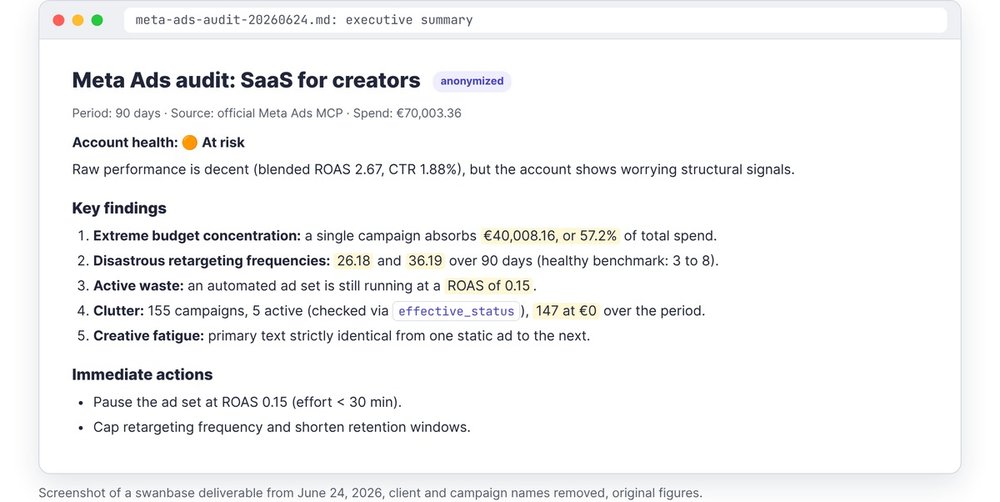
A SaaS for creators, with a 14-day free trial, spent €70,003.36 over 90 days. The audit found:
- 155 campaigns in total, 5 active according to
effective_status, 8 that spent during the period, and 147 at zero; - a single acquisition campaign absorbed €40,008.16, or 57.2% of spend;
- two retargeting ad sets ran at frequencies of 26.18 and 36.19 over 90 days, against a healthy benchmark of 3 to 8;
- an automated campaign was still active at a ROAS of 0.15;
- ten pixels on the account, some silent since September 2024;
- several website visitor audiences capped at 20 people, too small to deliver.
Account rating: at risk. First quick win, under 30 minutes of effort: pause the campaign running at 0.15 ROAS.
A free analysis offer: 11 sign-ups in Ads Manager, 41 at the pixel
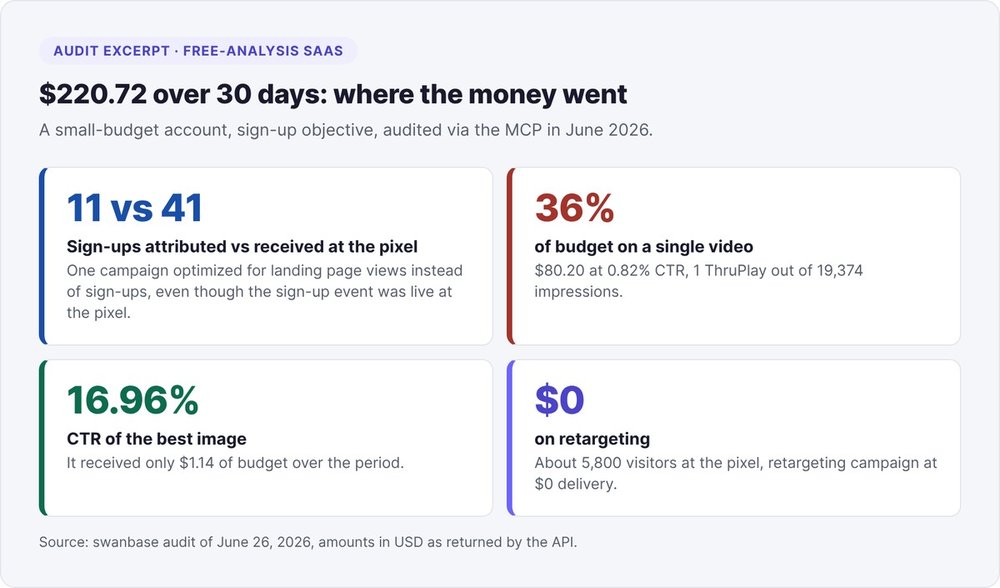
A local services SaaS offered a free analysis, no credit card required, and spent $220.72 over 30 days. The audit found:
- 11 sign-ups attributed in Ads Manager versus 41 received by the pixel over the same period;
- one campaign showed the
OUTCOME_LEADSobjective while its ad set optimized for landing page views, even though a registration event was active on the pixel; - one video absorbed 36% of the budget ($80.20) at a 0.82% CTR and 1 ThruPlay across 19,374 impressions, while an image with a 16.96% CTR received $1.14.
An e-shop rated healthy, with two warnings
A food e-shop spent €27,341.53 over 120 days for 1,518 purchases and was rated "healthy", with two warnings: an account frequency of 3.85 and active ad sets sitting under paused campaigns. Another lesson came from the creator SaaS: a video with a 33.5% hook ratio topped out at a ROAS of 1.49. A strong hook doesn't guarantee the sale.
The audit prompt to paste into Claude
Our agent starts from a short sentence, because we wrote the method into its files (extraction, 10 areas, summary). If you don't have those files, paste this prompt, which carries the same rules:
Audit Meta ad account [numeric ID, without act_] for the period
from [YYYY-MM-DD] to [YYYY-MM-DD], read-only.

1. Check access with ads_get_ad_accounts (is_queryable, is_ads_mcp_enabled).
   If either is false, stop and quote not_queryable_reason.
2. Use the same time_range for every call. Pull campaigns, ad sets
   and ads with ads_get_ad_entities (one call per level, explicit fields),
   then the age/gender and publisher_platform breakdowns, the creatives
   (ads_get_creatives), the audiences and the datasets.
3. Normalize values ("268,73 € (EUR)", "2,01%"). "Not available" =
   NOT_AVAILABLE, never 0. Count active entities with effective_status.
4. Any refused or missing field (targeting, promoted_object, Advantage+) is
   recorded as NOT_AVAILABLE via MCP. Infer nothing from campaign names.
5. Apply the 10 areas: structure, pixel, objectives, audiences, creatives,
   budget, Advantage+, placements, landing pages, performance. Thresholds:
   pixel > 7 days with conversion campaigns = critical; frequency > 3.0 in
   prospecting = high; hook ratio < 20% = high; > 80% of spend
   on one campaign = high; account CTR < 0.5% = high.
6. End each area with a "Not assessable" line.
7. Deliver: health rating, 3 to 5 quantified findings, 8 to 12 ranked
   recommendations (budget recovery first), plan for week 1 / weeks 2-4 /
   months 2-3. Exact values, no "~".
To turn this prompt into a reusable skill in Claude Code, our guide to Claude Code skills explains the format.
Your first Meta ads for a SaaS: what to watch with Claude
Both of our SaaS audits surfaced mistakes you can catch in the first month.
Optimize for the right event
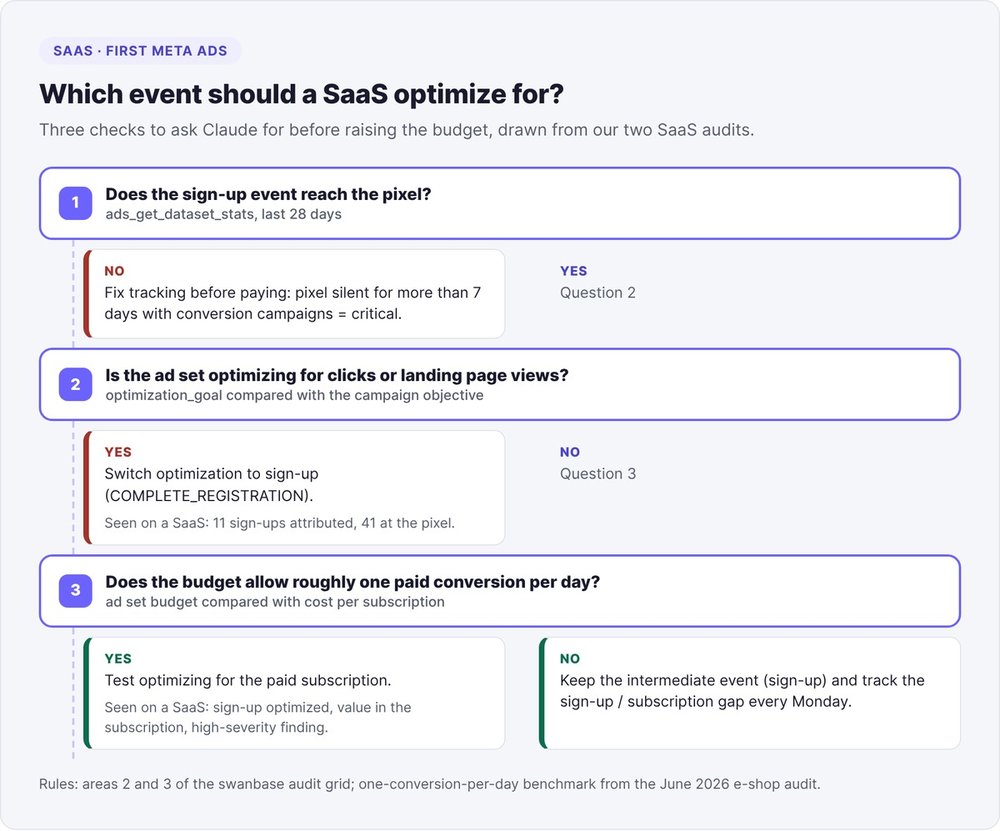
At the creator SaaS, the main campaign optimized for free sign-ups while the value came from paid subscriptions. We rated it high, because you risk buying sign-ups that never pay. On the same account, 927 "leads" sat alongside 9,698 purchases: the lead event only tracked part of the journey.
Three checks to ask Claude for:
- Which event each ad set optimizes for (
optimization_goal), compared with the campaign objective. - The gap between attributed conversions and events received by the pixel (
ads_get_dataset_stats, 28 days maximum, Unix timestamps in seconds). - The test budget: at the e-shop, ad sets at €14-16 a day stayed below the learning threshold. The audit recommended a budget that allows at least one estimated conversion per day.
Our September CPA plan set a cut rule: kill any ad with no conversion once it spends more than twice the target cost per purchase (€60 here). Stay level-headed with small volumes: at 10 to 16 conversions a week, a swing of 5 moved the cost per purchase by 40%.
The Monday check
We run reporting on Monday at 9 a.m., covering the previous Monday-to-Sunday week, and dig into any change of 25% or more versus the week before. The CPA plan set four metrics to track every Monday, each with a numeric target.
In February 2026, our weekly automation generated three reports and never sent them, because no delivery channel was configured. Test delivery end to end in the first week, and confirm that a scheduled task can actually see the Meta tools.
To place Meta within your wider acquisition strategy, read our startup growth marketing guide and our overview of AI tools for startups.
A Meta Ads audit run with Claude is only as good as its "Not assessable" lines.
FAQ
Is the Meta Ads MCP free?
Meta's April 29, 2026 announcement, which opened the beta, mentions no pricing for the connector. To use it, you need a compatible client (Claude or Claude Code) and access to the ad account.
Can Claude change my campaigns without my approval?
The connector includes write tools, and Meta requires your confirmation for some actions. Since July 2026, a business portfolio admin can also restrict what agents are allowed to do. For an audit, stay read-only.
Why does Claude say "MCP disabled" or "account not queryable"?
ads_get_ad_accounts returns two flags per account, is_ads_mcp_enabled and is_queryable. If either is false, Claude can't read the metrics. The not_queryable_reason field gives the cause.
Can you connect Meta Ads to ChatGPT the same way?
Yes. Meta built its server for any MCP-compatible agent, at the same address, https://mcp.facebook.com/ads. Only the step where you add the connector changes. The extraction and audit method stays the same.
How long does a full audit take?
For our September CPA plan, the agent delivered the diagnosis 13 minutes after a 49-second voice note, and the full report in 57 minutes. An account with several hundred entities requires more calls.
Does the MCP replace access to Ads Manager?
No. Through the MCP, you don't see the full setup: detailed targeting, Conversions API, the visual quality of creatives, consistency between ad and landing page. Check every "Not assessable" line from the audit in Ads Manager.