It's a Tuesday evening, a Luma event tells you "Your registration is pending host approval," and you wait. On the other side, the host looks at two things before saying yes: your public profile and your answers to the registration questions. Nothing else.
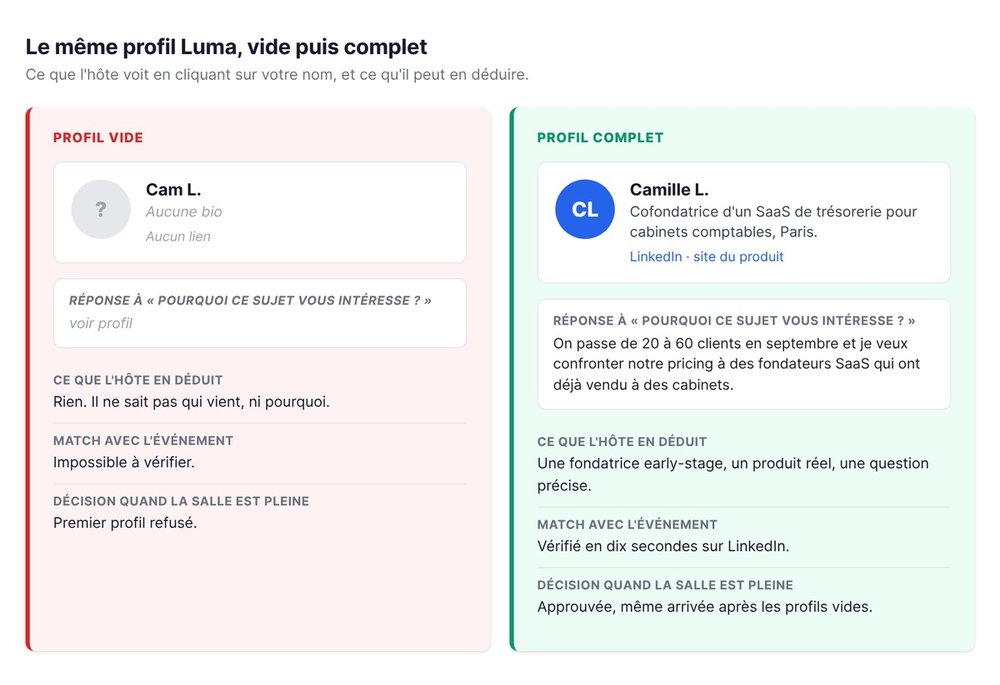
At swanbase, some events fill up in a matter of days. When that happens, we decide on those two things, and we check that the profile matches the event. Profiles with no photo, no bio and no link go into the rejection column first, because they give us nothing to weigh.
Why your Luma registration is still pending
🕐 Three mechanisms. A registration stuck on Luma comes down to a host setting, a capacity limit, or both at once. The message you get tells you which one.
Approval, capacity and waitlist: the three cases
The host can turn on approval. Every Luma registration subject to approval then lands in a pending queue, and the host clears them one by one, or in bulk.
The host can also set a capacity. According to Luma's documentation, registrations close once the event is full.
The two often stack up on tech events in Paris on Luma: a room with limited seats, approval switched on, and a queue that fills before the date.
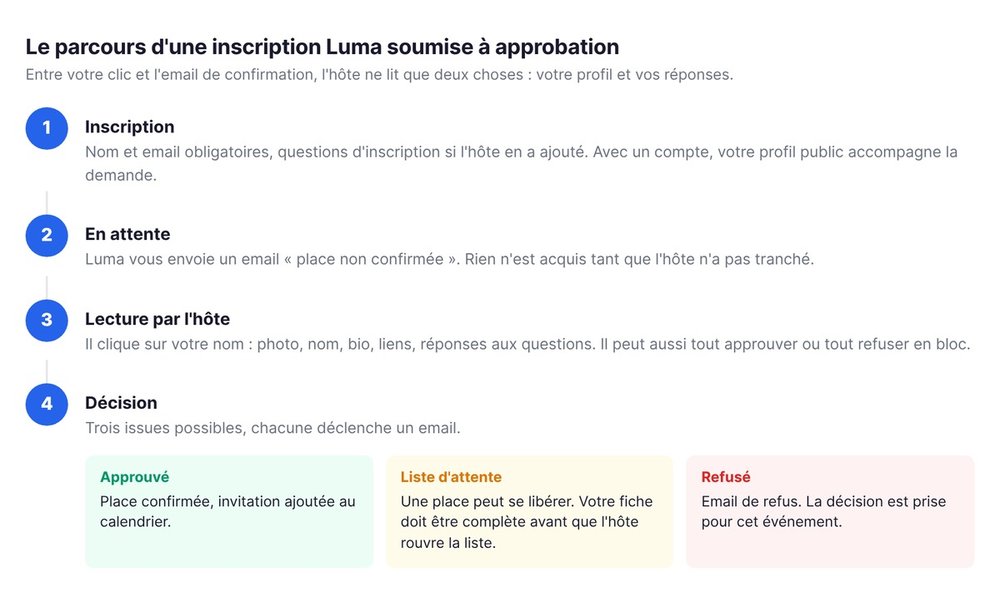
Luma emails you at every change: seat confirmed, seat pending, or rejection. No confirmation email means no seat.
On the host's side, while you wait
The host opens their guest list, filters for pending registrations and clicks each name. The record shows the profile and the answers to the questions. The host approves, declines or moves the person to the waitlist.
On the web, a full-screen view shows every guest and every answer, with two buttons: approve all, decline all. When an event gets more requests than seats, the host sorts fast. An empty profile gives them no reason to slow down.
What the host sees before deciding
👀 Two screens. Your public profile and your answers. The host has no resume, no inbox, no history on you.
Your public profile: photo, name, bio, links
The Luma profile is filled out in your account settings. Luma's documentation on profiles lists the fields: first and last name, display name, username, photo, bio, and links to Instagram, X, YouTube, TikTok, LinkedIn and a website.
The username sets the public address of your profile, in the form luma.com/user/your-name.
In a guest list, each person shows up with their first name, their photo if they have one, and their one-line bio if it's filled in. One tools writer who documented that list notes that most guests leave the bio empty.
Your answers to the registration questions
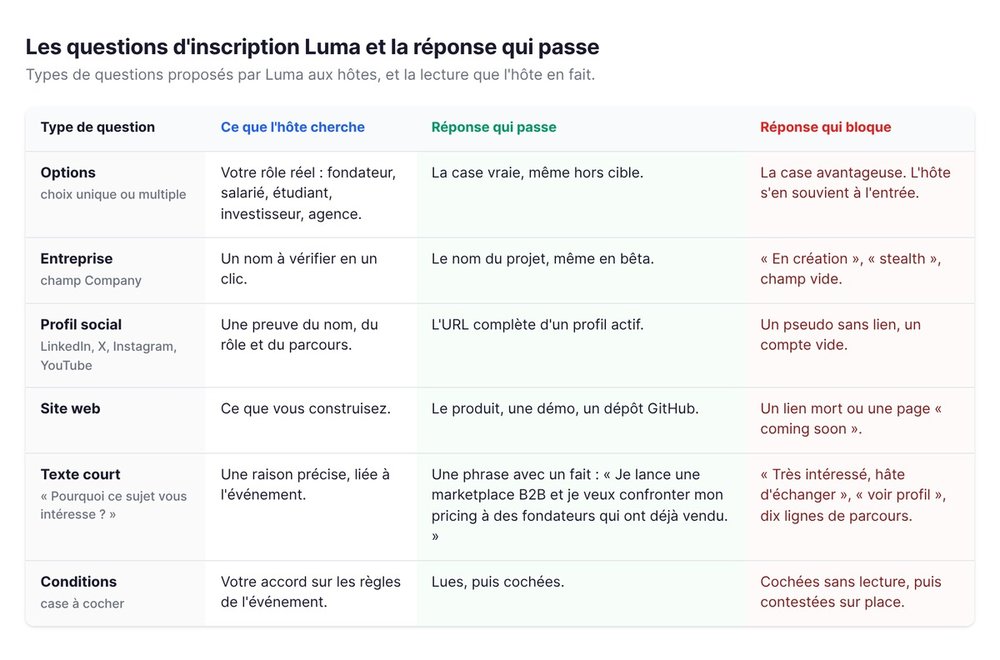
The host can add questions to the form. Luma offers several question types: short or long text, multiple choice, social profile (Instagram, X, LinkedIn, YouTube), company, website, checkbox, terms to accept. The host decides which ones are required.
Your answers appear when the host clicks your name. A "LinkedIn" or "Company" question on a form is a signal that the host will read those fields before deciding.
How we decide at swanbase when an event is full
We run our events on Luma, with a capacity tied to the room. On some formats, registrations outnumber seats within days.
Sorting starts with the profile: a photo, a real name, a bio, a link. Then the answers: does the person say in one sentence why this topic matters to them? Then the fit: an early-stage founder workshop takes early-stage founders first, an agency event takes agencies first.
Empty profiles go out first. Declining isn't a judgment on the person, it's an observation that there's nothing to read. A complete profile and a specific answer move ahead of an anonymous one.
The host isn't accepting a person. They're accepting what that person showed them.
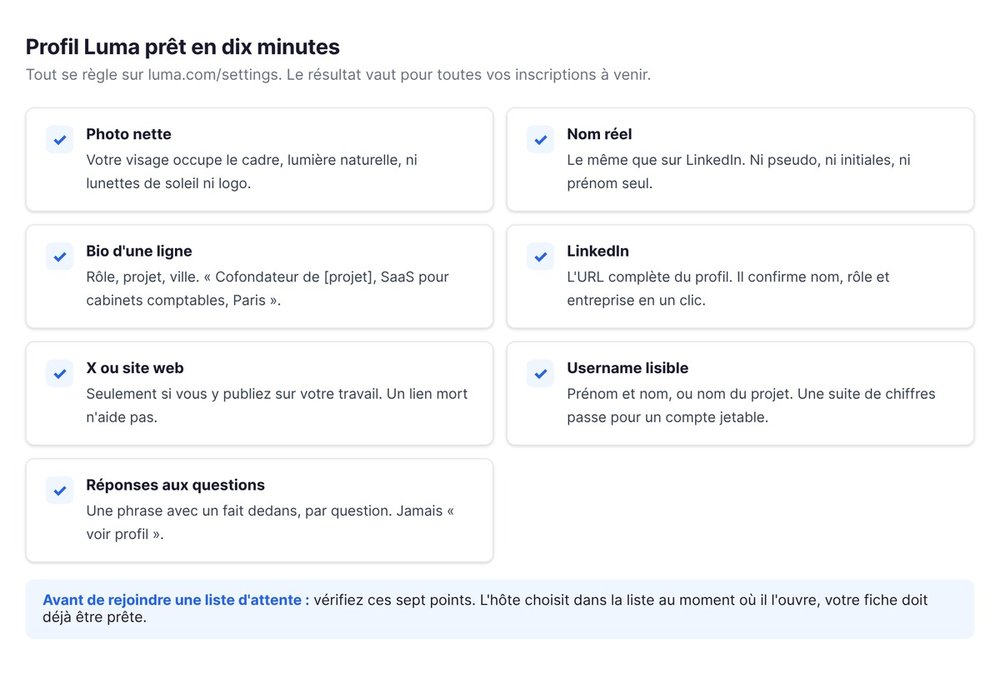
Filling out your Luma profile in ten minutes
⏱️ Four fields. Photo, name, bio, links. It all happens on luma.com/settings or in the app, and the result carries over to every registration you make from then on.
The photo and the real name
Use a photo where your face fills the frame, in natural light, no sunglasses and no logo standing in for your face. The host should be able to recognize you at the door.
The name should match the one on your LinkedIn. A first name alone, a handle or initials raise doubts.
The one-line bio: your role and your project
The bio fits in one sentence: your role, your project, your city. "Co-founder of [project], SaaS for accounting firms, Paris" says everything. "Passionate about innovation and entrepreneurship" says nothing.
If you're looking for a co-founder, write it down: the guide to finding a co-founder explains why events are still the most direct channel.
LinkedIn, X, website: the links that prove it
Add LinkedIn at minimum. An active profile confirms your name, role and company in one click.
X or Instagram help if you post about your work there. An empty or off-topic account doesn't: leave the field blank rather than filling it with a dead link.
The username and the public URL
Pick a readable username, first and last name, or your project's name. A string of digits reads as a throwaway account.
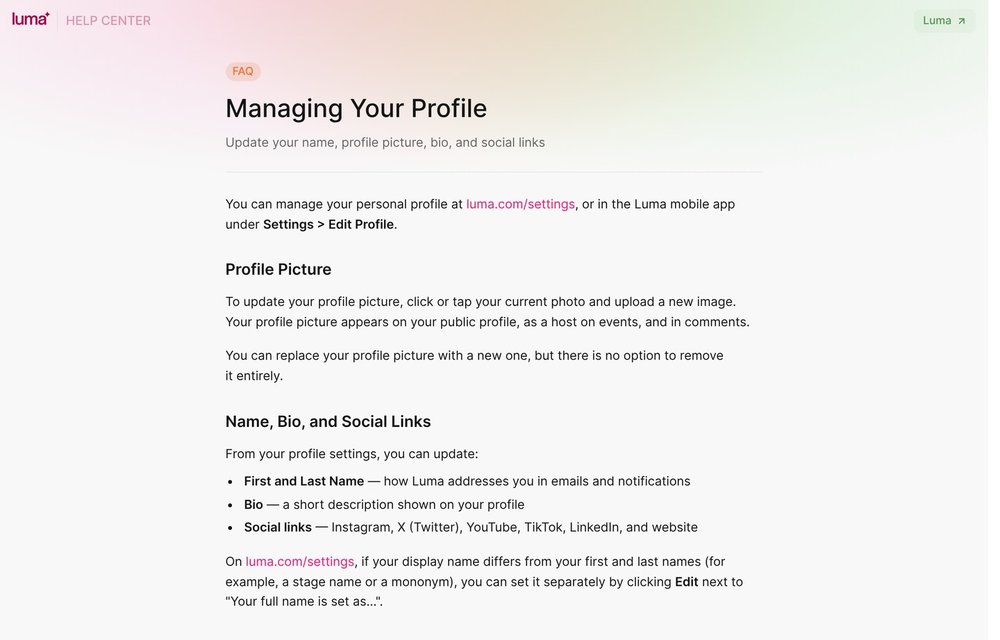
Source: help.luma.com, "Managing Your Profile" page, captured September 4, 2026.
Answering registration questions like a job application
✍️ One sentence per question. The form is the only place you speak to the host before they decide. Answer as if the seat depended on it, because it does.
The types of registration questions
At swanbase, a form asks three questions at most, and the tech hosts we spend time with do the same. The most common ones: your role (founder, employee, student, investor, agency), your company, your LinkedIn, and an open question about why you want to come.
A multiple-choice question gets answered honestly: a host filtering for "founder" who finds a student at the door will remember it. A "company" field expects a name, not "in the works." A LinkedIn field expects the full URL.
A good answer in one sentence, a bad one in ten
The open question takes one sentence with a fact in it. "I'm launching a B2B marketplace and I want to pressure-test my pricing with founders who have already sold" gives the host something to decide on. "Very interested in the topic, looking forward to meeting the community" gives them nothing.
Three traps: the answer copied from another event, the ten-line answer that walks through your career, and the empty answer ("." or "see profile").
The fit is with the event, not with you
The host isn't looking for the best profile. They're looking for the profiles that fit their room.
Reread the event description before you answer: it says who the host is expecting. If you're not in that group, say why you're coming anyway, in one honest sentence.
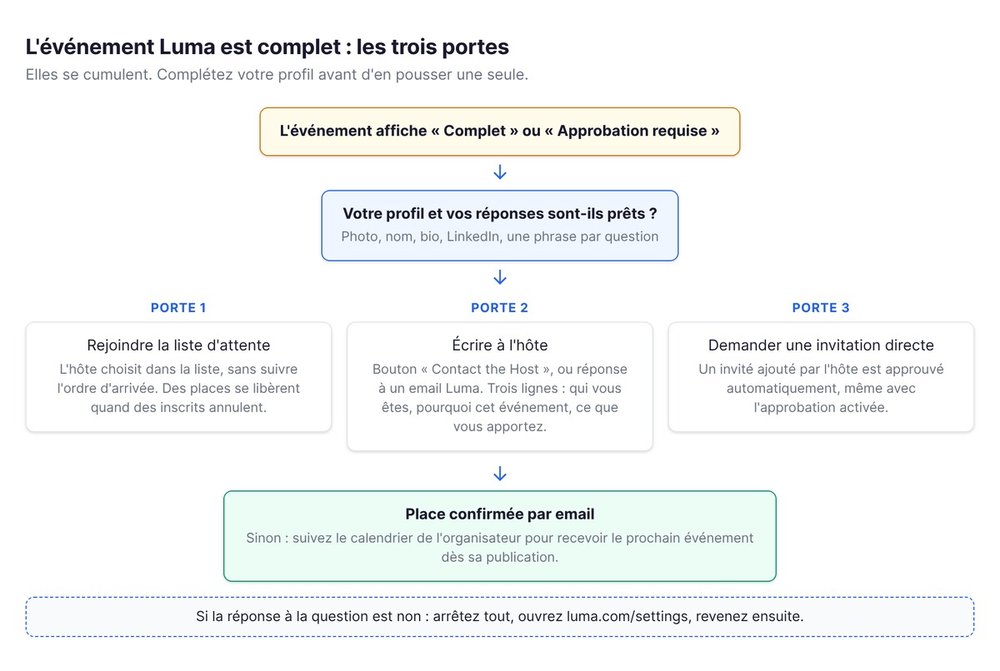
The event is full: what to do
🚪 Three doors. The waitlist, a message to the host, and a direct invite. They stack.
The waitlist: what actually frees up a seat
When the event shows as full, join the Luma waitlist if the option is there. Seats open up as registered guests drop out, and the host can widen the capacity as the date approaches.
The host chooses who moves from the waitlist to confirmed, without following the order people joined in.
Fill out your profile before you join the list.
Writing to the host, short and useful
Every event page has a "Contact the Host" button. The message goes by email to the event creator, with your address set for a direct reply. You can also reply to the confirmation or reminder email Luma sends: it reaches the host.
The message fits in three lines: who you are, why this specific event, and what you bring. The host should be able to say yes in ten seconds.
One caveat: the button sends the message to the event creator. On an event run by several people, a co-host added later won't receive it.
The direct invite and the calendar subscription
A guest the host adds themselves goes ahead of everyone: according to Luma, a directly invited person is approved automatically when they register, even with approval turned on. If you know a host or a co-host, ask for an invite rather than a favor on the waitlist.
For next time, follow the organizer's calendar. You get their events as soon as they're published, plus their newsletters and reminders.
Hackathons and technical events: what else gets checked
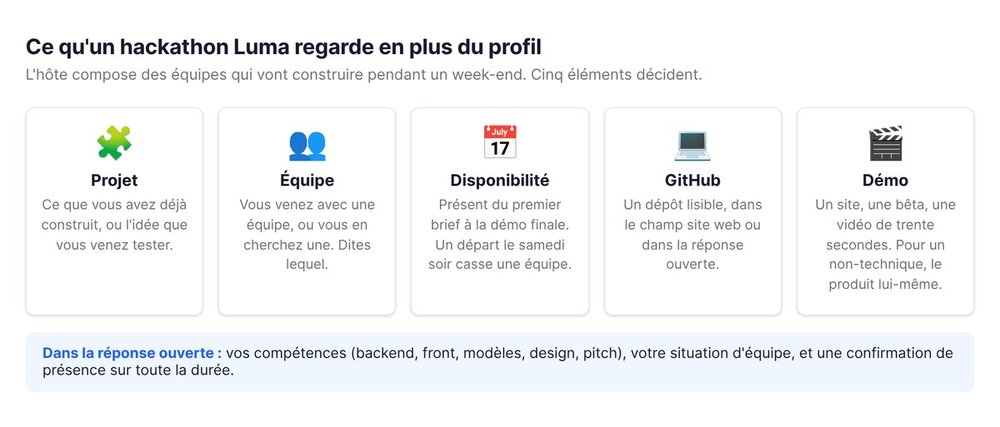
🛠️ The project before the profile. A Luma hackathon is picking teams that will build for a full weekend.
Project, team, availability for the whole thing
The Paris AI Hackathon by {Tech: Europe} shows a capacity of ninety people, registration subject to approval, and an invite-only ticket for mentors and partners.
In your answers, say what you can do (backend, front, models, design, pitching), whether you're coming with a team or looking for one, and confirm you'll be there the whole time. A participant who leaves Saturday night breaks a team.
GitHub and demos instead of a resume
At a technical event, the link that counts is GitHub, a demo site or a thirty-second video. Put it in the website field of your profile or in the open answer.
For a non-technical founder, a link to the product, even in beta, does the same job: the host sees what you're building.
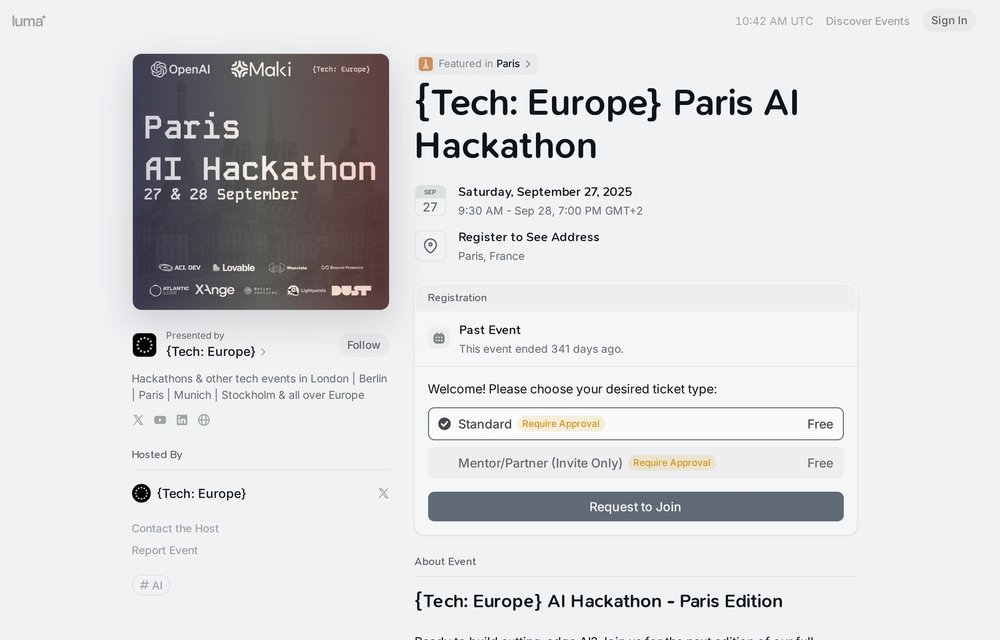
Source: luma.com, {Tech: Europe} Paris AI Hackathon page, captured September 4, 2026.
Once you're accepted, show up
✅ The seat is confirmed at the door. Getting accepted opens the entrance.
Check-in and the host's memory
At the door, the host scans your QR code or looks you up by name and email. The list then keeps a record of who showed up and who booked a seat and never came.
If you can't make it, cancel from the confirmation email. The seat goes back to the waitlist, and the host remembers that you freed one up.
swanbase events on Luma
Our workshops, pitch nights and founder meetups are on the swanbase calendar, with registration through Luma. Some formats require approval and ask two or three qualifying questions: your role, your company, and why the topic matters to you. A complete profile and one specific sentence are enough.
If you're building a startup and want more than an evening out, apply to swanbase.
FAQ on registering for Luma events
💬 Short answers. Enough to unblock a registration without rereading the guide.
Do you need a Luma account to register?
No. Luma asks for a name and an email for any registration, no account needed. That said, only an account carries a profile with a photo, bio and links, and that profile is what the host reads when approving.
Why did my registration go to the waitlist?
The event hit its capacity, or the host put you there while deciding. You get an email when a seat is confirmed.
Can the host see my LinkedIn?
Yes, in two ways. The LinkedIn link on your Luma profile shows on your public page. And if the form asks a social-profile question, your answer appears when the host clicks your name. Either way, use the full URL.
Can you get accepted after being declined?
For the same event, rarely: the rejection triggers an email and the decision is made. For the ones that follow, yes. Fill out your profile, answer the questions precisely, and write the host one line if a particular format matters to you.
If you have ten minutes right now: open luma.com/settings, add a photo, a line of bio and your LinkedIn. Your next registration will show up with something to read.