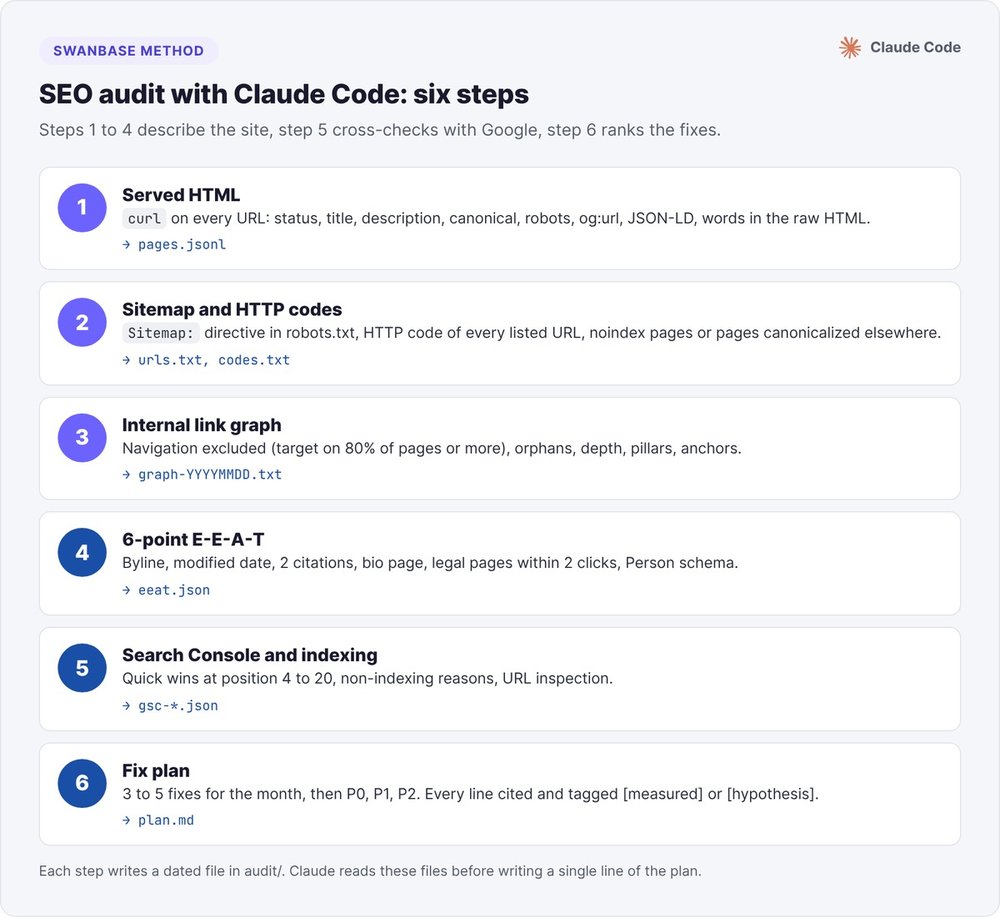
To run an SEO audit with Claude Code, you have it carry out six steps in your terminal: read the served HTML with curl, test the HTTP status codes in your sitemap, build the internal link graph, score each article on six E-E-A-T signals, cross-check with Search Console, then write a prioritized fix plan. Scripts take the measurements. Claude reads the files, filters out false positives and ranks the fixes.
Our audit of swanbase.co on August 31, 2026 crawled 363 pages. It found 11 orphan pages, 3 of which were sitemap files that have no place in internal linking anyway. That same day, /sitemap.xml returned a 200 with the content of our 404 page. Here are the commands, thresholds and pitfalls of our method.
Why run an SEO audit with Claude Code instead of an online tool?
On October 12, 2026, the first page of Google for the French query "audit seo ia" was mostly free tools and agency pages. You paste a URL and the tool gives you a score. For a SaaS site with a few hundred pages, you need every page, your own thresholds and a record of each finding.
The blind spots of free AI SEO audit tools
A canonical pointing to another domain, a sitemap listing noindex pages, an orphan page: these issues only show up when you cross-check the whole site, and a tool that scores one URL at a time can't see them. A well-ranked English tutorial on "claude code seo audit" drives a browser through MCP. It reads the page after JavaScript runs, which some crawlers never do.
Splitting the work between scripts and Claude
We set a rule after an April 2026 test: the report suggested title rewrites for pages it had never downloaded, labeled "current title (probable)". Since then, a script fetches the pages and computes the gaps. Claude reads the output files, spots false positives and writes the plan. Every value cited in the report points to the line in the crawl file that contains it.
Preparing the audit: four sources and one instruction
Create an audit/ folder at the root of your project and launch Claude Code from that folder. Every audit file lands there, dated.
The four sources to gather
- The served HTML of each page, fetched with
curl. This is what Googlebot reads before rendering, and what AI crawlers that don't execute JavaScript read. - The sitemap and
robots.txt, with the HTTP status code of every listed URL. - Search Console: a 90-day page × query export and the indexing status of your key pages. Our guide to Search Console and Claude Code covers the connection and the sorting.
- The Google results page for your 3 to 5 priority queries, so you can compare your page with the ones that rank.
The rule to write before the first command
An agent jumps quickly from a number to a diagnosis. One of our automated audits produced a "real status page by page" table without opening the files. So we wrote these instructions, which you can paste into the project's CLAUDE.md:
No verdict on a page's content without reading its full served HTML.
Search Console positions say "this page underperforms", never "the intro is weak".
Tag every recommendation [measured] or [hypothesis to verify].
Zero invented numbers: a number comes from an audit file, or you show the calculation.
Step 1: read the served HTML with curl
The tags to extract page by page
URL=https://votre-saas.fr/tarifs/
curl -sL -o page.html -w "%{http_code} %{url_effective}\n" "$URL"
grep -oiE '<title>[^<]*</title>|<link[^>]*rel="canonical"[^>]*>|<meta[^>]*(name="(description|robots)"|property="og:url")[^>]*>' page.html
grep -c 'application/ld+json' page.html
You get the final status code after redirects, then the title, description, canonical, robots directive, og:url and the number of JSON-LD blocks. Ask Claude to loop over every URL in the sitemap and write one JSON line per page.
Then read the gaps: a canonical pointing to the homepage or to another host, an og:url that differs from the URL, a noindex on a page you want to rank. Title lengths are only a hint: Google truncates by pixel width.
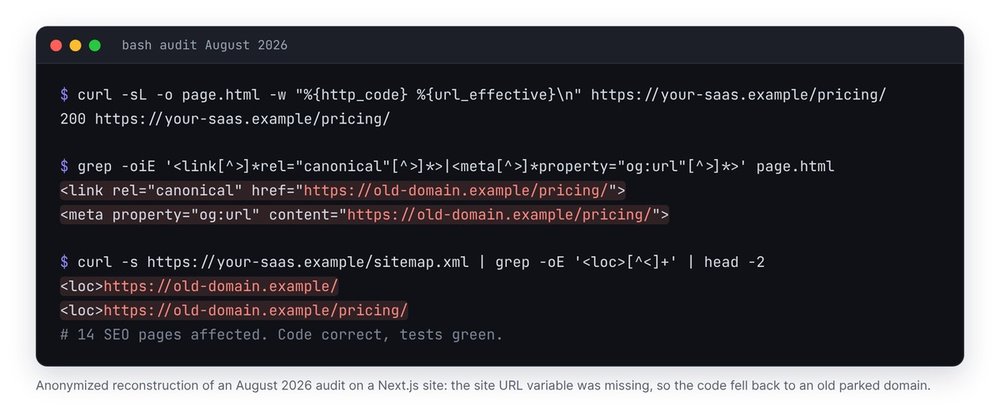
Correct code, broken production
In August 2026, on a client's Next.js site, nobody had set the variable holding the site URL. The code fell back to an old hardcoded domain that had since been parked. All 14 SEO pages served a canonical, an og:url and a sitemap pointing to that domain. The code was correct and the tests passed. Only a curl on the served page revealed the problem.
In June 2026, on our own blog, 37 of 39 articles published their FAQ without the FAQPage JSON-LD written in the source file. Our Markdown converter stripped <script> tags unless a flag was set in the article's front matter. We found out by counting FAQPage in the generated HTML. Since then, we never make a claim about schema based on the source file.
Pages that are empty without JavaScript
Count the words in the raw HTML, before JavaScript runs. Below 50 words on an indexable page, our agent flags it: crawlers that don't execute JavaScript see it as almost empty. Single-page apps and client-side loaded lists often fall into this trap.
Step 2: check the sitemap and HTTP status codes
Find the declared sitemap
curl -s https://votre-saas.fr/robots.txt | grep -i '^sitemap:'
for p in sitemap.xml sitemap_index.xml sitemap-index.xml; do
  curl -sL -o /dev/null -w "%{http_code} %{content_type} $p\n" "https://votre-saas.fr/$p"
done
Google follows the address in the Sitemap: directive. A valid sitemap returns a 200 with an XML content type, on your own domain.
Test every URL in the sitemap
curl -s https://votre-saas.fr/sitemap-0.xml | grep -oE '<loc>[^<]+' | cut -c6- > urls.txt
while read u; do echo "$(curl -s -o /dev/null -w '%{http_code}' "$u") $u"; done < urls.txt | grep -v '^200'
Every line printed flags a URL to remove from the sitemap or to fix: redirect, 404, server error. Add noindex pages and pages whose canonical points elsewhere to the check: listing them in the sitemap contradicts the page itself. According to Google's sitemap documentation, a file holds at most 50,000 URLs or 50 MB uncompressed, and Google ignores priority and changefreq values. Don't waste a line of your plan tuning them.
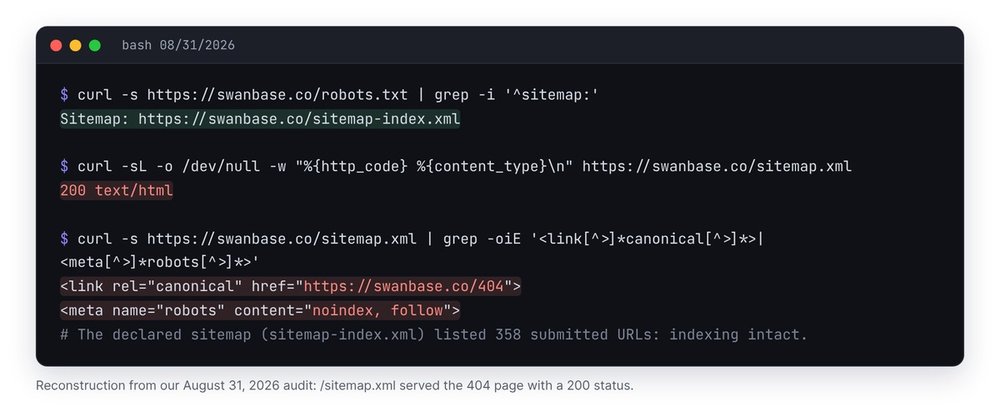
Our sitemap.xml returned a 200 with the 404 page
On August 31, https://swanbase.co/sitemap.xml returned a 200 status with the HTML of our 404 page, a canonical to /404 and noindex, follow. Our robots.txt pointed to sitemap-index.xml, which listed 358 URLs submitted in Search Console. Indexing didn't suffer. But any tool that tests /sitemap.xml first sees a broken sitemap, and the audit flagged it on every run.
Step 3: build the internal link graph
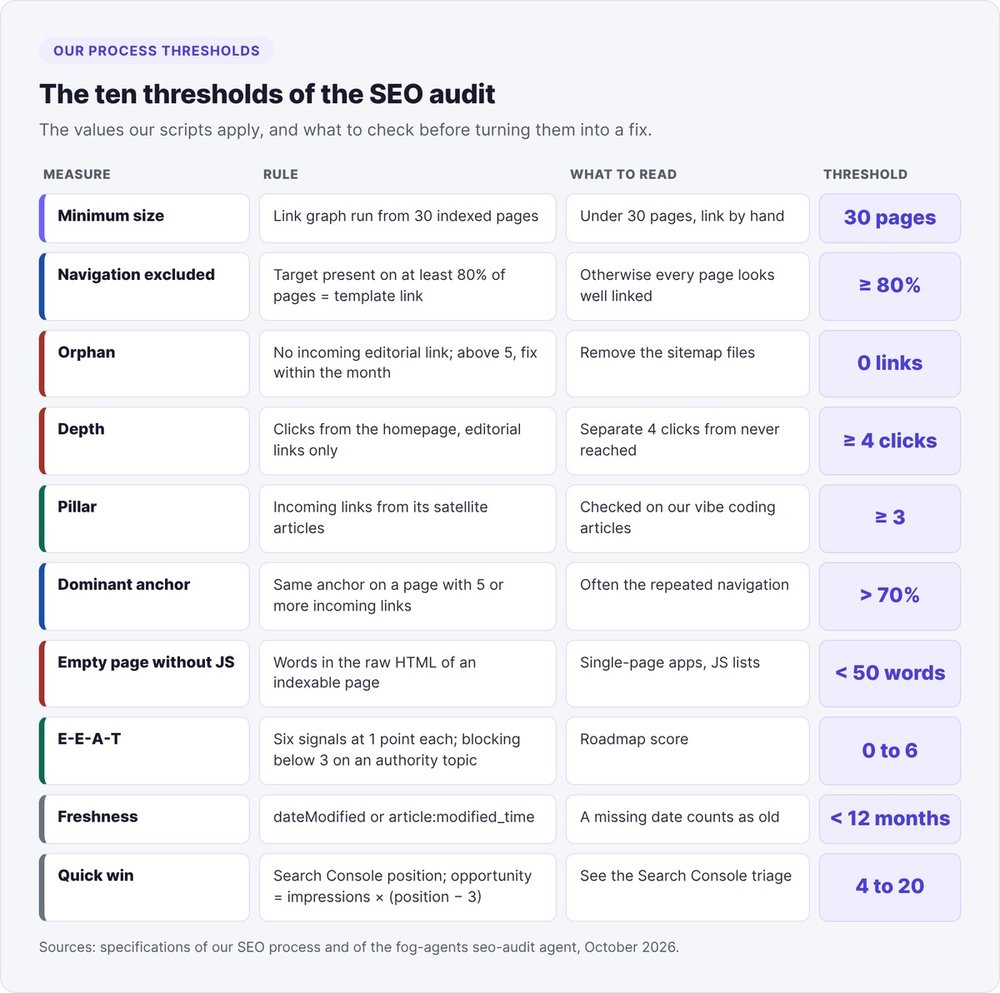
The graph shows you which pages receive links from your content, how many clicks from the homepage they sit, and with which anchor text. Our process reserves the graph for sites with 30 or more indexed pages: below that, the output doesn't drive any decision.
The thirty-line script
This script takes the URL list from step 2 and computes the four metrics. Any target present on at least 80% of pages counts as a navigation or footer link and is excluded from the calculation.
import sys, re, collections, urllib.request, urllib.parse
site = sys.argv[1].rstrip("/")
urls = [u.strip() for u in open(sys.argv[2]) if u.strip()]
norm = lambda u: urllib.parse.urljoin(site + "/", u).split("#")[0].rstrip("/") or site
liens = {}  # page -> {cible: ancre}
for u in urls:
    try:
        html = urllib.request.urlopen(u, timeout=15).read().decode("utf-8", "ignore")
    except Exception:
        html = ""  # 404, 5xx : page sans liens sortants
    a = re.findall(r'<a[^>]+href="([^"]+)"[^>]*>(.*?)</a>', html, re.S)
    liens[norm(u)] = {norm(h): re.sub(r"<[^>]+>|\s+", " ", t).strip()
                      for h, t in a if norm(h).startswith(site)}
# navigation and footer: target present on at least 80% of pages
freq = collections.Counter(c for cs in liens.values() for c in cs)
nav = {c for c, n in freq.items() if n / len(liens) >= 0.8}
ancres = collections.defaultdict(list)
for p, cs in liens.items():
    for c, t in cs.items():
        if c not in nav and c != p:
            ancres[c].append(t)
prof, file = {site: 0}, [site]  # parcours en largeur depuis l'accueil
while file:
    p = file.pop(0)
    for c in liens.get(p, {}):
        if c not in nav and c not in prof:
            prof[c] = prof[p] + 1
            file.append(c)
print("orphelines :", [p for p in liens if not ancres[p] and p != site])
print("4 clics ou plus :", [p for p, d in prof.items() if d >= 4])
print("jamais atteintes :", [p for p in liens if p not in prof])
for c, ts in ancres.items():
    if len(ts) < 5:
        continue
    top, n = collections.Counter(ts).most_common(1)[0]
    if n / len(ts) > 0.7:
        print(f"dominant anchor: {c} \"{top}\" {n}/{len(ts)}")
python3 graphe.py https://votre-saas.fr urls.txt > graphe-$(date +%Y%m%d).txt
We tested this script on a demo site served locally: it flagged three pages with no incoming editorial link, including an old URL with a 301 redirect.
The four thresholds: orphans, depth, pillars, anchors
- An orphan page receives no editorial link. Above 5 orphans, the fix goes into this month's work.
- A deep page sits 4 or more clicks from the homepage, following editorial links only.
- Each pillar page receives at least 3 links from its supporting articles.
- For a page with 5 or more incoming links, no single anchor text exceeds 70% of those links.
Reading the output correctly: our 363-page audit
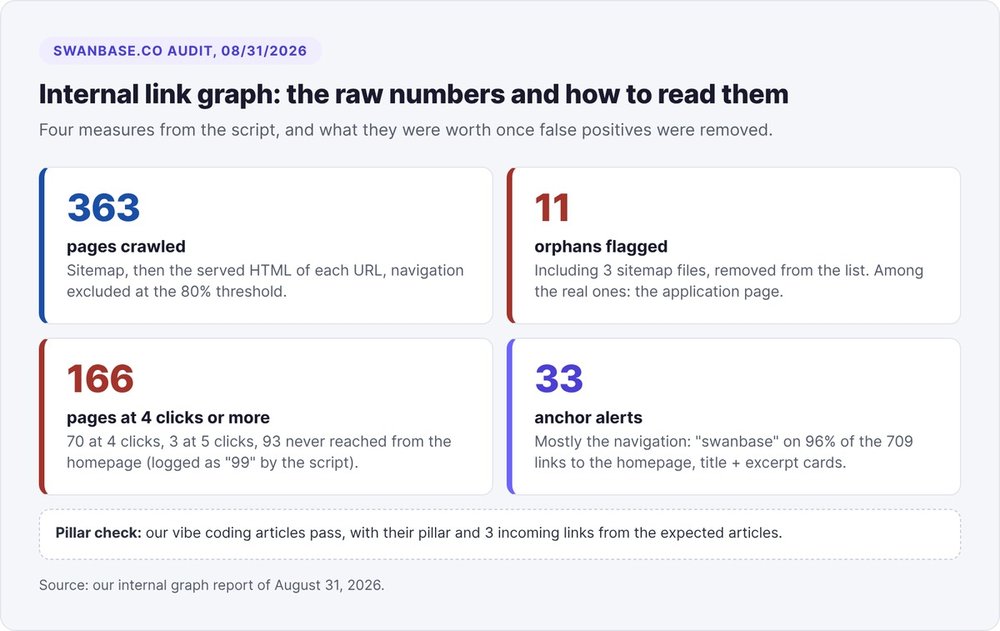
On August 31, our graph returned 11 orphans, 166 pages at 4 or more clicks, and 33 anchor alerts. Three readings changed the plan:
- 3 of the 11 orphans were sitemap files. A sitemap never receives an editorial link, so take those files off the list.
- Of the 166 deep pages, 70 were at 4 clicks, 3 at 5 clicks, and 93 were never reached from the homepage. Our script recorded those at "99 clicks". A page that is never reached is a missing-links problem and needs a different fix than a page at 4 clicks.
- Most anchor alerts came from repeated navigation. The homepage link carried "swanbase" on 96% of its 709 incoming links, and article cards concatenated title and excerpt into the anchor. Our plan classed this point as a hypothesis, with no rewrites until someone inspected the pages.
The same audit validated our vibe coding articles: pillar in place, 3 incoming links from the expected articles. Our application page, on the other hand, received no editorial link at all.
Step 4: score E-E-A-T on 6 points
Google added Experience to its E-A-T framework in December 2022, according to the Google Search Central blog post on E-E-A-T. The framework describes what quality raters look at. From it we derive six checks a script can verify without judgment.
The six signals a script can check
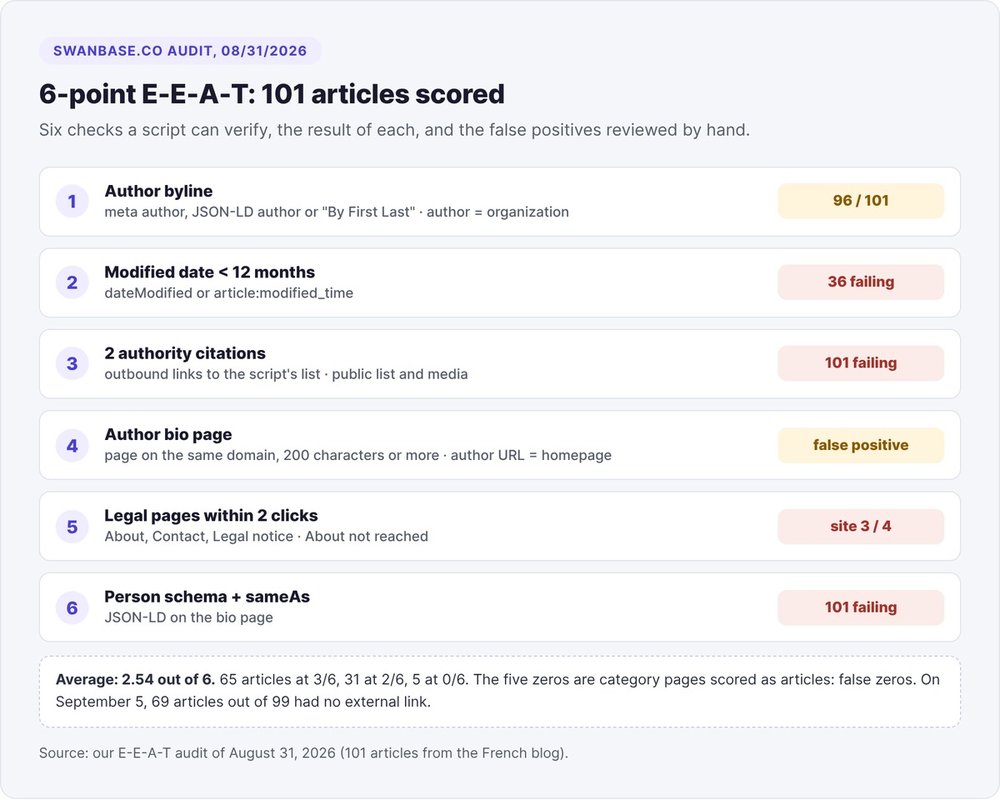
Each signal is worth 1 point, for a score of 0 to 6 per article:
- An author byline:
authormeta, author in the JSON-LD, or a "By First Last" line. - A modification date less than 12 months old (
dateModifiedorarticle:modified_time). - At least 2 outbound links to authoritative domains.
- An author bio page on the same domain, linked from the byline.
- About, Contact and Legal pages no more than 2 clicks from the homepage.
- A
Personschema for the author, withsameAslinks to their profiles.
A young site usually scores 1 or 2 out of 6: treat the score as a roadmap. It becomes a blocker below 3 out of 6 for articles on a topic where you want to build authority.
Reviewing our score of 2.5 out of 6
Across 101 articles audited on August 31, the average came to 2.54: 65 articles at 3/6, 31 at 2/6, 5 at 0/6. No article carried a Person schema, none cleared the two-authoritative-citations threshold, and 36 showed no modification date within the last 12 months.
Three results needed a second look. The 5 zero scores hit our category pages, which the script judged with article criteria. The "bio page" signal passed on every article because the author declared in the JSON-LD was the organization, with the homepage as its URL. And the script's list of authoritative domains contained only public institutions and media: a link to a vendor's documentation didn't count. Our September 5 review also found 69 of 99 articles with no external link at all.
Step 5: cross-check with Search Console and indexing
Search Console shows you which pages Google displays and which ones it rejects. We class as a quick win any query between position 4 and position 20, with an opportunity score equal to impressions multiplied by the distance to the top 3 (position minus 3). The sorting rules are detailed in our Search Console guide with Claude Code.
For indexing, export the Pages report and have Claude read the reasons. On June 12, 2026, Search Console counted 178 indexed pages and 204 non-indexed pages on swanbase.co. About 95 of the exclusions were intentional or harmless: 62 redirects, 21 noindex, 9 correct canonicals, 2 404 pages and 1 duplicate. That left 109 pages to deal with: 63 "Crawled - currently not indexed", which Google read and then set aside, and 46 "Discovered - currently not indexed", never crawled.
The two groups need two different fixes. A page that is discovered but never crawled lacks internal links: link to it from indexed pages. A page that is crawled and then rejected raises a duplication or thin content question. Google indexed none of our three articles on the same topic, so our plan called for merging them into one.
gsc inspect "https://votre-saas.fr/blog/<slug>/" --site "sc-domain:votre-saas.fr" --json
Step 6: write a prioritized fix plan
Three priority levels
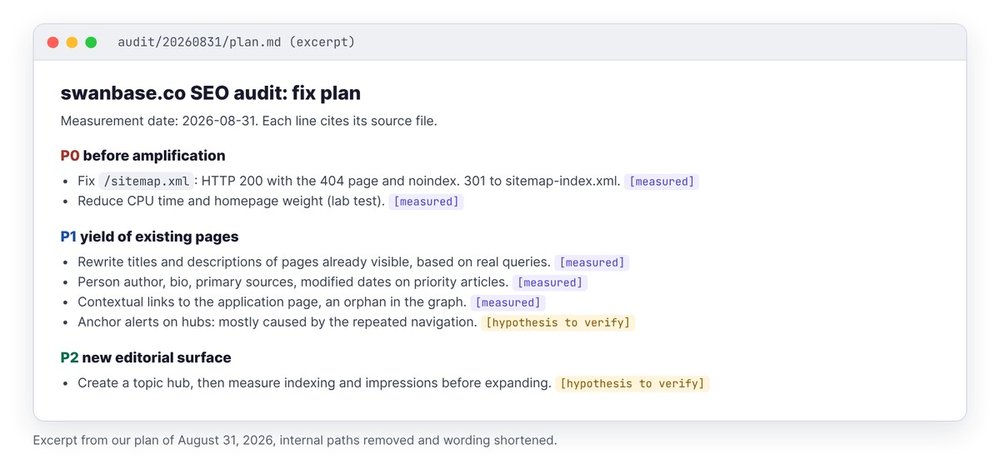
Our August 31 audit placed each fix in one level:
- P0, before any amplification: issues that distort what Google reads. For us, the
/sitemap.xml404 served as a 200, and the homepage load time. - P1, getting more from existing pages: titles and descriptions of pages that already have visibility, authors, sources, links to the application page.
- P2, new surface area: pages to create, once the first two levels are done.
Every line carries its tag. "The sitemap returns the 404 page" is [measured]. "Anchor alerts come mostly from navigation" stayed [hypothesis to verify] until someone opened the pages. Start the plan with a list of 3 to 5 fixes "to do this month": it's the only part your team will read in full.
Check the served page after every fix
A fix only exists once it's served. After deploying, rerun step 1 on the fixed page: 200 status, self-referencing canonical, og:url, presence in a sitemap on the same host, valid JSON-LD. Our September 5 review found 14 old English URLs "redirected" through 200 pages with an auto-refresh and noindex, instead of 301 redirects. Then track the page in Search Console at 14, 28 and 56 days.
The SEO audit prompt to give Claude Code
This prompt also works in ChatGPT if you feed it the files produced by the commands. Claude Code runs the commands itself and opens your site's code.
SEO audit of https://votre-saas.fr. Work in audit/YYYYMMDD/.
1. Read robots.txt and the declared sitemap. Write urls.txt and the HTTP status code of each URL.
2. For each URL, fetch the served HTML with curl and write one JSON line:
   status, title, description, canonical, robots, og:url, JSON-LD types, raw HTML word count.
3. Run graphe.py on urls.txt. Remove sitemap files from the orphans.
   Separate pages at 4+ clicks from pages never reached.
4. Score each article on the 6 E-E-A-T signals. Flag category pages separately.
5. Cross-check with the 90-day Search Console export (data/gsc-*.json).
6. Write plan.md: 3 to 5 fixes for the month at the top, then P0, P1, P2.
   Each line cites the file and line that prove it, tagged [measured] or [hypothesis to verify].
Do not modify any site file.
The last line matters. Stay in control of what goes to production: Claude proposes, you fix and redeploy.
Turning the SEO audit into a Claude Code skill
Once the prompt is stable, store it as a skill. According to the Claude Code skills documentation, a project skill lives in .claude/skills/<name>/SKILL.md and runs with /<name> or automatically when its description matches the request.
---
name: audit-seo
description: Technical and editorial SEO audit of the site (served HTML, sitemap, link graph, E-E-A-T, Search Console). Use when asked for an SEO audit or when traffic drops.
---
Follow the six steps in audit/METHODE.md. Scripts: audit/graphe.py.
No verdict without reading the file. Tag [measured] or [hypothesis to verify].
Independent steps, like the Google results page and E-E-A-T, can run in parallel in Claude Code subagents. Our guide to Claude Code skills covers the format in detail.
If you'd rather start from a complete agent, we publish seo-audit in fog-agents, under the Apache 2.0 license. Its plain Python scripts crawl the site while respecting robots.txt, reject any report that cites a title without its crawl line, and verify the published page. The agent never publishes anything: it hands you a report and briefs. For visibility in AI answers, it also checks crawler access for bots like GPTBot, ClaudeBot or PerplexityBot in robots.txt; our article on llms.txt covers that side. The full set of agents is presented in AI marketing agents.
FAQ
Can Claude Code replace SEO crawling software?
For a site with a few hundred pages, yes: curl, a Python script and Claude cover HTTP codes, tags, the sitemap and the link graph. Our 363-page audit ran on Python scripts and simple HTTP requests. Beyond several thousand URLs, a dedicated crawler is still faster, and Claude can read its export.
Can you run an SEO audit with ChatGPT?
Yes for the analysis, if you give it the files: fetched HTML, the URL list with status codes, the Search Console export. ChatGPT doesn't run curl on your machine. Claude Code runs the commands, reads the site's code and cites the line behind each finding.
How many pages does a site need before the internal link graph is useful?
Our process reserves it for sites with 30 or more indexed pages. Below that, you link each page by hand, and the depth and anchor thresholds don't have enough data to work with.
How much does an SEO audit with Claude Code cost?
The commands in this article use no paid API: curl, Python and the Search Console API are free. You pay for your Claude subscription or usage. A Google results API is optional.
How often should you rerun the SEO audit?
Our process runs the internal link graph monthly, and the E-E-A-T check and branded query audit quarterly. After a fix, the fog-agents seo-audit agent tracks the page at 14, 28 and 56 days.
Can Claude Code fix the issues it finds on its own?
It can propose the fix in your code: canonical, 301 redirect, JSON-LD, internal links. Our audit prompt forbids it from modifying the site. You then apply the fixes you choose and rerun step 1 on the served page.