An AI social media agent prepares your posts, rewrites each caption to fit each network, checks the limits and schedules the send. You keep a single job: read and approve. At swanbase, our AI social media agent has been running in production since October 3, 2026 on three accounts (LinkedIn, Instagram, X). It fills a queue three weeks ahead, runs every caption through check scripts, then waits for your "ok" before calling the Zernio API.
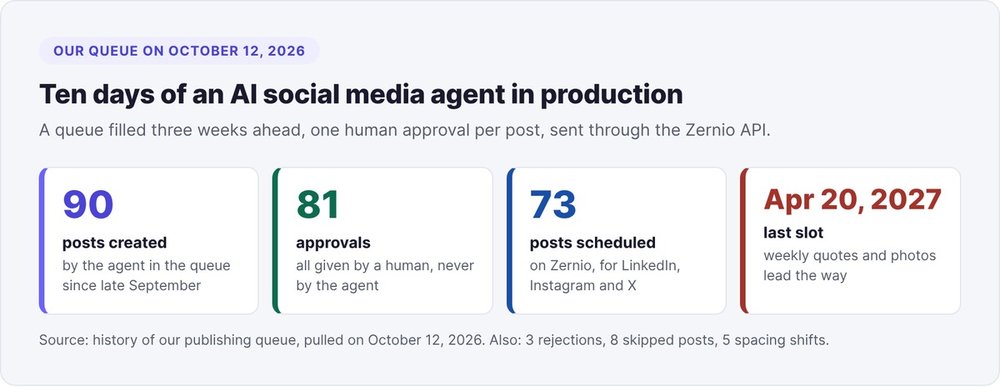
As of October 12, 2026, the queue holds 90 created posts, 81 recorded approvals and 73 scheduled posts, the last one set for April 20, 2027. This tutorial walks through the five-step pipeline, with our thresholds, our commands and three dated pitfalls.
What is an AI agent for managing social media?
An AI agent for managing social media is a program driven by a language model that chains several tools toward one goal: produce posts, adapt them, check them, then schedule them. It keeps state (the queue), reads sources (content you have already produced) and acts on a third-party service (the publishing API).
AI agent or scheduling tool
Three families of tools can automate social media publishing. With Buffer or Metricool, you schedule text you wrote yourself. An n8n or Zapier automation follows a fixed scenario. The agent adds the model's judgment: it picks the next quote, shortens a caption that runs too long for X, and restarts the writing after a failed check.
Ours combines Python scripts and calls to Claude, launched from Claude Code. The model writes. The scripts check and schedule.
How work splits between the agent and you
The agent fills the calendar, rewrites for each network, runs the checks and calls the API. You decide what gets published. One rule holds the whole thing together: only a human can move a post from "to review" to "approved". The day our agent broke that rule, we reverted everything within the hour (see step 4).
How a post moves through our queue
Every post lives in a single JSON file, the queue: format, slot, networks, caption, media and history.
Six statuses and a single human gate
A post follows this cycle:
to_review -> (revising -> to_review)* -> approved -> scheduled -> published
             skipped (slot skipped)   rejected (declined)   error
Three statuses concern you. In to_review, you need to read the post. In approved, you have signed off on it. In scheduled, Zernio holds it with its date. We leave the rest to the scripts. The revising status kicks in when you ask for a change: a Claude agent rewrites the caption and puts the post back in to_review, with your request logged in the history.
A typical week with one format per day
We set our standard week on September 28, 2026: one format per working day, at noon. Monday a carousel, Tuesday a quote, Wednesday a tool (plus a video at 6 p.m.), Thursday next week's agenda, Friday a photo. Each format has default networks: our carousels go to Instagram only. As of October 12, 59 posts in the queue target LinkedIn, Instagram and X at once.
For a SaaS, pick other formats (customer story, feature, product metric) and give each one a source that produces candidates without you.
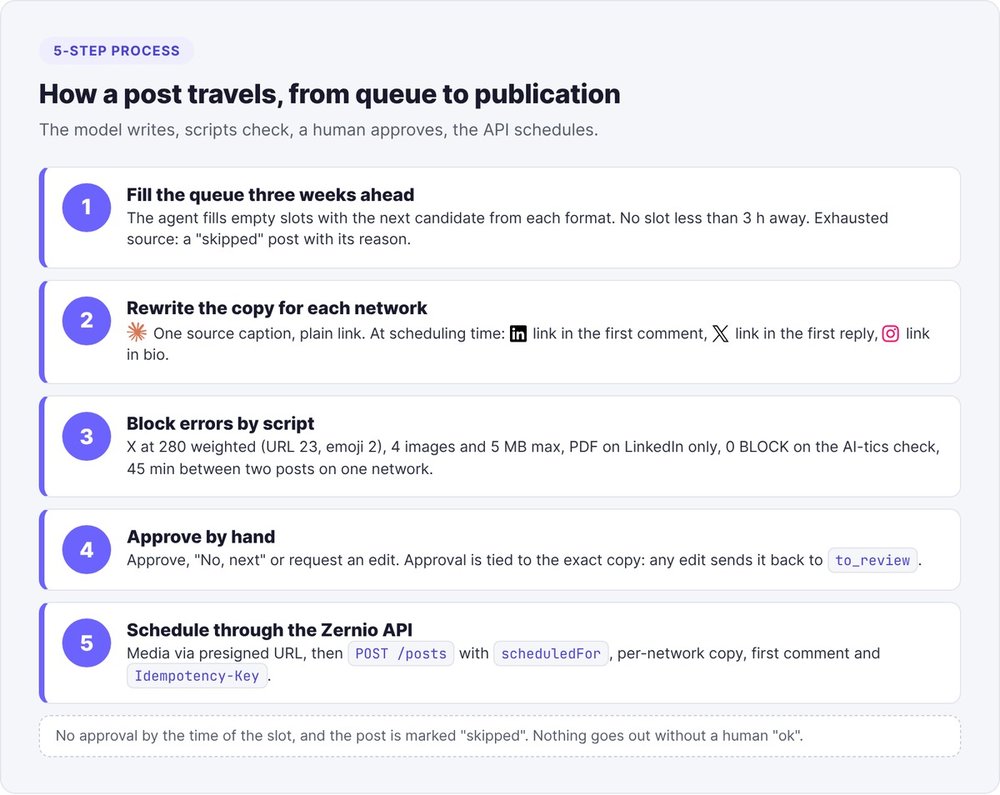
Step 1: generate the queue three weeks ahead
Fill the empty slots
Our queue settings fit in a handful of keys:
{
  "timezone": "Europe/Paris",
  "min_lead_hours": 3,
  "x_char_limit": 280,
  "spacing_minutes": 45,
  "formats": {
    "carousel": { "weekday": 0, "time": "12:00", "platforms": ["instagram"] },
    "quote":    { "weekday": 1, "time": "12:00", "platforms": ["linkedin", "instagram", "twitter"] },
    "tool":     { "weekday": 2, "time": "12:00", "platforms": ["linkedin", "twitter"] }
  }
}
On each pass, the agent spots the empty slots in the next three weeks and pulls the next candidate from that format's source. An exhausted source produces a "skipped" post with its reason, for example "Quote bank exhausted". You see the gap three weeks before the date.
Skip past slots
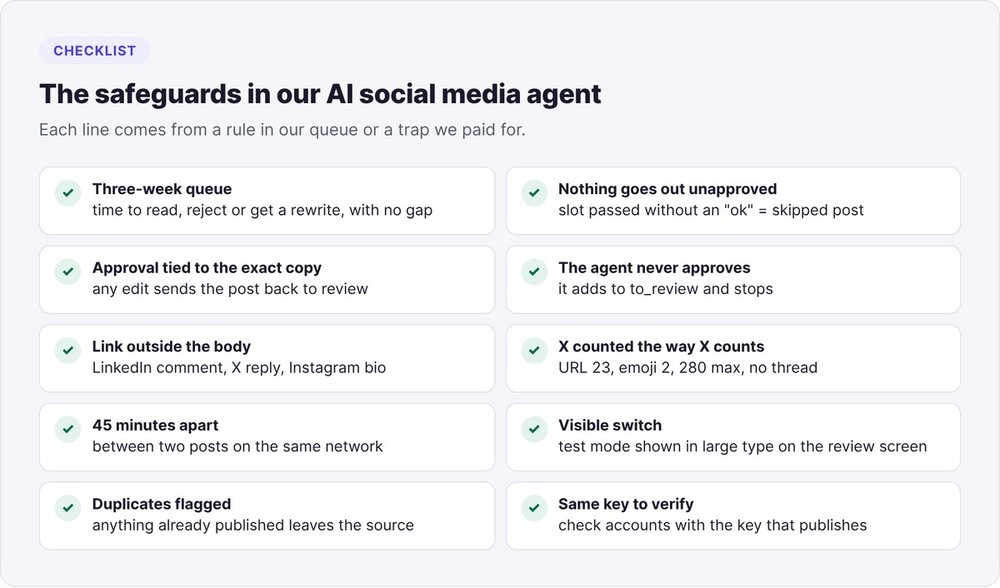
Two timing rules prevent surprise posts. The agent never schedules a slot less than three hours away (min_lead_hours). And a post whose slot passes without approval switches to "skipped" the next time the queue is read, with the reason "slot passed without approval". As of October 12, our queue holds 8 skipped posts. Without approval, nothing goes out.
Step 2: rewrite the copy for each network
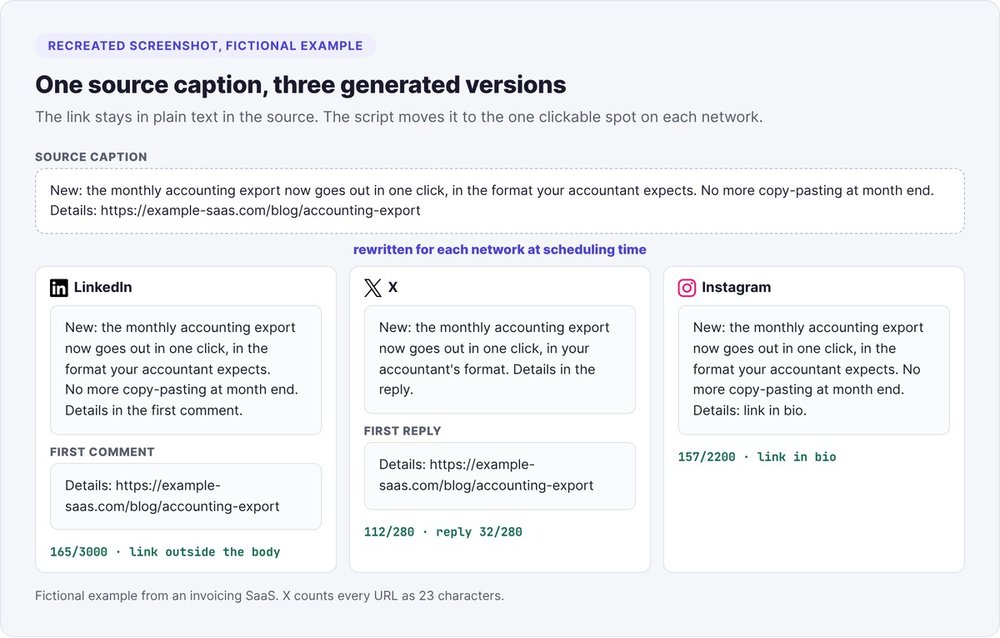
You write one source caption with the link in plain text. At scheduling time, a script produces the copy for each network and puts the link in the one place where it works.
LinkedIn: the link goes in the first comment
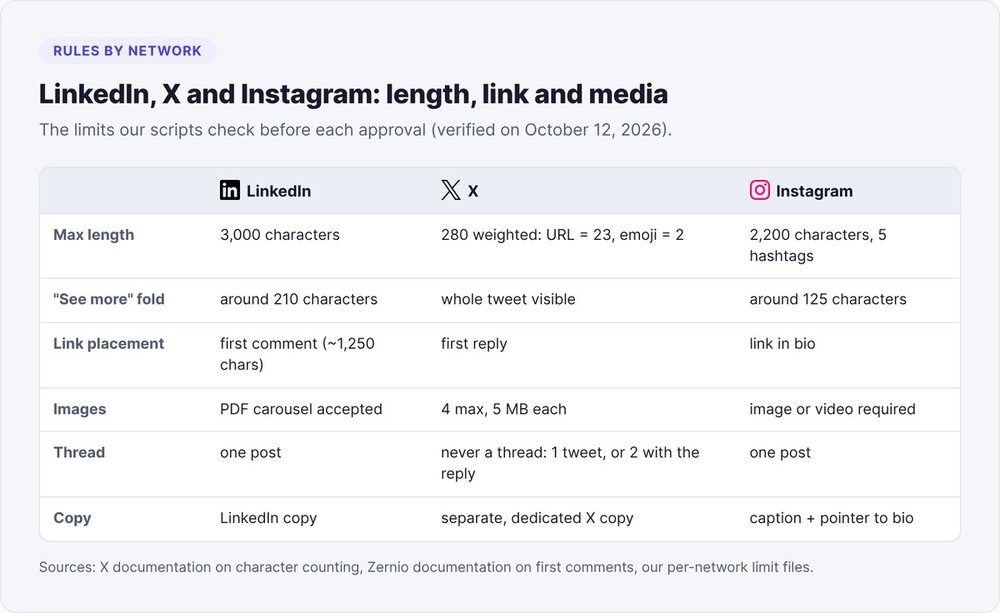
Since October 2, 2026, no link goes into the body of a LinkedIn post. The sentence carrying the link goes into the first comment, and the post points to it. On the API side, Zernio receives the LinkedIn copy in customContent and the comment in platformSpecificData.firstComment. The Zernio documentation on first comments gives roughly 1,250 characters for a LinkedIn comment, posted a few seconds after the post.
A LinkedIn post body can run to 3,000 characters, but the "see more" fold lands around 210: your idea has to fit before it.
X: one tweet of 280 weighted characters
X gets its own copy, separate from LinkedIn and Instagram. Our rule since October 3, 2026: one tweet of 280 characters at most, never a thread. An X post is therefore one message, or two when the link goes in the first reply.
The trap is in the counting. According to the official X documentation on counting characters, every URL counts as 23 characters regardless of length, and an emoji counts as 2. Our script reproduces that weighting:
def x_length(text: str) -> int:
    """Length as counted by X: each URL counts as 23, emoji and non-Latin symbols count as 2."""
    text = (text or "").strip()
    n = 0
    for part in X_URL.split(text):
        n += sum(_x_weight(c) for c in part)
    return n + 23 * len(X_URL.findall(text))
With a plain len(), a 275-character tweet that weighs 290 for X gets through your review, then fails on publishing day, three weeks after your "ok".
Instagram: the link in bio
A link in an Instagram caption isn't clickable. The script removes it and ends the caption with a pointer to the link in bio. The caption fits in 2,200 characters, with 5 hashtags at most, and the fold lands around 125 characters.
Step 3: block errors with scripts
Before you read anything, deterministic scripts check every post. As long as a post carries an error, it can't be approved or scheduled.
Length and media checks
Our scripts block approval in six cases:
- The tweet or its reply exceeds 280 weighted characters.
- The X copy contains a thread (
---separator). - The X copy is missing for a format with no default X copy.
- The X post carries more than 4 images, or an image over 5 MB.
- A PDF targets a network other than LinkedIn (document carousels only exist there).
- The post targets no network, or an unknown one.
Each message says what to do: "X: X copy missing, write it in the X Text field (one tweet of 280 characters at most)".
Checking for writing tics
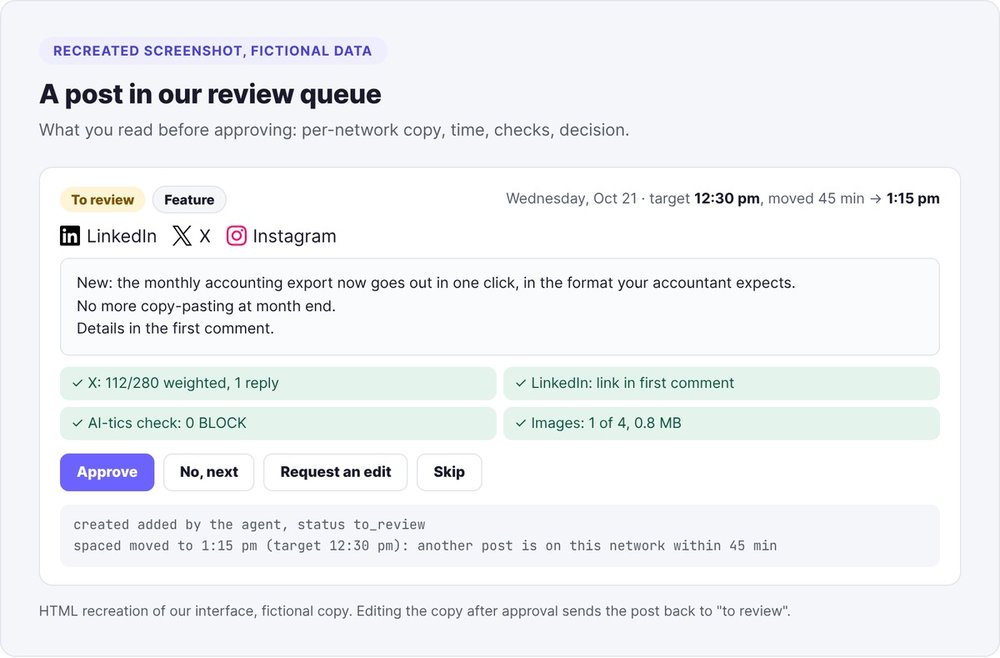
Every caption, in French or English, goes through our anti-tic script: two-step corrections, em-dashes, empty phrases, objects that act on their own. Since September 30, 2026, we require zero BLOCK results, otherwise approval and scheduling stay locked. Our review queue shows the result under the caption.
For a SaaS, the minimal equivalent is a list of banned patterns as regular expressions and an exit code of 1 as soon as one matches. Our tutorial on how to write a LinkedIn post with AI covers this check in detail.
45 minutes between two posts on the same network
Two posts on the same network stay at least 45 minutes apart. Each post keeps a target time. When there's a conflict, the post takes the nearest free window on the same day, in this order: +45, -45, +90, -90 minutes. The calculation runs every time the queue is saved, and the post returns to its target time as soon as the conflict clears.
A real excerpt from a post's history:
spaced  moved to 1:15 p.m. (target 12:30 p.m.): another post is on this network less than 45 min away
spaced  back to its target time, 12:30 p.m.
Spacing leaves posts already at Zernio alone: they keep their time.
Step 4: approve or reject each post
Our review queue shows the exact copy for each network, the first comment, the media, the time and the checks. You have three answers: approve, reject, or request a change.
Tie approval to the exact copy
Your approval applies to a specific text. If anyone edits the caption, the media, the X copy or the first comment of an approved post, it goes back to to_review. A simple time change keeps the approval.
The second version of our script goes further: it ties approval to a fingerprint of the copy and the image files, and you approve with a 6-character review code derived from that fingerprint:
python3 scripts/pubqueue.py approve offre-annuelle.linkedin --by <votre-nom> --code d84e8f
If the copy changed since you read it, the code no longer matches and the approval fails. A status typed by hand into the file goes back to review at scheduling time.
We also approve in batches: 6 carousels at once on October 8, each one run through the checks again.
Reject to move the queue forward
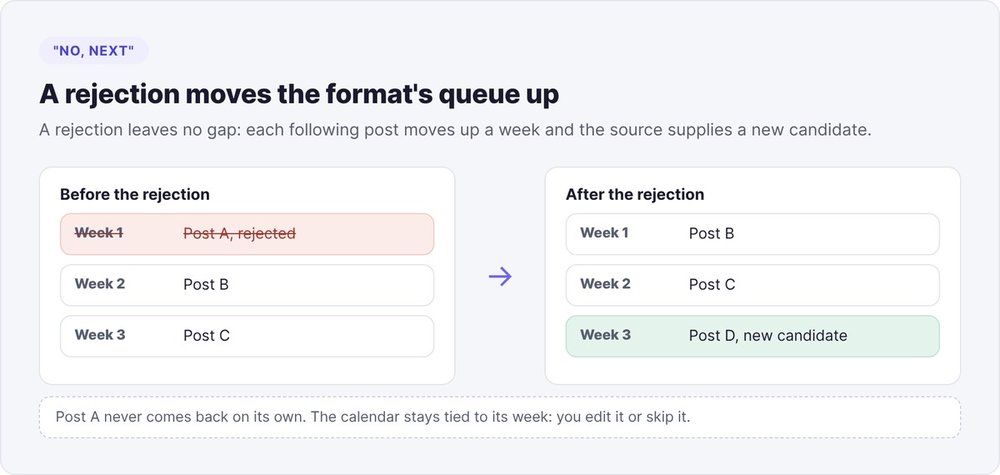
"No, next" rejects the post. The next post of the same format takes its slot, the posts after it move up a week, and the last freed slot gets the next candidate from the source. A rejected post never comes back on its own.
Rejecting leaves the calendar intact. As of October 12, we have rejected 3 posts.
A change request launches the format's agent. An example from our history: "Different quote in the caption, shorter (under 100 characters), still in English." The agent rewrites, reruns the checks and puts the post back in to_review.
Keep approval out of the agent's reach
On October 1, 2026, we asked the agent to add carousels to the queue. The slide content had received an "ok" earlier in the conversation. The agent read that "ok" as approval to publish and moved 7 carousels to approved. We reopened all 7 with the note "approval reverted: only the user approves".
Since then, the rule lives in both the agent's instructions and the code: the agent adds posts in to_review and stops. In the second version, the approve command rejects agent names and exits with an error (code 3) when nobody types the code.
Step 5: schedule with the Zernio API
To schedule our LinkedIn, Instagram and X posts, we go through Zernio, a publishing API that also covers about ten other networks. In our setup, an approval triggers scheduling immediately.
The scheduling request
The script first uploads each media file to Zernio's storage through a presigned URL (POST /media/presign, then a PUT of the file). It then creates the post:
{
  "content": "<source caption>",
  "mediaItems": [{ "type": "image", "url": "<Zernio storage URL>" }],
  "platforms": [
    { "platform": "linkedin", "accountId": "<LinkedIn account>",
      "customContent": "<LinkedIn copy without link>",
      "platformSpecificData": { "firstComment": "<sentence + link>" } },
    { "platform": "twitter", "accountId": "<X account>",
      "customContent": "<tweet>",
      "platformSpecificData": { "threadItems": ["<tweet>", "<reply + link>"] } },
    { "platform": "instagram", "accountId": "<Instagram account>",
      "customContent": "<caption + pointer to link in bio>" }
  ],
  "scheduledFor": "2026-10-20T12:00:00",
  "timezone": "Europe/Paris"
}
The Idempotency-Key header combines the post ID and its slot, so a double click or a retry after a network drop won't create two posts. On cost, X bills each post per API call through Zernio, and that cost weighs on which networks each format uses.
The production switch
The queue has a switch, live. Set to false, all scheduling stops with the message "auto-publishing not in prod". Handy while you're tuning things, dangerous afterward.
Three pitfalls from our AI social media agent
Five days of silent "approved"
Until October 3, 2026, the switch stayed at false. Our review queue showed "approved" and nothing reached Zernio. A photo approved on September 30 never went out on October 2. For 5 days, we assumed "approved" meant "published".
We switched the queue to production on October 3, then scheduled the already-approved posts one by one. If your tool has a test mode, display it prominently on the review screen.
The duplicate posted by hand
One of our 3 rejections carries the note "already published on Instagram on 09/26". Someone had posted the quote by hand before the queue was set up, and the agent could only see its source. Before plugging in an agent, list what has already gone out on each account and mark it as used in the source.
The connector linked to another account
Claude's Zernio MCP connector answered "No accounts connected". We wrongly concluded that none of our accounts were on Zernio. The connector was pointing to a different, empty Zernio account, while the script's API key could see LinkedIn, Instagram and X just fine. Check your accounts with the key that actually publishes.
Ten days of queue in numbers
As of October 12, 2026, after ten days in production:
| Metric | Value |
|---|---|
| Posts created in the queue | 90 |
| Recorded approvals | 81 |
| Posts scheduled at Zernio | 73 |
| Last scheduled slot | April 20, 2027 |
| Rejected posts | 3 |
| Skipped posts | 8 |
| Posts to review | 5 |
| Spacing shifts | 5 |
Weekly quotes and photos make up most of the 73 scheduled posts. Zernio had no best-time data at the start, so we'll revisit our posting times after six weeks of stats.
To decide what goes into the queue, our article on founder-led content strategy lays the groundwork, and the LinkedIn carousel with AI tutorial produces one of the formats. Our overview of AI marketing agents shows where this agent sits in the chain.
A well-tuned AI social media agent takes over the mechanics and leaves you the one decision that puts your name on the line.
FAQ
Can an AI agent publish to social media on its own?
Technically yes, with an API like Zernio. In our setup, only a human approves, and a post with no approval by the time its slot arrives is marked "skipped".
Which tasks should you hand to an AI social media agent?
Filling the calendar, rewriting for each network, placing links, counting characters, spacing posts and calling the API. Keep topic selection and the approval of each post for yourself.
Where should the link go on each network?
In the first comment on LinkedIn, in the first reply on X, in the bio on Instagram. Keep the link in plain text in the source. A script moves it at scheduling time.
How does X count characters?
A URL counts as 23 characters regardless of length, an emoji counts as 2, and the limit is 280. A Python len() gets it wrong as soon as there's a long link or an emoji.
How far ahead should you schedule posts?
We fill the queue three weeks ahead, with a minimum lead time of three hours before a slot. That lead time gives you room to reject a post without leaving a gap.
Do you need a paid tool to publish through an API?
You need a service that holds the networks' authorizations. We use Zernio, billed by usage, and X also bills each post per API call. You connect your accounts once, then the script publishes with an API key.