Build complete web apps in minutes, when traditional development can take weeks. With Bolt.new, that's now possible. This game-changing tool acts as your virtual development partner, capable of generating code from your plain instructions.
Bolt.new is a browser-based code editor powered by artificial intelligence. This innovative solution helps you create professional, polished websites in just a few clicks, using AI to build SaaS products, websites, programs, and plugins. In this complete guide, you'll learn how Bolt works, its main features, and how to use it effectively even if you're new to web development.
What is Bolt.new and who is it for?
Bolt.new is an innovative platform in the world of web development. Let's take a look at what it offers and who it's really designed for.
A simple definition of Bolt.new
Bolt.new is an online code editor powered by artificial intelligence that lets you build complete web apps without necessarily knowing how to program. Its principle is remarkably simple: you describe what you want to build in natural language, and Bolt AI automatically generates the corresponding code. This revolutionary approach radically transforms the development process by making it accessible to everyone.
Unlike traditional development environments that require in-depth knowledge of programming languages, Bolt code translates your ideas into working lines of code for both the frontend and backend of your application.
Target audience: beginners, freelancers, startups
If you're wondering "what is Bolt," it's designed mainly for three types of users:
- Beginners: Even with no programming experience, you can build functional, professional web apps.
- Freelancers: This tool speeds up your client projects considerably, cutting delivery times while maintaining professional quality.
- Startups: For young companies looking to develop an MVP (Minimum Viable Product) quickly, Bolt app offers an affordable, efficient solution.
The platform simplifies every stage of development, from design through deployment, making web app creation accessible at every level of expertise.
Why choose Bolt over another tool?
Among the many alternatives to Bolt.new, several advantages set this platform apart:
First, its learning curve is practically nonexistent. Where other tools require weeks of training, how Bolt works can be understood in a few minutes thanks to its intuitive interface.
Second, its development speed is unmatched. Projects that would normally take weeks can be completed in a few hours, or even minutes.
Finally, Bolt's flexibility lets you build a wide range of web apps, from landing pages to e-commerce platforms to internal management tools. The tool adapts to your specific needs without locking you into rigid templates.
On top of that, the free Bolt.new plan lets you test the platform before committing financially, ideal for assessing whether the tool fits your needs.
How does Bolt.new work?
To understand Bolt.new, you first need to grasp how it works, based on artificial intelligence. Let's explore the mechanisms that make this tool a revolution in web development.
How Bolt works: the principle of prompts
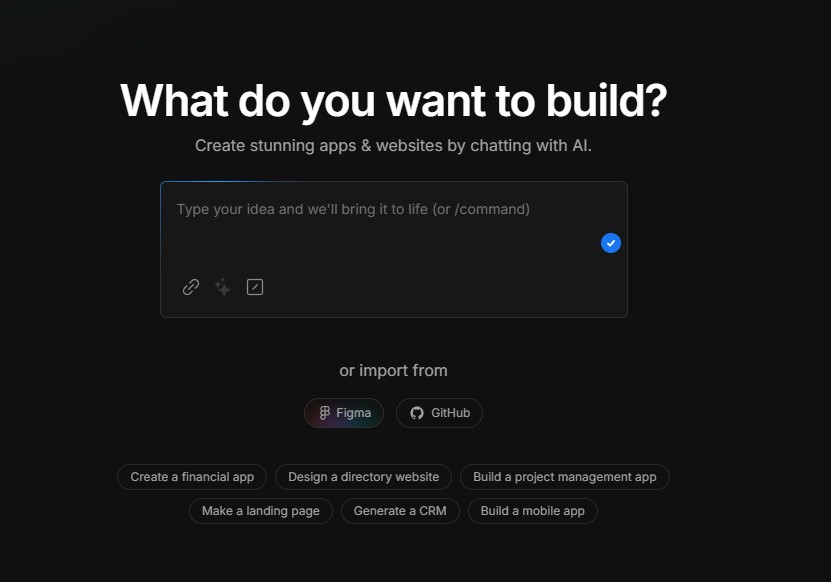
At the heart of how Bolt works is a system of prompts: instructions you write in natural language. Instead of coding manually, you simply explain what you want to create, and Bolt AI translates your requests into working code.
To get the best results, Bolt.new offers a prompt enhancement feature:
- Write your request in the chat area
- Click "Enhance prompt"
- Bolt then generates an improved version of your request
The platform also has a library of preset prompts you can use as a starting point. This feature saves you time by letting you reuse effective prompts.
The user interface explained simply
The Bolt.new interface is made up of three main elements:
First, the code editor, where you view and edit the generated code. You can target specific files by right-clicking to tell Bolt where to focus its changes.
Next, the chat area, where you communicate with the AI. This is where you enter your prompts and receive the assistant's responses.
Finally, the preview, which lets you see your application in real time. The "Inspector" tool even lets you click on any element to edit it via a prompt.
Bolt code: a look at the automatically generated code
Bolt code uses diff-based editing to precisely modify only the necessary parts of the code. This approach significantly improves token efficiency and the accuracy of changes.
Bolt.new also generates complete full-stack code, supporting both the frontend and backend. The code it produces is immediately functional, letting you test your app directly in the browser with no additional setup.
When errors occur, Bolt AI can identify and fix them on request. That said, it's recommended to break complex requests into small steps to get optimal results and make troubleshooting easier.
Bolt.new's main features
Let's now explore the features that make Bolt.new such a powerful tool for web development. These distinctive characteristics radically transform the traditional approach to coding.
AI code generation
At the core of Bolt AI is its ability to turn your text instructions into working code. Unlike conventional tools, Bolt code lets you describe what you want to create in natural language. So a simple sentence like "build me a React app with a responsive navigation bar" is enough to generate the necessary files. When errors occur, the assistant can identify and fix them automatically on request, saving you hours of debugging.
An intuitive, online interface
Bolt.new runs entirely in your browser, with no local installation required. Its clean interface splits your screen into two distinct areas: on the left, your dialogue space with the AI, and on the right, the generated code with its real-time preview. This minimalist approach lets you focus on your project without being overwhelmed by complex menus.
Full-stack support: frontend, backend, database
Bolt app excels at creating complete applications thanks to its multi-technology support. The platform supports popular frameworks like React, Vite, Next.js, Astro, and Svelte on the frontend. It also lets you set up a complete Node.js backend with Express. This versatility turns your browser into a true all-in-one development ecosystem.
Fast deployment with Netlify or Firebase
Putting your projects online has never been easier thanks to the native Netlify integration. Bolt.new lets you deploy your app in just a few clicks. Once deployed, your app instantly receives a public URL you can share right away. This feature eliminates the complex configurations usually required to deploy web apps.
Integration with GitHub and Supabase
To round out its arsenal, Bolt.new integrates seamlessly with GitHub for version control and Supabase for advanced backend features. Notably, Supabase provides a hosted SQL database, authentication services for user management, and edge functions for building APIs. This integration lets you build complete applications with authentication, data storage, and even payment processing through services like Stripe.
Building your first app with Bolt.new
Now let's get practical with Bolt.new. Follow this step-by-step guide to build your first app quickly and efficiently.
Step 1: Sign up and access Bolt app
To start your journey with Bolt app, head to the official site and create your account. No installation is required, since the platform runs entirely in your browser. Bolt.new offers a free version that lets you test the tool before committing. Once logged in, you'll see the main interface with a chat area for communicating with the AI.
Step 2: Write an effective prompt
The key to success with Bolt AI lies in the quality of your prompts. Before you start, think about:
- What you want to build
- Who will use your app
- What features it should include
- What visual style you prefer
To optimize your results, use the "Enhance prompt" feature, which automatically improves your instructions. For example, a simple "Build me a blog" can turn into a detailed description covering structure, technologies, and design.
Step 3: Customize the generated interface
After your app is generated, Bolt code lets you customize every aspect. You can target specific files by right-clicking and selecting "Target file." The visual editor also lets you edit the interface by simply clicking the elements you want to change.
Step 4: Test and fix errors
During development, proceed in small steps: add a feature, test it, then move on to the next. When an error occurs, this is where Bolt really shines. Use Discussion mode to analyze issues without burning through too many tokens. For complex projects, don't hesitate to use the npx knip command to clean up unused files and optimize performance.
Step 5: Deploy your project
How Bolt works also covers deployment. Simply click the "Deploy" button at the top right of the interface. Bolt.new integrates seamlessly with Netlify, letting you publish your app in one click and instantly get a public URL. You can then transfer ownership of the site to your Netlify account and even link your project to GitHub for effective version control.
Bolt.new's advantages, limits, and alternatives
Now that we've explored Bolt.new's features, let's look at its strengths, weaknesses, and the alternatives available on the market.
Bolt AI's strengths
Bolt AI stands out primarily for its impressive development speed. Projects that would normally take weeks can be completed in minutes, making it a valuable tool for rapid prototyping. According to some accounts, one founder built an AI-integrated CRM with billing in just 3 weeks for €286.26.
Bolt.new also lowers the barrier to entry considerably for non-developers. If you can describe what you want in plain language, you can probably get a working app without any prior technical knowledge.
The limits to know about (design, complexity)
That said, Bolt code has some limitations. The AI struggles with complex interface customizations, particularly with specific design systems or custom animations. On top of that, token consumption becomes an issue for large-scale projects, with some users having burned through 1.3 million tokens in a single day.
For complex applications, Bolt generally gets you 80% of the result quickly, but the remaining 20% can require considerable manual effort.
Bolt reviews: what users say
Bolt reviews are mixed. On one hand, many users appreciate its ability to quickly turn prompts into working apps. On the other hand, some report that the tool sometimes rewrites entire components for small changes, which wastes tokens and can break the code.
Free Bolt.new vs. the paid version
Free Bolt.new offers 150,000 tokens per day and 1 million per month. Paid plans start at €19.08 for 10 million monthly tokens (Pro), up to €95.42 for 50 million (Pro 100). Note that tokens don't roll over from one month to the next, but extra tokens you purchase are kept for as long as you stay subscribed.
Bolt.new alternatives: what similar options are there?
If Bolt.new doesn't meet your needs, several alternatives exist:
- UI Bakery: Ideal for apps connected to APIs or databases
- OpenBolt.dev: An open-source version inspired by Bolt.new
- Lovable: Focused on user experience and emotional design
- Bubble: Better suited to complex web apps with rich features
Conclusion
Bolt.new is arguably a significant step forward in web development. This platform radically transforms how you can build applications, even without any prior technical skills. Its ability to translate your natural-language instructions into working code makes development accessible to a much wider audience.
Bolt does have a few limitations, particularly for complex designs and large-scale projects that consume a lot of tokens. Even so, its advantages generally outweigh these drawbacks, especially for the beginners, freelancers, and startups looking to develop their ideas quickly.
Its intuitive interface, full-stack support, and integration with services like GitHub, Netlify, and Supabase make Bolt.new a complete tool for your web projects. Whether you want to build a simple landing page or a more complex application, this platform lets you reach your goals in record time.
Before you dive in, assess your specific needs to determine whether the free version is enough or whether a paid subscription would be a better fit. Also keep in mind that for some complex projects, you may need to finish the work manually to add the finishing touches.
Ultimately, Bolt.new is a perfect illustration of how artificial intelligence is revolutionizing web development. This democratization of digital creation tools opens the door to a new era where your ideas can take shape quickly, without the usual technical obstacles.
Key Takeaways
Discover how Bolt.new is revolutionizing web development by letting anyone build complete applications without prior technical skills.
• Bolt.new turns your ideas into code: Simply describe what you want in plain language, and the AI automatically generates the corresponding frontend and backend code.
• Ultra-fast development: Build complete web apps in minutes instead of weeks, ideal for quickly prototyping and testing your ideas.
• Accessible to beginners: No programming knowledge required. The intuitive interface and natural-language prompts are all you need to get started.
• A complete, integrated solution: Full-stack support with one-click deployment via Netlify, GitHub integration, and a Supabase database included.
• Watch out for the limitations: High token consumption for complex projects and difficulties with highly customized designs. Assess your needs before diving in.
This AI revolution in web development opens up new possibilities for entrepreneurs, freelancers, and creators who want to bring their digital projects to life without technical barriers.
FAQs
Q1. How does Bolt.new work for building web apps? Bolt.new uses artificial intelligence to turn your natural-language instructions into working code. You simply describe what you want to create, and the tool automatically generates the corresponding frontend and backend code.
Q2. What are the advantages of Bolt.new for development beginners? Bolt.new makes web development accessible to beginners by eliminating the need for in-depth technical knowledge. Its intuitive interface and prompt system let you build functional applications quickly, without having to code manually.
Q3. Is Bolt.new free or paid? Bolt.new offers a free version providing 150,000 tokens per day and 1 million per month. Paid plans are also available, starting at €19.08 for 10 million monthly tokens, for those who need more resources.
Q4. What are Bolt.new's main features? Bolt.new offers AI code generation, an intuitive online interface, full-stack support (frontend, backend, database), fast deployment via Netlify or Firebase, and integration with GitHub and Supabase.
Q5. What are Bolt.new's limits? Bolt.new can struggle with complex interface customizations and highly specific designs. In addition, large-scale projects can consume a lot of tokens, which can become expensive. For some complex applications, manual work may be needed to finalize the project.